wheel NISSAN NOTE 2016 Service Owner's Manual
[x] Cancel search | Manufacturer: NISSAN, Model Year: 2016, Model line: NOTE, Model: NISSAN NOTE 2016Pages: 3641, PDF Size: 28.72 MB
Page 243 of 3641
![NISSAN NOTE 2016 Service Owners Manual AV-238
< SYMPTOM DIAGNOSIS >[NAVIGATION]
NORMAL OPERATING CONDITION
PlaceIn a parking lot
When driving in a parking lot, or other loca-
tion where there are no roads on the map,
matching may place th](/img/5/57363/w960_57363-242.png "NISSAN NOTE 2016 Service Owners Manual AV-238
< SYMPTOM DIAGNOSIS >[NAVIGATION]
NORMAL OPERATING CONDITION
PlaceIn a parking lot
When driving in a parking lot, or other loca-
tion where there are no roads on the map,
matching may place th")
AV-238
< SYMPTOM DIAGNOSIS >[NAVIGATION]
NORMAL OPERATING CONDITION
PlaceIn a parking lot
When driving in a parking lot, or other loca-
tion where there are no roads on the map,
matching may place the vehicle mark on a
nearby road. When the vehicle returns to
the road, the vehicle mark may have devi-
ated from the correct location.
When driving in circle or turning the steer-
ing wheel repeatedly, direction errors accu-
mulate, and the vehicle mark may deviate
from the correct location.
If after travelling about 10 km (6
miles) the correct location has
not been restored, perform lo-
cation correction and, if neces-
sary, direction correction.
Turntable
When the ignition switch is OFF, the navi-
gation system cannot get the signal from
the gyroscope (angular speed sensor).
Therefore, the displayed direction may be
wrong and the correct road may not be eas-
ily returned to after rotating the vehicle on a
turntable with the ignition OFF.
Slippery roads On snow, wet roads, gravel, or other roads
where tires may slip easily, accumulated
mileage errors may cause the vehicle mark
to deviate from the correct road.
Slopes When parking in sloped garages, when
travelling on banked roads, or in other cas-
es where the vehicle turns when tilted, an
error in the turning angle will occur, and the
vehicle mark may deviate from the road.
Map data Road not displayed on the map screen
When driving on new roads or other roads
not displayed on the map screen, map
matching does not function correctly and
matches the location to a nearby road.
When the vehicle returns to a road which is
on the map, the vehicle mark may deviate
from the correct road.
Different road pattern
(Changed due to repair) If the road pattern stored in the map data
and the actual road pattern are different,
map matching does not function correctly
and matches the location to a nearby road.
The vehicle mark may deviate from the cor-
rect road.
Vehicle Use of tire chains When tire chains are used, the mileage is
not correctly detected, and the vehicle mark
may deviate from the correct road.Drive the vehicle for a while. If
the distance still deviates, ad-
just it by using the distance ad-
justment function. (If the tire
chain is removed, recover the
original value.)
Cause (condition) –: While driving ooo: Display
Driving conditionRemarks (correction, etc.)
SEL709V
SEL710V
SEL699V
ELK0201D
Revision: August 2015 2016 Versa Note
cardiagn.com
Page 244 of 3641
![NISSAN NOTE 2016 Service Owners Manual AV
NORMAL OPERATING CONDITIONAV-239
< SYMPTOM DIAGNOSIS > [NAVIGATION]
C
D
E
F
G H
I
J
K L
M B A
O P
Location Correction by Map-Matching is Slow
• The map-matching function needs to refer to the dat](/img/5/57363/w960_57363-243.png "NISSAN NOTE 2016 Service Owners Manual AV
NORMAL OPERATING CONDITIONAV-239
< SYMPTOM DIAGNOSIS > [NAVIGATION]
C
D
E
F
G H
I
J
K L
M B A
O P
Location Correction by Map-Matching is Slow
• The map-matching function needs to refer to the dat")
AV
NORMAL OPERATING CONDITIONAV-239
< SYMPTOM DIAGNOSIS > [NAVIGATION]
C
D
E
F
G H
I
J
K L
M B A
O P
Location Correction by Map-Matching is Slow
• The map-matching function needs to refer to the data of
the surrounding area. It is necessary to drive some
distance for the function to work.
• Because map-matching operates on this principle, when there are many roads running in similar directions
in the surrounding area, no matching determination ma y be made. The location may not be corrected until
some special feature is found.
Name of Road is Not Displayed
The current road name may not be displayed if there are no road names displayed on the map screen.
Contents of Display Differ for Birdview™ and the (Flat) Map Screen
Difference of the BIRDVIEW™ screen from the flat map screen are as follows.
• The current place name displays names which are primarily in the direction of vehicle travel.
• The amount of time before the vehicle travel or turn angle is updated on the screen is longer than for the
(flat) map display.
• The conditions for display of place names, roads, and other data are different for nearby areas and for more
distant areas.
• Some thinning of the character data is done to prevent the display becoming too complex. In some cases
and in some locations, the display contents may differ.
• The same place name, street name, et c. may be displayed multiple times.
Vehicle Mark Shows a Position Which is Completely Wrong
In the following cases, the vehicle mark may appear on completely different position in the map depending on
the GPS satellite signal receiving conditions. In this case, perform location correction and direction correction.
• When location correction has not been done
- If the receiving conditions of the GPS satellite signal is poor, if the vehicle mark becomes out of place, it may
move to a completely different location and not come back if location correction is not done. The position will
be corrected if the GPS signal can be received.
• When the vehicle has traveled by ferry, or when the vehicle has been being towed
Precautions
for driving Just after the engine is started
If the vehicle is driven just after the engine
is started when the gyroscope (angular
speed sensor) correction is not completed,
the vehicle can lose its direction and may
have deviated from the correct location. Wait for a short while before
driving after starting the engine.
Continuous driving without stopping When driving long distances without stop- ping, direction errors may accumulate, and
the current-location mark may deviate from
the correct road. Stop and adjust the orientation.
Abusive driving Spinning the wheels or engaging in other
kinds of abusive driving may result in the
system being unable perform correct detec-
tion, and may cause the vehicle mark to de-
viate from the correct road. If after travelling about 10 km (6
miles) the correct location has
not been restored, perform lo-
cation correction and, if neces-
sary, direction correction.
How to cor-
rect location Position correction accuracy
If the accuracy of location settings is poor,
accuracy may be reduced when the correct
road cannot be found, particularly in places
where there are many roads. Enter in the road displayed on
the screen with an accuracy of
approx. 1mm.
Caution: Whenever possible,
use detailed map for the correc-
tion.
Direction when location is corrected
If the accuracy of location settings during
correction is poor, accuracy may be re-
duced afterwards. Perform direction correction.
Cause (condition) –: While driving ooo: Display
Driving conditionRemarks (correction, etc.)
SEL701V
SEL702V
Revision: August 2015 2016 Versa Note
cardiagn.com
Page 245 of 3641
![NISSAN NOTE 2016 Service Owners Manual AV-240
< SYMPTOM DIAGNOSIS >[NAVIGATION]
NORMAL OPERATING CONDITION
- Because calculation of the current location cannot be
done when traveling with the ignition off, for example
when traveling by fe](/img/5/57363/w960_57363-244.png "NISSAN NOTE 2016 Service Owners Manual AV-240
< SYMPTOM DIAGNOSIS >[NAVIGATION]
NORMAL OPERATING CONDITION
- Because calculation of the current location cannot be
done when traveling with the ignition off, for example
when traveling by fe")
AV-240
< SYMPTOM DIAGNOSIS >[NAVIGATION]
NORMAL OPERATING CONDITION
- Because calculation of the current location cannot be
done when traveling with the ignition off, for example
when traveling by ferry or when being towed, the location before travel is displayed. If the precise location
can be detected with GPS, the location will be corrected.
Vehicle Mark Jumps
In the following cases, the vehicle mark may appear to ju mp as a result of automatic correction of the current
location.
• When map matching has been done
- If the current location and the vehicle mark are diff erent when map matching is done, the vehicle mark may
seem to jump. At this time, the location may be “corre cted” to the wrong road or to a location which is not on
a road.
• When GPS location correction has been done
- If the current location and the vehicle mark are different when the location is corrected using GPS measure-
ments, the vehicle mark may seem to jump. At this time, the location may be “corrected” to a location which
is not on a road.
Vehicle Mark is in a River or Sea
The navigation system moves the vehicle mark with no distinction between land and rivers or sea. If the vehi-
cle mark is somehow out of place, it may appear that the vehicle is driving in a river or the sea.
Vehicle Mark Automatically Rotates
The system wrongly memorizes the rotating status as st opping when the ignition switch is turned ON with the
turntable rotating. That causes the vehicle mark to rotate when the vehicle is stopped.
When Driving on Same Road, Sometimes Vehicle Mark is in Right Place and Sometimes it is in Wrong Place
The conditions of the GPS antenna (GPS data) and gyroscope (angular speed sensor) change gradually.
Depending on the road traveled and the operation of the steering wheel, \
the location detection results will be
different. Therefore, even on a road on which the lo cation has never been wrong, conditions may cause the
vehicle mark to deviate.
Revision: August 2015 2016 Versa Note
cardiagn.com
Page 252 of 3641
![NISSAN NOTE 2016 Service Owners Manual AV
STEERING SWITCHAV-247
< REMOVAL AND INSTALLATION > [NAVIGATION]
C
D
E
F
G H
I
J
K L
M B A
O P
STEERING SWITCH
Removal and InstallationINFOID:0000000012433099
REMOVAL
1. Remove the steering wheel. R](/img/5/57363/w960_57363-251.png "NISSAN NOTE 2016 Service Owners Manual AV
STEERING SWITCHAV-247
< REMOVAL AND INSTALLATION > [NAVIGATION]
C
D
E
F
G H
I
J
K L
M B A
O P
STEERING SWITCH
Removal and InstallationINFOID:0000000012433099
REMOVAL
1. Remove the steering wheel. R")
AV
STEERING SWITCHAV-247
< REMOVAL AND INSTALLATION > [NAVIGATION]
C
D
E
F
G H
I
J
K L
M B A
O P
STEERING SWITCH
Removal and InstallationINFOID:0000000012433099
REMOVAL
1. Remove the steering wheel. Refer to ST-8, "Removal and Installation".
2. Remove the steering wheel rear finisher (1) by releasing pawls (A).
3. Remove the steering wheel audio control switch screws (A) from the back of the steering wheel.
4. Remove the steering wheel audio control switches from the steering wheel.
INSTALLATION
Installation is in the reverse order of removal.
AWNIA3063ZZ
AWNIA3064ZZ
Revision: August 2015 2016 Versa Note
cardiagn.com
Page 336 of 3641
![NISSAN NOTE 2016 Service Owners Manual BCS
COMBINATION SWITCHBCS-75
< REMOVAL AND INSTALLATION > [WITH INTELLIGENT KEY SYSTEM]
C
D
E
F
G H
I
J
K L
B A
O P
N
COMBINATION SWITCH
Removal and InstallationINFOID:0000000012432359
CAUTION:
• Be](/img/5/57363/w960_57363-335.png "NISSAN NOTE 2016 Service Owners Manual BCS
COMBINATION SWITCHBCS-75
< REMOVAL AND INSTALLATION > [WITH INTELLIGENT KEY SYSTEM]
C
D
E
F
G H
I
J
K L
B A
O P
N
COMBINATION SWITCH
Removal and InstallationINFOID:0000000012432359
CAUTION:
• Be")
BCS
COMBINATION SWITCHBCS-75
< REMOVAL AND INSTALLATION > [WITH INTELLIGENT KEY SYSTEM]
C
D
E
F
G H
I
J
K L
B A
O P
N
COMBINATION SWITCH
Removal and InstallationINFOID:0000000012432359
CAUTION:
• Before servicing, turn the ignition
switch OFF, disconnect both battery terminals and wait at least
three minutes.
• Do not use air or electric tools when remo ving or installing the combination switch.
REMOVAL
1. Disconnect the negative and positive bat tery terminals, then wait at least three minutes. Refer to PG-70,
"Removal and Installation (Battery)".
2. Remove the steering column covers. Refer to IP-17, "
Removal and Installation".
3. Rotate steering wheel clockwise to access first combination switch screw (A) and remove.
4. Rotate steering wheel counter-clockwise to access second com- bination switch screw (A) and remove.
5. Disconnect the harness connector (B) from the combination switch (1) and remove.
INSTALLATION
Installation is in the reverse order of removal.
CAUTION:
• After the work is completed, make sure no system malfunction is detected by air bag warning lamp.
• In case a malfunction is detected by the air bag wa rning lamp, reset with the self-diagnosis function
and delete the memory with CONSULT.
• If a malfunction is still detected after the above operation, perform self-diagnosis to repair malfunc-
tions. Refer to BCS-58, "
Description".
ALMIA0648ZZ
ALMIA0649ZZ
Revision: August 2015 2016 Versa Note
cardiagn.com
Page 399 of 3641
![NISSAN NOTE 2016 Service Owners Manual BCS-138
< REMOVAL AND INSTALLATION >[WITHOUT INTELLIGENT KEY SYSTEM]
COMBINATION SWITCH
COMBINATION SWITCH
Removal and InstallationINFOID:0000000012432412
CAUTION:
• Before servicing, turn the ignit](/img/5/57363/w960_57363-398.png "NISSAN NOTE 2016 Service Owners Manual BCS-138
< REMOVAL AND INSTALLATION >[WITHOUT INTELLIGENT KEY SYSTEM]
COMBINATION SWITCH
COMBINATION SWITCH
Removal and InstallationINFOID:0000000012432412
CAUTION:
• Before servicing, turn the ignit")
BCS-138
< REMOVAL AND INSTALLATION >[WITHOUT INTELLIGENT KEY SYSTEM]
COMBINATION SWITCH
COMBINATION SWITCH
Removal and InstallationINFOID:0000000012432412
CAUTION:
• Before servicing, turn the ignition switch OFF, disconnect both battery terminals and wait at least
three minutes.
• Do not use air or electric tools when remo ving or installing the combination switch.
REMOVAL
1. Disconnect the negative and positive battery terminals, then wait at least three minutes. Refer to PG-70,
"Removal and Installation (Battery)".
2. Remove the steering column covers. Refer to IP-17, "
Removal and Installation".
3. Rotate steering wheel clockwise to access first combination switch screw (A) and remove.
4. Rotate steering wheel counter-c lockwise to access second com-
bination switch screw (A) and remove.
5. Disconnect the harness connector (B) from the combination switch (1) and remove.
INSTALLATION
Installation is in the reverse order of removal.
CAUTION:
• After the work is completed, make sure no system malfunction is detected by air bag warning lamp.
• In case a malfunction is detected by the air bag wa rning lamp, reset with the self-diagnosis function
and delete the memory with CONSULT.
• If a malfunction is still detected after the above operation, perform self-diagnosis to repair malfunc-
tions. Refer to BCS-121, "
Description".
ALMIA0648ZZ
ALMIA0649ZZ
Revision: August 2015 2016 Versa Note
cardiagn.com
Page 414 of 3641

BODY COMPONENT PARTSBRM-15
< PREPARATION >
C
DE
F
G H
I
J
L
M A
B
BRM
N
O P
1. Hood assembly (Under 440 MPa) 2. Front fender (LH/RH) (Under 440 MPa) 3. Front roof rail assembly (Under 440
MPa)
4. Roof center reinforcement (590 MPa) 5. Roof bow 3rd (Under 440 MPa)
6. Roof bow 4th (Under 440 MPa)
7. Rear roof rail assembly (Under 440 MPa) 8. Roof (Under 440 MPa)
9. Rear bumper upper retainer (Under
440 MPa)
10. Center pillar lo wer (Under 440
MPa) 11. Outer rear wheel house (LH/RH) (Under
440 MPa) 12. Front inner upper pillar (440 MPa)
13. Center pillar in ner upper (LH/RH)
(440 MPa) 14. Roof rail inner side (LH/RH) (440 MPa) 15. Rear panel upper (Under 440 MPa)
16. Front pillar ou ter reinforcement
(LH/RH) (440 MPa) 17. Center pillar hinge brace (LH/RH) (440
MPa) 18. Roof side rail outer reinforcement (LH/
RH) (440 MPa)
19. Rear inner pillar (LH/RH) (Under 440 MPa) 20. Rear pillar reinforcement (LH/RH) (Under
440 MPa) 21. Center pillar reinforcement (LH/RH)
(440 MPa)
22. Rear pillar reinforcement (LH/RH) (Under 440 MPa) 23. Rear seat belt anchor (LH/RH) (440 MPa) 24. Body side outer front (LH/RH) (Under
440 MPa)
25. Body side outer rear (LH/RH) (Un- der 440 MPa) 26. Body side outer sill (LH/RH) (Under 440
MPa) 27. Front door inner (LH/RH) (Under 440
MPa)
28. Rear door inner (LH/RH) (Under 440 MPa) 29. Front door outer (LH/RH) (Under 440
MPa) 30. Rear door outer (LH/RH) (Under 440
MPa)
31. Center pillar inner reinforcement (LH/RH) (440 MPa) 32. Rear lid assembly (Under 440 MPa)
Front
Revision: August 2015 2016 Versa Note
cardiagn.com
Page 416 of 3641
CORROSION PROTECTIONBRM-17
< REMOVAL AND INSTALLATION >
C
DE
F
G H
I
J
L
M A
B
BRM
N
O P
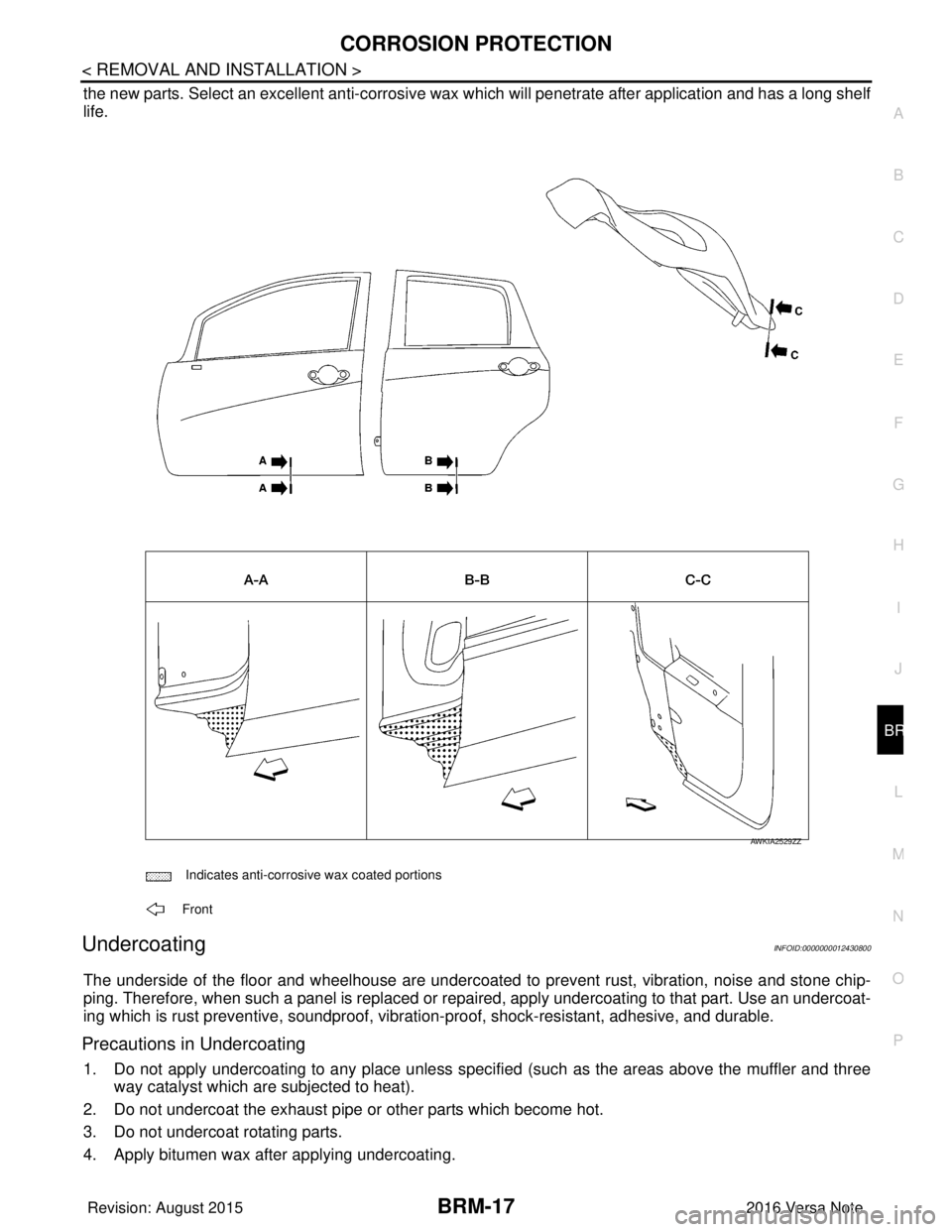
the new parts. Select an excellent anti-corrosive wax which will penetrate after application and has a long shelf
life.
UndercoatingINFOID:0000000012430800
The underside of the floor and wheelhouse are undercoated to prevent rust, vibration, noise and stone chip-
ping. Therefore, when such a panel is replaced or re paired, apply undercoating to that part. Use an undercoat-
ing which is rust preventive, soundproof, vibr ation-proof, shock-resistant, adhesive, and durable.
Precautions in Undercoating
1. Do not apply undercoating to any place unless specif ied (such as the areas above the muffler and three
way catalyst which are subjected to heat).
2. Do not undercoat the exhaust pipe or other parts which become hot.
3. Do not undercoat rotating parts.
4. Apply bitumen wax after applying undercoating.
Indicates anti-corrosive wax coated portions
Front
AWKIA2529ZZ
Revision: August 2015 2016 Versa Note
cardiagn.com
Page 449 of 3641

BRC-1
BRAKES
C
DE
G H
I
J
K L
M
SECTION BRC
A
B
BRC
N
O P
CONTENTS
BRAKE CONTROL SYSTEM
VDC/TCS/ABS
PRECAUTION ....... ........................................
4
PRECAUTIONS .............................................. .....4
Precaution for Supplemental Restraint System
(SRS) "AIR BAG" and "SEAT BELT PRE-TEN-
SIONER" ............................................................. ......
4
Precaution for Brake System ....................................4
Precaution for Brake Control System ........................5
Precaution for Harness Re pair ..................................5
PREPARATION ............................................6
PREPARATION .............................................. .....6
Special Service Tool ........................................... ......6
Commercial Service Tool ..........................................6
SYSTEM DESCRIPTION ..............................7
COMPONENT PARTS ................................... .....7
Component Parts Location .................................. ......7
Component Description .............................................8
ABS Actuator and Electric Unit (Control Unit) ...........8
Wheel Sensor and Sensor Rotor ..............................9
Stop Lamp Switch .....................................................9
Steering Angle Sensor ..............................................9
VDC OFF Switch .....................................................10
Brake Fluid Level Switch .........................................10
Parking Brake Switch ..............................................10
SYSTEM .............................................................11
VDC/TCS/ABS ....................................................... ....11
VDC/TCS/ABS : System Diagram ...........................11
VDC/TCS/ABS : System De scription ......................11
VDC/TCS/ABS : VDC Functi on ...............................22
VDC/TCS/ABS : TCS Function ........... ....................24
VDC/TCS/ABS : ABS Function ........................... ....26
VDC/TCS/ABS : EBD Functi on ...............................27
VDC/TCS/ABS : Fail-safe ......................... ..............28
DIAGNOSIS SYSTEM [ABS ACTUATOR
AND ELECTRIC UNIT (CONTROL UNIT)] .......
31
CONSULT Function (ABS) .................................. ....31
ECU DIAGNOSIS INFORMATION ..............36
ABS ACTUATOR AND ELECTRIC UNIT
(CONTROL UNIT) .............................................
36
Reference Value .................................................. ....36
Fail-safe ...................................................................39
DTC Inspection Priority Chart ..................................42
DTC Index ...............................................................43
WIRING DIAGRAM ......................................44
BRAKE CONTROL SYSTEM ...........................44
Wiring Diagram .................................................... ....44
BASIC INSPECTION ...................................52
DIAGNOSIS AND REPAIR WORK FLOW .......52
Work Flow ............................................................ ....52
Diagnostic Work Sheet ............................................53
INSPECTION AND ADJUSTMENT ..................55
ADDITIONAL SERVICE WHEN REPLACING
CONTROL UNIT .................................................... ....
55
ADDITIONAL SERVICE WHEN REPLACING
CONTROL UNIT : Description .................................
55
ADDITIONAL SERVICE WHEN REPLACING
CONTROL UNIT : Special Repair Requirement ......
55
ADJUSTMENT OF STEERING ANGLE SENSOR
NEUTRAL POSITION ............................................ ....
55
ADJUSTMENT OF STEERING ANGLE SENSOR
NEUTRAL POSITION : Description .........................
55
ADJUSTMENT OF STEERING ANGLE SENSOR
NEUTRAL POSITION : Special Repair Require-
ment .........................................................................
55
CALIBRATION OF DECEL G SENSOR ................ ....56
Revision: August 2015 2016 Versa Note
cardiagn.com
Page 450 of 3641

BRC-2
CALIBRATION OF DECEL G SENSOR : Descrip-
tion ..........................................................................
56
CALIBRATION OF DECEL G SENSOR : Special
Repair Requirement ..... ..........................................
56
DTC/CIRCUIT DIAGNOSIS ...................... ...58
C1101, C1102, C1103, C1104 WHEEL SEN-
SOR ................................................................. ...
58
DTC Description .................................................. ...58
Diagnosis Procedure ..............................................59
C1105, C1106, C1107, C1108 WHEEL SEN-
SOR ....................................................................
63
DTC Description .................................................. ...63
Diagnosis Procedure ..............................................64
C1109 POWER AND GROUND SYSTEM .........70
DTC Description .................................................. ...70
Diagnosis Procedure ..............................................70
C1110, C1153 ABS ACTUATOR AND ELEC-
TRIC UNIT (CONTROL UNIT) ...........................
72
DTC Description .....................................................72
Diagnosis Procedure ..............................................73
C1111 ABS MOTOR, MOTOR RELAY SYS-
TEM ....................................................................
74
DTC Description .................................................. ...74
Diagnosis Procedure ..............................................74
C1115 WHEEL SENSOR ...................................77
DTC Description .................................................. ...77
Diagnosis Procedure ..............................................77
C1116 STOP LAMP SWITCH ............................84
DTC Description .................................................. ...84
Diagnosis Procedure ..............................................85
Component Inspection ............................................87
C1120, C1122, C1124, C1126 ABS IN VALVE
SYSTEM .......................................................... ...
88
DTC Description .................................................. ...88
Diagnosis Procedure ..............................................88
C1121, C1123, C1125, C1127 ABS OUT
VALVE SYSTEM ................................................
90
DTC Description .................................................. ...90
Diagnosis Procedure ..............................................90
C1130 ENGINE SIGNAL ...................................92
DTC Description .................................................. ...92
Diagnosis Procedure ..............................................92
C1140 ACTUATOR RELAY SYSTEM ...............94
DTC Description .................................................. ...94
Diagnosis Procedure ..............................................94
C1142 PRESS SENSOR ...................................96
DTC Description .................................................. ...96
Diagnosis Procedure ..............................................96
C1143 STEERING ANGLE SENSOR ...............99
DTC Description ................................................... ...99
Diagnosis Procedure ...............................................99
C1144 INCOMPLETE STEERING ANGLE
SENSOR ADJUSTMENT .................................
103
DTC Description ................................................... .103
Diagnosis Procedure .............................................103
C1145, C1146 YAW RATE/SIDE/DECEL G
SENSOR ...........................................................
105
DTC Description ................................................... .105
Diagnosis Procedure .............................................105
C1154 TRANSMISSION RANGE SWITCH ......106
DTC Description ................................................... .106
Diagnosis Procedure .............................................106
C1155 BRAKE FLUID LEVEL SWITCH ..........108
DTC Description ................................................... .108
Diagnosis Procedure .............................................108
Component Inspection ..........................................111
C1164, C1165 CV SYSTEM .............................112
DTC Description ....................................................112
Diagnosis Procedure .............................................112
C1166, C1167 SV SYSTEM .............................114
DTC Description ....................................................114
Diagnosis Procedure .............................................114
C1170 VARIANT CODING ...............................116
DTC Description ................................................... .116
Diagnosis Procedure .............................................116
U1000 CAN COMM CIRCUIT ...........................117
DTC Description ................................................... .117
Diagnosis Procedure .............................................117
U1002 SYSTEM COMM (CAN) ........................118
DTC Description ................................................... .118
Diagnosis Procedure .............................................118
U1010 CONTROL UNIT (CAN) ........................120
DTC Description ................................................... .120
Diagnosis Procedure .............................................120
POWER SUPPLY AND GROUND CIRCUIT ....121
Diagnosis Procedure ............................................ .121
PARKING BRAKE SWITCH .............................124
Component Function Check ................................ .124
Diagnosis Procedure .............................................124
Component Inspection ..........................................125
VDC OFF SWITCH ...........................................126
Component Function Check ................................ .126
Diagnosis Procedure .............................................126
Component Inspection ..........................................127
ABS WARNING LAMP .....................................128
Component Function Check ................................ .128
Revision: August 2015 2016 Versa Note
cardiagn.com