ECU NISSAN NOTE 2016 Service Repair Manual
[x] Cancel search | Manufacturer: NISSAN, Model Year: 2016, Model line: NOTE, Model: NISSAN NOTE 2016Pages: 3641, PDF Size: 28.72 MB
Page 3037 of 3641
![NISSAN NOTE 2016 Service Repair Manual SRC-20
< ECU DIAGNOSIS INFORMATION >
DIAGNOSIS SENSOR UNIT
B-PILLAR SATELLITE SENSOR LH[SENSOR FAIL]
B0091Front side air bag satellite sensor LH has
malfunctioned.
Refer to
SRC-72, "Diag-
nosis Proc](/img/5/57363/w960_57363-3036.png "NISSAN NOTE 2016 Service Repair Manual SRC-20
< ECU DIAGNOSIS INFORMATION >
DIAGNOSIS SENSOR UNIT
B-PILLAR SATELLITE SENSOR LH[SENSOR FAIL]
B0091Front side air bag satellite sensor LH has
malfunctioned.
Refer to
SRC-72, \"Diag-
nosis Proc")
SRC-20
< ECU DIAGNOSIS INFORMATION >
DIAGNOSIS SENSOR UNIT
B-PILLAR SATELLITE SENSOR LH[SENSOR FAIL]
B0091Front side air bag satellite sensor LH has
malfunctioned.
Refer to
SRC-72, "Diag-
nosis Procedure".
B-PILLAR SATELLITE SENSOR LH [COMM FAIL] Front side air bag satellite sensor LH com-
munication error.
B-PILLAR SATELLITE SENSOR LH [DISCONNECT] Front side air bag satellite sensor LH is dis-
connected.
B-PILLAR SATELLITE SENSOR LH [UNMATCH] Front side air bag satellite sensor LH is out
of specification.
B-PILLAR SATELLITE SENSOR LH [GND-SHORT] Front side air bag satellite sensor LH circuit
is shorted to ground.
B-PILLAR SATELLITE SENSOR RH [SENSOR FAIL]
B0096Front side air bag satellite sensor RH has
malfunctioned.
Refer to
SRC-75, "
Diag-
nosis Procedure".
B-PILLAR SATELLITE SENSOR RH [COMM FAIL] Front side air bag satellite sensor RH com-
munication error.
B-PILLAR SATELLITE SENSOR RH [DISCONNECT] Front side air bag satellite sensor RH is dis-
connected.
B-PILLAR SATELLITE SENSOR RH [UNMATCH] Front side air bag satellite sensor RH is out
of specification.
B-PILLAR SATELLITE SENSOR RH [GND-SHORT] Front side air bag satellite sensor RH circuit
is shorted to ground.
C-PILLAR SATELLITE SENSOR LH [SENSOR FAIL]
B0092Rear side air bag satellite sensor LH has
malfunctioned.
Refer to
SRC-78, "
Diag-
nosis Procedure".
C-PILLAR SATELLITE SENSOR LH [COMM FAIL] Rear side air bag satellite sensor LH com-
munication error.
C-PILLAR SATELLITE SENSOR LH [DISCONNECT] Rear side air bag satellite sensor LH is dis-
connected.
C-PILLAR SATELLITE SENSOR LH [UNMATCH] Rear side air bag satellite sensor LH is out
of specification.
C-PILLAR SATELLITE SENSOR LH [GND-SHORT] Rear side air bag satellite sensor LH circuit
is shorted to ground.
C-PILLAR SATELLITE SENSOR RH [SENSOR FAIL]
B0097Rear side air bag satellite sensor RH has
malfunctioned.
Refer to
SRC-81, "
Diag-
nosis Procedure".
C-PILLAR SATELLITE SENSOR RH [COMM FAIL] Rear side air bag satellite sensor RH com-
munication error.
C-PILLAR SATELLITE SENSOR RH [DISCONNECT] Rear side air bag satellite sensor RH is dis-
connected.
C-PILLAR SATELLITE SENSOR RH [UNMATCH] Rear side air bag satellite sensor RH is out
of specification.
C-PILLAR SATELLITE SENSOR RH [GND-SHORT] Rear side air bag satellite sensor RH circuit
is shorted to ground.
CONSULT name DTC DTC detecting condition Repair order
Revision: August 2015
2016 Versa Note
cardiagn.com
Page 3038 of 3641
DIAGNOSIS SENSOR UNITSRC-21
< ECU DIAGNOSIS INFORMATION >
C
DE
F
G
I
J
K L
M A
B
SRC
N
O P
Flash Code IndexINFOID:0000000012430609
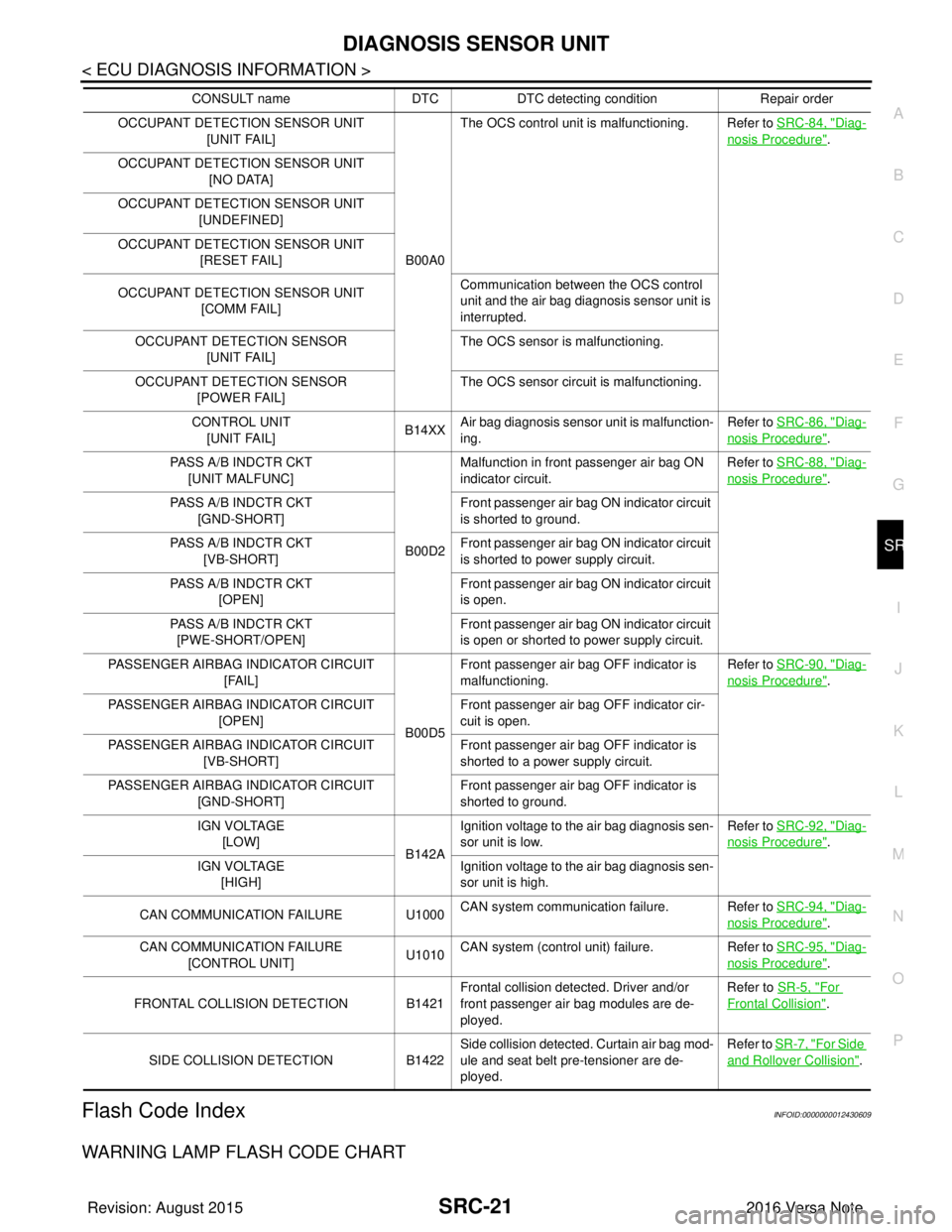
WARNING LAMP FLASH CODE CHART
OCCUPANT DETECTION SENSOR UNIT [UNIT FAIL]
B00A0The OCS control unit is malfunctioning. Refer to
SRC-84, "Diag-
nosis Procedure".
OCCUPANT DETECTION SENSOR UNIT [NO DATA]
OCCUPANT DETECTION SENSOR UNIT [UNDEFINED]
OCCUPANT DETECTION SENSOR UNIT [RESET FAIL]
OCCUPANT DETECTION SENSOR UNIT [COMM FAIL] Communication between the OCS control
unit and the air bag diagnosis sensor unit is
interrupted.
OCCUPANT DETECTION SENSOR [UNIT FAIL] The OCS sensor is malfunctioning.
OCCUPANT DETECTION SENSOR [POWER FAIL] The OCS sensor circuit is malfunctioning.
CONTROL UNIT [UNIT FAIL] B14XX
Air bag diagnosis sensor unit is malfunction-
ing. Refer to SRC-86, "
Diag-
nosis Procedure".
PASS A/B INDCTR CKT [UNIT MALFUNC]
B00D2Malfunction in front passenger air bag ON
indicator circuit.
Refer to SRC-88, "
Diag-
nosis Procedure".
PASS A/B INDCTR CKT [GND-SHORT] Front passenger air bag ON indicator circuit
is shorted to ground.
PASS A/B INDCTR CKT [VB-SHORT] Front passenger air bag ON indicator circuit
is shorted to power supply circuit.
PASS A/B INDCTR CKT [OPEN] Front passenger air bag ON indicator circuit
is open.
PASS A/B INDCTR CKT [PWE-SHORT/OPEN] Front passenger air bag ON indicator circuit
is open or shorted to power supply circuit.
PASSENGER AIRBAG INDICATOR CIRCUIT [FAIL]
B00D5Front passenger air bag OFF indicator is
malfunctioning.
Refer to SRC-90, "
Diag-
nosis Procedure".
PASSENGER AIRBAG INDICATOR CIRCUIT [OPEN] Front passenger air bag OFF indicator cir-
cuit is open.
PASSENGER AIRBAG INDICATOR CIRCUIT [VB-SHORT] Front passenger air bag OFF indicator is
shorted to a power supply circuit.
PASSENGER AIRBAG INDICATOR CIRCUIT [GND-SHORT] Front passenger air bag OFF indicator is
shorted to ground.
IGN VOLTAGE [LOW] B142AIgnition voltage to the air bag diagnosis sen-
sor unit is low.
Refer to SRC-92, "
Diag-
nosis Procedure".
IGN VOLTAGE [HIGH] Ignition voltage to the air bag diagnosis sen-
sor unit is high.
CAN COMMUNICATION FAILURE U1000 CAN system communication failure. Refer to
SRC-94, "
Diag-
nosis Procedure".
CAN COMMUNICATION FAILURE [CONTROL UNIT] U1010
CAN system (control unit) failure.
Refer to SRC-95, "
Diag-
nosis Procedure".
FRONTAL COLLISION DETECTION B1421 Frontal collision detected. Driver and/or
front passenger air bag modules are de-
ployed.Refer to SR-5, "
For
Frontal Collision".
SIDE COLLISION DETECTION B1422Side collision detected. Curtain air bag mod-
ule and seat belt pre-tensioner are de-
ployed. Refer to SR-7, "
For Side
and Rollover Collision".
CONSULT name
DTCDTC detecting condition Repair order
Revision: August 2015 2016 Versa Note
cardiagn.com
Page 3039 of 3641
SRC-22
< ECU DIAGNOSIS INFORMATION >
DIAGNOSIS SENSOR UNIT
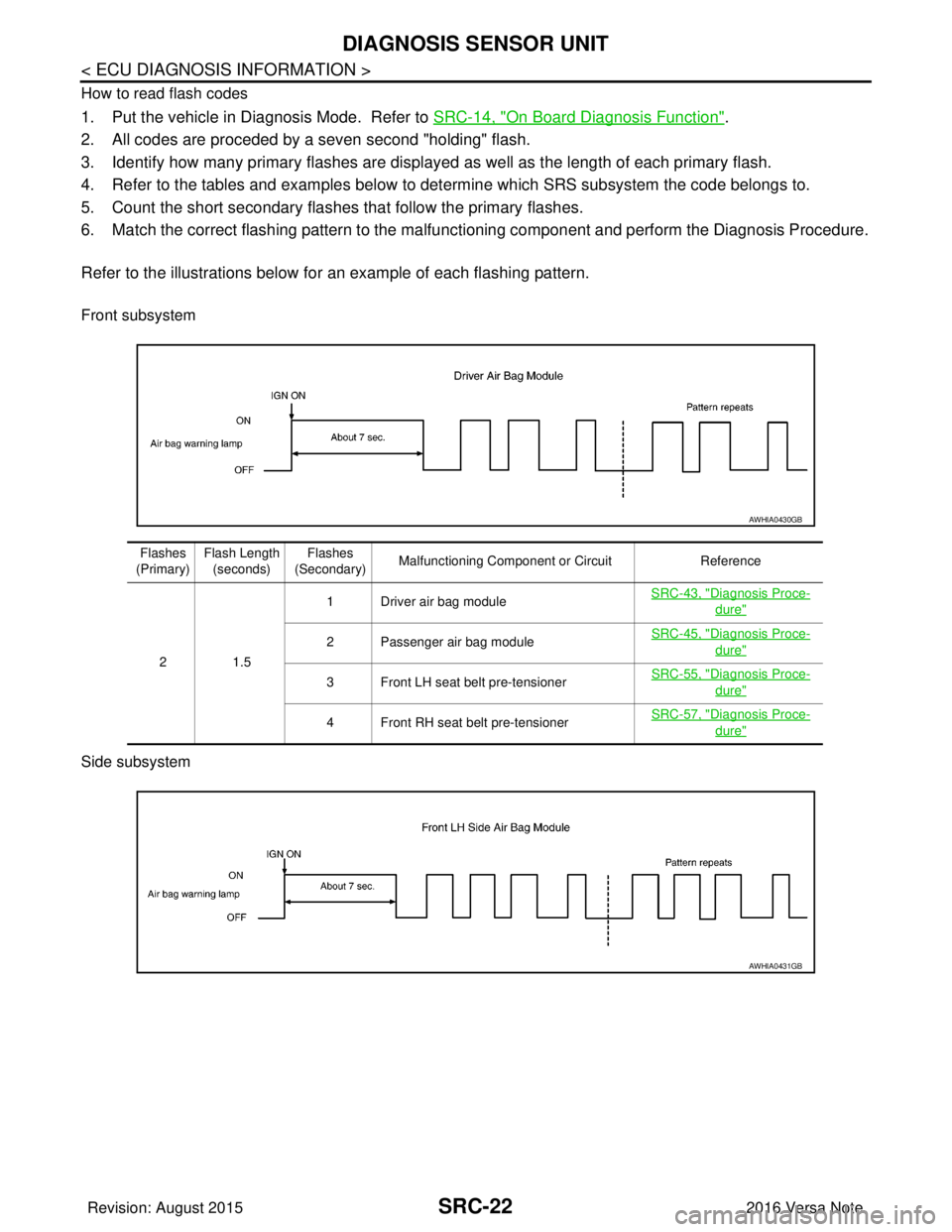
How to read flash codes
1. Put the vehicle in Diagnosis Mode. Refer to SRC-14, "On Board Diagnosis Function".
2. All codes are proceded by a seven second "holding" flash.
3. Identify how many primary flashes are display ed as well as the length of each primary flash.
4. Refer to the tables and examples below to determine which SRS subsystem the code belongs to.
5. Count the short secondary flashes that follow the primary flashes.
6. Match the correct flashing pattern to the malfunctioning component and perform the Diagnosis Procedure.
Refer to the illustrations below fo r an example of each flashing pattern.
Front subsystem
Side subsystem
AWHIA0430GB
Flashes
(Primary) Flash Length
(seconds) Flashes
(Secondary) Malfunctioning Component or Circuit
Reference
21 .5 1 Driver air bag module
SRC-43, "
Diagnosis Proce-
dure"
2 Passenger air bag moduleSRC-45, "Diagnosis Proce-
dure"
3 Front LH seat belt pre-tensioner
SRC-55, "Diagnosis Proce-
dure"
4 Front RH seat belt pre-tensionerSRC-57, "Diagnosis Proce-
dure"
AWHIA0431GB
Revision: August 2015
2016 Versa Note
cardiagn.com
Page 3040 of 3641
DIAGNOSIS SENSOR UNITSRC-23
< ECU DIAGNOSIS INFORMATION >
C
DE
F
G
I
J
K L
M A
B
SRC
N
O P
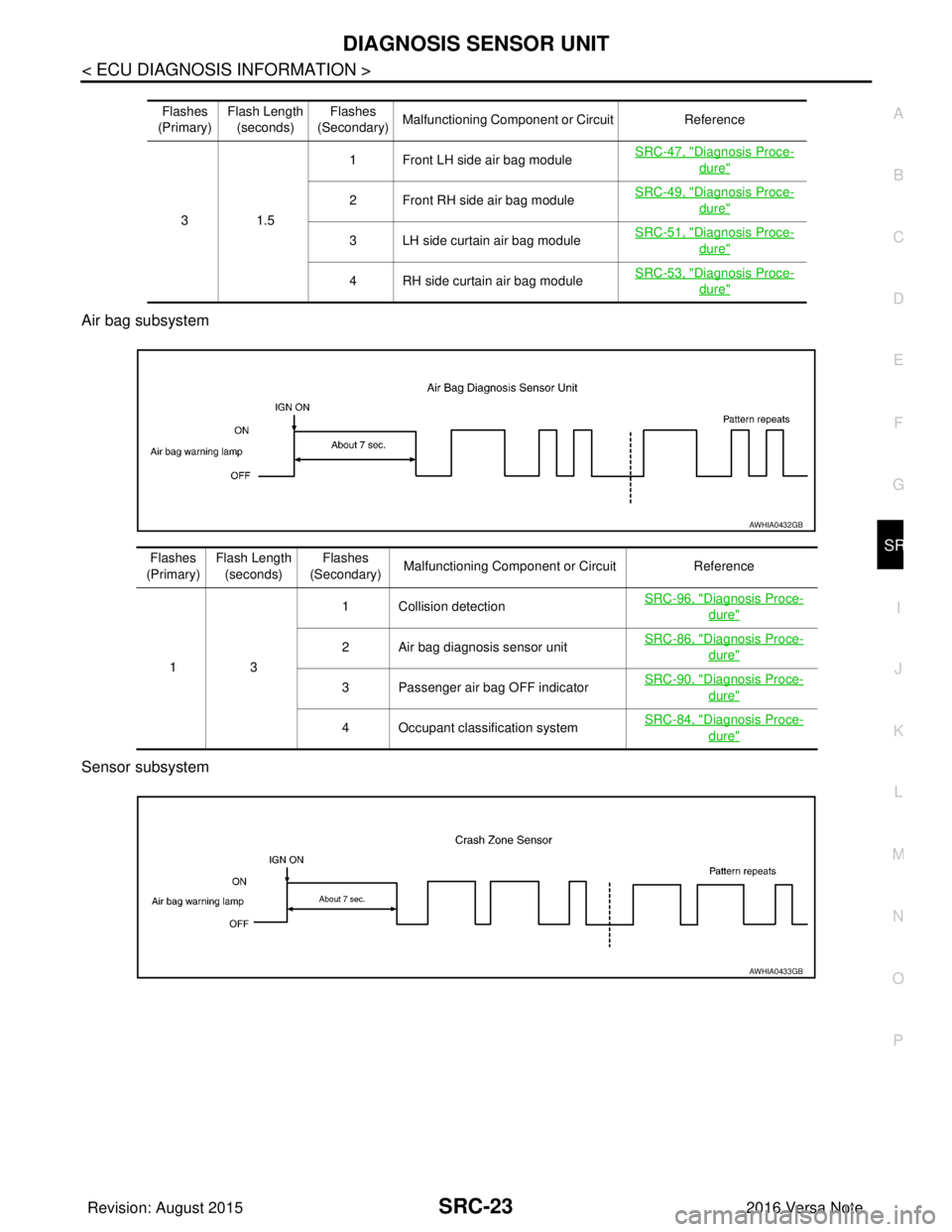
Air bag subsystem
Sensor subsystem
Flashes
(Primary) Flash Length
(seconds) Flashes
(Secondary) Malfunctioning Component or Circuit
Reference
31 .5 1 Front LH side air bag module
SRC-47, "
Diagnosis Proce-
dure"
2 Front RH side air bag moduleSRC-49, "Diagnosis Proce-
dure"
3 LH side curtain air bag module
SRC-51, "Diagnosis Proce-
dure"
4 RH side curtain air bag moduleSRC-53, "Diagnosis Proce-
dure"
AWHIA0432GB
Flashes
(Primary) Flash Length
(seconds) Flashes
(Secondary) Malfunctioning Component or Circuit
Reference
13 1 Collision detection
SRC-96, "
Diagnosis Proce-
dure"
2 Air bag diagnosis sensor unitSRC-86, "Diagnosis Proce-
dure"
3 Passenger air bag OFF indicator
SRC-90, "Diagnosis Proce-
dure"
4 Occupant classification systemSRC-84, "Diagnosis Proce-
dure"
AWHIA0433GB
Revision: August 2015
2016 Versa Note
cardiagn.com
Page 3041 of 3641

SRC-24
< ECU DIAGNOSIS INFORMATION >
DIAGNOSIS SENSOR UNIT
Flashes
(Primary) Flash Length
(seconds) Flashes
(Secondary) Malfunctioning Component or Circuit
Reference
23 1 Crash zone sensor
SRC-63, "
Diagnosis Proce-
dure"
2 Front side air bag satellite sensor LHSRC-72, "Diagnosis Proce-
dure"
3 Front side air bag satellite sensor RH
SRC-75, "Diagnosis Proce-
dure"
4 Rear side air bag satellite sensor LHSRC-78, "Diagnosis Proce-
dure"
5 Rear side air bag satellite sensor RHSRC-81, "Diagnosis Proce-
dure"
6 Front door satellite sensor LH
SRC-65, "Diagnosis Proce-
dure"
7 Front door satellite sensor RHSRC-67, "Diagnosis Proce-
dure"
8 Seat belt buckle switch LHSRC-59, "Diagnosis Proce-
dure"
9 Seat belt buckle switch RH
SRC-61, "Diagnosis Proce-
dure"
Revision: August 2015
2016 Versa Note
cardiagn.com
Page 3060 of 3641
B0001, B0002 DRIVER AIRBAG MODULE
SRC-43
< DTC/CIRCUIT DIAGNOSIS >
C
D E
F
G
I
J
K L
M A
B
SRC
N
O P
Is the DTC detected?
YES >> Refer to SRC-43, "Diagnosis Procedure".
NO >> Inspection End.
Diagnosis ProcedureINFOID:0000000012430618
WARNING:
• Before servicing, turn ignition sw itch OFF, disconnect battery negative terminal, and wait 3 minutes
or more. (To discharge backup capacitor.)
• Never use unspecified tester or other measuring device.
1.HARNESS CONNECTOR
Visually inspect all applicable harness connectors for the following:
• Visible damage to connector or terminal
• Loose terminal
• Poor connection NOTE:
All harness connectors should be inspected from t he air bag diagnosis sensor unit to the end component
(including any in-line connectors).
Is the inspection result normal?
YES >> GO TO 2.
NO >> Perform one of the following repairs: • Visible damage: Replace the harness.
• Loose terminal: Secure the terminal.
• Poor connection: Secure the connection.
2.CONFIRM DTC
1. Reconnect all harness connectors.
2. Turn ignition switch ON.
3. Check for DTC using CONSULT.
Is DTC still current?
YES >> GO TO 3.
NO >> Refer to GI-42, "
Intermittent Incident".
3.WIRING HARNESS
Check the wiring harness for visible damage.
NOTE:
The entire wiring harness should be inspected from the air bag diagnosis sensor unit to the end component
(including any in-line connectors).
Is the inspection result normal?
YES >> GO TO 4.
NO >> Replace the harness.
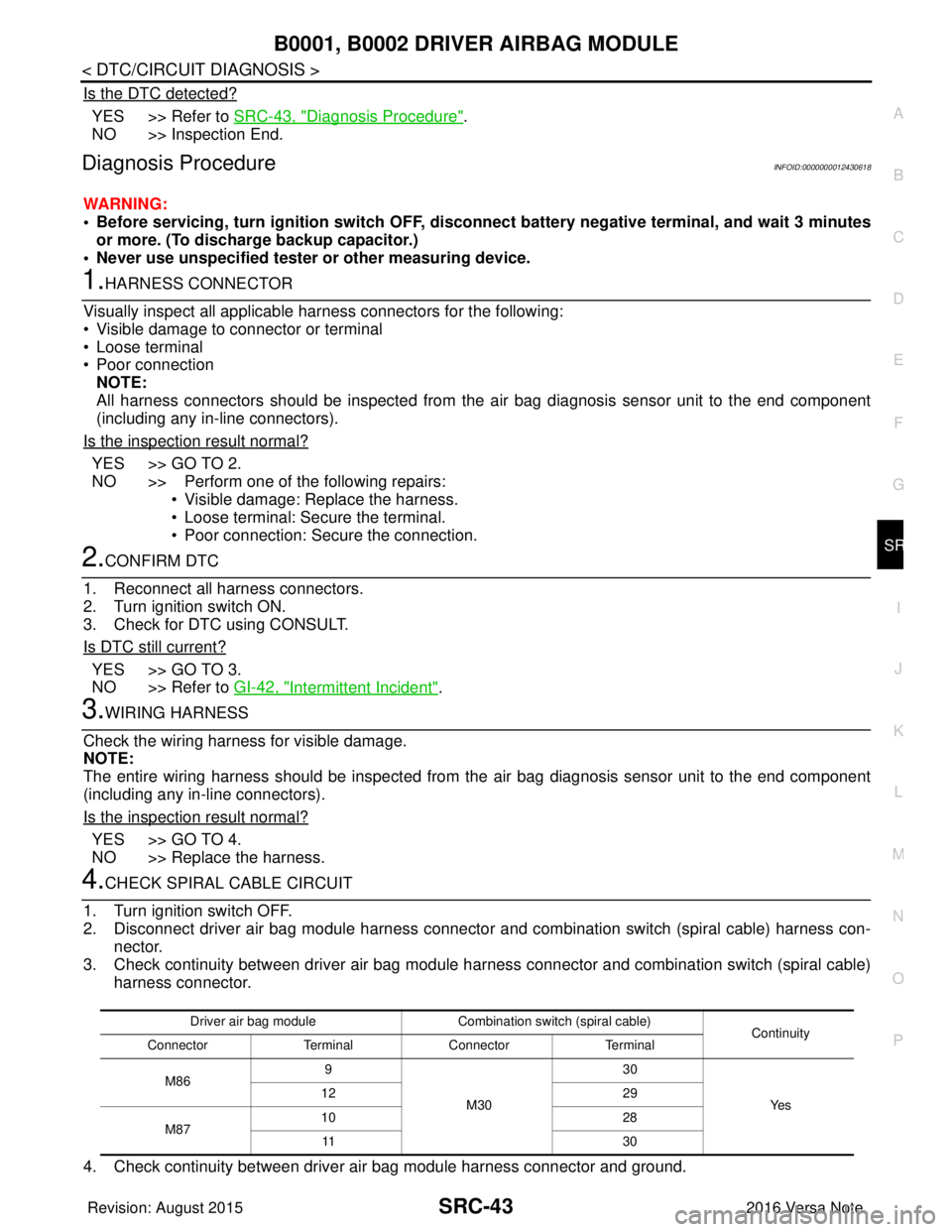
4.CHECK SPIRAL CABLE CIRCUIT
1. Turn ignition switch OFF.
2. Disconnect driver air bag module harness connector and combination switch (spiral cable) harness con- nector.
3. Check continuity between driver air bag module har ness connector and combination switch (spiral cable)
harness connector.
4. Check continuity between driver air bag module harness connector and ground.
Driver air bag module Combination switch (spiral cable)
Continuity
Connector TerminalConnector Terminal
M86 9
M30 30
Ye s
12
29
M87 10
28
11 3 0
Revision: August 2015 2016 Versa Note
cardiagn.com
Page 3063 of 3641
SRC-46
< DTC/CIRCUIT DIAGNOSIS >
B0010, B0011 PASSENGER AIRBAG MODULE
• Visible damage to connector or terminal
• Loose terminal
• Poor connection
NOTE:
All harness connectors should be inspected from t he air bag diagnosis sensor unit to the end component
(including any in-line connectors).
Is the inspection result normal?
YES >> GO TO 2.
NO >> Perform one of the following repairs: • Visible damage: Replace the harness.
• Loose terminal: Secure the terminal.
• Poor connection: Secure the connection.
2.CONFIRM DTC
1. Reconnect all harness connectors.
2. Turn ignition switch ON.
3. Check for DTC using CONSULT.
Is DTC still current?
YES >> GO TO 3.
NO >> Refer to GI-42, "
Intermittent Incident".
3.WIRING HARNESS
Check the wiring harness for visible damage.
NOTE:
The entire wiring harness should be in spected from the air bag diagnosis sensor unit to the end component
(including any in-line connectors).
Is the inspection result normal?
YES >> GO TO 4.
NO >> Replace the harness.
4.CONFIRM DTC
1. Reconnect all harness connectors.
2. Turn ignition switch ON.
3. Check for DTC using CONSULT.
Is DTC still current?
YES >> GO TO 5.
NO >> Refer to GI-42, "
Intermittent Incident".
5.AIR BAG DIAGNOSIS SENSOR UNIT
1. Replace the air bag diagnosis sensor unit. Refer to SR-30, "
Removal and Installation".
2. Turn ignition switch ON.
3. Check for DTC using CONSULT.
Is DTC still current?
YES >> GO TO 6.
NO >> Clear DTC. Inspection End.
6.FRONT PASSENGER AIR BAG MODULE
1. Replace the front passenger air bag module. Refer to SR-19, "
Removal and Installation".
2. Turn ignition switch ON.
3. Check for DTC using CONSULT.
Is DTC still current?
YES >> GO TO 7.
NO >> Clear DTC. Inspection End.
7.RELATED HARNESS
Replace the related harness.
>>END
Revision: August 2015 2016 Versa Note
cardiagn.com
Page 3065 of 3641
SRC-48
< DTC/CIRCUIT DIAGNOSIS >
B0020 SIDE AIRBAG MODULE LH
• Visible damage to connector or terminal
• Loose terminal
• Poor connectionNOTE:
All harness connectors should be inspected from t he air bag diagnosis sensor unit to the end component
(including any in-line connectors).
Is the inspection result normal?
YES >> GO TO 2.
NO >> Perform one of the following repairs: • Visible damage: Replace the harness.
• Loose terminal: Secure the terminal.
• Poor connection: Secure the connection.
2.CONFIRM DTC
1. Reconnect all harness connectors.
2. Turn ignition switch ON.
3. Check for DTC using CONSULT.
Is DTC still current?
YES >> GO TO 3.
NO >> Refer to GI-42, "
Intermittent Incident".
3.WIRING HARNESS
Check the wiring harness for visible damage.
NOTE:
The entire wiring harness should be in spected from the air bag diagnosis sensor unit to the end component
(including any in-line connectors).
Is the inspection result normal?
YES >> GO TO 4.
NO >> Replace the harness.
4.CONFIRM DTC
1. Reconnect all harness connectors.
2. Turn ignition switch ON.
3. Check for DTC using CONSULT.
Is DTC still current?
YES >> GO TO 5.
NO >> Refer to GI-42, "
Intermittent Incident".
5.AIR BAG DIAGNOSIS SENSOR UNIT
1. Replace the air bag diagnosis sensor unit. Refer to SR-30, "
Removal and Installation".
2. Turn ignition switch ON.
3. Check for DTC using CONSULT.
Is DTC still current?
YES >> GO TO 6.
NO >> Clear DTC. Inspection End.
6.SIDE AIRBAG MODULE LH
1. Replace the side airbag module LH. Refer to SR-24, "
Removal and Installation".
2. Turn ignition switch ON.
3. Check for DTC using CONSULT.
Is DTC still current?
YES >> GO TO 7.
NO >> Clear DTC. Inspection End.
7.RELATED HARNESS
Replace the related harness.
>>END
Revision: August 2015 2016 Versa Note
cardiagn.com
Page 3067 of 3641
SRC-50
< DTC/CIRCUIT DIAGNOSIS >
B0028 SIDE AIRBAG MODULE RH
• Visible damage to connector or terminal
• Loose terminal
• Poor connectionNOTE:
All harness connectors should be inspected from t he air bag diagnosis sensor unit to the end component
(including any in-line connectors).
Is the inspection result normal?
YES >> GO TO 2.
NO >> Perform one of the following repairs: • Visible damage: Replace the harness.
• Loose terminal: Secure the terminal.
• Poor connection: Secure the connection.
2.CONFIRM DTC
1. Reconnect all harness connectors.
2. Turn ignition switch ON.
3. Check for DTC using CONSULT.
Is DTC still current?
YES >> GO TO 3.
NO >> Refer to GI-42, "
Intermittent Incident".
3.WIRING HARNESS
Check the wiring harness for visible damage.
NOTE:
The entire wiring harness should be in spected from the air bag diagnosis sensor unit to the end component
(including any in-line connectors).
Is the inspection result normal?
YES >> GO TO 4.
NO >> Replace the harness.
4.CONFIRM DTC
1. Reconnect all harness connectors.
2. Turn ignition switch ON.
3. Check for DTC using CONSULT.
Is DTC still current?
YES >> GO TO 5.
NO >> Refer to GI-42, "
Intermittent Incident".
5.AIR BAG DIAGNOSIS SENSOR UNIT
1. Replace the air bag diagnosis sensor unit. Refer to SR-30, "
Removal and Installation".
2. Turn ignition switch ON.
3. Check for DTC using CONSULT.
Is DTC still current?
YES >> GO TO 6.
NO >> Clear DTC. Inspection End.
6.SIDE AIRBAG MODULE RH
1. Replace the side airbag module RH. Refer to SR-24, "
Removal and Installation".
2. Turn ignition switch ON.
3. Check for DTC using CONSULT.
Is DTC still current?
YES >> GO TO 7.
NO >> Clear DTC. Inspection End.
7.RELATED HARNESS
Replace the related harness.
>>END
Revision: August 2015 2016 Versa Note
cardiagn.com
Page 3069 of 3641
SRC-52
< DTC/CIRCUIT DIAGNOSIS >
B0021 SIDE CURTAIN AIR BAG MODULE LH
• Loose terminal: Secure the terminal.
• Poor connection: Secure the connection.
2.CONFIRM DTC
1. Reconnect all harness connectors.
2. Turn ignition switch ON.
3. Check for DTC using CONSULT.
Is DTC still current?
YES >> GO TO 3.
NO >> Refer to GI-42, "
Intermittent Incident".
3.WIRING HARNESS
Check the wiring harness for visible damage.
NOTE:
The entire wiring harness should be in spected from the air bag diagnosis sensor unit to the end component
(including any in-line connectors).
Is the inspection result normal?
YES >> GO TO 4.
NO >> Replace the harness.
4.CONFIRM DTC
1. Reconnect all harness connectors.
2. Turn ignition switch ON.
3. Check for DTC using CONSULT.
Is DTC still current?
YES >> GO TO 5.
NO >> Refer to GI-42, "
Intermittent Incident".
5.AIR BAG DIAGNOSIS SENSOR UNIT
1. Replace the air bag diagnosis sensor unit. Refer to SR-30, "
Removal and Installation".
2. Turn ignition switch ON.
3. Check for DTC using CONSULT.
Is DTC still current?
YES >> GO TO 6.
NO >> Clear DTC. Inspection End.
6.SIDE CURTAIN AIR BAG MODULE LH
1. Replace the side curtain air bag module LH. Refer to SR-21, "
Removal and Installation".
2. Turn ignition switch ON.
3. Check for DTC using CONSULT.
Is DTC still current?
YES >> GO TO 7.
NO >> Clear DTC. Inspection End.
7.RELATED HARNESS
Replace the related harness.
>>END
Revision: August 2015 2016 Versa Note
cardiagn.com