fuel type NISSAN NOTE 2016 Service Workshop Manual
[x] Cancel search | Manufacturer: NISSAN, Model Year: 2016, Model line: NOTE, Model: NISSAN NOTE 2016Pages: 3641, PDF Size: 28.72 MB
Page 2460 of 3641
![NISSAN NOTE 2016 Service Workshop Manual MWI-102
< DTC/CIRCUIT DIAGNOSIS >[TYPE B]
FUEL LEVEL SENSOR SIGNAL CIRCUIT
3.CHECK FUEL LEVEL SENSOR GROUND CIRCUIT
1. Disconnect ECM connector F11
2. Check continuity between combination meter har ne](/img/5/57363/w960_57363-2459.png "NISSAN NOTE 2016 Service Workshop Manual MWI-102
< DTC/CIRCUIT DIAGNOSIS >[TYPE B]
FUEL LEVEL SENSOR SIGNAL CIRCUIT
3.CHECK FUEL LEVEL SENSOR GROUND CIRCUIT
1. Disconnect ECM connector F11
2. Check continuity between combination meter har ne")
MWI-102
< DTC/CIRCUIT DIAGNOSIS >[TYPE B]
FUEL LEVEL SENSOR SIGNAL CIRCUIT
3.CHECK FUEL LEVEL SENSOR GROUND CIRCUIT
1. Disconnect ECM connector F11
2. Check continuity between combination meter har ness connector M24 terminal 24 and fuel level sensor
unit and fuel pump harness connector B44 terminal 5.
3. Check continuity between fuel level sensor unit and fuel pump harness connector B44 terminal 5 and ground.
Is the inspection result normal?
YES >> GO TO 4.
NO >> Repair harness or connector.
4.CHECK INSTALLATION CONDITION
Check fuel level sensor unit installation, and verify t he float arm does not interfere or bind with the internal
components in the fuel tank.
Is the inspection result normal?
YES >> Inspection End.
NO >> Install the fuel level sensor unit properly.
Component InspectionINFOID:0000000012432639
1.REMOVE FUEL LEVEL SENSOR UNIT
Remove the fuel level sensor unit. Refer to FL-6, "
Removal and Installation".
>> GO TO 2.
2.CHECK FUEL LEVEL SENSOR UNIT
Check the resistance between fuel level sensor unit and fuel pump.
*: When float rod is in contact with stopper.
Is inspection result OK?
YES >> Inspection End.
NO >> Replace fuel level sensor unit and fuel pump. Refer to
FL-6, "
Removal and Installation".
Connector TerminalConnector Terminal Continuity
M24 24B44 5Yes
Connector Terminal
GroundContinuity
B44 5 No
Te r m i n a l s
ConditionResistance (Ω
)
(Approx.) Height [mm (in)]
Fuel level sensor unit
25 Full
* (A)
51 168.2 (6.62)
Empty
* (B) 283 17.5 (0.69)
JPNIA0841ZZ
Revision: August 2015
2016 Versa Note
cardiagn.com
Page 2465 of 3641
![NISSAN NOTE 2016 Service Workshop Manual MWI
THE FUEL GAUGE INDICATOR DOES NOT OPERATEMWI-107
< SYMPTOM DIAGNOSIS > [TYPE B]
C
D
E
F
G H
I
J
K L
M B A
O P
SYMPTOM DIAGNOSIS
THE FUEL GAUGE INDICA TOR DOES NOT OPERATE
DescriptionINFOID:0000000](/img/5/57363/w960_57363-2464.png "NISSAN NOTE 2016 Service Workshop Manual MWI
THE FUEL GAUGE INDICATOR DOES NOT OPERATEMWI-107
< SYMPTOM DIAGNOSIS > [TYPE B]
C
D
E
F
G H
I
J
K L
M B A
O P
SYMPTOM DIAGNOSIS
THE FUEL GAUGE INDICA TOR DOES NOT OPERATE
DescriptionINFOID:0000000")
MWI
THE FUEL GAUGE INDICATOR DOES NOT OPERATEMWI-107
< SYMPTOM DIAGNOSIS > [TYPE B]
C
D
E
F
G H
I
J
K L
M B A
O P
SYMPTOM DIAGNOSIS
THE FUEL GAUGE INDICA TOR DOES NOT OPERATE
DescriptionINFOID:0000000012432647
Fuel gauge will not indicate from a certain position.
Diagnosis ProcedureINFOID:0000000012432648
1.CHECK COMBINATION METER INPUT SIGNAL
1. Select METER/M&A on CONSULT.
2. Using DATA MONITOR, compare the monitor value with the fuel gauge reading on the combination met\
er. Refer to MWI-101, "
Component Function Check".
Does monitor value match fuel gauge reading?
YES >> GO TO 2.
NO >> Replace combination meter. Refer to MWI-115, "
Removal and Installation".
2.CHECK FUEL LEVEL SENSOR SIGNAL CIRCUIT
Check the fuel level sensor signal circuit. Refer to MWI-101, "
DiagnosisProcedure".
Is the inspection result normal?
YES >> GO TO 3.
NO >> Repair harness or connector.
3.COMPONENT INSPECTION
Perform a component inspection on the fuel level sensor unit. Refer to MWI-102, "
Component Inspection".
Is the inspection result normal?
YES >> GO TO 4.
NO >> Replace fuel level sensor unit. Refer to FL-6, "
Removal and Installation".
4.CHECK FLOAT INTERFERENCE
Check that the float arm does not interfer e or bind with components in the fuel tank.
Is the inspection result normal?
YES >> Replace combination meter. Refer to MWI-115, "Removal and Installation".
NO >> Repair or replace malfunctioning parts.
Revision: August 2015 2016 Versa Note
cardiagn.com
Page 2730 of 3641

RSU-2
< PRECAUTION >
PRECAUTIONS
PRECAUTION
PRECAUTIONS
Precaution for Supplemental Restraint System (SRS) "AIR BAG" and "SEAT BELT
PRE-TENSIONER"
INFOID:0000000012431916
The Supplemental Restraint System such as “A IR BAG” and “SEAT BELT PRE-TENSIONER”, used along
with a front seat belt, helps to reduce the risk or severity of injury to the driver and front passenger for certain
types of collision. Information necessary to service the system safely is included in the SR and SB section of
this Service Manual.
WARNING:
• To avoid rendering the SRS inopera tive, which could increase the risk of personal injury or death in
the event of a collision which would result in air bag inflation, all maintenance must be performed by
an authorized NISSAN/INFINITI dealer.
• Improper maintenance, including in correct removal and installation of the SRS, can lead to personal
injury caused by unintent ional activation of the system. For re moval of Spiral Cable and Air Bag
Module, see the SR section.
• Do not use electrical test equipmen t on any circuit related to the SRS unless instructed to in this
Service Manual. SRS wiring harn esses can be identified by yellow and/or orange harnesses or har-
ness connectors.
PRECAUTIONS WHEN USING POWER TOOLS (AIR OR ELECTRIC) AND HAMMERS
WARNING:
• When working near the Airbag Diagnosis Sensor Unit or other Airbag System sensors with the Igni-
tion ON or engine running, DO NOT use air or electri c power tools or strike near the sensor(s) with a
hammer. Heavy vibration could activate the sensor( s) and deploy the air bag(s), possibly causing
serious injury.
• When using air or electric power tools or hammers , always switch the Ignition OFF, disconnect the
battery and wait at least three minutes before performing any service.
Precaution for SuspensionINFOID:0000000012431917
• When installing rubber bushings, the final tightening mu st be carried out under unladen conditions with tires
on ground. Spilled oil might shorten the life of rubber bushings. Be sure to wipe off any spilled oil.
- Unladen conditions mean that fuel, engine coolant and lubricant are full. Spare tire, jack, hand tools and mats are in designated positions.
• After servicing suspension parts, be sure to check wheel alignment.
• Self-lock nuts are not reusable. Always use new ones when installing. Since new self-lock nuts are pre-oiled,
tighten as they are.
• The tightening surface must be kept free of oil/grease.
• When jacking up the vehicle with a floor jack, do not hang the jack on the suspension beam.
Revision: August 2015 2016 Versa Note
cardiagn.com
Page 2734 of 3641

RSU-6
< PERIODIC MAINTENANCE >
WHEEL ALIGNMENT
WHEEL ALIGNMENT
InspectionINFOID:0000000012431922
DESCRIPTION
Measure the wheel alignment under unladen conditions.
NOTE:
“Unladen conditions” means that fuel, engine coolant, and lubricants are full. Spare tire, jack, hand tools and
mats are in designated positions.
PRELIMINARY
Check the following:
1. Tires for improper air pressure and wear.
2. Road wheels for runout. Refer to WT-44, "
Inspection".
3. Wheel bearing axial end play. Refer to RAX-10, "
Wheel Bearing".
4. Shock absorber operation.
5. Each mounting part of suspension for looseness and deformation.
6. Rear suspension beam for cracks, deformation, and other damage.
7. Vehicle height (posture).
GENERAL INFORMATION AND RECOMMENDATIONS
1. A Four-Wheel Thrust Alignment should be performed. • This type of alignment is recommended for any NISSAN/INFINITI vehicle.
• The four-wheel “thrust” process helps ensure that the vehicle is properly aligned and the steering wheel
is centered.
• The alignment machine itself should be capabl e of accepting any NISSAN/INFINITI vehicle.
• The alignment machine should be checked to ensure that it is level.
2. Make sure the alignment machine is properly calibrated. • Your alignment machine should be regularly calibrated in order to give correct information.
• Check with the manufacturer of your specific al ignment machine for their recommended Service/Cali-
bration Schedule.
THE ALIGNMENT PROCESS
IMPORTANT: Use only the alignment specifications listed in this Service Manual. Refer to RSU-15, "Wheel
Alignment (Unladen*1)".
1. When displaying the alignment settings, many alignment machines use “indicators”: (Green/red, plus or minus, Go/No Go). Do NOT use these indicators.
• The alignment specifications programmed into your alignment machine that operate these indicators may not be correct.
• This may result in an ERROR.
2. Most camera-type alignment machines are equipped with both "Rolling Compensation" method and optional "Jacking Compensation" method to "com pensate" the alignment targets or head units.
"Rolling Compensation" is the preferred method.
• If using the "Rolling Compensation" method, after installing the alignment targets or head units, push or pull on the rear wheel to move the vehicle. Do not push or pull the vehicle body.
• If using the "Jacking Compensation" method, after in stalling the alignment targets or head units, raise
the vehicle and rotate the wheels 1/2 turn both ways.
NOTE:
Do not use the "rolling compensation" if you are using sensor-type alignment equipment.
• Follow all instructions for the alignment machine you're using for more information.
CAMBER INSPECTION
• Measure camber of both right and left wheels with a suitable alignment gauge.
• If it is out of the specificati on value, inspect and replace any damaged or worn rear suspension parts.
Camber : Refer to RSU-15, "
Wheel Alignment
(Unladen*1)".
Revision: August 2015
2016 Versa Note
cardiagn.com
Page 3529 of 3641
WCS-14
< SYSTEM DESCRIPTION >
DIAGNOSIS SYSTEM (COMBINATION METER)
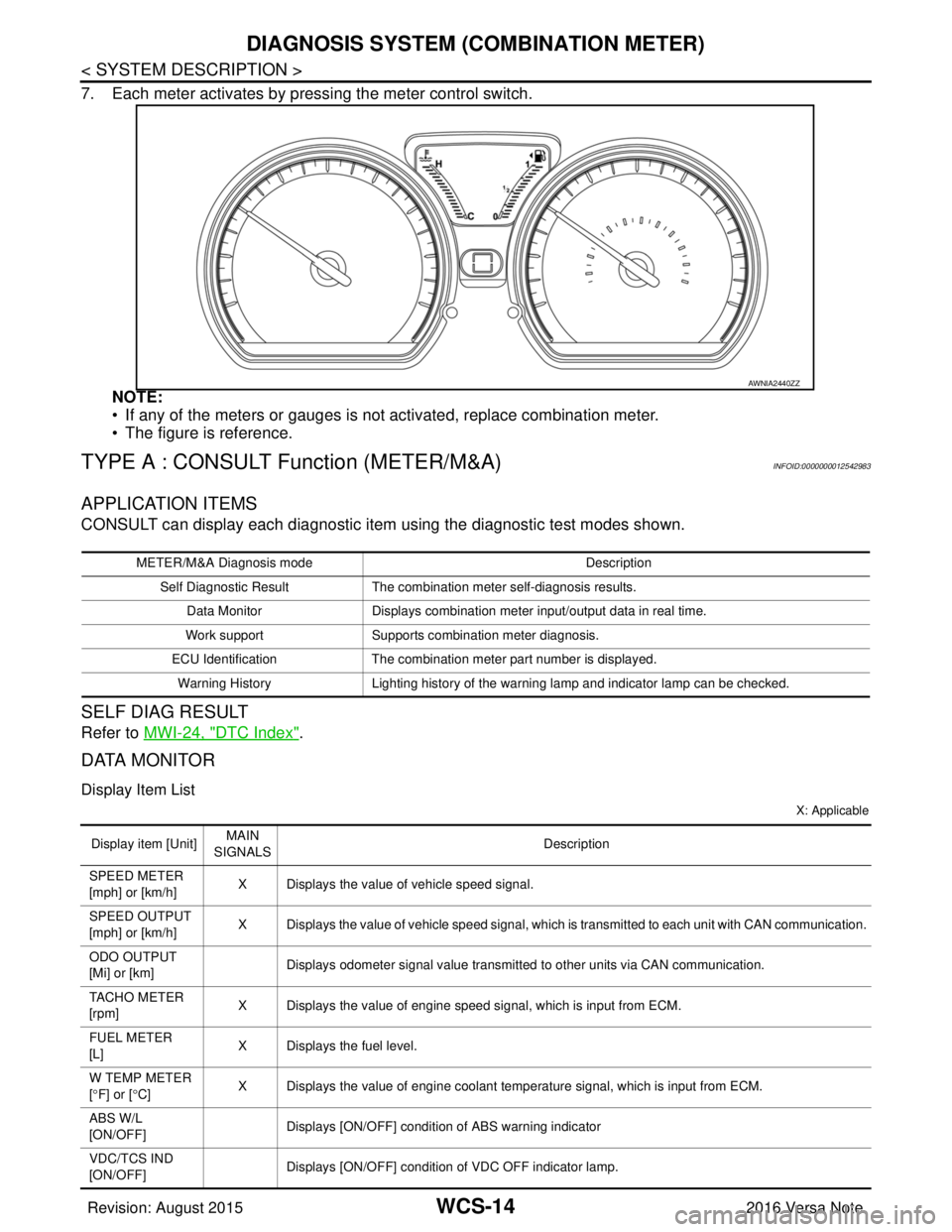
7. Each meter activates by pressing the meter control switch.NOTE:
• If any of the meters or gauges is not activated, replace combination meter.
• The figure is reference.
TYPE A : CONSULT Function (METER/M&A)INFOID:0000000012542983
APPLICATION ITEMS
CONSULT can display each diagnostic item using the diagnostic test modes shown.
SELF DIAG RESULT
Refer to MWI-24, "DTC Index".
DATA MONITOR
Display Item List
X: Applicable
AWNIA2440ZZ
METER/M&A Diagnosis mode Description
Self Diagnostic Result The combination meter self-diagnosis results.
Data Monitor Displays combination meter input/output data in real time.
Work support Supports combination meter diagnosis.
ECU Identification The combination meter part number is displayed.
Warning History Lighting history of the warning lamp and indicator lamp can be checked.
Display item [Unit]MAIN
SIGNALS Description
SPEED METER
[mph] or [km/h] X Displays the value of vehicle speed signal.
SPEED OUTPUT
[mph] or [km/h] X Displays the value of vehicle speed signal, which is transmitted to each unit with CAN communication.
ODO OUTPUT
[Mi] or [km] Displays odometer signal value transmitted to other units via CAN communication.
TACHO METER
[rpm] X Displays the value of engine speed signal, which is input from ECM.
FUEL METER
[L] X Displays the fuel level.
W TEMP METER
[ ° F] or [ °C] X Displays the value of engine coolant temperature signal, which is input from ECM.
ABS W/L
[ON/OFF] Displays [ON/OFF] conditio
n of ABS warning indicator
VDC/TCS IND
[ON/OFF] Displays [ON/OFF] condition
of VDC OFF indicator lamp.
Revision: August 2015 2016 Versa Note
cardiagn.com
Page 3531 of 3641
WCS-16
< SYSTEM DESCRIPTION >
DIAGNOSIS SYSTEM (COMBINATION METER)
WARNING HISTORY
W/L ON HISTORY
• Stores histories when warning/indicator lamp is turned on.
• “W/L ON HISTORY” indicates the “TIME” when the warning/ indicator lamp is turned on.
• The “TIME” above is:
- 0: The condition that the warning/indicator lamp has been turned on 1 or more times after starting the engine and waiting for 30 seconds.
- 1 - 39: The number of times the engine was restarted after the 0 condition.
- NO W/L ON HISTORY: Stores NO (0) turning on history of warning/indicator lamp.
NOTE:
• W/L ON HISTORY is not stored for approximately 30 seconds after the engine starts.
• Brake warning lamp does not store any history when the parking brake is applied or the brake fluid level gets low.
TYPE B
TYPE B : On Board Diagnosis FunctionINFOID:0000000012542984
ON BOARD DIAGNOSIS
The following meter functions can be checked during Combination Meter Self-Diagnosis Mode:
• Pointer sweep of speedometer, tachometer and gauges.
• Illumination of all lamps/LEDs that are controlled by the combination meter (regardless of switch status).
• Error code
STARTING COMBINATION ME TER SELF-DIAGNOSIS MODE
NOTE:
• Check combination meter power supply and ground circuits if self-diagnosis mode does not start. Refer to
MWI-98, "
COMBINATION METER : Diagnosis Procedure". Replace combination meter if power supply and
ground circuits are found to be normal and self-diagnosis mode does not start. Refer to MWI-115, "
Removal
and Installation".
• Combination meter self-diagnosis mode will function with the ignition switch in ON. Combination meter self- diagnosis mode will exit upon turning the ignition switch to OFF.
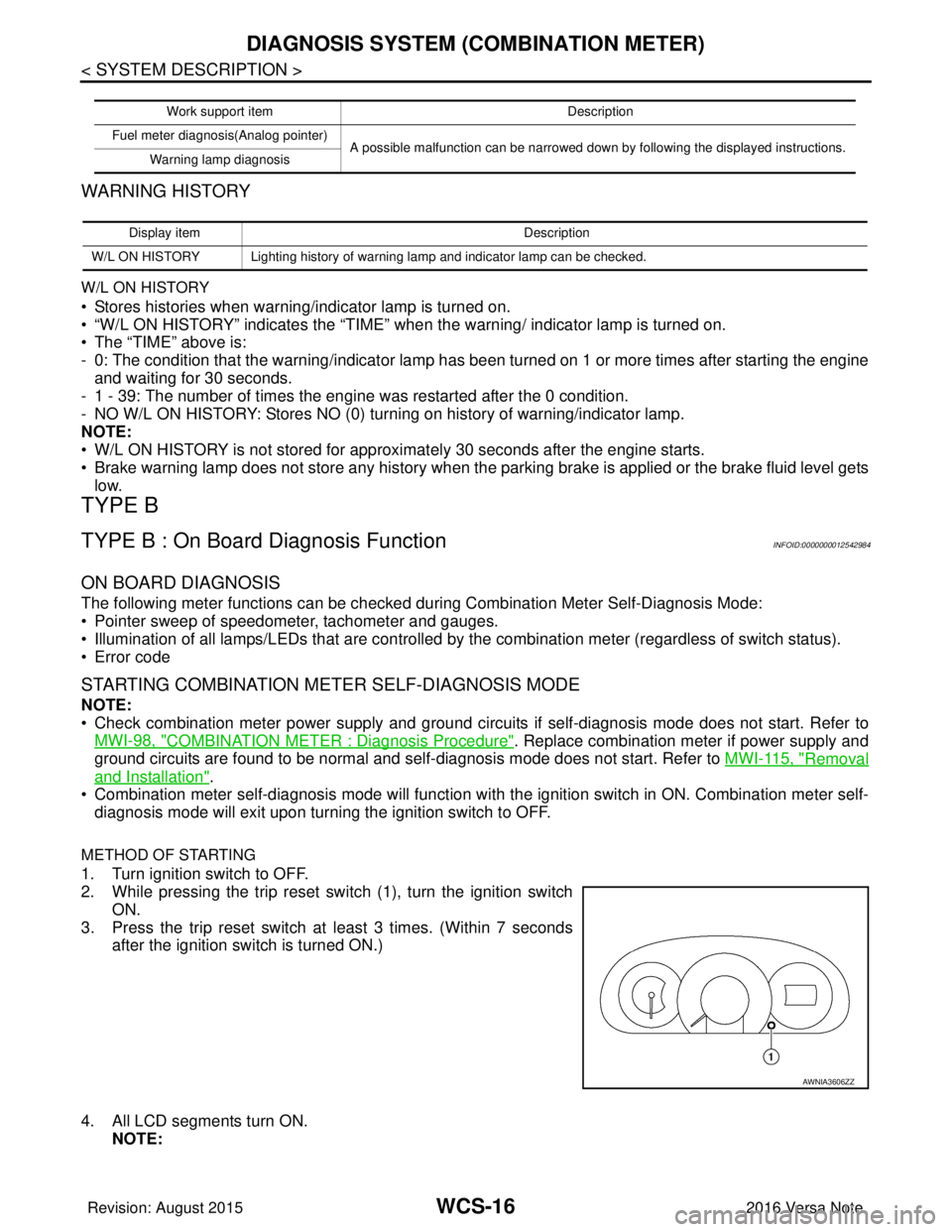
METHOD OF STARTING
1. Turn ignition switch to OFF.
2. While pressing the trip reset switch (1), turn the ignition switch
ON.
3. Press the trip reset switch at least 3 times. (Within 7 seconds
after the ignition switch is turned ON.)
4. All LCD segments turn ON. NOTE:
Work support item Description
Fuel meter diagnosis(Analog pointer) A possible malfunction can be narrowed down by following the displayed instructions.
Warning lamp diagnosis
Display item Description
W/L ON HISTORY Lighting history of warning lamp and indicator lamp can be checked.
AWNIA3606ZZ
Revision: August 2015 2016 Versa Note
cardiagn.com
Page 3533 of 3641
WCS-18
< SYSTEM DESCRIPTION >
DIAGNOSIS SYSTEM (COMBINATION METER)
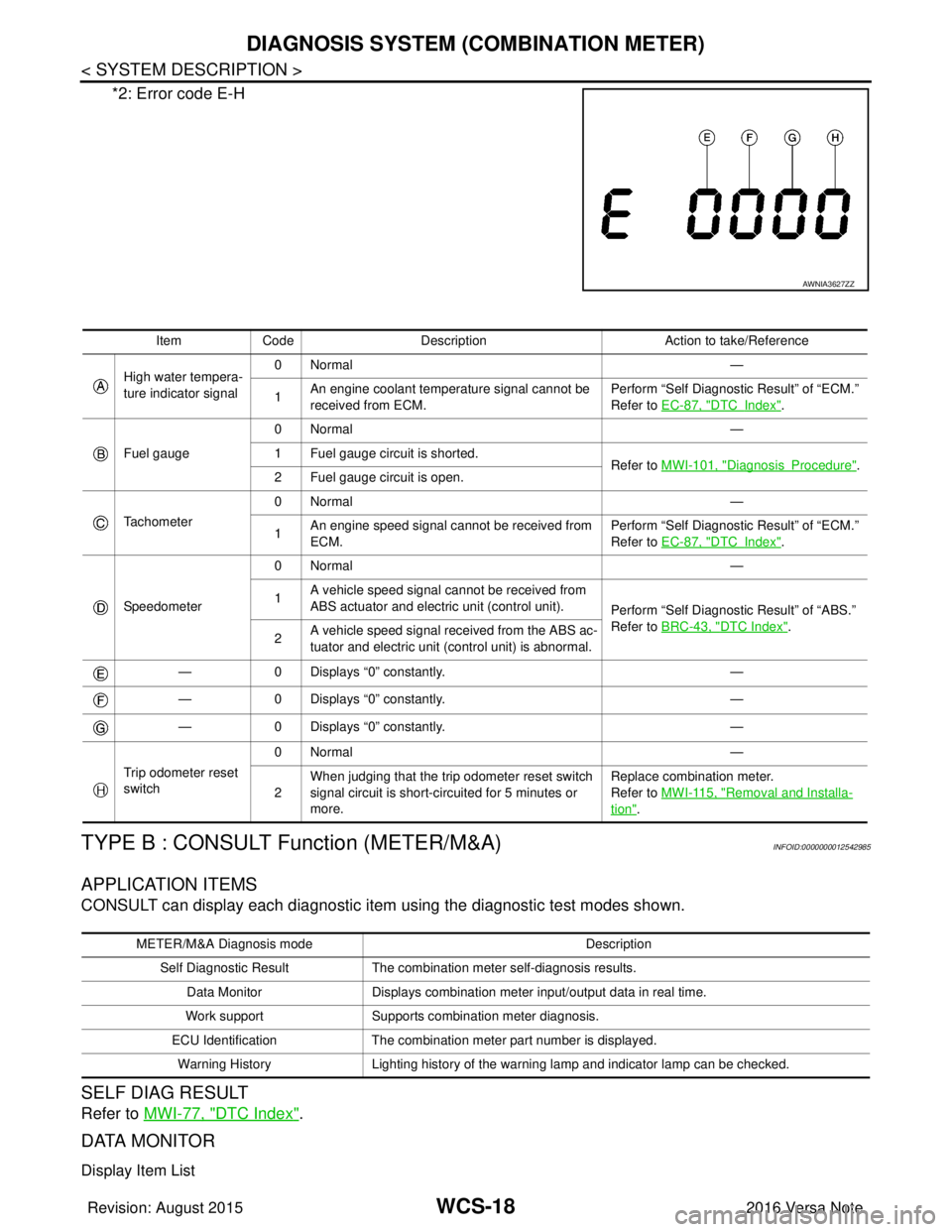
*2: Error code E-H
TYPE B : CONSULT Function (METER/M&A)INFOID:0000000012542985
APPLICATION ITEMS
CONSULT can display each diagnostic item using the diagnostic test modes shown.
SELF DIAG RESULT
Refer to MWI-77, "DTC Index".
DATA MONITOR
Display Item List
AWNIA3627ZZ
Item Code Description Action to take/Reference
High water tempera-
ture indicator signal 0Normal
—
1 An engine coolant temperature signal cannot be
received from ECM. Perform “Self Diagnostic Result” of “ECM.”
Refer to
EC-87, "
DTCIndex".
Fuel gauge 0Normal
—
1 Fuel gauge circuit is shorted. Refer to MWI-101, "
DiagnosisProcedure".
2 Fuel gauge circuit is open.
Tachometer 0Normal
—
1 An engine speed signal cannot be received from
ECM. Perform “Self Diagnostic Result” of “ECM.”
Refer to
EC-87, "
DTCIndex".
Speedometer 0Normal
—
1 A vehicle speed signal cannot be received from
ABS actuator and electric unit (control unit).
Perform “Self Diagnostic Result” of “ABS.”
Refer to BRC-43, "
DTC Index".
2 A vehicle speed signal re
ceived from the ABS ac-
tuator and electric unit (control unit) is abnormal.
— 0 Displays “0” constantly. —
— 0 Displays “0” constantly. —
— 0 Displays “0” constantly. —
Trip odometer reset
switch 0Normal
—
2 When judging that the trip odometer reset switch
signal circuit is short-circuited for 5 minutes or
more. Replace combination meter.
Refer to
MWI-115, "
Removal and Installa-
tion".
METER/M&A Diagnosis mode Description
Self Diagnostic Result The combination meter self-diagnosis results.
Data Monitor Displays combination meter input/output data in real time.
Work support Supports combination meter diagnosis.
ECU Identification The combination meter part number is displayed.
Warning History Lighting history of the warning lamp and indicator lamp can be checked.
Revision: August 2015 2016 Versa Note
cardiagn.com