bluetooth NISSAN NV PASSENGER VAN 2016 Owner's Guide
[x] Cancel search | Manufacturer: NISSAN, Model Year: 2016, Model line: NV PASSENGER VAN, Model: NISSAN NV PASSENGER VAN 2016Pages: 380, PDF Size: 4.05 MB
Page 237 of 380
![NISSAN NV PASSENGER VAN 2016 Owners Guide PHONE SETTINGS
To access the phone settings:1. Press the [
] button.
2. Touch the “Settings” key.
3. Touch the “Phone & Bluetooth” key.
4. Touch the “Phone Settings” key and adjust the fol](/img/5/58179/w960_58179-236.png "NISSAN NV PASSENGER VAN 2016 Owners Guide PHONE SETTINGS
To access the phone settings:1. Press the [
] button.
2. Touch the “Settings” key.
3. Touch the “Phone & Bluetooth” key.
4. Touch the “Phone Settings” key and adjust the fol")
PHONE SETTINGS
To access the phone settings:1. Press the [
] button.
2. Touch the “Settings” key.
3. Touch the “Phone & Bluetooth” key.
4. Touch the “Phone Settings” key and adjust the following settings as desired:
● Sort Phonebook By:
Select “First Name” or “Last Name” to
choose how phonebook entries are alpha-
betically displayed on the screen.
● Use Phonebook From:
Select “Handset” to use the phone’s phone-
book. Select “SIM” to use the phonebook on
the SIM card. Select “Both” to use both
sources.
● Download Phonebook Now:
Select to download the phonebook to the
vehicle from the chosen source.
● Record Name for Phonebook Entry:
Select to record a name for a phonebook
entry for use with the NISSAN Voice Recog-
nition System. ●
Text Messaging:
Select to toggle the text message function-
ality on or off.
● Show Incoming Text:
Select to toggle text notification on or off.
● Auto Reply:
Select to toggle auto reply functionality on or
off.
● Auto Reply Message:
Select to choose a message that is sent
when the auto reply function is activated.
● Use Vehicle’s Signature:
Select to toggle on or off the addition of the
vehicle signature to outgoing messages.
● Custom Text Messages:
Select the predefined messages that are
used by the system. The NISSAN Voice Recognition system allows
hands-free operation of the systems equipped on
this vehicle, such as the phone and navigation
systems.
To operate NISSAN Voice Recognition, press
the
button located on the steering wheel.
When prompted, speak the command for the
system you wish to activate. The command given
is picked up by the microphone and performed
when it is properly recognized. NISSAN Voice
Recognition will provide a voice response as well
as a message in the center display to inform you
of the command results.
USING THE SYSTEM
Initialization
When the ignition switch is in the ON position,
NISSAN Voice Recognition is initialized, which
takes a few seconds. When completed, the sys-
tem is ready to accept voice commands. If
the
button is pressed before the initializa-
tion completes, the system will announce: “Voice
Recognition System not ready. Please wait.”
NISSAN VOICE RECOGNITION
SYSTEM (if so equipped)
4-82Monitor, climate, audio, phone and voice recognition systems
Page 239 of 380
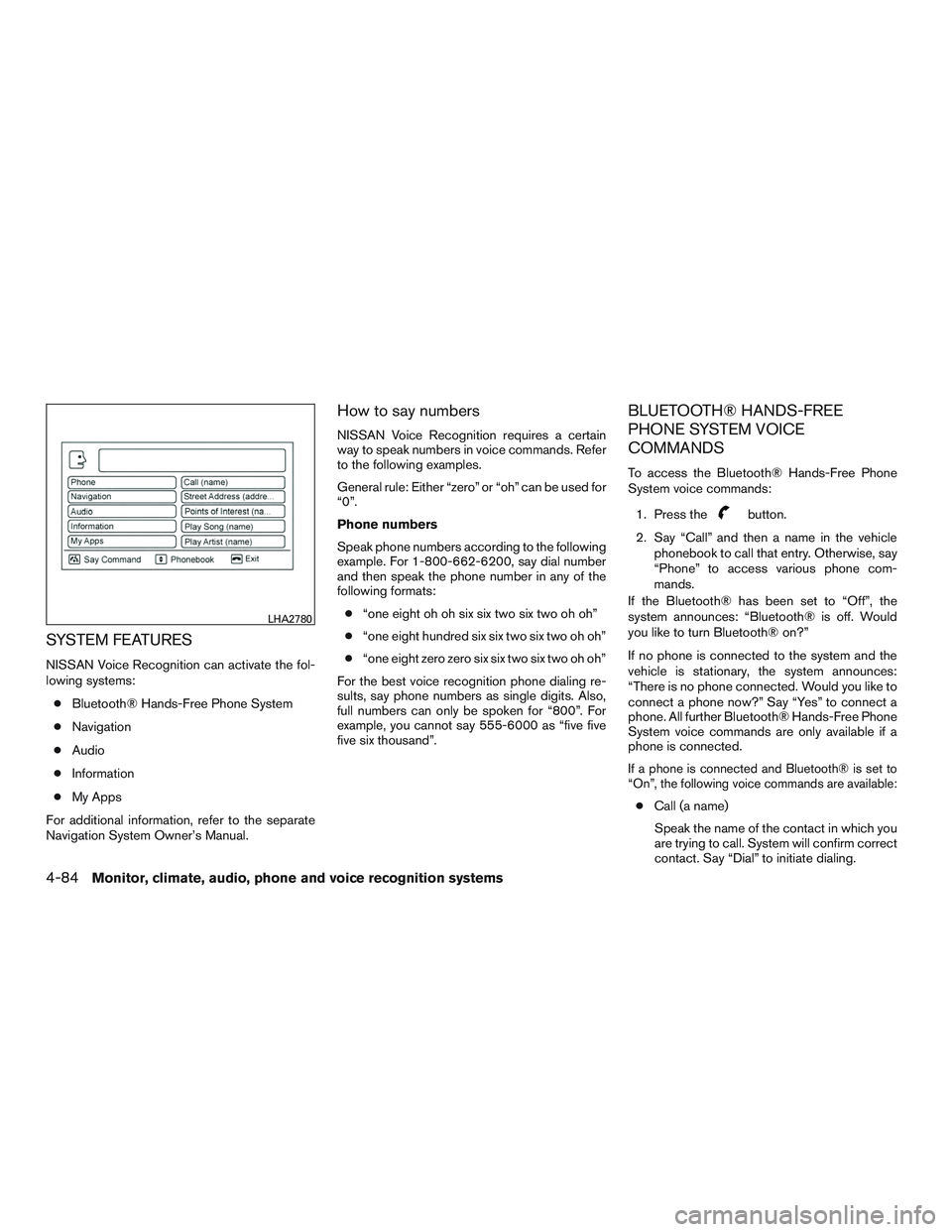
SYSTEM FEATURES
NISSAN Voice Recognition can activate the fol-
lowing systems:● Bluetooth® Hands-Free Phone System
● Navigation
● Audio
● Information
● My Apps
For additional information, refer to the separate
Navigation System Owner’s Manual.
How to say numbers
NISSAN Voice Recognition requires a certain
way to speak numbers in voice commands. Refer
to the following examples.
General rule: Either “zero” or “oh” can be used for
“0”.
Phone numbers
Speak phone numbers according to the following
example. For 1-800-662-6200, say dial number
and then speak the phone number in any of the
following formats: ● “one eight oh oh six six two six two oh oh”
● “one eight hundred six six two six two oh oh”
● “one eight zero zero six six two six two oh oh”
For the best voice recognition phone dialing re-
sults, say phone numbers as single digits. Also,
full numbers can only be spoken for “800”. For
example, you cannot say 555-6000 as “five five
five six thousand”.
BLUETOOTH® HANDS-FREE
PHONE SYSTEM VOICE
COMMANDS
To access the Bluetooth® Hands-Free Phone
System voice commands:
1. Press the
button.
2. Say “Call” and then a name in the vehicle phonebook to call that entry. Otherwise, say
“Phone” to access various phone com-
mands.
If the Bluetooth® has been set to “Off”, the
system announces: “Bluetooth® is off. Would
you like to turn Bluetooth® on?”
If no phone is connected to the system and the
vehicle is stationary, the system announces:
“There is no phone connected. Would you like to
connect a phone now?” Say “Yes” to connect a
phone. All further Bluetooth® Hands-Free Phone
System voice commands are only available if a
phone is connected.
If a phone is connected and Bluetooth® is set to
“On”, the following voice commands are available:
● Call (a name)
Speak the name of the contact in which you
are trying to call. System will confirm correct
contact. Say “Dial” to initiate dialing.
LHA2780
4-84Monitor, climate, audio, phone and voice recognition systems
Page 240 of 380
●Dial Number
Allows for up to 24 digits to be dialed. After
the number is entered, say “Dial” to initiate
dialing. Say “Correction” to correct the num-
ber entered. Say “Go Back” to return to the
main menu.
● List Phonebook
Starting with the first alphabetical entry in
the vehicle phonebook, the system prompts
for an additional command. Say “Dial” to call
the number of the phonebook entry. Say
“Send Text” to send a text message to the
number of the phonebook entry. Say “Next
Entry” to skip to the next alphabetical entry in
the vehicle phonebook, where the same op-
tions will then be available.
● Recent Calls
The system prompts for an additional com-
mand. Say “Missed Calls”, “Incoming Calls”
or “Outgoing Calls” to display a list of such
calls on the screen.
Speak the number of the entry displayed on
the screen to dial that number or say “Next
Page” to view entries on the next page (if
available) .
● Redial
Redials the last called number. ●
Read Text
Reads an incoming text message. For addi-
tional information, refer to “Bluetooth®
Hands-Free Phone System with Navigation
System” in this section.
● Send Text
Sends a text message. For additional infor-
mation, refer to “Bluetooth® Hands-Free
Phone System with Navigation System” in
this section.
● Select Phone
The system replies “Please use manual con-
trols to continue”. Use manual controls to
change the active phone from among the
listed phones connected to the vehicle.
For additional information, refer to “Bluetooth®
Hands-Free Phone System with Navigation Sys-
tem” in this section.
NAVIGATION SYSTEM VOICE
COMMANDS
The following voice commands are available for
the Navigation System: ● Street Address (address)
● Points of Interest (name)
● POI by Category ●
Home
● Address Book
● Previous Destinations
● Enter Address in Steps
● Cancel Route
For additional information, refer to the separate
Navigation System Owner’s Manual.
AUDIO SYSTEM VOICE
COMMANDS
To access the audio system voice commands: 1. Press the button.
2. Say “Audio”
3. Speak a command from the following avail- able commands:
● Play (AM, FM, etc.)
Allows user to select radio band
● Tune AM (number)
Allows user to tune directly to a desired AM
frequency
● Tune FM (number)
Allows user to tune directly to a desired FM
frequency
Monitor, climate, audio, phone and voice recognition systems4-85
Page 372 of 380
10 Index
A
Active brake limited slip (ABLS) system . . .5-24
Air bag (See supplemental restraint
system) .....................1-51
Air bag system Front (See supplemental front impact
air bag system) ...............1-58
Airbagwarninglabels.............1-62
Airbagwarninglight...........1-62,2-15
Air bag warning light, supplemental . .1-62, 2-15
AirCleaner ...................8-21
Air cleaner housing filter ............8-21
Air conditioner Air conditioner operation ..........4-21
Air conditioner service ...........4-29
Air conditioner specification label .....9-12
Air conditioner system refrigerant and
oil recommendations .............9-7
Air conditioner system refrigerant
recommendations ..............9-7
Heater and air conditioner
controls................4-18,4-26
Rear seat air conditioner ..........4-28
Servicing air conditioner .......4-22,4-29
Alarm system (See vehicle security system). .2-23
Anchor point locations .............1-34
Antenna .....................4-59
Antifreeze ....................5-30
Anti-lock brake warning light ..........2-12
Anti-lock Braking System (ABS) ........5-23
Apps .......................4-60 Audible reminders
...............2-18
Audio system ..................4-29
AM-FM radio with compact disc (CD)
player.................4-37,4-41
AMradioreception.............4-30
Bluetooth®audio..............4-56
Bluetooth® streaming audio ........4-56
Compact disc (CD) player . .4-39, 4-43, 4-50
FM/AM radio with compact disc (CD)
player.................4-37,4-41
FM/AM/SAT radio with compact disc (CD)
player ....................4-45
FMradioreception.............4-30
iPod® Player ................4-53
iPod® player operation ...........4-53
Radio ....................4-29
Steering wheel audio control switch . . .4-58
USB interface ................4-51
USB (Universal Serial Bus) Connection
Port .....................4-51
Automatic Automatic power window switch .....2-47
Automatic transmission position indicator
light .....................2-16
Driving with automatic transmission ....5-12
Automatic anti-glare inside mirror .......3-17
Automatic door locks ..............3-8
Automatic transmission fluid temperature
gauge.......................2-7
AUXjack..............4-40,4-44,4-51 B
Back button ....................4-7
Back door .....................3-7
Battery ..................5-30, 8-17
Charge warning light ............2-13
Battery replacement Keyfob................8-27,8-28
Before starting the engine ...........5-10
Belt (See drive belt) ..............8-19
Block heater Engine ....................5-31
Bluetooth® audio ................4-56
Bluetooth® Hands-Free Phone System with
Navigation System ...............4-75
Bluetooth® Hands-Free Phone System without
Navigation System ...............4-61
Bluetooth® streaming audio with Navigation
System .....................4-56
Boosterseats..................1-48
Brake Anti-lock Braking System (ABS) ......5-23
Brake fluid ..................8-16
Brakelight(Seestoplight).........8-31
Brake system ................5-22
Brakewarninglight.............2-12
Brakewearindicators........2-18,8-23
Parking brake operation ..........5-17
Self-adjusting brakes ............8-23
Brake fluid ....................8-16
Brakes ......................8-23
Brake system ..................5-22
Page 377 of 380
Sliding doorManual sliding door ..............3-6
Sliding door locks Child safety sliding door locks ........3-8
Smartphone connectivity ............4-60
Sonar Rear system .................5-27
Spark plug replacement .............8-20
Spark plugs ...................8-20
Specifications ...................9-8
Speedometer ...................2-4
Speedometer and odometer ...........2-4
SRS warning label ................1-62
Stability control .................5-25
Starting Before starting the engine ..........5-10
Jump starting ..............6-9,8-19
Precautions when starting and driving ....5-2
Push starting .................6-11
Starting the engine .............5-10
Starting the engine ...............5-10
Steering Power steering fluid .............8-15
Power steering system ...........5-22
Tilting steering wheel ............3-15
Steering wheel ..................3-15
Steering wheel audio control switch ......4-58
Stoplight.....................8-31
Storage......................2-38
Storagebin....................2-45
Storage tray ................2-38,2-39
Sunglassescase.................2-39
Sun visors ....................3-16
Supplemental air bag warning labels ......1-62
Supplemental air bag warning light . . .1-62, 2-15
Supplemental front impact air bag system . . .1-58 Supplemental restraint system
Information and warning labels .......1-62
Precautions on supplemental restraint
system ....................1-51
Supplemental restraint system
(Supplemental air bag system) .........1-51
Switch Automatic power window switch ......2-47
Foglightswitch ...............2-29
Hazard warning flasher switch ........6-2
Headlight and turn signal switch ......2-27
Headlight control switch ..........2-27
Ignition switch .................5-8
Instrument brightness control ........2-29
Power door lock switch ............3-5
Power inverter switch ............2-31
Rear sonar system off switch ........2-32
Rear window and outside mirror defroster
switch.....................2-26
Steering wheel switch for audio
control/Bluetooth® Hands-Free Phone
System ....................4-58
Tow mode switch ..............2-33
Turn signal switch ..............2-29
Vehicle dynamic control (VDC) off
switch.....................2-31
T
Tachometer ....................2-5
Temperature gauge Engine coolant temperature gauge .....2-5
Engine oil pressure low/engine coolant
temperature high warning light .......2-12Theft (NISSAN Vehicle Immobilizer System) ,
engine start
.................2-24,5-9
Three-way catalyst ................5-2
Tilting
steering wheel ..............3-15
Tire Flat tire .....................6-2
Spare tire ...................6-4
Tire and Loading Information label .....9-12
Tire chains ..................8-40
Tire pressure .................8-33
Tire rotation..................8-40
Types of tires .................8-39
Uniform tire quality grading .........9-28
Wheels and tires ............8-33,9-9
Wheel/tire size .................9-9
Tirepressure...................8-33 Low tire pressure warning light .......2-13
Tire Pressure Monitoring System (TPMS). .5-3, 6-2
Top tether strap child restraint .........1-34
Towing Flattowing..................9-28
Towing load/specification ..........9-20
Trailer towing .................9-17
Towing a trailer ..................9-17
Towingyourvehicle...............6-12
Tow mode switch ................2-33
TMPS Reset TPMS ..............2-22,8-41
Transmission Driving with automatic transmission ....5-12
Travel (See registering a vehicle in another
country) ......................9-10
Trip odometer ...................2-4
Troubleshooting guide
(NISSAN voice recognition system) ......4-87
Turn signal switch ................2-29
10-6