cooling NISSAN NV PASSENGER VAN 2016 Owners Manual
[x] Cancel search | Manufacturer: NISSAN, Model Year: 2016, Model line: NV PASSENGER VAN, Model: NISSAN NV PASSENGER VAN 2016Pages: 380, PDF Size: 4.05 MB
Page 173 of 380
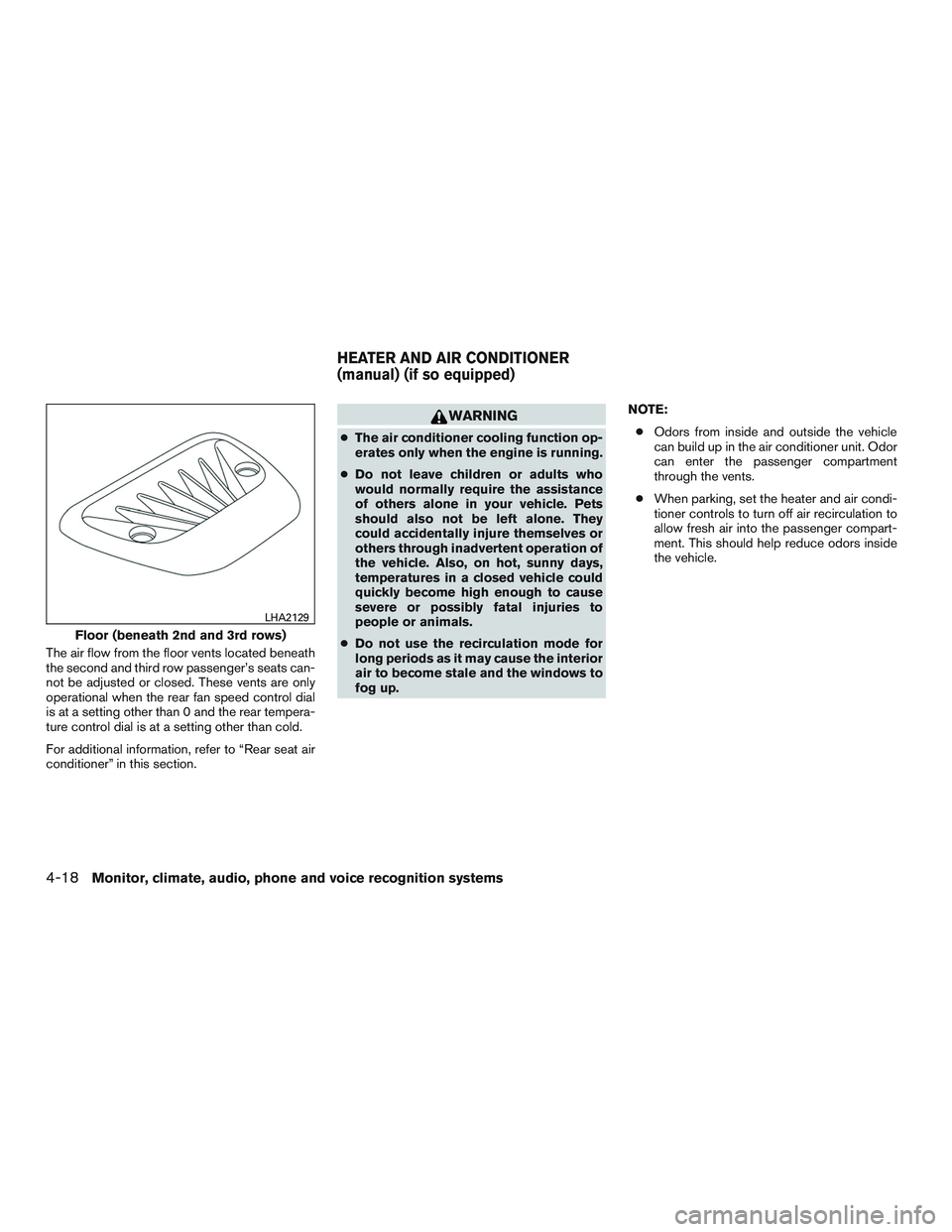
The air flow from the floor vents located beneath
the second and third row passenger’s seats can-
not be adjusted or closed. These vents are only
operational when the rear fan speed control dial
is at a setting other than 0 and the rear tempera-
ture control dial is at a setting other than cold.
For additional information, refer to “Rear seat air
conditioner” in this section.
WARNING
●The air conditioner cooling function op-
erates only when the engine is running.
● Do not leave children or adults who
would normally require the assistance
of others alone in your vehicle. Pets
should also not be left alone. They
could accidentally injure themselves or
others through inadvertent operation of
the vehicle. Also, on hot, sunny days,
temperatures in a closed vehicle could
quickly become high enough to cause
severe or possibly fatal injuries to
people or animals.
● Do not use the recirculation mode for
long periods as it may cause the interior
air to become stale and the windows to
fog up. NOTE:
● Odors from inside and outside the vehicle
can build up in the air conditioner unit. Odor
can enter the passenger compartment
through the vents.
● When parking, set the heater and air condi-
tioner controls to turn off air recirculation to
allow fresh air into the passenger compart-
ment. This should help reduce odors inside
the vehicle.
Floor (beneath 2nd and 3rd rows)
LHA2129
HEATER AND AIR CONDITIONER
(manual) (if so equipped)
4-18Monitor, climate, audio, phone and voice recognition systems
Page 174 of 380
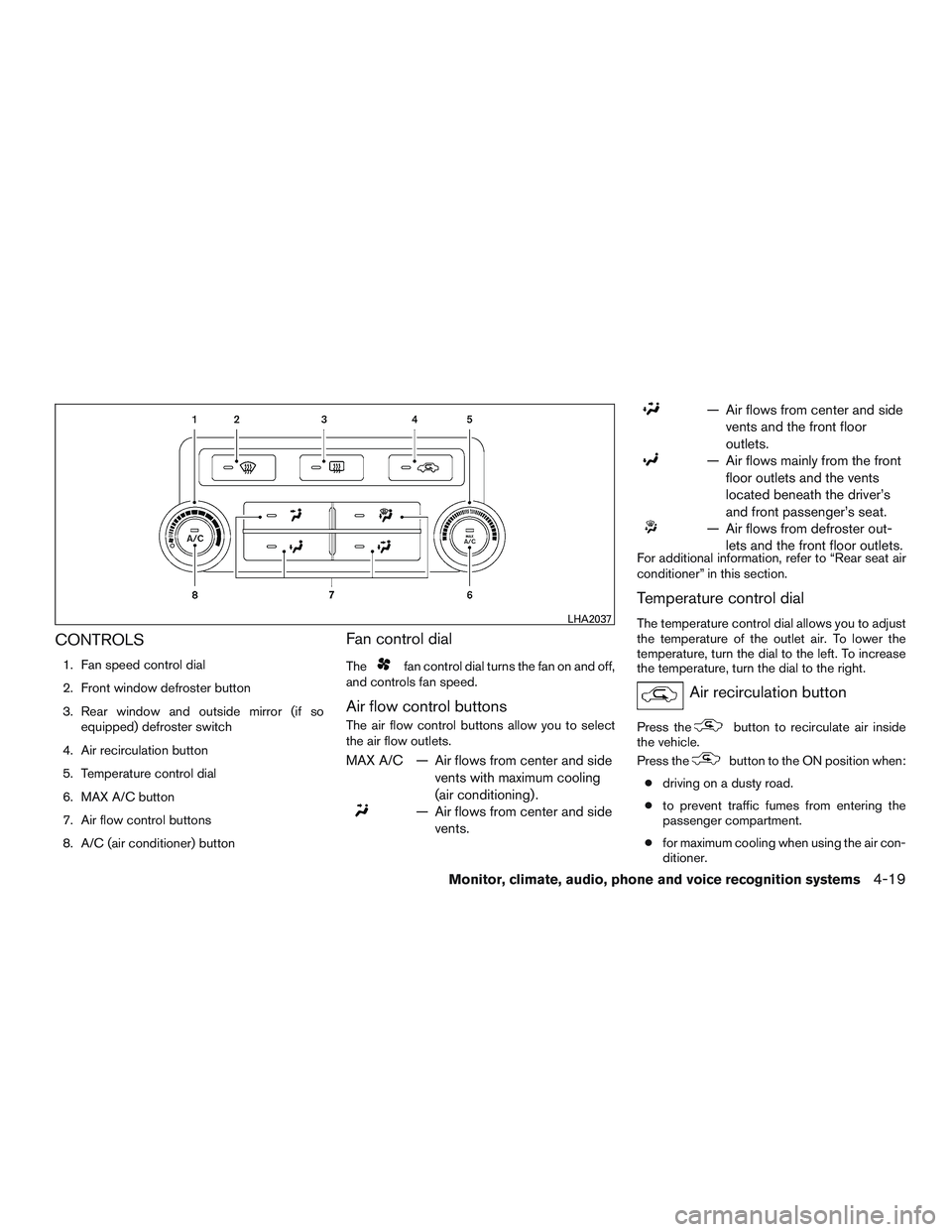
CONTROLS
1. Fan speed control dial
2. Front window defroster button
3. Rear window and outside mirror (if soequipped) defroster switch
4. Air recirculation button
5. Temperature control dial
6. MAX A/C button
7. Air flow control buttons
8. A/C (air conditioner) button
Fan control dial
Thefan control dial turns the fan on and off,
and controls fan speed.
Air flow control buttons
The air flow control buttons allow you to select
the air flow outlets.
MAX A/C — Air flows from center and side
vents with maximum cooling
(air conditioning) .
— Air flows from center and sidevents.
— Air flows from center and sidevents and the front floor
outlets.
— Air flows mainly from the frontfloor outlets and the vents
located beneath the driver’s
and front passenger’s seat.
— Air flows from defroster out-lets and the front floor outlets.
For additional information, refer to “Rear seat air
conditioner” in this section.
Temperature control dial
The temperature control dial allows you to adjust
the temperature of the outlet air. To lower the
temperature, turn the dial to the left. To increase
the temperature, turn the dial to the right.
Air recirculation button
Press thebutton to recirculate air inside
the vehicle.
Press the
button to the ON position when:
● driving on a dusty road.
● to prevent traffic fumes from entering the
passenger compartment.
● for maximum cooling when using the air con-
ditioner.
LHA2037
Monitor, climate, audio, phone and voice recognition systems4-19
Page 175 of 380
The air recirculation mode is only functional when
the air flow control mode is in the following
positions:
,or.
Press the
button to turn air recirculation
off. Outside air is drawn into the passenger com-
partment and distributed through the selected
outlet.
The
mode is not necessary for normal
heater or air conditioner operation.
Air conditioner button
Start the engine, turn thefan control dial to
the desired position and press the
button
to turn on the air conditioner. To turn off the air
conditioner, press the
button again.
The air conditioner cooling function oper-
ates only when the engine is running.
Rear window and outside mirror (if so
equipped) defroster switch
For additional information, refer to “Rear window
and outside mirror (if so equipped) defroster
switch” in the “Instruments and controls” section
of this manual.
HEATER OPERATION
Heating
This mode is used to direct heated air to the foot
outlets. Some air also flows from the defrost
outlets.
1. Press the
button to the OFF position
for normal heating. The indicator light on
the
button will go off.
2. Press the
air flow control button.
3. Turn the fan control dial to the desired posi- tion.
4. Turn the temperature control dial to the de- sired position between the middle and the
hot position.
Ventilation
This mode directs outside air to the side and
center vents.
1. Press the
button to the OFF position.
The indicator light on the
button will
go off.
2. Press the
air flow control button.
3. Turn the fan control dial to the desired posi- tion. 4. Turn the temperature control dial to the de-
sired position.
Defrosting or defogging
This mode directs the air to the defrost outlets to
defrost/defog the windows.
1. Turn the air flow control dial to the
position.
2. Turn the fan control dial to the desired posi- tion.
3. Turn the temperature control dial to the de- sired position between the middle and the
hot position.
● To quickly remove ice or fog from the win-
dows, turn the fan control dial to the right
and the temperature control to the full HOT
position.
● When the
position is selected, the air
conditioner automatically turns on if the out-
side temperature is more than 36°F (2°C) .
This dehumidifies the air which helps defog
the windshield. The
mode automati-
cally turns off, allowing outside air to be
drawn into the passenger compartment to
further improve the defogging performance.
4-20Monitor, climate, audio, phone and voice recognition systems
Page 176 of 380
Bi-level heating
The bi-level mode directs warmed air to the side
and center vents and to the front and rear floor
outlets.1. Press the
button to the OFF position.
The indicator light on the
button will
go off.
2. Press the
air flow control button.
3. Turn the fan control dial to the desired posi- tion.
4. Turn the temperature control dial to the de- sired position.
Heating and defogging
This mode heats the interior and defogs the wind-
shield.
1. Press the
air flow control button.
2. Turn the
fan control dial to the desired
position.
3. Turn the temperature control dial to the de- sired position between the middle and the
hot position. ●
When the
position is selected, the air
conditioner automatically turns on if the out-
side temperature is more than 36°F (2°C) .
This dehumidifies the air which helps defog
the windshield. The
mode automati-
cally turns off, allowing outside air to be
drawn into the passenger compartment to
further improve the defogging performance.
Operating tips
Clear snow and ice from the wiper blades
and air inlet in front of the windshield. This
improves heater operation.
AIR CONDITIONER OPERATION
Start the engine, turn thefan control dial to
the desired position, and press the
button
to activate the air conditioner. When the air con-
ditioner is on, cooling and dehumidifying func-
tions are added to the heater operation.
The air conditioner cooling function oper-
ates only when the engine is running.
Cooling
This mode is used to cool and dehumidify the air.
1. Press the
button to the OFF position.
2. Press the
air flow control button. 3. Turn the fan control dial to the desired posi-
tion.
4. Press the
button. The indicator light
on the
button will come on.
5. Turn the temperature control dial to the de- sired position.
● For quick cooling when the outside tem-
perature is high, press the
button to
the ON position. The indicator light on
the
button will come on. Be sure to
return the
button to the OFF position
for normal cooling. The indicator light on
the
button will go off. You may also
select MAX A/C for quick cooling.
Dehumidified heating
This mode is used to heat and dehumidify the air.
1. Press the
button to the OFF position.
The indicator light on the
button will
go off.
2. Press the
air flow control button.
3. Turn the fan control dial to the desired posi- tion.
4. Press the
button on. The indicator
light on the
button will come on.
Monitor, climate, audio, phone and voice recognition systems4-21
Page 177 of 380
5. Turn the temperature control dial to the de-sired position.
Operating tips
●Keep the windows closed while the air con-
ditioner is in operation.
● After parking in the sun, drive for 2 or 3 min-
utes with the windows open to vent hot air
from the passenger compartment. Then,
close the windows. This allows the air con-
ditioner to cool the interior more quickly.
● The air conditioning system should be
operated for approximately 10 minutes
at least once a month. This helps pre-
vent damage to the system due to lack
of lubrication.
● A visible mist may be seen coming from the
ventilators in hot, humid conditions as the air
is cooled rapidly. This does not indicate a
malfunction.
● If the engine coolant temperature
gauge indicates engine coolant tem-
perature over the normal range, turn
the air conditioner off. For additional
information, refer to “If your vehicle
overheats” in the “In case of emer-
gency” section of this manual.
AIR FLOW CHARTS
The following charts show the button and dial
positions for MAXIMUM AND QUICK heating,
cooling or defrosting. For additional information
on heating and cooling, refer to “Heater and air
conditioner” in this section. The air recircula-
tion (
) mode should always be OFF for
heating and defrosting.
4-22Monitor, climate, audio, phone and voice recognition systems
Page 180 of 380
WARNING
●The air conditioner cooling function op-
erates only when the engine is running.
● Do not leave children or adults who
would normally require the assistance
of others alone in your vehicle. Pets
should also not be left alone. They
could accidentally injure themselves or
others through inadvertent operation of
the vehicle. Also, on hot, sunny days,
temperatures in a closed vehicle could
quickly become high enough to cause
severe or possibly fatal injuries to
people or animals.
● Do not use the recirculation mode for
long periods as it may cause the interior
air to become stale and the windows to
fog up.
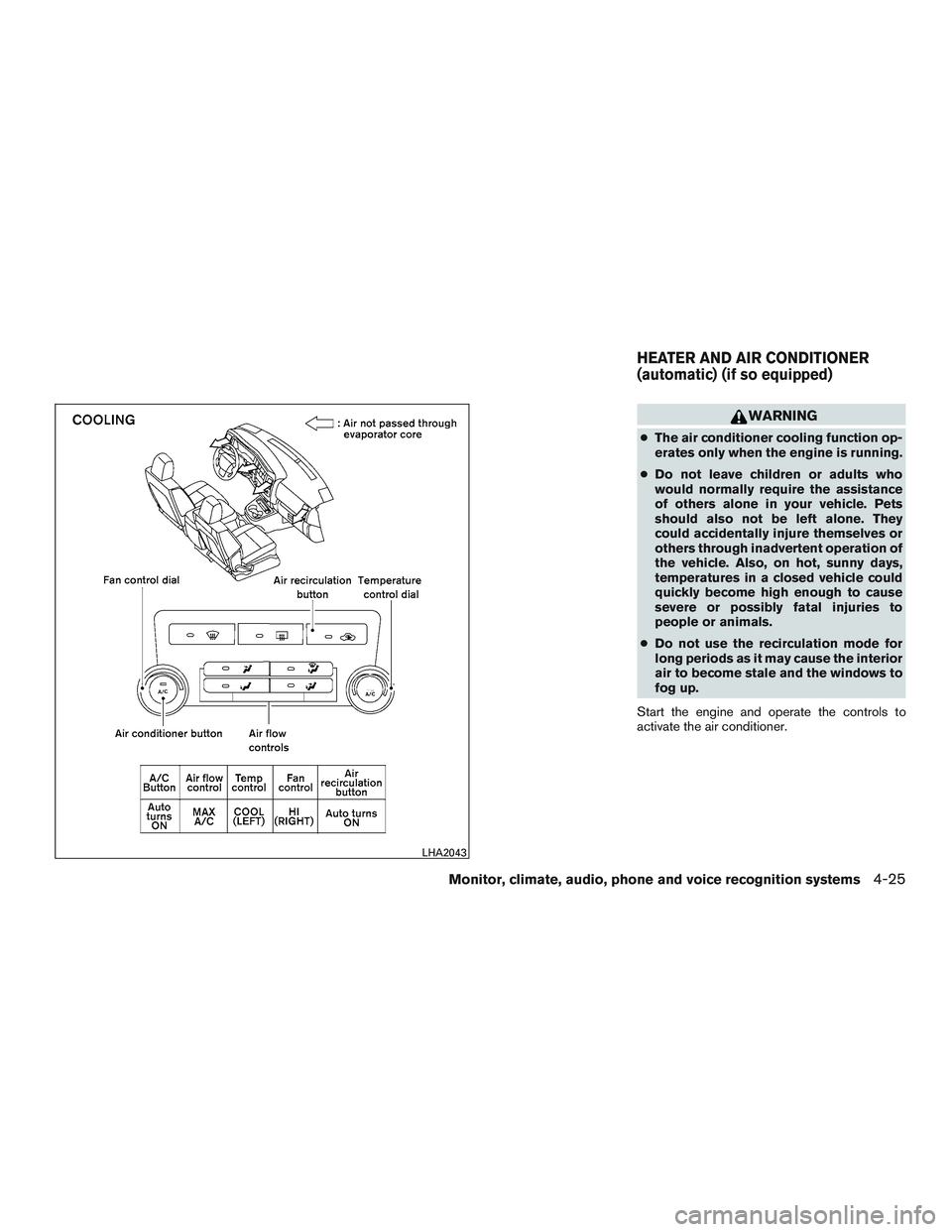
Start the engine and operate the controls to
activate the air conditioner.
LHA2043
HEATER AND AIR CONDITIONER
(automatic) (if so equipped)
Monitor, climate, audio, phone and voice recognition systems4-25
Page 181 of 380
NOTE:● Odors from inside and outside the vehicle
can build up in the air conditioner unit. Odor
can enter the passenger compartment
through the vents.
● When parking, set the heater and air condi-
tioner controls to turn off air recirculation to
allow fresh air into the passenger compart-
ment. This should help reduce odors inside
the vehicle.
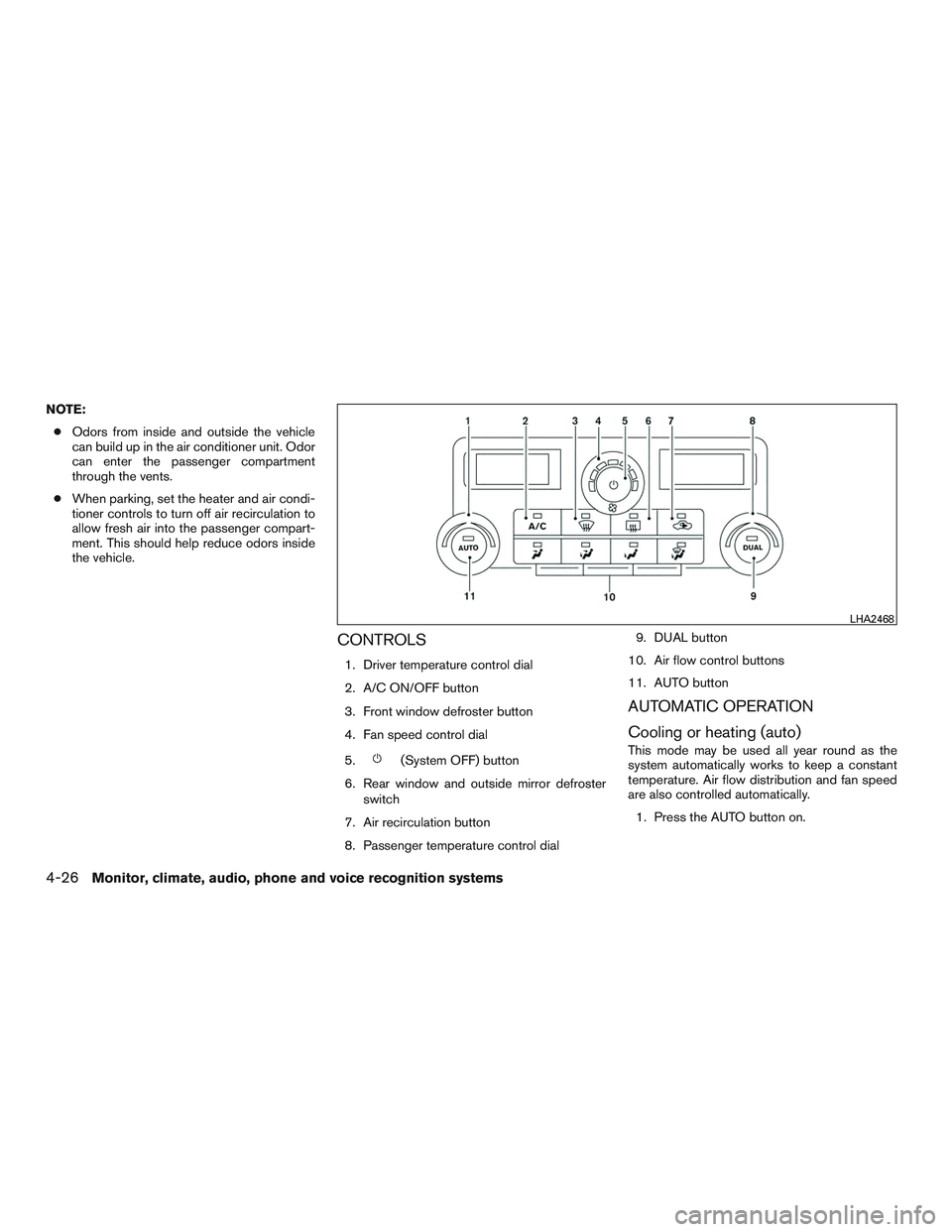
CONTROLS
1. Driver temperature control dial
2. A/C ON/OFF button
3. Front window defroster button
4. Fan speed control dial
5.
(System OFF) button
6. Rear window and outside mirror defroster switch
7. Air recirculation button
8. Passenger temperature control dial 9. DUAL button
10. Air flow control buttons
11. AUTO button
AUTOMATIC OPERATION
Cooling or heating (auto)
This mode may be used all year round as the
system automatically works to keep a constant
temperature. Air flow distribution and fan speed
are also controlled automatically. 1. Press the AUTO button on.
LHA2468
4-26Monitor, climate, audio, phone and voice recognition systems
Page 182 of 380
2. Turn the temperature dial to the left or rightto set the desired temperature. Driver and
passenger temperatures can be set inde-
pendently. Press DUAL to activate dual cli-
mate control functions. Turn the passenger’s
side temperature control dial to the left or
right to set the desired passenger’s tem-
perature.
● Adjust the temperature dial to about 75°F
(24°C) for normal operation.
● The temperature of the front passenger
compartment will be maintained automati-
cally. Air flow distribution, fan speed and A/C
on/off are also controlled automatically.
● A visible mist may be seen coming from the
vents in hot, humid conditions as the air is
cooled rapidly. This does not indicate a mal-
function.
Dehumidified defrosting or defogging
1. Press the defroster control switchto
turn the system on. The indicator light in the
button will illuminate.
2. Turn the temperature dial to the left or right to set the desired temperature.
● To quickly remove ice from the outside of the
windows, turn the manual fan control to the
maximum position. ●
As soon as possible after the windshield is
clean, press the AUTO button to return to
the auto mode.
● When the
control is activated, the air
conditioner will automatically be turned on at
outside temperatures above 36°F (2°C) . If in
defrost mode for more than 1 minute, the air
conditioning system will continue to operate
until the fan control is turned OFF, the ve-
hicle is shut off or the A/C button is used to
turn off the compressor even if an air flow
button other than
is selected. This
dehumidifies the air which helps defog the
windshield. The air recirculation mode auto-
matically turns off, allowing outside air to be
drawn into the passenger compartment to
further improve the defogging performance.
Air conditioner button
Start the engine and press thebutton to
turn on the air conditioner. To turn off the air
conditioner, press the
button again.
The air conditioner cooling function oper-
ates only when the engine is running.
Rear window and outside mirror
defroster switch
For additional information, refer to “Rear window
and outside mirror (if so equipped) defroster
switch” in the “Instruments and controls” section
of this manual.
MANUAL OPERATION
Fan speed control dial
Turn the fan speed control dialleft or right
to manually control the fan speed or turn the
system on or off.
Press the AUTO button to return to automatic
control of the fan speed.
Air recirculation
Press the air recirculation buttonto recir-
culate interior air inside the vehicle. Press the
AUTO button to return to automatic mode.
The air recirculation button will not be activated
when the air conditioner is in DEF, floor, or
floor/defrost mode.
Monitor, climate, audio, phone and voice recognition systems4-27
Page 254 of 380
cranking the engine, release the accel-
erator pedal. Crank the enginewith your
foot off the accelerator pedal by turn-
ing the ignition key to START. Release the
key when the engine starts. If the engine
starts, but fails to run, repeat the above
procedure.
CAUTION
Do not operate the starter for more than
15 seconds at a time. If the engine does
not start, turn the key off and wait 10 sec-
onds before cranking again, otherwise the
starter could be damaged.
4. Allow the engine to idle for at least 30 sec- onds after starting. Do not race the engine
while warming it up. Drive at moderate
speed for a short distance first, especially in
cold weather.
In cold weather, keep the engine running for
a minimum of 2–3 minutes before shutting it
off. Starting and stopping the engine over a
short period of time may make the vehicle
more difficult to start. NOTE:
Care should be taken to avoid situations
that can lead to potential battery discharge
and potential no-start conditions such as:
1. Installation or extended use of electronic accessories that consume battery power
when the engine is not running (Phone char-
gers, GPS, DVD players, etc.)
2. Vehicle is not driven regularly and/or only driven short distances. In these cases, the
battery may need to be charged to maintain
battery health.
ENGINE PROTECTION MODE
The engine has an engine protection mode to
reduce the chance of damage if the coolant tem-
perature becomes too high (for example, when
climbing steep grades in high temperature with
heavy loads, such as when towing a trailer) .
When the engine temperature reaches a certain
level:
● The engine coolant temperature gauge will
move toward the H position.
● Engine power may be reduced.
● The air conditioning cooling function may be
automatically turned off for a short time (the
blower will continue to operate) .
Engine power and, under some conditions, ve-
hicle speed will decrease. Vehicle speed can be
controlled with the accelerator pedal, but the
vehicle may not accelerate at the desired speed.
The transmission will downshift or upshift as it
reaches prescribed shift points. You can also
shift manually.
As driving conditions change and engine coolant
temperature is reduced, vehicle speed can be
increased using the accelerator pedal, and air
conditioning cooling function will automatically
be turned back on.
DRIVING THE VEHICLE
Starting and driving5-11
Page 255 of 380
If:1. The engine coolant temperature is not re- duced.
2. The air conditioning cooling function does not turn back on.
3. If the engine oil pressure low warning light illuminates or the engine coolant tempera-
ture gauge indicates an overheating condi-
tion, this may indicate a malfunction. Move
the vehicle off the road in a safe area and
allow the engine to cool. If either condition is
still present after checking the oil and cool-
ant, do not continue to drive and call a
NISSAN dealer.
The Malfunction Indicator Light (MIL) may also
come on. If onlyit remains on, you do not need to
have your vehicle towed, but have it inspected
soon by a NISSAN dealer. For additional informa-
tion, refer to “Malfunction Indicator Light (MIL)” in
the “Instruments and controls ” section of this
manual.WARNING
Overheating can result in reduced engine
power and vehicle speed. The reduced
speed may be lower than other traffic,
which could increase the chance of a col-
lision. Be especially careful when driving.
If the vehicle cannot maintain a safe driv-
ing speed, pull to the side of the road in a
safe area. Allow the engine to cool and
return to normal operation. For additional
information, refer to “If your vehicle over-
heats” in the “In case of emergency” sec-
tion of this manual.
CAUTION
Running the engine with the engine oil
pressure warning light on could cause se-
rious damage to the engine almost imme-
diately. Such damage is not covered by
warranty. Turn off the engine as soon as it
is safe to do so.
AUTOMATIC TRANSMISSION
WARNING
● Do not depress the accelerator pedal
while shifting from P (Park) or N (Neu-
tral) to R (Reverse) , or L (Low) . Always
depress the brake pedal until shifting is
completed. Failure to do so could cause
you to lose control and have an
accident.
● Cold engine idle speed is high, so use
caution when shifting into a forward or
reverse gear before the engine has
warmed up.
● Never shift to either the P (Park) or R
(Reverse) position while the vehicle is
moving forward and P (Park) or D
(Drive) position while the vehicle is re-
versing. This could cause an accident or
damage the transmission.
● Except in an emergency, do not shift to
the N (Neutral) position while driving.
Coasting with the transmission in the N
(Neutral) position may cause serious
damage to the transmission.
5-12Starting and driving