warning lights NISSAN NV PASSENGER VAN 2016 Owners Manual
[x] Cancel search | Manufacturer: NISSAN, Model Year: 2016, Model line: NV PASSENGER VAN, Model: NISSAN NV PASSENGER VAN 2016Pages: 380, PDF Size: 4.05 MB
Page 10 of 380
0 Illustrated table of contents
Air bags, seat belts and child restraints..............0-2
Exterior front ......................................0-3
Exterior rear .......................................0-4
Passenger compartment ...........................0-5 Instrument panel
...................................0-6
Engine compartment check locations . . ..............0-8
Warning and indicator lights .......................0-10
Page 15 of 380
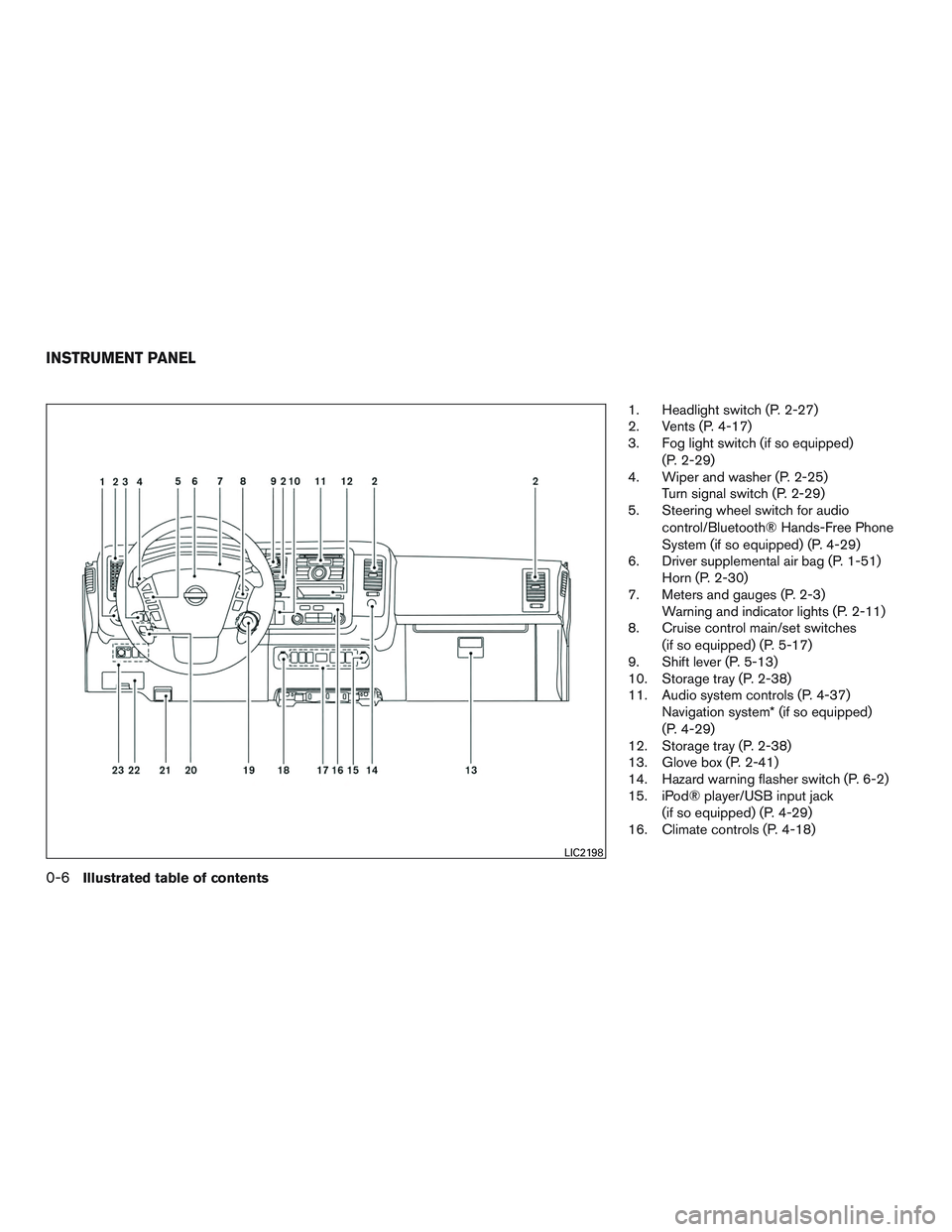
1. Headlight switch (P. 2-27)
2. Vents (P. 4-17)
3. Fog light switch (if so equipped)(P. 2-29)
4. Wiper and washer (P. 2-25) Turn signal switch (P. 2-29)
5. Steering wheel switch for audio
control/Bluetooth® Hands-Free Phone
System (if so equipped) (P. 4-29)
6. Driver supplemental air bag (P. 1-51) Horn (P. 2-30)
7. Meters and gauges (P. 2-3) Warning and indicator lights (P. 2-11)
8. Cruise control main/set switches
(if so equipped) (P. 5-17)
9. Shift lever (P. 5-13)
10. Storage tray (P. 2-38)
11. Audio system controls (P. 4-37) Navigation system* (if so equipped)
(P. 4-29)
12. Storage tray (P. 2-38)
13. Glove box (P. 2-41)
14. Hazard warning flasher switch (P. 6-2)
15. iPod® player/USB input jack
(if so equipped) (P. 4-29)
16. Climate controls (P. 4-18)
LIC2198
INSTRUMENT PANEL
0-6Illustrated table of contents
Page 19 of 380
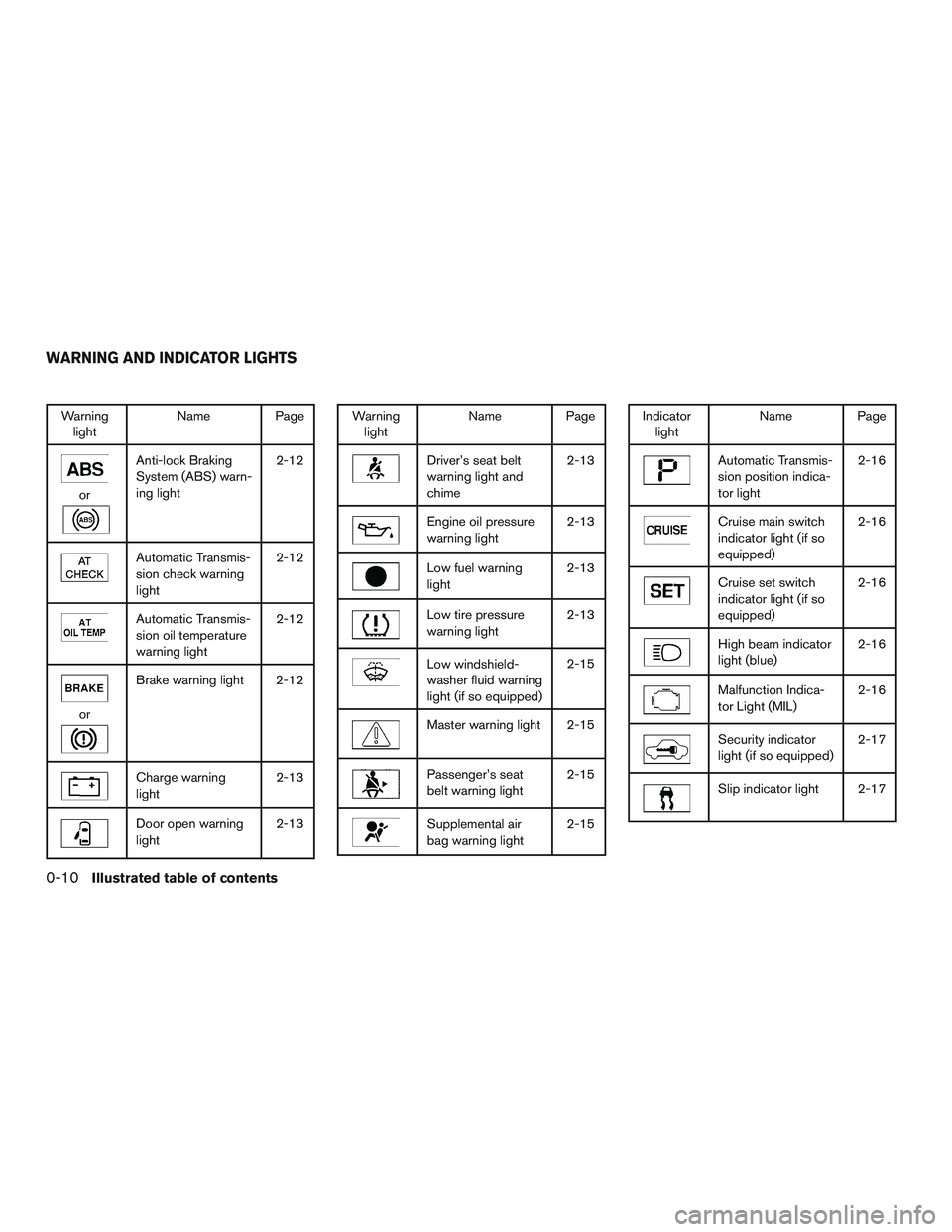
Warninglight Name Page
or
Anti-lock Braking
System (ABS) warn-
ing light 2-12
Automatic Transmis-
sion check warning
light2-12
Automatic Transmis-
sion oil temperature
warning light2-12
or
Brake warning light 2-12
Charge warning
light
2-13
Door open warning
light2-13
Warning
light Name Page
Driver’s seat belt
warning light and
chime 2-13
Engine oil pressure
warning light
2-13
Low fuel warning
light2-13
Low tire pressure
warning light2-13
Low windshield-
washer fluid warning
light (if so equipped)2-15
Master warning light 2-15
Passenger’s seat
belt warning light
2-15
Supplemental air
bag warning light2-15
Indicator
light Name Page
Automatic Transmis-
sion position indica-
tor light 2-16
Cruise main switch
indicator light (if so
equipped)2-16
Cruise set switch
indicator light (if so
equipped)2-16
High beam indicator
light (blue)
2-16
Malfunction Indica-
tor Light (MIL)2-16
Security indicator
light (if so equipped)2-17
Slip indicator light 2-17
WARNING AND INDICATOR LIGHTS
0-10Illustrated table of contents
Page 43 of 380
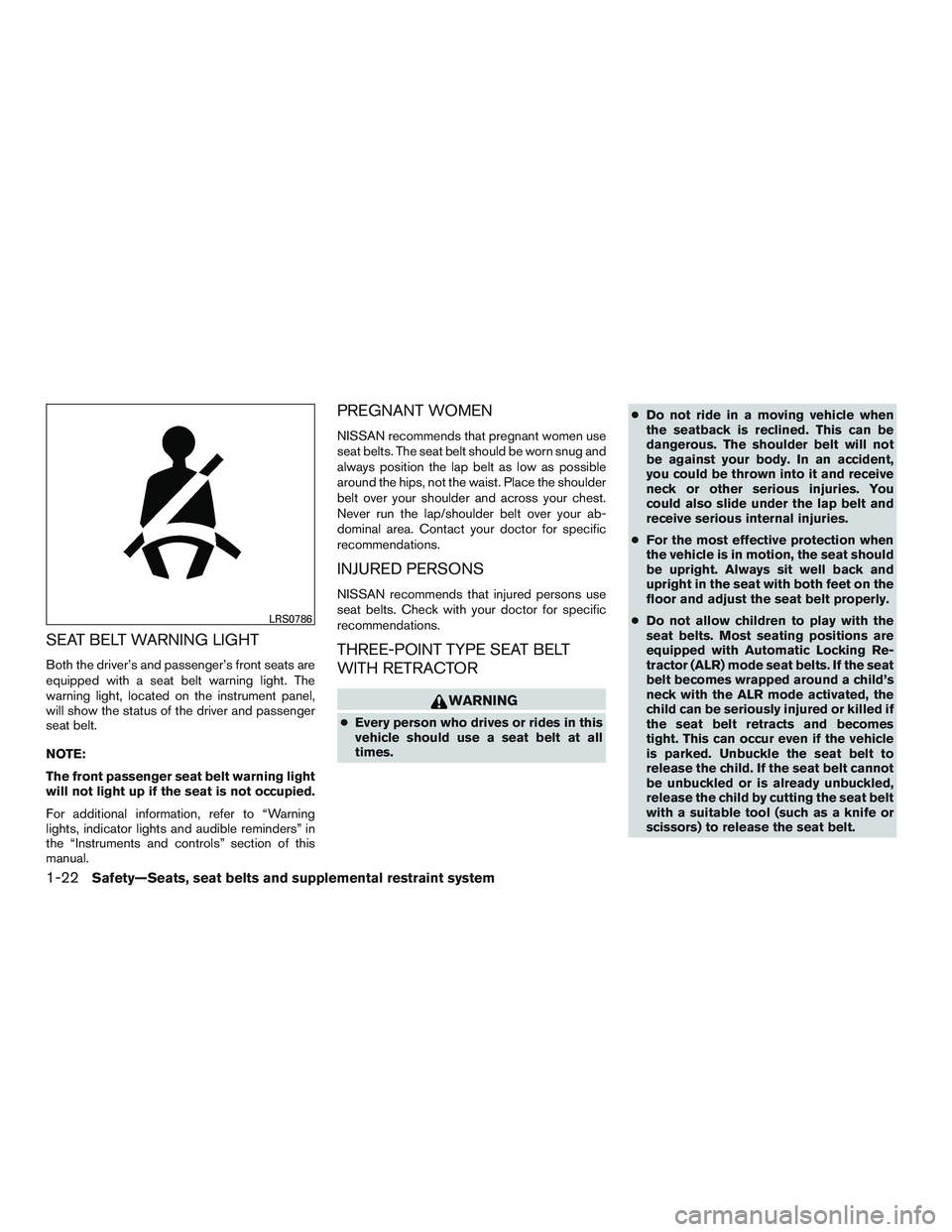
SEAT BELT WARNING LIGHT
Both the driver’s and passenger’s front seats are
equipped with a seat belt warning light. The
warning light, located on the instrument panel,
will show the status of the driver and passenger
seat belt.
NOTE:
The front passenger seat belt warning light
will not light up if the seat is not occupied.
For additional information, refer to “Warning
lights, indicator lights and audible reminders” in
the “Instruments and controls” section of this
manual.
PREGNANT WOMEN
NISSAN recommends that pregnant women use
seat belts. The seat belt should be worn snug and
always position the lap belt as low as possible
around the hips, not the waist. Place the shoulder
belt over your shoulder and across your chest.
Never run the lap/shoulder belt over your ab-
dominal area. Contact your doctor for specific
recommendations.
INJURED PERSONS
NISSAN recommends that injured persons use
seat belts. Check with your doctor for specific
recommendations.
THREE-POINT TYPE SEAT BELT
WITH RETRACTOR
WARNING
●Every person who drives or rides in this
vehicle should use a seat belt at all
times. ●
Do not ride in a moving vehicle when
the seatback is reclined. This can be
dangerous. The shoulder belt will not
be against your body. In an accident,
you could be thrown into it and receive
neck or other serious injuries. You
could also slide under the lap belt and
receive serious internal injuries.
● For the most effective protection when
the vehicle is in motion, the seat should
be upright. Always sit well back and
upright in the seat with both feet on the
floor and adjust the seat belt properly.
● Do not allow children to play with the
seat belts. Most seating positions are
equipped with Automatic Locking Re-
tractor (ALR) mode seat belts. If the seat
belt becomes wrapped around a child’s
neck with the ALR mode activated, the
child can be seriously injured or killed if
the seat belt retracts and becomes
tight. This can occur even if the vehicle
is parked. Unbuckle the seat belt to
release the child. If the seat belt cannot
be unbuckled or is already unbuckled,
release the child by cutting the seat belt
with a suitable tool (such as a knife or
scissors) to release the seat belt.
LRS0786
1-22Safety—Seats, seat belts and supplemental restraint system
Page 85 of 380
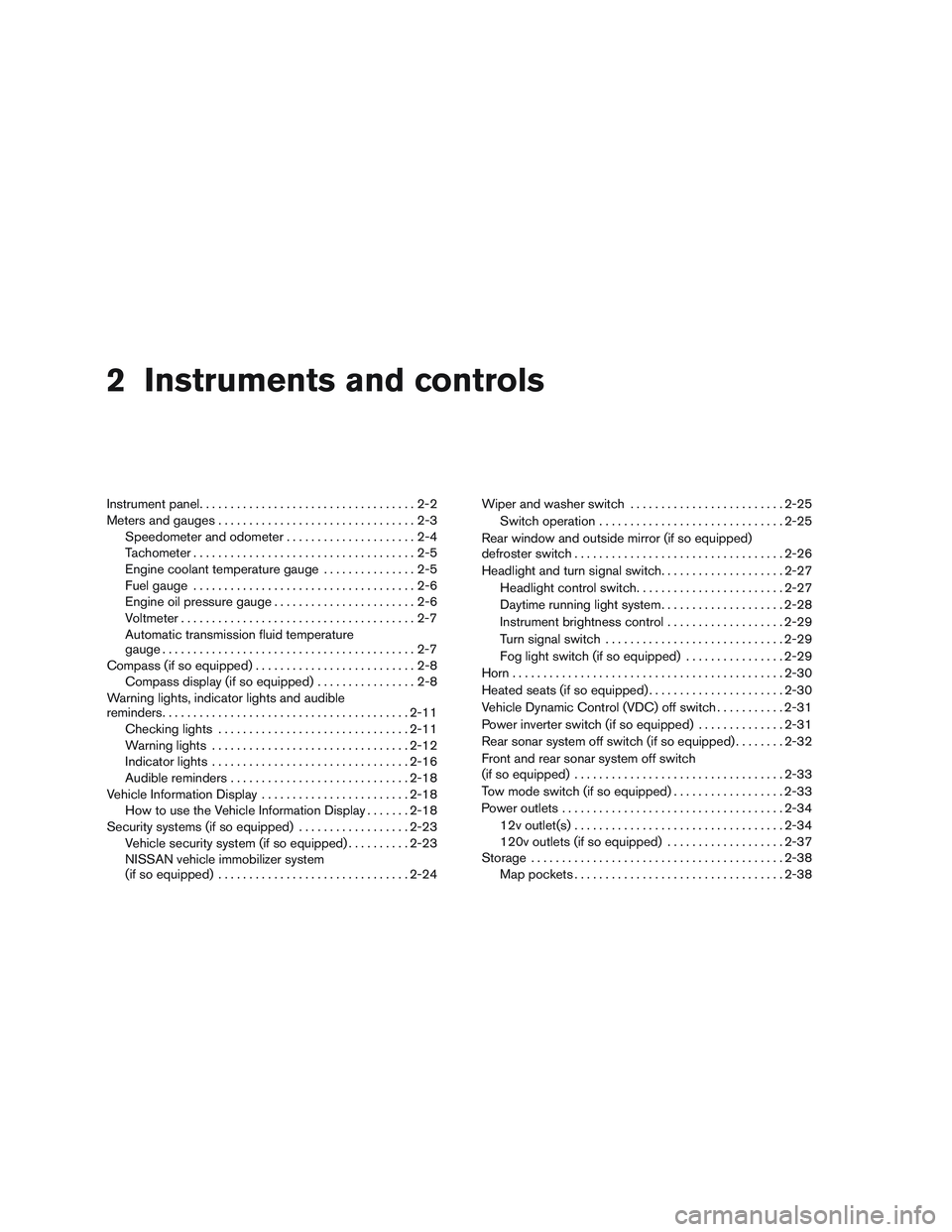
2 Instruments and controls
Instrument panel...................................2-2
Meters and gauges ................................2-3
Speedometer and odometer .....................2-4
Tachometer ....................................2-5
Engine coolant temperature gauge ...............2-5
Fuel gauge ....................................2-6
Engine oil pressure gauge .......................2-6
Voltmeter ......................................2-7
Automatic transmission fluid temperature
gauge .........................................2-7
Compass (if so equipped) ..........................2-8
Compass display (if so equipped) ................2-8
Warning lights, indicator lights and audible
reminders ........................................ 2-11
Checking lights ............................... 2-11
Warning lights ................................ 2-12
Indicator lights ................................ 2-16
Audible reminders ............................. 2-18
Vehicle Information Display ........................2-18
How to use the Vehicle Information Display .......2-18
Security systems (if so equipped) ..................2-23
Vehicle security system (if so equipped) ..........2-23
NISSAN vehicle immobilizer system
(if so equipped) ............................... 2-24Wiper and washer switch
......................... 2-25
Switch operation .............................. 2-25
Rear window and outside mirror (if so equipped)
defroster switch .................................. 2-26
Headlight and turn signal switch ....................2-27
Headlight control switch ........................ 2-27
Daytime running light system ....................2-28
Instrument brightness control ...................2-29
Turn signal switch ............................. 2-29
Fog light switch (if so equipped) ................2-29
Horn ............................................ 2-30
Heated seats (if so equipped) ......................2-30
Vehicle Dynamic Control (VDC) off switch ...........2-31
Power inverter switch (if so equipped) ..............2-31
Rear sonar system off switch (if so equipped) ........2-32
Front and rear sonar system off switch
(if so equipped) .................................. 2-33
T
ow mode switch (if so equipped) ..................2-33
Power outlets .................................... 2-34
12v outlet(s) .................................. 2-34
120v outlets (if so equipped) ...................2-37
Storage ......................................... 2-38
Map pockets .................................. 2-38
Page 87 of 380
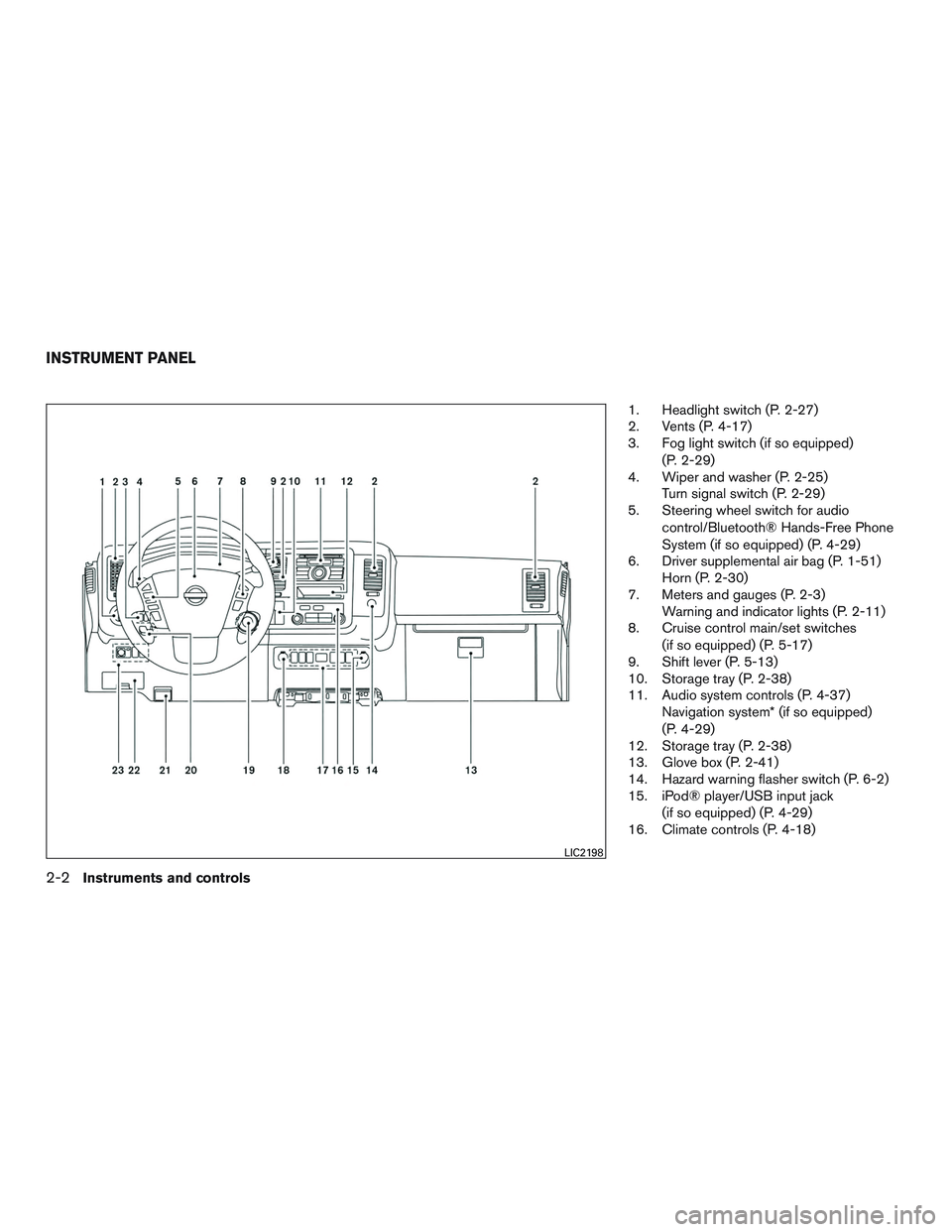
1. Headlight switch (P. 2-27)
2. Vents (P. 4-17)
3. Fog light switch (if so equipped)(P. 2-29)
4. Wiper and washer (P. 2-25) Turn signal switch (P. 2-29)
5. Steering wheel switch for audio
control/Bluetooth® Hands-Free Phone
System (if so equipped) (P. 4-29)
6. Driver supplemental air bag (P. 1-51) Horn (P. 2-30)
7. Meters and gauges (P. 2-3) Warning and indicator lights (P. 2-11)
8. Cruise control main/set switches
(if so equipped) (P. 5-17)
9. Shift lever (P. 5-13)
10. Storage tray (P. 2-38)
11. Audio system controls (P. 4-37) Navigation system* (if so equipped)
(P. 4-29)
12. Storage tray (P. 2-38)
13. Glove box (P. 2-41)
14. Hazard warning flasher switch (P. 6-2)
15. iPod® player/USB input jack
(if so equipped) (P. 4-29)
16. Climate controls (P. 4-18)
LIC2198
INSTRUMENT PANEL
2-2Instruments and controls
Page 88 of 380
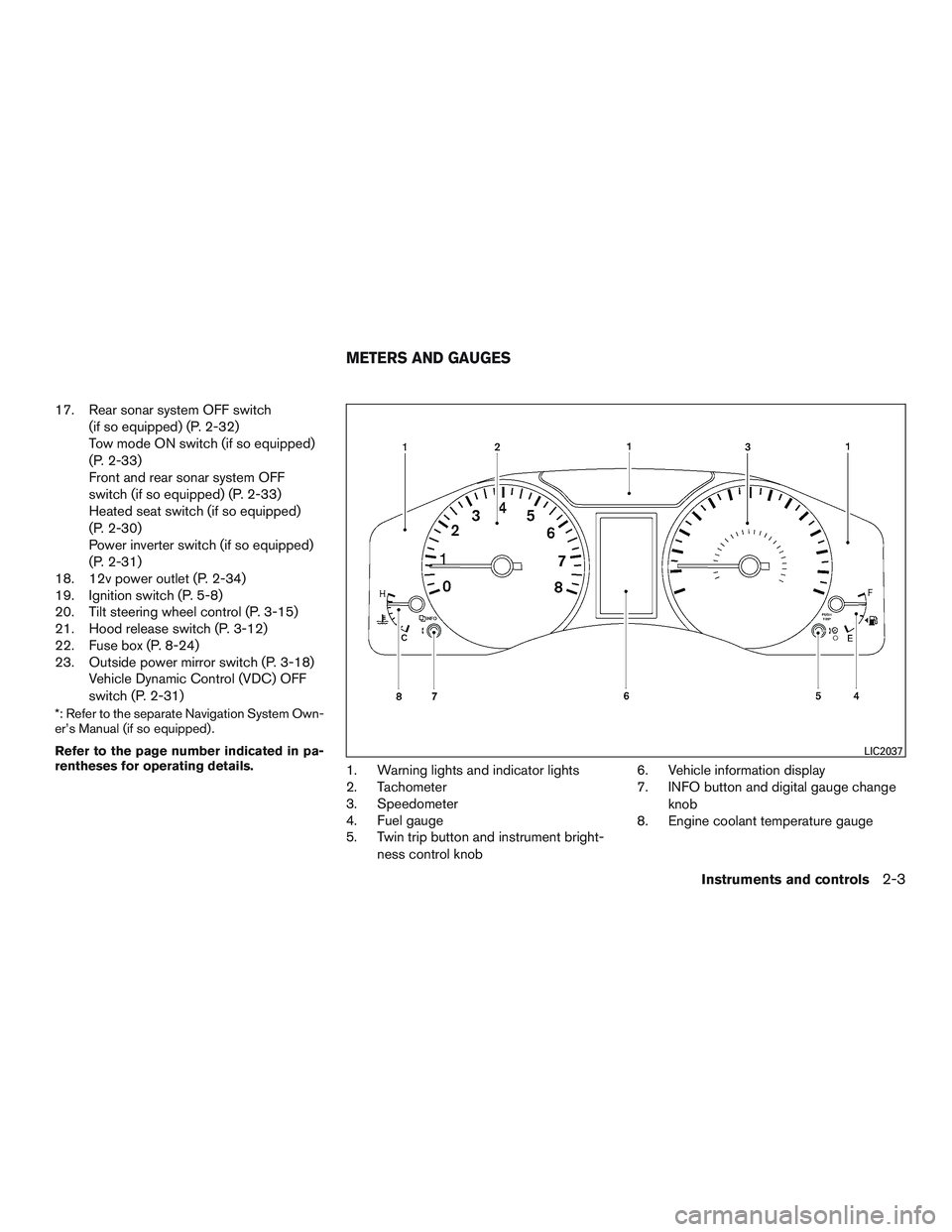
17. Rear sonar system OFF switch(if so equipped) (P. 2-32)
Tow mode ON switch (if so equipped)
(P. 2-33)
Front and rear sonar system OFF
switch (if so equipped) (P. 2-33)
Heated seat switch (if so equipped)
(P. 2-30)
Power inverter switch (if so equipped)
(P. 2-31)
18. 12v power outlet (P. 2-34)
19. Ignition switch (P. 5-8)
20. Tilt steering wheel control (P. 3-15)
21. Hood release switch (P. 3-12)
22. Fuse box (P. 8-24)
23. Outside power mirror switch (P. 3-18) Vehicle Dynamic Control (VDC) OFF
switch (P. 2-31)
*: Refer to the separate Navigation System Own-
er’s Manual (if so equipped) .
Refer to the page number indicated in pa-
rentheses for operating details.
1. Warning lights and indicator lights
2. Tachometer
3. Speedometer
4. Fuel gauge
5. Twin trip button and instrument bright-
ness control knob 6. Vehicle information display
7. INFO button and digital gauge change
knob
8. Engine coolant temperature gauge
LIC2037
METERS AND GAUGES
Instruments and controls2-3
Page 96 of 380
orAnti-lock Braking System (ABS)
warning lightLow fuel warning lightCruise set switch indicator light
(if so equipped)
Automatic Transmission check warning lightLow tire pressure warning lightHigh beam indicator light (blue)
Automatic Transmission oil temperature
warning lightLow windshield-washer fluid warning light
(if so equipped)Malfunction Indicator Light (MIL)
orBrake warning lightMaster warning lightSecurity indicator light (if so equipped)
Charge warning lightPassenger’s seat belt warning lightSlip indicator light
Door open warning lightSupplemental air bag warning lightTow mode ON indicator light (if so equipped)
Driver’s seat belt warning light and chimeAutomatic Transmission position indicator lightTurn signal/hazard indicator lights
Engine oil pressure warning lightCruise main switch indicator light
(if so equipped)Vehicle Dynamic Control (VDC) OFF indicator
light
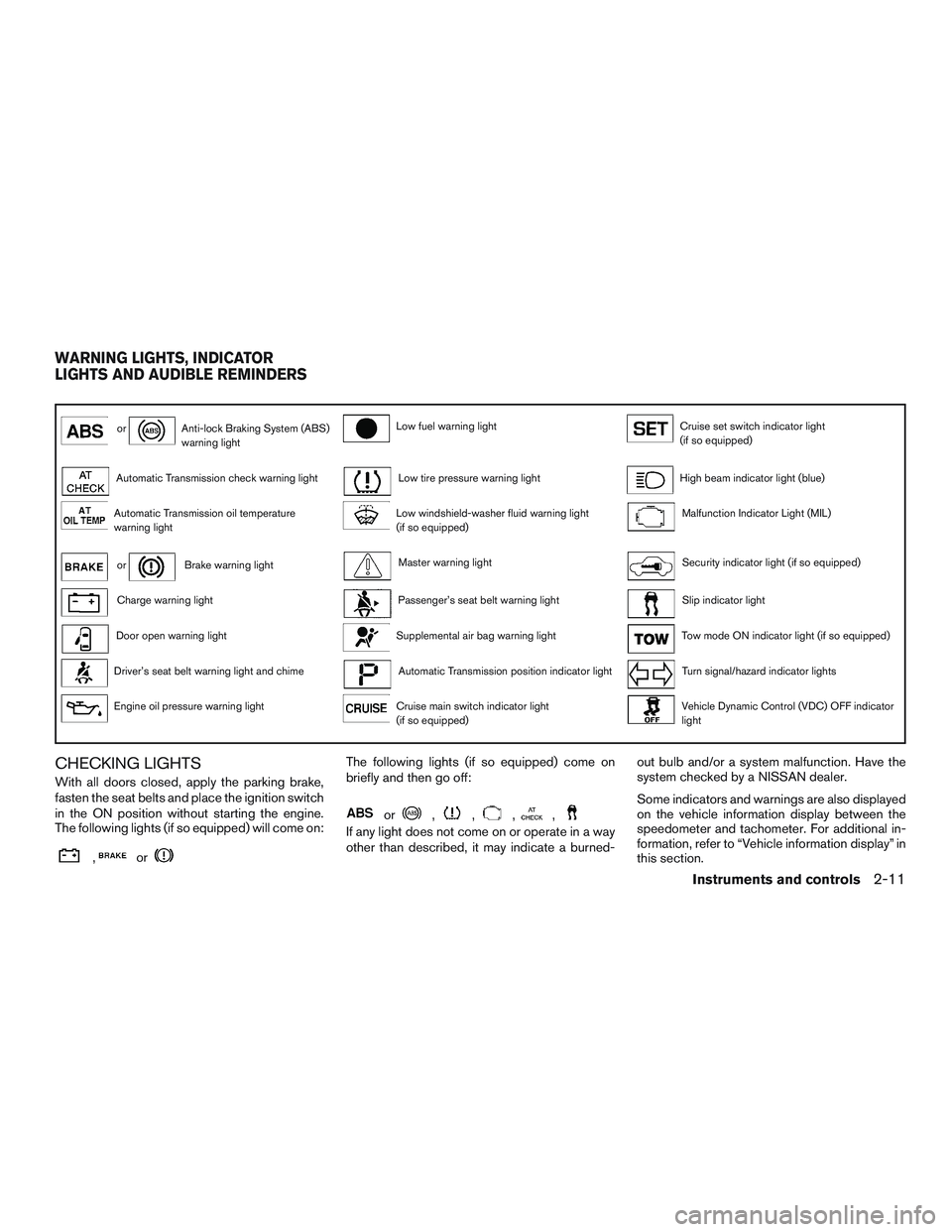
CHECKING LIGHTS
With all doors closed, apply the parking brake,
fasten the seat belts and place the ignition switch
in the ON position without starting the engine.
The following lights (if so equipped) will come on:
,or
The following lights (if so equipped) come on
briefly and then go off:
or,,,,
If any light does not come on or operate in a way
other than described, it may indicate a burned-out bulb and/or a system malfunction. Have the
system checked by a NISSAN dealer.
Some indicators and warnings are also displayed
on the vehicle information display between the
speedometer and tachometer. For additional in-
formation, refer to “Vehicle information display” in
this section.
WARNING LIGHTS, INDICATOR
LIGHTS AND AUDIBLE REMINDERS
Instruments and controls2-11
Page 97 of 380
WARNING LIGHTS
For additional information, refer to “Vehicle infor-
mation display” in this section.
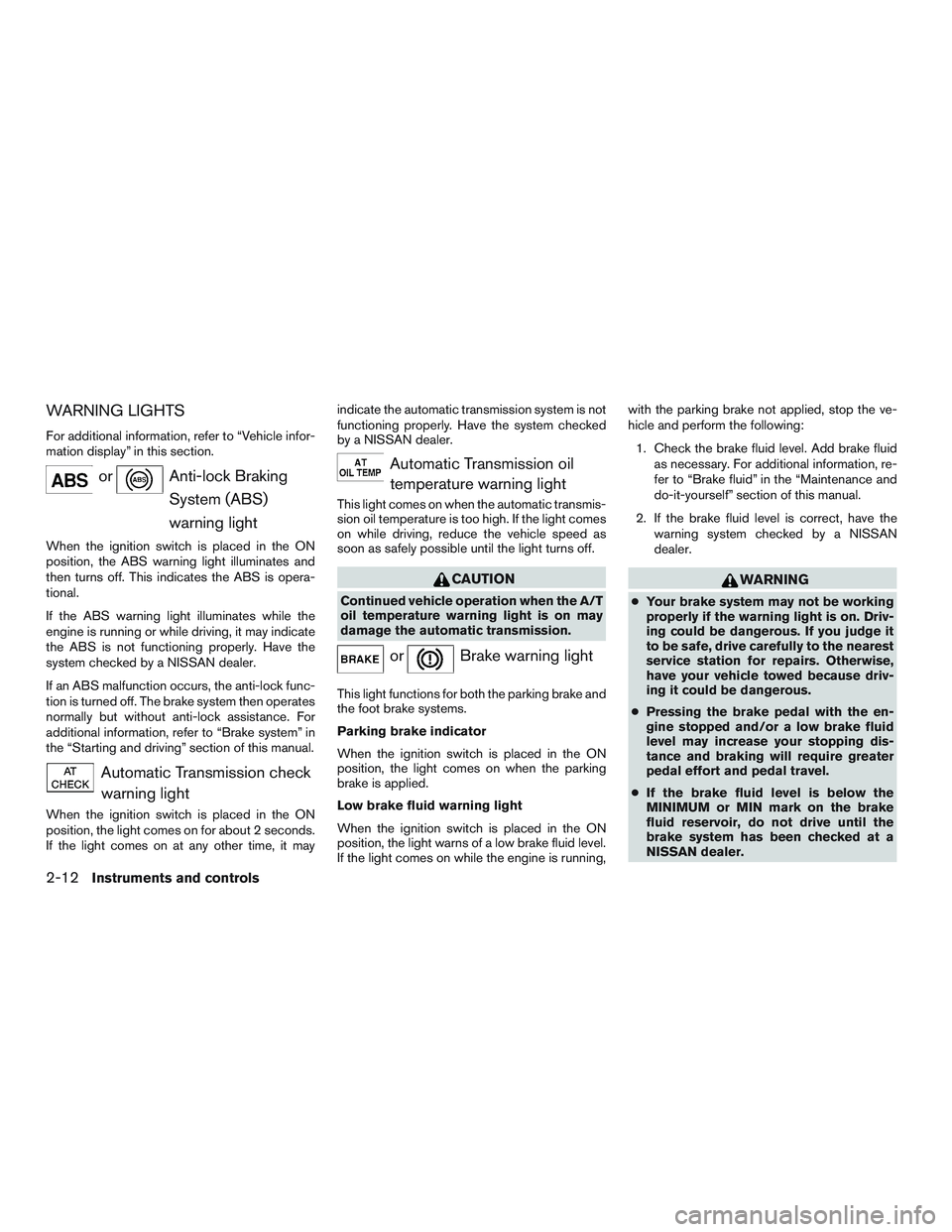
orAnti-lock BrakingSystem (ABS)
warning light
When the ignition switch is placed in the ON
position, the ABS warning light illuminates and
then turns off. This indicates the ABS is opera-
tional.
If the ABS warning light illuminates while the
engine is running or while driving, it may indicate
the ABS is not functioning properly. Have the
system checked by a NISSAN dealer.
If an ABS malfunction occurs, the anti-lock func-
tion is turned off. The brake system then operates
normally but without anti-lock assistance. For
additional information, refer to “Brake system” in
the “Starting and driving” section of this manual.
Automatic Transmission checkwarning light
When the ignition switch is placed in the ON
position, the light comes on for about 2 seconds.
If the light comes on at any other time, it may indicate the automatic transmission system is not
functioning properly. Have the system checked
by a NISSAN dealer.
Automatic Transmission oil
temperature warning light
This light comes on when the automatic transmis-
sion oil temperature is too high. If the light comes
on while driving, reduce the vehicle speed as
soon as safely possible until the light turns off.
CAUTION
Continued vehicle operation when the A/T
oil temperature warning light is on may
damage the automatic transmission.
orBrake warning light
This light functions for both the parking brake and
the foot brake systems.
Parking brake indicator
When the ignition switch is placed in the ON
position, the light comes on when the parking
brake is applied.
Low brake fluid warning light
When the ignition switch is placed in the ON
position, the light warns of a low brake fluid level.
If the light comes on while the engine is running, with the parking brake not applied, stop the ve-
hicle and perform the following:
1. Check the brake fluid level. Add brake fluid as necessary. For additional information, re-
fer to “Brake fluid” in the “Maintenance and
do-it-yourself” section of this manual.
2. If the brake fluid level is correct, have the warning system checked by a NISSAN
dealer.
WARNING
●Your brake system may not be working
properly if the warning light is on. Driv-
ing could be dangerous. If you judge it
to be safe, drive carefully to the nearest
service station for repairs. Otherwise,
have your vehicle towed because driv-
ing it could be dangerous.
● Pressing the brake pedal with the en-
gine stopped and/or a low brake fluid
level may increase your stopping dis-
tance and braking will require greater
pedal effort and pedal travel.
● If the brake fluid level is below the
MINIMUM or MIN mark on the brake
fluid reservoir, do not drive until the
brake system has been checked at a
NISSAN dealer.
2-12Instruments and controls
Page 101 of 380
INDICATOR LIGHTS
For additional information, refer to “Vehicle infor-
mation display” in this section.
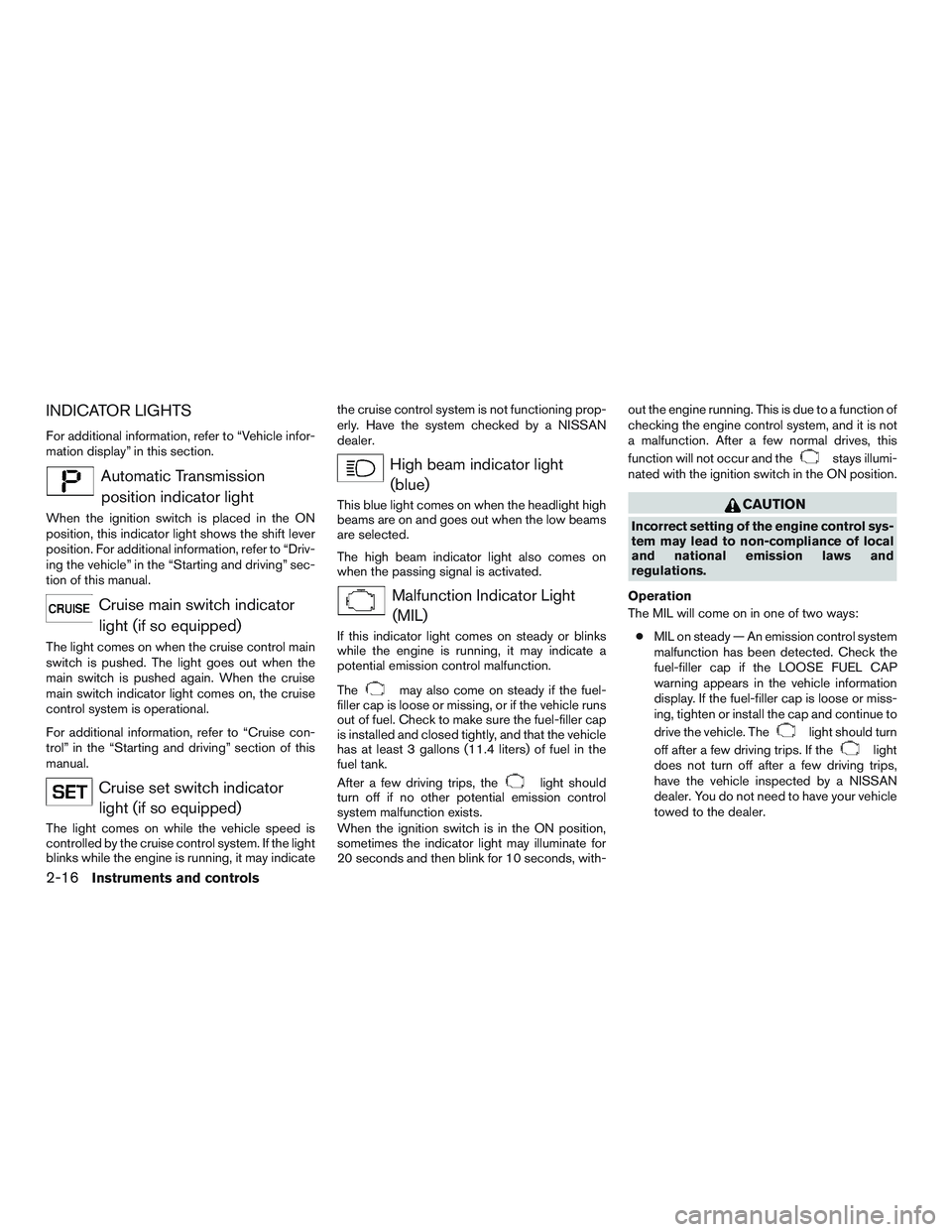
Automatic Transmissionposition indicator light
When the ignition switch is placed in the ON
position, this indicator light shows the shift lever
position. For additional information, refer to “Driv-
ing the vehicle” in the “Starting and driving” sec-
tion of this manual.
Cruise main switch indicatorlight (if so equipped)
The light comes on when the cruise control main
switch is pushed. The light goes out when the
main switch is pushed again. When the cruise
main switch indicator light comes on, the cruise
control system is operational.
For additional information, refer to “Cruise con-
trol” in the “Starting and driving” section of this
manual.
Cruise set switch indicatorlight (if so equipped)
The light comes on while the vehicle speed is
controlled by the cruise control system. If the light
blinks while the engine is running, it may indicate the cruise control system is not functioning prop-
erly. Have the system checked by a NISSAN
dealer.
High beam indicator light
(blue)
This blue light comes on when the headlight high
beams are on and goes out when the low beams
are selected.
The high beam indicator light also comes on
when the passing signal is activated.
Malfunction Indicator Light(MIL)
If this indicator light comes on steady or blinks
while the engine is running, it may indicate a
potential emission control malfunction.
The
may also come on steady if the fuel-
filler cap is loose or missing, or if the vehicle runs
out of fuel. Check to make sure the fuel-filler cap
is installed and closed tightly, and that the vehicle
has at least 3 gallons (11.4 liters) of fuel in the
fuel tank.
After a few driving trips, the
light should
turn off if no other potential emission control
system malfunction exists.
When the ignition switch is in the ON position,
sometimes the indicator light may illuminate for
20 seconds and then blink for 10 seconds, with- out the engine running. This is due to a function of
checking the engine control system, and it is not
a malfunction. After a few normal drives, this
function will not occur and the
stays illumi-
nated with the ignition switch in the ON position.
CAUTION
Incorrect setting of the engine control sys-
tem may lead to non-compliance of local
and national emission laws and
regulations.
Operation
The MIL will come on in one of two ways: ● MIL on steady — An emission control system
malfunction has been detected. Check the
fuel-filler cap if the LOOSE FUEL CAP
warning appears in the vehicle information
display. If the fuel-filler cap is loose or miss-
ing, tighten or install the cap and continue to
drive the vehicle. The
light should turn
off after a few driving trips. If the
light
does not turn off after a few driving trips,
have the vehicle inspected by a NISSAN
dealer. You do not need to have your vehicle
towed to the dealer.
2-16Instruments and controls