key NISSAN NV PASSENGER VAN 2018 Owner's Guide
[x] Cancel search | Manufacturer: NISSAN, Model Year: 2018, Model line: NV PASSENGER VAN, Model: NISSAN NV PASSENGER VAN 2018Pages: 426, PDF Size: 4.52 MB
Page 222 of 426
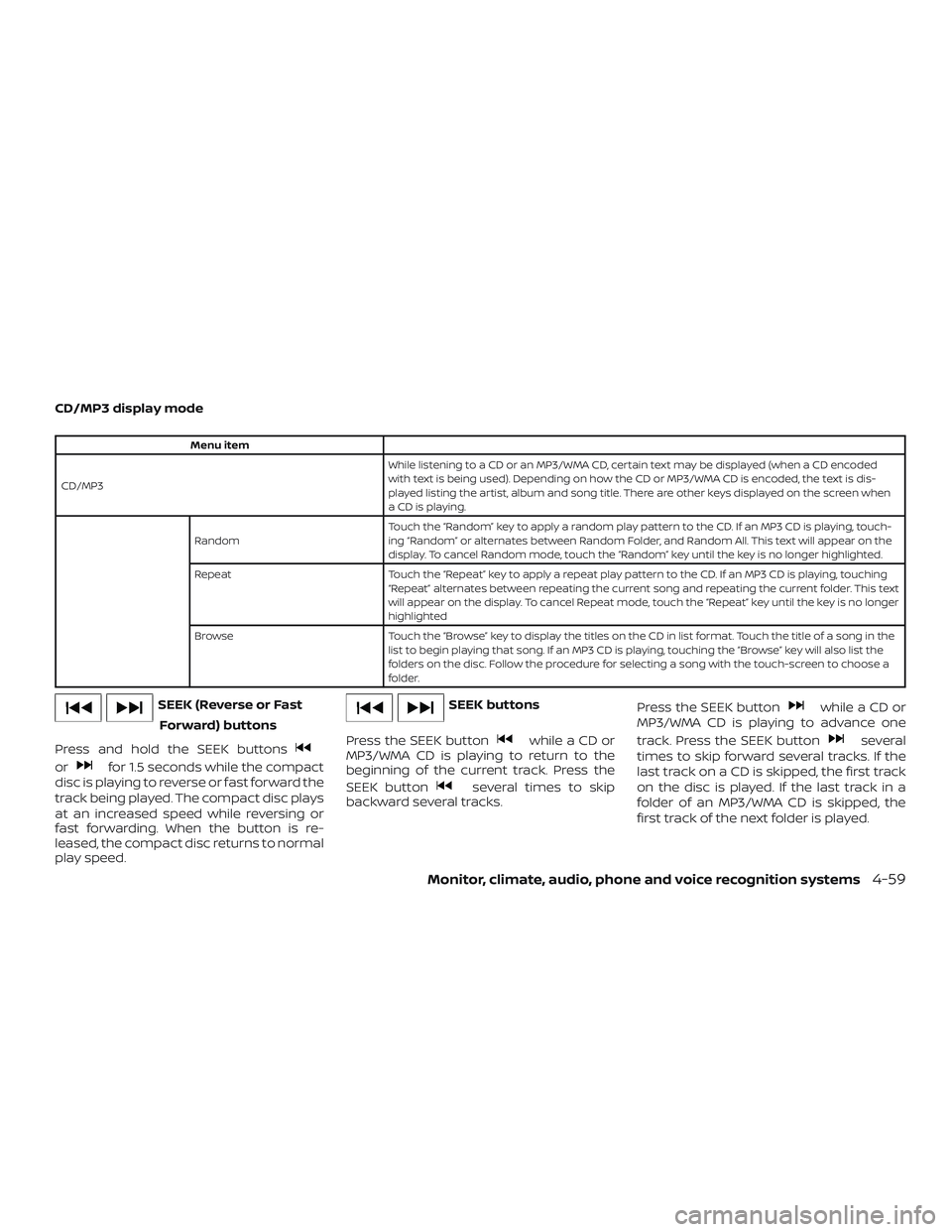
CD/MP3 display mode
Menu item
CD/MP3 While listening to a CD or an MP3/WMA CD, certain text may be displayed (when a CD encoded
with text is being used). Depending on how the CD or MP3/WMA CD is encoded, the text is dis-
played listing the artist, album and song title. There are other keys displayed on the screen when
aCDisplaying.
Random Touch the “Random” key to apply a random play pattern to the CD. If an MP3 CD is playing, touch-
ing “Random” or alternates between Random Folder, and Random All. This text will appear on the
display. To cancel Random mode, touch the “Random” key until the key is no longer highlighted.
Repeat Touch the “Repeat” key to apply a repeat play pattern to the CD. If an MP3 CD is playing, touching
“Repeat” alternates between repeating the current song and repeating the current folder. This text
will appear on the display. To cancel Repeat mode, touch the “Repeat” key until the key is no longer
highlighted
Browse Touch the “Browse” key to display the titles on the CD in list format. Touch the title of a song in the
list to begin playing that song. If an MP3 CD is playing, touching the “Browse” key will also list the
folders on the disc. Follow the procedure for selecting a song with the touch-screen to choose a
folder.
SEEK (Reverse or Fast
Forward) buttons
Press and hold the SEEK buttons
orfor 1.5 seconds while the compact
disc is playing to reverse or fast forward the
track being played. The compact disc plays
at an increased speed while reversing or
fast forwarding. When the button is re-
leased, the compact disc returns to normal
play speed.
SEEK buttons
Press the SEEK button
while a CD or
MP3/WMA CD is playing to return to the
beginning of the current track. Press the
SEEK button
several times to skip
backward several tracks. Press the SEEK button
while a CD or
MP3/WMA CD is playing to advance one
track. Press the SEEK button
several
times to skip forward several tracks. If the
last track on a CD is skipped, the first track
on the disc is played. If the last track in a
folder of an MP3/WMA CD is skipped, the
first track of the next folder is played.
Monitor, climate, audio, phone and voice recognition systems4-59
Page 226 of 426
Audio file operation
AUX button
Place the ignition switch in the ON or ACC
position and press the AUX button to
switch to the USB input mode. If another
audio source is playing and a USB memory
device is inserted, press the AUX button
until the center display changes to the USB
memory mode.
If the system has been turned off while the
USB memory was playing, press the ON-
OFF button to restart the USB memory.Play information
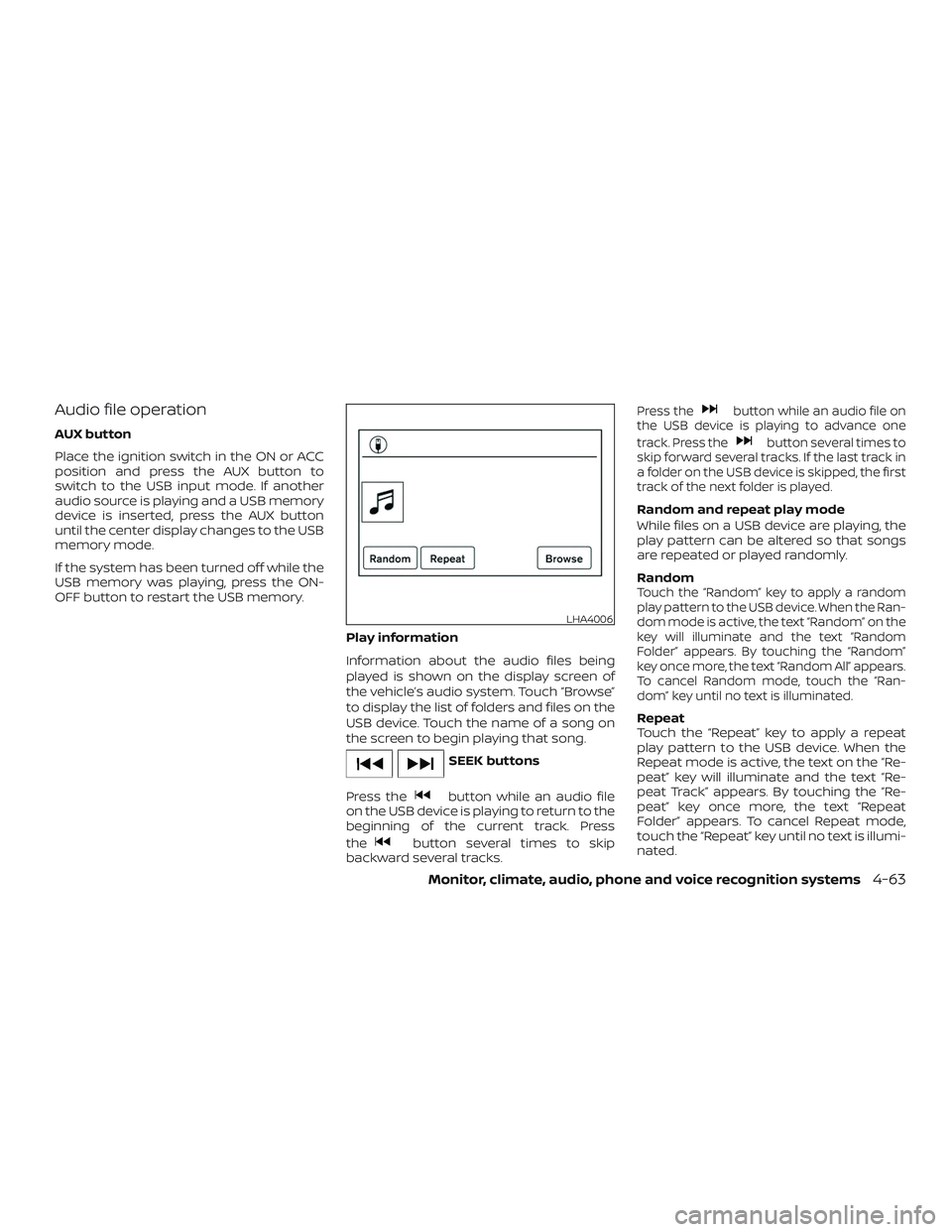
Information about the audio files being
played is shown on the display screen of
the vehicle’s audio system. Touch “Browse”
to display the list of folders and files on the
USB device. Touch the name of a song on
the screen to begin playing that song.
SEEK buttons
Press the
button while an audio file
on the USB device is playing to return to the
beginning of the current track. Press
the
button several times to skip
backward several tracks.
Press thebutton while an audio file on
the USB device is playing to advance one
track. Press the
button several times to
skip forward several tracks. If the last track in
a folder on the USB device is skipped, the first
track of the next folder is played.
Random and repeat play mode
While files on a USB device are playing, the
play pattern can be altered so that songs
are repeated or played randomly.
Random
Touch the “Random” key to apply a random
play pattern to the USB device. When the Ran-
dom mode is active, the text “Random” on the
key will illuminate and the text “Random
Folder” appears. By touching the “Random”
key once more, the text “Random All” appears.
To cancel Random mode, touch the “Ran-
dom” key until no text is illuminated.
Repeat
Touch the “Repeat” key to apply a repeat
play pattern to the USB device. When the
Repeat mode is active, the text on the “Re-
peat” key will illuminate and the text “Re-
peat Track” appears. By touching the “Re-
peat” key once more, the text “Repeat
Folder” appears. To cancel Repeat mode,
touch the “Repeat” key until no text is illumi-
nated.
LHA4006
Monitor, climate, audio, phone and voice recognition systems4-63
Page 231 of 426
iPod® main operation
Place the ignition switch in the ACC or ON
position. Press the AUX button repeatedly
to switch to the iPod® mode.
If the system has been turned off while the
iPod® was playing, pressing the ON-OFF
button will start the iPod®.
AUX button
When the AUX button is pressed with the
system off and the iPod® connected, the
system will turn on. If another audio source
is playing and the iPod® is connected, press
the AUX button repeatedly until the center
display changes to the iPod® mode.Interface
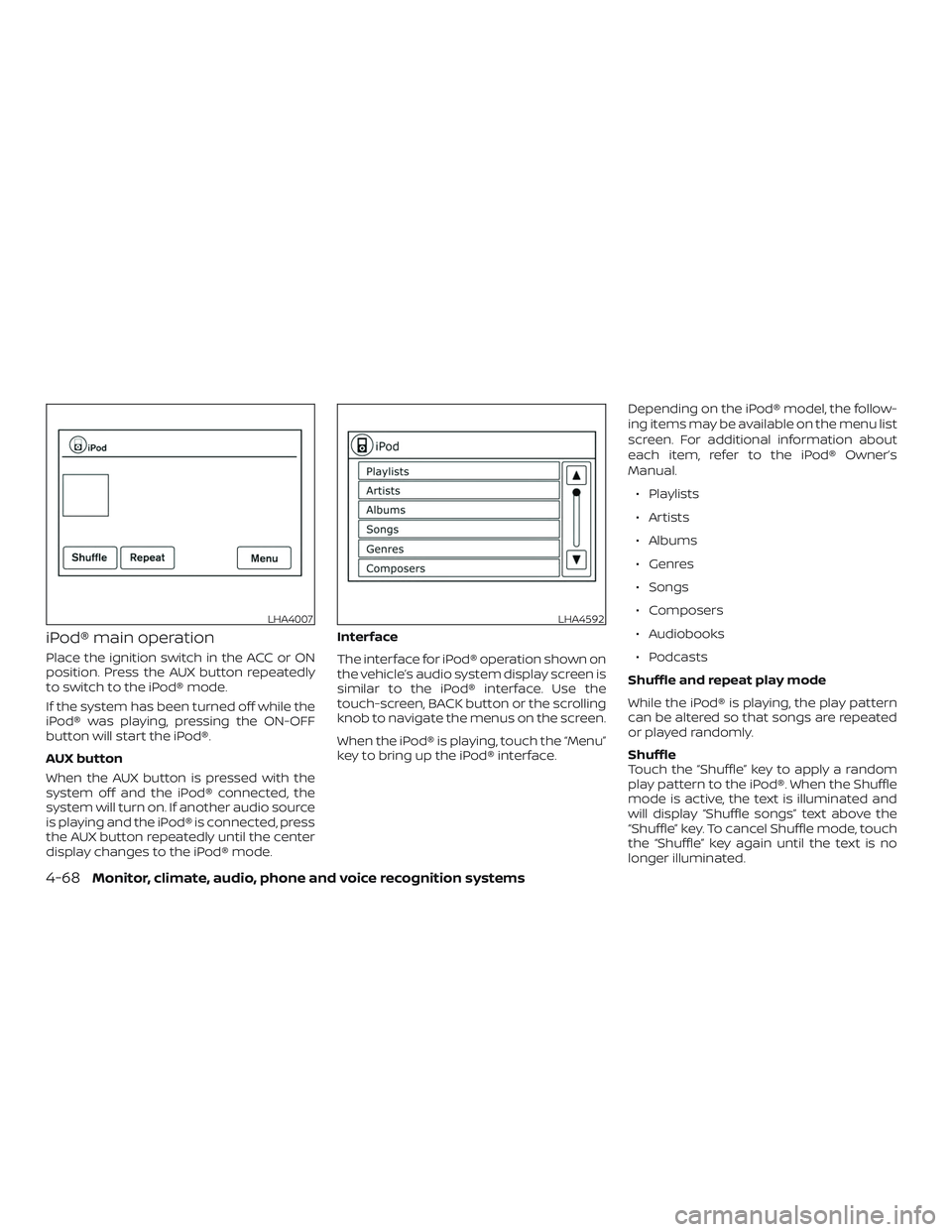
The interface for iPod® operation shown on
the vehicle’s audio system display screen is
similar to the iPod® interface. Use the
touch-screen, BACK button or the scrolling
knob to navigate the menus on the screen.
When the iPod® is playing, touch the “Menu”
key to bring up the iPod® interface.Depending on the iPod® model, the follow-
ing items may be available on the menu list
screen. For additional information about
each item, refer to the iPod® Owner’s
Manual.
∙ Playlists
∙ Artists
∙ Albums
∙ Genres
∙ Songs
∙ Composers
∙ Audiobooks
∙ Podcasts
Shuffle and repeat play mode
While the iPod® is playing, the play pattern
can be altered so that songs are repeated
or played randomly.
Shuffle
Touch the “Shuffle” key to apply a random
play pattern to the iPod®. When the Shuffle
mode is active, the text is illuminated and
will display “Shuffle songs” text above the
“Shuffle” key. To cancel Shuffle mode, touch
the “Shuffle” key again until the text is no
longer illuminated.
LHA4007LHA4592
4-68Monitor, climate, audio, phone and voice recognition systems
Page 232 of 426
Repeat
Touch the “Repeat” key to apply a repeat
play pattern to the iPod®. When the repeat
mode is active, the text is illuminated and
will display “Repeat song” text above the
“Repeat” key. To cancel Repeat mode, touch
the “Repeat” key again until the text is no
longer illuminated.
SEEK buttons
Press the
orSEEK buttons to
skip backward or forward one track.
Press and hold the
orSEEK but-
tons for 1.5 seconds while a track is playing
to reverse or fast forward the track being
played. The track plays at an increased
speed while reversing or fast forwarding.
When the button is released, the track re-
turns to normal play speed. Scrolling menus
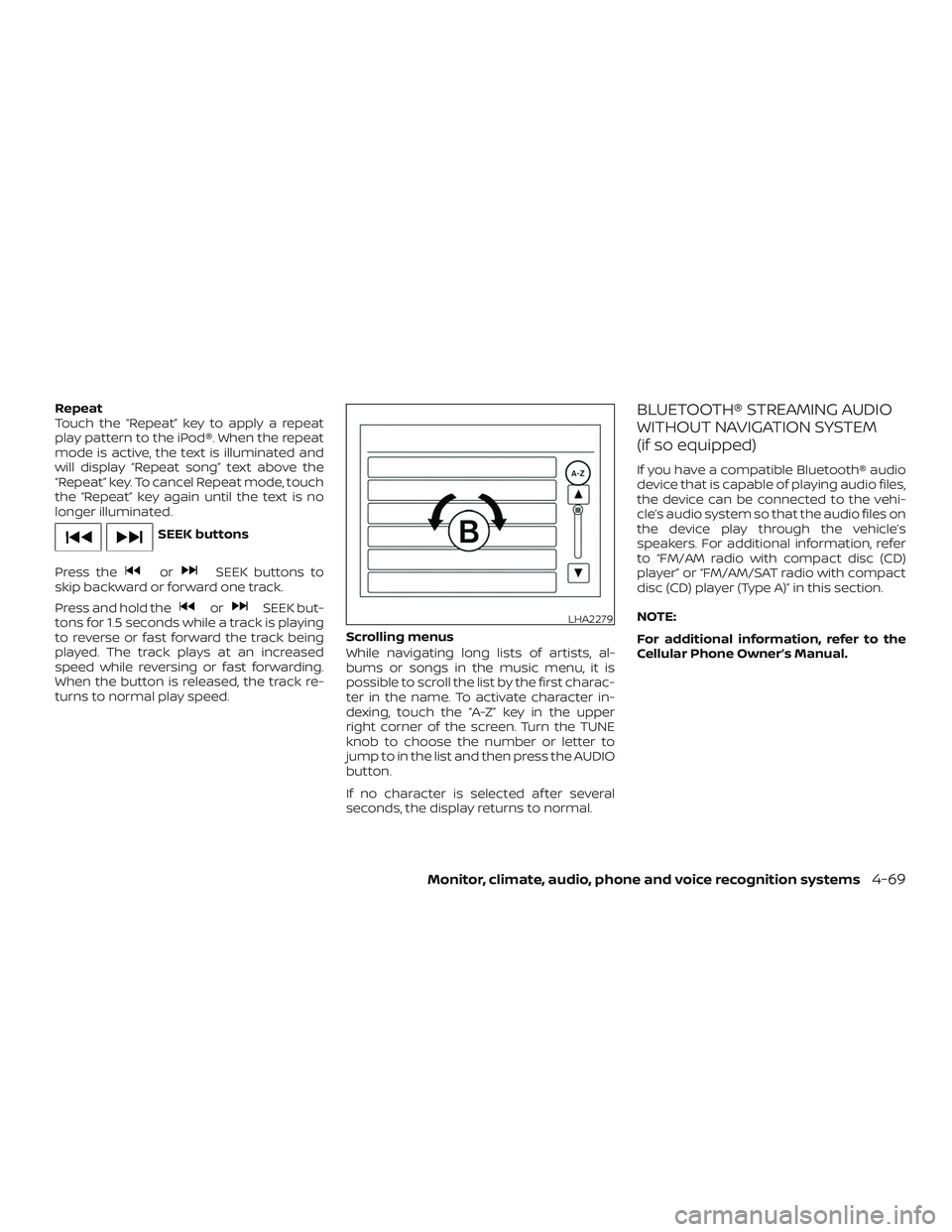
While navigating long lists of artists, al-
bums or songs in the music menu, it is
possible to scroll the list by the first charac-
ter in the name. To activate character in-
dexing, touch the “A-Z” key in the upper
right corner of the screen. Turn the TUNE
knob to choose the number or letter to
jump to in the list and then press the AUDIO
button.
If no character is selected af ter several
seconds, the display returns to normal.
BLUETOOTH® STREAMING AUDIO
WITHOUT NAVIGATION SYSTEM
(if so equipped)
If you have a compatible Bluetooth® audio
device that is capable of playing audio files,
the device can be connected to the vehi-
cle’s audio system so that the audio files on
the device play through the vehicle’s
speakers. For additional information, refer
to “FM/AM radio with compact disc (CD)
player” or “FM/AM/SAT radio with compact
disc (CD) player (Type A)” in this section.
NOTE:
For additional information, refer to the
Cellular Phone Owner’s Manual.
LHA2279
Monitor, climate, audio, phone and voice recognition systems4-69
Page 234 of 426
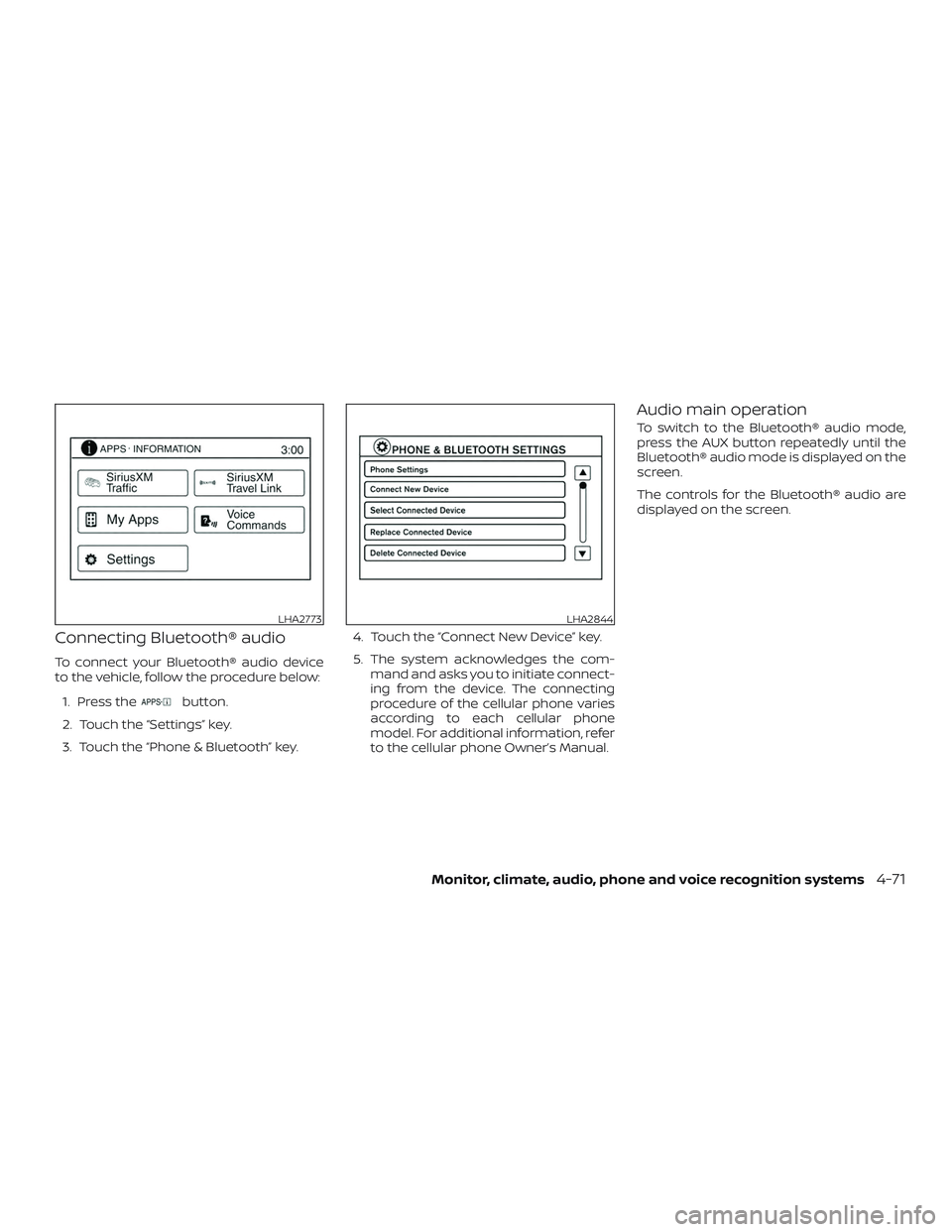
Connecting Bluetooth® audio
To connect your Bluetooth® audio device
to the vehicle, follow the procedure below:1. Press the
button.
2. Touch the “Settings” key.
3. Touch the “Phone & Bluetooth” key. 4. Touch the “Connect New Device” key.
5. The system acknowledges the com-
mand and asks you to initiate connect-
ing from the device. The connecting
procedure of the cellular phone varies
according to each cellular phone
model. For additional information, refer
to the cellular phone Owner’s Manual.
Audio main operation
To switch to the Bluetooth® audio mode,
press the AUX button repeatedly until the
Bluetooth® audio mode is displayed on the
screen.
The controls for the Bluetooth® audio are
displayed on the screen.
LHA2773LHA2844
Monitor, climate, audio, phone and voice recognition systems4-71
Page 252 of 426
– This Class B digital apparatus meets allrequirements of the Canadian Interference-Causing Equipment Regulations.
BLUETOOTH® is a
trademark owned
by Bluetooth SIG,
Inc. and licensed
to Bosch.
VOICE COMMANDS
You can use voice commands to operate
various Bluetooth® Hands-Free Phone Sys-
tem features using the NISSAN Voice Rec-
ognition system. For additional informa-
tion, refer to “NISSAN Voice Recognition
System” in this section.
Voice Prompt Interrupt
While using the voice recognition system,
the system voice can be interrupted to al-
low the user to speak commands. While
the system is speaking, press the
button on the steering wheel. The system
voice will stop and a tone will be heard.
Af ter the tone, speak desired command
(displayed on the touch-screen).
CONNECTING PROCEDURE
NOTE:
The connecting procedure must be per-
formed when the vehicle is stationary. If
the vehicle starts moving during the pro-
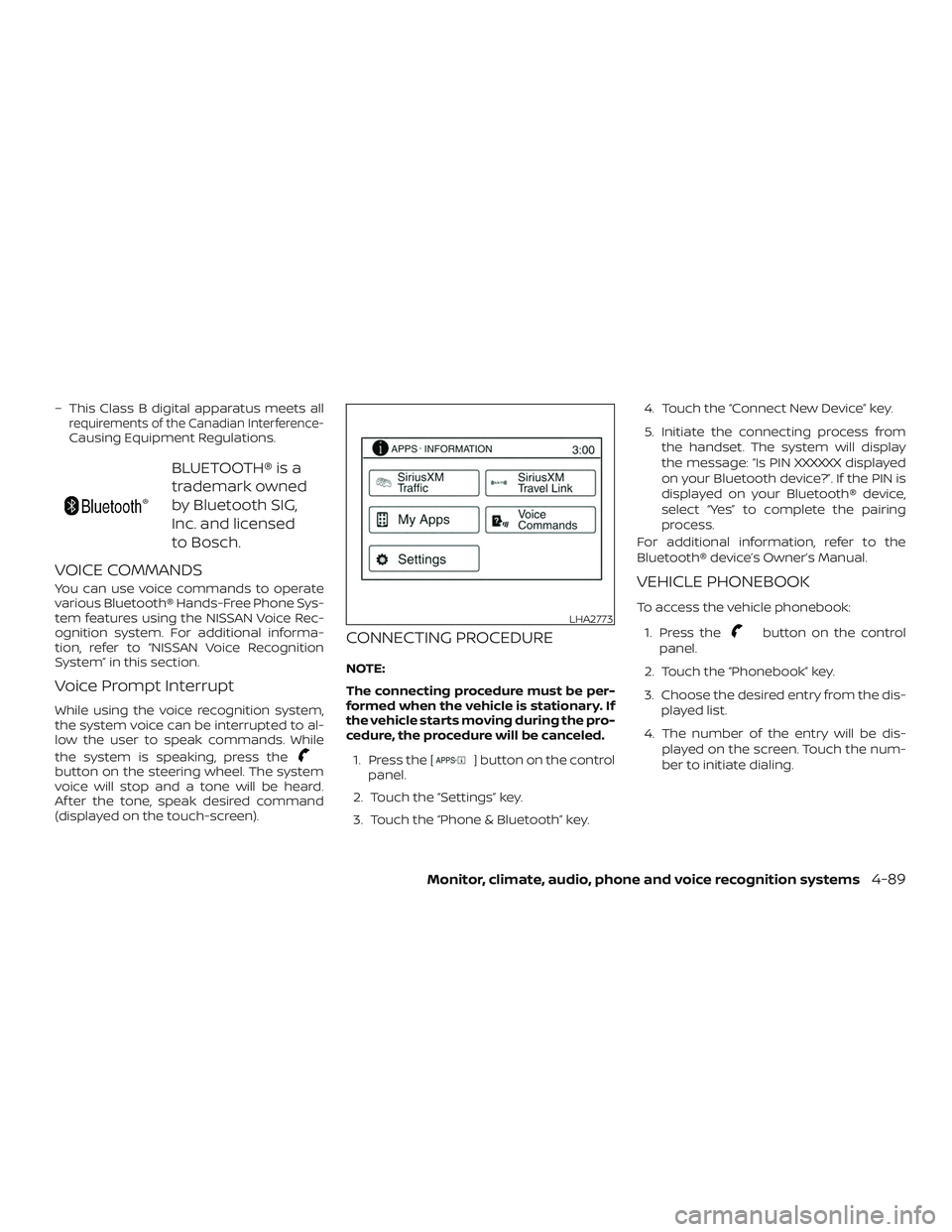
cedure, the procedure will be canceled.1. Press the [
] button on the control
panel.
2. Touch the “Settings” key.
3. Touch the “Phone & Bluetooth” key. 4. Touch the “Connect New Device” key.
5. Initiate the connecting process from
the handset. The system will display
the message: “Is PIN XXXXXX displayed
on your Bluetooth device?”. If the PIN is
displayed on your Bluetooth® device,
select “Yes” to complete the pairing
process.
For additional information, refer to the
Bluetooth® device’s Owner’s Manual.
VEHICLE PHONEBOOK
To access the vehicle phonebook:
1. Press the
button on the control
panel.
2. Touch the “Phonebook” key.
3. Choose the desired entry from the dis- played list.
4. The number of the entry will be dis- played on the screen. Touch the num-
ber to initiate dialing.LHA2773
Monitor, climate, audio, phone and voice recognition systems4-89
Page 253 of 426
NOTE:
To scroll quickly through the list, touch
the “A-Z” key in the upper right corner of
the screen. Turn the TUNE knob to
choose a letter or number and then
press the AUDIO button. The list will
move to the first entry that begins with
that number or letter.
MAKING A CALL
To make a call, follow the procedure below:1. Press the
button on the control
panel. The “Phone” screen will appear
on the display.
2. Select one of the following options to make a call:
∙ “Phonebook”: Select the name from an entry stored in the vehicle phonebook.
∙ “Call Lists”: Select the name from the incoming, outgoing or missed.
∙ “Redial”: Dial the last outgoing call from the vehicle.
∙“
”: Input the phone number manu-
ally using a keypad displayed on the
screen. For additional information, refer
to “How to use the touch-screen” in this
section.
RECEIVING A CALL
When a call is placed to the connected
phone, the display will change to phone
mode.
To accept the incoming call, either:
∙ Press the
button on the steering
wheel, or
∙ Touch the
icon on the screen.
To reject the incoming call, either:
∙ Press the
button on the steering
wheel, or
∙ Touch the phone icon on the screen.
DURING A CALL
While a call is active, the following options
are available on the screen: ∙ “Handset” Select this option to switch control of
the phone call over to the handset.
∙ “Mute Mic.” Select this option to mute the micro-
phone. Select again to unmute the mi-
crophone.
∙ Phone
icon
Select to end the phone call.
ENDING A CALL
To end a phone call, select the phone
icon on the screen or press thebut-
ton on the steering wheel.
TEXT MESSAGING (if so equipped)
WARNING
∙ Laws in some jurisdictions may re- strict the use of “Text-to-Speech.”
Check local regulations before using
the feature.
∙ Laws in some jurisdictions may re- strict the use of some of the applica-
tions and features, such as social net-
working and texting. Check local
regulations for any requirements.
∙ Use the text messaging feature af ter stopping your vehicle in a safe loca-
tion. If you have to use the feature
while driving, exercise extreme cau-
tion at all times so full attention may
be given to vehicle operation.
∙ If you are unable to devote full atten- tion to vehicle operation while using
the text messaging feature, pull off
the road to a safe location and stop
your vehicle.
4-90Monitor, climate, audio, phone and voice recognition systems
Page 255 of 426
Reading a received text message:1. Press the
button on the steering
wheel.
2. Say “Phone” af ter the tone.
3. Say “Read Text” af ter the tone.
The text message, sender and delivery
time are shown on the screen. Use the tun-
ing switch
to scroll through all text
messages if more than one are available.
Press the
button to exit the text mes-
sage screen. Press the
button to ac-
cess the following options for replying to
the text message:
∙ Call Back Speak this command to call the sender
of the text message using the
Bluetooth® Hands-Free Phone System.
∙ Send Text Speak this command to send a text
message response to the sender of the
text message.
∙ Read Text Speak this command to read the text
message again.
∙ Previous Text Speak this command to move to the
previous text message (if available). ∙ Next Text
Speak this command to move to the
next text message (if available).
NOTE:
Text messages are only displayed if the
vehicle speed is less than 5 mph
(8 km/h).
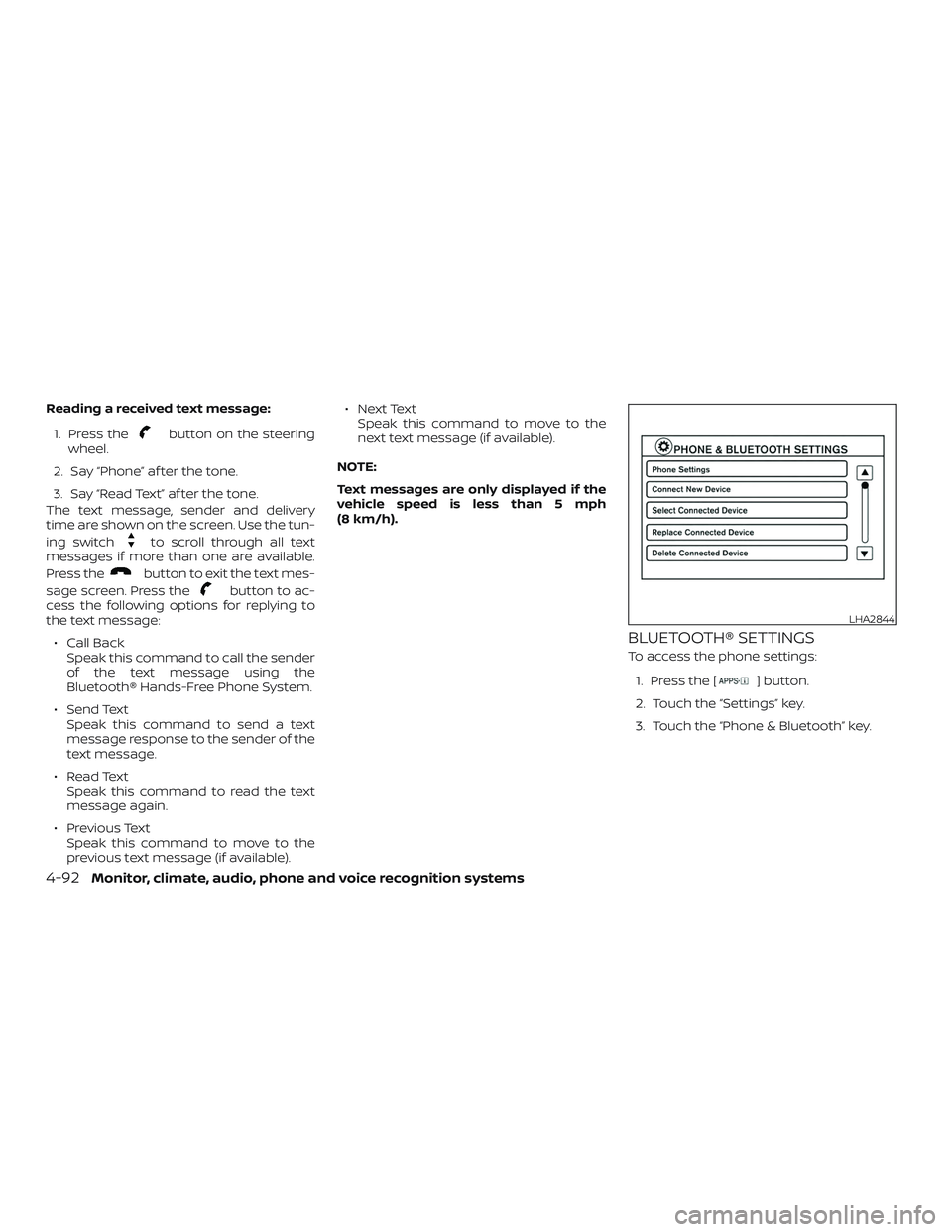
BLUETOOTH® SETTINGS
To access the phone settings: 1. Press the [
] button.
2. Touch the “Settings” key.
3. Touch the “Phone & Bluetooth” key.
LHA2844
4-92Monitor, climate, audio, phone and voice recognition systems
Page 256 of 426
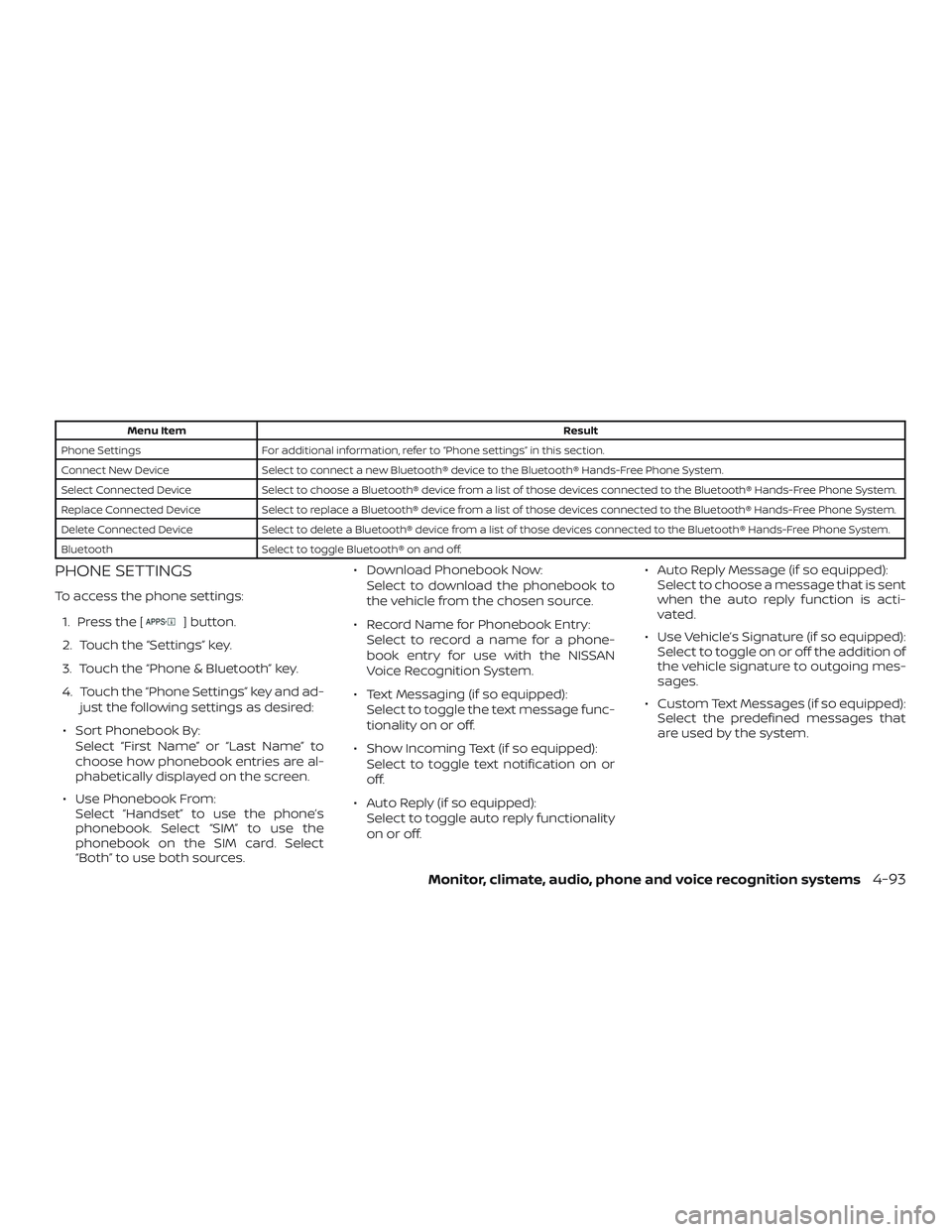
Menu ItemResult
Phone Settings For additional information, refer to “Phone settings” in this section.
Connect New Device Select to connect a new Bluetooth® device to the Bluetooth® Hands-Free Phone System.
Select Connected Device Select to choose a Bluetooth® device from a list of those devices connected to the Bluetooth® Hands-Free Phone System.
Replace Connected Device Select to replace a Bluetooth® device from a list of those devices connected to the Bluetooth® Hands-Free Phone System.
Delete Connected Device Select to delete a Bluetooth® device from a list of those devices connected to the Bluetooth® Hands-Free Phone System.
Bluetooth Select to toggle Bluetooth® on and off.
PHONE SETTINGS
To access the phone settings:
1. Press the [
] button.
2. Touch the “Settings” key.
3. Touch the “Phone & Bluetooth” key.
4. Touch the “Phone Settings” key and ad- just the following settings as desired:
∙ Sort Phonebook By: Select “First Name” or “Last Name” to
choose how phonebook entries are al-
phabetically displayed on the screen.
∙ Use Phonebook From: Select “Handset” to use the phone’s
phonebook. Select “SIM” to use the
phonebook on the SIM card. Select
“Both” to use both sources. ∙ Download Phonebook Now:
Select to download the phonebook to
the vehicle from the chosen source.
∙ Record Name for Phonebook Entry: Select to record a name for a phone-
book entry for use with the NISSAN
Voice Recognition System.
∙ Text Messaging (if so equipped): Select to toggle the text message func-
tionality on or off.
∙ Show Incoming Text (if so equipped): Select to toggle text notification on or
off.
∙ Auto Reply (if so equipped): Select to toggle auto reply functionality
on or off. ∙ Auto Reply Message (if so equipped):
Select to choose a message that is sent
when the auto reply function is acti-
vated.
∙ Use Vehicle’s Signature (if so equipped): Select to toggle on or off the addition of
the vehicle signature to outgoing mes-
sages.
∙ Custom Text Messages (if so equipped): Select the predefined messages that
are used by the system.
Monitor, climate, audio, phone and voice recognition systems4-93
Page 258 of 426
The NISSAN Voice Recognition system al-
lows hands-free operation of the systems
equipped on this vehicle, such as the
phone and navigation systems.
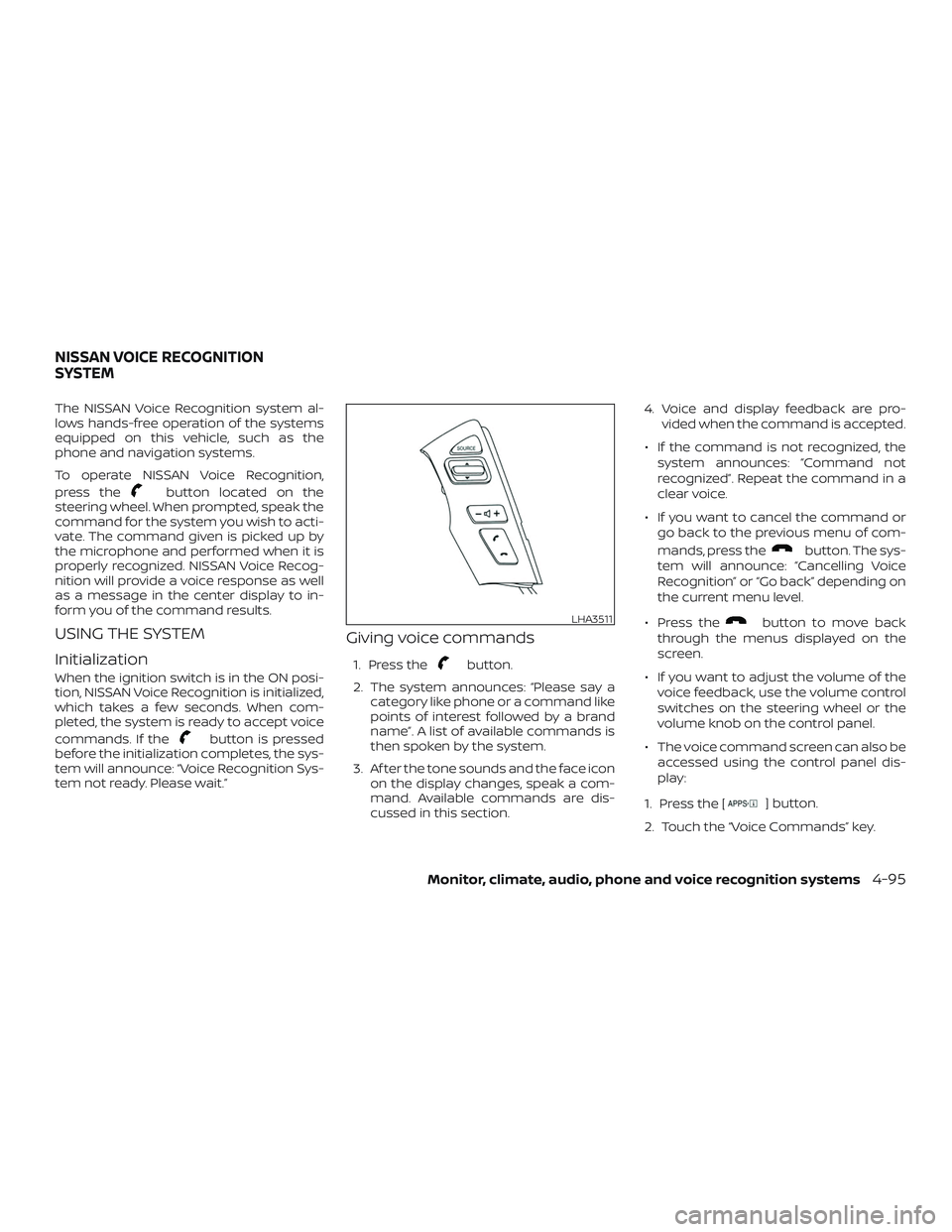
To operate NISSAN Voice Recognition,
press the
button located on the
steering wheel. When prompted, speak the
command for the system you wish to acti-
vate. The command given is picked up by
the microphone and performed when it is
properly recognized. NISSAN Voice Recog-
nition will provide a voice response as well
as a message in the center display to in-
form you of the command results.
USING THE SYSTEM
Initialization
When the ignition switch is in the ON posi-
tion, NISSAN Voice Recognition is initialized,
which takes a few seconds. When com-
pleted, the system is ready to accept voice
commands. If the
button is pressed
before the initialization completes, the sys-
tem will announce: “Voice Recognition Sys-
tem not ready. Please wait.”
Giving voice commands
1. Press thebutton.
2. The system announces: “Please say a category like phone or a command like
points of interest followed by a brand
name”. A list of available commands is
then spoken by the system.
3. Af ter the tone sounds and the face icon on the display changes, speak a com-
mand. Available commands are dis-
cussed in this section. 4. Voice and display feedback are pro-
vided when the command is accepted.
∙ If the command is not recognized, the system announces: “Command not
recognized”. Repeat the command in a
clear voice.
∙ If you want to cancel the command or go back to the previous menu of com-
mands, press the
button. The sys-
tem will announce: “Cancelling Voice
Recognition” or “Go back” depending on
the current menu level.
∙ Press the
button to move back
through the menus displayed on the
screen.
∙ If you want to adjust the volume of the voice feedback, use the volume control
switches on the steering wheel or the
volume knob on the control panel.
∙ The voice command screen can also be accessed using the control panel dis-
play:
1. Press the [
] button.
2. Touch the “Voice Commands” key.
LHA3511
NISSAN VOICE RECOGNITION
SYSTEM
Monitor, climate, audio, phone and voice recognition systems4-95