VDC NISSAN NV200 2016 Owners Manual
[x] Cancel search | Manufacturer: NISSAN, Model Year: 2016, Model line: NV200, Model: NISSAN NV200 2016Pages: 312, PDF Size: 6.65 MB
Page 15 of 312
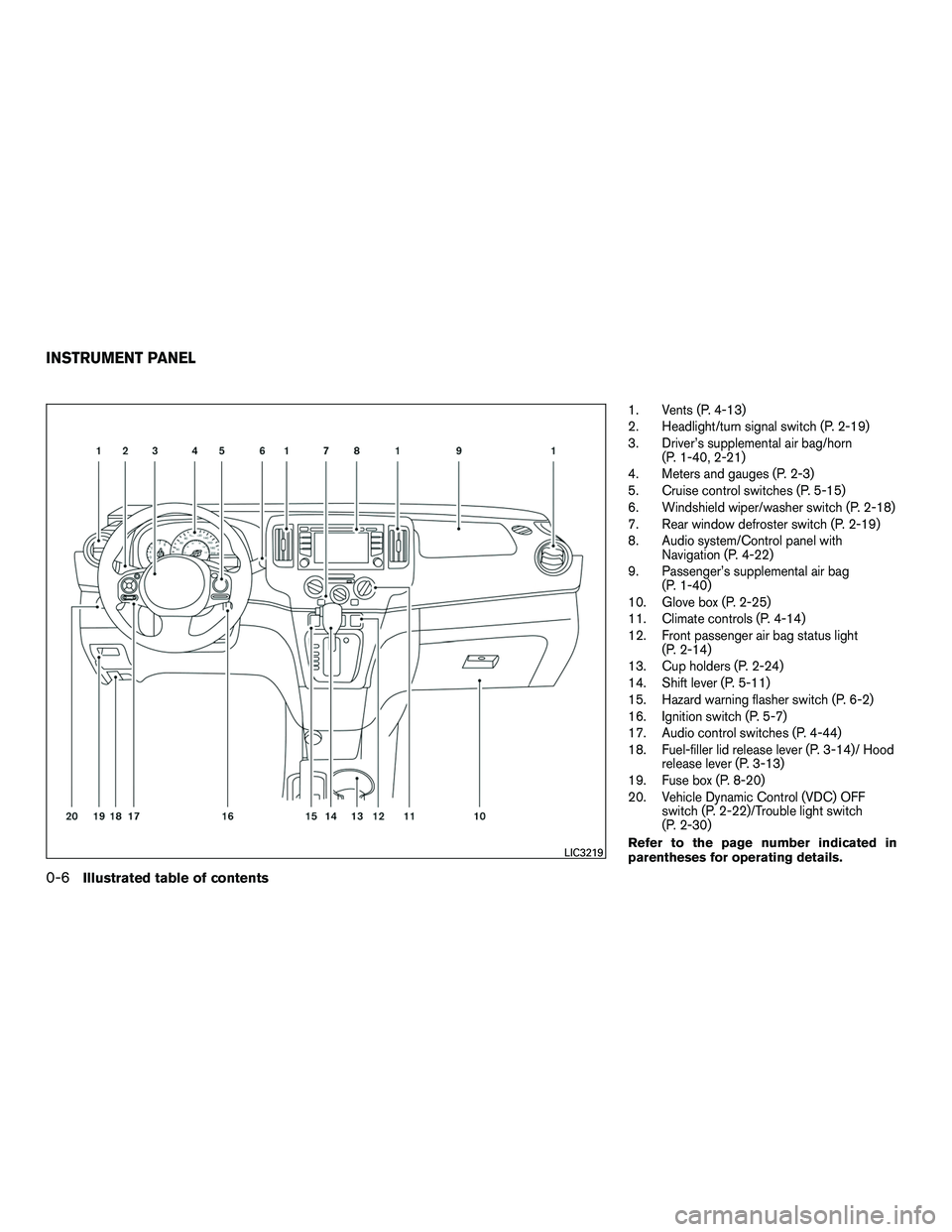
1. Vents (P. 4-13)
2. Headlight/turn signal switch (P. 2-19)
3. Driver’s supplemental air bag/horn(P. 1-40, 2-21)
4. Meters and gauges (P. 2-3)
5. Cruise control switches (P. 5-15)
6. Windshield wiper/washer switch (P. 2-18)
7. Rear window defroster switch (P. 2-19)
8. Audio system/Control panel with Navigation (P. 4-22)
9. Passenger’s supplemental air bag (P. 1-40)
10. Glove box (P. 2-25)
11. Climate controls (P. 4-14)
12. Front passenger air bag status light (P. 2-14)
13. Cup holders (P. 2-24)
14. Shift lever (P. 5-11)
15. Hazard warning flasher switch (P. 6-2)
16. Ignition switch (P. 5-7)
17. Audio control switches (P. 4-44)
18. Fuel-filler lid release lever (P. 3-14)/ Hood release lever (P. 3-13)
19. Fuse box (P. 8-20)
20. Vehicle Dynamic Control (VDC) OFF switch (P. 2-22)/Trouble light switch
(P. 2-30)
Refer to the page number indicated in
parentheses for operating details.LIC3219
INSTRUMENT PANEL
0-6Illustrated table of contents
Page 18 of 312
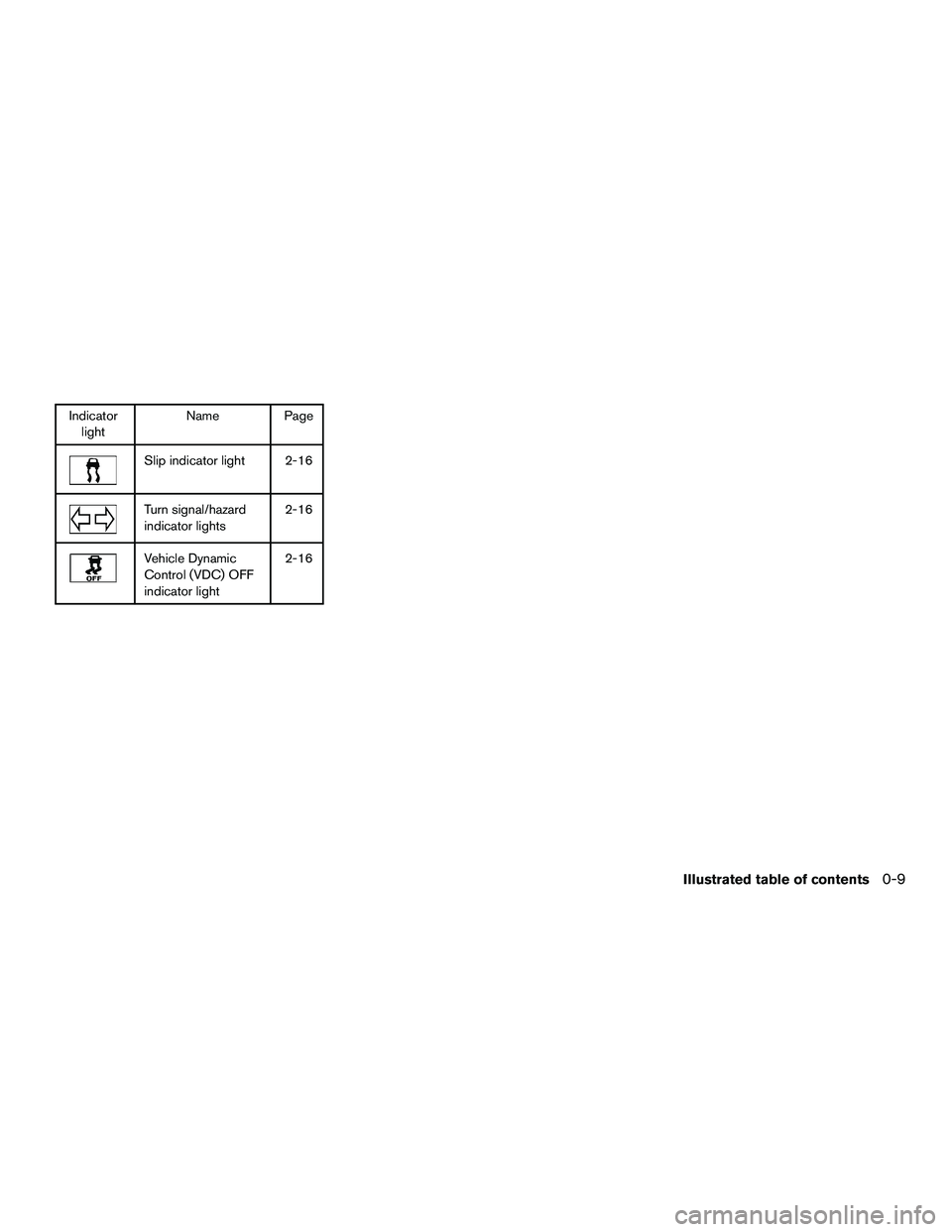
Indicatorlight Name Page
Slip indicator light 2-16
Turn signal/hazard
indicator lights 2-16
Vehicle Dynamic
Control (VDC) OFF
indicator light2-16
Illustrated table of contents0-9
Page 80 of 312
2 Instruments and controls
Instrument panel...................................2-2
Meters and gauges ................................2-3
Speedometer and odometer .....................2-4
Tachometer ....................................2-6
Fuel gauge ....................................2-6
Trip computer ..................................2-7
Outside temperature display .....................2-8
Warning/indicator lights and audible reminders .......2-9
Checking bulbs ................................2-9
Warning lights ................................ 2-10
Indicator lights ................................ 2-14
Audible reminders ............................. 2-16
Security systems ................................. 2-17
NISSAN vehicle immobilizer system .............2-17
Windshield wiper and washer switch ...............2-18
Switch operation .............................. 2-18
Rear window and outside mirror defroster switch .....2-19
Headlight and turn signal switch ....................2-19
Headlight control switch ........................ 2-19
Instrument brightness control ...................2-20
Turn signal switch ............................. 2-21Horn
............................................ 2-21
Vehicle Dynamic Control (VDC) off switch ...........2-22
Power outlet ..................................... 2-22
Storage ......................................... 2-23
Map pockets .................................. 2-24
Under-seat storage bins ........................ 2-24
Cup holders .................................. 2-24
Glove box .................................... 2-25
Windows ........................................ 2-25
Power windows ............................... 2-25
Sliding rear window ............................ 2-27
Moonroof ........................................ 2-28
Panoramic sunshade ........................... 2-28
Cargo light ...................................... 2-28
Personal lights ................................... 2-29
Map light ........................................ 2-29
Rear
room light ................................... 2-30
Trouble light switch ............................... 2-30
Intercom system switch ........................... 2-30
Personal light switches ............................ 2-31
Auto step switch ................................. 2-31
Page 82 of 312
20. Vehicle Dynamic Control (VDC) OFFswitch (P. 2-22)/Trouble light switch
(P. 2-30)
Refer to the page number indicated in pa-
rentheses for operating details.
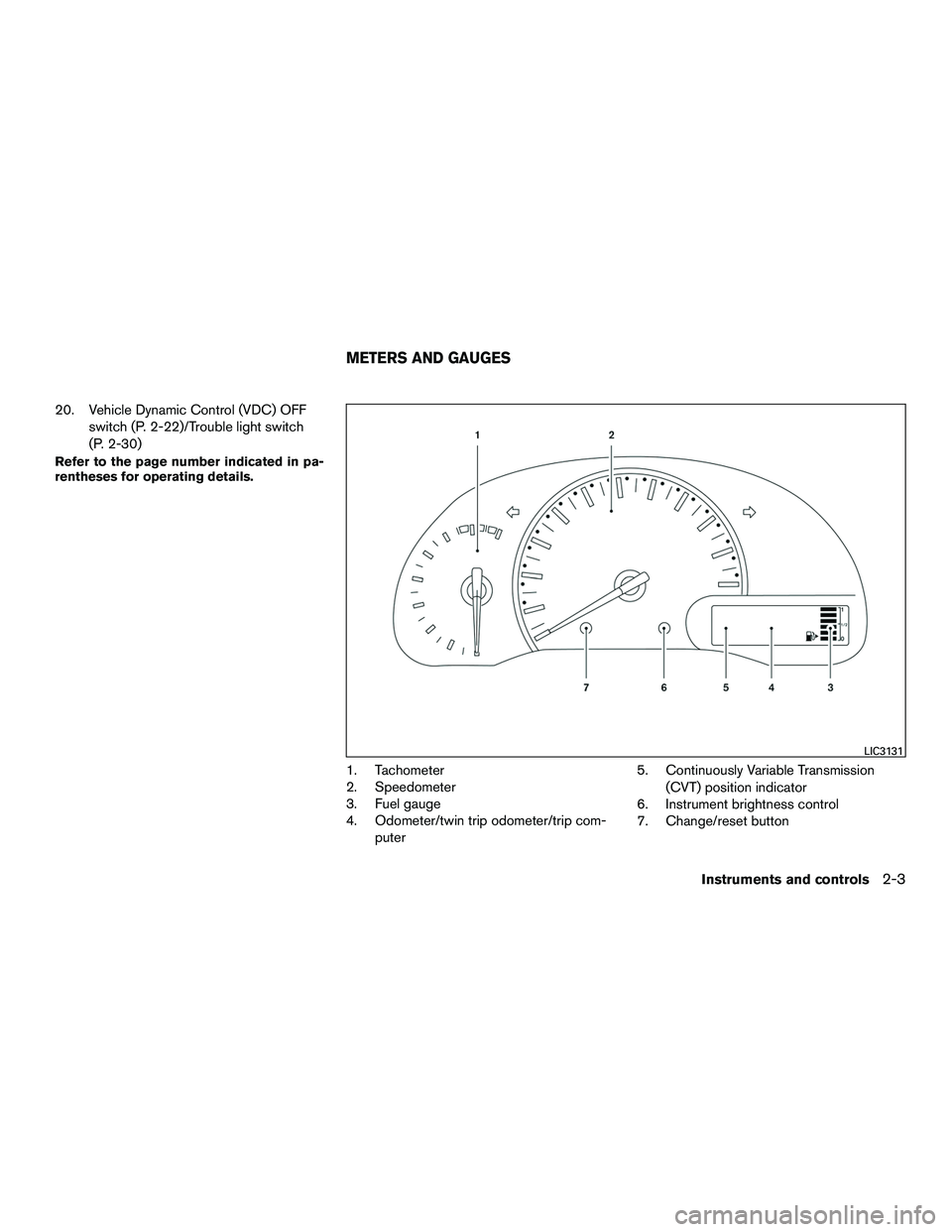
1. Tachometer
2. Speedometer
3. Fuel gauge
4. Odometer/twin trip odometer/trip com-puter 5. Continuously Variable Transmission
(CVT) position indicator
6. Instrument brightness control
7. Change/reset button
LIC3131
METERS AND GAUGES
Instruments and controls2-3
Page 88 of 312
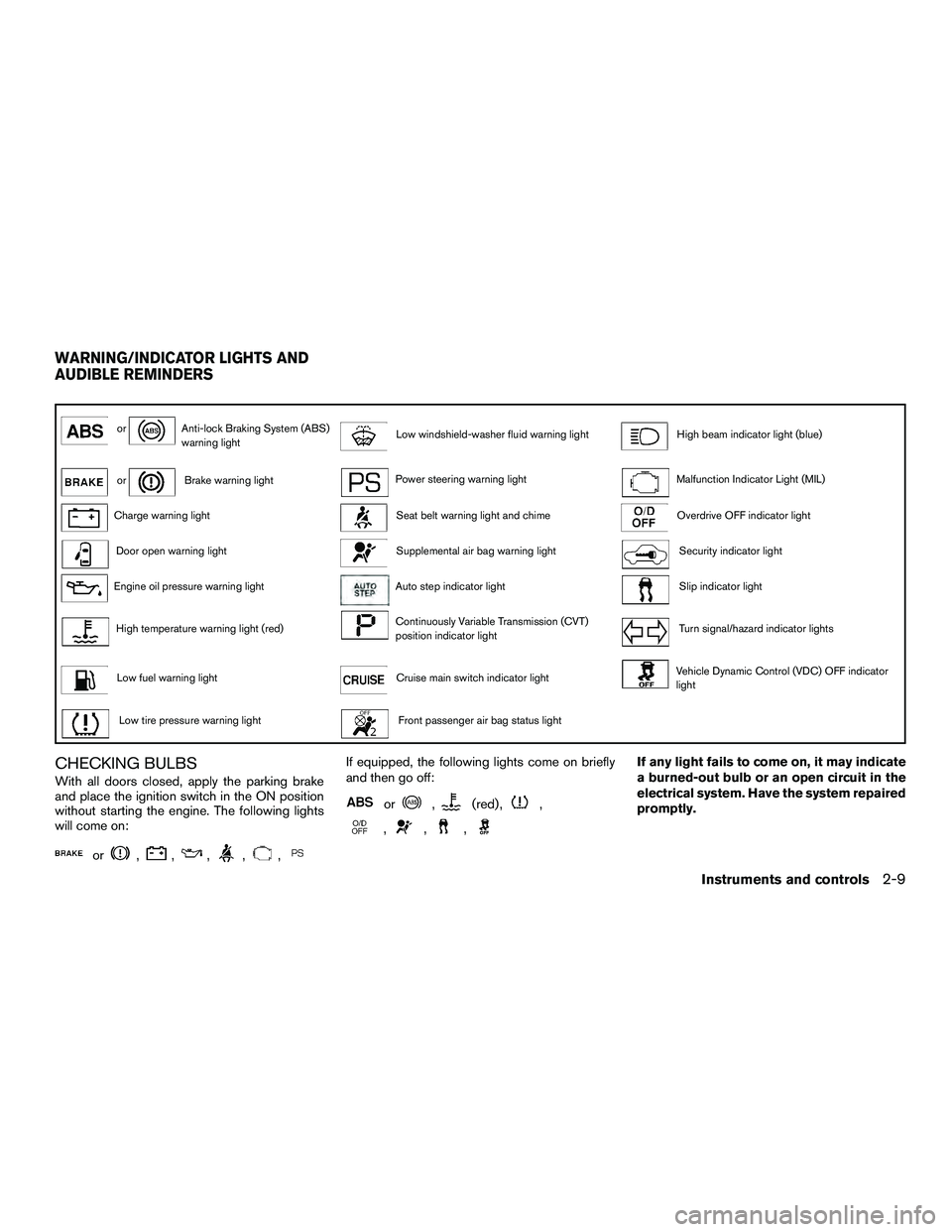
orAnti-lock Braking System (ABS)
warning lightLow windshield-washer fluid warning lightHigh beam indicator light (blue)
orBrake warning lightPower steering warning lightMalfunction Indicator Light (MIL)
Charge warning lightSeat belt warning light and chimeOverdrive OFF indicator light
Door open warning lightSupplemental air bag warning lightSecurity indicator light
Engine oil pressure warning lightAuto step indicator lightSlip indicator light
High temperature warning light (red)Continuously Variable Transmission (CVT)
position indicator lightTurn signal/hazard indicator lights
Low fuel warning lightCruise main switch indicator lightVehicle Dynamic Control (VDC) OFF indicator
light
Low tire pressure warning lightFront passenger air bag status light
CHECKING BULBS
With all doors closed, apply the parking brake
and place the ignition switch in the ON position
without starting the engine. The following lights
will come on:
or,,,,,
If equipped, the following lights come on briefly
and then go off:
or,(red) ,,
,,,
If any light fails to come on, it may indicate
a burned-out bulb or an open circuit in the
electrical system. Have the system repaired
promptly.
WARNING/INDICATOR LIGHTS AND
AUDIBLE REMINDERS
Instruments and controls2-9
Page 95 of 312
For additional information, refer to “Security sys-
tems” in this section.
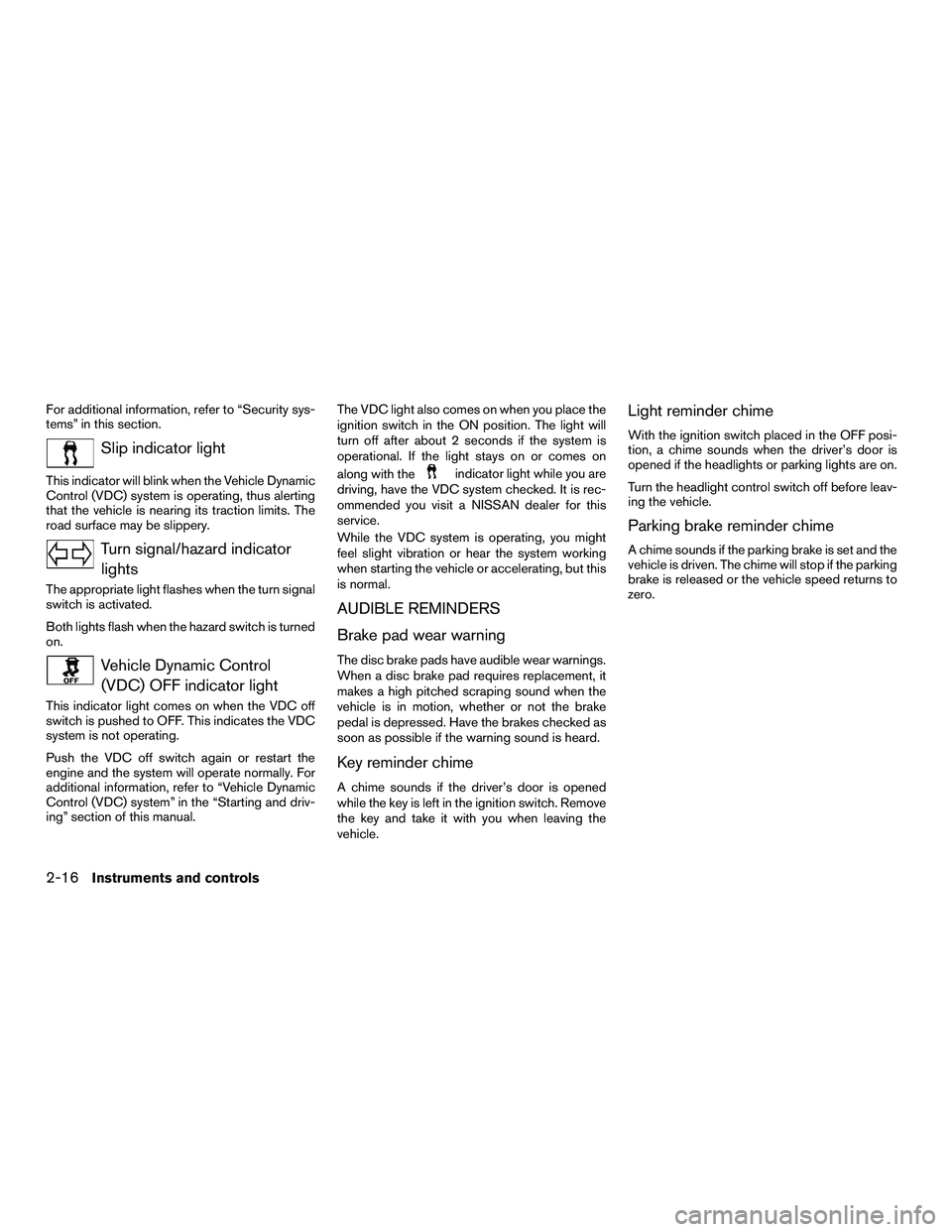
Slip indicator light
This indicator will blink when the Vehicle Dynamic
Control (VDC) system is operating, thus alerting
that the vehicle is nearing its traction limits. The
road surface may be slippery.
Turn signal/hazard indicatorlights
The appropriate light flashes when the turn signal
switch is activated.
Both lights flash when the hazard switch is turned
on.
Vehicle Dynamic Control(VDC) OFF indicator light
This indicator light comes on when the VDC off
switch is pushed to OFF. This indicates the VDC
system is not operating.
Push the VDC off switch again or restart the
engine and the system will operate normally. For
additional information, refer to “Vehicle Dynamic
Control (VDC) system” in the “Starting and driv-
ing” section of this manual. The VDC light also comes on when you place the
ignition switch in the ON position. The light will
turn off after about 2 seconds if the system is
operational. If the light stays on or comes on
along with the
indicator light while you are
driving, have the VDC system checked. It is rec-
ommended you visit a NISSAN dealer for this
service.
While the VDC system is operating, you might
feel slight vibration or hear the system working
when starting the vehicle or accelerating, but this
is normal.
AUDIBLE REMINDERS
Brake pad wear warning
The disc brake pads have audible wear warnings.
When a disc brake pad requires replacement, it
makes a high pitched scraping sound when the
vehicle is in motion, whether or not the brake
pedal is depressed. Have the brakes checked as
soon as possible if the warning sound is heard.
Key reminder chime
A chime sounds if the driver’s door is opened
while the key is left in the ignition switch. Remove
the key and take it with you when leaving the
vehicle.
Light reminder chime
With the ignition switch placed in the OFF posi-
tion, a chime sounds when the driver’s door is
opened if the headlights or parking lights are on.
Turn the headlight control switch off before leav-
ing the vehicle.
Parking brake reminder chime
A chime sounds if the parking brake is set and the
vehicle is driven. The chime will stop if the parking
brake is released or the vehicle speed returns to
zero.
2-16Instruments and controls
Page 101 of 312
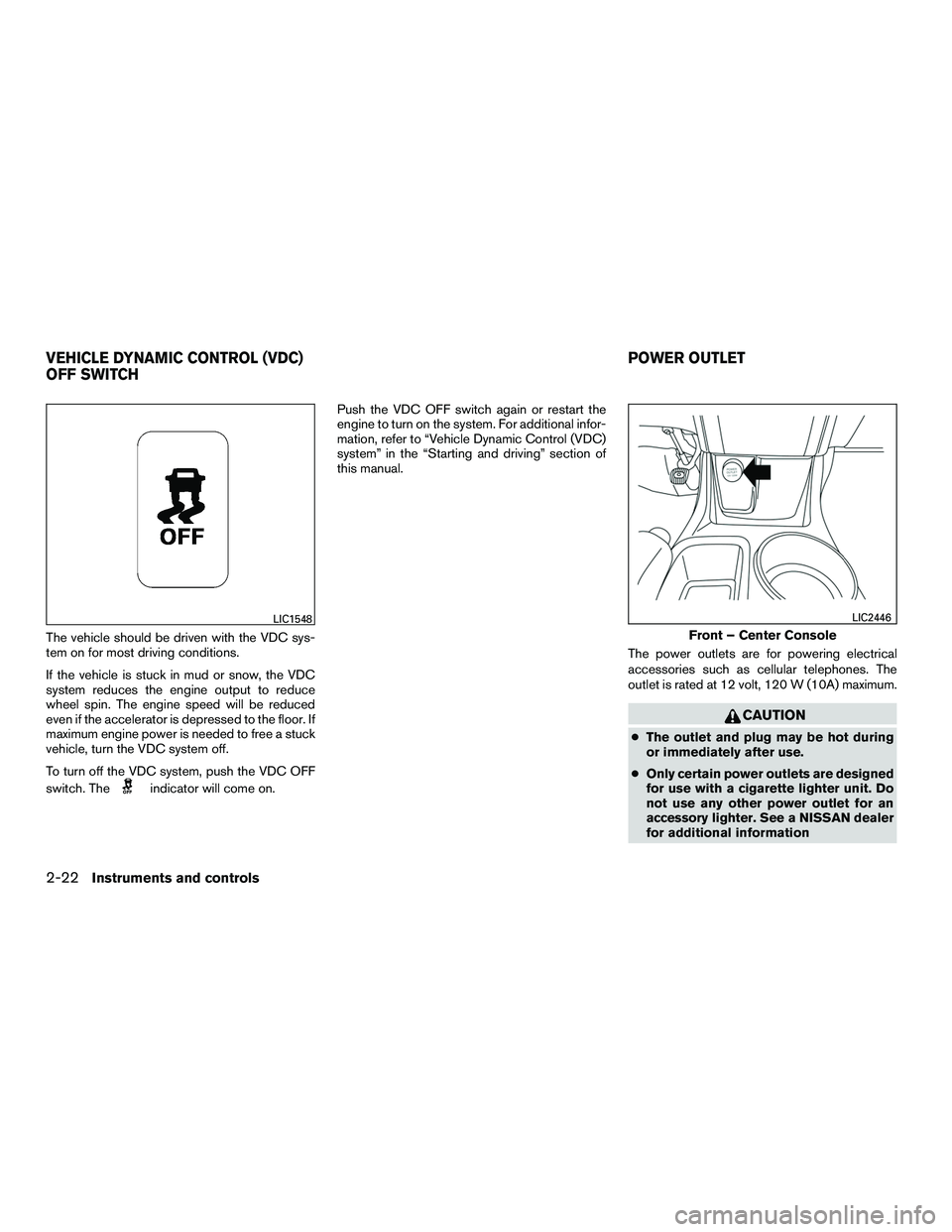
The vehicle should be driven with the VDC sys-
tem on for most driving conditions.
If the vehicle is stuck in mud or snow, the VDC
system reduces the engine output to reduce
wheel spin. The engine speed will be reduced
even if the accelerator is depressed to the floor. If
maximum engine power is needed to free a stuck
vehicle, turn the VDC system off.
To turn off the VDC system, push the VDC OFF
switch. The
indicator will come on.Push the VDC OFF switch again or restart the
engine to turn on the system. For additional infor-
mation, refer to “Vehicle Dynamic Control (VDC)
system” in the “Starting and driving” section of
this manual.
The power outlets are for powering electrical
accessories such as cellular telephones. The
outlet is rated at 12 volt, 120 W (10A) maximum.
CAUTION
●The outlet and plug may be hot during
or immediately after use.
● Only certain power outlets are designed
for use with a cigarette lighter unit. Do
not use any other power outlet for an
accessory lighter. See a NISSAN dealer
for additional information
LIC1548
Front – Center Console
LIC2446
VEHICLE DYNAMIC CONTROL (VDC)
OFF SWITCH POWER OUTLET
2-22Instruments and controls
Page 192 of 312
5 Starting and driving
Precautions when starting and driving................5-2
Exhaust gas (carbon monoxide) ..................5-2
Three-way catalyst ..............................5-2
Tire Pressure Monitoring System (TPMS) ..........5-3
Avoiding collision and rollover . . ..................5-5
Off-road recovery ...............................5-6
Rapid air pressure loss ..........................5-6
Drinking alcohol/drugs and driving ................5-7
Ignition switch .....................................5-7
Continuously Variable Transmission (CVT) .........5-8
Ignition switch positions .........................5-8
NISSAN Vehicle Immobilizer System ..............5-8
Before starting the engine ..........................5-9
Starting the engine ................................5-9
Driving the vehicle ................................ 5-10
Continuously Variable Transmission (CVT) ........5-10
Parking brake .................................... 5-14
Cruise control .................................... 5-15
Precautions on cruise control . . .................5-15Cruise control operations
.......................5-15
Break-in schedule ................................ 5-16
Fuel efficient driving tips ........................... 5-17
Increasing fuel economy ........................... 5-18
Parking/parking on hills ............................ 5-19
Power steering ................................... 5-20
Brake system .................................... 5-20
Brake precautions ............................. 5-20
Anti-lock Braking System (ABS) .................5-21
Vehicle Dynamic Control (VDC) system .............5-22
Brake force distribution ........................ 5-24
Cold weather driving .............................. 5-25
Freeing a frozen door lock ......................5-25
Antifreeze ..................................... 5-25
Battery ....................................... 5-25
Draining of coolant water .......................5-25
Tire equipment ................................ 5-25
Special winter equipment .......................5-25
Driving on snow or ice ......................... 5-25
Page 213 of 312
WARNING
Do not pump the brake pedal. Doing so
may result in increased stopping
distances.
Self-test feature
The ABS includes electronic sensors, electric
pumps, hydraulic solenoids and a computer. The
computer has a built-in diagnostic feature that
tests the system each time you start the engine
and move the vehicle at a low speed in forward or
reverse. When the self-test occurs, you may hear
a “clunk” noise and/or feel a pulsation in the brake
pedal. This is normal and does not indicate a
malfunction. If the computer senses a malfunc-
tion, it switches the ABS off and illuminates the
ABS warning light on the instrument panel. The
brake system then operates normally but without
anti-lock assistance.
If the ABS warning light illuminates during the
self-test or while driving, have the vehicle
checked. It is recommended that you visit a
NISSAN dealer for this service.
Normal operation
The ABS operates at speeds above3-6mph(5
- 10 km/h). The speed varies according to road
conditions.
When the ABS senses that one or more wheels
are close to locking up, the actuator rapidly ap-
plies and releases hydraulic pressure. This action
is similar to pumping the brakes very quickly. You
may feel a pulsation in the brake pedal and hear a
noise from under the hood or feel a vibration from
the actuator when it is operating. This is normal
and indicates that the ABS is operating properly.
However, the pulsation may indicate that road
conditions are hazardous and extra care is re-
quired while driving.The VDC system uses various sensors to monitor
driver inputs and vehicle motion. Under certain
driving conditions, the VDC system helps to per-
form the following functions:
● Controls brake pressure to reduce wheel
slip on one slipping drive wheel so power is
transferred to a non slipping drive wheel on
the same axle.
● Controls brake pressure and engine output
to reduce drive wheel slip based on vehicle
speed (traction control function) .
● Controls brake pressure at individual wheels
and engine output to help the driver maintain
control of the vehicle in the following condi-
tions:
– understeer (vehicle tends to not follow the steered path despite increased steer-
ing input)
– oversteer (vehicle tends to spin due to certain road or driving conditions)
The VDC system can help the driver to maintain
control of the vehicle, but it cannot prevent loss of
vehicle control in all driving situations.
VEHICLE DYNAMIC CONTROL (VDC)
SYSTEM
5-22Starting and driving
Page 214 of 312
When the VDC system operates, theindi-
cator in the instrument panel flashes to note the
following:
● The road may be slippery or the system may
determine some action is required to help
keep the vehicle on the steered path.
● You may feel a pulsation in the brake pedal
and hear a noise or vibration from under the
hood. This is normal and indicates that the
VDC system is working properly.
● Adjust your speed and driving to the road
conditions.
For additional information, refer to “Slip indicator
light” and “Vehicle Dynamic Control (VDC) OFF
indicator light” in the “Instruments and controls”
section of this manual.
If a malfunction occurs in the system, the
indicator light comes on in the instrument panel.
The VDC system automatically turns off when the
indicator light is on.
The VDC OFF switch is used to turn off the VDC
system. The
indicator illuminates to indi-
cate the VDC system is off.
When the VDC switch is used to turn off the
system, the VDC system still operates to prevent
one drive wheel from slipping by transferring
power to a non slipping drive wheel. The
indicator flashes if this occurs. All other VDC
functions are off and the
indicator will not
flash.
The VDC system is automatically reset to ON
when the ignition switch is placed in the OFF
position then back to the ON position.
The computer has a built in diagnostic feature
that tests the system each time you start the
engine and move the vehicle forward or in reverse
at a slow speed. When the self-test occurs, you
may hear a clunk noise and/or feel a pulsation in
the brake pedal. This is normal and is not an
indication of a malfunction.
WARNING
● The VDC system is designed to help the
driver maintain stability but does not
prevent accidents due to abrupt steer-
ing operation at high speeds or by care-
less or dangerous driving techniques.
Reduce vehicle speed and be especially
careful when driving and cornering on
slippery surfaces and always drive
carefully. ●
Do not modify the vehicle’s suspension.
If suspension parts such as shock ab-
sorbers, struts, springs, stabilizer bars,
bushings and wheels are not NISSAN
recommended for your vehicle or are
extremely deteriorated, the VDC system
may not operate properly. This could
adversely affect vehicle handling per-
formance, and the
indicator may
flash or the
indicator light may
illuminate.
● If brake related parts such as brake
pads, rotors and calipers are not
NISSAN recommended or are extremely
deteriorated, the VDC system may not
operate properly and both the
andindicator light may
illuminate.
● If engine control related parts are not
NISSAN recommended or are extremely
deteriorated, both the
and
the
indicator light may illuminate.
Starting and driving5-23