light NISSAN PATHFINDER 1998 R50 / 2.G Owner's Manual
[x] Cancel search | Manufacturer: NISSAN, Model Year: 1998, Model line: PATHFINDER, Model: NISSAN PATHFINDER 1998 R50 / 2.GPages: 249, PDF Size: 2.14 MB
Page 66 of 249

The indicator light will remain on as long as
the switch is on.
3. When the vehicle's interior is warmed or
before you leave the vehicle, be sure to turn
the switch off.IDo not use the seat heater for ex-
tended periods or when no one is
using the seat.
IDo not put anything on the seat which
insulates heat, such as a blanket,
cushion, seat cover, etc. Otherwise,
the seat may become overheated.
IDo not place anything hard or heavy
on the seat or pierce it with a pin or
similar object. This may result in
damage to the heater.
IAny liquid spilled on the heating seat
should be removed immediately with
a dry cloth.
IWhen cleaning the seat, never use
benzine, thinner, or any similar mate-
rials.IIf any abnormalities are found or the
heating seat does not operate, turn
the switch OFF and have the system
checked by your NISSAN dealer.
ITake care as the socket and plug may
be hot during or immediately after
use.
IThis power socket is not designed for
use with a cigarette lighter unit.
IDo not use with accessories that ex-
ceed a 12 volt, 120W (10A) power
draw. Do not use double adapters or
more than one electrical accessory.
SIC0686
POWER SOCKET
Instruments and controls
2-21
Z
01.1.31/R50-D
X
Page 67 of 249

IUse this power socket with the en-
gine running. (If the engine is
stopped, this could result in a dis-
charged battery.)
IAvoid using when the air conditioner,
headlights or rear window defogger
is on.
IBefore inserting or disconnecting a
plug, be sure to turn off the power
switch of electrical accessory being
used or the ACC power of the vehicle.
IPush the plug in as far as it will go. If
good contact is not made, the plug
may overheat or the internal tempera-
ture fuse may blow.
IWhen not in use, be sure to close the
cap. Do not allow water to contact the
socket.
The cigarette lighter operates when the igni-
tion switch is in ACC or ON.
Push the lighter in all the way. When the lighter
is heated, it will spring out.
Replace the lighter in its original position after
use.The cigarette lighter should not be used
while driving in order that full attention
may be given to the driving operation.The cigarette lighter socket is a power
source for the cigarette lighter element
only. The use of the cigarette lighter
socket as a power source for any other
accessory is not recommended.
SIC0685
CIGARETTE LIGHTER AND
ASHTRAYS
2-22
Instruments and controls
Z
01.1.31/R50-D
X
Page 68 of 249
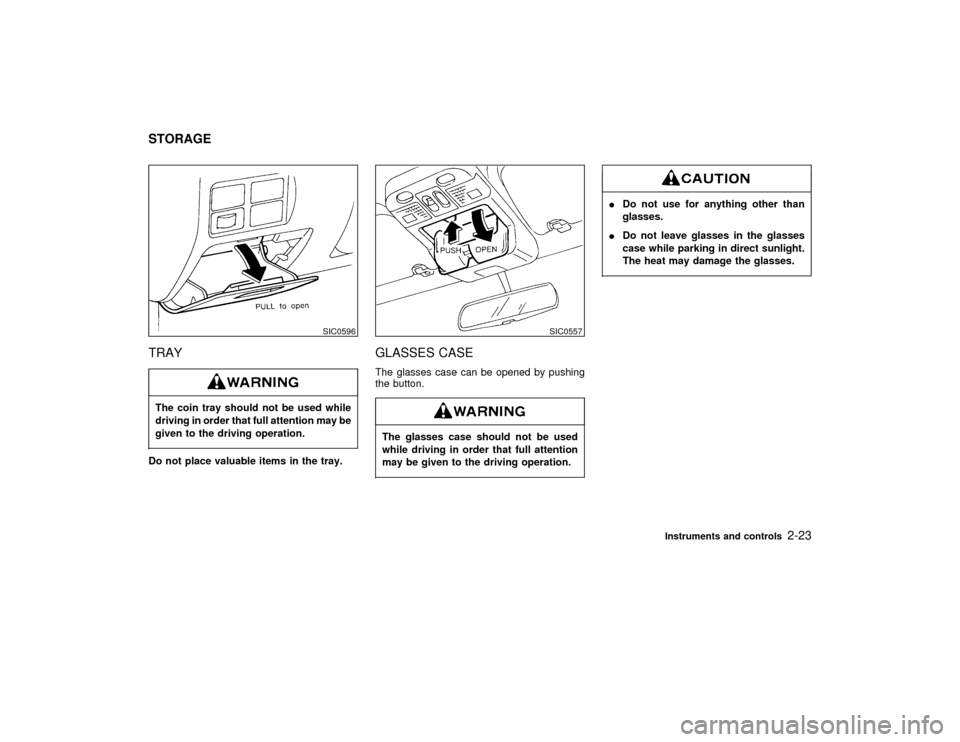
TRAYThe coin tray should not be used while
driving in order that full attention may be
given to the driving operation.Do not place valuable items in the tray.
GLASSES CASEThe glasses case can be opened by pushing
the button.The glasses case should not be used
while driving in order that full attention
may be given to the driving operation.
IDo not use for anything other than
glasses.
IDo not leave glasses in the glasses
case while parking in direct sunlight.
The heat may damage the glasses.
SIC0596
SIC0557
STORAGE
Instruments and controls
2-23
Z
01.1.31/R50-D
X
Page 77 of 249

Automatic operationTo fully open the driver side window, com-
pletely push down the switch and release it; it
need not be held. The window will automati-
cally open all the way. To stop the window, just
pull up the switch toward the close side.
A light press on the switch will cause the
window to open until the switch is released.
AUTOMATIC SUNROOFThe sunroof will only operate when the ignition
key is in the ON position.Sliding the sunroofTo open the roof, keep pressing the switch to
the
side.
To close the roof, keep pressing the switch to
theside.
Tilting the sunroofTo tilt up, first close the sunroof, then keep
pushing the
side of the tilt switch.To tilt down the sunroof, keep pushing the
side.
Sun shadeOpen/close the sun shade by sliding it
backward/forward.
SIC0601
SIC0560
SIC0561
SUNROOF (if so equipped)
2-32
Instruments and controls
Z
01.1.31/R50-D
X
Page 79 of 249

CLOCK OPERATIONBy pressing the CLOCK button, you can alter-
nate the clock and the radio/cassette tape
options in the display.CLOCK PRIORITY MODEIn this mode the clock will be shown in the
display. If any radio or cassette tape functions
are activated, the radio, cassette or CD display
will illuminate for ten seconds then return to
the clock mode.
After clock adjustment, the radio is in the
clock priority mode.The interior light has a three position switch.
The interior light will operate regardless of
ignition key position.
IWhen the switch is in the OFF position, theinterior light will not illuminate, regardless of
door position.
IWhen the switch is in the centerqposition,
the light will illuminate when a door is
opened.
IWhen the switch is in the ON position, the
interior light will illuminate, whether any
door is open or closed.
Leaving the interior light switch in the
ON position for extended periods of time
will result in a discharged battery.
SIC0691
SIC0564
INTERIOR LIGHT
2-34
Instruments and controls
Z
01.1.31/R50-D
X
Page 80 of 249

Do not use for extended periods of time
with the engine stopped. This could re-
sult in a discharged battery.
The light on the vanity mirror will turn on when
the cover on the vanity mirror is opened.The Integrated HomeLink
Transmitter pro-
vides a convenient way to consolidate the
functions of up to three individual hand-held
transmitters into one built-in device.
IThe Integrated HomeLinkTransmitter will
operate garage doors, gates, home/
office lighting systems and security sys-
tems by storing and transmitting the pro-
gramming information of your current hand-
held transmitters.
IThe Integrated HomeLink
Transmitter
is built-in and powered by your vehicle's
battery and charging system. No separate
batteries are necessary.
Do not use this Integrated HomeLinkTransmitter with any garage door
opener that lacks safety stop and re-
verse features as required by federal
safety standards (these standards be-
came effective for models manufactured
after April 1, 1982). A garage door
opener which cannot detect an object in
the path of a closing garage door and
then automatically stop and reverse the
door, does not meet current federal
safety standards. Using a garage door
SIC0565
SIC0186
PERSONAL LIGHT VANITY MIRROR LIGHT
INTEGRATED HomeLink
TRANSMITTER (if so equipped)
Instruments and controls
2-35
Z
01.1.31/R50-D
X
Page 81 of 249

opener without these features increases
the risk of serious injury or death.
PROGRAMMING THE HomeLinkTRANSMITTERDuring the programming procedure
your garage door or security gate will
open and close (if the transmitter is
within range). Make sure that people or
objects are clear of the garage door,
gate, etc. that you are programming.
Your vehicle's engine should be turned
off while programming your transmitter.The Integrated HomeLink
Transmitter
may not work with older garage door
openers that do not meet current Fed-
eral Consumer Safety Standards.
1. Test the Integrated HomeLink
Transmitter
by pressing any button. The red indicator
light should come on. If you have previously
programmed a button proceed to step 3.
2. Clear all channels on the Integrated
HomeLink
Transmitter by holding down
both outside buttons (#1 & #3) until the red
light begins to flash rapidly (approximately
20 seconds). Then release both buttons.
3. Select which of the three Integrated
HomeLinkTransmitter buttons you want to
program.
4. Hold your hand-held transmitter against the
bottom surface of the Integrated
HomeLinkTransmitter so that you can still
see the red indicator light.
5. Press the desired button until the red indi-
cator light flashes slowly. Do not release
the button. Continue holding and press the
hand-held transmitter button through step
6.
SIC0602
2-36
Instruments and controls
Z
01.1.31/R50-D
X
Page 82 of 249

6. Hold down both buttons until the
red indicator light on the Integrated
HomeLink
Transmitter flashes rapidly
(This may take 1 to 90 seconds). Then
release both buttons. The rapid flashing
means that the transmitter has been suc-
cessfully programmed to match your hand-
held transmitter. You can now use the
Integrated HomeLink
Transmitter instead
of your hand-held transmitter.
Note to Canadian users:
Prior to 1992, D.O.C. regulations required
many hand-held transmitters to stop transmit-
ting after one or two seconds, even though you
continue to hold down the button. If you think
you have one of these hand-held transmitters,
you should press and re-press the transmitter
button every 2 seconds without ever releasing
the integrated HomeLinkTransmitter button.
The indicator light on the Integrated
HomeLink
Transmitter should blink rapidly
indicating a successful programming proce-
dure. If it returns to the slow blink of program
mode, continue to periodically reactivate your
hand-held transmitter until a successful pro-
gramming procedure is indicated by the rapidly
flashing indicator light.
OPERATING THE TRANSMITTERTo operate, simply press the appropriate but-
ton on the Integrated HomeLink
Transmitter.
The red indicator light illuminates while the
signal is being transmitted. The effective trans-
mission range of the Integrated HomeLink
Transmitter may differ from your hand-held
transmitter.PROGRAMMING PROBLEM
DIAGNOSISBe sure to keep your original hand-held trans-
mitter for possible reprogramming if neces-
sary.
IMake sure batteries in the hand-held trans-
mitter are fully charged.
IHold your hand-held transmitter against the
bottom surface of the Integrated
HomeLink
Transmitter so that you can still
see the red indicator light.
IHold buttons for duration of the program-
ming without interruption.IRotate your hand-held transmitter end-
over-end and program again. For best re-
sults, place the end opposite the battery
compartment against the Integrated
HomeLink
Transmitter when program-
ming.Instruments and controls
2-37
Z
01.1.31/R50-D
X
Page 83 of 249

ROLLING CODES (if so equipped)If your hand held transmitter appears to train to
the HomeLink
Transmitter, but does not open
your garage door, and your garage door
opener was manufactured after 1995, your
garage door opener may have a Code Pro-
tected or Rolling Code feature. This type of
system will change the code of your garage
door opener every time you open or close your
garage door.
To determine if you have one of these sys-
tems, depress the button on the HomeLink
Transmitter that you have just programmed. If
the LED on the HomeLink
Transmitterflashes rapidly for 1 to 2 seconds, then re-
mains on, your garage door opener has a
rolling code system.
To operate your Rolling Code garage door
opener from your HomeLink
Transmitter, fol-
low these steps:
1. Program your hand held transmitter to the
HomeLink
Transmitter by following the
procedures outlined above (if not yet pro-
grammed).
2. Program your garage door opener receiver
to recognize your HomeLink
Transmitter
(The HomeLink
Transmitter follows the
same procedure to train to the receiver as
your hand held transmitter did when it was
first installed):
a) Remove the cover panel from your ga-
rage door opener receiver. The receiver
should be located by the garage door
opener motor.
b) Locate the training button on the garage
door opener receiver. The exact location
and color of the button may vary by
garage door opener brand. If you have
difficulty locating the training button, ref-
erence your garage door opener
manual. If you have difficulty program-
ming your garage door opener equippedwith a rolling code system to recognize
the HomeLink
Transmitter with the
Rolling Code feature, call NISSAN Con-
sumer Affairs Department.
c) Press the training button on the garage
door opener receiver for 1 to 2 seconds.
d) Return to the HomeLink
Transmitter in
the vehicle, and depress the pro-
grammed HomeLink
button for the du-
ration of the fast blink on the HomeLink
Transmitter (1 to 2 seconds). Release
the button, and re-press to confirm that
the system has trained.
e) Your garage door opener should now
recognize your HomeLink
Transmitter.
You may use either your HomeLink
Transmitter or your original hand held
transmitter to open your garage door.
CLEARING THE PROGRAMMING
INFORMATIONShould you sell your vehicle, be sure to clear
the channels of the Integrated HomeLinkTransmitter. To clear the channels, simulta-
neously hold down the outside two buttons (#1
& #3) until the red indicator light begins to flash
rapidly (approximately 20 seconds). This will
clear all three buttons. Individual buttons can-
not be cleared, but can be reprogrammed at
SPA0609
2-38
Instruments and controls
Z
01.1.31/R50-D
X
Page 90 of 249

Unlocking doors1. Push the
button on the multi-remote
controller. Only the driver side door will
unlock.
2. Push thebutton on the multi-remotecontroller again within 5 seconds.
All doors will unlock.
3. The interior light will stay on for 30 seconds
when the interior light switch is in the center
qposition.The interior light can be turned off without
waiting for 30 seconds by inserting the key into
the ignition or by locking the doors with the
multi-remote controller or by pushing the inte-
rior light button.
Using the panic alarmIf you are near your vehicle and feel threat-
ened, you may activate the alarm to call atten-
tion as follows:
1. Push the
button on the remote control-
ler forlonger than 1.5 seconds.
2. The theft warning alarm and headlights will
stay on for 30 seconds.
3. The alarm will stop when any of the key
functions are used. For example, when the
or the
button is pushed, or the
button is pushed for longer than 1.5
seconds on the multi-remote controller, the
panic alarm function will be cancelled.
The remote controller will not function.
IWhen the key is inserted into the key
switch.
IWhen the battery in the remote control-
ler is dead.
IThe distance between the remote con-
SPA0398
Pre-driving checks and adjustments
3-5
Z
01.1.31/R50-D
X