ESP NISSAN PATHFINDER 2002 R50 / 2.G User Guide
[x] Cancel search | Manufacturer: NISSAN, Model Year: 2002, Model line: PATHFINDER, Model: NISSAN PATHFINDER 2002 R50 / 2.GPages: 288, PDF Size: 2.49 MB
Page 148 of 288
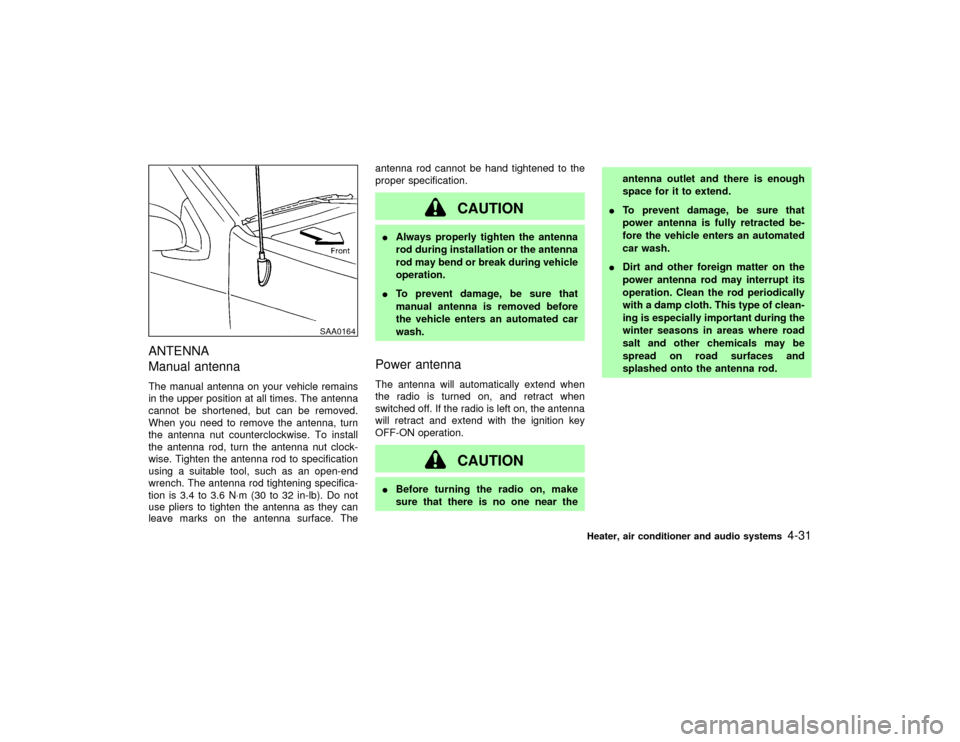
ANTENNA
Manual antennaThe manual antenna on your vehicle remains
in the upper position at all times. The antenna
cannot be shortened, but can be removed.
When you need to remove the antenna, turn
the antenna nut counterclockwise. To install
the antenna rod, turn the antenna nut clock-
wise. Tighten the antenna rod to specification
using a suitable tool, such as an open-end
wrench. The antenna rod tightening specifica-
tion is 3.4 to 3.6 N×m (30 to 32 in-lb). Do not
use pliers to tighten the antenna as they can
leave marks on the antenna surface. Theantenna rod cannot be hand tightened to the
proper specification.
CAUTION
IAlways properly tighten the antenna
rod during installation or the antenna
rod may bend or break during vehicle
operation.
ITo prevent damage, be sure that
manual antenna is removed before
the vehicle enters an automated car
wash.Power antennaThe antenna will automatically extend when
the radio is turned on, and retract when
switched off. If the radio is left on, the antenna
will retract and extend with the ignition key
OFF-ON operation.
CAUTION
IBefore turning the radio on, make
sure that there is no one near theantenna outlet and there is enough
space for it to extend.
ITo prevent damage, be sure that
power antenna is fully retracted be-
fore the vehicle enters an automated
car wash.
IDirt and other foreign matter on the
power antenna rod may interrupt its
operation. Clean the rod periodically
with a damp cloth. This type of clean-
ing is especially important during the
winter seasons in areas where road
salt and other chemicals may be
spread on road surfaces and
splashed onto the antenna rod.
SAA0164
Heater, air conditioner and audio systems
4-31
Z
01.9.21/R50-D/V5
X
Page 158 of 288
IMake sure the area around the vehicle is
clear.
ICheck fluid levels such as engine oil, cool-
ant, brake and clutch fluid, window washer
fluid as frequently as possible, at least
whenever you refuel.
ICheck to be sure that all windows and light
lenses are clean.
IVisually inspect tires for their appearance
and condition. Also check tires for proper
inflation.
ILock all doors.
IPosition seat and adjust head restraints.
IAdjust inside and outside mirrors.
IFasten seat belts and ask all passengers to
do likewise.
ICheck the operation of warning lights when
key is turned to the ON (3) position.1. Apply the parking brake.
2.Automatic transmission:
Move the selector lever to P (Park position)
or N (Neutral position). (P preferred)
The selector lever cannot be moved out
of P and into any of the other gear
positions if the ignition key is turned to
LOCK or if the key is removed from the
switch.
The starter is designed not to operate if
the selector lever is in one of the driving
positions.
Manual transmission:
Move the gearshift lever to N (Neutral po-
sition), and depress the clutch pedal to the
floor while starting the engine.
The starter is designed not to operate
unless the clutch pedal is fully de-
pressed.
3. Crank the enginewith your foot off the
accelerator pedalby turning the ignition
key to START. Release the key when the
engine starts. If the engine starts, but fails
to run, repeat the above procedure.
Ð If the engine is very hard to start in
extremely cold or hot weather ÐUse the accelerator pedal to help start the
engine.
CAUTION
Do not operate the starter for more than
15 seconds at a time. If the engine does
not start, turn the key off and wait 10
seconds before cranking again, other-
wise the starter could be damaged.
4.Warm-up
Always allow the engine to idle for at least
30 seconds after starting. Drive at moder-
ate speed for a short distance first, espe-
cially in cold weather.
BEFORE STARTING THE ENGINE STARTING THE ENGINE
Starting and driving
5-9
Z
01.9.21/R50-D/V5
X
Page 176 of 288
This occurs because the transfer clutch
is released and not because of a mal-
function.
CAUTION
IWhen driving straight, shift the 4WD
shift switch to the 2WD, AUTO, or 4H
position. Do not move the 4WD shift
switch when making a turn or revers-
ing.
IDo not shift the 4WD shift switch
while driving on steep downhill
grades. Use the engine brake.
IDo not operate the 4WD shift switch
with the rear wheels spinning.
IBefore placing the 4WD shift switch
in the 4H position from 2WD or AUTO,
ensure the vehicle speed is less than
50 MPH (80 km/h). Failure to do so
can damage the 4WD system.
INever shift the 4WD shift switch be-
tween 4LO and 4H while driving.
IEngine idling speed is high while
warming up the engine. Be espe-cially careful when starting or driving
on slippery surfaces with the 4WD
shift switch set in AUTO.
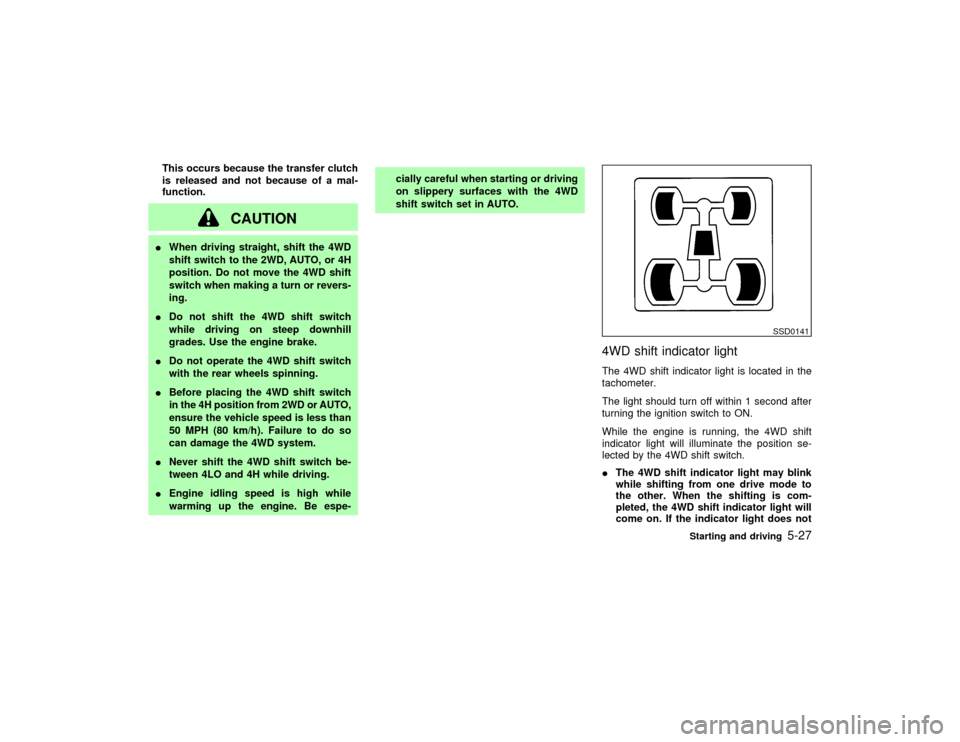
4WD shift indicator lightThe 4WD shift indicator light is located in the
tachometer.
The light should turn off within 1 second after
turning the ignition switch to ON.
While the engine is running, the 4WD shift
indicator light will illuminate the position se-
lected by the 4WD shift switch.
IThe 4WD shift indicator light may blink
while shifting from one drive mode to
the other. When the shifting is com-
pleted, the 4WD shift indicator light will
come on. If the indicator light does not
SSD0141
Starting and driving
5-27
Z
01.9.21/R50-D/V5
X
Page 178 of 288
this occurs, move the 4WD shift switch to the
4H or 4LO position.
The 4WD warning light comes on when the
key switch is turned to ON. It turns off soon
after the engine is started.
If any malfunction occurs in the 4WD system
when the key switch is ON, the warning light
will either remain illuminated or blink.
If the 4WD warning light comes on, the 4WD
indicator light goes out.
High-temperature transfer case oil makes the
warning light blink rapidly (about twice per
second). If the warning light blinks rapidly
during operation, stop the vehicle in a safe
place immediately. Then if the light goes off
after a while, you can continue driving.
A large difference between the diameters of
front and rear wheels will make the warning
light blink slowly (about once per two sec-
onds). Change the 4WD shift switch into 2WD
and do not drive fast.
CAUTION
IIf the warning light comes on or
blinks slowly during operation or rap-idly after stopping the vehicle for a
while, have your vehicle checked by
an authorized NISSAN dealer as soon
as possible.
IShifting between 4H and 4LO is not
recommended when the 4WD warn-
ing light turns on.
IWhen the warning light comes on, the
2WD mode may be engaged even if
the 4WD shift switch is in AUTO or
4H. Be especially careful when driv-
ing. If corresponding parts are mal-
functioning, the 4WD mode will not
be engaged even if the 4WD shift
switch is shifted.
IDo not drive on dry hard surface
roads in the 4H or 4LO position.
If the 4WD warning light turns on
when you are driving on dry hard
surface roads
Iin the AUTO or 4H position, shift
the 4WD shift switch to 2WD.
Iin the 4LO position, stop the ve-hicle, move the automatic transmis-
sion lever to the N position, and shift
the 4WD shift switch to 2WD.
IIf the warning light is still on after the
above operation, have your vehicle
checked by an authorized NISSAN
dealer as soon as possible.
IThe transfer case may be damaged if
you continue driving with the warning
light blinking rapidly.
Starting and driving
5-29
Z
01.9.21/R50-D/V5
X
Page 180 of 288
Part time 4WD models:
IIf the ATP light is ON, this indicates
that the automatic transmission P
(park) position will not function and
the transfer shift lever is in the N
position. Failure to engage the trans-
fer shift lever in H or 4L could result
in the vehicle moving unexpectedly,
resulting in serious personal injury or
property damage.
All-mode 4WD models:
IIf the ATP light is ON, this indicates
that the automatic transmission P
(park) position will not function and
the transfer case is in neutral. Make
sure that the 4WD shift indicator light
(and transfer 4LO position indicator)
light remains illuminated before stop-
ping the engine. Otherwise, the ve-
hicle could unexpectedly move even
if the automatic transmission is in the
P (park) position.
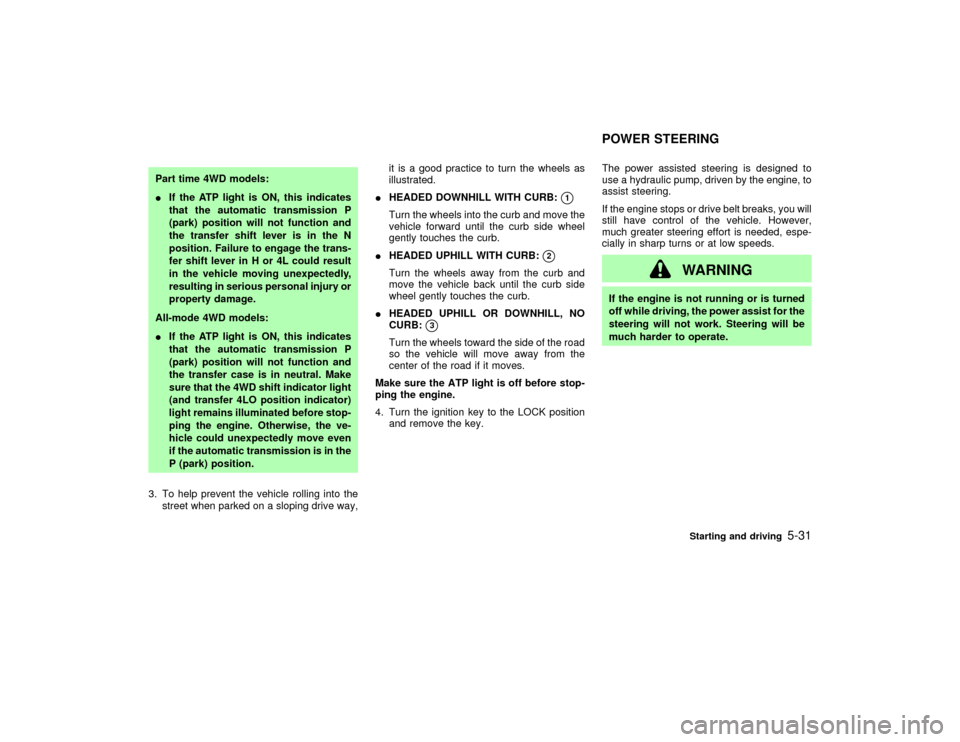
3. To help prevent the vehicle rolling into the
street when parked on a sloping drive way,it is a good practice to turn the wheels as
illustrated.
IHEADED DOWNHILL WITH CURB:
q1
Turn the wheels into the curb and move the
vehicle forward until the curb side wheel
gently touches the curb.
IHEADED UPHILL WITH CURB:
q2
Turn the wheels away from the curb and
move the vehicle back until the curb side
wheel gently touches the curb.
IHEADED UPHILL OR DOWNHILL, NO
CURB:
q3
Turn the wheels toward the side of the road
so the vehicle will move away from the
center of the road if it moves.
Make sure the ATP light is off before stop-
ping the engine.
4. Turn the ignition key to the LOCK position
and remove the key.The power assisted steering is designed to
use a hydraulic pump, driven by the engine, to
assist steering.
If the engine stops or drive belt breaks, you will
still have control of the vehicle. However,
much greater steering effort is needed, espe-
cially in sharp turns or at low speeds.
WARNING
If the engine is not running or is turned
off while driving, the power assist for the
steering will not work. Steering will be
much harder to operate.POWER STEERING
Starting and driving
5-31
Z
01.9.21/R50-D/V5
X
Page 182 of 288
conditions are hazardous and extra care is
required while driving.
If a tire slips on rough roads for more than
10 seconds, the ABS brake warning light
may come on. Turn OFF the ignition key,
restart the engine and drive the vehicle at
speeds above 20 MPH (30 km/h). If the
warning light does not go out, have the
vehicle checked at a NISSAN dealer.Self-test featureThe anti-lock brake system consists of elec-
tronic sensors, electric pumps, and hydraulic
solenoids controlled by a computer. The com-
puter has a built-in diagnostic feature that tests
the system each time you start the engine and
move the vehicle at a low speed in forward or
reverse. When the self-test occurs, you may
hear a clunk noise and/or feel a pulsation in
the brake pedal. This is normal and is not an
indication of any malfunction. If the computer
senses any malfunction, it switches the anti-
lock brake system OFF and turns on the ABS
brake warning light in the dashboard. The
brake system will then behave normally, but
without anti-lock assistance.
If the light comes on during the self check, or
while you are driving, you should take your
vehicle to your NISSAN dealer for repair at
your earliest convenience.
WARNING
The anti-lock brake system is a sophis-
ticated device, but it cannot prevent ac-
cidents resulting from careless or dan-
gerous driving techniques. It can help
maintain vehicle control during braking
on slippery surfaces, but remember that
the stopping distance on slippery sur-
faces will be longer than on normal
surfaces, even with the anti-lock sys-
tem. Stopping distances may also be
longer on rough, gravel or snow covered
roads, or if you are using tire chains.
Always maintain a safe distance from
the vehicle in front of you. Ultimately,
the responsibility for safety of self and
others rests in the hands of the driver.
Tire type and condition of tires may also
affect braking effectiveness.
IWhen replacing tires, install the
specified size of tires on all four
wheels.
IWhen installing a spare tire, make
sure it is the proper size and type asspecified on the tire placard. See
ªTire placardº in the ª9. Technical
and consumer informationº section
for tire placard location information.
Starting and driving
5-33
Z
01.9.21/R50-D/V5
X
Page 191 of 288
the vehicle to move. This is especially
true for vehicle with limited slip dif-
ferential carriers.
IDo not allow passengers to stay in
the vehicle while it is on the jack.
Carefully read the following instructions.
1. Place the jack directly under the jack-up
point.
The jack should be used on level firm
ground.
2. Loosen each wheel nut one or two turns by
turning counterclockwise with the wheel nut
wrench.
Do not remove the wheel nuts until the tire
is off the ground.
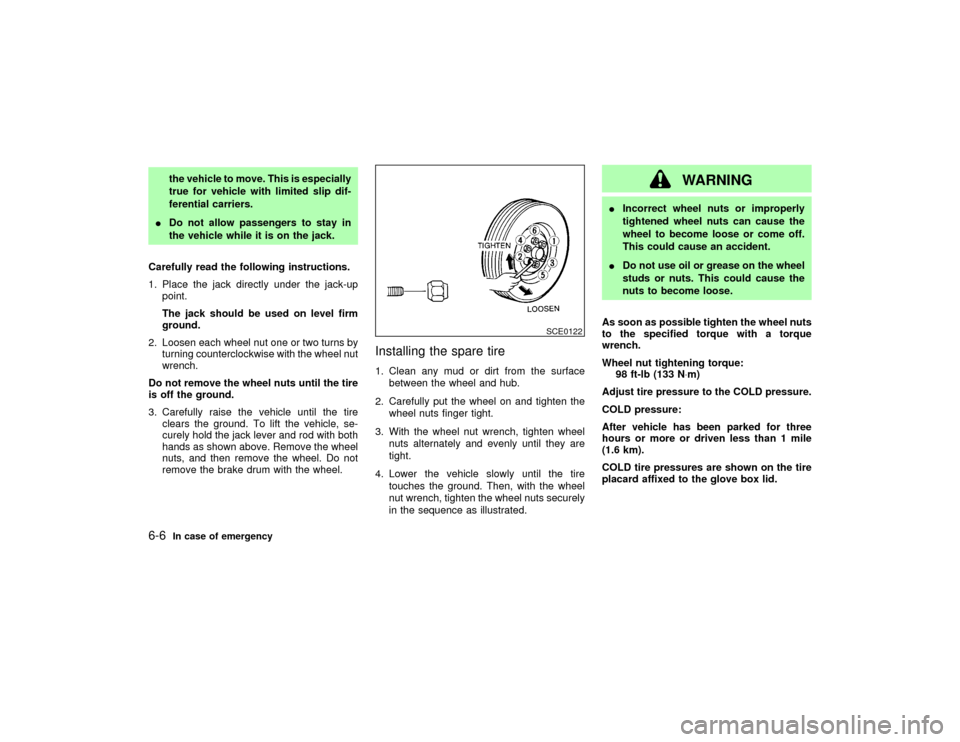
3. Carefully raise the vehicle until the tire
clears the ground. To lift the vehicle, se-
curely hold the jack lever and rod with both
hands as shown above. Remove the wheel
nuts, and then remove the wheel. Do not
remove the brake drum with the wheel.
Installing the spare tire1. Clean any mud or dirt from the surface
between the wheel and hub.
2. Carefully put the wheel on and tighten the
wheel nuts finger tight.
3. With the wheel nut wrench, tighten wheel
nuts alternately and evenly until they are
tight.
4. Lower the vehicle slowly until the tire
touches the ground. Then, with the wheel
nut wrench, tighten the wheel nuts securely
in the sequence as illustrated.
WARNING
IIncorrect wheel nuts or improperly
tightened wheel nuts can cause the
wheel to become loose or come off.
This could cause an accident.
IDo not use oil or grease on the wheel
studs or nuts. This could cause the
nuts to become loose.
As soon as possible tighten the wheel nuts
to the specified torque with a torque
wrench.
Wheel nut tightening torque:
98 ft-lb (133 N×m)
Adjust tire pressure to the COLD pressure.
COLD pressure:
After vehicle has been parked for three
hours or more or driven less than 1 mile
(1.6 km).
COLD tire pressures are shown on the tire
placard affixed to the glove box lid.
SCE0122
6-6
In case of emergency
Z
01.9.21/R50-D/V5
X
Page 206 of 288
IWax your vehicle only after a thorough
washing. Follow the instructions supplied
with the wax.
IDo not use a wax containing any abrasives,
cutting compounds or cleaners that may
damage the vehicle finish.
IIf the surface does not polish easily, use a
road tar remover and wax again.
Machine compounding or aggressive pol-
ishing on a base coat/clear coat paint finish
may dull the finish or leave swirl marks.
Only apply black wax or black shoe polish to
the black urethane or polypropylene bumper.REMOVING SPOTSRemove tar and oil spots, industrial dust, in-
sects and tree sap as quickly as possible from
the surface of the paint to avoid lasting dam-
age or staining. Special cleaning products are
available at your NISSAN dealer or any auto-
motive accessories store.UNDERBODYIn areas where road salt is used in winter, it is
necessary to clean the underbody regularly in
order to prevent dirt and salt from building up
and causing corrosion on the underbody and
suspension. Before the winter period andagain in the spring, the underseal must be
checked and, if necessary, re-treated.
GLASSUse glass cleaner to remove smoke and dust
film from the glass surfaces. It is normal for
glass to be coated with a film after the vehicle
is parked in the hot sun. Glass cleaner and a
soft cloth will easily remove this film.
CAUTION
When cleaning the inside of the window,
do not use sharp-edged tools, abrasive
cleaners or chlorine based disinfectant
cleaners. They could damage the elec-
trical conductors, radio antenna ele-
ments or rear window defogger ele-
ments.ALUMINUM ALLOY WHEELSWash regularly, especially during winter
months in areas where road salt is used. Salt
could discolor the wheel if not removed.CHROME PARTSClean all chrome parts regularly with a non-
abrasive chrome polish to maintain the finish.Occasionally remove loose dust from the inte-
rior trim, plastic parts and seats using a
vacuum cleaner or soft brush. Wipe the vinyl
and leather surfaces with a clean, soft cloth
dampened in mild soap solution, then wipe
clean with a dry soft cloth. Before using any
fabric protector, read the manufacturer's rec-
ommendations. Some fabric protectors con-
tains chemicals that stain or bleach the seat
material. Use a cloth dampened only with
water, to clean the meter and gauge lens.
CAUTION
INever use gasoline, thinner or any
similar material.
IThe leather seats should be regularly
coated with a leather wax like saddle
soap. Never use car wax.
INever use fabric protectors unless
recommended by the manufacturer.
IDo not use glass or plastic cleaner on
meter or gauge lens covers. It may
damage the lens cover.CLEANING INTERIOR
Appearance and care
7-3
Z
01.9.21/R50-D/V5
X
Page 207 of 288
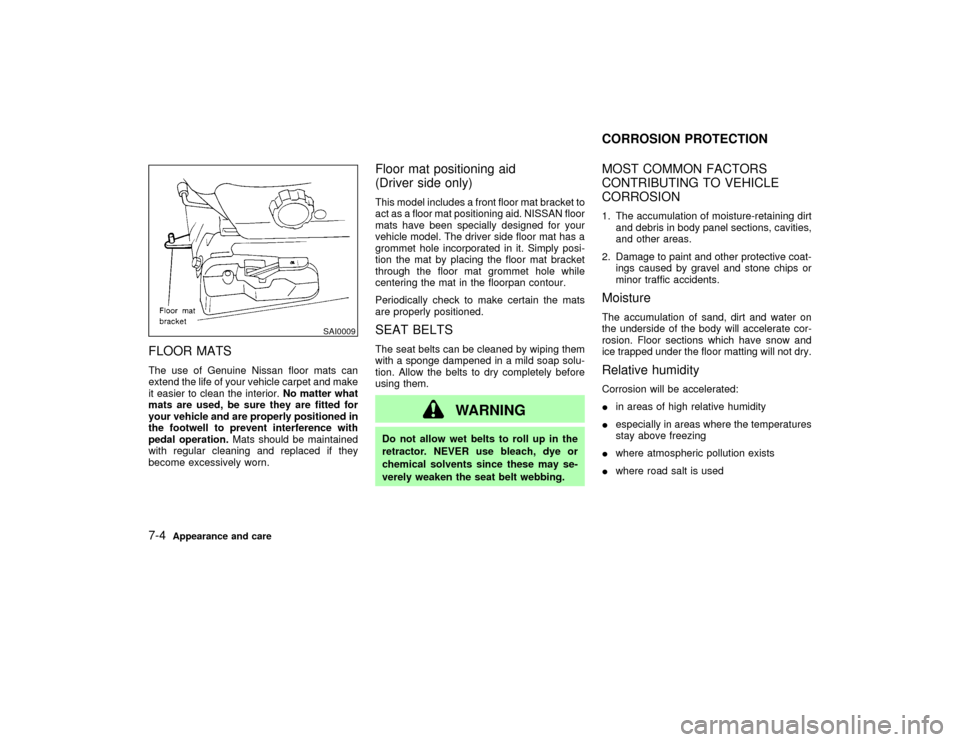
FLOOR MATSThe use of Genuine Nissan floor mats can
extend the life of your vehicle carpet and make
it easier to clean the interior.No matter what
mats are used, be sure they are fitted for
your vehicle and are properly positioned in
the footwell to prevent interference with
pedal operation.Mats should be maintained
with regular cleaning and replaced if they
become excessively worn.
Floor mat positioning aid
(Driver side only)This model includes a front floor mat bracket to
act as a floor mat positioning aid. NISSAN floor
mats have been specially designed for your
vehicle model. The driver side floor mat has a
grommet hole incorporated in it. Simply posi-
tion the mat by placing the floor mat bracket
through the floor mat grommet hole while
centering the mat in the floorpan contour.
Periodically check to make certain the mats
are properly positioned.SEAT BELTSThe seat belts can be cleaned by wiping them
with a sponge dampened in a mild soap solu-
tion. Allow the belts to dry completely before
using them.
WARNING
Do not allow wet belts to roll up in the
retractor. NEVER use bleach, dye or
chemical solvents since these may se-
verely weaken the seat belt webbing.
MOST COMMON FACTORS
CONTRIBUTING TO VEHICLE
CORROSION1. The accumulation of moisture-retaining dirt
and debris in body panel sections, cavities,
and other areas.
2. Damage to paint and other protective coat-
ings caused by gravel and stone chips or
minor traffic accidents.MoistureThe accumulation of sand, dirt and water on
the underside of the body will accelerate cor-
rosion. Floor sections which have snow and
ice trapped under the floor matting will not dry.Relative humidityCorrosion will be accelerated:
Iin areas of high relative humidity
Iespecially in areas where the temperatures
stay above freezing
Iwhere atmospheric pollution exists
Iwhere road salt is used
SAI0009
CORROSION PROTECTION
7-4
Appearance and care
Z
01.9.21/R50-D/V5
X
Page 211 of 288

Your new NISSAN has been designed to have
minimum maintenance requirements with
longer service intervals to save you both time
and money. However, some day-to-day and
regular maintenance is essential to maintain
your NISSAN's good mechanical condition, as
well as its emission and engine performance.
It is the owner's responsibility to make sure
that scheduled maintenance, as well as gen-
eral maintenance, is performed.
As the vehicle owner, you are the only one
who can ensure that your vehicle receives the
proper maintenance care. You are a vital link
in the maintenance chain.
Scheduled maintenance:
For your convenience, both required and op-
tional scheduled maintenance items are de-
scribed and listed in your ªService and Main-
tenance Guideº. You must refer to that guide to
ensure that necessary maintenance is per-
formed on your NISSAN at regular intervals.
General maintenance:
General maintenance includes those items
which should be checked during normal day-
to-day operation of the vehicle. They are es-
sential if your vehicle is to continue to operate
properly. It is your responsibility to perform
these procedures regularly as prescribed.Performing general maintenance checks re-
quire minimal mechanical skill and only a few
general automotive tools.
These checks or inspections can be done by
yourself, a qualified technician or, if you prefer,
your NISSAN dealer.
Where to go for service:
If maintenance service is required or your
vehicle appears to malfunction, have the sys-
tems checked and tuned by an authorized
NISSAN dealer.
NISSAN technicians are well-trained special-
ists and are kept up to date with the latest
service information through technical bulletins,
service tips, and in-dealership training pro-
grams. They are completely qualified to work
on NISSAN vehiclesbeforethey work on your
vehicle, rather than after they have worked on
it.
You can be confident that your NISSAN deal-
er's service department performs the best job
to meet the maintenance requirements of your
vehicle Ð in a reliable and economic way.During the normal day-to-day operation of the
vehicle, general maintenance should be per-
formed regularly as prescribed in this section.
If you detect any unusual sounds, vibrations or
smell, be sure to check for the cause or have
your NISSAN dealer check it promptly. In
addition, you should notify your NISSAN
dealer if you think that repairs are required.
When performing any checks or maintenance
work, closely observe the ªMaintenance pre-
cautionsº later in this section.
EXPLANATION OF GENERAL
MAINTENANCE ITEMSAdditional information on the following
items with ª*º is found later in this section.Outside the vehicleThe maintenance items listed here should be
performed from time to time, unless otherwise
specified.
Tires*:
Check the pressure with a gauge at least once
a month and always prior to long distance
trips, including the spare, and adjust to the
specified pressure if necessary. Check care-
fully for damage, cuts or excessive wear.
MAINTENANCE REQUIREMENTS GENERAL MAINTENANCE8-2
Maintenance and do-it-yourself
Z
01.9.21/R50-D/V5
X