4WD NISSAN PATHFINDER 2010 Owner´s Manual
[x] Cancel search | Manufacturer: NISSAN, Model Year: 2010, Model line: PATHFINDER, Model: NISSAN PATHFINDER 2010Pages: 463, PDF Size: 5.69 MB
Page 345 of 463
When the vehicle is stuck,
cSet the 4WD shift switch to 4H or 4LO.
cIf it is difficult to free the vehicle, repeat
forward and backward movement to in-
crease the movement.
cIf the vehicle is stuck deep in mud, place
stones or wooden blocks under the tires.
Then try the recovery procedures above. Tire
chains may be effective.
CAUTION
cDo not spin the tires excessively. Tires
will sink deep into the mud, making it
difficult to free the vehicle.
cAvoid shifting gears with the engine
running at high speeds as this may
cause malfunction.
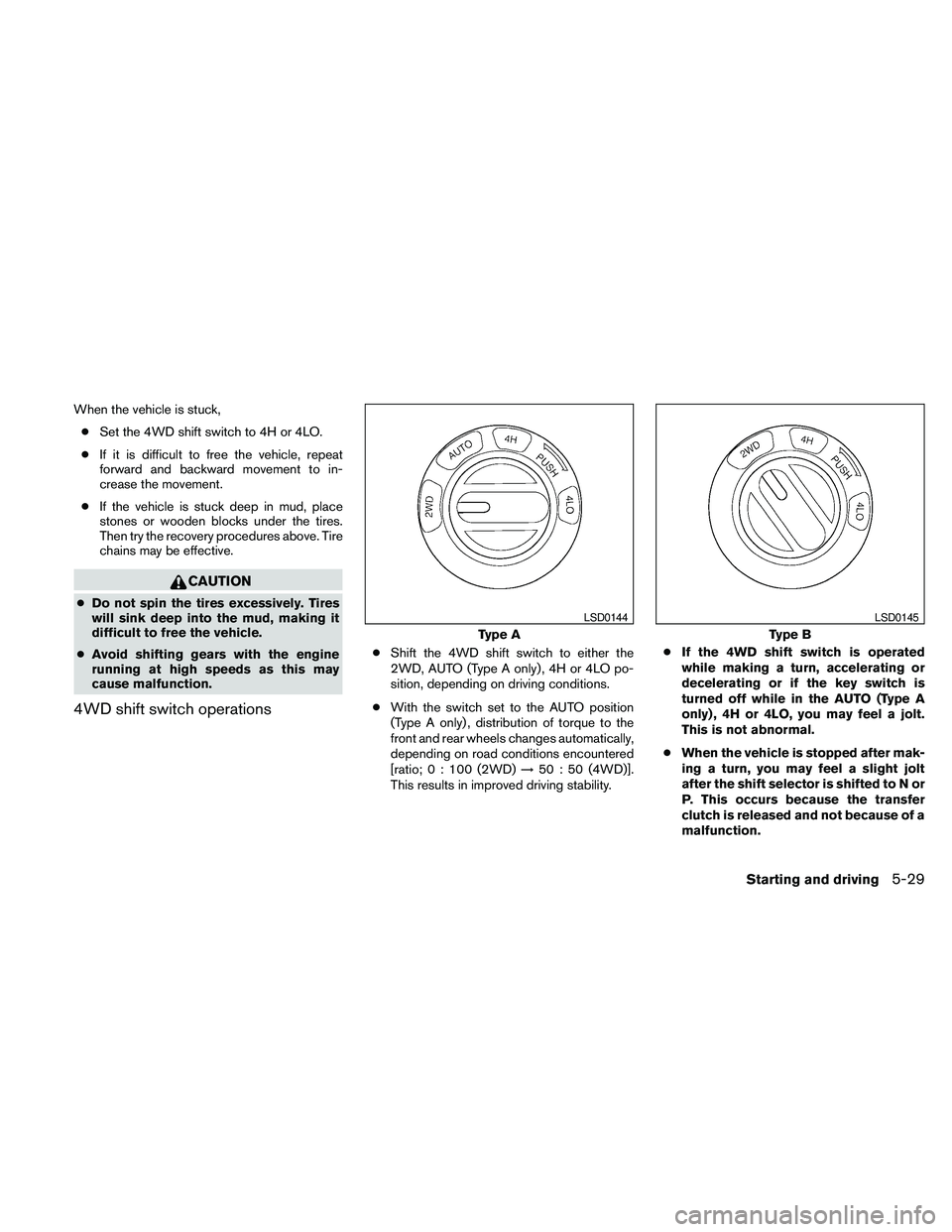
4WD shift switch operations
cShift the 4WD shift switch to either the
2WD, AUTO (Type A only) , 4H or 4LO po-
sition, depending on driving conditions.
cWith the switch set to the AUTO position
(Type A only) , distribution of torque to the
front and rear wheels changes automatically,
depending on road conditions encountered
[ratio; 0 : 100 (2WD)!50 : 50 (4WD)].
This results in improved driving stability.cIf the 4WD shift switch is operated
while making a turn, accelerating or
decelerating or if the key switch is
turned off while in the AUTO (Type A
only) , 4H or 4LO, you may feel a jolt.
This is not abnormal.
cWhen the vehicle is stopped after mak-
ing a turn, you may feel a slight jolt
after the shift selector is shifted to N or
P. This occurs because the transfer
clutch is released and not because of a
malfunction.
Type A
LSD0144
Type B
LSD0145
Starting and driving5-29
Page 346 of 463
CAUTION
cWhen driving straight, shift the 4WD
shift switch to the 2WD, AUTO or 4H
position. Do not move the 4WD shift
switch when making a turn or reversing.
cDo not shift the 4WD shift switch while
driving on steep downhill grades. Use
the engine brake and low automatic
transmission gears (D1 or D2) for en-
gine braking.
cDo not operate the 4WD shift switch
with the rear wheels spinning.
cBefore placing the 4WD shift switch in
the 4H position from 2WD or AUTO,
ensure the vehicle speed is less than 62
MPH (100 km/h) . Failure to do so can
damage the 4WD system.
cNever shift the 4WD shift switch be-
tween 4LO and 4H while driving.
cEngine idling speed is high while warm-
ing up the engine. Be especially careful
when starting or driving on slippery sur-
faces with the 4WD shift switch set in
AUTO.
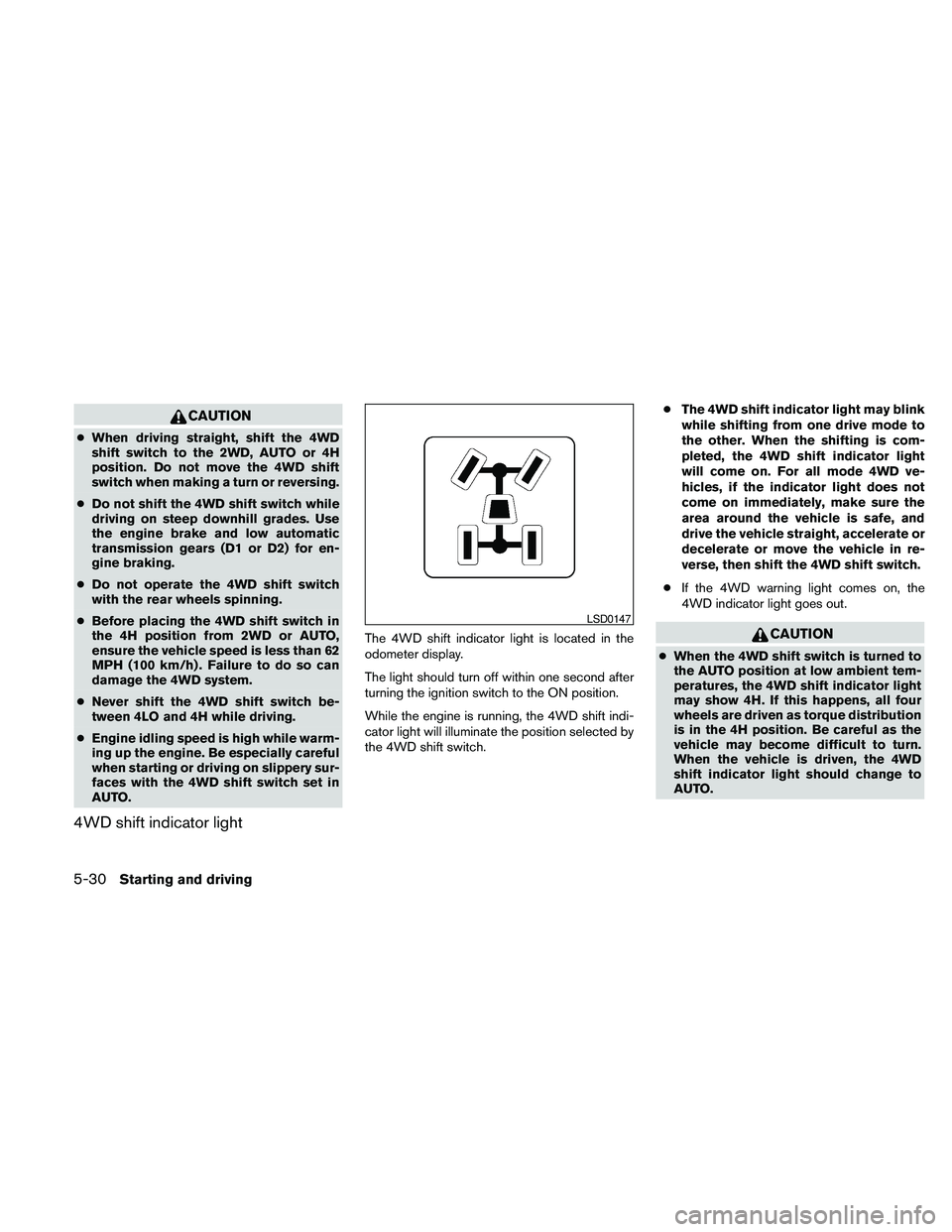
4WD shift indicator light
The 4WD shift indicator light is located in the
odometer display.
The light should turn off within one second after
turning the ignition switch to the ON position.
While the engine is running, the 4WD shift indi-
cator light will illuminate the position selected by
the 4WD shift switch.cThe 4WD shift indicator light may blink
while shifting from one drive mode to
the other. When the shifting is com-
pleted, the 4WD shift indicator light
will come on. For all mode 4WD ve-
hicles, if the indicator light does not
come on immediately, make sure the
area around the vehicle is safe, and
drive the vehicle straight, accelerate or
decelerate or move the vehicle in re-
verse, then shift the 4WD shift switch.
cIf the 4WD warning light comes on, the
4WD indicator light goes out.CAUTION
cWhen the 4WD shift switch is turned to
the AUTO position at low ambient tem-
peratures, the 4WD shift indicator light
may show 4H. If this happens, all four
wheels are driven as torque distribution
is in the 4H position. Be careful as the
vehicle may become difficult to turn.
When the vehicle is driven, the 4WD
shift indicator light should change to
AUTO.
LSD0147
5-30Starting and driving
Page 347 of 463
cIf the 4WD shift indicator light indica-
tion changes to 2WD when the 4WD
shift switch is shifted to the AUTO or 4H
position at low ambient temperatures,
the 2WD mode may be being engaged
due to malfunctioning drive system. If
the indicator does not return to normal
and the 4WD warning light comes on,
have the system checked by the nearest
NISSAN dealer.
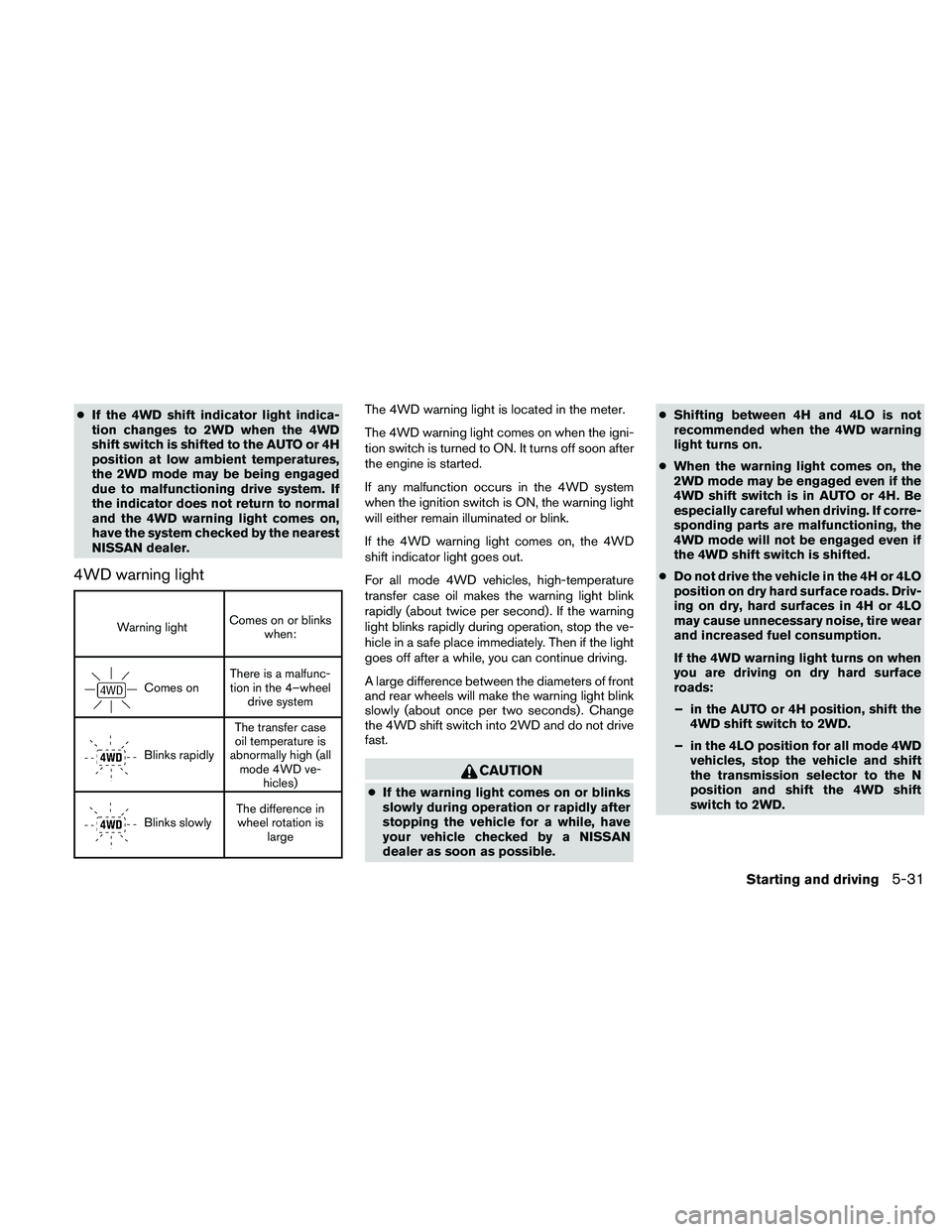
4WD warning light
Warning lightComes on or blinks
when:
Comes onThere is a malfunc-
tion in the 4–wheel
drive system
Blinks rapidlyThe transfer case
oil temperature is
abnormally high (all
mode 4WD ve-
hicles)
Blinks slowlyThe difference in
wheel rotation is
large
The 4WD warning light is located in the meter.
The 4WD warning light comes on when the igni-
tion switch is turned to ON. It turns off soon after
the engine is started.
If any malfunction occurs in the 4WD system
when the ignition switch is ON, the warning light
will either remain illuminated or blink.
If the 4WD warning light comes on, the 4WD
shift indicator light goes out.
For all mode 4WD vehicles, high-temperature
transfer case oil makes the warning light blink
rapidly (about twice per second) . If the warning
light blinks rapidly during operation, stop the ve-
hicle in a safe place immediately. Then if the light
goes off after a while, you can continue driving.
A large difference between the diameters of front
and rear wheels will make the warning light blink
slowly (about once per two seconds) . Change
the 4WD shift switch into 2WD and do not drive
fast.
CAUTION
cIf the warning light comes on or blinks
slowly during operation or rapidly after
stopping the vehicle for a while, have
your vehicle checked by a NISSAN
dealer as soon as possible.cShifting between 4H and 4LO is not
recommended when the 4WD warning
light turns on.
cWhen the warning light comes on, the
2WD mode may be engaged even if the
4WD shift switch is in AUTO or 4H. Be
especially careful when driving. If corre-
sponding parts are malfunctioning, the
4WD mode will not be engaged even if
the 4WD shift switch is shifted.
cDo not drive the vehicle in the 4H or 4LO
position on dry hard surface roads. Driv-
ing on dry, hard surfaces in 4H or 4LO
may cause unnecessary noise, tire wear
and increased fuel consumption.
If the 4WD warning light turns on when
you are driving on dry hard surface
roads:
– in the AUTO or 4H position, shift the
4WD shift switch to 2WD.
– in the 4LO position for all mode 4WD
vehicles, stop the vehicle and shift
the transmission selector to the N
position and shift the 4WD shift
switch to 2WD.
Starting and driving5-31
Page 351 of 463
WARNING
Do not pump the brake pedal. Doing so
may result in increased stopping
distances.
Normal operation
The ABS operates at speeds above3-6MPH(5
- 10 km/h) . The speed varies according to road
conditions.
When the ABS senses that 1 or more wheels are
close to locking up, the actuator rapidly applies
and releases hydraulic pressure. This action is
similar to pumping the brakes very quickly. You
may feel a pulsation in the brake pedal and hear a
noise from under the hood or feel a vibration from
the actuator when it is operating. This is normal
and indicates that the ABS is operating properly.
However, the pulsation may indicate that road
conditions are hazardous and extra care is re-
quired while driving.
Self-test feature
The ABS includes electronic sensors, electric
pumps, hydraulic solenoids and a computer. The
computer has a built-in diagnostic feature that
tests the system each time you start the engine
and move the vehicle at a low speed in forward or
reverse. When the self-test occurs, you may hear
a “clunk” noise and/or feel a pulsation in the brakepedal. This is normal and does not indicate a
malfunction. If the computer senses a malfunc-
tion, it switches the ABS off and illuminates the
ABS warning light on the instrument panel. The
brake system then operates normally, but without
anti-lock assistance.
If the ABS warning light illuminates during the
self-test or while driving, have the vehicle
checked by a NISSAN dealer.cABLS is a form of traction control using
sensors from the Anti-lock Brake System
(ABS) to transfer power from a slipping drive
wheel to a wheel with more traction. The
ABLS system applies braking to the slipping
wheel, which helps redirect power to an-
other wheel.
cOn 4WD models the ABLS system operates
in both 4H and 4LO modes. If 4WD mode is
engaged, the ABLS system will operate for
both drive axles. On 2WD vehicles, the
ABLS system operates on the drive axle
only.
cThe ABLS system is always ON unless the
system detects brake pad overheating. If
high brake pad temperature is detected, it
will turn OFF, but normal brake function will
continue. ABLS will function even when the
VDC system is turned OFF.
WARNING
The ABLS system provides increased trac-
tion, but will not prevent accidents due to
abrupt steering operation or by careless
driving or dangerous driving practices.
Reduce vehicle speed and be especially
careful when driving and cornering on
slippery surfaces, and always drive
carefully.
ACTIVE BRAKE LIMITED SLIP (ABLS)
SYSTEM
Starting and driving5-35
Page 352 of 463
The Vehicle Dynamic Control (VDC) system uses
various sensors to monitor driver inputs and ve-
hicle motion. Under certain driving situations, the
system will control braking and engine output to
help keep the vehicle on its steered path.
cWhen the Vehicle Dynamic Control (VDC)
system is operating, theSLIPindicator in
the instrument panel blinks.
cIf the 4WD transfer case is shifted into 4LO
the
indicator light will come on and
the VDC system will be turned off. See “Us-
ing Four Wheel Drive (4WD)” earlier in this
section.
cIf the SLIP indicator blinks, the road condi-
tions may be slippery. Be sure to adjust your
speed and driving to these conditions. See
“Slip indicator light”, and “Vehicle Dynamic
Control (VDC) off indicator light” in the “In-
struments and controls” section.
If the battery is removed or discharged, the Trac-
tion Control System may be disabled and the
SLIPand
indicator lights will not turn off
after 2 seconds when the ignition switch is turned
to the ON position.Perform the following procedure to reset the
system:
cStart the engine and set the steering wheel
in the straight forward position.
cDrive the vehicle at speeds above 10 mph
(15 km/h) for at least 10 minutes.
cThe VDC OFF indicator light should go off
indicating the traction control system is op-
erational.
cIf you interrupt the reset procedure by turn-
ing the ignition off, you will need to restart
the reset procedure.
If after driving the vehicle for more than 10 minutes
and theSLIP
andlights remain illuminated
in the instrument panel, have the vehicle dynamic
control system checked by a NISSAN dealer.
If the vehicle is operated with the Vehicle Dy-
namic Control system off using the VDC OFF
switch, VDC and Traction Control System (TCS)
functions will be turned off. TheSLIPindicator
will flash if wheel spin is detected. The ABS will
still operate with the VDC system off.
When the VDC system is operating, you may feel a
pulsation in the brake pedal and hear a noise or
vibration from under the hood. This is normal and
indicates that the VDC system is working properly.
The computer has a built in diagnostic feature
that tests the system each time you start the
engine and move the vehicle forward or in reverse
at a slow speed. When the self-test occurs, you
may hear a clunk noise and/or feel a pulsation in
the brake pedal. This is normal and is not an
indication of a malfunction.
WARNING
cThe Vehicle Dynamic Control system is
designed to help maintain traction with
the road service but does not prevent
accidents due to abrupt steering opera-
tion at high speeds or by careless or
dangerous driving techniques. Reduce
vehicle speed and be especially careful
when driving and cornering on slippery
surfaces and always drive carefully.
cIf brake related parts such as brake
pads, rotors and calipers are not stan-
dard equipment or are extremely dete-
riorated, the Vehicle Dynamic Control
system may not operate properly and
the Vehicle Dynamic Control off indica-
tor light may come on.
VEHICLE DYNAMIC CONTROL (VDC)
SYSTEM
5-36Starting and driving
Page 369 of 463
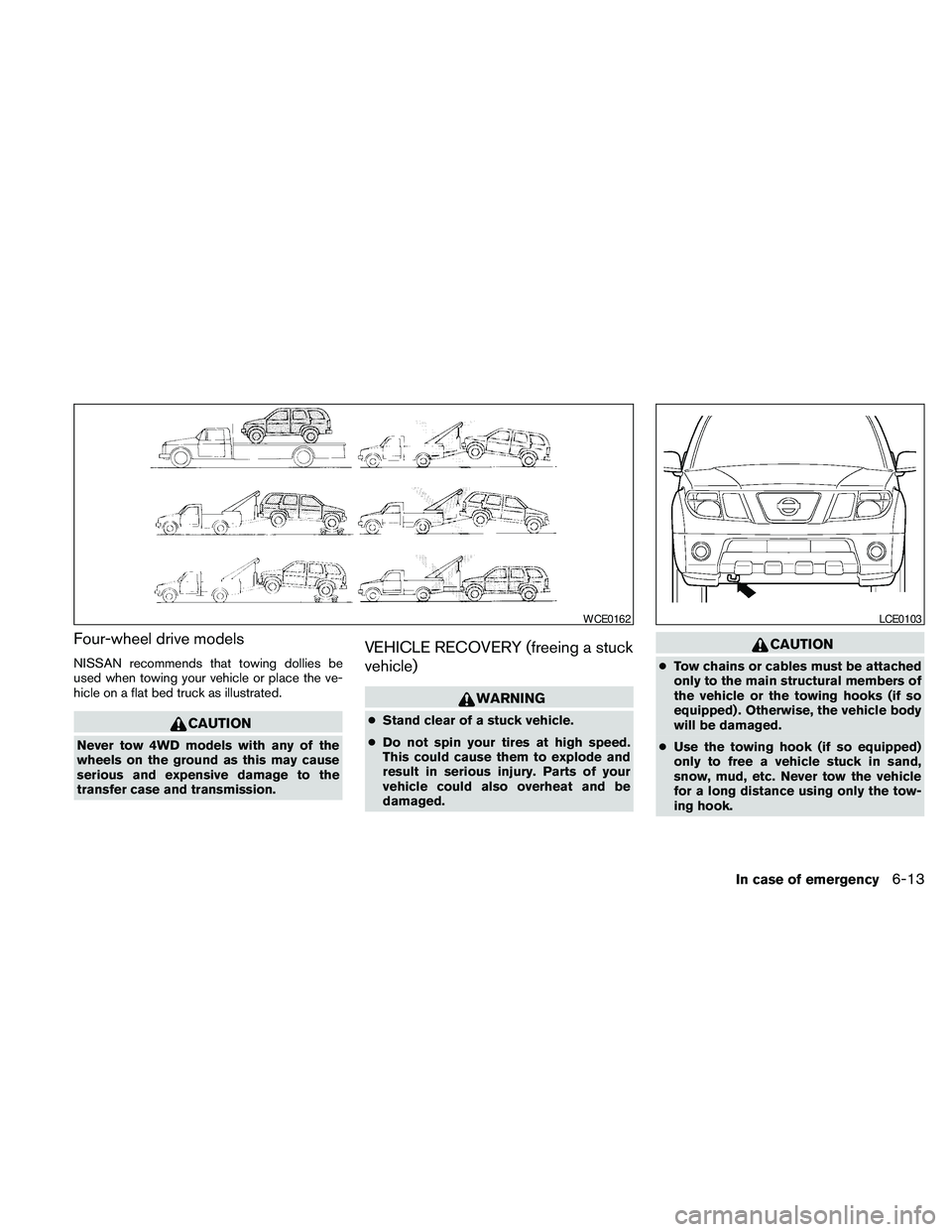
Four-wheel drive models
NISSAN recommends that towing dollies be
used when towing your vehicle or place the ve-
hicle on a flat bed truck as illustrated.
CAUTION
Never tow 4WD models with any of the
wheels on the ground as this may cause
serious and expensive damage to the
transfer case and transmission.
VEHICLE RECOVERY (freeing a stuck
vehicle)
WARNING
cStand clear of a stuck vehicle.
cDo not spin your tires at high speed.
This could cause them to explode and
result in serious injury. Parts of your
vehicle could also overheat and be
damaged.
CAUTION
cTow chains or cables must be attached
only to the main structural members of
the vehicle or the towing hooks (if so
equipped) . Otherwise, the vehicle body
will be damaged.
cUse the towing hook (if so equipped)
only to free a vehicle stuck in sand,
snow, mud, etc. Never tow the vehicle
for a long distance using only the tow-
ing hook.
WCE0162LCE0103
In case of emergency6-13
Page 424 of 463
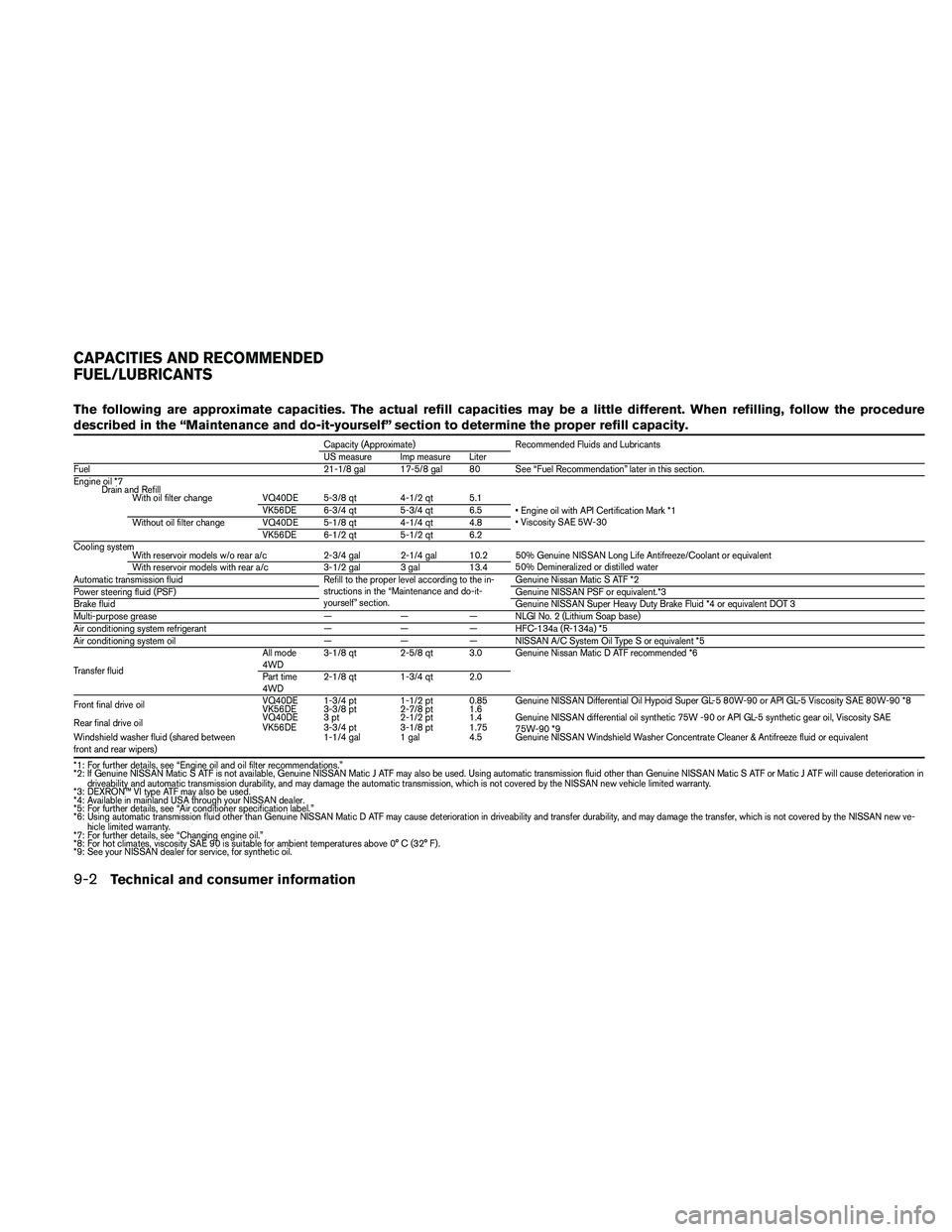
The following are approximate capacities. The actual refill capacities may be a little different. When refilling, follow the procedure
described in the “Maintenance and do-it-yourself” section to determine the proper refill capacity.
Capacity (Approximate) Recommended Fluids and Lubricants
US measure Imp measure Liter
Fuel 21-1/8 gal 17-5/8 gal 80 See “Fuel Recommendation” later in this section.
Engine oil *7
Drain and Refill
With oil filter change VQ40DE 5-3/8 qt 4-1/2 qt 5.1
• Engine oil with API Certification Mark *1
• Viscosity SAE 5W-30 VK56DE 6-3/4 qt 5-3/4 qt 6.5
Without oil filter change VQ40DE 5-1/8 qt 4-1/4 qt 4.8
VK56DE 6-1/2 qt 5-1/2 qt 6.2
Cooling system
With reservoir models w/o rear a/c 2-3/4 gal 2-1/4 gal 10.2 50% Genuine NISSAN Long Life Antifreeze/Coolant or equivalent
50% Demineralized or distilled water
With reservoir models with rear a/c 3-1/2 gal 3 gal 13.4
Automatic transmission fluid Refill to the proper level according to the in-
structions in the “Maintenance and do-it-
yourself” section.Genuine Nissan Matic S ATF *2
Power steering fluid (PSF)Genuine NISSAN PSF or equivalent.*3
Brake fluidGenuine NISSAN Super Heavy Duty Brake Fluid *4 or equivalent DOT 3
Multi-purpose grease — — — NLGI No. 2 (Lithium Soap base)
Air conditioning system refrigerant — — — HFC-134a (R-134a) *5
Air conditioning system oil — — — NISSAN A/C System Oil Type S or equivalent *5
Transfer fluidAll mode
4WD3-1/8 qt 2-5/8 qt 3.0 Genuine Nissan Matic D ATF recommended *6
Part time
4WD2-1/8 qt 1-3/4 qt 2.0
Front final drive oilVQ40DE 1-3/4 pt 1-1/2 pt 0.85 Genuine NISSAN Differential Oil Hypoid Super GL-5 80W-90 or API GL-5 Viscosity SAE 80W-90 *8
VK56DE 3-3/8 pt 2-7/8 pt 1.6
Rear final drive oilVQ40DE 3 pt 2-1/2 pt 1.4 Genuine NISSAN differential oil synthetic 75W -90 or API GL-5 synthetic gear oil, Viscosity SAE
75W-90 *9 VK56DE 3-3/4 pt 3-1/8 pt 1.75
Windshield washer fluid (shared between
front and rear wipers)1-1/4 gal 1 gal 4.5 Genuine NISSAN Windshield Washer Concentrate Cleaner & Antifreeze fluid or equivalent
*1: For further details, see “Engine oil and oil filter recommendations.”
*2: If Genuine NISSAN Matic S ATF is not available, Genuine NISSAN Matic J ATF may also be used. Using automatic transmission fluid other than Genuine NISSAN Matic S ATF or Matic J ATF will cause deterioration in
driveability and automatic transmission durability, and may damage the automatic transmission, which is not covered by the NISSAN new vehicle limited warranty.
*3: DEXRON™ VI type ATF may also be used.
*4: Available in mainland USA through your NISSAN dealer.
*5: For further details, see “Air conditioner specification label.”
*6: Using automatic transmission fluid other than Genuine NISSAN Matic D ATF may cause deterioration in driveability and transfer durability, and may damage the transfer, which is not covered by the NISSAN new ve-
hicle limited warranty.
*7: For further details, see “Changing engine oil.”
*8: For hot climates, viscosity SAE 90 is suitable for ambient temperatures above 0° C (32° F) .
*9: See your NISSAN dealer for service, for synthetic oil.
CAPACITIES AND RECOMMENDED
FUEL/LUBRICANTS
9-2Technical and consumer information
Page 447 of 463
3. After the wheel blocks are in place, slowly
release the brake pedal until the blocks ab-
sorb the vehicle load.
4. Apply the parking brake.
5. Shift the transmission into P (Park) .
6. Make sure the
indicator light (if so
equipped) indicates the transfer case is in
4H, 4L, or 2H and that the ATP light is off. If
the
indicator light is flashing, or the
ATP light is ON, make sure the transmission
is in P (Park) (AT) and turn the 4WD switch
to 2WD or 4H. See “Automatic transmission
park warning light” in the “Instruments and
controls” section and “Using four wheel
drive (4WD)” in the “Starting and driving”
section.
7. Turn off the engine.
To drive away:
1. Start the vehicle.
2. Apply and hold the brake pedal.
3. Shift the transmission into gear.
4. Release the parking brake.
5. Drive slowly until the vehicle and trailer are
clear from the blocks.
6. Apply and hold the brake pedal.7. Have someone retrieve and store the blocks.
cWhile going downhill, the weight of the
trailer pushing on the tow vehicle may de-
crease overall stability. Therefore, to main-
tain adequate control, reduce your speed
and shift to a lower gear. Avoid long or
repeated use of the brakes when descend-
ing a hill, as this reduces their effectiveness
and could cause overheating. Shifting to a
lower gear instead provides “engine brak-
ing” and reduces the need to brake as fre-
quently.
cIf the engine coolant temperature rises to a
high temperature, refer to “If your vehicle
overheats” in the “In case of emergency”
section of this owner’s manual.
cTrailer towing requires more fuel than normal
circumstances.
cAvoid towing a trailer for your vehicle’s first
500 miles (805 km) .
cFor the first 500 miles (805 km) that you do
tow, do not drive over 50 MPH (80 km/h) .
cHave your vehicle serviced more often than
at intervals specified in the recommended
Maintenance Schedule in the “NISSAN Ser-
vice and Maintenance Guide”.cWhen making a turn, your trailer wheels will
be closer to the inside of the turn than your
vehicle wheels. To compensate for this,
make a larger than normal turning radius
during the turn.
cCrosswinds and rough roads will adversely
affect vehicle/trailer handling, possibly caus-
ing vehicle sway. When being passed by
larger vehicles, be prepared for possible
changes in crosswinds that could affect ve-
hicle handling.
Do the following if the trailer begins to sway:
1. Take your foot off the accelerator pedal to
allow the vehicle to coast and steer as
straight ahead as the road conditions allow.
This combination will help stabilize the ve-
hicle
– Do not correct trailer sway by steering or
applying the brakes.
2. When the trailer sway stops, gently apply the
brakes and pull to the side of the road in a
safe area.
3. Try to rearrange the trailer load so it is bal-
anced as described earlier in this section.
Technical and consumer information9-25
Page 455 of 463
10 Index
4WD warning light...............2-15
A
Active brake limited slip (ABLS) system . . .5-35
Adjusting pedal position............3-25
Air bag (See supplemental restraint
system).....................1-44
Air bag system
Front (See supplemental front impact
air bag system)...............1-52
Air bag warning labels.............1-58
Air bag warning light...........1-59, 2-18
Air cleaner housing filter............8-19
Air conditioner
Air conditioner operation..........4-39
Air conditioner service...........4-47
Air conditioner specification label.....9-11
Air conditioner system refrigerant and
oil recommendations.............9-6
Heater and air conditioner
controls................4-37, 4-44
Rear seat air conditioner..........4-46
Servicing air conditioner..........4-47
Air flow charts..................4-41
Alarm system
(See vehicle security system).........2-22
Anchor point locations.............1-30
Antenna.....................4-87
Anti-lock brake warning light..........2-13
Anti-lock Braking System (ABS)........5-34
Audible reminders...............2-21Audio system..................4-47
Compact Disc (CD) changer.......4-62
Compact disc (CD) player.....4-56, 4-70
Audio System
CompactFlash (CF) player.........4-72
Audio system
FM/AM radio with compact disc (CD)
player....................4-54
FM/AM/SAT radio with compact disc
(CD) changer................4-59
FM/AM/SAT radio with compact disc
(CD) player.................4-67
Audio System
Music Box hard-disk drive audio
system....................4-74
Audio system
Radio....................4-47
Rear audio controls.............4-86
Audio System
Settings...............4-59, 4-67
Audio system
Steering wheel audio control switch . . .4-85
Autolight switch.................2-28
Automatic
Automatic drive positioner.........3-30
Automatic power window switch.....2-45
Automatic transmission position indicator
light.....................2-18
Driving with automatic transmission. . . .5-14
Transmission selector lever lock
release....................5-17
Automatic anti-glare inside mirror.......3-27
Automatic door locks..............3-6AUX jack.................4-65, 4-72
B
Battery......................8-15
Charge warning light............2-14
Before starting the engine...........5-13
Belt (See drive belt)..............8-18
Block heater
Engine....................5-38
BluetoothThands-free phone
system.................4-103, 4-118
Booster seats..................1-41
Brake
Anti-lock Braking System (ABS)......5-34
Brake fluid..................8-14
Brake light (See stop light).........8-32
Brake system................5-33
Brake warning light.............2-14
Brake wear indicators........2-21, 8-24
Parking brake operation..........5-19
Self-adjusting brakes............8-24
Brakes......................8-24
Break-in schedule...............5-21
Brightness control
Instrument panel..............2-30
Brightness/contrast button.......4-17, 4-33
Bulb check/instrument panel..........2-13
Bulb replacement................8-32
Page 461 of 463
Flat towing..................9-26
Tow truck towing...............6-11
Towing load/specification..........9-20
Trailer towing.................9-17
Transceiver
HomeLinkTUniversal Transceiver......2-49
Transmission
Driving with automatic transmission. . . .5-14
Selector lever lock release.........5-17
Travel (See registering your vehicle in another
country)......................9-9
Trip computer...................2-5
Trip odometer...................2-4
Turn signal switch................2-30
U
Uniform tire quality grading...........9-27
V
Vanity mirror...................3-26
Variable voltage control system.........8-17
Vehicle dimensions and weights.........9-8
Vehicle dynamic control (VDC) off switch . . .2-33
Vehicle dynamic control (VDC) system.....5-36
Vehicle electronic system........4-15, 4-29
Vehicle identification...............9-9
Vehicle identification number (VIN)
(Chassis number).................9-9
Vehicle identification number (VIN) plate. . . .9-9
Vehicle loading information...........9-12
Vehicle recovery..............6-13, 6-14
Vehicle security system.............2-22Vehicle security system (NISSAN vehicle immobi-
lizer system) , engine start......2-23, 3-2, 5-12
Ventilators....................4-36
Visors.......................3-25
Voice recognition system...........4-129
Voltmeter......................2-8
W
Warning
4WD warning light..............2-15
Air bag warning light.........1-59, 2-18
Anti-lock brake warning light........2-13
Battery charge warning light........2-14
Brake warning light.............2-14
Door open warning light...........2-15
Engine oil pressure warning light......2-15
Hazard warning flasher switch.......2-31
Low fuel warning light............2-16
Low tire pressure warning light.......2-16
Low washer fluid warning light.......2-17
Passenger air bag and status light.....1-53
Seat belt warning light............2-17
Vehicle security system...........2-22
Warning labels (for SRS)..........1-58
Warning/indicator lights and audible
reminders...................2-12
Warning lights..................2-12
Washer switch
Rear window wiper and washer
switches...................2-25
Windshield wiper and washer switch . . .2-24
Weights (See dimensions and weights).....9-8
Wheels and tires.................8-35
Wheel/tire size...................9-8When traveling or registering your vehicle in
another country..................9-9
Window washer fluid..............8-15
Windows
Locking passengers’ windows.......2-45
Power rear windows.............2-45
Power windows...............2-43
Rear power windows............2-45
Windshield wiper and washer switch.....2-24
Wiper
Rear window wiper and washer
switches...................2-25
Windshield wiper and washer switch . . .2-24
Wiper blades.................8-21
10-7