cool NISSAN PATHFINDER 2010 Owner´s Manual
[x] Cancel search | Manufacturer: NISSAN, Model Year: 2010, Model line: PATHFINDER, Model: NISSAN PATHFINDER 2010Pages: 463, PDF Size: 5.69 MB
Page 14 of 463
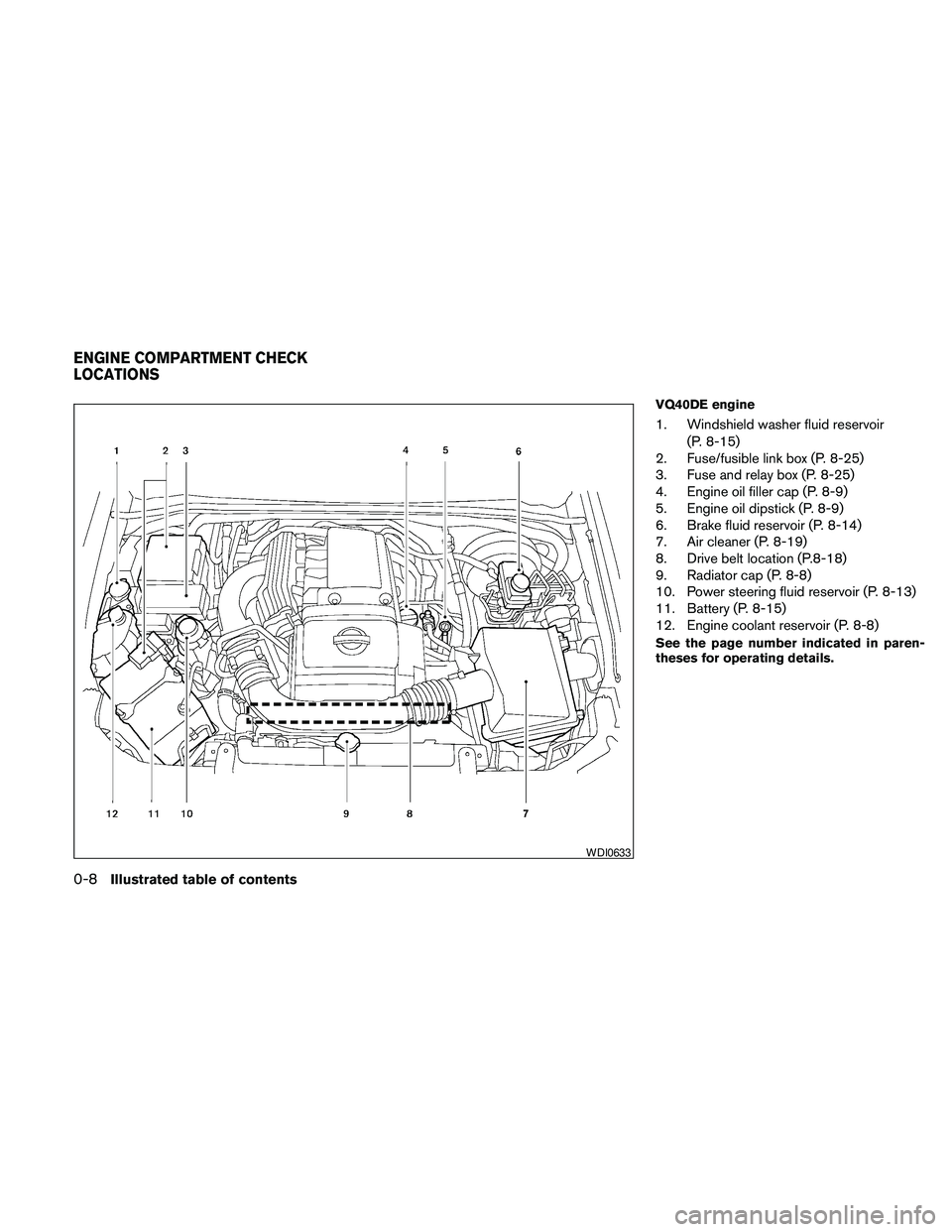
VQ40DE engine
1. Windshield washer fluid reservoir
(P. 8-15)
2. Fuse/fusible link box (P. 8-25)
3. Fuse and relay box (P. 8-25)
4. Engine oil filler cap (P. 8-9)
5. Engine oil dipstick (P. 8-9)
6. Brake fluid reservoir (P. 8-14)
7. Air cleaner (P. 8-19)
8. Drive belt location (P.8-18)
9. Radiator cap (P. 8-8)
10. Power steering fluid reservoir (P. 8-13)
11. Battery (P. 8-15)
12. Engine coolant reservoir (P. 8-8)
See the page number indicated in paren-
theses for operating details.
WDI0633
ENGINE COMPARTMENT CHECK
LOCATIONS
0-8Illustrated table of contents
Page 15 of 463
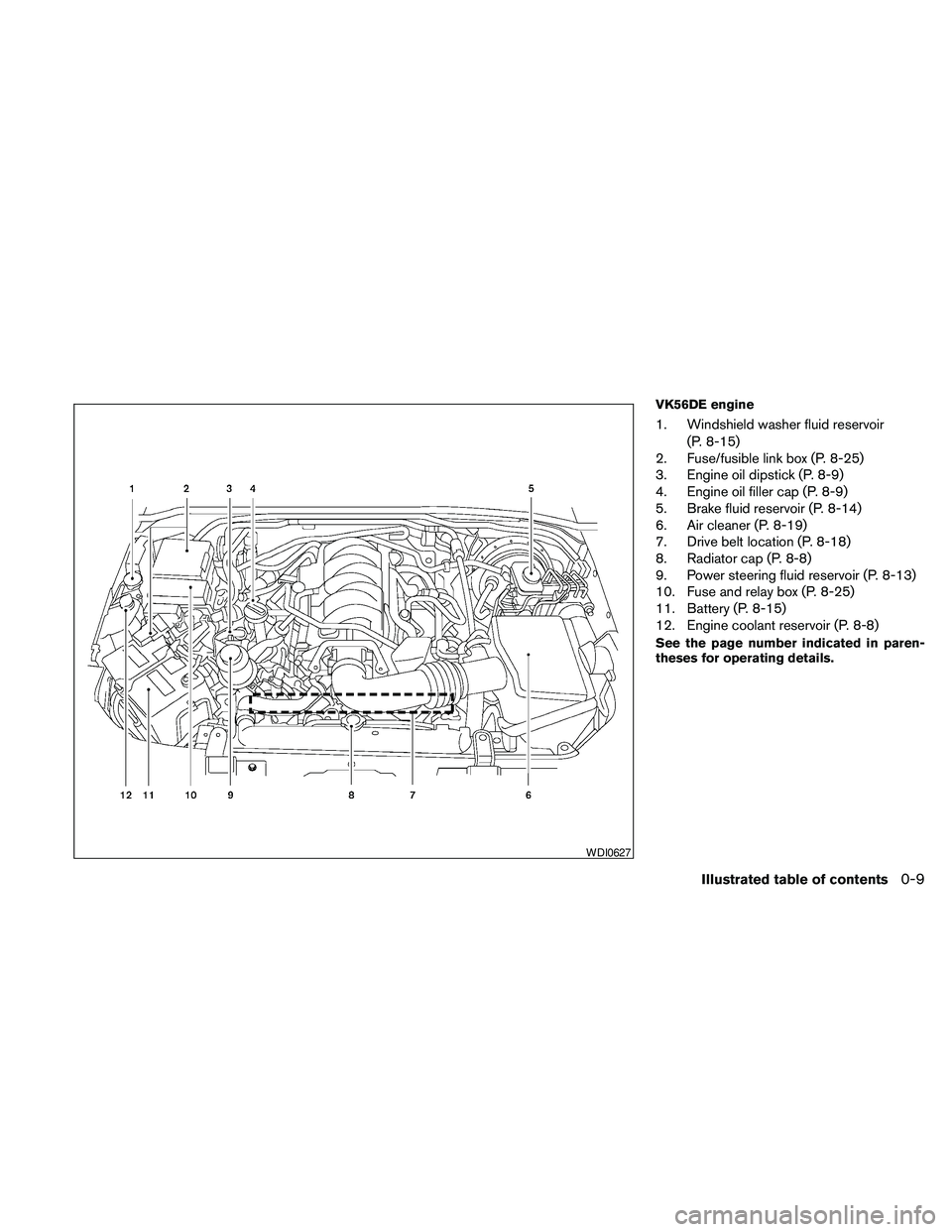
VK56DE engine
1. Windshield washer fluid reservoir
(P. 8-15)
2. Fuse/fusible link box (P. 8-25)
3. Engine oil dipstick (P. 8-9)
4. Engine oil filler cap (P. 8-9)
5. Brake fluid reservoir (P. 8-14)
6. Air cleaner (P. 8-19)
7. Drive belt location (P. 8-18)
8. Radiator cap (P. 8-8)
9. Power steering fluid reservoir (P. 8-13)
10. Fuse and relay box (P. 8-25)
11. Battery (P. 8-15)
12. Engine coolant reservoir (P. 8-8)
See the page number indicated in paren-
theses for operating details.
WDI0627
Illustrated table of contents0-9
Page 80 of 463
2 Instruments and controls
Instrument panel...................................2-2
Meters and gauges................................2-3
Speedometer and odometer.....................2-4
Trip computer..................................2-5
Tachometer....................................2-6
Engine coolant temperature gauge...............2-6
Fuel gauge....................................2-7
Engine oil pressure gauge.......................2-7
Voltmeter......................................2-8
Compass display (if so equipped)...................2-8
Compass display...............................2-9
Warning/indicator lights and audible reminders......2-12
Checking bulbs...............................2-13
Warning lights................................2-13
Indicator lights................................2-18
Audible reminders.............................2-21
Security systems.................................2-22
Vehicle security system.........................2-22
NISSAN vehicle immobilizer system.............2-23
Windshield wiper and washer switch...............2-24
Switch operation..............................2-24
Rear window wiper and washer switch..............2-25Rear window and outside mirror (if so equipped)
defroster switch..................................2-26
Headlight and turn signal switch....................2-27
Headlight control switch........................2-27
Daytime running light system (Canada only)......2-29
Instrument brightness control...................2-30
Turn signal switch.............................2-30
Fog light switch (if so equipped)................2-30
Hazard warning flasher switch.....................2-31
Horn............................................2-31
Heated steering wheel (if so equipped).............2-32
Heated seat (if so equipped).......................2-32
Vehicle Dynamic Control (VDC) OFF switch.........2-33
Power outlet.....................................2-34
Storage.........................................2-35
Storage trays.................................2-35
Storage bins..................................2-36
Console box..................................2-36
Glove box....................................2-37
Sunglasses holder.............................2-37
Map pockets..................................2-38
Seat pockets..................................2-38
Page 83 of 463
16. 4WD shift switch (if so equipped)
(P. 5-22)
17. Storage (P. 2-35)
18. Front passenger air bag status light
(P. 1-53)
19. Climate controls (P. 4-37, 4-44)
20. Hazard warning flasher switch (P. 2-31)
21. Ignition switch (P. 5-9)
22. Tilt steering wheel control (P. 3-24)
23. Heated steering wheel switch
(if so equipped) (P. 2-32)
24. Pedal position adjustment switch
(if so equipped) (P. 3-25)
25. Outside mirror controls (P. 3-29)
*: Refer to the separate Navigation System
Owner’s Manual (if so equipped) .
See the page number indicated in paren-
theses for operating details.
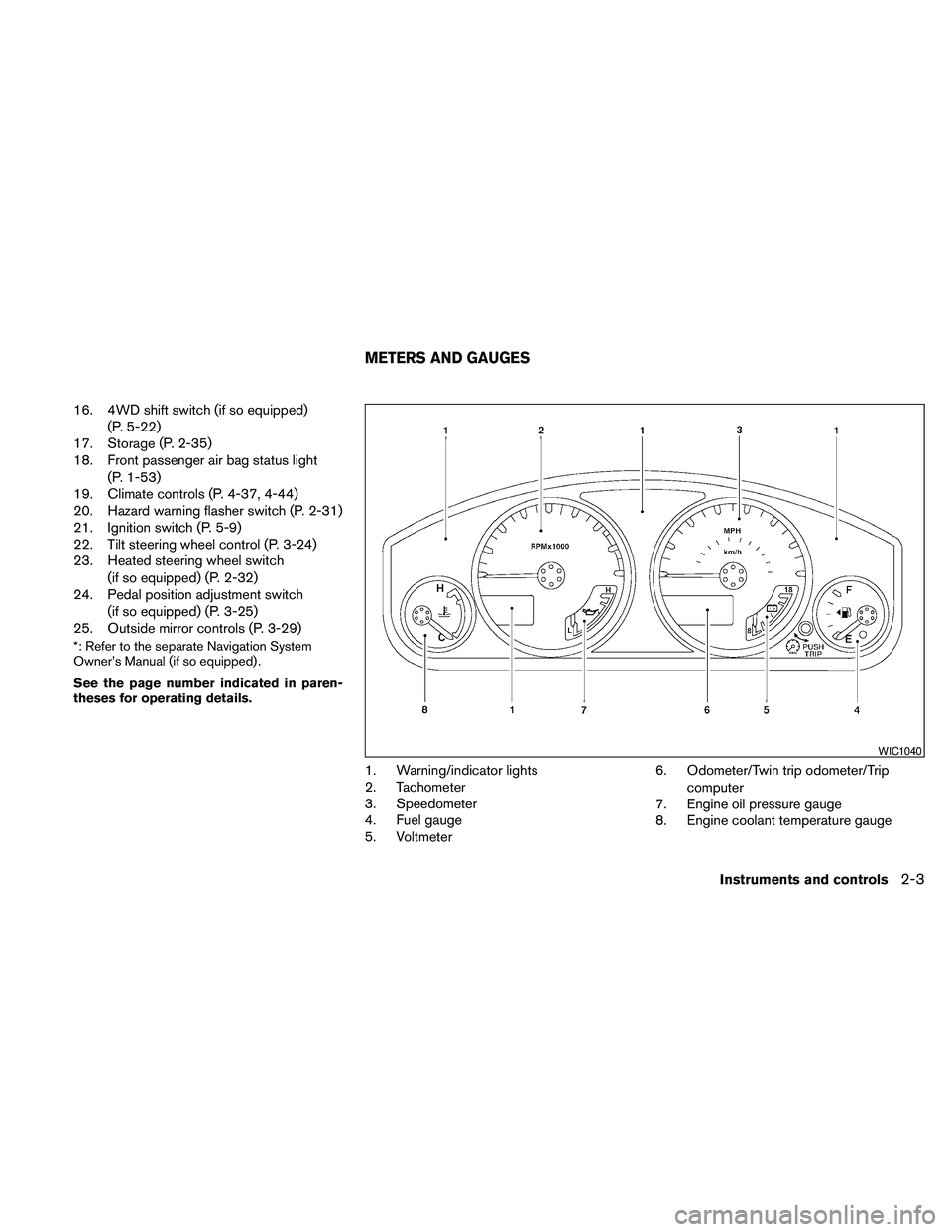
1. Warning/indicator lights
2. Tachometer
3. Speedometer
4. Fuel gauge
5. Voltmeter6. Odometer/Twin trip odometer/Trip
computer
7. Engine oil pressure gauge
8. Engine coolant temperature gauge
WIC1040
METERS AND GAUGES
Instruments and controls2-3
Page 86 of 463
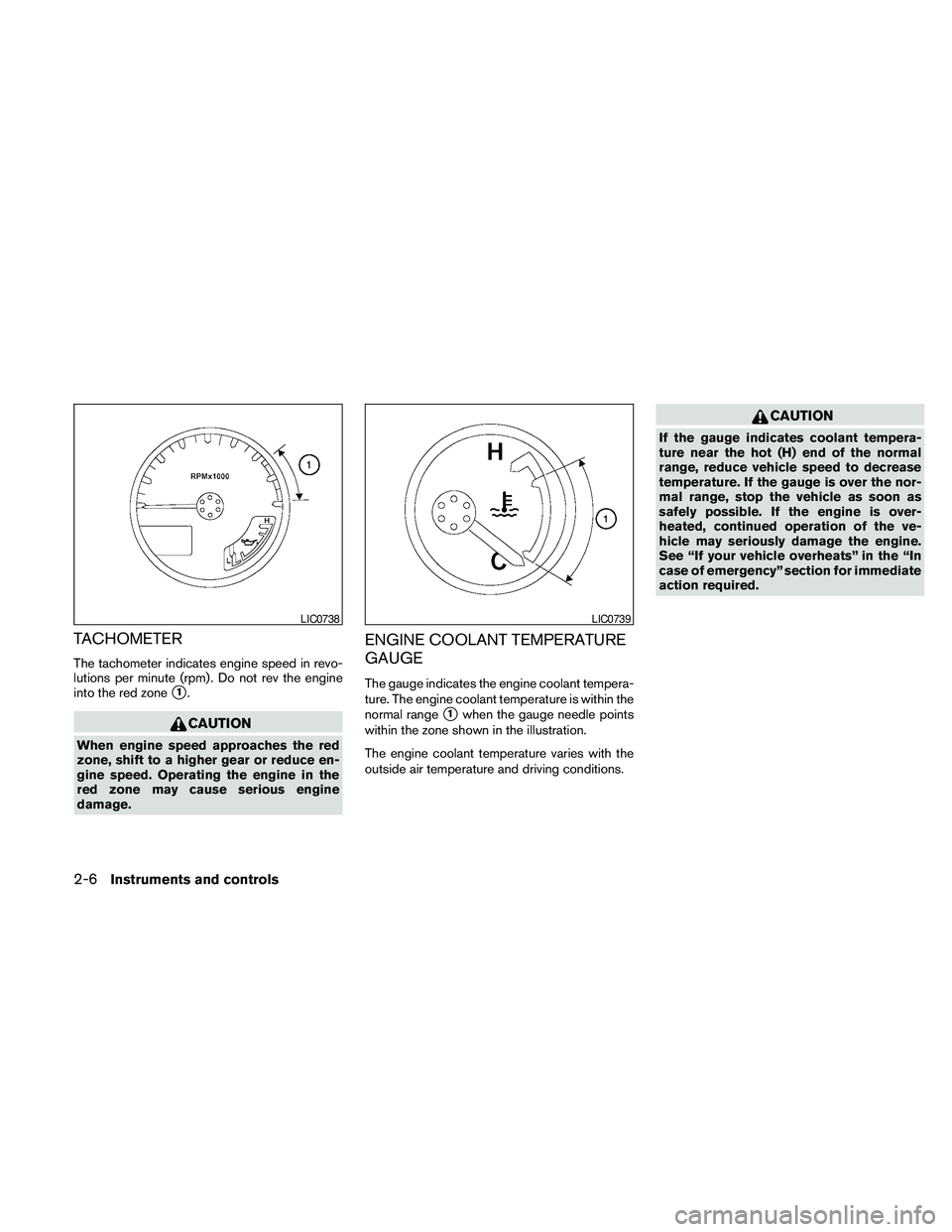
TACHOMETER
The tachometer indicates engine speed in revo-
lutions per minute (rpm) . Do not rev the engine
into the red zone
s1.
CAUTION
When engine speed approaches the red
zone, shift to a higher gear or reduce en-
gine speed. Operating the engine in the
red zone may cause serious engine
damage.
ENGINE COOLANT TEMPERATURE
GAUGE
The gauge indicates the engine coolant tempera-
ture. The engine coolant temperature is within the
normal range
s1when the gauge needle points
within the zone shown in the illustration.
The engine coolant temperature varies with the
outside air temperature and driving conditions.
CAUTION
If the gauge indicates coolant tempera-
ture near the hot (H) end of the normal
range, reduce vehicle speed to decrease
temperature. If the gauge is over the nor-
mal range, stop the vehicle as soon as
safely possible. If the engine is over-
heated, continued operation of the ve-
hicle may seriously damage the engine.
See “If your vehicle overheats” in the “In
case of emergency” section for immediate
action required.
LIC0738LIC0739
2-6Instruments and controls
Page 201 of 463
WARNING
cThe air conditioner cooling function op-
erates only when the engine is running.
cDo not leave children or adults who
would normally require the assistance
of others alone in your vehicle. Pets
should also not be left alone. They
could accidentally injure themselves or
others through inadvertent operation of
the vehicle. Also, on hot, sunny days,
temperatures in a closed vehicle could
quickly become high enough to cause
severe or possibly fatal injuries to
people or animals.
cDo not use the recirculation mode for
long periods as it may cause the interior
air to become stale and the windows to
fog up.
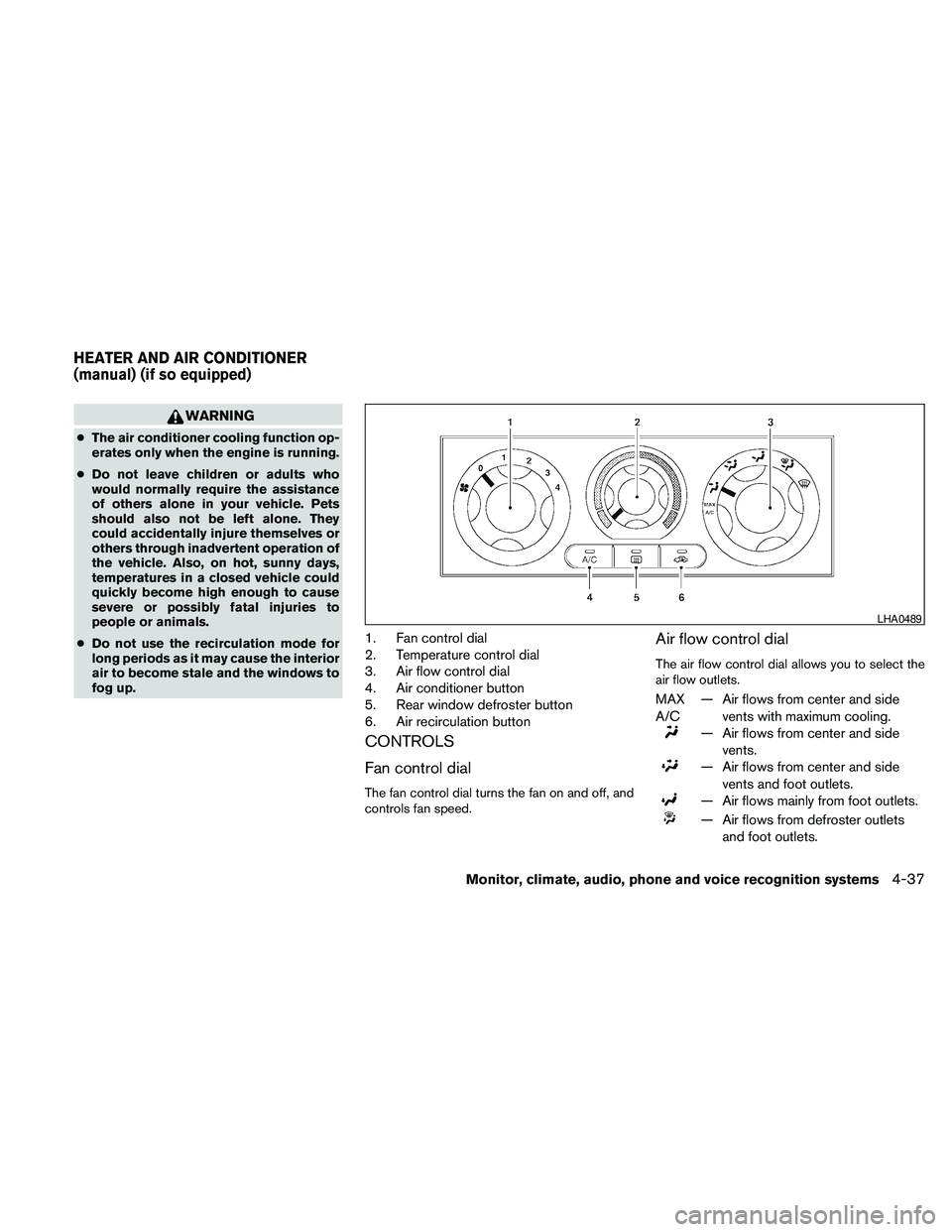
1. Fan control dial
2. Temperature control dial
3. Air flow control dial
4. Air conditioner button
5. Rear window defroster button
6. Air recirculation button
CONTROLS
Fan control dial
The fan control dial turns the fan on and off, and
controls fan speed.
Air flow control dial
The air flow control dial allows you to select the
air flow outlets.
MAX
A/C— Air flows from center and side
vents with maximum cooling.
— Air flows from center and side
vents.
— Air flows from center and side
vents and foot outlets.
— Air flows mainly from foot outlets.
— Air flows from defroster outlets
and foot outlets.
LHA0489
HEATER AND AIR CONDITIONER
(manual) (if so equipped)
Monitor, climate, audio, phone and voice recognition systems4-37
Page 202 of 463
— Air flows mainly from defroster
outlets.
Temperature control dial
The temperature control dial allows you to adjust
the temperature of the outlet air. To lower the
temperature, turn the dial to the left. To increase
the temperature, turn the dial to the right.
Air recirculation button
ON position (Indicator light on):
Interior air is recirculated inside the vehicle.
Press the
button to the on position when:
cdriving on a dusty road.
cto prevent traffic fumes from entering pas-
senger compartment.
cfor maximum cooling when using the air con-
ditioner.
OFF position (Indicator light off):
Outside air is drawn into the passenger compart-
ment and distributed through the selected outlet.
Use the off position for normal heater or air con-
ditioner operation.
Air conditioner button
Start the engine, turn the fan control dial to the
desired (1 to 4) position and push the
button to turn on the air conditioner. The indicator
light on the
button will come on. Push
the
button again to turn off the air condi-
tioner. The indicator light on the
button will
go off.
The air conditioner cooling function oper-
ates only when the engine is running.
Rear window defroster switch
For more information about the rear window de-
froster switch, see “Rear window defroster
switch” in the “Instruments and controls” section
of this manual.
HEATER OPERATION
Heating
This mode is used to direct heated air to the foot
outlets. Some air also flows from the defrost
outlets.
1. Push the
button to the off position for
normal heating.
2. Turn the air flow control dial to the
position.3. Turn the fan control dial to the desired posi-
tion.
4. Turn the temperature control dial to the de-
sired position between the middle and the
hot position.
Ventilation
This mode directs outside air to the side and
center vents.
1. Push the
button to the off position.
2. Turn the air flow control dial to the
position.
3. Turn the fan control dial to the desired posi-
tion.
4. Turn the temperature control dial to the de-
sired position.
Defrosting or defogging
This mode directs the air to the defrost outlets to
defrost/defog the windows.
1. Turn the air flow control dial to the
position.
2.
Turn the fan control dial to the desired position.
3. Turn the temperature control dial to the de-
sired position between the middle and the
hot position.
4-38Monitor, climate, audio, phone and voice recognition systems
Page 203 of 463
cTo quickly remove ice or fog from the win-
dows, turn the fan control dial to 4 and the
temperature control lever to the full HOT
position.
cWhen the
position is selected, the air
conditioner automatically turns on (however,
the indicator light will not illuminate) if the
outside temperature is more than 36°F
(2°C) . If the system is in defrost mode for
more than one minute, the air conditioning
system will continue to operate until the fan
control dial is turned to OFF or the vehicle is
shut off, even if the air flow control dial is
turned to a position other than the
position. This dehumidifies the air which
helps defog the windshield. The
mode automatically turns off, allowing out-
side air to be drawn into the passenger
compartment to further improve the defog-
ging performance.
Bi-level heating
This mode directs cooler air from the side and
center vents and warmer air from the floor outlets.
When the temperature control dial is moved to
the full hot or full cool position, the air between
the vents and the floor outlets is the same tem-
perature.
1. Push the
button to the off position.
2. Turn the air flow control dial to the
position.
3. Turn the fan control dial to the desired posi-
tion.
4. Turn the temperature control dial to the de-
sired position.
Heating and defogging
This mode heats the interior and defogs the wind-
shield.
1. Turn the air flow control dial to the
position.
2. Turn the fan control dial to the desired posi-
tion.
3. Turn the temperature control dial to the de-
sired position between the middle and the
hot position.cWhen the
position is selected, the air
conditioner automatically turns on (however,
the indicator light on the
button will
not come on) if the outside temperature is
more than 36°F (2°C) . If the air flow control
dial is in the
position for more than
one minute, the air conditioning system will
continue to operate until the fan control dial
is turned to OFF or the vehicle is shut off,
even if the air flow control dial is turned to a
position other than the
position. This
dehumidifies the air which helps defog the
windshield. The
mode automatically
turns off, allowing outside air to be drawn
into the passenger compartment to further
improve the defogging performance.
Operating tips
Clear snow and ice from the wiper blades
and air inlet in front of the windshield. This
improves heater operation.
AIR CONDITIONER OPERATION
Start the engine, turn the fan control dial to the
desired position, and push in the
button to
activate the air conditioner. When the air condi-
tioner is on, cooling and dehumidifying functions
are added to the heater operation.
Monitor, climate, audio, phone and voice recognition systems4-39
Page 204 of 463
The air conditioner cooling function oper-
ates only when the engine is running.
Cooling
This mode is used to cool and dehumidify the air.
1. Push the
button to the off position.
2. Turn the air flow control dial to the
position.
3. Turn the fan control dial to the desired posi-
tion.
4. Push the
button. The indicator light
comes on.
5. Turn the temperature control dial to the de-
sired position.
cFor quick cooling when the outside tem-
perature is high, push the
button to
the on position (indicator light on) . Be sure
to return the
button to the off position
for normal cooling.
Dehumidified heating
This mode is used to heat and dehumidify the air.
1. Push the
button to the off position.
2. Turn the air flow control dial to the
position.3. Turn the fan control dial to the desired posi-
tion.
4. Push the
button. The indicator light
comes on.
5. Turn the temperature control dial to the de-
sired position.
Dehumidified defogging
This mode is used to defog the windows and
dehumidify the air.
1. Turn the air flow control dial to the
position.
2. Turn the fan control dial to the desired posi-
tion.
3. Push the
button. The indicator light
comes on.
When the air flow control dial is in the
orposition, the air conditioner automati-
cally turns on (however, the indicator light will not
illuminate) if the outside temperature is more than
36°F (2°C) . If one of these positions is selected
for more than one minute, the air conditioning
system will continue to operate until the fan con-
trol dial is turned to OFF or the vehicle is shut off,
even if the air flow control dial is turned to a
position other than these positions. This dehu-
midifies the air which helps defog the windshield.The
mode automatically turns off, allowing
outside air to be drawn into the passenger com-
partment to further improve the defogging perfor-
mance.
4. Turn the temperature control dial to the de-
sired position.
Operating tips
cKeep the windows and moonroof (if so
equipped) closed while the air conditioner is
in operation.
cAfter parking in the sun, drive for two or three
minutes with the windows open to vent hot
air from the passenger compartment. Then,
close the windows. This allows the air con-
ditioner to cool the interior more quickly.
cThe air conditioning system should be
operated for approximately 10 minutes
at least once a month. This helps pre-
vent damage to the system due to lack
of lubrication.
cA visible mist may be seen coming from the
vents in hot, humid conditions as the air is
cooled rapidly. This does not indicate a mal-
function.
4-40Monitor, climate, audio, phone and voice recognition systems
Page 205 of 463
cIf the engine coolant temperature
gauge indicates engine coolant tem-
perature over the normal range, turn
the air conditioner off. See “If your
vehicle overheats” in the “In case of
emergency” section of this manual.
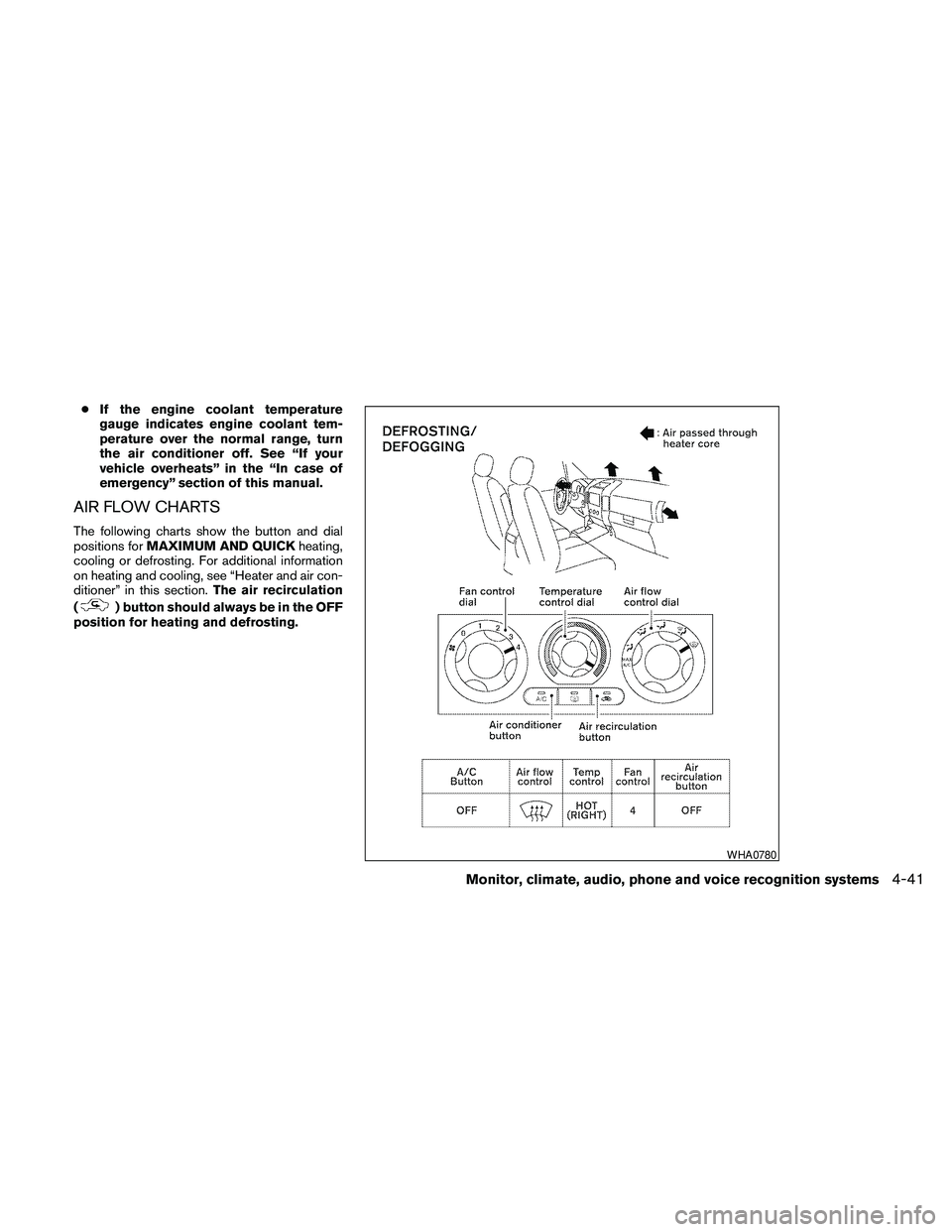
AIR FLOW CHARTS
The following charts show the button and dial
positions forMAXIMUM AND QUICKheating,
cooling or defrosting. For additional information
on heating and cooling, see “Heater and air con-
ditioner” in this section.The air recirculation
(
) button should always be in the OFF
position for heating and defrosting.
WHA0780
Monitor, climate, audio, phone and voice recognition systems4-41