maintenance NISSAN PATHFINDER 2016 R52 / 4.G User Guide
[x] Cancel search | Manufacturer: NISSAN, Model Year: 2016, Model line: PATHFINDER, Model: NISSAN PATHFINDER 2016 R52 / 4.GPages: 540, PDF Size: 5.49 MB
Page 118 of 540
Release Parking Brake
This warning illuminates in the message area of
the vehicle information display when the parking
brake is set and the vehicle is driven.
Low Fuel
This warning illuminates when the fuel level in the
fuel tank is getting low. Refuel as soon as it is
convenient, preferably before the fuel gauge
reaches 0 (Empty) .There will be a small re-
serve of fuel in the tank when the fuel
gauge needle reaches 0 (Empty) .
Low Washer Fluid
This warning illuminates when the windshield-
washer fluid is at a low level. Add windshield-
washer fluid as necessary. For additional informa-
tion, refer to “Windshield-washer fluid” in the
“Maintenance and do-it-yourself” section of this
manual.
Door Open
This warning illuminates when a door has been
opened when the engine is running.
Liftgate Open
This warning illuminates when the liftgate has
been opened when the engine is running. Timer Alert – Have a break?
This indicator appears when the set time is
reached. The time can be set up to 6 hours. For
setting the timer, refer to “Settings” in this sec-
tion.
Low Outside Temperature
This warning appears if the outside temperature
is below 37°F (3°C) . The temperature can be
changed to display in Celsius or Fahrenheit. For
additional information, refer to “Settings” in this
section.
Power will turn off to save the battery
This warning appears in the message area of the
vehicle information display after a period of time if
the shift lever has not moved from the P (Park)
position.
CVT Error: See Owner’s Manual
This warning illuminates when the there is a prob-
lem with the CVT system. If this warning comes
on, have the system checked. It is recommended
you visit a NISSAN dealer for this service.
Turn off the lights
This warning appears when the headlights are
left in the ON position when exiting the vehicle.
Place the headlight switch to OFF or AUTO po-sition. For additional information, refer to “Head-
light and turn signal switch” in this section.
Low Oil Pressure: See Owner’s Manual
This warning appears in message area of the
vehicle information display if low oil pressure is
detected. This gauge is not designed to indicate
low oil level.
The low oil pressure warning is
not designed to indicate a low oil level. Use
the dipstick to check the oil level. For additional
information, refer to “Engine oil” in the “Mainte-
nance and do-it-yourself” section of this manual.
Key Registration Complete
This appears when a new Intelligent Key is regis-
tered to the vehicle.
Tire Pressure Low - Add Air
This warning appears when the low tire pressure
warning light in the meter illuminates and low tire
pressure is detected. The warning appears each
time the ignition switch is placed in the ON
position as long as the low tire pressure warning
light remains illuminated. If this warning appears,
stop the vehicle and adjust the tire pressures of
all four tires to the recommended COLD tire
pressure shown on the Tire and Loading Informa-
tion label. For additional information, refer to
“Low tire pressure warning light” in this section
Instruments and controls2-29
Page 165 of 540
Although the life of the battery varies depending
on the operating conditions, the battery’s life is
approximately two years. If the battery is dis-
charged, replace it with a new one.
When the Intelligent Key battery is low, an indi-
cator illuminates in the Vehicle Information Dis-
play. For additional information, refer to “Vehicle
Information Display” in the “Instruments and con-
trols” section of this manual.
Since the Intelligent Key is continuously receiving
radio waves, if the key is left near equipment
which transmits strong radio waves, such as sig-
nals from a TV and personal computer, the bat-
tery life may become shorter.
For additional information, refer to “Battery re-
placement” in the “Maintenance and do-it-
yourself” section of this manual.
As many as four Intelligent Keys can be regis-
tered and used with one vehicle. For information
about the purchase and use of additional Intelli-
gent Keys, contact a NISSAN dealer.CAUTION
Listed below are conditions or occur-
rences which will damage the Intelligent
Key:
●Do not allow the Intelligent Key, which
contains electrical components, to
come into contact with water or salt
water. This could affect the system
function.
● Do not drop the Intelligent Key.
● Do not strike the Intelligent Key sharply
against another object.
● Do not change or modify the Intelligent
Key.
● Wetting may damage the Intelligent
Key. If the Intelligent Key gets wet, im-
mediately wipe until it is completely dry.
● Do not place the Intelligent Key for an
extended period in an area where tem-
peratures exceed 140°F (60°C) .
● Do not attach the Intelligent Key with a
key holder that contains a magnet.
● Do not place the Intelligent Key near
equipment that produces a magnetic
field, such as a TV, audio equipment and
personal computers. If an Intelligent Key is lost or stolen, NISSAN
recommends erasing the ID code of that Intelli-
gent Key from the vehicle. This may prevent the
unauthorized use of the Intelligent Key to operate
the vehicle. For information regarding the erasing
procedure, contact a NISSAN dealer.
3-8Pre-driving checks and adjustments
Page 175 of 540
SymptomPossible CauseRemedy
When pushing the ignition switch to start
the engine The Intelligent Key battery indicator appears
on the display.
The battery charge is low.Replace the battery with a new one. For
additional information, refer to “Battery re-
placement” in the “Maintenance and do-it-
yourself” section of this manual.
The No Key Detected warning appears on
the display, the outside chime sounds three
times and the inside warning chime sounds
for approximately 3 seconds. The Intelligent Key is not in the vehicle. Carry the Intelligent Key with you.
When pushing the ignition switch The Intelligent Key system warning mes-
sage in the vehicle information display
appears. It warns of a malfunction with the Intelligent
Key system.
Contact a NISSAN dealer.
3-18Pre-driving checks and adjustments
Page 198 of 540
4 Monitor, climate, audio, phone and voice
recognition systems
Control panel buttons — color screen without
Navigation System (if so equipped)..................4-4
How to use the NISSAN controller ...............4-5
How to select menus on the screen ..............4-6
How to use the STATUS button ..................4-6
How to use the INFO button .....................4-6
How to use the SETTING button .................4-8
OFF button..............................4-9
Control panel buttons — color screen with
Navigation System (if so equipped) .................4-10
How to use the NISSAN controller ..............4-12
How to use the touch-screen . . .................4-12
How to select menus on the screen .............4-14
How to use the STATUS button .................4-14
How to use the INFO button ....................4-15
How to use the SETTING button ................4-17
How to use the DISP button (if so equipped) .....4-19
How to use the CAMERA button ................4-20
OFF button............................. 4-20
Image viewer (if so equipped) ......................4-20
Using the image viewer ........................ 4-20
RearView Monitor (if so equipped) ..................4-22
RearView Monitor system operation .............4-23 How to read the displayed lines
.................4-23
Difference between predicted and actual
distances ..................................... 4-24
How to park with predicted course lines ..........4-25
Adjusting the screen ........................... 4-27
How to turn on and off predicted course
lines ......................................... 4-27
RearView Monitor system limitations .............4-28
System maintenance ........................... 4-29
Around View® Monitor (if so equipped) .............4-30
Around View® Monitor system operation .........4-31
Difference between predicted and actual
distances ..................................... 4-34
How to park with predicted course lines ..........4-36
How to switch the display ......................4-37
Adjusting the screen ........................... 4-38
Around View® Monitor system limitations ........4-38
System maintenance ........................... 4-40
Camera Aiding Sonar (parking sensor)
(if so equipped) .................................. 4-41
Vents ........................................... 4-42
Heater and air conditioner (automatic) (Type A)
(if so equipped) .................................. 4-43
Automatic operation ........................... 4-44
Page 200 of 540
Care and maintenance........................ 4-120
Car phone or CB radio ........................... 4-121
Bluetooth® Hands-Free Phone System without
Navigation System (if so equipped) ................4-121
Regulatory Information ........................ 4-123
Using the system ............................. 4-123
Control buttons .............................. 4-125
Getting started ............................... 4-126
List of voice commands ....................... 4-127
Voice Adaptation (VA) mode ...................4-132
Manual control ............................... 4-133
Troubleshooting guide ........................ 4-134
Bluetooth® Hands-Free Phone System with
Navigation System (if so equipped) ................4-135
Regulatory Information ........................ 4-137
Using the system ............................. 4-137
Connecting procedure ........................ 4-138
Quick Dial ................................... 4-139
Phonebook .................................. 4-141Making a call .
................................ 4-142
Receiving a call .............................. 4-143
During a call ................................. 4-144
Ending a call ................................. 4-144
Phone settings ............................... 4-145
Bluetooth® settings .......................... 4-146
Call volume .................................. 4-147
NISSAN Voice Recognition System
(if so equipped) ................................. 4-148
NISSAN Voice Recognition Standard Mode .....4-148
Using the system ............................. 4-151
Before starting . . ............................. 4-151
Giving voice commands ....................... 4-151
NISSAN Voice Recognition Alternate
Command Mode ............................. 4-156
Using the system ............................. 4-161
Speaker Adaptation function ...................4-163
Troubleshooting guide ........................ 4-164
Page 203 of 540
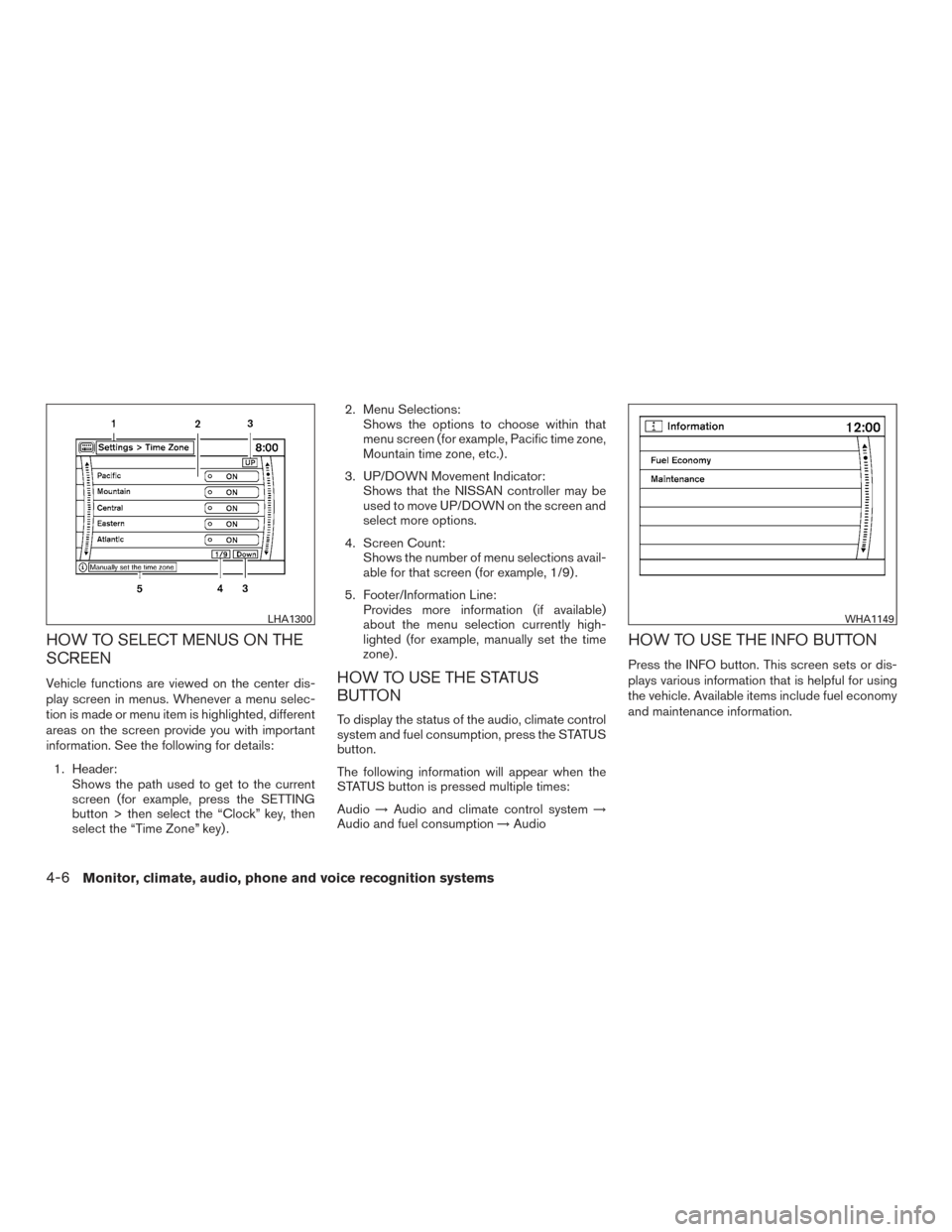
HOW TO SELECT MENUS ON THE
SCREEN
Vehicle functions are viewed on the center dis-
play screen in menus. Whenever a menu selec-
tion is made or menu item is highlighted, different
areas on the screen provide you with important
information. See the following for details:1. Header: Shows the path used to get to the current
screen (for example, press the SETTING
button > then select the “Clock” key, then
select the “Time Zone” key) . 2. Menu Selections:
Shows the options to choose within that
menu screen (for example, Pacific time zone,
Mountain time zone, etc.) .
3. UP/DOWN Movement Indicator: Shows that the NISSAN controller may be
used to move UP/DOWN on the screen and
select more options.
4. Screen Count: Shows the number of menu selections avail-
able for that screen (for example, 1/9) .
5. Footer/Information Line: Provides more information (if available)
about the menu selection currently high-
lighted (for example, manually set the time
zone) .HOW TO USE THE STATUS
BUTTON
To display the status of the audio, climate control
system and fuel consumption, press the STATUS
button.
The following information will appear when the
STATUS button is pressed multiple times:
Audio →Audio and climate control system →
Audio and fuel consumption →Audio
HOW TO USE THE INFO BUTTON
Press the INFO button. This screen sets or dis-
plays various information that is helpful for using
the vehicle. Available items include fuel economy
and maintenance information.
LHA1300WHA1149
4-6Monitor, climate, audio, phone and voice recognition systems
Page 204 of 540
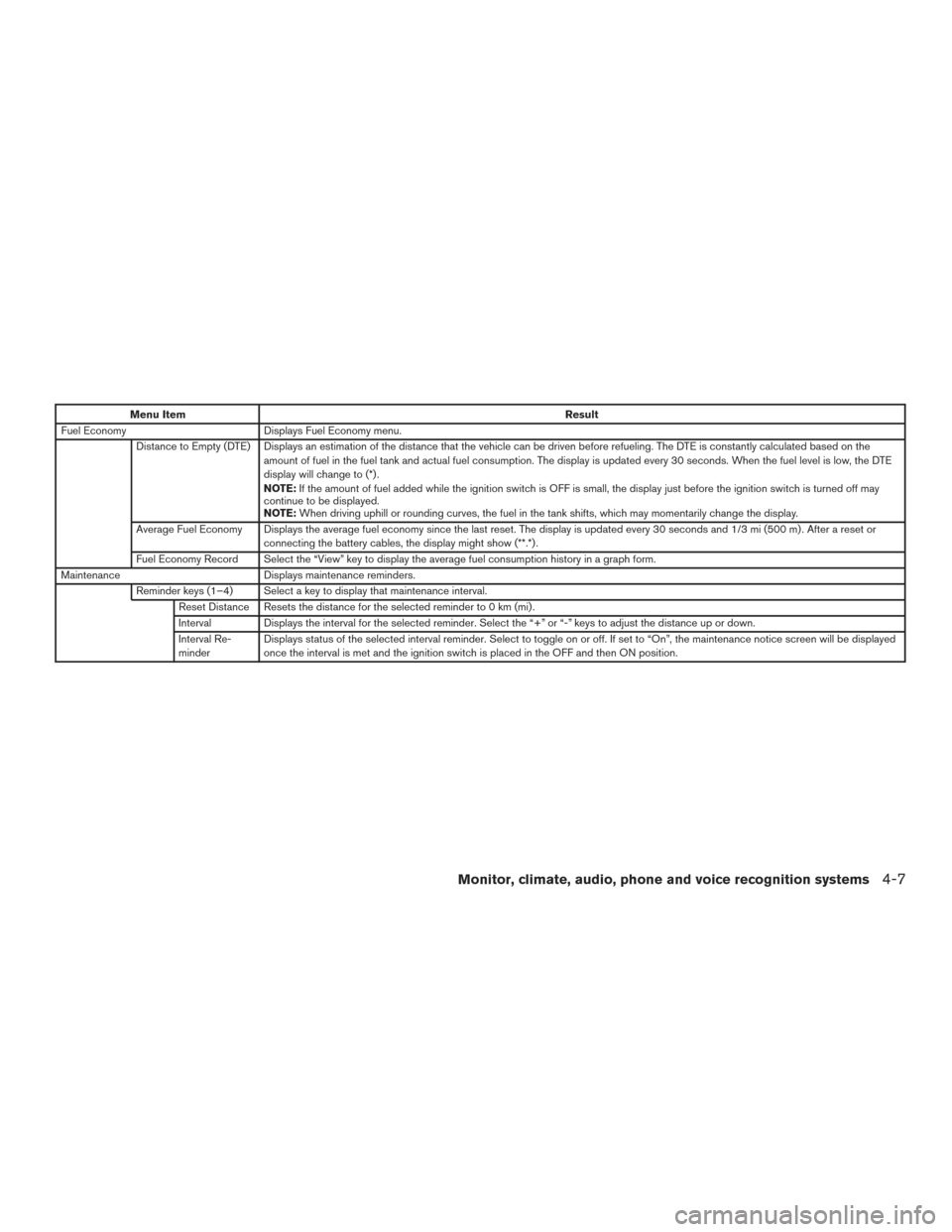
Menu ItemResult
Fuel Economy Displays Fuel Economy menu.
Distance to Empty (DTE) Displays an estimation of the distance that the vehicle can be driven before refueling. The DTE is constantly calculated based on the amount of fuel in the fuel tank and actual fuel consumption. The display is updated every 30 seconds. When the fuel level is low, the DTE
display will change to (*) .
NOTE:If the amount of fuel added while the ignition switch is OFF is small, the display just before the ignition switch is turned off may
continue to be displayed.
NOTE: When driving uphill or rounding curves, the fuel in the tank shifts, which may momentarily change the display.
Average Fuel Economy Displays the average fuel economy since the last reset. The display is updated every 30 seconds and 1/3 mi (500 m) . After a reset or connecting the battery cables, the display might show (**.*) .
Fuel Economy Record Select the “View” key to display the average fuel consumption history in a graph form.
Maintenance Displays maintenance reminders.
Reminder keys (1–4) Select a key to display that maintenance interval. Reset Distance Resets the distance for the selected reminder to 0 km (mi) .
Interval Displays the interval for the selected reminder. Select the “+” or “-” keys to adjust the distance up or down.
Interval Re-
minder Displays status of the selected interval reminder. Select to toggle on or off. If set to “On”, the maintenance notice screen will be displayed
once the interval is met and the ignition switch is placed in the OFF and then ON position.
Monitor, climate, audio, phone and voice recognition systems4-7
Page 211 of 540
Touch-screen maintenance
If you clean the display screen, use a dry, soft
cloth. If additional cleaning is necessary, use a
small amount of neutral detergent with a soft
cloth. Never spray the screen with water or de-
tergent. Dampen the cloth first, and then wipe the
screen.
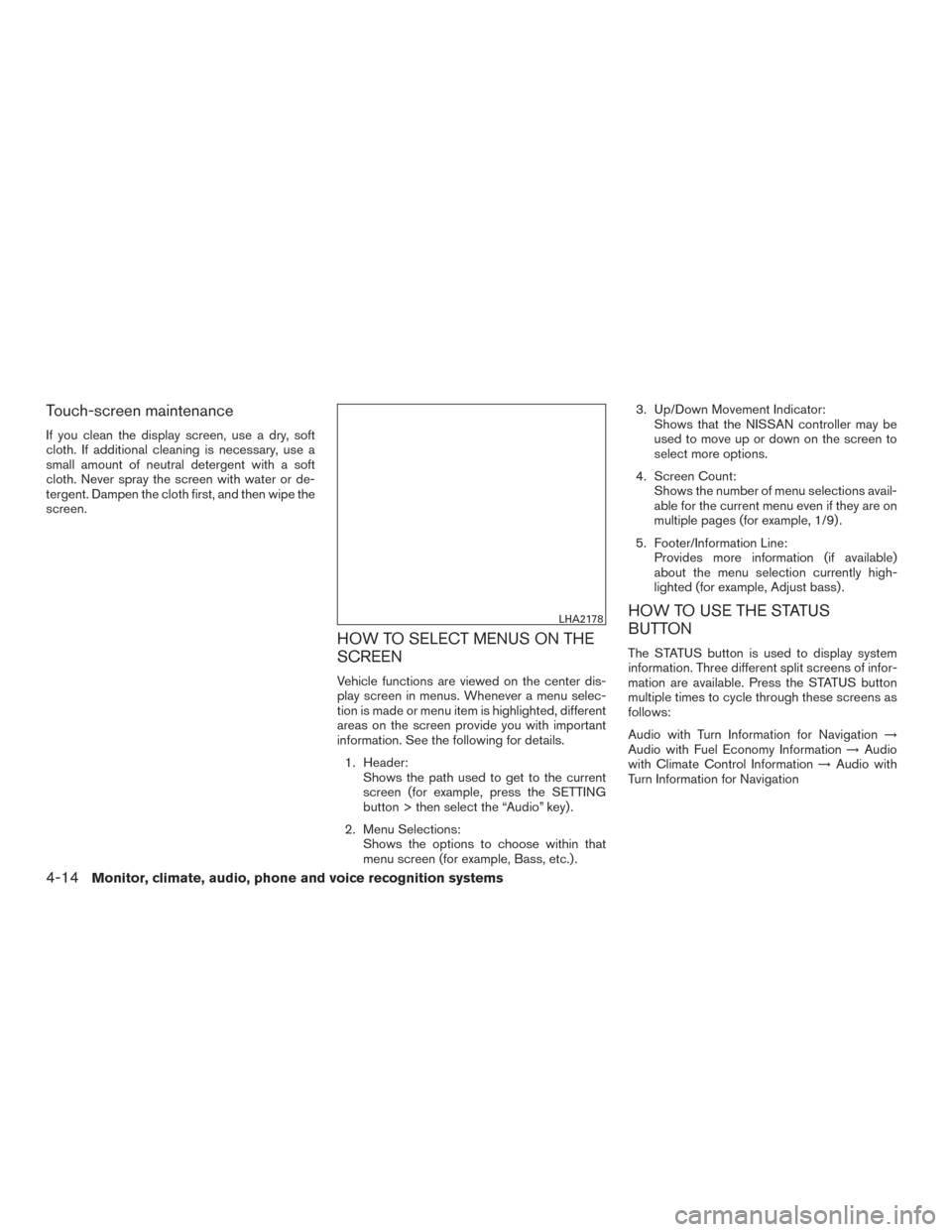
HOW TO SELECT MENUS ON THE
SCREEN
Vehicle functions are viewed on the center dis-
play screen in menus. Whenever a menu selec-
tion is made or menu item is highlighted, different
areas on the screen provide you with important
information. See the following for details.1. Header: Shows the path used to get to the current
screen (for example, press the SETTING
button > then select the “Audio” key) .
2. Menu Selections: Shows the options to choose within that
menu screen (for example, Bass, etc.) . 3. Up/Down Movement Indicator:
Shows that the NISSAN controller may be
used to move up or down on the screen to
select more options.
4. Screen Count: Shows the number of menu selections avail-
able for the current menu even if they are on
multiple pages (for example, 1/9) .
5. Footer/Information Line: Provides more information (if available)
about the menu selection currently high-
lighted (for example, Adjust bass) .
HOW TO USE THE STATUS
BUTTON
The STATUS button is used to display system
information. Three different split screens of infor-
mation are available. Press the STATUS button
multiple times to cycle through these screens as
follows:
Audio with Turn Information for Navigation →
Audio with Fuel Economy Information →Audio
with Climate Control Information →Audio with
Turn Information for Navigation
LHA2178
4-14Monitor, climate, audio, phone and voice recognition systems
Page 212 of 540
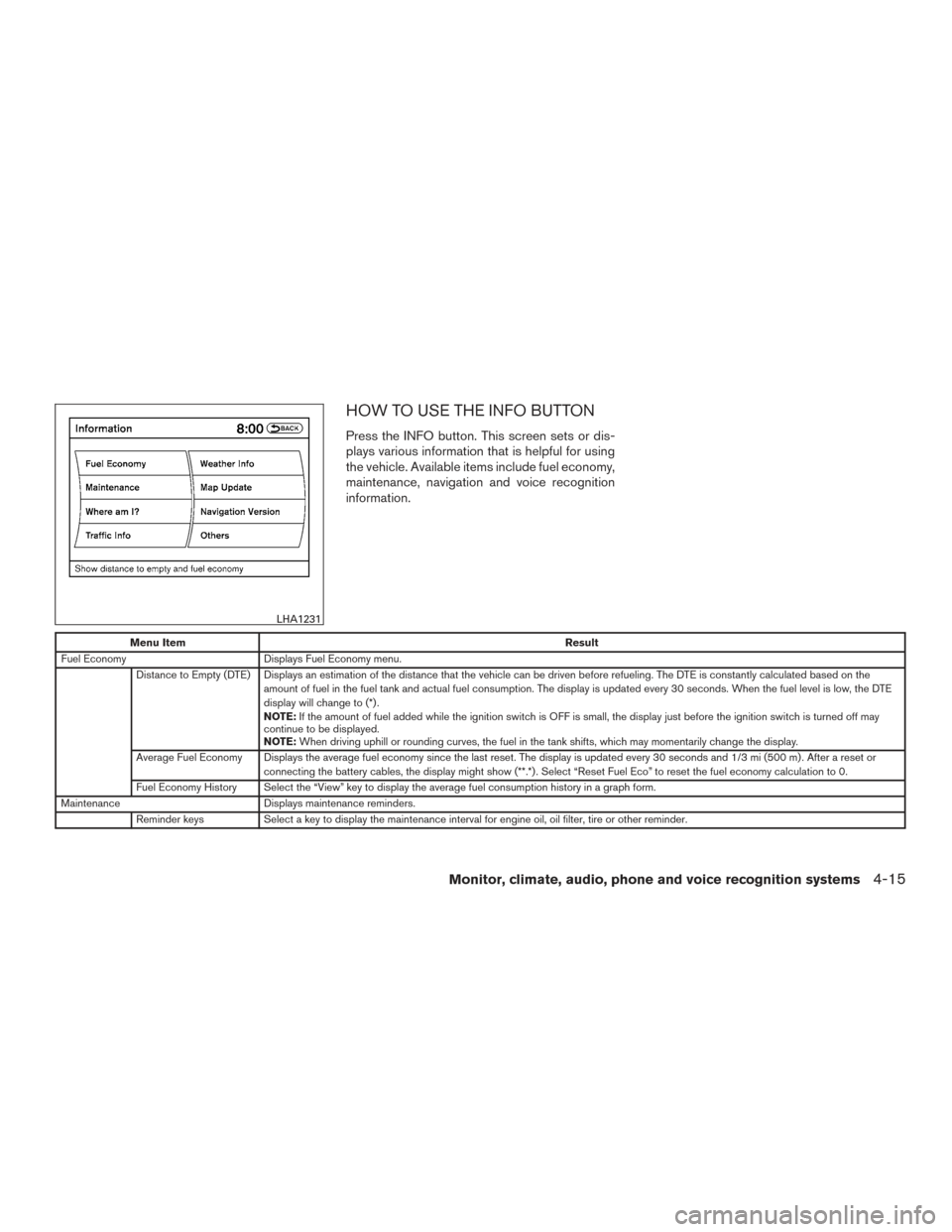
HOW TO USE THE INFO BUTTON
Press the INFO button. This screen sets or dis-
plays various information that is helpful for using
the vehicle. Available items include fuel economy,
maintenance, navigation and voice recognition
information.
Menu ItemResult
Fuel Economy Displays Fuel Economy menu.
Distance to Empty (DTE) Displays an estimation of the distance that the vehicle can be driven before refueling. The DTE is constantly calculated based on the amount of fuel in the fuel tank and actual fuel consumption. The display is updated every 30 seconds. When the fuel level is low, the DTE
display will change to (*) .
NOTE:If the amount of fuel added while the ignition switch is OFF is small, the display just before the ignition switch is turned off may
continue to be displayed.
NOTE: When driving uphill or rounding curves, the fuel in the tank shifts, which may momentarily change the display.
Average Fuel Economy Displays the average fuel economy since the last reset. The display is updated every 30 seconds and 1/3 mi (500 m) . After a reset or connecting the battery cables, the display might show (**.*) . Select “Reset Fuel Eco” to reset the fuel economy calculation to 0.
Fuel Economy History Select the “View” key to display the average fuel consumption history in a graph form.
Maintenance Displays maintenance reminders.
Reminder keys Select a key to display the maintenance interval for engine oil, oil filter, tire or other reminder.
LHA1231
Monitor, climate, audio, phone and voice recognition systems4-15
Page 213 of 540
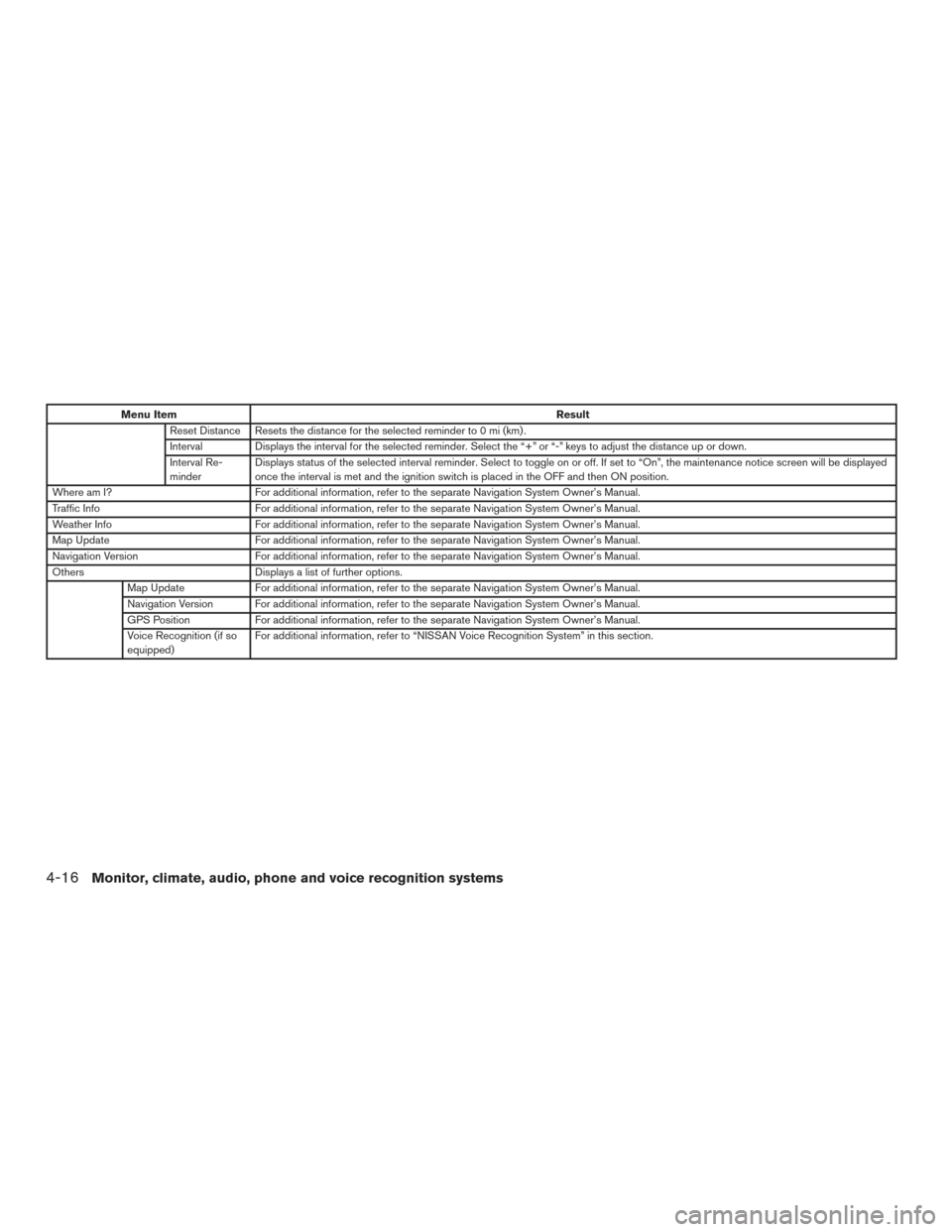
Menu ItemResult
Reset Distance Resets the distance for the selected reminder to 0 mi (km) .
Interval Displays the interval for the selected reminder. Select the “+” or “-” keys to adjust the distance up or down.
Interval Re-
minder Displays status of the selected interval reminder. Select to toggle on or off. If set to “On”, the maintenance notice screen will be displayed
once the interval is met and the ignition switch is placed in the OFF and then ON position.
Where am I? For additional information, refer to the separate Navigation System Owner’s Manual.
Traffic Info For additional information, refer to the separate Navigation System Owner’s Manual.
Weather Info For additional information, refer to the separate Navigation System Owner’s Manual.
Map Update For additional information, refer to the separate Navigation System Owner’s Manual.
Navigation Version For additional information, refer to the separate Navigation System Owner’s Manual.
Others Displays a list of further options.
Map Update For additional information, refer to the separate Navigation System Owner’s Manual.
Navigation Version For additional information, refer to the separate Navigation System Owner’s Manual.
GPS Position For additional information, refer to the separate Navigation System Owner’s Manual.
Voice Recognition (if so
equipped) For additional information, refer to “NISSAN Voice Recognition System” in this section.
4-16Monitor, climate, audio, phone and voice recognition systems