ignition NISSAN PATHFINDER 2016 R52 / 4.G Owner's Manual
[x] Cancel search | Manufacturer: NISSAN, Model Year: 2016, Model line: PATHFINDER, Model: NISSAN PATHFINDER 2016 R52 / 4.GPages: 540, PDF Size: 5.49 MB
Page 105 of 540
Operation
The MIL will come on in one of two ways:● MIL on steady — An emission control system
malfunction has been detected. Check the
fuel-filler cap. If the LOOSE FUEL CAP
warning message is displayed in the odom-
eter, and the fuel-filler cap is loose or miss-
ing, tighten or install the cap and continue to
drive the vehicle. The
light should turn
off after a few driving trips. If the
light
does not turn off after a few driving trips,
have the vehicle inspected. It is recom-
mended you visit a NISSAN dealer for this
service. You do not need to have your vehicle
towed to the dealer.
● MIL blinking — An engine misfire has been
detected which may damage the emission
control system. To reduce or avoid emission
control system damage:
– do not drive at speeds above 45 mph (72 km/h);
– avoid hard acceleration or deceleration;
– avoid steep uphill grades;
– if possible, reduce the amount of cargo being hauled.
The MIL may stop blinking and come on steady.
Have the vehicle inspected. It is recommended you visit a NISSAN dealer for this service. You do
not need to have your vehicle towed to the dealer.
CAUTION
Continued vehicle operation without hav-
ing the emission control system checked
and repaired as necessary could lead to
poor driveability, reduced fuel economy,
and possible damage to the emission con-
trol system.
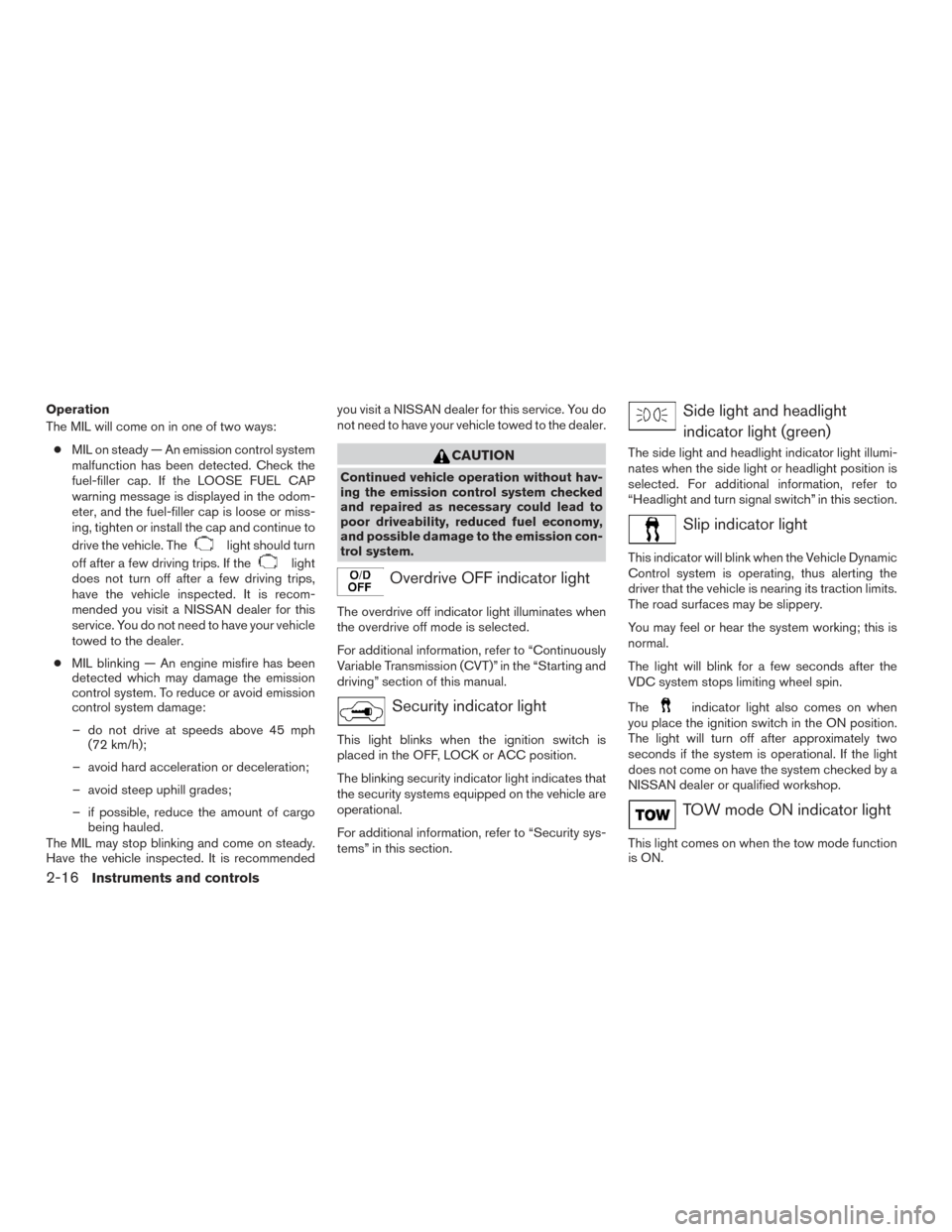
Overdrive OFF indicator light
The overdrive off indicator light illuminates when
the overdrive off mode is selected.
For additional information, refer to “Continuously
Variable Transmission (CVT)” in the “Starting and
driving” section of this manual.
Security indicator light
This light blinks when the ignition switch is
placed in the OFF, LOCK or ACC position.
The blinking security indicator light indicates that
the security systems equipped on the vehicle are
operational.
For additional information, refer to “Security sys-
tems” in this section.
Side light and headlight
indicator light (green)
The side light and headlight indicator light illumi-
nates when the side light or headlight position is
selected. For additional information, refer to
“Headlight and turn signal switch” in this section.
Slip indicator light
This indicator will blink when the Vehicle Dynamic
Control system is operating, thus alerting the
driver that the vehicle is nearing its traction limits.
The road surfaces may be slippery.
You may feel or hear the system working; this is
normal.
The light will blink for a few seconds after the
VDC system stops limiting wheel spin.
The
indicator light also comes on when
you place the ignition switch in the ON position.
The light will turn off after approximately two
seconds if the system is operational. If the light
does not come on have the system checked by a
NISSAN dealer or qualified workshop.
TOW mode ON indicator light
This light comes on when the tow mode function
is ON.
2-16Instruments and controls
Page 106 of 540
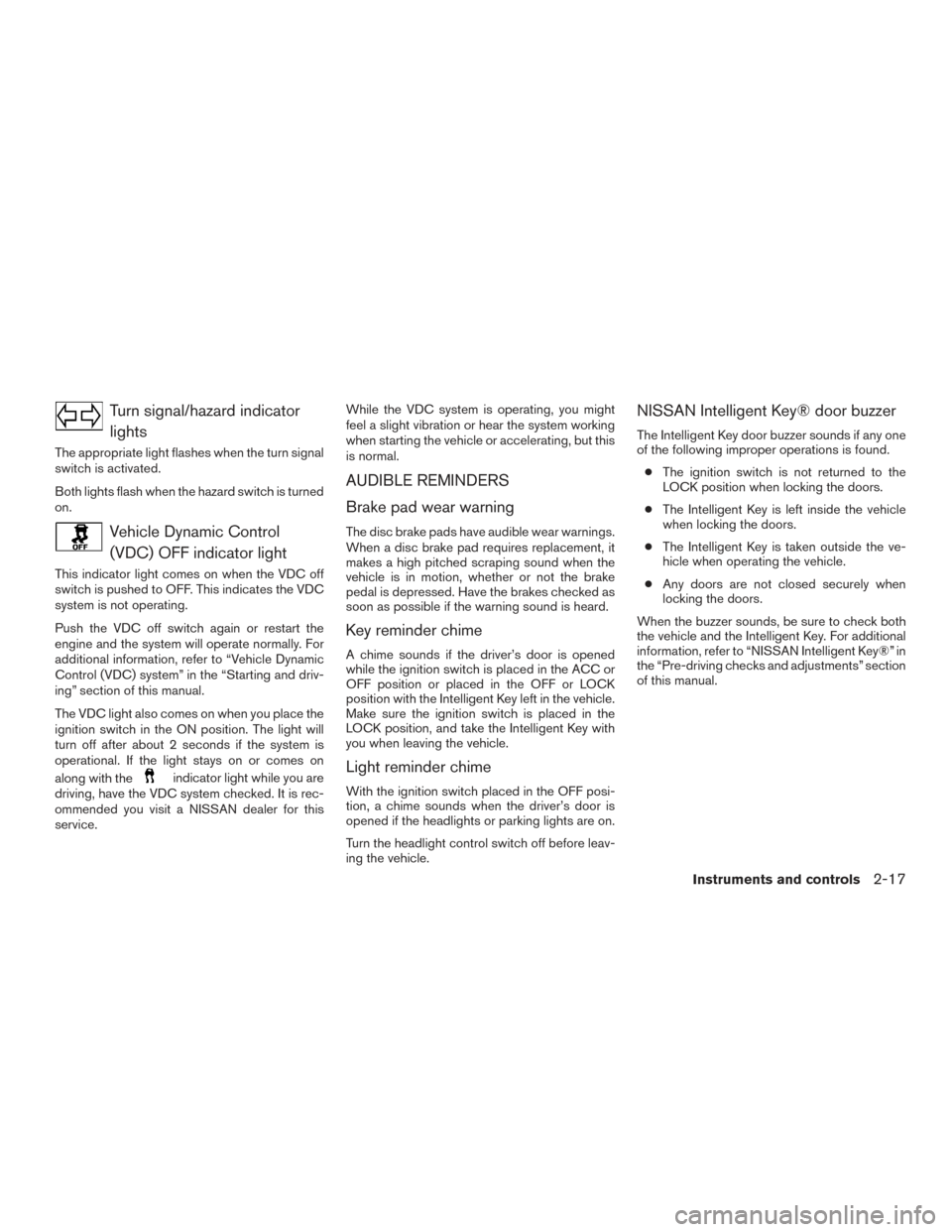
Turn signal/hazard indicatorlights
The appropriate light flashes when the turn signal
switch is activated.
Both lights flash when the hazard switch is turned
on.
Vehicle Dynamic Control(VDC) OFF indicator light
This indicator light comes on when the VDC off
switch is pushed to OFF. This indicates the VDC
system is not operating.
Push the VDC off switch again or restart the
engine and the system will operate normally. For
additional information, refer to “Vehicle Dynamic
Control (VDC) system” in the “Starting and driv-
ing” section of this manual.
The VDC light also comes on when you place the
ignition switch in the ON position. The light will
turn off after about 2 seconds if the system is
operational. If the light stays on or comes on
along with the
indicator light while you are
driving, have the VDC system checked. It is rec-
ommended you visit a NISSAN dealer for this
service. While the VDC system is operating, you might
feel a slight vibration or hear the system working
when starting the vehicle or accelerating, but this
is normal.
AUDIBLE REMINDERS
Brake pad wear warning
The disc brake pads have audible wear warnings.
When a disc brake pad requires replacement, it
makes a high pitched scraping sound when the
vehicle is in motion, whether or not the brake
pedal is depressed. Have the brakes checked as
soon as possible if the warning sound is heard.
Key reminder chime
A chime sounds if the driver’s door is opened
while the ignition switch is placed in the ACC or
OFF position or placed in the OFF or LOCK
position with the Intelligent Key left in the vehicle.
Make sure the ignition switch is placed in the
LOCK position, and take the Intelligent Key with
you when leaving the vehicle.
Light reminder chime
With the ignition switch placed in the OFF posi-
tion, a chime sounds when the driver’s door is
opened if the headlights or parking lights are on.
Turn the headlight control switch off before leav-
ing the vehicle.
NISSAN Intelligent Key® door buzzer
The Intelligent Key door buzzer sounds if any one
of the following improper operations is found.
● The ignition switch is not returned to the
LOCK position when locking the doors.
● The Intelligent Key is left inside the vehicle
when locking the doors.
● The Intelligent Key is taken outside the ve-
hicle when operating the vehicle.
● Any doors are not closed securely when
locking the doors.
When the buzzer sounds, be sure to check both
the vehicle and the Intelligent Key. For additional
information, refer to “NISSAN Intelligent Key®” in
the “Pre-driving checks and adjustments” section
of this manual.
Instruments and controls2-17
Page 110 of 540
Menu itemResult
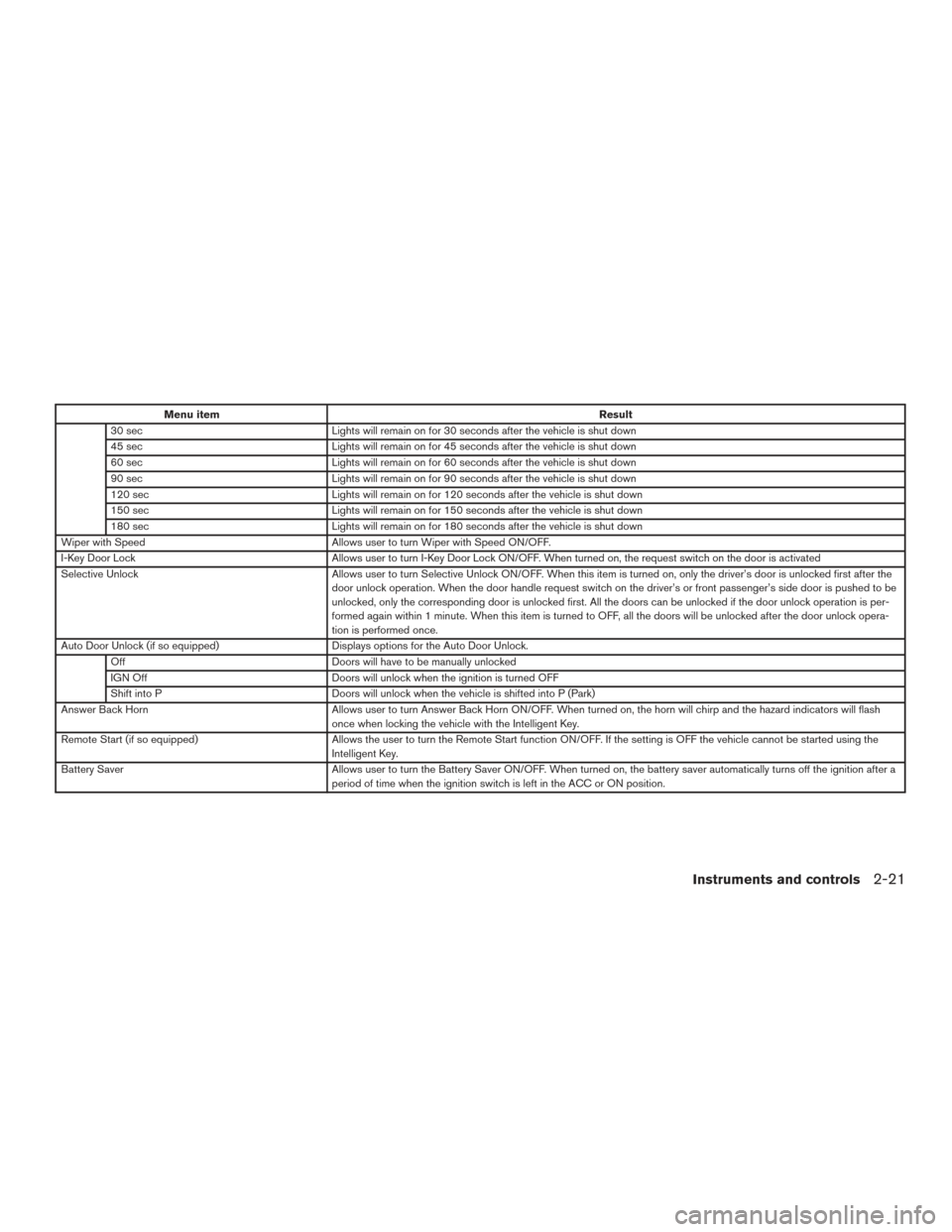
30 sec Lights will remain on for 30 seconds after the vehicle is shut down
45 sec Lights will remain on for 45 seconds after the vehicle is shut down
60 sec Lights will remain on for 60 seconds after the vehicle is shut down
90 sec Lights will remain on for 90 seconds after the vehicle is shut down
120 sec Lights will remain on for 120 seconds after the vehicle is shut down
150 sec Lights will remain on for 150 seconds after the vehicle is shut down
180 sec Lights will remain on for 180 seconds after the vehicle is shut down
Wiper with Speed Allows user to turn Wiper with Speed ON/OFF.
I-Key Door Lock Allows user to turn I-Key Door Lock ON/OFF. When turned on, the request switch on the door is activated
Selective Unlock Allows user to turn Selective Unlock ON/OFF. When this item is turned on, only the driver’s door is unlocked first after the
door unlock operation. When the door handle request switch on the driver’s or front passenger’s side door is pushed to be
unlocked, only the corresponding door is unlocked first. All the doors can be unlocked if the door unlock operation is per-
formed again within 1 minute. When this item is turned to OFF, all the doors will be unlocked after the door unlock opera-
tion is performed once.
Auto Door Unlock (if so equipped) Displays options for the Auto Door Unlock.
Off Doors will have to be manually unlocked
IGN Off Doors will unlock when the ignition is turned OFF
Shift into P Doors will unlock when the vehicle is shifted into P (Park)
Answer Back Horn Allows user to turn Answer Back Horn ON/OFF. When turned on, the horn will chirp and the hazard indicators will flash
once when locking the vehicle with the Intelligent Key.
Remote Start (if so equipped) Allows the user to turn the Remote Start function ON/OFF. If the setting is OFF the vehicle cannot be started using the
Intelligent Key.
Battery Saver Allows user to turn the Battery Saver ON/OFF. When turned on, the battery saver automatically turns off the ignition after a
period of time when the ignition switch is left in the ACC or ON position.
Instruments and controls2-21
Page 111 of 540
Menu itemResult
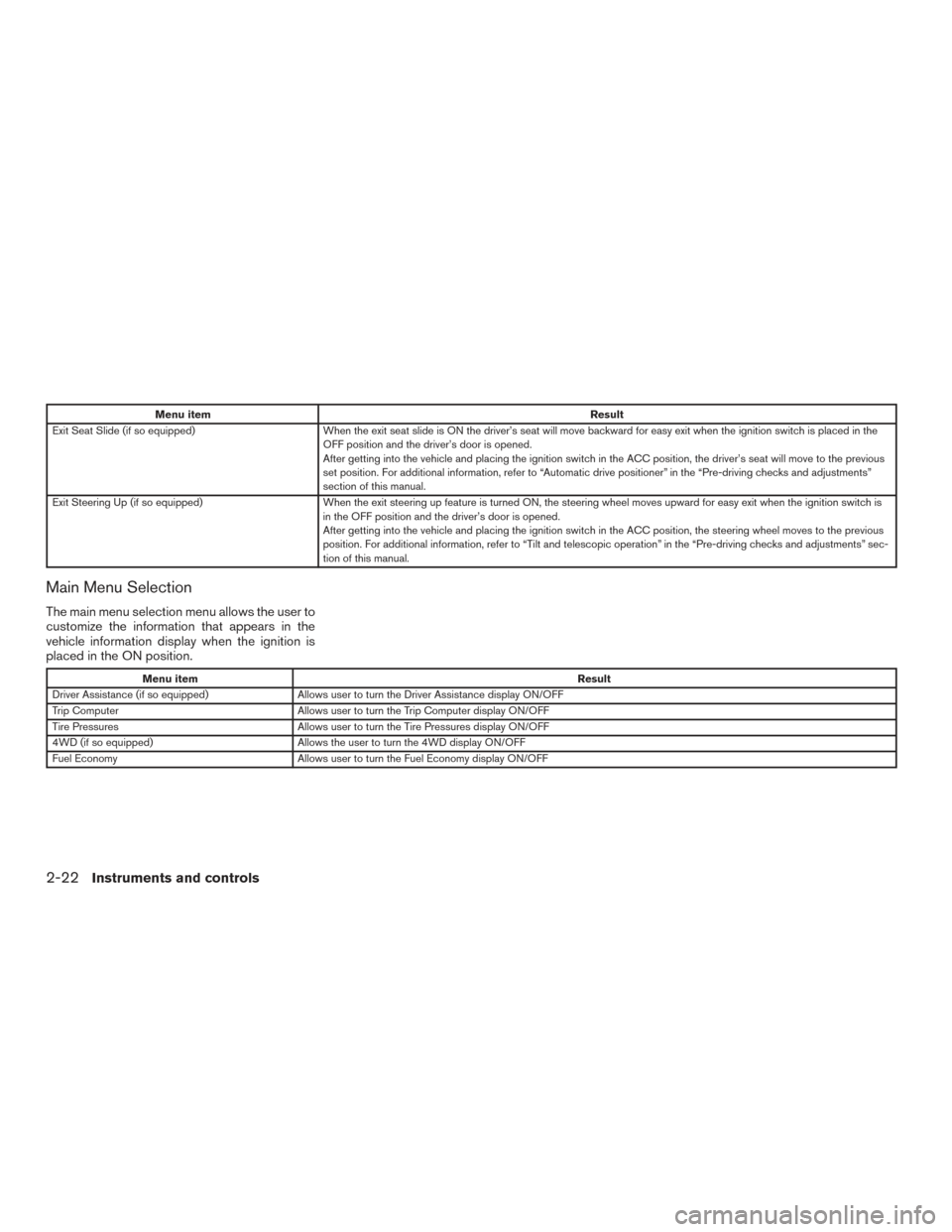
Exit Seat Slide (if so equipped) When the exit seat slide is ON the driver’s seat will move backward for easy exit when the ignition switch is placed in the
OFF position and the driver’s door is opened.
After getting into the vehicle and placing the ignition switch in the ACC position, the driver’s seat will move to the previous
set position. For additional information, refer to “Automatic drive positioner” in the “Pre-driving checks and adjustments”
section of this manual.
Exit Steering Up (if so equipped) When the exit steering up feature is turned ON, the steering wheel moves upward for easy exit when the ignition switch i s
in the OFF position and the driver’s door is opened.
After getting into the vehicle and placing the ignition switch in the ACC position, the steering wheel moves to the previous
position. For additional information, refer to “Tilt and telescopic operation” in the “Pre-driving checks and adjustments” sec-
tion of this manual.
Main Menu Selection
The main menu selection menu allows the user to
customize the information that appears in the
vehicle information display when the ignition is
placed in the ON position.
Menu item Result
Driver Assistance (if so equipped) Allows user to turn the Driver Assistance display ON/OFF
Trip Computer Allows user to turn the Trip Computer display ON/OFF
Tire Pressures Allows user to turn the Tire Pressures display ON/OFF
4WD (if so equipped) Allows the user to turn the 4WD display ON/OFF
Fuel Economy Allows user to turn the Fuel Economy display ON/OFF
2-22Instruments and controls
Page 116 of 540
VEHICLE INFORMATION DISPLAY
WARNINGS AND INDICATORS
1. No Key Detected
2. Key ID Incorrect
3. Shift to Park4. Push ignition to OFF
5. Key low battery
6. Engine start operation for Intelligent Key sys-
tem (if I-Key battery level is low)
7. Release Parking Brake 8. Low Fuel
9. Low Washer Fluid
10. Door Open
11. Liftgate Open
12. Timer Alert – Have a break?
LIC3454
Instruments and controls2-27
Page 117 of 540
13. Low Outside Temperature
14. Power will turn off to save the battery
15. CVT Error: See Owner’s Manual
16. Turn off the lights
17. Low Oil Pressure: See Owner’s Manual
18. Key Registration Complete
19. Tire Pressure Low - Add Air
20. TPMS Error: See Owner’s Manual
21. Parking Sensor Error: See Owner’s Manual(if so equipped)
22. I-Key System Error: See Owner’s Manual
23. Loose Fuel Cap
24. Shift Position indicator
25. Side Radar Obstruction (if so equipped)
26. 4x4–i indicators (if so equipped)
27. Cruise control indicators
28. 4WD Error: See Owner’s Manual (if so equipped)
29. Push brake and start button to drive
30. Blind Spot Warning (BSW) and Rear Cross Traffic Alert (RCTA) indicator (if so
equipped) No Key Detected
This warning appears when the Intelligent Key is
left outside the vehicle with the ignition switch in
the ON or ACC position. Make sure the Intelli-
gent Key is inside the vehicle.
Key ID Incorrect
This warning appears when the ignition switch is
placed from the OFF position and the Intelligent
Key is not recognized by the system. You cannot
start the engine with an unregistered key.
For additional information, refer to “NISSAN In-
telligent Key®” in the “Pre-driving checks and
adjustments” section of this manual.
Shift to Park
This warning illuminates when the ignition switch
is in the ACC or OFF position and the shift lever
is in any position other than P (Park) position.
Also, a chime sounds when the ignition switch is
in the OFF position.
If this warning illuminates, move the shift lever to
the P (Park) position or start the engine.
For additional information about Intelligent Key,
refer to “NISSAN Intelligent Key®” in the “Pre-
driving checks and adjustments” section of this
manual.
Push ignition to OFF
After the Push ignition to OFF warning illumi-
nates, the warning will illuminate if the ignition
switch is placed in the ACC position when the
shift lever is moved to the P (Park) position.
To turn off the Push warning, place the ignition
switch in the ON position and then in the LOCK
position.
Key low battery
This indicator illuminates when the Intelligent Key
battery is running out of power.
If this indicator illuminates, replace the battery
with a new one. For additional information, refer
to “Battery replacement” in the “Maintenance and
do-it-yourself” section of this manual.
Engine start operation for Intelligent Key
system (if I-Key battery level is low)
This indicator appears when the battery of the
Intelligent Key is low and when the Intelligent Key
system and the vehicle are not communicating
normally.
If this appears, touch the ignition switch with the
Intelligent Key while depressing the brake pedal.
For additional information, refer to “NISSAN In-
telligent Key® battery discharge” in the “Starting
and driving” section of this manual.
2-28Instruments and controls
Page 118 of 540
Release Parking Brake
This warning illuminates in the message area of
the vehicle information display when the parking
brake is set and the vehicle is driven.
Low Fuel
This warning illuminates when the fuel level in the
fuel tank is getting low. Refuel as soon as it is
convenient, preferably before the fuel gauge
reaches 0 (Empty) .There will be a small re-
serve of fuel in the tank when the fuel
gauge needle reaches 0 (Empty) .
Low Washer Fluid
This warning illuminates when the windshield-
washer fluid is at a low level. Add windshield-
washer fluid as necessary. For additional informa-
tion, refer to “Windshield-washer fluid” in the
“Maintenance and do-it-yourself” section of this
manual.
Door Open
This warning illuminates when a door has been
opened when the engine is running.
Liftgate Open
This warning illuminates when the liftgate has
been opened when the engine is running. Timer Alert – Have a break?
This indicator appears when the set time is
reached. The time can be set up to 6 hours. For
setting the timer, refer to “Settings” in this sec-
tion.
Low Outside Temperature
This warning appears if the outside temperature
is below 37°F (3°C) . The temperature can be
changed to display in Celsius or Fahrenheit. For
additional information, refer to “Settings” in this
section.
Power will turn off to save the battery
This warning appears in the message area of the
vehicle information display after a period of time if
the shift lever has not moved from the P (Park)
position.
CVT Error: See Owner’s Manual
This warning illuminates when the there is a prob-
lem with the CVT system. If this warning comes
on, have the system checked. It is recommended
you visit a NISSAN dealer for this service.
Turn off the lights
This warning appears when the headlights are
left in the ON position when exiting the vehicle.
Place the headlight switch to OFF or AUTO po-sition. For additional information, refer to “Head-
light and turn signal switch” in this section.
Low Oil Pressure: See Owner’s Manual
This warning appears in message area of the
vehicle information display if low oil pressure is
detected. This gauge is not designed to indicate
low oil level.
The low oil pressure warning is
not designed to indicate a low oil level. Use
the dipstick to check the oil level. For additional
information, refer to “Engine oil” in the “Mainte-
nance and do-it-yourself” section of this manual.
Key Registration Complete
This appears when a new Intelligent Key is regis-
tered to the vehicle.
Tire Pressure Low - Add Air
This warning appears when the low tire pressure
warning light in the meter illuminates and low tire
pressure is detected. The warning appears each
time the ignition switch is placed in the ON
position as long as the low tire pressure warning
light remains illuminated. If this warning appears,
stop the vehicle and adjust the tire pressures of
all four tires to the recommended COLD tire
pressure shown on the Tire and Loading Informa-
tion label. For additional information, refer to
“Low tire pressure warning light” in this section
Instruments and controls2-29
Page 119 of 540
and “Tire Pressure Monitoring System (TPMS)”
in the “Starting and driving” section of this
manual.
TPMS Error: See Owner’s Manual
This warning appears when there is an error with
your TPMS. If this warning comes on, it is recom-
mended you have the system checked by a
NISSAN dealer.
Parking Sensor Error: See Owner’s
Manual (if so equipped)
This warning illuminates when there is an error
with the system. For additional information, refer
to “Rear Sonar System (RSS)” in the “Starting
and driving” section of this manual.
I-Key System Error: See Owner’s Manual
After the ignition switch is pushed to the ON
position, this light comes on for about 2 seconds
and then turns off.
The I-Key System Error message warns of a
malfunction with the Intelligent Key system. If the
light comes on while the engine is stopped, it may
be impossible to start the engine.
If the light comes on while the engine is running,
you can drive the vehicle. However in these
cases, have the system checked. It is recom-
mended that you visit a NISSAN dealer for this
service.Loose Fuel Cap
This warning appears when the fuel-filler cap is
not tightened correctly after the vehicle has been
refueled. For additional information, refer to
“Fuel-filler cap” in the “Pre-driving checks and
adjustments” section of this manual.
Shift Position indicator
This indicator shows the transmission shift posi-
tion.
Side Radar Obstruction (if so equipped)
This warning appears when there is radar block-
age detected. For additional information, refer to
“Blind Spot Warning (BSW)” in the “Starting and
driving” section of this manual.
4x4–i indicators (if so equipped)
These indicators show the Intelligent 4WD sys-
tem status while the engine is running.
For additional information, refer to “Intelligent 4WD”
in the “Starting and driving” section of this manual.
Cruise control indicators
These indicators show the cruise control system
status.
For additional information, refer to “Cruise con-
trol” in the “Starting and Driving” section of this
manual.4WD Erorr: See Owner’s Manual (if so
equipped)
This warning appears when the 4-wheel drive
system is not functioning properly. For additional
information, refer to “Intelligent 4WD” in the
“Starting and driving” section of this manual.
Push brake and start button to drive
This indicator appears when the shift lever is in
the P (Park) position.
This indicator also appears when the vehicle has
been started with the remote start function (if so
equipped) .
This indicator means that the engine will start by
pushing the ignition switch with the brake pedal
depressed. You can start the engine from any
position of the ignition switch.
Blind Spot Warning (BSW) and Rear Cross
Traffic Alert (RCTA) indicator (if so
equipped)
This indicator shows when the BSW and RCTA
systems are engaged.
For additional information, refer to “Blind Spot
Warning (BSW)” and “Rear Cross Traffic Alert
(RCTA)” in the “Starting and driving” section of
this manual.
2-30Instruments and controls
Page 120 of 540
Your vehicle has one security system:● Vehicle security system
● NISSAN Vehicle Immobilizer System
VEHICLE SECURITY SYSTEM
The vehicle security system provides visual and
audible alarm signals if someone opens the
doors, trunk, liftgate or the hood when the system
is armed. It is not, however, a motion detection
type system that activates when a vehicle is
moved or when a vibration occurs.
The system helps deter vehicle theft but cannot
prevent it, nor can it prevent the theft of interior or
exterior vehicle components in all situations. Al- ways secure your vehicle even if parking for a
brief period. Never leave your Intelligent Key in
the vehicle, and always lock the vehicle when
unattended. Be aware of your surroundings, and
park in secure, well-lit areas whenever possible.
Many devices offering additional protection, such
as component locks, identification markers, and
tracking systems, are available at auto supply
stores and specialty shops. A NISSAN dealer
may also offer such equipment. Check with your
insurance company to see if you may be eligible
for discounts for various theft protection features.
How to arm the vehicle security
system
1. Close all windows.
(The system can be
armed even if the windows are open.)
2. Remove the intelligent key from the vehicle.
3. Close all doors, hood and trunk. Lock all doors. The doors can be locked with the
Intelligent Key, door handle request switch,
power door lock switch or mechanical key.
4. Confirm that the security indicator light comes on. The security light stays on for
about 30 seconds. The vehicle security sys-
tem is now pre-armed. After about 30 sec-
onds the vehicle security system automati-
cally shifts into the armed phase. The security light begins to flash once every
3 seconds. If, during the 30-second pre-arm
time period, the driver’s door is unlocked by
the key or the key fob, or the ignition switch
is placed in the ACC or ON position, the
system will not arm.
● Even when the driver and/or passen-
gers are in the vehicle, the system will
activate with all the doors, hood and
trunk lid locked with the ignition switch
placed in the LOCK position. When
placing the ignition switch in the ACC
or ON position, the system will be re-
leased.
Vehicle security system activation
The vehicle security system will give the following
alarm:
● The headlights blink and the horn sounds
intermittently.
● The alarm automatically turns off after a pe-
riod of time. However, the alarm reactivates if
the vehicle is tampered with again. The alarm
can be shut off by unlocking the driver’s door
with the key, or by pressing the
button
on the Intelligent Key.
LIC2385
SECURITY SYSTEMS
Instruments and controls2-31
Page 121 of 540
The alarm is activated by:● opening the door or hood without using the
key or Intelligent Key (even if the door is
unlocked by releasing the door inside lock
switch) .
How to stop an activated alarm
The alarm stops only by unlocking the driver’s
door or the liftgate with the key, pressing
the
button on the Intelligent Key, or press-
ing the request switch on the driver’s or passen-
ger’s door with the Intelligent Key in range of the
door handle.
NISSAN VEHICLE IMMOBILIZER
SYSTEM
The NISSAN Vehicle Immobilizer System will not
allow the engine to start without the use of a
registered key.
If the engine fails to start using a registered key
(for example, when interference is caused by
another registered key, an automated toll road
device or automatic payment device on the key
ring) , restart the engine using the following pro-
cedures:
1. Leave the ignition switch placed in the ON position for approximately 5 seconds. 2. Place the ignition switch in the OFF or
LOCK position, and wait approximately
10 seconds.
3. Repeat steps 1 and 2.
4. Restart the engine while holding the device (which may have caused the interference)
separate from the registered key.
If the no start condition re-occurs, NISSAN rec-
ommends placing the registered key on a sepa-
rate key ring to avoid interference from other
devices.
FCC Notice:
For USA:
This device complies with part 15 of the
FCC Rules. Operation is subject to the fol-
lowing two conditions: (1) This device may
not cause harmful interference, and (2) this
device must accept any interference re-
ceived, including interference that may
cause undesired operation.
NOTE:
Changes or modifications not expressly ap-
proved by the party responsible for compli-
ance could void the user’s authority to op-
erate the equipment. For Canada:
This device complies with Industry Canada
licence-exempt RSS standard(s) . Opera-
tion is subject to the following two condi-
tions: (1) this device may not cause inter-
ference, and (2) this device must accept any
interference, including interference that
may cause undesired operation of the de-
vice.
2-32Instruments and controls