display NISSAN PATHFINDER 2017 R52 / 4.G Owners Manual
[x] Cancel search | Manufacturer: NISSAN, Model Year: 2017, Model line: PATHFINDER, Model: NISSAN PATHFINDER 2017 R52 / 4.GPages: 555, PDF Size: 6.13 MB
Page 321 of 555
Sending a text message
To display the phone menu screen, take the fol-
lowing actions:1. Push the
switch on the steering wheel
or on the control panel (if so equipped) .
2. Touch the “Text Message” key.
3. Touch the “Compose Message” key.
The following items are available.
Available item Action
To Keypad
Type in the address of the recipient using the keypad. Touch the “OK” key to confirm the
address.
Phonebook Select a recipient from the phonebook and touch the “OK” key to confirm.
Template Select from list
Select an item from the message list. The selected text will be added to the message to be
sent.
Edit Text Message Replies Select an item in the message list to be edited. Use the keypad to edit the text and touch the “OK” key to complete editing.
Send Touch to send the message.
5GF0003X
4-122Monitor, climate, audio, phone and voice recognition systems
Page 325 of 555
Phonebook
Information in the phonebook on cellular phones
can be downloaded. For additional information,
refer to “Phone and text message settings” in this
section.1. Push the
switch.
2. Touch the “Phonebook” key and select from the list.
This can be viewed on the display and used to
make calls or send text messages.
Favorites
Up to 40 phone numbers can be transferred to
the favorites list from a cellular phone.
1. Push the
switch.
2. Touch the “Favorites” key and select from the list.
It can be viewed on the display and used to make
calls or send text messages. Voice Tag:
A custom voice tag can be recorded for phone
numbers on the favorites list and used to dial the
number by speaking it.
1. Push theswitch.
2. Touch the “Favorites” key.
3. Select an item from the list.
4. Touch the “Voice Tag” key.
5GF0021X5GF0022X5GF0023X
4-126Monitor, climate, audio, phone and voice recognition systems
Page 327 of 555
BLUETOOTH® INFORMATION
Information about the connected Bluetooth® de-
vice can be viewed.1. Press the SETTING button.
2. Touch the “Bluetooth” key.
3. Touch the “Vehicle Bluetooth Device Info.” key.
The following items are available.Available item Action
Device Name The name of the connected Bluetooth® device is
displayed. Touch the “Device Name” key to display the
keyboard input screen for editing.
Enter PIN Code The passkey of the connected Bluetooth® device is
displayed. Touch the “Enter PIN Code” key to display the
keyboard input screen.
Device Address The device address of the connected Bluetooth® device
is displayed.
4-128Monitor, climate, audio, phone and voice recognition systems
Page 328 of 555
NISSANCONNECTSMAPPS
OVERVIEW
Laws in some jurisdictions may restrict the use of
some of the applications and features, such as
social networking and texting. Check local regu-
lations for any requirements.
NissanConnect
SMApps provide in-vehicle ac-
cess to NissanConnect Vehicle Apps.
Some pre-installed NissanConnect Vehicle Apps
can be used without taking any extra steps.
CAUTION
● While driving, some operations are lim-
ited in order to prevent distracting the
driver. While driving, avoid keeping a
close watch on the display.
● Some application services may be sub-
ject to change or termination without
prior notice.
The system allows you to download new applica-
tions, update downloaded applications and de-
lete downloaded applications in a similar manner
as popular smartphone operating systems.
You will need to connect a compatible smart-
phone to the vehicle in order to update Nissan-
Connect Vehicle Apps. The usage of applications is only guaranteed for
smartphones that have been tested and ap-
proved for use with NissanConnect
SMApps.
Only iPhone® and Android devices are currently
supported. Android smartphones must support
Bluetooth® and SPP (Serial Port Profile) .
USING APPLICATIONS
NOTE:
To use APP functions on the models with-
out a navigation system, the calendar set-
ting is necessary for checking the SSL ex-
piration date. For additional information,
refer to “Clock settings” in this section.
MAIN OPERATION
Push the APPS button to display the menu
screen.
Touch the icon for the desired application. The
selected application will be launched.
The applications shown on the menu screen and
the display order can be customized. For addi-
tional information, refer to “App Garage Settings
screen” in this section.
Some applications can be set to launch automati-
cally upon vehicle ignition.
NISSANCONNECT VEHICLE APPS
NissanConnect Vehicle Apps are unique applica-
tions developed by NISSAN.
NISSANCONNECTSMAPPS
Monitor, climate, audio, phone and voice recognition systems4-129
Page 329 of 555
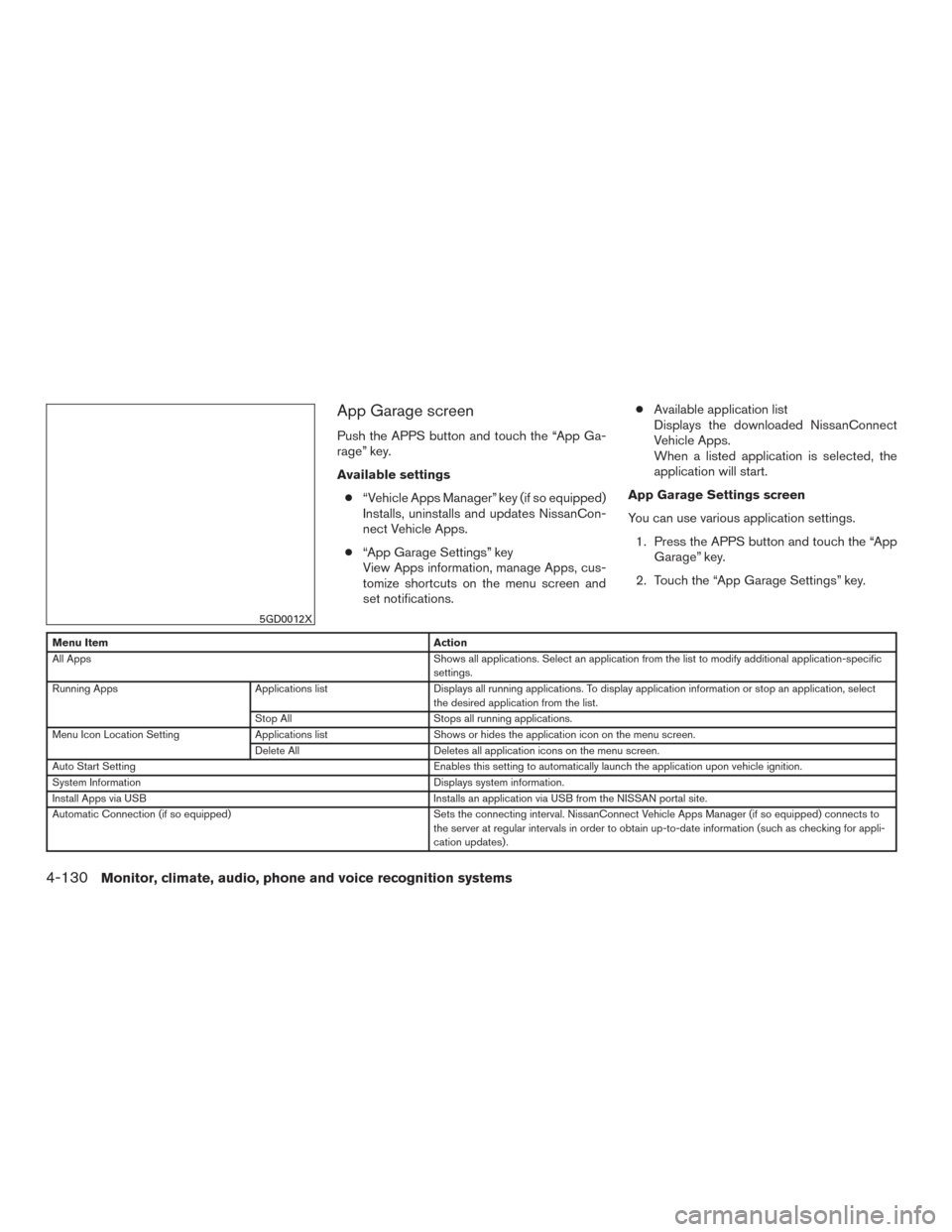
App Garage screen
Push the APPS button and touch the “App Ga-
rage” key.
Available settings● “Vehicle Apps Manager” key (if so equipped)
Installs, uninstalls and updates NissanCon-
nect Vehicle Apps.
● “App Garage Settings” key
View Apps information, manage Apps, cus-
tomize shortcuts on the menu screen and
set notifications. ●
Available application list
Displays the downloaded NissanConnect
Vehicle Apps.
When a listed application is selected, the
application will start.
App Garage Settings screen
You can use various application settings. 1. Press the APPS button and touch the “App Garage” key.
2. Touch the “App Garage Settings” key.
Menu Item Action
All Apps Shows all applications. Select an application from the list to modify additional application-specific
settings.
Running Apps Applications listDisplays all running applications. To display application information or stop an application, select
the desired application from the list.
Stop All Stops all running applications.
Menu Icon Location Setting Applications listShows or hides the application icon on the menu screen.
Delete All Deletes all application icons on the menu screen.
Auto Start Setting Enables this setting to automatically launch the application upon vehicle ignition.
System Information Displays system information.
Install Apps via USB Installs an application via USB from the NISSAN portal site.
Automatic Connection (if so equipped) Sets the connecting interval. NissanConnect Vehicle Apps Manager (if so equipped) connects to
the server at regular intervals in order to obtain up-to-date information (such as checking for appli-
cation updates) .
5GD0012X
4-130Monitor, climate, audio, phone and voice recognition systems
Page 330 of 555
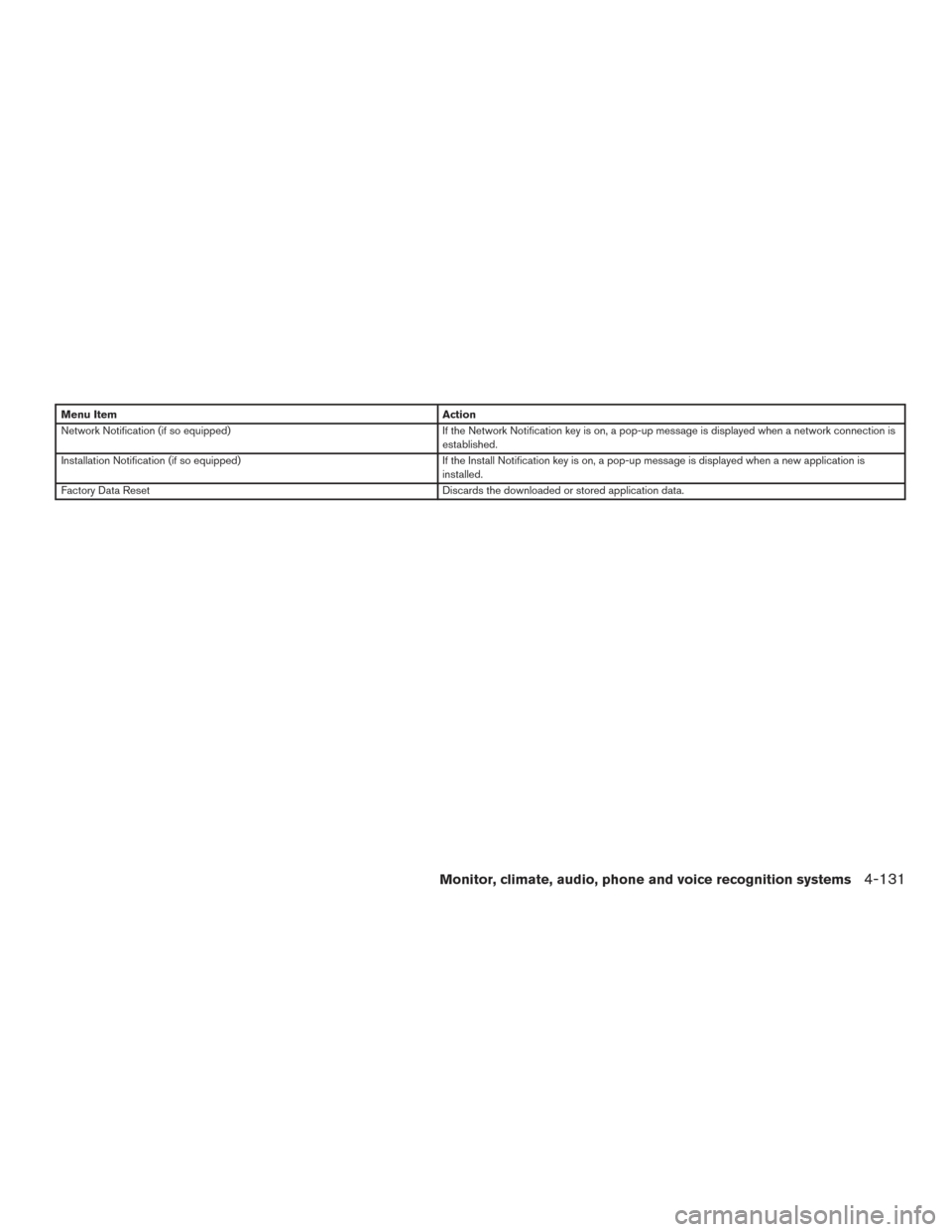
Menu ItemAction
Network Notification (if so equipped) If the Network Notification key is on, a pop-up message is displayed when a network connection is
established.
Installation Notification (if so equipped) If the Install Notification key is on, a pop-up message is displayed when a new application is
installed.
Factory Data Reset Discards the downloaded or stored application data.
Monitor, climate, audio, phone and voice recognition systems4-131
Page 331 of 555
NOTE:● If the Auto Start Setting is enabled, some
applications may be accessible to other driv-
ers of your vehicle.
● When the “Network Notification” key (if so
equipped) is turned off, some apps will be
started automatically and use network com-
munication. Communication fees will be
charged.
● Depending on the type of application, some
applications may not be displayed in the
“Running Apps” key field even if they are
running.
● The Auto Start function may not be available
for some applications.
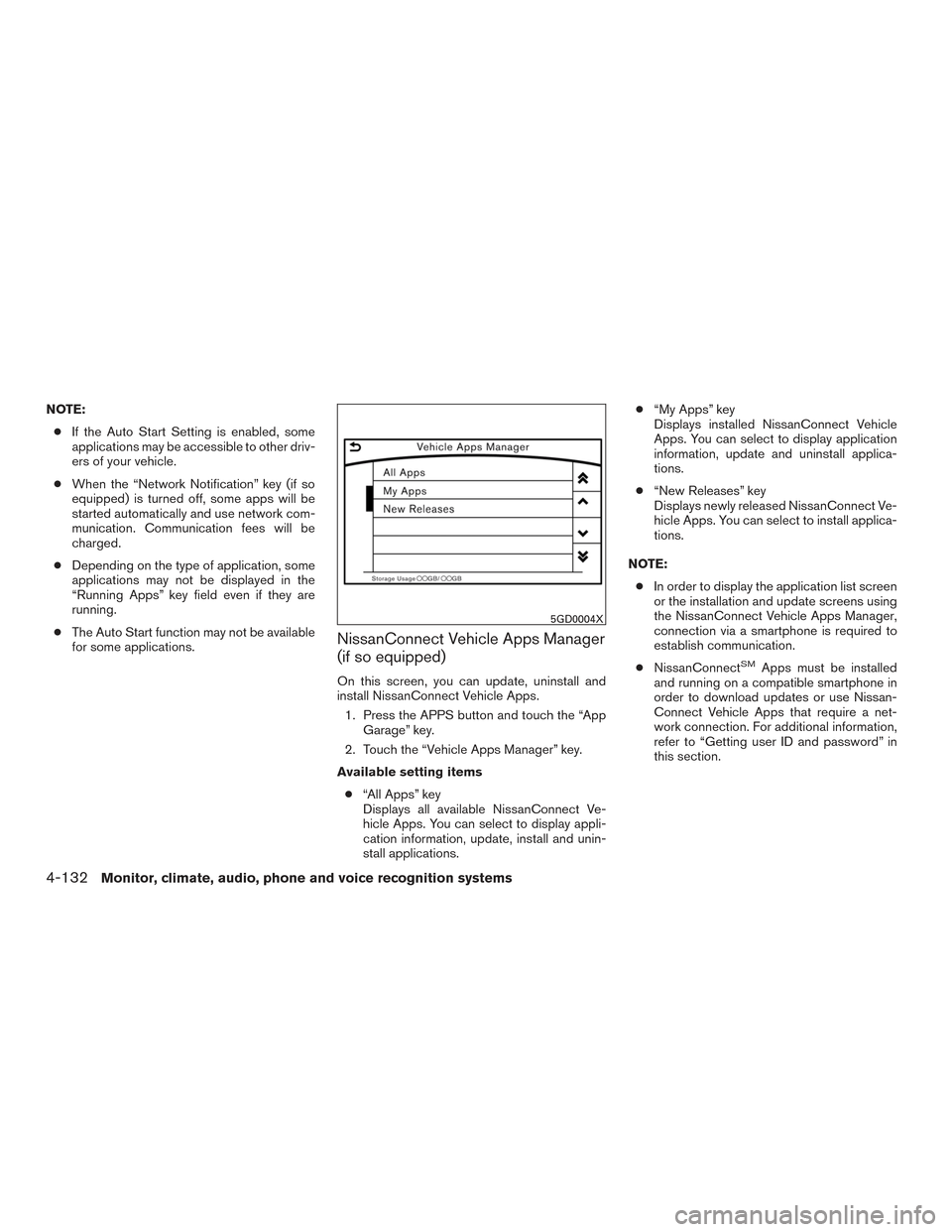
NissanConnect Vehicle Apps Manager
(if so equipped)
On this screen, you can update, uninstall and
install NissanConnect Vehicle Apps.
1. Press the APPS button and touch the “App Garage” key.
2. Touch the “Vehicle Apps Manager” key.
Available setting items ● “All Apps” key
Displays all available NissanConnect Ve-
hicle Apps. You can select to display appli-
cation information, update, install and unin-
stall applications. ●
“My Apps” key
Displays installed NissanConnect Vehicle
Apps. You can select to display application
information, update and uninstall applica-
tions.
● “New Releases” key
Displays newly released NissanConnect Ve-
hicle Apps. You can select to install applica-
tions.
NOTE: ● In order to display the application list screen
or the installation and update screens using
the NissanConnect Vehicle Apps Manager,
connection via a smartphone is required to
establish communication.
● NissanConnect
SMApps must be installed
and running on a compatible smartphone in
order to download updates or use Nissan-
Connect Vehicle Apps that require a net-
work connection. For additional information,
refer to “Getting user ID and password” in
this section.
5GD0004X
4-132Monitor, climate, audio, phone and voice recognition systems
Page 333 of 555
WARNING
●Use the information from the Driving
Performance strictly as a reference to
make your driving more comfortable.
The readings are not meant to prevent
accidents caused by reckless driving or
poor driving conditions (due to weather,
road conditions, etc.) . Always obey all
traffic regulations and posted speed
limits.
● Operating the Driving Performance
while driving can lead to a crash result-
ing in serious injuries or death. Always
park the vehicle in a safe place before
operating the display screen.
● Look at the display screen only briefly
while driving. Keep your eyes on the
road. Inattentive driving may lead to a
crash resulting in serious injuries or
death. For Canada
NOTE:
A PIN code can be used so that other
people cannot see your email and calendar
apps. When the engine is turned off and
then on again, the PIN code has to be input.
After the PIN code is input, regardless of
whether your smartphone is connected to
the vehicle or not, your email and calendar
apps will be viewable until the engine is
turned off. When the system is set to valet
parking, if the relevant account is erased,
your email and schedule will be erased
from the system.
INFO:
● NissanConnect
SMApps must be installed
and running on a compatible smartphone in
order to download updates or use Nissan-
Connect Vehicle Apps that require a net-
work connection. For additional information,
refer to “Getting user ID and password” in
this section. ●
When email service and calendar schedule
information are displayed in the in-vehicle
display, the system controls the display
based on the ID and password. Therefore,
users are required to manage an ID and
password.
4-134Monitor, climate, audio, phone and voice recognition systems
Page 334 of 555
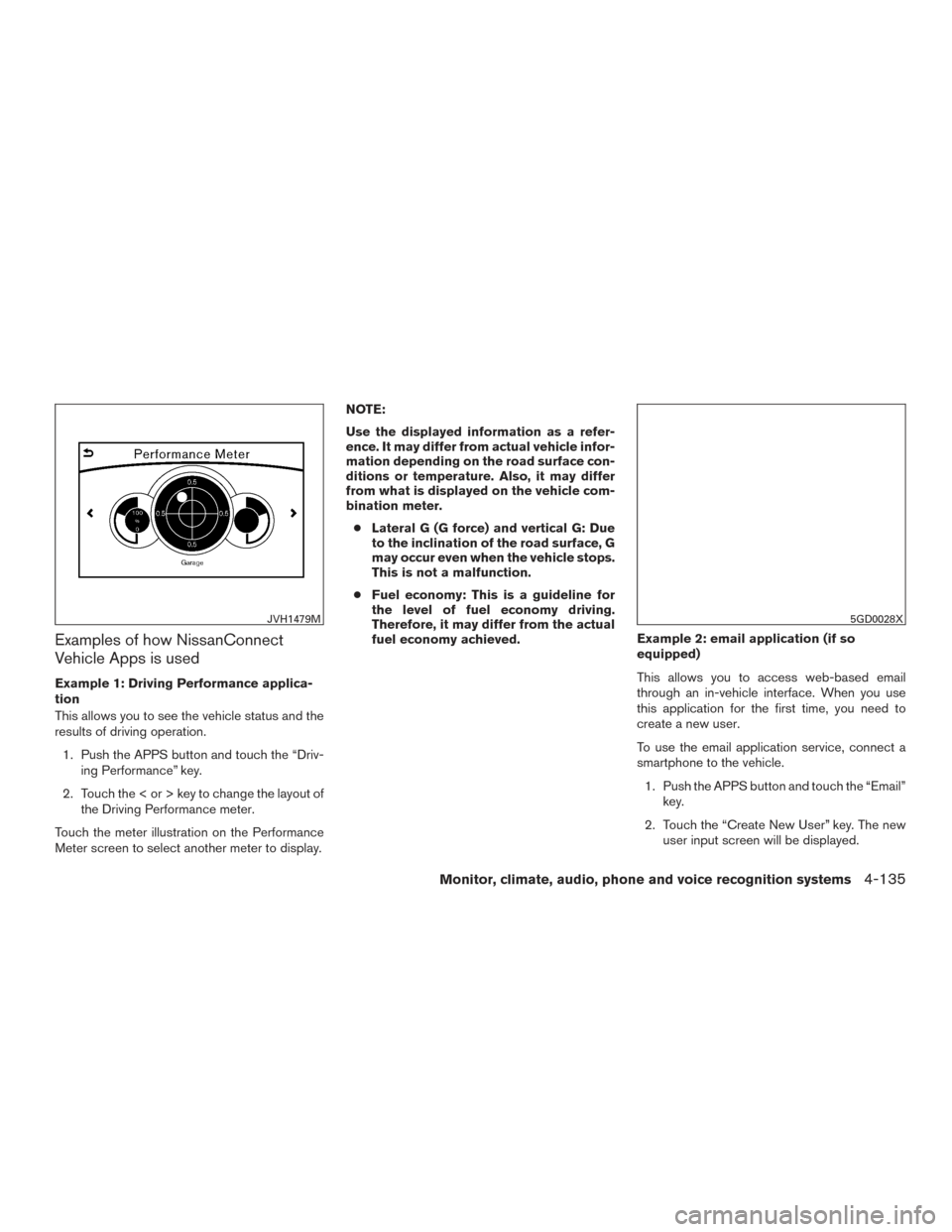
Examples of how NissanConnect
Vehicle Apps is used
Example 1: Driving Performance applica-
tion
This allows you to see the vehicle status and the
results of driving operation.1. Push the APPS button and touch the “Driv- ing Performance” key.
2. Touch the < or > key to change the layout of the Driving Performance meter.
Touch the meter illustration on the Performance
Meter screen to select another meter to display. NOTE:
Use the displayed information as a refer-
ence. It may differ from actual vehicle infor-
mation depending on the road surface con-
ditions or temperature. Also, it may differ
from what is displayed on the vehicle com-
bination meter.
● Lateral G (G force) and vertical G: Due
to the inclination of the road surface, G
may occur even when the vehicle stops.
This is not a malfunction.
● Fuel economy: This is a guideline for
the level of fuel economy driving.
Therefore, it may differ from the actual
fuel economy achieved. Example 2: email application (if so
equipped)
This allows you to access web-based email
through an in-vehicle interface. When you use
this application for the first time, you need to
create a new user.
To use the email application service, connect a
smartphone to the vehicle.
1. Push the APPS button and touch the “Email” key.
2. Touch the “Create New User” key. The new user input screen will be displayed.
JVH1479M5GD0028X
Monitor, climate, audio, phone and voice recognition systems4-135
Page 335 of 555
3. Input your name and PIN code and selectthe “Instant Access” key ON or OFF and
then touch the “Save” key.
INFO:
If the Instant Access mode is set to ON, it is not
necessary to enter a PIN code each time. 4. The stored user name is displayed in the list. Touch the user name.
5. Input PIN code and touch the “OK” key. This will display your mail box screen.
If an account is not yet set up, set up an account
(Google account, etc.) in the Manager Account
screen displayed.
INFO:
● On the receive message screen, touch the
sender name or address to display the
sender detail screen.
● System folders (Inbox, Draft, Send, etc.)
cannot be modified.
USING VOICE RECOGNITION
SYSTEM
Initialization
The Voice Recognition system will activate a few
seconds after the ignition switch is turned on.
Once activation is complete, you can start using
the system by pushing the
switch on the
steering wheel and speaking voice commands. If
the
switch on the steering wheel is pushed
before the activation completes, the display will
show a message to wait until the system is ready.
BEFORE STARTING
To get the best recognition performance from the
Voice Recognition system, observe the following
items.
● The interior of the vehicle should be as quiet
as possible. Close the windows to eliminate
surrounding noises (traffic noise and vibra-
tion sounds, etc.) which may prevent the
system from correctly recognizing the voice
commands.
● Wait until the tone sounds before speaking a
command.
● Speak in a natural conversational voice with-
out pausing between words.
GIVING VOICE COMMANDS
1. Push theswitch located on the steer-
ing wheel.
2. A list of commands appear on the screen, and the system provides a voice menu
prompt.
When this screen is displayed, almost all of
the commands can be recognized. Available
commands for each category can be shown
on the right side of the screen. Highlight a
category listed on the left side of the screen
with the multi-function controller to find your
preferred command.
5GE0002X
VOICE RECOGNITION SYSTEM
4-136Monitor, climate, audio, phone and voice recognition systems