air condition NISSAN PATHFINDER 2020 Owner´s Manual
[x] Cancel search | Manufacturer: NISSAN, Model Year: 2020, Model line: PATHFINDER, Model: NISSAN PATHFINDER 2020Pages: 482, PDF Size: 5.51 MB
Page 226 of 482
4 Monitor, climate, audio, phone and
voice recognition systems
NissanConnect® Owner’s Manual................4-2
RearView Monitor (if so equipped) ...............4-3
RearView Monitor system operation ..........4-4
How to read the displayed lines ...............4-5
Difference between predicted and
actual distances ..............................4-5
How to park with predicted course
lines ..........................................4-7
Adjusting the screen .........................4-9
How to turn on and off predicted
course lines ..................................4-9
RearView Monitor system limitations .........4-9
System maintenance ........................ 4-10
Intelligent Around View Monitor
(if so equipped) .................................. 4-11
Intelligent Around View Monitor system
operation .................................... 4-12
Difference between predicted and
actual distances ............................. 4-16
How to park with predicted course
lines ......................................... 4-17
How to switch the display ...................4-19
Adjusting the screen ........................ 4-19Intelligent Around View Monitor system
limitations
................................... 4-20
System maintenance ........................ 4-22
Camera aiding sonar (parking sensor)
(if so equipped) ................................. 4-23
Sonar system operation .....................4-23
Turning on and off the sonar function .......4-24
Sonar system limitations ....................4-25
System maintenance ........................ 4-26
Moving Object Detection (MOD)
(if so equipped) ................................. 4-27
MOD system operation ......................4-28
Turning MOD on and off .....................4-30
MOD system limitations .....................4-30
System maintenance ........................ 4-31
Vents ........................................... 4-32
Heater and air conditioner (automatic) .........4-33
Automatic operation ........................ 4-34
Manual operation ........................... 4-35
Operating tips ............................... 4-37
Rear automatic air conditioning system .....4-38
Ser
vicing air conditioner ........................ 4-41
Page 259 of 482
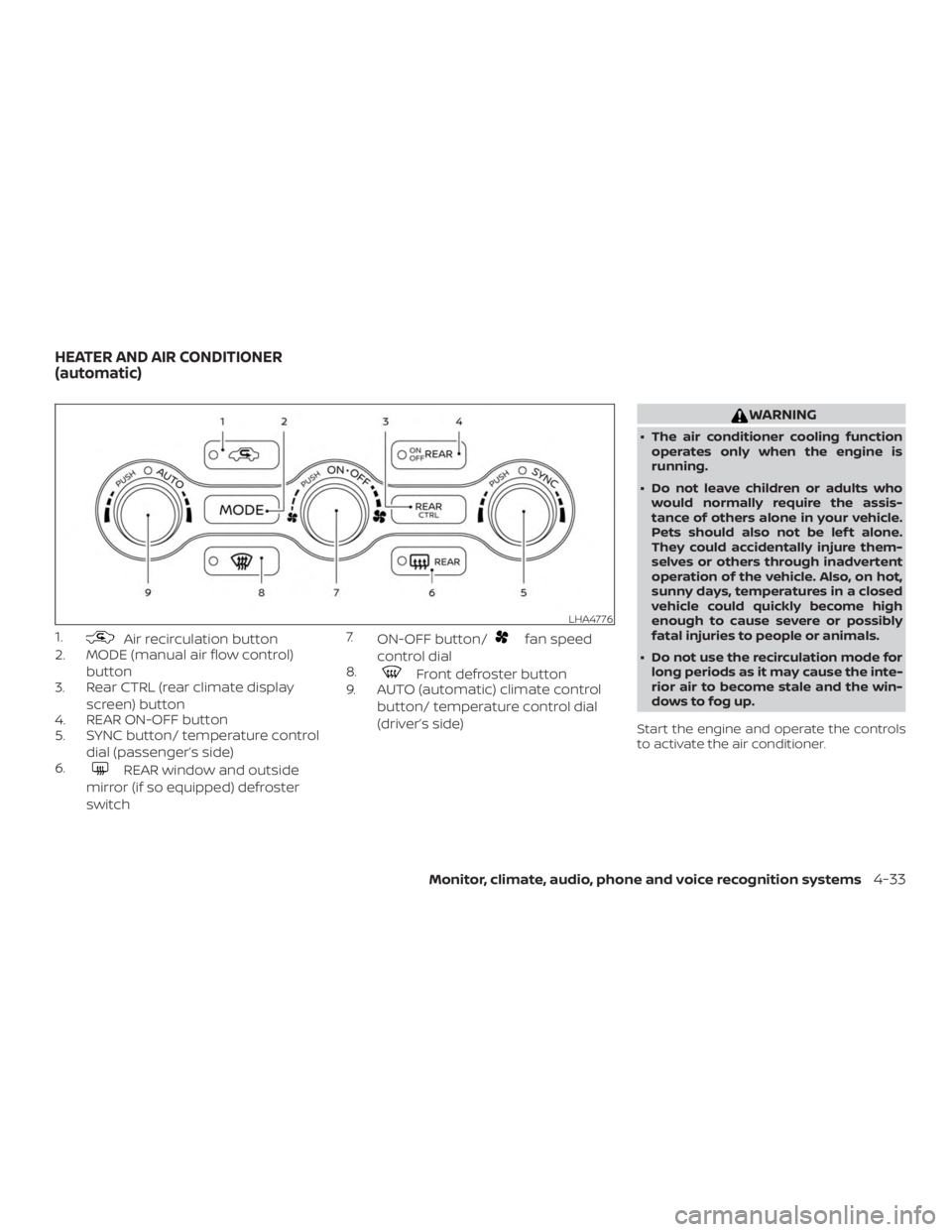
1.Air recirculation button
2. MODE (manual air flow control)
button
3. Rear CTRL (rear climate display
screen) button
4. REAR ON-OFF button
5. SYNC button/ temperature control
dial (passenger’s side)
6.
REAR window and outside
mirror (if so equipped) defroster
switch 7.
ON-OFF button/
fan speed
control dial
8.
Front defroster button
9. AUTO (automatic) climate control
button/ temperature control dial
(driver’s side)
WARNING
∙ The air conditioner cooling functionoperates only when the engine is
running.
∙ Do not leave children or adults who would normally require the assis-
tance of others alone in your vehicle.
Pets should also not be lef t alone.
They could accidentally injure them-
selves or others through inadvertent
operation of the vehicle. Also, on hot,
sunny days, temperatures in a closed
vehicle could quickly become high
enough to cause severe or possibly
fatal injuries to people or animals.
∙ Do not use the recirculation mode for long periods as it may cause the inte-
rior air to become stale and the win-
dows to fog up.
Start the engine and operate the controls
to activate the air conditioner.
LHA4776
HEATER AND AIR CONDITIONER
(automatic)
Monitor, climate, audio, phone and voice recognition systems4-33
Page 260 of 482
NOTE:∙ Odors from inside and outside the ve-
hicle can build up in the air condi-
tioner unit. Odor can enter the pas-
senger compartment through the
vents.
∙ When parking, set the heater and air
conditioner controls to turn off air re-
circulation to allow fresh air into the
passenger compartment. This should
help reduce odors inside the vehicle.
AUTOMATIC OPERATION
Cooling and/or dehumidified
heating (AUTO)
This mode may be used all year round as
the system automatically works to keep a
constant temperature. Air flow distribution,
air intake control, and fan speed are also
controlled automatically.
1. Press the AUTO button on.
2. Turn the temperature control dial to the lef t or right to set the desired tem-
perature.
∙ Adjust the temperature display to about 75°F (24°C) for normal operation. ∙ The temperature of the passenger
compartment will be maintained auto-
matically. Air flow distribution, air intake
control and fan speed are also con-
trolled automatically.
∙ A visible mist may be seen coming from the vents in hot, humid conditions as
the air is cooled rapidly. This does not
indicate a malfunction.
3. You can individually set driver’s and front passenger’s side temperature us-
ing each temperature control dial.
∙ To synchronizes the driver’s and front passenger’s temperature settings,
press the SYNC button. The SYNC indi-
cator will illuminate and SYNC text will
appear in the Climate display.
Heating (A/C off )
The air conditioner does not activate. When
you need to heat only, use this mode.
Turn the temperature control dial to set the
desired temperature.
1. If the air conditioner is on, touch the “A/C” key on the screen. The A/C indica-
tor light will turn off.
2. Turn the temperature control dial to set the desired temperature. ∙ The temperature of the passenger
compartment will be maintained auto-
matically. Air flow distribution, air intake
control and fan speed are also con-
trolled automatically.
∙ Do not set the temperature lower than the outside air temperature. Otherwise,
the system may not work properly.
∙ Not recommended if windows fog up.
Dehumidified defrosting or
defogging
1. Press thefront defroster button
on. (The indicator light on the button
will come on.)
2. Turn the temperature control dial to set the desired temperature.
∙ To quickly remove ice from the outside of the windows, use the
fan speed
control dial to set the fan speed to
maximum.
∙ As soon as possible af ter the wind- shield is clean, press the AUTO button to
return to the automatic mode.
4-34Monitor, climate, audio, phone and voice recognition systems
Page 261 of 482
∙ When thefront defroster button is
pressed, the air conditioner will auto-
matically be turned on at outside tem-
peratures above 36°F (2°C). The air recir-
culate mode automatically turns off,
allowing outside air to be drawn into the
passenger compartment to further im-
prove the defogging performance.
Remote Engine Start with
Intelligent Climate Control (if so
equipped)
Vehicles equipped with automatic climate
controls and Remote Engine Start function
may go into automatic heating or cooling
mode when Remote Engine Start is acti-
vated depending on outside and cabin
temperatures. During this period, the cli-
mate control display and buttons will be
inoperable until the ignition switch is
turned on. In Remote Engine Start defrost-
ing mode, the rear window defroster and
heated steering wheel (if so equipped) may
be activated automatically.
Voice Recognition logic (if so
equipped)
When the climate control system is on, the
front and rear fan speeds may be auto-
matically lowered so that commands are
more easily recognized. Fan speed can be
adjusted using the fan speed decrease and
increase buttons, if desired.
MANUAL OPERATION
Fan speed control dial
Turn thefan speed control dial to
manually control the fan speed.
Press the AUTO button to return to auto-
matic control of the fan speed.
Temperature control dial
The temperature control dial allows you to
adjust the temperature of the outlet air. To
lower the temperature, turn the dial to the
lef t. To increase the temperature, turn the
dial to the right. Temperature can be ad-
justed on the driver’s and passenger’s side.
Air recirculation
Press theair recirculation button to
recirculate interior air inside the vehicle.
The
indicator light on the button will
come on.
The air recirculation cannot be activated
when the air conditioner is in the
front defrosting mode.
When the outside temperature exceeds
70°F (21°C), the air conditioning system may
default to air recirculation mode automati-
cally to reduce overall power consumption.
To exit air recirculation mode, deselect the
air recirculation button (indicator will turn
off ) to enter fresh air mode.
Automatic intake air control
In the AUTO mode, the intake air will be
controlled automatically. To manually con-
trol the intake air, press the
air recir-
culation button. To return to the automatic
control mode, press and hold the
air
recirculation button for about 2 seconds.
The indicator light will flash twice, and then
the intake air will be controlled automati-
cally.
Monitor, climate, audio, phone and voice recognition systems4-35
Page 262 of 482
A/C (air conditioner) operation
Start the engine, turn thefan speed
control dial to the desired position and
press the CLIMATE button on the center
multi-function control panel. Touch the
“A/C” key on the screen to turn on the air
conditioner. To turn off the air conditioner,
touch the “A/C” key again.
The air conditioner cooling function op-
erates only when the engine is running.
Air flow control
Pressing the MODE button manually con-
trols air flow and selects the air outlet:
— Air flows from center and side
vents.
— Air flows from center and sidevents and foot outlets.
— Air flows mainly from footoutlets.
— Air flows from defroster andfoot outlets.
Synchronize climate settings
Press the SYNC button to synchronize cli-
mate settings. The sync indicator will turn
on and SYNC text will appear in the Climate
display. When rear climate is off, pressing SYNC will
synchronize only driver’s and front passen-
ger’s climate settings. When rear climate is
on, pressing SYNC will synchronize driver,
front passenger, and rear temperature and
fan settings.
To change climate settings when SYNC is
active (the SYNC indicator is on):
∙ The driver’s side temperature control dial will control the driver, front passen-
ger, and rear (if rear climate is on) tem-
peratures.
∙ The fan speed control dial will control the front and rear climate fan speeds.
∙ The front AUTO (automatic) climate control ON-OFF button will activate the
front and rear climate automatic set-
tings.
To exit SYNC: ∙ To remove the front passenger from SYNC, turn the passenger’s side tem-
perature control dial. The driver and rear
settings remain in SYNC until rear is re-
moved from SYNC. ∙ To remove the rear from SYNC, change
any of the rear climate settings. The
driver and front passenger settings re-
main in SYNC until the front passenger
is removed from SYNC.
∙ To reactivate SYNC press the SYNC but- ton.
To turn system off
Press the ON-OFF button to turn the sys-
tem off.
To turn system on
Press the ON-OFF button when the heater
or air conditioner is off. The system will turn
on with the settings that were used imme-
diately before the system was turned off.
CLIMATE button
Press the CLIMATE button on the multi-
function control panel to display the screen
for front air conditioner operations.
Rear window and outside mirror
(if so equipped) defroster switch
For additional information, refer to “Rear
window and outside mirror (if so equipped)
defroster switch” in the “Instruments and
controls” section of this manual.
4-36Monitor, climate, audio, phone and voice recognition systems
Page 263 of 482
OPERATING TIPS
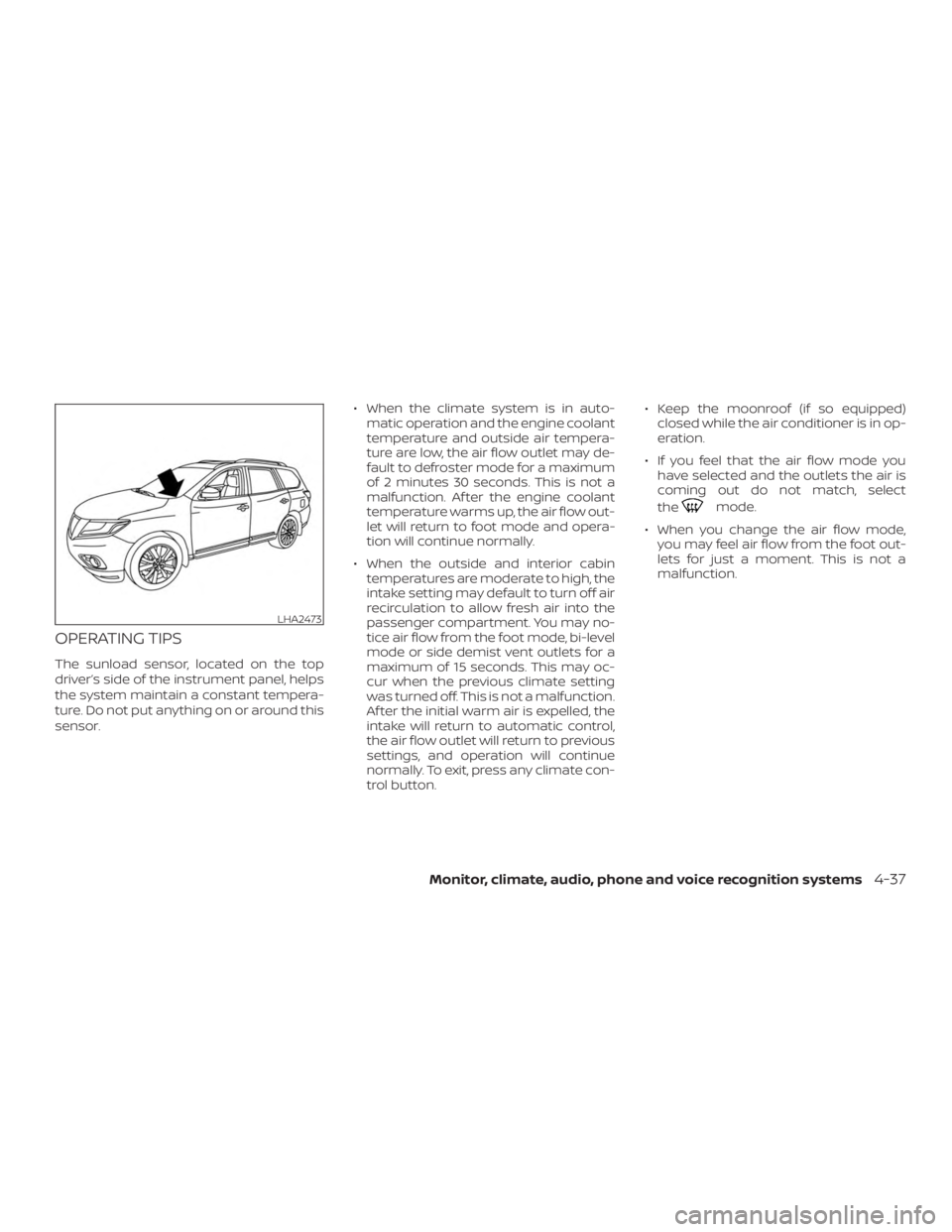
The sunload sensor, located on the top
driver’s side of the instrument panel, helps
the system maintain a constant tempera-
ture. Do not put anything on or around this
sensor.∙ When the climate system is in auto-
matic operation and the engine coolant
temperature and outside air tempera-
ture are low, the air flow outlet may de-
fault to defroster mode for a maximum
of 2 minutes 30 seconds. This is not a
malfunction. Af ter the engine coolant
temperature warms up, the air flow out-
let will return to foot mode and opera-
tion will continue normally.
∙ When the outside and interior cabin temperatures are moderate to high, the
intake setting may default to turn off air
recirculation to allow fresh air into the
passenger compartment. You may no-
tice air flow from the foot mode, bi-level
mode or side demist vent outlets for a
maximum of 15 seconds. This may oc-
cur when the previous climate setting
was turned off. This is not a malfunction.
Af ter the initial warm air is expelled, the
intake will return to automatic control,
the air flow outlet will return to previous
settings, and operation will continue
normally. To exit, press any climate con-
trol button. ∙ Keep the moonroof (if so equipped)
closed while the air conditioner is in op-
eration.
∙ If you feel that the air flow mode you have selected and the outlets the air is
coming out do not match, select
the
mode.
∙ When you change the air flow mode, you may feel air flow from the foot out-
lets for just a moment. This is not a
malfunction.
LHA2473
Monitor, climate, audio, phone and voice recognition systems4-37
Page 264 of 482
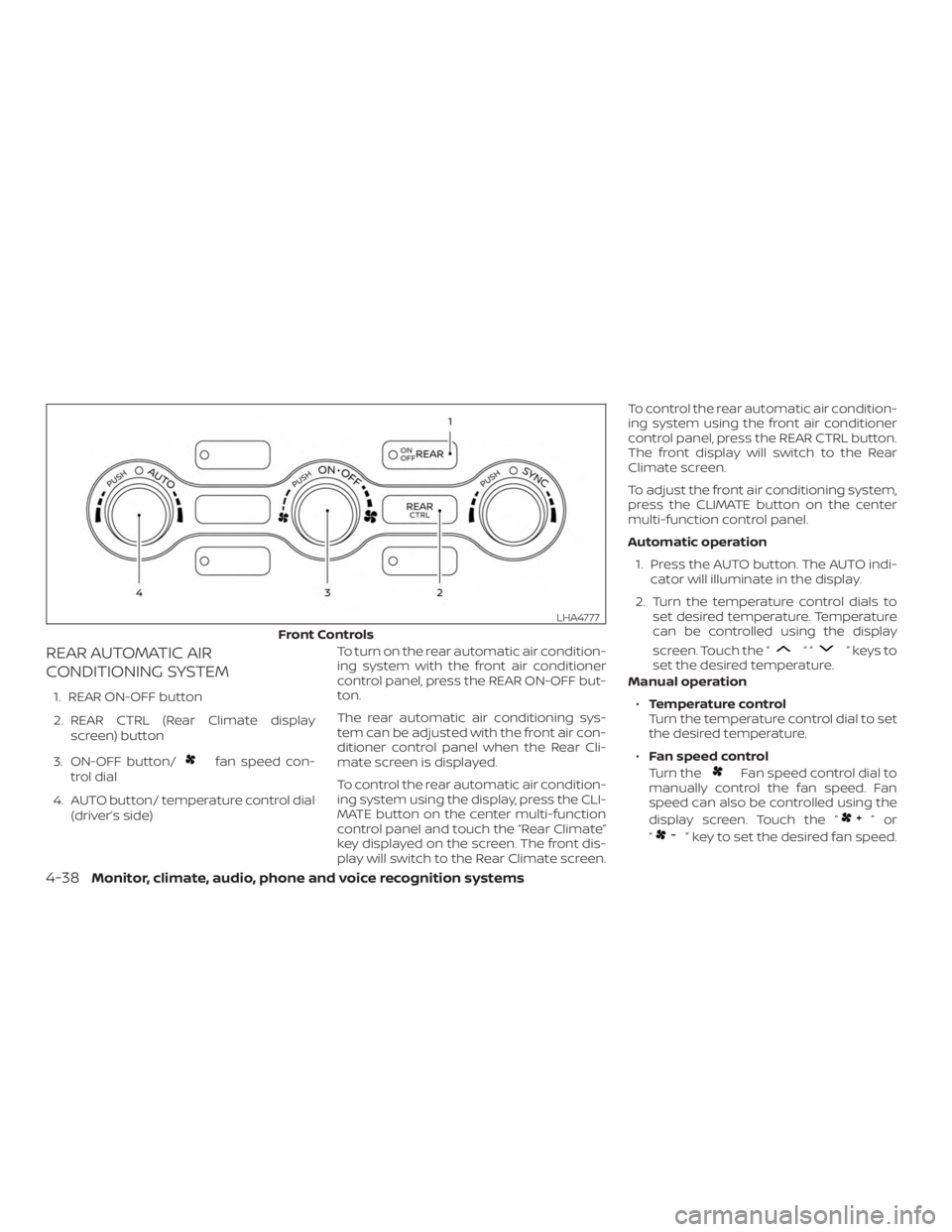
REAR AUTOMATIC AIR
CONDITIONING SYSTEM
1. REAR ON-OFF button
2. REAR CTRL (Rear Climate displayscreen) button
3. ON-OFF button/
fan speed con-
trol dial
4. AUTO button/ temperature control dial (driver’s side) To turn on the rear automatic air condition-
ing system with the front air conditioner
control panel, press the REAR ON-OFF but-
ton.
The rear automatic air conditioning sys-
tem can be adjusted with the front air con-
ditioner control panel when the Rear Cli-
mate screen is displayed.
To control the rear automatic air condition-
ing system using the display, press the CLI-
MATE button on the center multi-function
control panel and touch the “Rear Climate”
key displayed on the screen. The front dis-
play will switch to the Rear Climate screen. To control the rear automatic air condition-
ing system using the front air conditioner
control panel, press the REAR CTRL button.
The front display will switch to the Rear
Climate screen.
To adjust the front air conditioning system,
press the CLIMATE button on the center
multi-function control panel.
Automatic operation
1. Press the AUTO button. The AUTO indi- cator will illuminate in the display.
2. Turn the temperature control dials to set desired temperature. Temperature
can be controlled using the display
screen. Touch the “
““”keysto
set the desired temperature.
Manual operation
∙ Temperature control
Turn the temperature control dial to set
the desired temperature.
∙ Fan speed control
Turn the
Fan speed control dial to
manually control the fan speed. Fan
speed can also be controlled using the
display screen. Touch the “
”or
“
” key to set the desired fan speed.
Front Controls
LHA4777
4-38Monitor, climate, audio, phone and voice recognition systems
Page 266 of 482
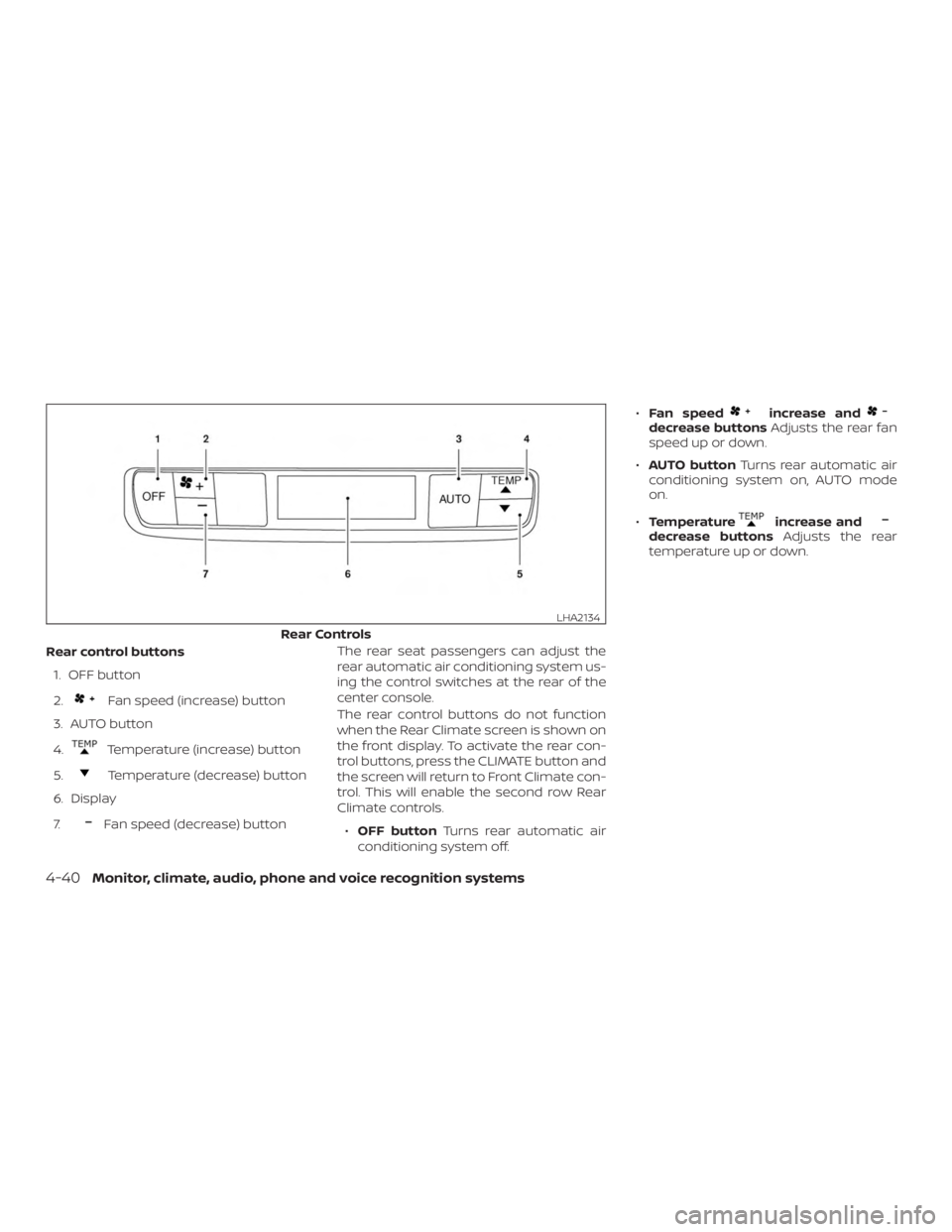
Rear control buttons1. OFF button
2.
Fan speed (increase) button
3. AUTO button
4.
Temperature (increase) button
5.
Temperature (decrease) button
6. Display
7.
Fan speed (decrease) button The rear seat passengers can adjust the
rear automatic air conditioning system us-
ing the control switches at the rear of the
center console.
The rear control buttons do not function
when the Rear Climate screen is shown on
the front display. To activate the rear con-
trol buttons, press the CLIMATE button and
the screen will return to Front Climate con-
trol. This will enable the second row Rear
Climate controls.
∙ OFF button Turns rear automatic air
conditioning system off. ∙
Fan speed
increase anddecrease buttons Adjusts the rear fan
speed up or down.
∙ AUTO button Turns rear automatic air
conditioning system on, AUTO mode
on.
∙ Temperature
increase anddecrease buttons Adjusts the rear
temperature up or down.
Rear Controls
LHA2134
4-40Monitor, climate, audio, phone and voice recognition systems
Page 267 of 482
The air conditioner system in your NISSAN
vehicle is charged with a refrigerant de-
signed with the environment in mind.
This refrigerant does not harm the
earth’s ozone layer.
Special charging equipment and lubricant
is required when servicing your NISSAN air
conditioner. Using improper refrigerants or
lubricants will cause severe damage to
your air conditioner system. For additional
information, refer to “Air conditioner sys-
tem refrigerant and oil recommendations”
in the “Technical and consumer informa-
tion” section of this manual.
It is recommended that you visit a NISSAN
dealer to service your “environmentally
friendly” air conditioner system.
WARNING
The air conditioner system contains re-
frigerant under high pressure. To avoid
personal injury, any air conditioner ser-
vice should be done only by an experi-
enced technician with proper
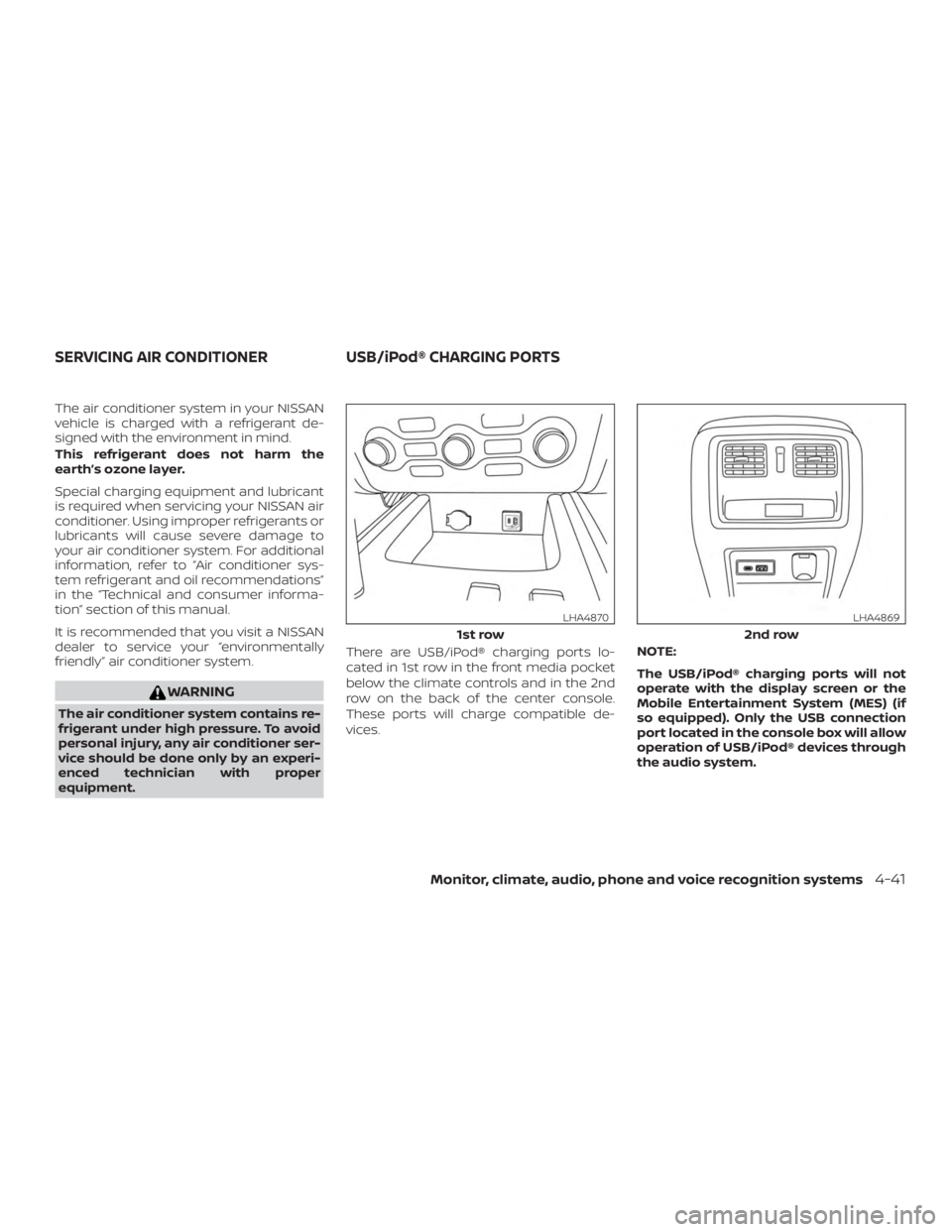
equipment.There are USB/iPod® charging ports lo-
cated in 1st row in the front media pocket
below the climate controls and in the 2nd
row on the back of the center console.
These ports will charge compatible de-
vices.
NOTE:
The USB/iPod® charging ports will not
operate with the display screen or the
Mobile Entertainment System (MES) (if
so equipped). Only the USB connection
port located in the console box will allow
operation of USB/iPod® devices through
the audio system.
1st row
LHA4870
2nd row
LHA4869
SERVICING AIR CONDITIONER
USB/iPod® CHARGING PORTS
Monitor, climate, audio, phone and voice recognition systems4-41
Page 276 of 482
∙ If the wheel is not originally specified byNISSAN.
FCC Notice:
For USA:
This device complies with Part 15 of the
FCC Rules. Operation is subject to the fol-
lowing two conditions: (1) This device
may not cause harmful interference, and
(2) this device must accept any interfer-
ence received, including interference
that may cause undesired operation.
NOTE:
Changes or modifications not expressly
approved by the party responsible for
compliance could void the user’s author-
ity to operate the equipment.
For Canada:
This device complies with Industry
Canada licence-exempt RSS standard(s).
Operation is subject to the following two
conditions: (1) this device may not cause
interference, and (2) this device must ac-
cept any interference, including interfer-
ence that may cause undesired opera-
tion of the device.TPMS with Easy-Fill Tire Alert
When adding air to an under-inflated tire,
the TPMS with Easy-Fill Tire Alert provides
visual and audible signals outside the ve-
hicle to help you inflate the tires to the rec-
ommended COLD tire pressure.
Vehicle set-up 1. Park the vehicle in a safe and level place.
2. Apply the parking brake and place the shif t lever in the P (Park) position.
3. Place the ignition switch in the ON po- sition. Do not start the engine.
Operation 1. Add air to the tire.
2. Af ter a few seconds, the hazard indica- tors will start flashing.
3. When the designated pressure is reached, the horn beeps once and the
hazard indicators stop flashing.
4. Perform the above steps for each tire. ∙ If the tire is over-inflated more thanapproximately 4 psi (30 kPa), the horn
beeps and the hazard indicators
flash three times. To correct the pres-
sure, push the core of the valve stem on the tire briefly to release pressure.
When the pressure reaches the des-
ignated pressure, the horn beeps
once.
∙ If the hazard indicator does not flash within approximately 15 seconds af-
ter starting to inflate the tire, it indi-
cates that the Easy-Fill Tire Alert is
not operating.
∙ The TPMS will not activate the Easy- Fill Tire Alert under the following con-
ditions:
– If there is interference from an exter- nal device or transmitter.
– The air pressure from the inflation device is not sufficient to inflate the
tire.
– There is a malfunction in the TPMS.
– There is a malfunction in the horn or hazard indicators.
– The identification code of the tire pressure sensor is not registered to
the system.
– The battery of the tire pressure sen- sor is low.
5-6Starting and driving