ECO mode NISSAN PATHFINDER 2020 Owner´s Manual
[x] Cancel search | Manufacturer: NISSAN, Model Year: 2020, Model line: PATHFINDER, Model: NISSAN PATHFINDER 2020Pages: 482, PDF Size: 5.51 MB
Page 406 of 482
If you have a flat tire, refer to “Flat tire” in
the “In case of emergency ” section of
this manual.
TIRE PRESSURE
Tire Pressure Monitoring System
(TPMS)
WARNING
Radio waves could aversely effect
electric medical equipment.
Those who use a pacemaker
should contact the electric medi-
cal equipment manufacturer for
the possible influences before
use.
This vehicle is equipped with the Tire
Pressure Monitoring System (TPMS).
It monitors tire pressure of all tires
except the spare. When the low tire
pressure warning light is lit and the
“Tire Pressure Low - Add Air” warning
appears in the vehicle information
display, one or more of your tires is
significantly under-inflated. If
equipped, the system also displays
pressure of all tires (except the spare tire) on the display screen by send-
ing a signal from a sensor that is
installed in each wheel.
The TPMS will activate only when the
vehicle is driven at speeds above
16 mph (25 km/h). Also, this system
may not detect a sudden drop in tire
pressure (for example a flat tire while
driving).
For additional information, refer to
“Low tire pressure warning light” in
the “Instruments and controls” sec-
tion, “Tire Pressure Monitoring Sys-
tem (TPMS)” in the “Starting and driv-
ing” section and “Flat tire” in the “In
case of emergency” section of this
manual.
Tire inflation pressure
Check the tire pressures (including
the spare) of ten and always prior to
long distance trips. The recom-
mended tire pressure specifications
are shown on the F.M.V.S.S./C.M.V.S.S.
certification label or the Tire and
Loading Information label under the“Cold Tire Pressure” heading. The Tire
and Loading Information label is af-
fixed to the driver side center pillar.
Tire pressures should be checked
regularly because:
∙ Most tires naturally lose air over time.
∙ Tires can lose air suddenly when driven over potholes or other ob-
jects or if the vehicle strikes a
curb while parking.
The tire pressures should be
checked when the tires are cold. The
tires are considered COLD af ter the
vehicle has been parked for 3 or
more hours, or driven less than 1 mile
(1.6 km) at moderate speeds.
The TPMS with Easy-Fill Tire Alert
provides visual and audible signals
outside the vehicle for inflating tires
to the recommended COLD tire
pressure. For additional information,
refer to “TPMS with Easy-Fill Tire
Alert” in the “Starting and driving”
section of this manual.
WHEELS AND TIRES
8-28Do-it-yourself
Page 413 of 482
∙ Always use tires of the same type,size, brand, construction and tread
pattern on all four wheels. Failure to
do so may result in a circumference
difference between tires on the front
and rear axles which can cause the
Vehicle Dynamic Control (VDC) system
to malfunction resulting in personal
injury or death, excessive tire wear
and may damage the transmission
and differential gears.
∙ For additional information regarding tires, refer to “Important Tire Safety
Information” (US) or “Tire Safety Infor-
mation” (Canada) in the Warranty In-
formation Booklet.
All season tires
NISSAN specifies All Season tires on some
models to provide good performance all
year, including snowy and icy road condi-
tions. All Season tires are identified by ALL
SEASON and/or M&S on the tire sidewall.
Snow tires have better snow traction than
All Season tires and may be more appropri-
ate in some areas.
Summer tires
NISSAN specifies summer tires on some
models to provide superior performance
on dry roads. Summer tire performance is
substantially reduced in snow and ice.
Summer tires do not have the tire traction
rating “M&S” on the tire sidewall.
If you plan to operate your vehicle in snowy
or icy conditions, NISSAN recommends the
use of SNOW tires or ALL SEASON tires on all
four wheels.
Snow tires
If snow tires are needed, it is necessary to
select tires equivalent in size and load rat-
ing to the original equipment tires. If you do
not, it can adversely affect the safety and
handling of your vehicle.
Generally, snow tires have lower speed rat-
ings than factory equipped tires and may
not match the potential maximum vehicle
speed. Never exceed the maximum speed
rating of the tire.
If you install snow tires, they must be the
same size, brand, construction and tread
pattern on all four wheels. For additional traction on icy roads, stud-
ded tires may be used. However, some U.S.
states and Canadian provinces prohibit
their use. Check local, state and provincial
laws before installing studded tires. Skid
and traction capabilities of studded snow
tires on wet or dry surfaces may be poorer
than that of non-studded snow tires.
TIRE CHAINS
CAUTION
Tire chains/cables should not be in-
stalled on 235/55R20 or 255/60R18 size
tires. Installation of the tire
chains/cables on 235/55R20 or
255/60R18 size tires will cause damage
to the vehicle. If you plan to use tire
chains/cables, you should install
235/65R18 size tires on your vehicle.
Use of tire chains may be prohibited ac-
cording to location. Check the local laws
before installing tire chains. When installing
tire chains, make sure they are the proper
size for the tires on your vehicle and are
installed according to the chain manufac-
turer’s suggestions. Use only SAE class “S”
chains. Class “S” chains are used on ve-
hicles with restricted tire to vehicle clear-
ance. Vehicles that can use Class “S” chains
Do-it-yourself8-35
Page 416 of 482
∙ For 2WD models, if your vehicle wasoriginally equipped with four tires
that were the same size and you are
only replacing two of the four tires,
install the new tires on the rear axle.
Placing new tires on the front axle
may cause loss of vehicle control in
some driving conditions and cause an
accident and personal injury.
∙ If the wheels are changed for any rea- son, always replace with wheels
which have the same off-set dimen-
sion. Wheels of a different off-set
could cause premature tire wear, de-
grade vehicle handling characteris-
tics, affect the VDC system and/or in-
terference with the brake discs. Such
interference can lead to decreased
braking efficiency and/or early brake
pad wear. For additional information
on wheel off-set dimensions, refer to
“Wheels and tires” in the “Technical
and consumer information” section of
this manual. ∙ When replacing a wheel without the
TPMS such as the spare tire, the TPMS
will not function and the low tire pres-
sure warning light will flash for ap-
proximately 1 minute. The light will re-
main on af ter 1 minute. Have your
tires replaced and/or TPMS system
reset as soon as possible. It is recom-
mended that you visit a NISSAN dealer
for this service.
∙ Replacing tires with those not origi- nally specified by NISSAN could affect
the proper operation of the TPMS.
∙ The TPMS sensor may be damaged if it is not handled correctly. Be careful
when handling the TPMS sensor.
∙ When replacing the TPMS sensor, the ID registration may be required. It is
recommended that you visit a NISSAN
dealer for ID registration.
∙ Do not use a valve stem cap that is not specified by NISSAN. The valve stem
cap may become stuck.
∙ Be sure that the valve stem caps are correctly fitted. Otherwise the valve
may be clogged up with dirt and
cause a malfunction or loss of
pressure. ∙ Do not install a damaged or deformed
wheel or tire even if it has been re-
paired. Such wheels or tires could
have structural damage and could fail
without warning.
∙ The use of retread tires is not recommended.
∙ For additional information regarding tires, refer to “Important Tire Safety
Information” (US) or “Tire Safety Infor-
mation” (Canada) in the Warranty In-
formation Booklet.
Four-wheel drive models
CAUTION
Always use tires of the same type, size,
brand, construction (bias, bias-belted
or radial), and tread pattern on all four
wheels. Failure to do so may result in a
circumference difference between tires
on the front and rear axles which will
cause excessive tire wear and may
damage the transmission, transfer case
and differential gears.
8-38Do-it-yourself
Page 450 of 482
Temperature conditions can also affect
towing. For example, towing a heavy trailer
in high outside temperatures on graded
roads can affect engine performance and
cause overheating. The engine protection
mode, which helps reduce the chance of
engine damage, could activate and auto-
matically decrease engine power. Vehicle
speed may decrease under high load. Plan
your trip carefully to account for trailer and
vehicle load, weather and road conditions.
WARNING
Overheating can result in reduced en-
gine power and vehicle speed. The re-
duced speed may be lower than other
traffic, which could increase the chance
of a collision. Be especially careful when
driving. If the vehicle cannot maintain a
safe driving speed, pull to the side of the
road in a safe area. Allow the engine to
cool and return to normal operation. For
additional information, refer to “If your
vehicle overheats” in the “In case of
emergency ” section of this manual.
CAUTION
Vehicle damage resulting from im-
proper towing procedures is not cov-
ered by NISSAN warranties.
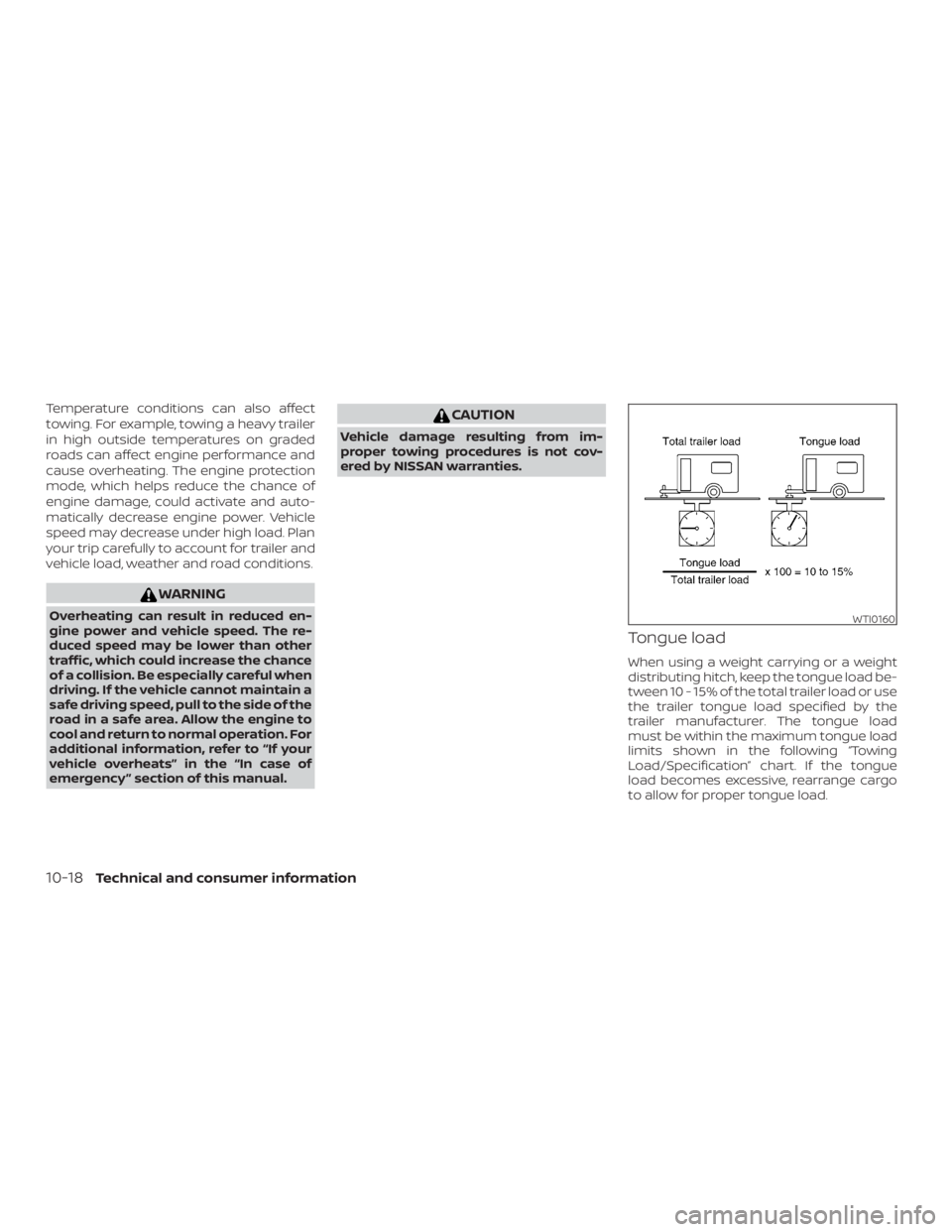
Tongue load
When using a weight carrying or a weight
distributing hitch, keep the tongue load be-
tween 10 - 15% of the total trailer load or use
the trailer tongue load specified by the
trailer manufacturer. The tongue load
must be within the maximum tongue load
limits shown in the following “Towing
Load/Specification” chart. If the tongue
load becomes excessive, rearrange cargo
to allow for proper tongue load.
WTI0160
10-18Technical and consumer information
Page 459 of 482
Pre-towing tips
∙ Be certain your vehicle maintains a levelposition when a loaded and/or un-
loaded trailer is hitched. Do not drive the
vehicle if it has an abnormal nose-up or
nose-down condition; check for im-
proper tongue load, overload, worn sus-
pension or other possible causes of ei-
ther condition.
∙ Always secure items in the trailer to pre- vent load shif t while driving.
∙ Keep the cargo load as low as possible in the trailer to keep the trailer center of
gravity low.
∙ Load the trailer so approximately 60% of the trailer load is in the front half and
40% is in the back half. Also make sure
the load is balanced side to side.
∙ Check your hitch, trailer tire pressure, vehicle tire pressure, trailer light opera-
tion, and trailer wheel lug nuts every
time you attach a trailer to the vehicle.
∙ Be certain your rearview mirrors con- form to all federal, state or local regula-
tions. If not, install any mirrors required
for towing before driving the vehicle. ∙ Determine the overall height of the ve-
hicle and trailer so the required clear-
ance is known.
Trailer towing tips
In order to gain skill and an understanding
of the vehicle’s behavior, you should prac-
tice turning, stopping and backing up in an
area which is free from traffic. Steering sta-
bility and braking performance will be
somewhat different than under normal
driving conditions.
∙ Always secure items in the trailer to pre- vent load shif t while driving.
∙ Lock the trailer hitch coupler with a pin or lock to prevent the coupler from in-
advertently becoming unlatched.
∙ Avoid abrupt starts, acceleration or stops.
∙ Avoid sharp turns or lane changes.
∙ Always drive your vehicle at a moderate speed. ∙ When backing up, hold the bottom of
the steering wheel with one hand. Move
your hand in the direction in which you
want the trailer to go. Make small cor-
rections and back up slowly. If possible,
have someone guide you when you are
backing up.
Always block the wheels on both vehicle
and trailer when parking. Parking on a
slope is not recommended; however, if you
must do so:
CAUTION
If you move the shif t lever to the P (Park)
position before blocking the wheels
and applying the parking brake, trans-
mission damage could occur.
1. Apply and hold the brake pedal.
2. Have someone place blocks on the downhill side of the vehicle and trailer
wheels.
3. Af ter the wheel blocks are in place, slowly release the brake pedal until the
blocks absorb the vehicle load.
4. Apply the parking brake.
5. Shif t the transmission into P (Park).
6. Turn off the engine.
Technical and consumer information10-27
Page 460 of 482
To drive away:1. Start the vehicle.
2. Apply and hold the brake pedal.
3. Shif t the transmission into gear.
4. Release the parking brake.
5. Drive slowly until the vehicle and trailer are clear from the blocks.
6. Apply and hold the brake pedal.
7. Have someone retrieve and store the blocks.
∙ While going downhill, the weight of the trailer pushing on the tow vehicle may
decrease overall stability. Therefore, to
maintain adequate control, reduce your
speed and shif t to a lower gear. Avoid
long or repeated use of the brakes
when descending a hill, as this reduces
their effectiveness and could cause
overheating. Shif ting to a lower gear in-
stead provides “engine braking” and re-
duces the need to brake as frequently.
∙ If the engine coolant temperature rises to a high temperature, refer to “If your
vehicle overheats” in the “In case of
emergency” section of this manual. ∙ Trailer towing requires more fuel than
normal circumstances.
∙ Avoid towing a trailer for your vehicle’s first 500 miles (805 km).
∙ For the first 500 miles (805 km) that you do tow, do not drive over 50 mph
(80 km/h).
∙ Have your vehicle serviced more of ten than at intervals specified in the recom-
mended Maintenance Schedule in the
“Maintenance and schedules” section of
this manual.
∙ When making a turn, your trailer wheels will be closer to the inside of the turn
than your vehicle wheels. To compen-
sate for this, make a larger than normal
turning radius during the turn.
∙ Crosswinds and rough roads will ad- versely affect vehicle/trailer handling,
possibly causing vehicle sway. When
being passed by larger vehicles, be pre-
pared for possible changes in cross-
winds that could affect vehicle han-
dling. Do the following if the trailer begins to
sway:
1. Take your foot off the accelerator pedal to allow the vehicle to coast and steer
as straight ahead as the road condi-
tions allow. This combination will help
stabilize the vehicle.
– Do not correct trailer sway by steer- ing or applying the brakes.
2. When the trailer sway stops, gently ap- ply the brakes and pull to the side of the
road in a safe area.
3. Try to rearrange the trailer load so it is balanced. For additional information,
refer to “Pre-towing tips” in this section.
∙ Be careful when passing other vehicles. Passing while towing a trailer requires
considerably more distance than nor-
mal passing. Remember, the length of
the trailer must also pass the other ve-
hicle before you can safely change
lanes.
∙ Use the Tow Mode or downshif t the transmission to a lower gear for engine
braking when driving down steep or
long hills. This will help slow the vehicle
without applying the brakes.
10-28Technical and consumer information
Page 461 of 482
∙ Avoid holding the brake pedal down toolong or too frequently. This could cause
the brakes to overheat, resulting in re-
duced braking efficiency.
∙ Increase your following distance to al- low for greater stopping distances
while towing a trailer. Anticipate stops
and brake gradually.
∙ NISSAN recommends that the cruise control not be used while towing a
trailer.
∙ Some states or provinces have specific regulations and speed limits for ve-
hicles that are towing trailers. Obey the
local speed limits.
∙ Check your hitch, trailer wiring harness connections, and trailer wheel lug nuts
af ter 50 miles (80 km) of travel and at
every break.
∙ When launching a boat, don’t allow the water level to go over the exhaust tail
pipe or rear bumper.
∙ Make sure you disconnect the trailer lights before backing the trailer into the
water or the trailer lights may burn out.
When towing a trailer, final drive gear oil
should be replaced and transmission oil/fluid should be changed more fre-
quently. For additional information, refer
to the “Do-it-yourself ” section in this
manual.
Tow mode
Using tow mode is recommended when
pulling a heavy trailer or hauling a heavy
load. Push the TOW MODE switch to acti-
vate tow mode. Push the TOW MODE
switch again to turn tow mode off. Tow
mode is automatically canceled when the
ignition switch is turned off.
Tow mode includes the following features:
∙ Grade logic — Adjusts transmission shif ts when pulling a trailer or hauling a
load up a grade.
∙ Downhill Speed Control (DSC) — auto- matically downshif ts when driving
down a grade with a trailer or heavy
load to help control vehicle speed.
Driving the vehicle in the tow mode with no
trailer/load or light trailer/light load will not
cause any damage. However, fuel
economy may be reduced and the
transmission/engine driving characteris-
tics may feel unusual. When towing a trailer, final drive gear oil
should be replaced and transmission
oil/fluid should be changed more fre-
quently. For additional information, refer
to the “Do-it-yourself ” section of this
manual.FLAT TOWING FOR 4–WHEEL DRIVE
VEHICLE (if so equipped)
Towing your vehicle with all four wheels on
the ground is sometimes called flat towing.
This method is sometimes used when
towing a vehicle behind a recreational ve-
hicle, such as a motor home.
CAUTION
∙ Failure to follow these guidelines can
result in severe transmission damage.
∙ Never flat tow your 4-wheel drive (4WD) vehicle.
∙ DO NOT tow your 4-wheel drive (4WD) vehicle with any wheels on the
ground. Doing so may cause serious
and expensive damage to the
powertrain.
Technical and consumer information10-29
Page 466 of 482
This vehicle is equipped with an Event Data
Recorder (EDR). The main purpose of an
EDR is to record, in certain crash or near
crash-like situations, such as an air bag
deployment or hitting a road obstacle, data
that will assist in understanding how a ve-
hicle’s systems performed. The EDR is de-
signed to record data related to vehicle dy-
namics and safety systems for a short
period of time, typically 30 seconds or less.
The EDR in this vehicle is designed to re-
cord such data as:∙ How various systems in your vehicle were operating;
∙ Whether or not the driver and passen- ger safety belts were buckled/fastened;
∙ How far (if at all) the driver was depress- ing the accelerator and/or brake pedal;
and,
∙ How fast the vehicle was traveling.
∙ Sounds are not recorded. These data can help provide a better un-
derstanding of the circumstances in which
crashes and injuries occur. NOTE: EDR data
are recorded by your vehicle only if a non-
trivial crash situation occurs; no data are
recorded by the EDR under normal driving
conditions and no personal data (e.g.
name, gender, age and crash location) are
recorded. However, other parties, such as
law enforcement, could combine the EDR
data with the type of personally identif ying
data routinely acquired during a crash in-
vestigation.
To read data recorded by an EDR, special
equipment is required and access to the
vehicle or the EDR is needed. In addition to
the vehicle manufacturer and NISSAN
dealer, other parties, such as law enforce-
ment, that have the special equipment, can
read the information if they have access to
the vehicle or the EDR. EDR data will only be
accessed with the consent of the vehicle
owner or lessee or as otherwise required or
permitted by law. Genuine NISSAN Service Manuals for this
model year and prior can be purchased. A
Genuine NISSAN Service Manual is the best
source of service and repair information for
your vehicle. This manual is the same one
used by the factory-trained technicians
working at NISSAN dealerships. Genuine
NISSAN Owner’s Manuals can also be pur-
chased.
For USA
For current pricing and availability of Genu-
ine
NISSAN Service Manuals, contact:
www.nissan-techinfo.com
For current pricing and availability of Genu-
ine NISSAN Owner’s Manuals, contact:
1-800-247-5321
For Canada
To purchase a copy of a Genuine NISSAN
Service Manual or Owner’s Manual, for this
model year and prior, please contact your
nearest NISSAN dealer. For the phone num-
ber and location of a NISSAN dealer in your
area, call the NISSAN Information Center at
1-800-387-0122 and a bilingual NISSAN rep-
resentative will assist you.
EVENT DATA RECORDERS (EDR) OWNER’S MANUAL/SERVICE
MANUAL ORDER INFORMATION
10-34Technical and consumer information