belt NISSAN PATHFINDER 2022 Owner´s Manual
[x] Cancel search | Manufacturer: NISSAN, Model Year: 2022, Model line: PATHFINDER, Model: NISSAN PATHFINDER 2022Pages: 647, PDF Size: 8.48 MB
Page 327 of 647
NISSAN VEHICLE IMMOBILIZER
SYSTEM
The NISSAN Vehicle Immobilizer System
will not allow the engine to start without
the use of the registered key.
If the engine fails to start using a registered
key (for example, when interference is
caused by another registered key, an auto-
mated toll road device or automatic pay-
ment device on the key ring), restart the
engine using the following procedure:
1. Leave the ignition switch in the ON posi-tion for approximately 5 seconds.
2. Place the ignition switch in the OFF or LOCK position, and wait approximately
10 seconds.
3. Repeat steps 1 and 2.
4. Restart the engine while holding the de- vice (which may have caused the inter-
ference) separate from the registered
key.
If the no start condition re-occurs, NISSAN
recommends placing the registered key on
a separate key ring to avoid interference
from other devices. • Make sure the area around the vehicle is
clear.
• Check fluid levels such as engine oil, cool- ant, brake fluid, and windshield-washer
fluid as frequently as possible, or at least
whenever you refuel.
• Check that all windows and lights are clean.
• Visually inspect tires for their appearance and condition. Also check tires for proper
inflation.
• Lock all doors.
• Position seat and adjust headrests/head restraints.
• Adjust inside and outside mirrors.
• Fasten seat belts and ask all passengers to do likewise.
• Check the operation of warning lights when the ignition switch is pushed to the
ON position. For additional information,
see “Warning lights, indicator lights and
audible reminders” (P. 2-12). 1. Apply the parking brake.
2. Confirm that the vehicle is in the P (Park)
position.
The Intelligent Key must be carried
when operating the ignition switch.
3. Push the ignition switch to the ON posi- tion. Depress the brake pedal and push
the ignition switch to start the engine.
To start the engine immediately, push
and release the ignition switch while de-
pressing the brake pedal with the igni-
tion switch in any position.
• If the engine is very hard to start in extremely cold weather or when re-
starting, depress the accelerator
pedal a little (approximately 1/3 to the
floor) and while holding, crank the en-
gine. Release the accelerator pedal
when the engine starts.
• If the engine is very hard to start be- cause it is flooded, depress the accel-
erator pedal all the way to the floor
and hold it. Push the ignition switch to
the ON position to start cranking the
engine. Af ter 5 or 6 seconds, stop
cranking by pushing the ignition
switch to the LOCK position. Af ter
BEFORE STARTING THE ENGINE STARTING THE ENGINE
5-16Starting and driving
Page 332 of 647
• You unfasten the driver’s seat belt andopen the driver side door when the ve-
hicle is stationary or driving at very low
speed and the transmission is in the D
(Drive) position, the N (Neutral) position.
CAUTION
To avoid A/T malfunction, it is recom-
mended that you manually place the
shif t position in the P (Park) position
under the above conditions.
R (Reverse)
CAUTION
To prevent transmission damage, use
the R (Reverse) position only when the
vehicle is completely stopped.
Use the R (Reverse) position to back up.
Make sure the vehicle is completely
stopped before selecting the R (Reverse)
position. The brake pedal must be de-
pressed and the shif t lever button
pressed to move the shif t lever from the
home position to R (Reverse). If the ve-
hicle is placed in R (Reverse) position
while the vehicle is moving forward, the
chime will sound and the vehicle will
switch into the N (Neutral) position.
N (Neutral)
Neither forward nor reverse gear is en-
gaged. The engine can be started in this
position. You may shif t to the N (Neutral)
position and restart a stalled engine while
the vehicle is moving.
You can select this position by holding the
shif t lever at this position for 0.5 seconds.
D (Drive)
Use this position for all normal forward
driving. The A/T changes gears automati-
cally. All forward gears are available. If the
vehicle is placed in the D (Drive) position
while the vehicle is reversing, the chime
will sound and the vehicle will switch into
the N (Neutral) position.
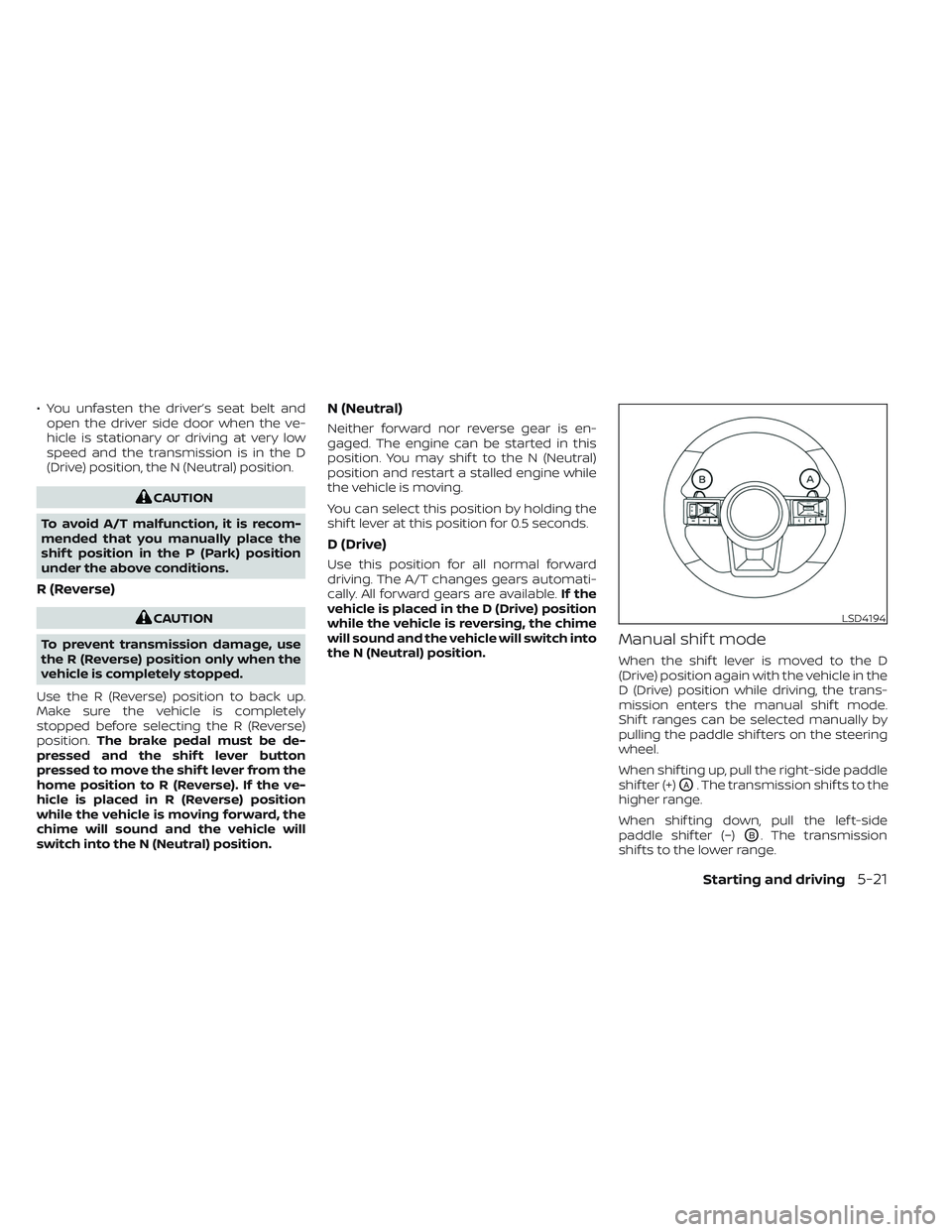
Manual shif t mode
When the shif t lever is moved to the D
(Drive) position again with the vehicle in the
D (Drive) position while driving, the trans-
mission enters the manual shif t mode.
Shif t ranges can be selected manually by
pulling the paddle shif ters on the steering
wheel.
When shif ting up, pull the right-side paddle
shif ter (+)
OA. The transmission shif ts to the
higher range.
When shif ting down, pull the lef t-side
paddle shif ter (−)
OB. The transmission
shif ts to the lower range.
LSD4194
Starting and driving5-21
Page 338 of 647
HOW TO ACTIVATE/DEACTIVATE
THE AUTOMATIC BRAKE HOLD
FUNCTION
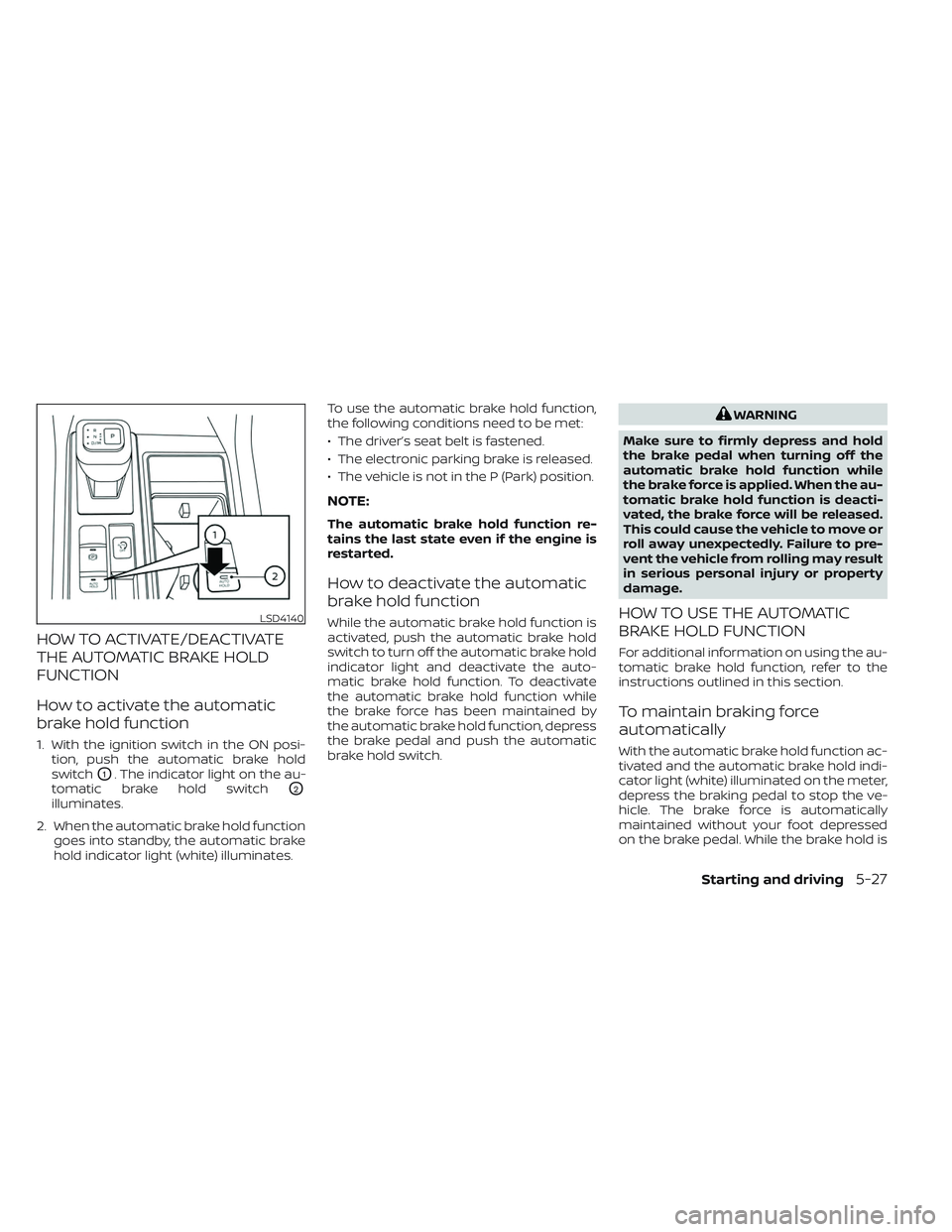
How to activate the automatic
brake hold function
1. With the ignition switch in the ON posi-tion, push the automatic brake hold
switch
O1. The indicator light on the au-
tomatic brake hold switch
O2
illuminates.
2. When the automatic brake hold function goes into standby, the automatic brake
hold indicator light (white) illuminates. To use the automatic brake hold function,
the following conditions need to be met:
• The driver’s seat belt is fastened.
• The electronic parking brake is released.
• The vehicle is not in the P (Park) position.
NOTE:
The automatic brake hold function re-
tains the last state even if the engine is
restarted.
How to deactivate the automatic
brake hold function
While the automatic brake hold function is
activated, push the automatic brake hold
switch to turn off the automatic brake hold
indicator light and deactivate the auto-
matic brake hold function. To deactivate
the automatic brake hold function while
the brake force has been maintained by
the automatic brake hold function, depress
the brake pedal and push the automatic
brake hold switch.
WARNING
Make sure to firmly depress and hold
the brake pedal when turning off the
automatic brake hold function while
the brake force is applied. When the au-
tomatic brake hold function is deacti-
vated, the brake force will be released.
This could cause the vehicle to move or
roll away unexpectedly. Failure to pre-
vent the vehicle from rolling may result
in serious personal injury or property
damage.
HOW TO USE THE AUTOMATIC
BRAKE HOLD FUNCTION
For additional information on using the au-
tomatic brake hold function, refer to the
instructions outlined in this section.
To maintain braking force
automatically
With the automatic brake hold function ac-
tivated and the automatic brake hold indi-
cator light (white) illuminated on the meter,
depress the braking pedal to stop the ve-
hicle. The brake force is automatically
maintained without your foot depressed
on the brake pedal. While the brake hold is
LSD4140
Starting and driving5-27
Page 398 of 647

•There are limitations to the ProPILOT
Assist system capability. The ProPI-
LOT Assist system does not function
in all driving, traffic, weather, and
road conditions. It is the driver’s re-
sponsibility to stay alert, drive safely,
keep the vehicle in the traveling lane,
and be in control of the vehicle at all
times.
• The ProPILOT Assist system is only an
aid to assist the driver and is not a
collision warning or avoidance
device.
• The ProPILOT Assist system is for
highway use only and is not intended
for city driving. Failure to apply the
brakes or steer the vehicle when nec-
essary may result in a serious
accident.
• Always observe posted speed limits
and do not set the speed over them.
• Never take your hands off the steer-
ing wheel when driving. Always keep
your hands on the steering wheel
and drive your vehicle safely.
• Never unfasten your safety belt
when using ProPILOT Assist. Doing so
automatically cancels the ProPILOT
Assist system. •
The ProPILOT Assist system does not
react to stationary and slow moving
vehicles.
• Always drive carefully and atten-
tively when using the ProPILOT Assist
system. Read and understand the
Owner’s Manual thoroughly before
using the ProPILOT Assist system. To
avoid serious injury or death, do not
rely on the system to prevent acci-
dents or to control the vehicle’s
speed in emergency situations. Do
not use the ProPILOT Assist system
except in appropriate road and traffic
conditions.
The ProPILOT Assist system is intended to
enhance the operation of the vehicle when
following a vehicle traveling in the same
lane and direction.
The ProPILOT Assist system uses a multi-
sensing front camera
OAinstalled behind the
windshield and a radar sensor located on the
front of the vehicle
OBto measure the dis-
tance to the vehicle ahead in the same lane
and to monitor the lane markers. If the vehicle
detects a slower moving vehicle ahead, the
system will reduce the vehicle speed so that
your vehicle follows the vehicle in front at the
selected distance. The system will also help
keep the vehicle centered in the traveling lane
when clear lane markings are detected.
LSD4315
Starting and driving5-87
Page 408 of 647
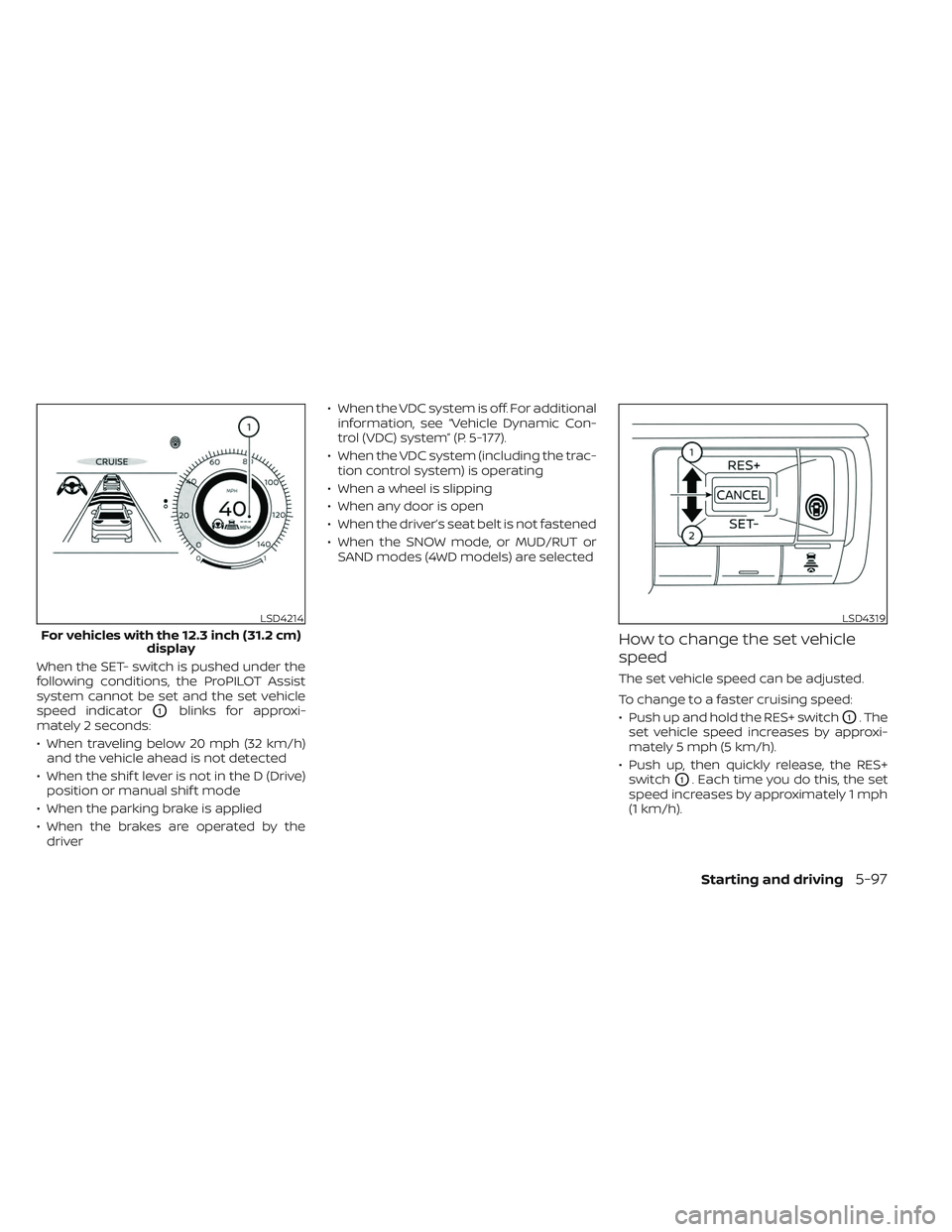
When the SET- switch is pushed under the
following conditions, the ProPILOT Assist
system cannot be set and the set vehicle
speed indicator
O1blinks for approxi-
mately 2 seconds:
• When traveling below 20 mph (32 km/h) and the vehicle ahead is not detected
• When the shif t lever is not in the D (Drive) position or manual shif t mode
• When the parking brake is applied
• When the brakes are operated by the driver • When the VDC system is off. For additional
information, see “Vehicle Dynamic Con-
trol (VDC) system” (P. 5-177).
• When the VDC system (including the trac- tion control system) is operating
• When a wheel is slipping
• When any door is open
• When the driver’s seat belt is not fastened
• When the SNOW mode, or MUD/RUT or SAND modes (4WD models) are selected
How to change the set vehicle
speed
The set vehicle speed can be adjusted.
To change to a faster cruising speed:
• Push up and hold the RES+ switch
O1. The
set vehicle speed increases by approxi-
mately 5 mph (5 km/h).
• Push up, then quickly release, the RES+ switch
O1. Each time you do this, the set
speed increases by approximately 1 mph
(1 km/h).
LSD4214
For vehicles with the 12.3 inch (31.2 cm) display
LSD4319
Starting and driving5-97
Page 426 of 647

When driving on some roads, such as wind-
ing, hilly, curved, narrow roads, or roads
which are under construction, the radar
sensor may detect vehicles in a different
lane, or may temporarily not detect a ve-
hicle traveling ahead. This may cause the
radar system to decelerate or accelerate
the vehicle.
The detection of vehicles may also be af-
fected by vehicle operation (steering ma-
neuver or traveling position in the lane, etc.)
or vehicle condition.If this occurs, the ICC system may warn you
by blinking the system indicator and sound-
ing the chime unexpectedly. You will have to
manually control the proper distance away
from the vehicle traveling ahead.
System Temporarily Unavailable
The following are conditions in which the
ICC system may be temporarily unavail-
able. In these instances, the ICC system
may not cancel and may not be able to
maintain the selected following distance
from the vehicle ahead.Condition A
Under the following conditions, the ICC sys-
tem is automatically canceled. A chime will
sound and the system will not be able to be
set:
• Any door is open.
• The driver’s seat belt is not fastened.
• The vehicle ahead is not detected and
your vehicle is traveling below the speed
of 15 mph (24 km/h). For ProPILOT Assist
with Navi-link equipped vehicles on a lim-
ited access freeway as identified in the
navigation map data, the ICC system
cancels and a warning chime sounds if
your vehicle is at a standstill for more
than approximately 3 seconds and a ve-
hicle is not detected ahead.
• Your vehicle has been stopped by the ICC system for approximately 3 minutes or
longer.
• The shif t lever is not in the D (Drive) posi- tion or manual shif t mode.
• The electronic parking brake is applied.
• The VDC system is turned off.
• The AEB with Pedestrian Detection ap- plies harder braking.
• VDC (including the traction control sys- tem) operates.
SSD0253
Starting and driving5-115
Page 427 of 647

• The SNOW mode, or MUD/RUT or SANDmode (4WD models) is selected.
• A wheel slips.
• When the front radar is impaired due to dirt or an other obstruction blocking the
radar sensor.
• When the radar signal is temporarily interrupted.
Action to take:
When the conditions listed above are no
longer present, turn the system off using
the ProPILOT Assist switch. Turn the ProPI-
LOT Assist system back on to use the
system.
NOTE:
When the ICC system is canceled un-
der the following conditions at a
standstill, the electronic parking brake
is automatically activated:
• Any door is open.
• The driver’s seat belt is not fastened.
• Your vehicle has been stopped by the ICC system for approximately 3 min-
utes or longer.
• The shif t lever is not in the D (Drive) position or manual shif t mode.
• The VDC system is turned off. • When distance measurement be-
comes impaired due to adhesion of dirt
or obstruction to the sensor.
• When the radar signal is temporarily interrupted.
Condition B
When there is inclement weather (rain, fog,
snow, etc.) blocking the front radar sensor,
the ICC system will automatically be can-
celed, the chime will sound and the “For-
ward Driving Aids temporarily disabled
Front Sensor Blocked See Owner’s Manual”
warning message will appear in the vehicle
information display.
Action to take:
When the conditions listed above are no
longer present, the warning message will
no longer be available in the vehicle infor-
mation display and the system will operate
normally. If the “Forward Driving Aids tem-
porarily disabled Front Sensor Blocked See
Owner’s Manual” warning message contin-
ues to be displayed, have the system
checked. It is recommended that you visit a
NISSAN dealer for this service. Condition C
When the radar sensor of the front bumper
is covered with dirt or is obstructed, the ICC
system will automatically be canceled.
The chime will sound and the “Forward
Driving Aids temporarily disabled Front
Sensor Blocked See Owner’s Manual”
warning message will appear in the vehicle
information display.
Action to take:
If the warning message appears, stop the
vehicle in a safe place, press the park but-
ton to engage the P (Park) position, and
turn the engine off. When the radar signal is
temporarily interrupted, clean the sensor
area of the front bumper and restart the
engine. If the “Forward Driving Aids tempo-
rarily disabled Front Sensor Blocked See
Owner’s Manual” warning message contin-
ues to be displayed, have the system
checked. It is recommended that you visit a
NISSAN dealer for this service.
5-116Starting and driving
Page 500 of 647
• If the sonar sensors are dirty, wipe themoff with a sof t cloth while being careful to
not damage them.
• The sonar sensors may be blocked by temporary ambient conditions such as
splashing water, mist or fog. The blocked
condition may also be caused by objects
such as ice, frost or dirt obstructing the
sonar sensors. Check for and remove ob-
jects obstructing the area around the so-
nar sensors.
• Do not subject the area around the sonar sensors to strong impact. Also, do not
remove or disassemble the sonar sen-
sors. If the sonar sensors and peripheral
areas are deformed in an accident, etc.,
have the sonar sensors checked by a
NISSAN dealer.
• Do not attach stickers (including trans- parent material), install accessories or
apply additional paint on the sonar sen-
sors and their surrounding areas. This
may cause a malfunction or improper
operation.
• When washing the vehicle using a high- pressure washer, do not apply direct
washer pressure on the sonar sensors.
This may cause a malfunction of the so-
nar sensors. The Idling Stop System activates to prevent
unnecessary fuel consumption, exhaust
emissions and noise.
• When you stop the vehicle, the engine is
turned off automatically.
• When you release the brake pedal to be- gin moving again, the engine is turned on
automatically.
WARNING
The engine restarts if the vehicle
moves at approximately 1 mph (2
km/h) or more (on a downhill grade,
etc.) while the engine is turned off by
the Idling Stop System. Depress the
brake pedal immediately to stop the
vehicle to prevent an accident.
CAUTION
At the end of the journey the engine
must be stopped and ignition switch be
pushed off. Lock the vehicle as normal.
Pushing the ignition switch off will shut
down all electrical systems. Failure to
do this may result in a discharged
battery.
NOTE:
The Idling Stop System will not activate
under the following conditions:
• When the vehicle is in TOW mode.
• When the engine is kept idling without
the vehicle being driven af ter the en-
gine is turned on.
• When the engine coolant temperature
is low.
• When the battery capacity is low.
• When the battery temperature is low or
extremely high
• When the vehicle is moving.
• When a negative pressure booster
decreases.
• When the engine hood is opened with
the engine running.
• When the engine is turned on with the
engine hood open.
• When the driver’s seat belt is not
fastened.
• When the driver’s door is open.
• When the steering wheel is operated.
• When the Idling Stop System indicator
blinks at a low speed.
IDLING STOP SYSTEM
Starting and driving5-189
Page 501 of 647
•When the fan speed control is in any
position other than “OFF,” (0) while the
air flow control is in the front defogger
position.
• When the front defroster switch is on.
• When the rear window defroster switch
is on.
• When the temperature inside the ve-
hicle is lower than approximately 20°C
(68°F), unless the Air Conditioning ECO
customize option is selected, and the
ECO driving mode is on.
• When the temperature inside the ve-
hicle is higher than approximately 30°C
(86°F), unless the Air Conditioning ECO
customize option is selected, and the
ECO driving mode is on. (When the air
conditioner is off, the Idling Stop Sys-
tem will operate.)
• When the fan speed of the air condi-
tioner is set to the maximum speed,
unless the Air Conditioning ECO cus-
tomize option is selected, and the ECO
driving mode is on.
• When the Idling Stop OFF switch is
turned on.
• When the power consumption is large.
• When the vehicle is traveling at alti-
tudes higher than 6,562 f t (2,000 m). •
When the accelerator pedal is
depressed.
• When the shif t lever is in the R (Reverse)
position.
• When the brake pedal is not firmly
depressed.
• When stopping the vehicle on steep
sloping roads.
NOTE:
The engine will not restart even if the
brake pedal is released while the Idling
Stop System is activated under the fol-
lowing conditions: (The engine may re-
start by the other engine restart condi-
tions.)
• When the shif t position is in the P (Park)
position.
NOTE:
It may take some time until the Idling
Stop System activates under the follow-
ing conditions:
• When the battery is discharged.
• When the outside temperature is low or
high.
•
When the battery is replaced or the bat-
tery terminal is disconnected for ex-
tended periods and then reconnected.
NOTE:
When the Idling Stop System indicator
light illuminates, the engine starts run-
ning automatically under at least one of
the following conditions:
• The brake pedal is released with the
shif t lever in the D (Drive) or N (Neutral)
position.
• The shif t position is placed in the D
(Drive) or R (Reverse) position from the
N (Neutral) or P (Park) position.
• The driver’s seat belt is unfastened, or
the driver’s door is open.
• The battery voltage becomes low (due
to electrical load from other vehicle
systems like headlights, heaters, etc.,
or auxiliary devices connected to the
12 volt socket inside the vehicle).
• The vehicle speed is above about 1 mph
(2 km/h).
• When the rear window defroster is
operated.
• When the temperature inside the ve-
hicle is lower than approximately 68°F
(20°C), unless the Air Conditioning ECO
customize option is selected, and the
ECO driving mode is on.
5-190Starting and driving
Page 521 of 647
3. Turn off the air conditioner. Open all thewindows, move the heater or air condi-
tioner temperature control to maximum
hot and fan control to high speed.
4. Get out of the vehicle. Look and listen for steam or coolant escaping from the ra-
diator before opening the hood. If steam
or coolant is escaping, turn off the en-
gine. Do not open the hood further until
no steam or coolant can be seen.
5. Open the engine hood.
WARNING
If steam or water is coming from the
engine, stand clear to prevent getting
burned.
6. Visually check drive belts for damage or looseness. Also check if the cooling fan
is running. The radiator hoses and radia-
tor should not leak water. If coolant is
leaking, the water pump belt is missing
or loose, or the cooling fan does not run,
stop the engine.
WARNING
Be careful not to allow your hands, hair,
jewelry or clothing to come into con-
tact with, or get caught in, engine belts
or the engine cooling fan. The engine
cooling fan can start at any time.
7. Af ter the engine cools down, check the coolant level in the engine coolant reser-
voir tank with the engine running. Add
coolant to the engine coolant reservoir
tank if necessary. Have your vehicle re-
paired. It is recommended that you visit a
NISSAN dealer for this service. When towing your vehicle, all jurisdictional
and local regulations for towing must be
followed. Incorrect towing equipment
could damage your vehicle. Towing in-
structions are available from a NISSAN
dealer. Local service operators are gener-
ally familiar with the applicable laws and
procedures for towing. To assure proper
towing and to prevent accidental damage
to your vehicle, NISSAN recommends hav-
ing a service operator tow your vehicle. It is
advisable to have the service operator
carefully read the following precautions:
WARNING
• Never ride in a vehicle that is being
towed.
• Never get under your vehicle af ter it
has been lif ted by a tow truck.
CAUTION
• When towing, make sure that the
transmission, axles, steering system
and powertrain are in working condi-
tion. Use dollies or flatbed if any of
the listed systems are not working.
• Always attach safety chains before
towing.
TOWING YOUR VEHICLE
6-14In case of emergency