Drive mode NISSAN PATHFINDER 2022 Owner´s Manual
[x] Cancel search | Manufacturer: NISSAN, Model Year: 2022, Model line: PATHFINDER, Model: NISSAN PATHFINDER 2022Pages: 647, PDF Size: 8.48 MB
Page 166 of 647
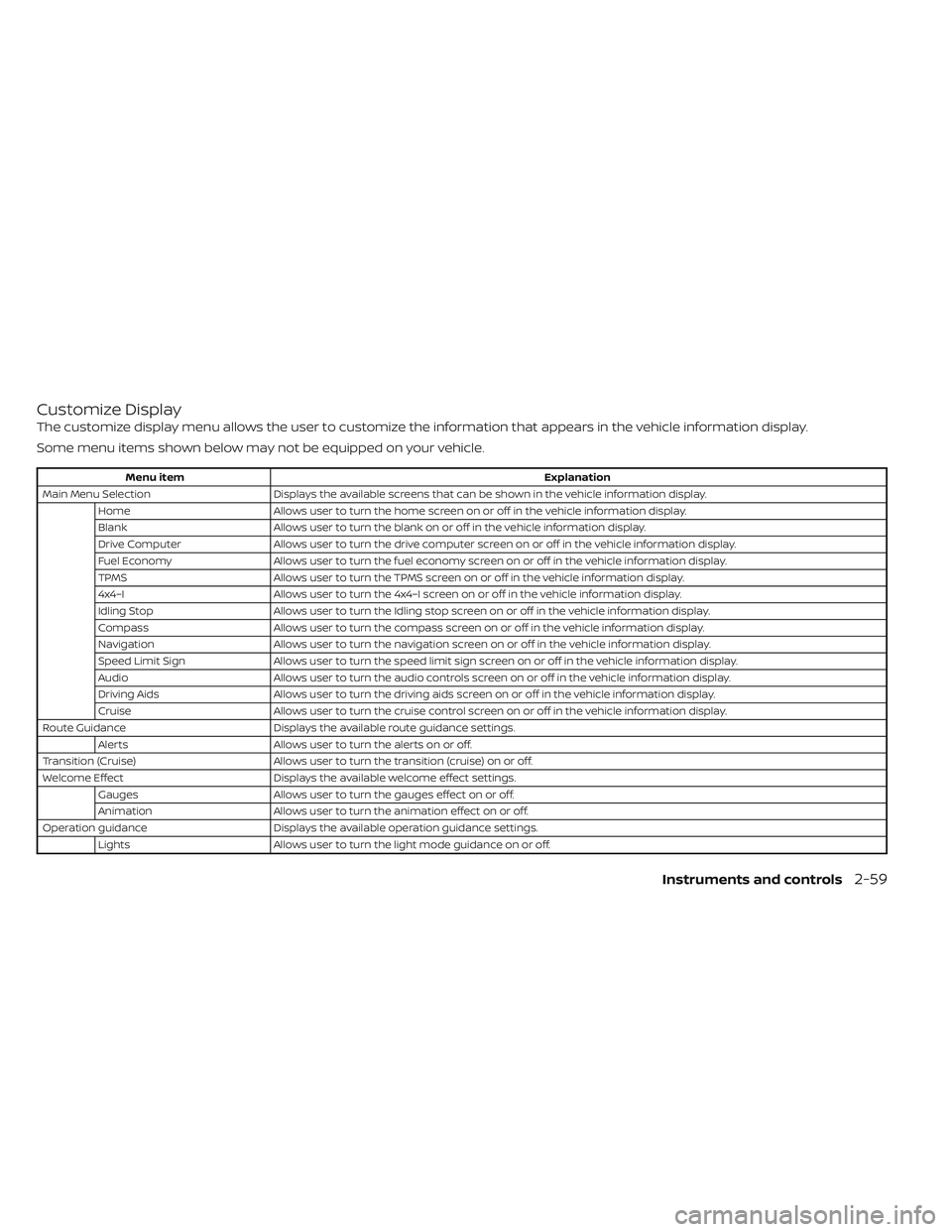
Customize Display
The customize display menu allows the user to customize the information that appears in the vehicle information display.
Some menu items shown below may not be equipped on your vehicle.
Menu itemExplanation
Main Menu Selection Displays the available screens that can be shown in the vehicle information display.
Home Allows user to turn the home screen on or off in the vehicle information display.
Blank Allows user to turn the blank on or off in the vehicle information display.
Drive Computer Allows user to turn the drive computer screen on or off in the vehicle information display.
Fuel Economy Allows user to turn the fuel economy screen on or off in the vehicle information display.
TPMS Allows user to turn the TPMS screen on or off in the vehicle information display.
4x4–I Allows user to turn the 4x4–I screen on or off in the vehicle information display.
Idling Stop Allows user to turn the Idling stop screen on or off in the vehicle information display.
Compass Allows user to turn the compass screen on or off in the vehicle information display.
Navigation Allows user to turn the navigation screen on or off in the vehicle information display.
Speed Limit Sign Allows user to turn the speed limit sign screen on or off in the vehicle information display.
Audio Allows user to turn the audio controls screen on or off in the vehicle information display.
Driving Aids Allows user to turn the driving aids screen on or off in the vehicle information display.
Cruise Allows user to turn the cruise control screen on or off in the vehicle information display.
Route Guidance Displays the available route guidance settings.
Alerts Allows user to turn the alerts on or off.
Transition (Cruise) Allows user to turn the transition (cruise) on or off.
Welcome Effect Displays the available welcome effect settings.
Gauges Allows user to turn the gauges effect on or off.
Animation Allows user to turn the animation effect on or off.
Operation guidance Displays the available operation guidance settings.
Lights Allows user to turn the light mode guidance on or off.
Instruments and controls2-59
Page 169 of 647
Chassis Control System Error See
Owner’s Manual
This warning appears if the chassis control
module detects a malfunction in the chas-
sis control system. Have the system
checked. It is recommended that you visit a
NISSAN dealer for this service. For addi-
tional information, see “Chassis Control”
(P. 5-180).
Check Back Seat For All Articles
When the system is enabled, this message
appears when the vehicle comes to a com-
plete stop, the vehicle is transitioned from
the D (Drive) position to P (Park) position,
and the driver exits the vehicle. This mes-
sage alerts the driver, af ter a period of time,
to check for items in the rear seat af ter the
audible alert has been provided.
NOTE:
This system is disabled until a driver en-
ables it using the vehicle information
display. For additional information, see
“How to use the vehicle information dis-
play ” (P. 2-46).
For additional information, see “Rear Door
Alert” (P. 2-94).
Rear Door Alert is activated
When the system is enabled, this message
appears when the Rear Door Alert system
is active and can remind the driver to check
the back seat.
• Using the steering wheel switch, a drivercan select “Dismiss Message” to clear the
display for a period of time. If no selection
is made, this message automatically
turns off af ter a period of time.
• Using the steering wheel switch, a driver can select “Disable Alert” to disable the
horn alert for the remainder of the cur-
rent trip.
WARNING
Selecting “Dismiss Message” during a
stop within a trip temporarily dis-
misses the message for that stop with-
out turning the system off. Alerts can
be provided for other stops during the
trip. Selecting “Disable Alert” turns off
the Rear Door Alert system for the re-
mainder of a trip and no audible alert
will be provided.
NOTE:
This system is disabled until a driver en-
ables it using the vehicle information
display. For additional information, see
“How to use the vehicle information dis-
play ” (P. 2-46).
For additional information, see “Rear Door
Alert” (P. 2-94).
Door/Lif tgate Open
This warning appears when a door or the
lif tgate has been opened.
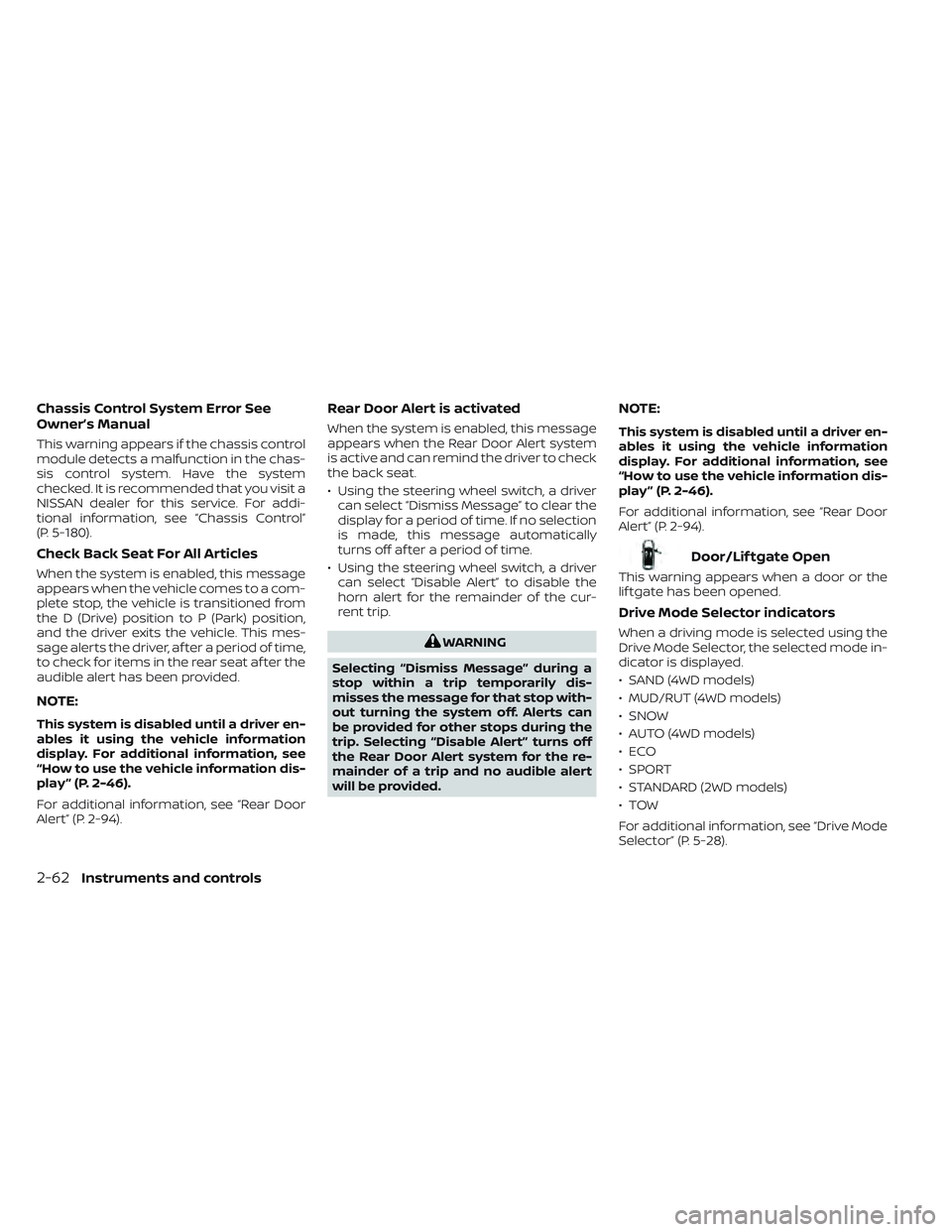
Drive Mode Selector indicators
When a driving mode is selected using the
Drive Mode Selector, the selected mode in-
dicator is displayed.
• SAND (4WD models)
• MUD/RUT (4WD models)
• SNOW
• AUTO (4WD models)
•ECO
• SPORT
• STANDARD (2WD models)
•TOW
For additional information, see “Drive Mode
Selector” (P. 5-28).
2-62Instruments and controls
Page 173 of 647
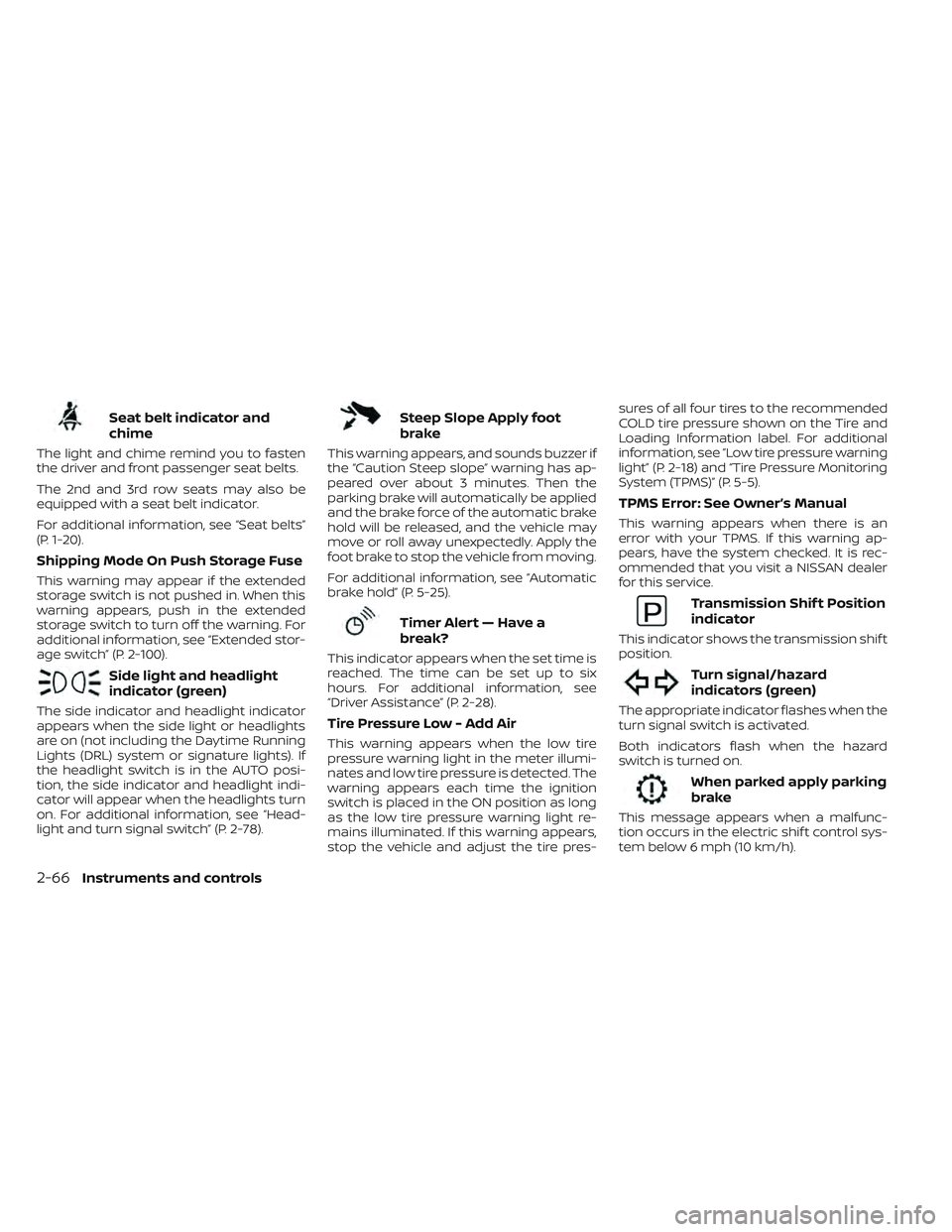
Seat belt indicator and
chime
The light and chime remind you to fasten
the driver and front passenger seat belts.
The 2nd and 3rd row seats may also be
equipped with a seat belt indicator.
For additional information, see “Seat belts”
(P. 1-20).
Shipping Mode On Push Storage Fuse
This warning may appear if the extended
storage switch is not pushed in. When this
warning appears, push in the extended
storage switch to turn off the warning. For
additional information, see “Extended stor-
age switch” (P. 2-100).
Side light and headlight
indicator (green)
The side indicator and headlight indicator
appears when the side light or headlights
are on (not including the Daytime Running
Lights (DRL) system or signature lights). If
the headlight switch is in the AUTO posi-
tion, the side indicator and headlight indi-
cator will appear when the headlights turn
on. For additional information, see “Head-
light and turn signal switch” (P. 2-78).
Steep Slope Apply foot
brake
This warning appears, and sounds buzzer if
the “Caution Steep slope” warning has ap-
peared over about 3 minutes. Then the
parking brake will automatically be applied
and the brake force of the automatic brake
hold will be released, and the vehicle may
move or roll away unexpectedly. Apply the
foot brake to stop the vehicle from moving.
For additional information, see “Automatic
brake hold” (P. 5-25).
Timer Alert — Have a
break?
This indicator appears when the set time is
reached. The time can be set up to six
hours. For additional information, see
“Driver Assistance” (P. 2-28).
Tire Pressure Low - Add Air
This warning appears when the low tire
pressure warning light in the meter illumi-
nates and low tire pressure is detected. The
warning appears each time the ignition
switch is placed in the ON position as long
as the low tire pressure warning light re-
mains illuminated. If this warning appears,
stop the vehicle and adjust the tire pres-sures of all four tires to the recommended
COLD tire pressure shown on the Tire and
Loading Information label. For additional
information, see “Low tire pressure warning
light” (P. 2-18) and “Tire Pressure Monitoring
System (TPMS)” (P. 5-5).
TPMS Error: See Owner’s Manual
This warning appears when there is an
error with your TPMS. If this warning ap-
pears, have the system checked. It is rec-
ommended that you visit a NISSAN dealer
for this service.
Transmission Shif t Position
indicator
This indicator shows the transmission shif t
position.
Turn signal/hazard
indicators (green)
The appropriate indicator flashes when the
turn signal switch is activated.
Both indicators flash when the hazard
switch is turned on.
When parked apply parking
brake
This message appears when a malfunc-
tion occurs in the electric shif t control sys-
tem below 6 mph (10 km/h).
2-66Instruments and controls
Page 174 of 647
Have the system checked. It is recom-
mended that you visit a NISSAN dealer for
this service.
AWD Error: See Owner’s Manual
This warning appears when the 4-Wheel
Drive (4WD) system is not functioning prop-
erly while the engine is running. Reduce
vehicle speed and have your vehicle
checked by a NISSAN dealer as soon as
possible. For additional information, see
“Intelligent 4x4 (I-4x4)” (P. 5-171).
AWD High Temp. Stop Vehicle
This warning appears when the oil tem-
perature of the powertrain parts will in-
crease due to the difference in rotation be-
tween the front and rear wheels is large
(wheel slip), such as when driving the ve-
hicle on rough roads, through sand or mud,
or freeing a stuck vehicle. If this warning is
displayed, stop the vehicle with the engine
idling, as soon as it is safe to do so. In these
cases, the 4WD changes to 2WD to protect
the powertrain parts. Then if the warning
turns off, you can continue 4WD driving.
Tire Size Incorrect See Owner’s
Manual
This warning may appear if there is a large
difference between the diameters of the
front and rear wheels. Pull off the road in a
safe area, with the engine idling. Check that
all the tire sizes, brand, construction and
tread patterns are the same, that the tire
pressure is correct and that the tires are
not excessively worn. If you have any prob-
lems, please change tires or adjust to the
correct tire pressure. Do not select the
SNOW or SAND or MUD/RUT (if so equipped)
mode with the Drive Mode Selector and do
not drive fast. For additional information,
see “Intelligent 4x4 (I-4x4)” (P. 5-171).
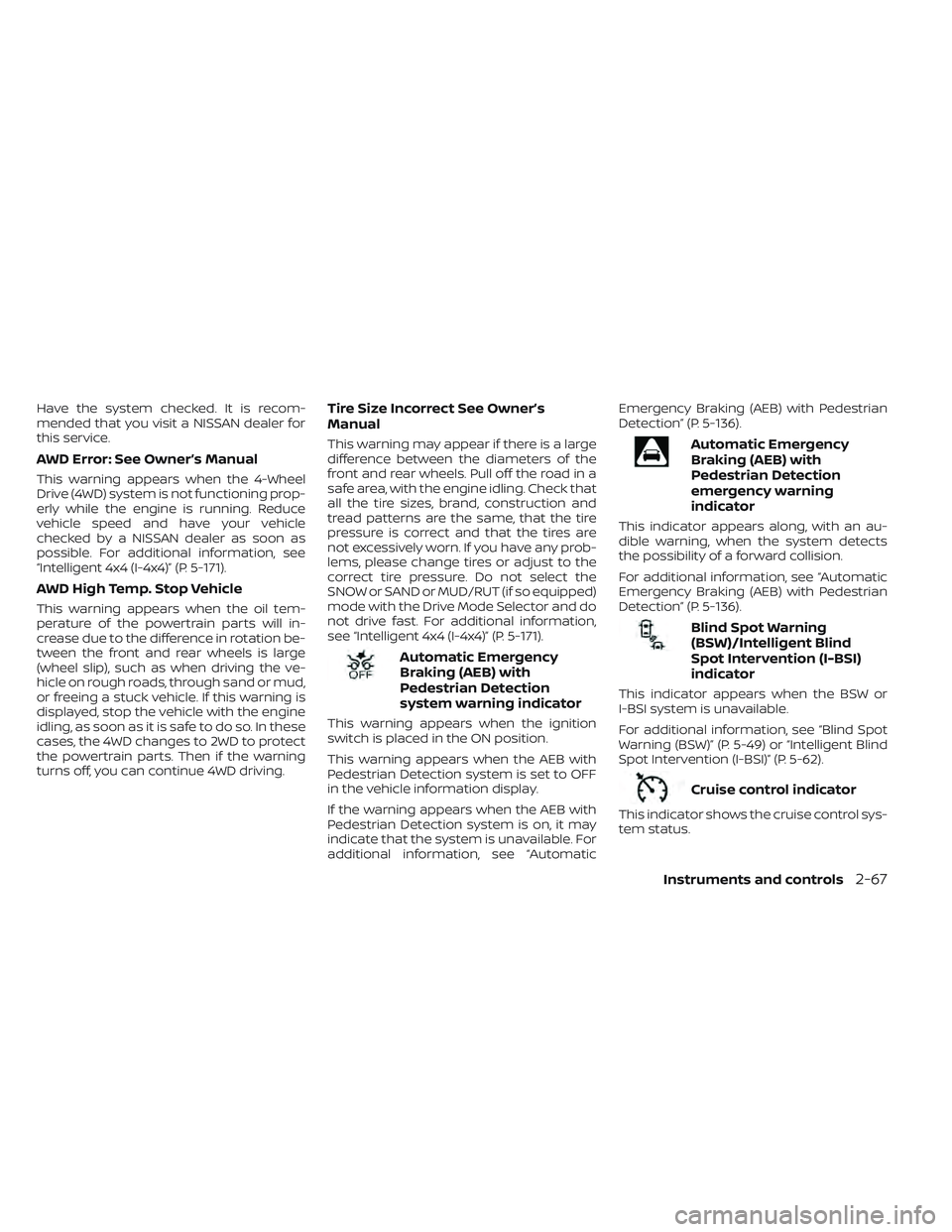
Automatic Emergency
Braking (AEB) with
Pedestrian Detection
system warning indicator
This warning appears when the ignition
switch is placed in the ON position.
This warning appears when the AEB with
Pedestrian Detection system is set to OFF
in the vehicle information display.
If the warning appears when the AEB with
Pedestrian Detection system is on, it may
indicate that the system is unavailable. For
additional information, see “AutomaticEmergency Braking (AEB) with Pedestrian
Detection” (P. 5-136).
Automatic Emergency
Braking (AEB) with
Pedestrian Detection
emergency warning
indicator
This indicator appears along, with an au-
dible warning, when the system detects
the possibility of a forward collision.
For additional information, see “Automatic
Emergency Braking (AEB) with Pedestrian
Detection” (P. 5-136).
Blind Spot Warning
(BSW)/Intelligent Blind
Spot Intervention (I-BSI)
indicator
This indicator appears when the BSW or
I-BSI system is unavailable.
For additional information, see “Blind Spot
Warning (BSW)” (P. 5-49) or “Intelligent Blind
Spot Intervention (I-BSI)” (P. 5-62).
Cruise control indicator
This indicator shows the cruise control sys-
tem status.
Instruments and controls2-67
Page 175 of 647

When cruise control is activated, a green
circle will illuminate to indicate it is set. The
vehicle information display will also display
the speed the cruise control was set at. If
you accelerate past the set speed, the
speed will blink until you either cancel
cruise control or go back to the set speed.
If cruise control is on and canceled, the
speed will be displayed to show the speed
the vehicle will return to if the resume but-
ton is activated.
Currently not available
This message may appear when the Pro-
PILOT Assist system, Intelligent Blind Spot
Intervention (I-BSI) or the Intelligent Lane
Intervention (I-LI) system is engaged.
Under the following conditions, the Pro-
PILOT Assist, Intelligent Blind Spot Interven-
tion (I-BSI) or the Intelligent Lane Interven-
tion (I-LI) system is automatically canceled:
• When the VDC system is turned off
• The SNOW mode or the SAND or MUD/RUT mode is selected (4WD models).
The above system cannot be used in some
situations (VDC operates, wheel slip and
VDC system is off.)
Driver Attention Alert
Malfunction
This warning appears when the Intelligent
Driver Alertness (I-DA) system is not func-
tioning properly. For additional information,
see “Intelligent Driver Alertness (I-DA)”
(P. 5-165).
Driver Attention Alert—
TakeaBreak?
This alert appears when the system has
detected that the driver may be displaying
fatigue or a lack of attention.
Forward Driving Aids temporarily
disabled Front Sensor blocked See
Owner’s Manual
This message appears when the front ra-
dar sensor may be obstructed due to:
• mud, dirt, snow, ice, etc.
• inclement weather (rain, fog, snow, etc.).
All forward driving aids are temporarily dis-
abled until the system detects that the
front radar sensor is no longer obstructed.
For additional information, see:
• Automatic Emergency Braking (AEB) with Pedestrian Detection (P. 5-136)
• ProPILOT Assist (P. 5-86) • Intelligent Forward Collision Warning
(I-FCW) (P. 5-149)
Hands on detection
warning
This warning appears when the Steering
Assist system is engaged and the following
condition(s) occur:
• When not holding the steering wheel
• When there is no steering wheeloperation
Hold onto the steering wheel immediately.
When the steering operation is detected,
the warning turns off and the Steering As-
sist function is automatically restored.
For additional information, see “ProPILOT
Assist” (P. 5-86).
Intelligent Lane
Intervention (I-LI)/
Intelligent Blind Spot
Intervention (I-BSI)/
ProPILOT Assist indicator
This indicator shows when the I-LI, I-BSI or
ProPILOT Assist system is engaged.
For additional information, see “Intelligent
Lane Intervention (I-LI)” (P. 5-42), “Intelligent
Blind Spot Intervention (I-BSI)” (P. 5-62) or
“ProPILOT Assist” (P. 5-86).
2-68Instruments and controls
Page 246 of 647

• Switching the Auto Room Lamp featureto the OFF position in the “Vehicle Set-
tings” menu on the vehicle information
display. For additional information, see
“Vehicle information display 7 inch (18 cm)
Type A” (P. 2-22) or “Vehicle information
display 12.3 inch (31 cm) Type B” (P. 2-45).
For additional information, see “Interior
lights” (P. 2-116).
Opening windows
The Intelligent Key allows you to simultane-
ously open windows equipped with auto-
matic operation.
All doors must be closed and the key must
be outside the vehicle.
To open the windows, press and hold the
button on the Intelligent Key for lon-
ger than 3 seconds af ter all doors are
unlocked.
The door windows will open while pressing
the
button on the Intelligent Key.
To interrupt opening of the windows, re-
lease the
button.
Releasing the rear lif tgate (if so
equipped)
The rear lif tgate can be opened and closed
by performing the following:
• Press the
button for longer than 1
second to open the rear lif tgate.
• Press the
button again for longer
than 1 second to close the rear lif tgate.
When the
button is pressed during
the open or close process the lif tgate will
stop. When pressed again, the lif tgate will
reverse and go in the opposite direction.
Using the panic alarm
If you are near your vehicle and feel threat-
ened, you may activate the panic alarm to
call attention by pressing and holding the
button on the Intelligent Key for lon-
ger than 0.5 seconds.
The panic alarm and headlights will stay on
for a period of time.
The panic alarm stops when:
• It has run for a period of time.
• Any button is pressed on the Intelligent Key. • The lock sensor on the driver or passen-
ger door is pushed and the Intelligent Key
is in range of the door handle.
Answer back horn feature
If desired, the answer back horn feature
can be deactivated using the Intelligent
Key. When it is deactivated and the
button is pressed, the hazard indicator
lights flash twice. When thebutton is
pressed, neither the hazard indicator lights
nor the horn operates.
NOTE:
If you can change the Answer Back Horn
feature with the Intelligent Key, the ve-
hicle information display screen will
show the current mode af ter the ignition
switch has been cycled from the OFF to
the ON position. The vehicle information
display screen can also be used to
change the answer back horn mode.
For additional information, see “Vehicle
information display 7 inch (18 cm) Type A”
(P. 2-22) or “Vehicle information display
12.3 inch (31 cm) Type B” (P. 2-45).
Pre-driving checks and adjustments3-15
Page 297 of 647
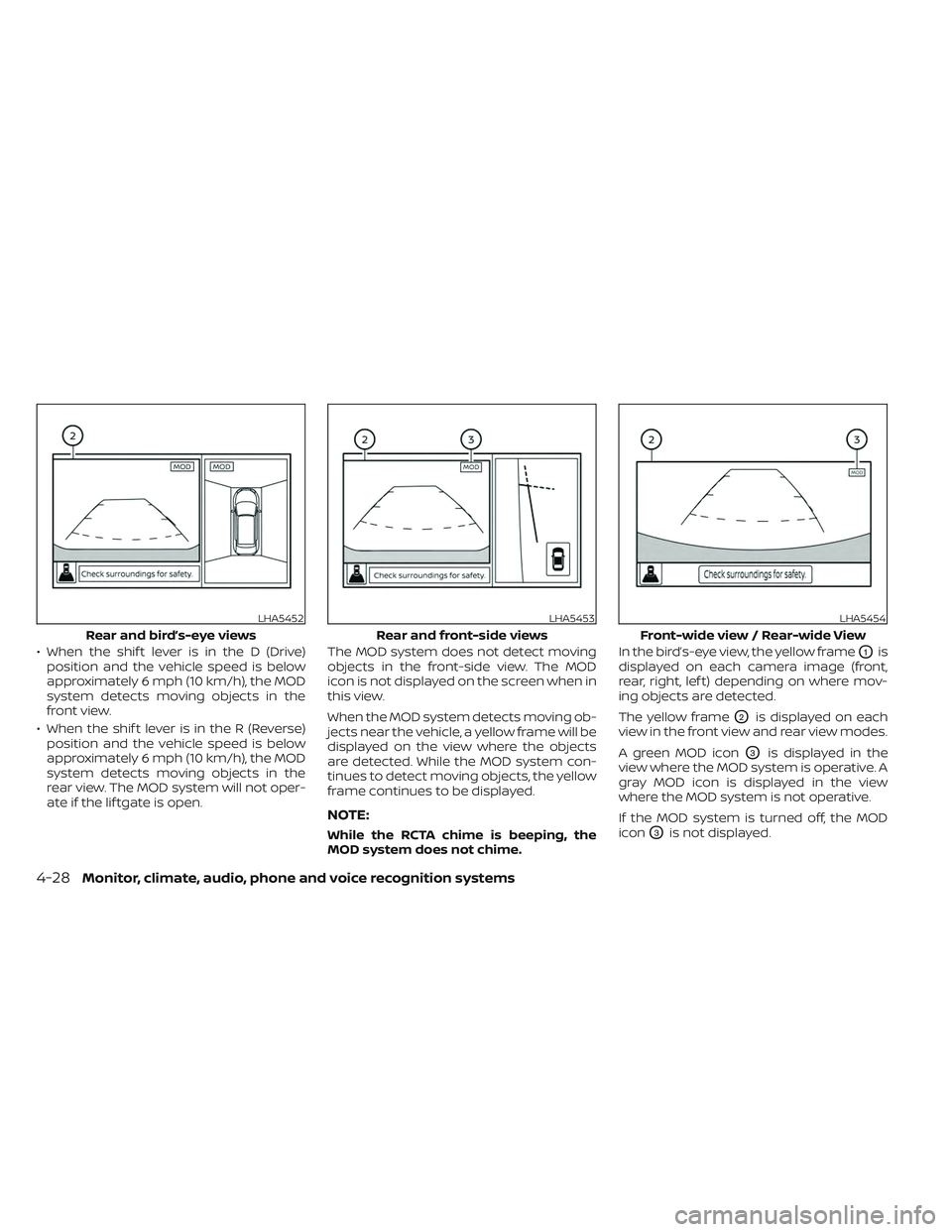
• When the shif t lever is in the D (Drive)position and the vehicle speed is below
approximately 6 mph (10 km/h), the MOD
system detects moving objects in the
front view.
• When the shif t lever is in the R (Reverse) position and the vehicle speed is below
approximately 6 mph (10 km/h), the MOD
system detects moving objects in the
rear view. The MOD system will not oper-
ate if the lif tgate is open. The MOD system does not detect moving
objects in the front-side view. The MOD
icon is not displayed on the screen when in
this view.
When the MOD system detects moving ob-
jects near the vehicle, a yellow frame will be
displayed on the view where the objects
are detected. While the MOD system con-
tinues to detect moving objects, the yellow
frame continues to be displayed.
NOTE:
While the RCTA chime is beeping, the
MOD system does not chime. In the bird’s-eye view, the yellow frame
O1is
displayed on each camera image (front,
rear, right, lef t) depending on where mov-
ing objects are detected.
The yellow frame
O2is displayed on each
view in the front view and rear view modes.
A green MOD icon
O3is displayed in the
view where the MOD system is operative. A
gray MOD icon is displayed in the view
where the MOD system is not operative.
If the MOD system is turned off, the MOD
icon
O3is not displayed.
LHA5452
Rear and bird’s-eye views
LHA5453
Rear and front-side views
LHA5454
Front-wide view / Rear-wide View
4-28Monitor, climate, audio, phone and voice recognition systems
Page 301 of 647
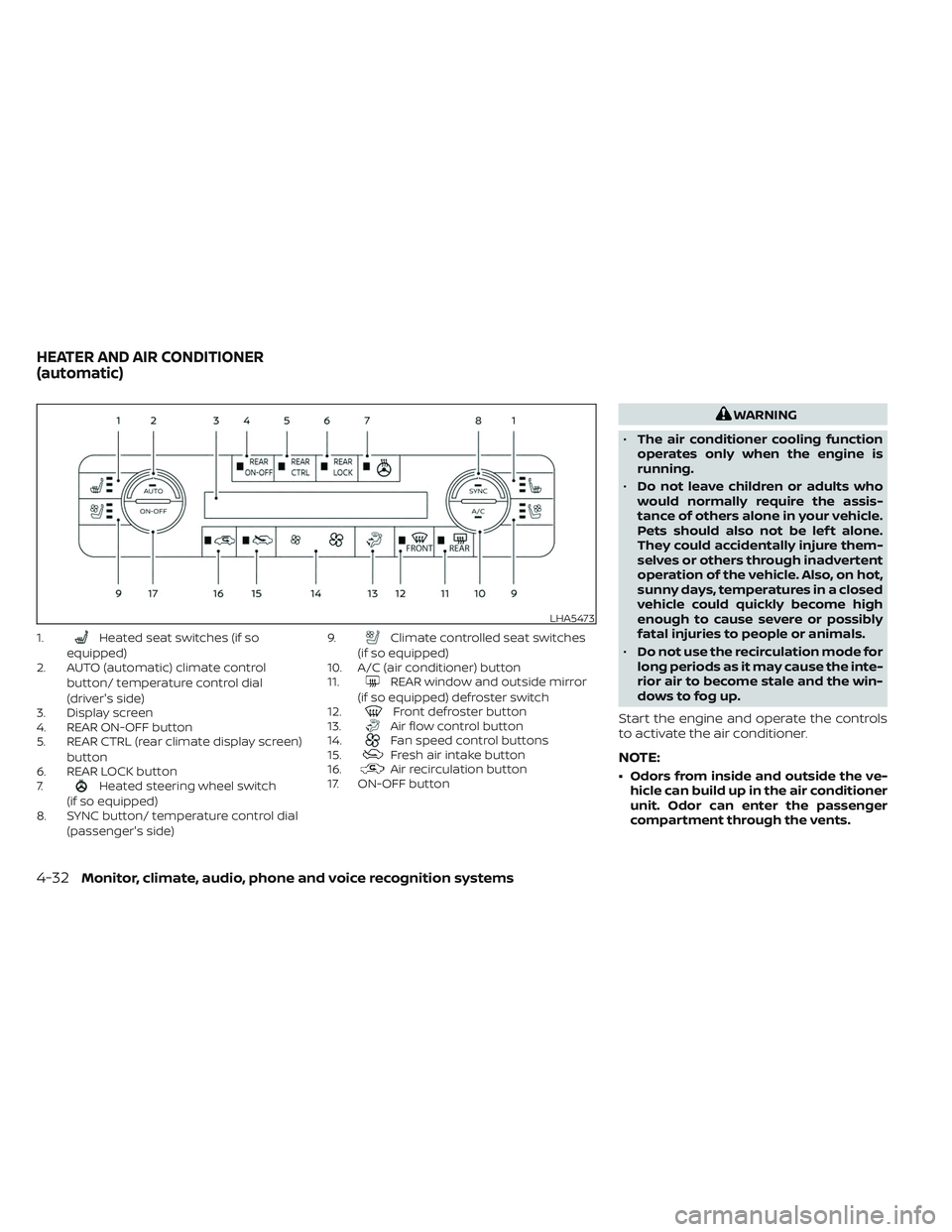
1.Heated seat switches (if so
equipped)
2. AUTO (automatic) climate control
button/ temperature control dial
(driver's side)
3. Display screen
4. REAR ON-OFF button
5. REAR CTRL (rear climate display screen)
button
6. REAR LOCK button
7.
Heated steering wheel switch
(if so equipped)
8. SYNC button/ temperature control dial
(passenger's side) 9.
Climate controlled seat switches
(if so equipped)
10. A/C (air conditioner) button
11.
REAR window and outside mirror
(if so equipped) defroster switch
12.
Front defroster button
13.Air flow control button
14.Fan speed control buttons
15.Fresh air intake button
16.Air recirculation button
17. ON-OFF button
WARNING
• The air conditioner cooling function
operates only when the engine is
running.
• Do not leave children or adults who
would normally require the assis-
tance of others alone in your vehicle.
Pets should also not be lef t alone.
They could accidentally injure them-
selves or others through inadvertent
operation of the vehicle. Also, on hot,
sunny days, temperatures in a closed
vehicle could quickly become high
enough to cause severe or possibly
fatal injuries to people or animals.
• Do not use the recirculation mode for
long periods as it may cause the inte-
rior air to become stale and the win-
dows to fog up.
Start the engine and operate the controls
to activate the air conditioner.
NOTE:
• Odors from inside and outside the ve- hicle can build up in the air conditioner
unit. Odor can enter the passenger
compartment through the vents.
LHA5473
HEATER AND AIR CONDITIONER
(automatic)
4-32Monitor, climate, audio, phone and voice recognition systems
Page 302 of 647
• When parking, set the heater and airconditioner controls to turn off air re-
circulation to allow fresh air into the
passenger compartment. This should
help reduce odors inside the vehicle.
AUTOMATIC OPERATION
Cooling and/or dehumidified
heating (AUTO)
This mode may be used all year round as
the system automatically works to keep a
constant temperature. Air flow distribution,
air intake control, and fan speed are also
controlled automatically.
1. Press the AUTO button on.
2. Turn the temperature control dial to the lef t or right to set the desired
temperature.
• Adjust the temperature display to about 75°F (24°C) for normal operation.
• The temperature of the passenger com- partment will be maintained automati-
cally. Air flow distribution, air intake con-
trol and fan speed are also controlled
automatically. • A visible mist may be seen coming from
the vents in hot, humid conditions as the
air is cooled rapidly. This does not indicate
a malfunction.
3. You can individually set driver's and front passenger's side temperature using
each temperature control dial.
• To synchronize the driver’s and front pas- senger’s temperature settings, press the
SYNC button. The SYNC indicator will
illuminate.
Heating (A/C off)
The air conditioner does not activate. When
you need to heat only, use this mode.
1. Press the AUTO button.
2. Turn the temperature control dial to set the desired temperature.
• The temperature of the passenger com- partment will be maintained automati-
cally. Air flow distribution, air intake con-
trol and fan speed are also controlled
automatically.
• Not recommended if windows fog up.
Dehumidified defrosting or
defogging
1. Press thefront defroster button on.
(The indicator light on the button will
come on.)
2. Turn the temperature control dial to set the desired temperature.
• To quickly remove ice from the outside of the windows, use the
fan speed con-
trol buttons to set the fan speed to
maximum.
• As soon as possible af ter the windshield is clean, press the AUTO button to return
to the automatic mode.
• When the
front defroster button is
pressed, the air conditioner will automati-
cally be turned on at outside tempera-
tures above 36°F (2°C). The air recirculate
mode automatically turns off, allowing
outside air to be drawn into the passen-
ger compartment to further improve the
defogging performance.
Monitor, climate, audio, phone and voice recognition systems4-33
Page 303 of 647
Remote Engine Start with
Intelligent Climate Control (if so
equipped)
Vehicles equipped with automatic climate
controls and Remote Engine Start function
may go into automatic heating or cooling
mode when Remote Engine Start is acti-
vated depending on outside and cabin
temperatures. During this period, the cli-
mate control display and buttons will be
inoperable until the ignition switch is
turned on. In Remote Engine Start defrost-
ing mode, the rear window defroster,
heated seats (if so equipped) and heated
steering wheel (if so equipped) may be ac-
tivated automatically.
Voice Recognition logic (if so
equipped)
When the climate control system is on, the
front and rear fan speeds may be auto-
matically lowered so that commands are
more easily recognized. Fan speed can be
adjusted using the fan speed decrease and
increase buttons, if desired.
MANUAL OPERATIONFan speed control
Press thefan speed control buttons
to manually control the fan speed.
Press the AUTO button to return to auto-
matic control of the fan speed.
Temperature control dial
The temperature control dial allows you to
adjust the temperature of the outlet air. To
lower the temperature, turn the dial to the
lef t. To increase the temperature, turn the
dial to the right. Temperature can be ad-
justed on the driver’s and passenger’s side.
Air recirculation
Press theair recirculation button to
recirculate interior air inside the vehicle.
The
indicator light on the button will
come on.
The air recirculation cannot be activated
when the air conditioner is in the
front
defrosting mode.
When the outside temperature exceeds
70°F (21°C), the air conditioning system may
default to air recirculation mode automati-
cally to reduce overall power consumption.
To exit air recirculation mode, deselect the
air recirculation button (indicator will turn
off ) to enter fresh air mode.
Fresh air intake
Press thefresh air intake button to
draw outside air into the passenger
compartment.
A/C (air conditioner) button
Start the engine, press thefan speed
control buttons to the desired position and
press the
button to turn on the air
conditioner. To turn off the air conditioner,
press the
button again.
The air conditioner cooling function op-
erates only when the engine is running.
Air flow control
Pressing theair flow control button
manually controls air flow and selects the
air outlet:
— Air flows from center and side
vents.
— Air flows from center and sidevents and foot outlets.
— Air flows mainly from foot out-lets.
— Air flows from defroster and footoutlets.
4-34Monitor, climate, audio, phone and voice recognition systems