ECO mode NISSAN PATHFINDER 2022 Owner´s Manual
[x] Cancel search | Manufacturer: NISSAN, Model Year: 2022, Model line: PATHFINDER, Model: NISSAN PATHFINDER 2022Pages: 647, PDF Size: 8.48 MB
Page 311 of 647
5 Starting and driving
Precautions when starting and driving..........5-4
Exhaust gas (carbon monoxide) ..............5-4
Three-way catalyst ...........................5-4
Tire Pressure Monitoring System
(TPMS) .......................................5-5
On-pavement and off-road driving
precautions ..................................5-8
Avoiding collision and rollover ................5-9
Off-roadrecovery ............................5-9
Rapid air pressure loss .......................5-9
Drinking alcohol/drugs and driving ..........5-10
Driving safety precautions ...................5-10
Push-button ignition switch ....................5-13
Operating range ............................ 5-14
Push-button ignition switch positions .......5-14
Emergency engine shut off ..................5-15
NISSAN Intelligent Key® battery
discharge ................................... 5-15
NISSAN Vehicle Immobilizer System .........5-16
Before starting the engine .....................5-16
Starting the engine ............................. 5-16
Remote Engine Start (if so equipped) ........5-17
Driving the vehicle .............................. 5-18
Automatic Transmission (A/T) ...............5-18
Parking brake .................................. 5-23
Electronic parking brake (switch type) .......5-24 Automatic brake hold
.......................... 5-25
How to activate/deactivate the
automatic brake hold function ..............5-27
How to use the automatic brake hold
function ..................................... 5-27
Drive Mode Selector ............................ 5-28
STANDARD MODE (2WD models)/AUTO
MODE (4WD models) ........................ 5-29
SPORT mode ................................ 5-29
SNOW mode ................................ 5-29
TOW mode .................................. 5-30
MUD/RUT mode (4WD models only) .........5-30
SAND mode (4WD models only) ..............5-30
ECO mode .................................. 5-30
Traffic Sign Recognition (TSR) (if so equipped) . . . 5-32 System operation ........................... 5-32
Turning the Traffic Sign Recognition
(TSR) system on and off .....................5-33
System temporarily unavailable .............5-34
System malfunction ......................... 5-34
S
ystem maintenance ....................... 5-34
Lane Departure Warning (LDW) .................5-35
LDW system operation ......................5-36
How to enable/disable the LDW system .....5-38
LDW system limitations .....................5-39
System temporarily unavailable .............5-40
Page 322 of 647
Please observe the following precautions:
WARNING
• Spinning the front wheels on slippery
surfaces may cause the AWD warn-
ing message to display and the 4WD
system to automatically switch from
the 4WD to the 2WD mode. This could
reduce the traction. Be especially
careful when towing a trailer (4WD
models).
• Drive carefully when off the road and
avoid dangerous areas. Every person
who drives or rides in this vehicle
should be seated with their seat belt
fastened. This will keep you and your
passengers in position when driving
over rough terrain.
• Do not drive across steep slopes. In-
stead drive either straight up or
straight down the slopes. Off-road
vehicles can tip over sideways much
more easily than they can forward or
backward.
• Many hills are too steep for any ve-
hicle. If you drive up them, you may
stall. If you drive down them, you may
not be able to control your speed. If
you drive across them, you may roll
over. •
Do not shif t gears while driving on
downhill grades as this could cause
loss of control of the vehicle.
• Stay alert when driving to the top of a
hill. At the top there could be a drop-
off or other hazard that could cause
an accident.
• If your engine stalls or you cannot
make it to the top of a steep hill,
never attempt to turn around. Your
vehicle could tip or roll over. Always
back straight down in R (Reverse)
gear and apply brakes to control your
speed.
• Heavy braking going down a hill
could cause your brakes to overheat
and fade, resulting in loss of control
and an accident. Apply brakes lightly
and use a low gear to control your
speed.
• Unsecured cargo can be thrown
around when driving over rough ter-
rain. Properly secure all cargo so it
will not be thrown forward and cause
injury to you or your passengers. •
Secure heavy loads in the cargo area
as far forward and as low as possible.
Do not equip the vehicle with tires
larger than specified in this manual.
This could cause your vehicle to roll
over.
• Do not grip the inside or spokes of
the steering wheel when driving off-
road. The steering wheel could move
suddenly and injure your hands. In-
stead drive with your fingers and
thumbs on the outside of the rim.
• Before operating the vehicle, ensure
that the driver and all passengers
have their seat belts fastened.
• Always drive with the floor mats in
place as the floor may become hot.
• Lower your speed when encounter-
ing strong crosswinds. With a higher
center of gravity, your NISSAN is more
affected by strong side winds. Slower
speeds ensure better vehicle control.
• Do not drive beyond the perfor-
mance capability of the tires, even
with 4WD engaged.
Starting and driving5-11
Page 328 of 647
cranking the engine, release the accel-
erator pedal. Crank the engine with
your foot off the accelerator pedal by
depressing the brake pedal and push-
ing the ignition switch to start the en-
gine. If the engine starts, but fails to
run, repeat the above procedure.
CAUTION
Do not operate the starter for more
than 15 seconds at a time. If the engine
does not start, push the ignition switch
to the OFF position and wait 10 seconds
before cranking again, otherwise the
starter could be damaged.
4. Warm-up:
Allow the engine to idle for at least 30
seconds af ter starting. Do not race the
engine while warming it up. Drive at a
moderate speed for a short distance
first, especially in cold weather. In cold
weather, keep the engine running for a
minimum of 2 to 3 minutes before shut-
ting it off. Starting and stopping the en-
gine over a short period of time may
make the vehicle more difficult to start. 5. To stop the engine, push the park button
to shif t to the P (Park) position, and push
the ignition switch to the OFF position.
NOTE:
Care should be taken to avoid situa-
tions that can lead to potential battery
discharge and potential no-start con-
ditions such as:
1. Installation or extended use of elec- tronic accessories that consume bat-
tery power when the engine is not
running (phone chargers, GPS, DVD
players, etc.).
2. The vehicle is not driven regularly and/or only driven short distances.
In these cases, the battery may need to
be charged to maintain battery health.
REMOTE ENGINE START (if so
equipped)
Vehicles started with the Remote Engine
Start require the ignition switch to be
placed in the ON position before the shif t
position can be shif ted from the P (Park)
position. To place the ignition switch in the
ON position, follow these steps:
1. Make sure that the Intelligent Key is on you. 2. Apply the brake.
3. Push the ignition switch once to the ON
position.
For additional information, see “NISSAN In-
telligent Key® system” (P. 3-7).
Starting and driving5-17
Page 332 of 647
• You unfasten the driver’s seat belt andopen the driver side door when the ve-
hicle is stationary or driving at very low
speed and the transmission is in the D
(Drive) position, the N (Neutral) position.
CAUTION
To avoid A/T malfunction, it is recom-
mended that you manually place the
shif t position in the P (Park) position
under the above conditions.
R (Reverse)
CAUTION
To prevent transmission damage, use
the R (Reverse) position only when the
vehicle is completely stopped.
Use the R (Reverse) position to back up.
Make sure the vehicle is completely
stopped before selecting the R (Reverse)
position. The brake pedal must be de-
pressed and the shif t lever button
pressed to move the shif t lever from the
home position to R (Reverse). If the ve-
hicle is placed in R (Reverse) position
while the vehicle is moving forward, the
chime will sound and the vehicle will
switch into the N (Neutral) position.
N (Neutral)
Neither forward nor reverse gear is en-
gaged. The engine can be started in this
position. You may shif t to the N (Neutral)
position and restart a stalled engine while
the vehicle is moving.
You can select this position by holding the
shif t lever at this position for 0.5 seconds.
D (Drive)
Use this position for all normal forward
driving. The A/T changes gears automati-
cally. All forward gears are available. If the
vehicle is placed in the D (Drive) position
while the vehicle is reversing, the chime
will sound and the vehicle will switch into
the N (Neutral) position.
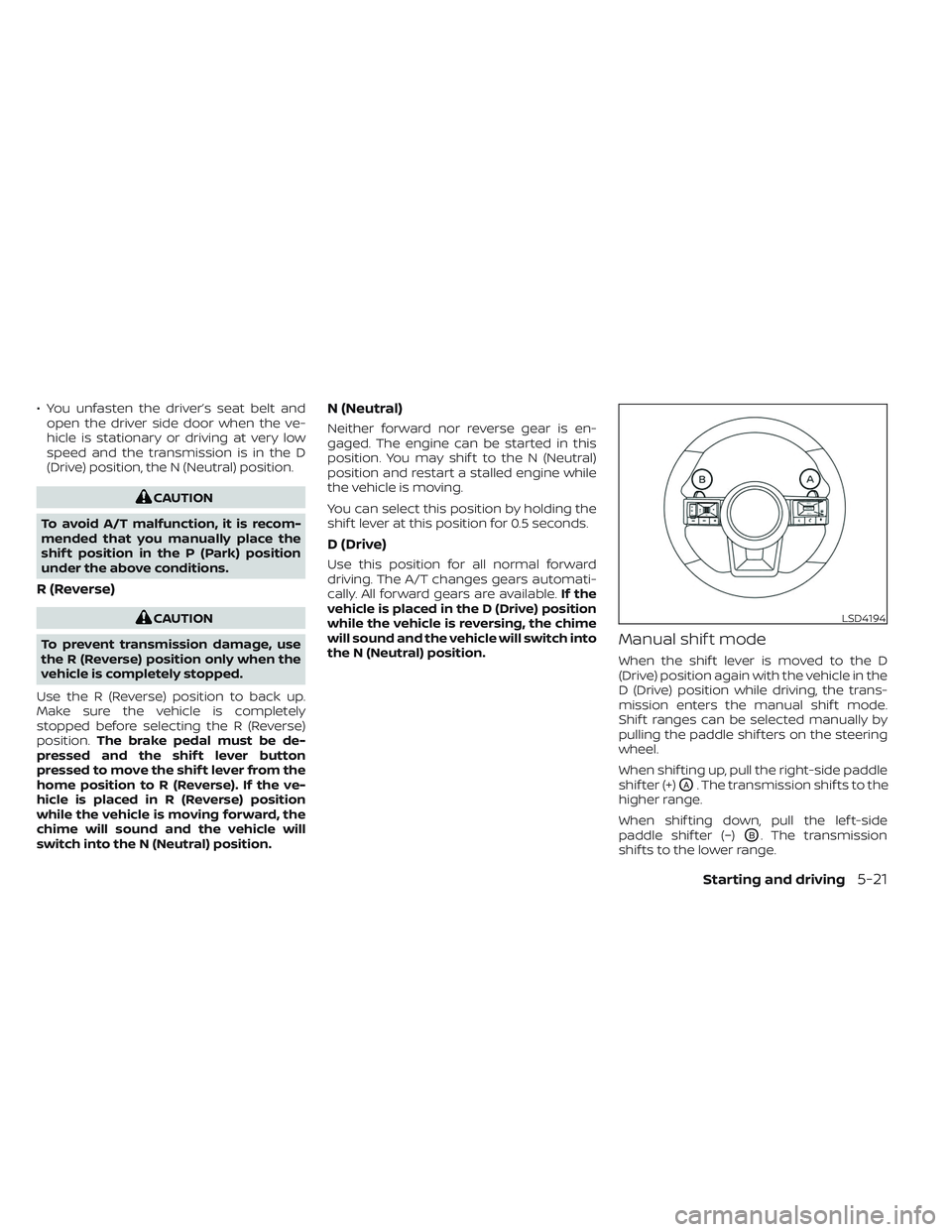
Manual shif t mode
When the shif t lever is moved to the D
(Drive) position again with the vehicle in the
D (Drive) position while driving, the trans-
mission enters the manual shif t mode.
Shif t ranges can be selected manually by
pulling the paddle shif ters on the steering
wheel.
When shif ting up, pull the right-side paddle
shif ter (+)
OA. The transmission shif ts to the
higher range.
When shif ting down, pull the lef t-side
paddle shif ter (−)
OB. The transmission
shif ts to the lower range.
LSD4194
Starting and driving5-21
Page 333 of 647
When canceling the manual shif t mode,
move the shif t lever to the D (Drive) position
again. The transmission returns to the nor-
mal driving mode.
When you pull the paddle shif ter while in
the D (Drive) position, the transmission will
shif t to the upper or lower range temporar-
ily. The transmission will automatically re-
turn to the D (Drive) position af ter a short
period of time. If you want to return to the D
(Drive) position manually, pull and hold the
paddle shif ter for about 1.5 seconds.
In the manual shif t mode, the shif t range is
displayed in the vehicle information
display.
Shif t ranges up or down one by one as
follows:
1M⇔2M⇔3M ⇔4M ⇔5M ⇔6M ⇔7M ⇔8M
⇔ 9M
9M (9th) and 8M (8th)
Use this position for all normal forward
driving at highway speeds.
7M (7th), 6M (6th) and 5M (5th)
Use these positions when driving up long
slopes, or for engine braking when driving
down long slopes.
4M (4th), 3M (3rd) and 2M (2nd)
Use these positions for hill climbing or en-
gine braking on downhill grades.
1M (1st)
Use this position when climbing steep hills
slowly or driving slowly through deep snow,
or for maximum engine braking on steep
downhill grades.
• Remember not to drive at high speeds for
extended periods of time in lower than
the 8th range. This reduces fuel economy.
• Pulling the same paddle shif ter twice will shif t the ranges in succession. However, if
this motion is rapidly done, the second
shif ting may not be completed properly.
• In the manual shif t mode, the trans-
mission may not shif t to the selected
gear. This helps maintain driving per-
formance and reduces the chance of
vehicle damage or loss of control.
• In the manual shif t mode, the trans-
mission may shif t up automatically to a
higher range than selected if the en-
gine speed is too high. When the ve-
hicle speed decreases, the transmis-
sion automatically shif ts down and
shif ts to 1st gear before the vehicle
comes to a stop.
Accelerator downshif t
— in D (Drive) position —
For passing or hill climbing, depress the
accelerator pedal to the floor. This shif ts
the transmission down into a lower gear,
depending on the vehicle speed.
High fluid temperature protection
mode
This transmission has a high fluid tem-
perature protection mode. If the fluid tem-
perature becomes too high (for example,
when climbing steep grades in high tem-
peratures with heavy loads, such as when
towing a trailer), engine power and, under
some conditions, vehicle speed will be de-
creased automatically to reduce the
chance of transmission damage. Vehicle
speed can be controlled with the accelera-
tor pedal, but the engine and vehicle speed
may be limited.
5-22Starting and driving
Page 334 of 647
Fail-safe
If the vehicle is driven under extreme
conditions, such as excessive wheel
spinning and subsequent hard braking,
the fail-safe system may be activated.
The Malfunction Indicator Light (MIL)
may come on to indicate the fail-safe
mode is activated. For additional infor-
mation, see “Malfunction Indicator Light
(MIL)” (P. 2-19). This will occur even if all
electrical circuits are functioning prop-
erly. In this case, place the ignition switch
in the OFF position and wait for 10 sec-
onds. Then push the switch back to the
ON position. The vehicle should return to
its normal operating condition. If it does
not return to its normal operating condi-
tion, have the transmission checked and
repaired, if necessary. It is recommended
that you visit a NISSAN dealer for this
service.
WARNING
When the high fluid temperature pro-
tection mode or fail-safe operation oc-
curs, vehicle speed may be gradually
reduced. The reduced speed may be
lower than other traffic, which could in-
crease the chance of a collision. Be es-
pecially careful when driving. If neces-
sary, pull to the side of the road at a safe
place and allow the transmission to re-
turn to normal operation, or have it re-
paired if necessary.WARNING
• Be sure the parking brake is fully re-
leased before driving. Failure to do so
can cause brake failure and lead to
an accident.
• Do not release the parking brake
from outside the vehicle.
• Do not use the shif t lever in place of
the parking brake. When parking, be
sure the parking brake is fully
engaged.
• To help avoid risk of injury or death
through unintended operation of the
vehicle and/or its systems, do not
leave children, people who require
the assistance of others or pets unat-
tended in your vehicle. Additionally,
the temperature inside a closed ve-
hicle on a warm day can quickly be-
come high enough to cause a signifi-
cant risk of injury or death to people
and pets.
PARKING BRAKE
Starting and driving5-23
Page 339 of 647
maintained, the automatic brake hold indi-
cator light (green) illuminates on the meter.
To start the vehicle from a
standstill
With the vehicle not in the P (Park) or the
shif t lever not in the N (Neutral) position,
depress the accelerator pedal while the
brake force is maintained. The brake force
will automatically be released to restart the
vehicle.
The automatic brake hold indicator light
(white) on the meter illuminates and the
automatic brake hold returns to standby.
Parking
When the park button is pushed to engage
the P (Park) position with the brake force
maintained by the automatic brake hold
function, the parking brake will automati-
cally be applied and the brake force of the
automatic brake hold will be released. The
automatic brake hold indicator light turns
off. When the parking brake is applied with
the brake force maintained by the auto-
matic brake hold function, the brake force
of the automatic brake hold will be re-
leased. The automatic brake hold indicator
light turns off.
NOTE:
• When the vehicle stops, but the brakeforce is not automatically applied, de-
press the brake pedal firmly until the
automatic brake hold indicator light
(green) illuminates.
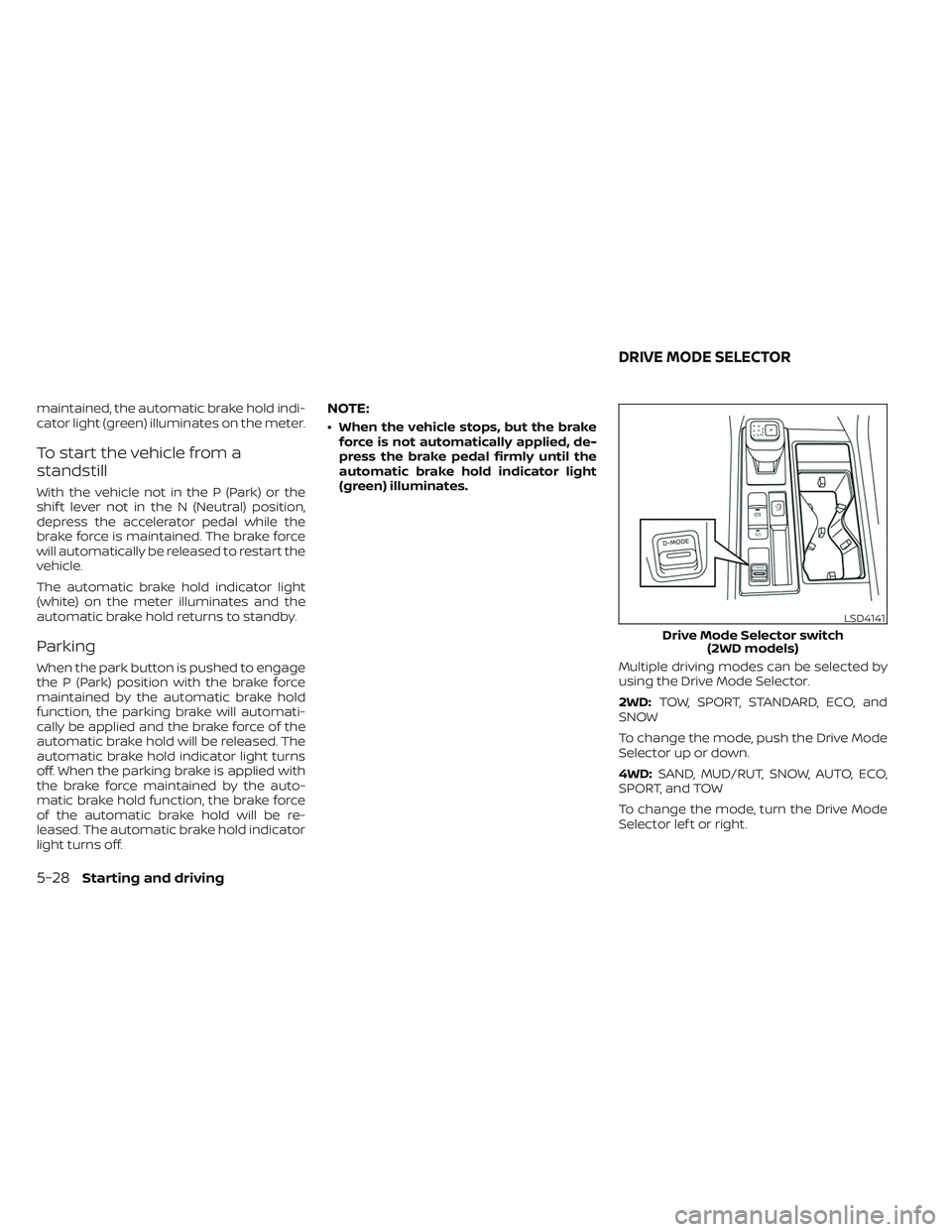
Multiple driving modes can be selected by
using the Drive Mode Selector.
2WD:TOW, SPORT, STANDARD, ECO, and
SNOW
To change the mode, push the Drive Mode
Selector up or down.
4WD: SAND, MUD/RUT, SNOW, AUTO, ECO,
SPORT, and TOW
To change the mode, turn the Drive Mode
Selector lef t or right.
LSD4141
Drive Mode Selector switch (2WD models)
DRIVE MODE SELECTOR
5-28Starting and driving
Page 340 of 647
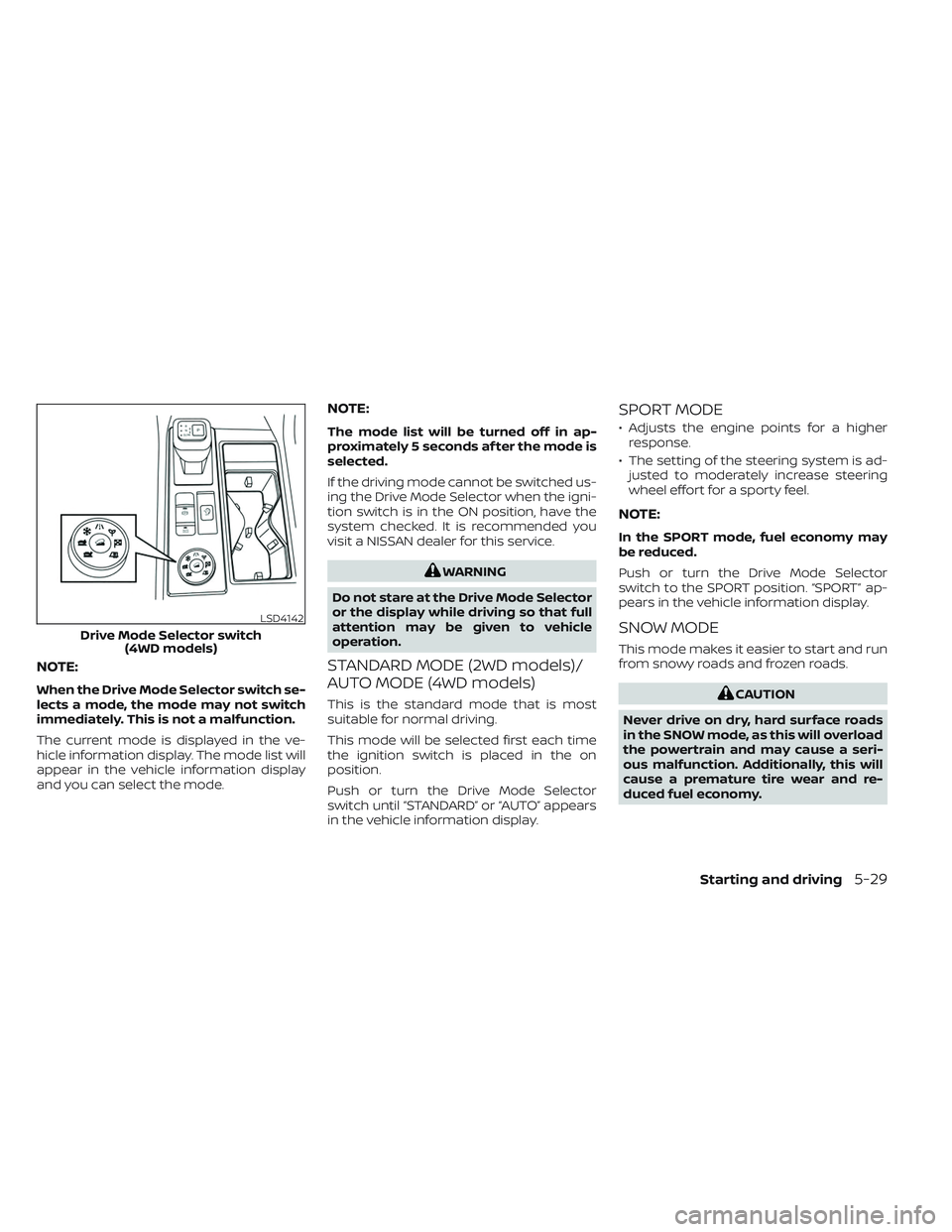
NOTE:
When the Drive Mode Selector switch se-
lects a mode, the mode may not switch
immediately. This is not a malfunction.
The current mode is displayed in the ve-
hicle information display. The mode list will
appear in the vehicle information display
and you can select the mode.
NOTE:
The mode list will be turned off in ap-
proximately 5 seconds af ter the mode is
selected.
If the driving mode cannot be switched us-
ing the Drive Mode Selector when the igni-
tion switch is in the ON position, have the
system checked. It is recommended you
visit a NISSAN dealer for this service.
WARNING
Do not stare at the Drive Mode Selector
or the display while driving so that full
attention may be given to vehicle
operation.
STANDARD MODE (2WD models)/
AUTO MODE (4WD models)
This is the standard mode that is most
suitable for normal driving.
This mode will be selected first each time
the ignition switch is placed in the on
position.
Push or turn the Drive Mode Selector
switch until “STANDARD” or “AUTO” appears
in the vehicle information display.
SPORT MODE
• Adjusts the engine points for a higher response.
• The setting of the steering system is ad- justed to moderately increase steering
wheel effort for a sporty feel.
NOTE:
In the SPORT mode, fuel economy may
be reduced.
Push or turn the Drive Mode Selector
switch to the SPORT position. “SPORT” ap-
pears in the vehicle information display.
SNOW MODE
This mode makes it easier to start and run
from snowy roads and frozen roads.
CAUTION
Never drive on dry, hard surface roads
in the SNOW mode, as this will overload
the powertrain and may cause a seri-
ous malfunction. Additionally, this will
cause a premature tire wear and re-
duced fuel economy.
LSD4142
Drive Mode Selector switch (4WD models)
Starting and driving5-29
Page 341 of 647
When the SNOW mode is selected, small
vibration in cornering may occur. This is not
a malfunction.
Push or turn the Drive Mode Selector
switch to the SNOW position. “SNOW ” ap-
pears in the vehicle information display.
TOW MODE
Using the tow mode is recommended
when pulling a heavy trailer or hauling a
heavy load.
The Idling Stop System is disabled when
the vehicle is in TOW mode.
Push or turn the Drive Mode Selector
switch to the TOW position. “TOW ” appears
in the vehicle information display.
MUD/RUT MODE (4WD models
only)
This mode allows for easier driving or start-
ing on a bumpy road surface such as an
uneven dirt road or a steep uphill slope or
through sand.
CAUTION
Never drive on dry, hard surface roads
in the MUD/RUT mode, as this will over-
load the powertrain and may cause a
serious malfunction. Additionally, this
will cause premature tire wear and re-
duced fuel economy.
NOTE:
When the MUD/RUT mode is selected,
small tight-corner braking phenomenon
or small vibration in cornering may oc-
cur. This is not a malfunction
Turn the Drive Mode Selector switch to the
MUD/RUT position. “MUD/RUT” appears in
the vehicle information display.
SAND MODE (4WD models only)
This mode allows for easier driving or start-
ing on a bumpy road surface such as an
uneven dirt road or a steep uphill slope or
through sand.
CAUTION
Never drive on dry, hard surface roads
in the SAND mode, as this will overload
the powertrain and may cause a seri-
ous malfunction. Additionally, this will
cause premature tire wear and reduced
fuel economy.
NOTE:
When the SAND mode is selected, small
tight-corner braking phenomenon or
small vibration in cornering may occur.
This is not a malfunction
Turn the Drive Mode Selector switch to the
SAND position. “SAND” appears in the ve-
hicle information display.
ECO MODE
Assists the driver’s ECO-driving. The engine
points are adjusted for improved fuel
economy, providing such driving features
as smooth starting or constant cruising.
NOTE:
Selecting this ECO mode will not necessar-
ily improve fuel economy as many driving
factors influence its effectiveness.
5-30Starting and driving
Page 342 of 647
Operation
Select the ECO mode using the Drive Mode
Selector. The ECO indicator illuminates.
When the accelerator pedal is depressed
within the range of economy drive, the ECO
drive indicator illuminates in green. When
the accelerator pedal is depressed above
the range of economy drive, the ECO drive
indicator turns off.
The ECO drive indicator will not illuminate
in the following cases:
• When the shif t lever is in the R (Reverse)position.
• When the vehicle speed is below 2 mph (3.2 km/h) or over 90 mph (144 km/h).
• When the Cruise Control (if so equipped) or Intelligent Cruise Control (ICC) system
(if so equipped) is operated.
ECO Customize
The “ECO Customize” is a function that can
change the priority from the Cruise Control
(if so equipped) or Intelligent Cruise Control
(ICC) (if so equipped) to fuel efficiency im-
provements. It can be set when the ECO
mode is selected. To activate or deactivate
this function, see “ECO Mode Setting”
(P. 2-28) or (P. 2-52).
• Cruise Control
When the setting is ON, the fuel efficiency
while cruising will be improved by lower-
ing acceleration target from normal
(setting OFF) mode.
NOTE:
When the vehicle speed is reduced (for
example, when the vehicle is driven on
an uphill road from a flat road), it will take
more time to return to the previously set
speed than normal mode.
Tire Pres ECO advice
The “Tire Pres ECO advice” is a function to
show ECO advice information in the vehicle
information display when low tire pressure
is detected. To activate or deactivate this
function, see “ECO Mode Setting” (P. 2-28) or
(P. 2-52).
When the setting is on, the ECO Drive Re-
port display shows “See Tire Pressures”. You
can switch the display to the Tire Pressures
display by selecting it in the vehicle infor-
mation display.
Starting and driving5-31