tow NISSAN PATHFINDER 2022 Owner´s Manual
[x] Cancel search | Manufacturer: NISSAN, Model Year: 2022, Model line: PATHFINDER, Model: NISSAN PATHFINDER 2022Pages: 647, PDF Size: 8.48 MB
Page 453 of 647
•The AEB with Pedestrian Detection
system does not detect the following
objects:
– Pedestrians that are small (for ex- ample, children), in a sitting posi-
tion, operating toys/skateboards,
on scooters or in wheelchairs, or
not in an upright standing or
walking position.
– Animals of any size.
– Obstacles (for example, cargo or debris) on the roadway or
roadside.
– Oncoming or crossing vehicles.
– Vehicles where the tires are diffi- cult to see or the shape of the rear
of the vehicle is unclear or
obstructed.
– Parked vehicles.
• The AEB with Pedestrian Detection
system has some performance limi-
tations.
– If a stationary vehicle is in the ve-
hicle’s path, the system will not
function when the vehicle ap-
proaches the stationary vehicle at
speeds over approximately 50
mph (80 km/h). –
Pedestrian detection will not
function when the vehicle is
driven at speeds over approxi-
mately 37 mph (60 km/h) or below
approximately 6 mph (10km/h).
• For pedestrians, the AEB with Pedes-
trian Detection system will not issue
the first warning.
• The AEB with Pedestrian Detection
system may not function properly or
detect a vehicle or pedestrians
ahead in the following conditions:
– In poor visibility conditions (such
as rain, snow, fog, dust storms,
sand storms, smoke, and road
spray from other vehicles).
– If dirt, ice, snow, fog or other ma-
terial is covering the radar sensor
area or camera area of
windshield.
– If a strong light (for example, sun-
light or high beams) enters the
front camera or a sudden change
in brightness occurs (for example,
entering a tunnel or driving in
lightning). –
In dark or dimly lit conditions,
such as at night or in tunnels, in-
cluding cases where your vehi-
cle’s headlights are off or dim, or
the tail lights of the vehicle ahead
are off.
– When the direction of the camera
is misaligned.
– When driving on a steep downhill
slope, on roads with sharp curves,
and/or bumpy or dirt roads.
– If there is interference by other ra-
dar sources.
– When your vehicle’s position or
movement is changed quickly or
significantly (for example, lane
change, turning vehicle, abrupt
steering, sudden acceleration or
deceleration).
– When your vehicle or the vehicle
or pedestrian ahead moves
quickly or significantly such that
the system cannot detect and re-
act in time (for example, pedes-
trian moving quickly toward the
vehicle at close range, vehicle cut-
ting in, changing lanes, making a
turn, steering abruptly, sudden
acceleration or deceleration).
5-142Starting and driving
Page 454 of 647
–When the vehicle or pedestrian is
offset from the vehicle’s forward
path.
– If the speed difference between
the two vehicles is small.
– The pedestrian’s profile is par-
tially obscured or unidentifiable;
for example, due to transporting
luggage, pushing a stroller, wear-
ing bulky or very loose-fitting
clothing or accessories, or being
in a unique posture (such as rais-
ing hands).
– There is poor contrast of a person
to the background, such as having
clothing color or pattern which is
similar to the background.
– For approximately 15 seconds af-
ter starting the engine.
– If the vehicle ahead has a unique
or unusual shape, extremely low
or high clearance heights, or un-
usual cargo loading or is narrow
(for example, a motorcycle).
– When the vehicle or pedestrian is
located near a traffic sign, a reflec-
tive area (for example, water on
road), or is in a shadow.
– When multiple pedestrians are
grouped together. –
When the view of the pedestrian is
obscured by a vehicle or other
object.
– While towing a trailer or other
vehicle.
• The system performance may de-
graded in the following conditions:
– The vehicle is driven on a slippery
road.
– The vehicle is driven on a slope.
– Excessively heavy baggage is
loaded in the rear seat or the
cargo area of your vehicle.
• The system is designed to automati-
cally check the sensor’s (radar and
camera) functionality, within certain
limitations. The system may not de-
tect some forms of obstruction of the
sensor area such as ice, snow or
stickers, for example. In these cases,
the system may not be able to warn
the driver properly. Be sure that you
check, clean and clear sensor areas
regularly.
• In some road and traffic conditions,
the AEB with Pedestrian Detection
system may unexpectedly apply par-
tial braking. When acceleration is
necessary, depress the accelerator
pedal to override the system. •
The AEB with Pedestrian Detection
system may operate when a pattern,
object, shadow or lights are detected
that are similar to the outline of ve-
hicles or pedestrians, or if they are
the same size and position as a ve-
hicle or motorcycle’s tail lights.
• The system may keep operating
when the vehicle ahead is turning
right or lef t.
• The system may operate when your
vehicle is approaching and passing a
vehicle ahead.
• Depending on the road shape
(curved road, entrance and exit of the
curve, winding road, lane regulation,
under construction, etc.), the system
may operate temporarily for the on-
coming vehicle in front of your
vehicle.
Starting and driving5-143
Page 467 of 647
WARNING
Listed below are the system limitations
for the I-FCW system. Failure to operate
the vehicle in accordance with these
system limitations could result in seri-
ous injury or death.
• The I-FCW system cannot detect all
vehicles under all conditions. •
The radar sensor does not detect the
following objects:
– Pedestrians, animals or obstacles
in the roadway
– Oncoming vehicles
– Crossing vehicles
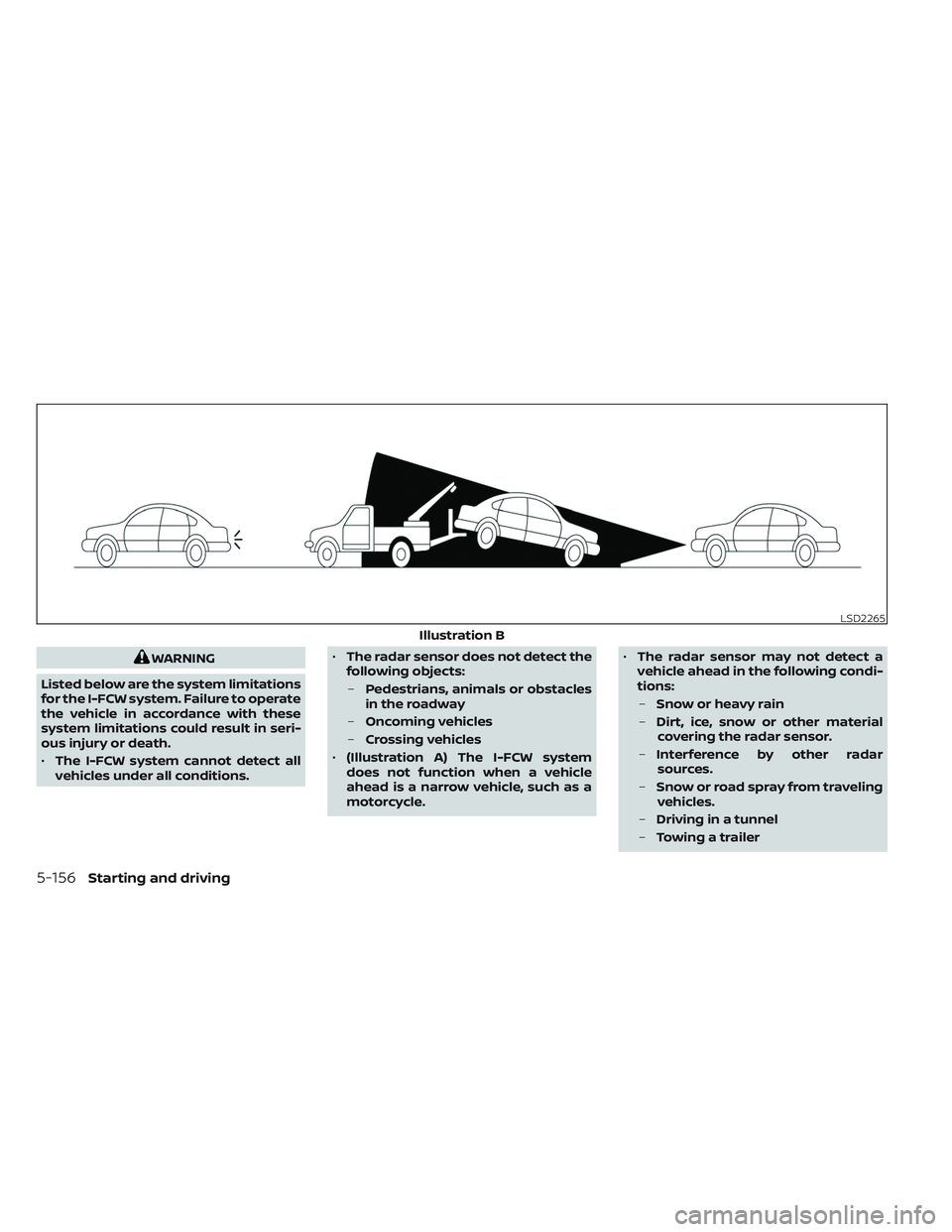
• (Illustration A) The I-FCW system
does not function when a vehicle
ahead is a narrow vehicle, such as a
motorcycle. •
The radar sensor may not detect a
vehicle ahead in the following condi-
tions:
– Snow or heavy rain
– Dirt, ice, snow or other material
covering the radar sensor.
– Interference by other radar
sources.
– Snow or road spray from traveling
vehicles.
– Driving in a tunnel
– Towing a trailer
LSD2265
Illustration B
5-156Starting and driving
Page 468 of 647
•(Illustration B) When the vehicle
ahead is being towed.
• (Illustration C) When the distance to
the vehicle ahead is too close, the
beam of the radar sensor is
obstructed.
• (Illustration D) When driving on a
steep downhill slope or roads with
sharp curves.
• The system is designed to automati-
cally check the sensor’s functionality,
within certain limitations. The sys-
tem may not detect some forms of
obstruction of the sensor area such
as ice, snow, stickers, etc. In these
cases, the system may not be able to
warn the driver properly. Be sure that
you check, clean and clear the sensor
area regularly.
• Excessive noise will interfere with the
warning chime sound, and the chime
may not be heard.
Starting and driving5-157
Page 480 of 647
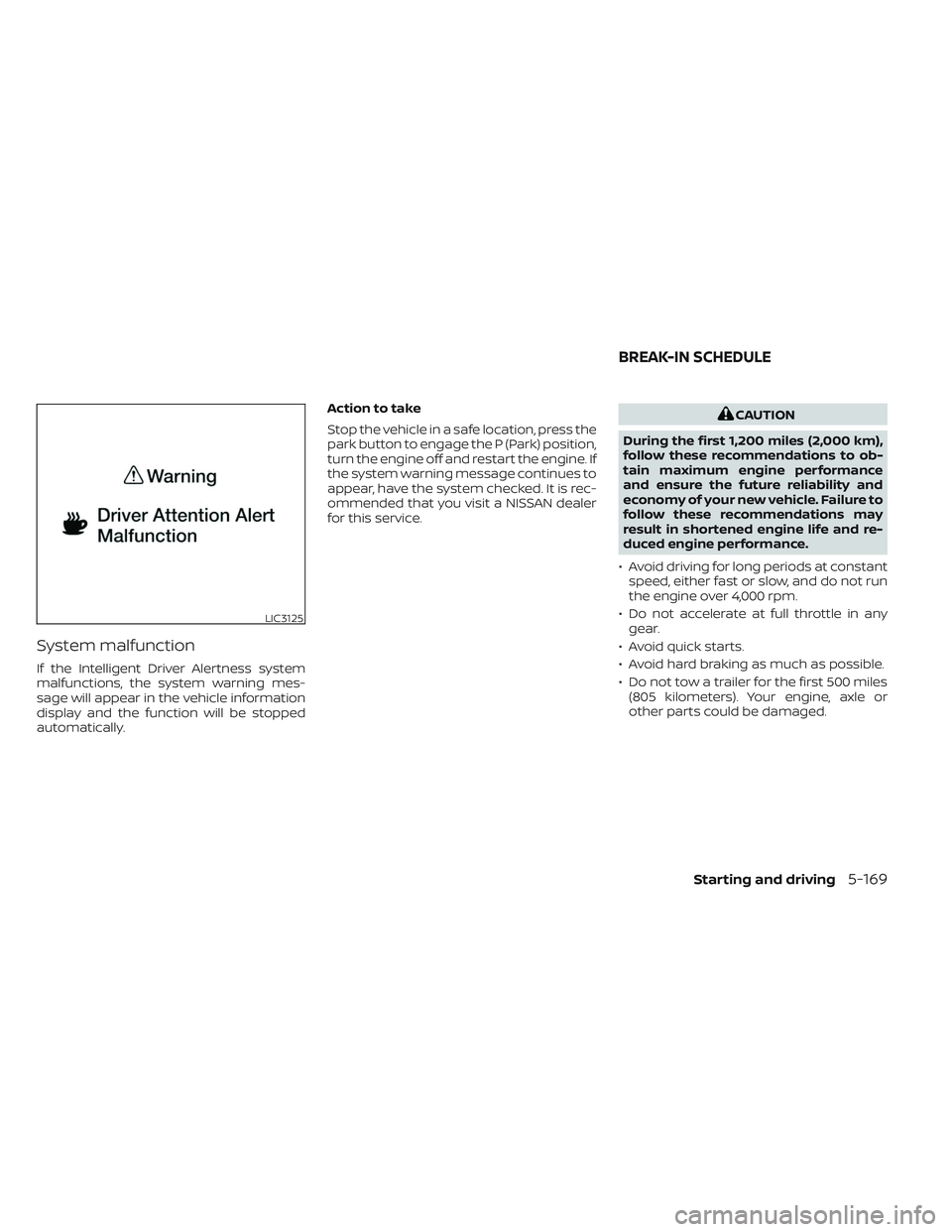
System malfunction
If the Intelligent Driver Alertness system
malfunctions, the system warning mes-
sage will appear in the vehicle information
display and the function will be stopped
automatically.Action to take
Stop the vehicle in a safe location, press the
park button to engage the P (Park) position,
turn the engine off and restart the engine. If
the system warning message continues to
appear, have the system checked. It is rec-
ommended that you visit a NISSAN dealer
for this service.
CAUTION
During the first 1,200 miles (2,000 km),
follow these recommendations to ob-
tain maximum engine performance
and ensure the future reliability and
economy of your new vehicle. Failure to
follow these recommendations may
result in shortened engine life and re-
duced engine performance.
• Avoid driving for long periods at constant speed, either fast or slow, and do not run
the engine over 4,000 rpm.
• Do not accelerate at full throttle in any gear.
• Avoid quick starts.
• Avoid hard braking as much as possible.
• Do not tow a trailer for the first 500 miles (805 kilometers). Your engine, axle or
other parts could be damaged.
LIC3125
BREAK-IN SCHEDULE
Starting and driving5-169
Page 485 of 647
1. Firmly apply the parking brake.
2. Press the park button to shif t to the P(Park) position.
3. To help prevent the vehicle from rolling into traffic when parked on an incline, it
is a good practice to turn the wheels as
illustrated.
• HEADED DOWNHILL WITH CURB
OA:
Turn the wheels into the curb and
move the vehicle forward until the
curb side wheel gently touches the
curb.
• HEADED UPHILL WITH CURB
OB:
Turn the wheels away from the curb
and move the vehicle back until the
curb side wheel gently touches the
curb.
• HEADED UPHILL OR DOWNHILL, NO
CURB
OC:
Turn the wheels toward the side of the
road so the vehicle will move away
from the center of the road if it moves.
4. Place the ignition switch in the LOCK position.
WARNING
• If the engine is not running or is
turned off while driving, the power
assist for the steering will not work.
Steering will be harder to operate.
• When the electric power steering
warning light illuminates with the
engine running, there will be no
power assist for the steering. You will
still have control of the vehicle, but
the steering will be harder to operate.
Have the power steering system
checked. It is recommended that you
visit a NISSAN dealer for this service.
The power steering system is designed to
provide power assist while driving to oper-
ate the steering wheel with light force.
When the steering wheel is operated re-
peatedly or continuously while parking or
driving at a very low speed, the power as-
sist for the steering wheel will be reduced.
This is to prevent overheating of the power
steering system and protect it from getting
damaged. While the power assist is re-
duced, steering wheel operation will be-
come heavy. When the temperature of the
power steering system goes down, the
power assist level will return to normal. Avoid repeating such steering wheel op-
erations that could cause the power steer-
ing system to overheat.
You may hear a sound when the steering
wheel is operated quickly. However, this is
not a malfunction.
If the electric power steering warning light
illuminates while the engine is running, it
may indicate the power steering system is
not functioning properly and may need
servicing. Have the power steering system
checked. It is recommended that you visit a
NISSAN dealer for this service.
When the electric power steering warning
light illuminates with the engine running,
there will be no power assist for the steer-
ing, but you will still have control of the
vehicle. At this time, greater steering effort
is required to operate the steering wheel,
especially in sharp turns and at low speeds.
For additional information, see “Electric
Power steering warning light” (P. 2-16).
POWER STEERING
5-174Starting and driving
Page 500 of 647
• If the sonar sensors are dirty, wipe themoff with a sof t cloth while being careful to
not damage them.
• The sonar sensors may be blocked by temporary ambient conditions such as
splashing water, mist or fog. The blocked
condition may also be caused by objects
such as ice, frost or dirt obstructing the
sonar sensors. Check for and remove ob-
jects obstructing the area around the so-
nar sensors.
• Do not subject the area around the sonar sensors to strong impact. Also, do not
remove or disassemble the sonar sen-
sors. If the sonar sensors and peripheral
areas are deformed in an accident, etc.,
have the sonar sensors checked by a
NISSAN dealer.
• Do not attach stickers (including trans- parent material), install accessories or
apply additional paint on the sonar sen-
sors and their surrounding areas. This
may cause a malfunction or improper
operation.
• When washing the vehicle using a high- pressure washer, do not apply direct
washer pressure on the sonar sensors.
This may cause a malfunction of the so-
nar sensors. The Idling Stop System activates to prevent
unnecessary fuel consumption, exhaust
emissions and noise.
• When you stop the vehicle, the engine is
turned off automatically.
• When you release the brake pedal to be- gin moving again, the engine is turned on
automatically.
WARNING
The engine restarts if the vehicle
moves at approximately 1 mph (2
km/h) or more (on a downhill grade,
etc.) while the engine is turned off by
the Idling Stop System. Depress the
brake pedal immediately to stop the
vehicle to prevent an accident.
CAUTION
At the end of the journey the engine
must be stopped and ignition switch be
pushed off. Lock the vehicle as normal.
Pushing the ignition switch off will shut
down all electrical systems. Failure to
do this may result in a discharged
battery.
NOTE:
The Idling Stop System will not activate
under the following conditions:
• When the vehicle is in TOW mode.
• When the engine is kept idling without
the vehicle being driven af ter the en-
gine is turned on.
• When the engine coolant temperature
is low.
• When the battery capacity is low.
• When the battery temperature is low or
extremely high
• When the vehicle is moving.
• When a negative pressure booster
decreases.
• When the engine hood is opened with
the engine running.
• When the engine is turned on with the
engine hood open.
• When the driver’s seat belt is not
fastened.
• When the driver’s door is open.
• When the steering wheel is operated.
• When the Idling Stop System indicator
blinks at a low speed.
IDLING STOP SYSTEM
Starting and driving5-189
Page 505 of 647
• When the Idling Stop System is deacti-vated af ter the engine has been auto-
matically stopped by the Idling Stop Sys-
tem, the engine will immediately restart if
suitable conditions are present. The en-
gine will then be prevented from auto-
matically stopping during the same
journey.
NOTE:
• The Idling Stop System ON or OFF mes- sage is displayed for a few seconds in
the vehicle information display when
the Idling Stop System OFF switch is
pushed. For additional information,
see “Idling Stop System ON or OFF”
(P. 5-191).
• The Idling Stop System resets to ON every time the ignition switch is
switched from the OFF position to the
ON position.
• It is best to disable the ISS system when towing a trailer. You can do this
by either pushing the Idling Stop OFF
switch, or by selecting TOW mode with
the Drive Mode Selector.
FREEING A FROZEN DOOR LOCK
To prevent a door lock from freezing, apply
de-icer through the key hole. If the lock
becomes frozen, heat the key before in-
serting it into the key hole, or use the
NISSAN Intelligent Key®.
ANTIFREEZE
In the winter when it is anticipated that the
temperature will drop below 32°F (0°C),
check the antifreeze to assure proper win-
ter protection. For additional information,
see “Engine cooling system” (P. 8-5).
BATTERY
If the battery is not fully charged during
extremely cold weather conditions, the
battery fluid may freeze and damage the
battery. To maintain maximum efficiency,
the battery should be checked regularly.
For additional information, see “Battery”
(P. 8-14).
DRAINING OF COOLANT WATER
If the vehicle is to be lef t outside without
antifreeze, drain the cooling system, includ-
ing the engine block. Refill before operating
the vehicle. For additional information, see
“Changing engine coolant” (P. 8-6).
TIRE EQUIPMENT
1. SUMMER tires have a tread designed to provide superior performance on dry
pavement. However, the performance of
these tires will be substantially reduced
in snowy and icy conditions. If you oper-
ate your vehicle on snowy or icy roads,
NISSAN recommends the use of MUD &
SNOW or ALL SEASON TIRES on all four
wheels. It is recommended that you visit
a NISSAN dealer for the tire type, size,
speed rating and availability information.
2. For additional traction on icy roads, studded tires may be used. However,
some U.S. states and Canadian prov-
inces prohibit their use. Check local,
state and provincial laws before install-
ing studded tires.
Skid and traction capabilities of studded
snow tires on wet or dry surfaces may be
poorer than that of non-studded snow
tires.
3. Tire chains may be used. For additional information, see “Tire chains” (P. 8-37).
COLD WEATHER DRIVING
5-194Starting and driving
Page 508 of 647
6 In case of emergency
Hazard warning flasher switch..................6-2
Emergency engine shut off ......................6-2
Flat tire ..........................................6-3
Tire Pressure Monitoring System
(TPMS) .......................................6-3
Changing a flat tire ...........................6-4
Jump starting ................................... 6-11Push starting
................................... 6-13
If your vehicle overheats ........................6-13
Towing your vehicle ............................ 6-14
Towing recommended by NISSAN ...........6-15
Vehicle recovery (freeing a stuck
vehicle) ...................................... 6-17
Page 513 of 647
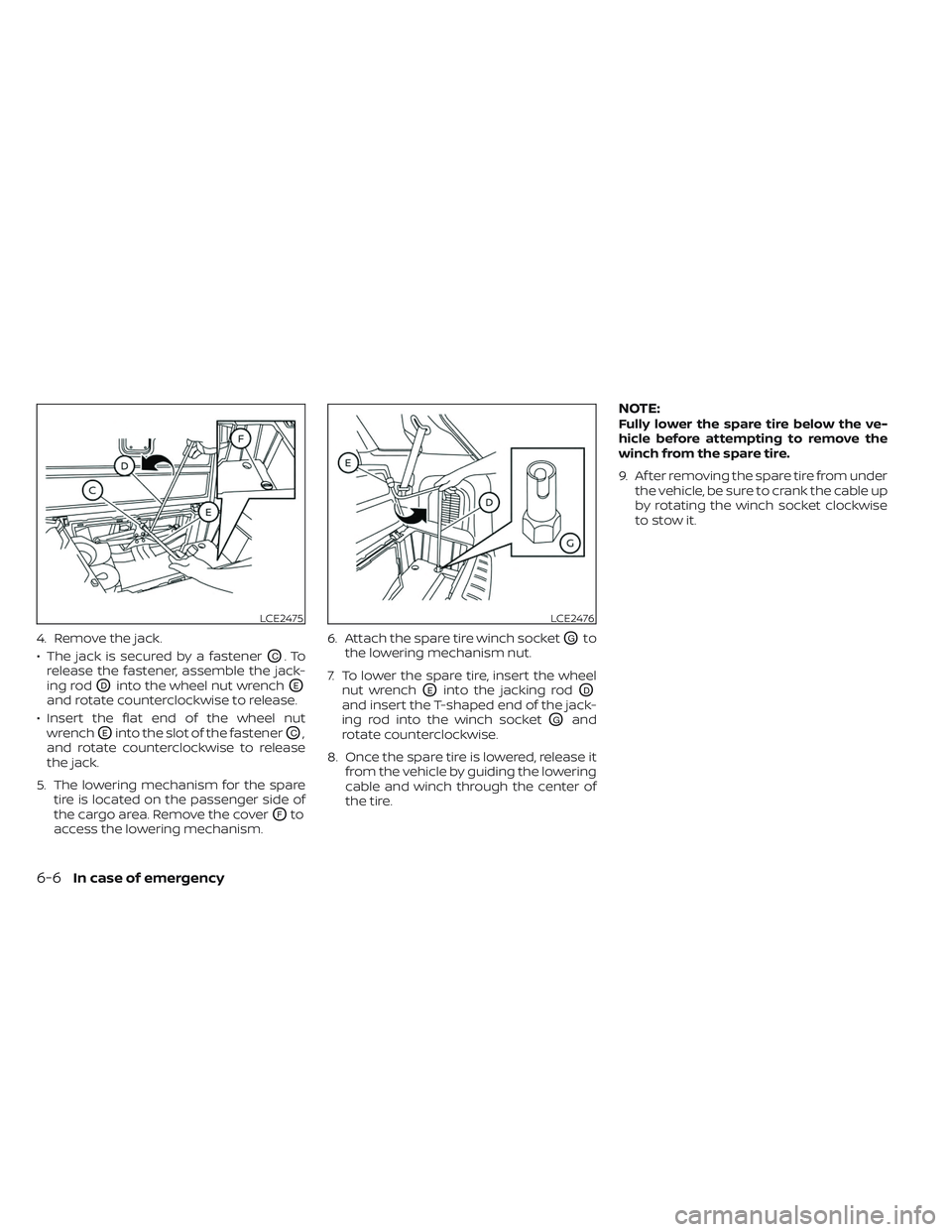
4. Remove the jack.
• The jack is secured by a fastener
OC.To
release the fastener, assemble the jack-
ing rod
ODinto the wheel nut wrenchOE
and rotate counterclockwise to release.
• Insert the flat end of the wheel nut wrench
OEinto the slot of the fastenerOC,
and rotate counterclockwise to release
the jack.
5. The lowering mechanism for the spare tire is located on the passenger side of
the cargo area. Remove the cover
OFto
access the lowering mechanism. 6. Attach the spare tire winch socket
OGto
the lowering mechanism nut.
7. To lower the spare tire, insert the wheel nut wrench
OEinto the jacking rodOD
and insert the T-shaped end of the jack-
ing rod into the winch socket
OGand
rotate counterclockwise.
8. Once the spare tire is lowered, release it from the vehicle by guiding the lowering
cable and winch through the center of
the tire.
NOTE:Fully lower the spare tire below the ve-
hicle before attempting to remove the
winch from the spare tire.
9. Af ter removing the spare tire from underthe vehicle, be sure to crank the cable up
by rotating the winch socket clockwise
to stow it.
LCE2475LCE2476
6-6In case of emergency