Camera NISSAN PATHFINDER 2022 Owner´s Manual
[x] Cancel search | Manufacturer: NISSAN, Model Year: 2022, Model line: PATHFINDER, Model: NISSAN PATHFINDER 2022Pages: 647, PDF Size: 8.48 MB
Page 453 of 647
•The AEB with Pedestrian Detection
system does not detect the following
objects:
– Pedestrians that are small (for ex- ample, children), in a sitting posi-
tion, operating toys/skateboards,
on scooters or in wheelchairs, or
not in an upright standing or
walking position.
– Animals of any size.
– Obstacles (for example, cargo or debris) on the roadway or
roadside.
– Oncoming or crossing vehicles.
– Vehicles where the tires are diffi- cult to see or the shape of the rear
of the vehicle is unclear or
obstructed.
– Parked vehicles.
• The AEB with Pedestrian Detection
system has some performance limi-
tations.
– If a stationary vehicle is in the ve-
hicle’s path, the system will not
function when the vehicle ap-
proaches the stationary vehicle at
speeds over approximately 50
mph (80 km/h). –
Pedestrian detection will not
function when the vehicle is
driven at speeds over approxi-
mately 37 mph (60 km/h) or below
approximately 6 mph (10km/h).
• For pedestrians, the AEB with Pedes-
trian Detection system will not issue
the first warning.
• The AEB with Pedestrian Detection
system may not function properly or
detect a vehicle or pedestrians
ahead in the following conditions:
– In poor visibility conditions (such
as rain, snow, fog, dust storms,
sand storms, smoke, and road
spray from other vehicles).
– If dirt, ice, snow, fog or other ma-
terial is covering the radar sensor
area or camera area of
windshield.
– If a strong light (for example, sun-
light or high beams) enters the
front camera or a sudden change
in brightness occurs (for example,
entering a tunnel or driving in
lightning). –
In dark or dimly lit conditions,
such as at night or in tunnels, in-
cluding cases where your vehi-
cle’s headlights are off or dim, or
the tail lights of the vehicle ahead
are off.
– When the direction of the camera
is misaligned.
– When driving on a steep downhill
slope, on roads with sharp curves,
and/or bumpy or dirt roads.
– If there is interference by other ra-
dar sources.
– When your vehicle’s position or
movement is changed quickly or
significantly (for example, lane
change, turning vehicle, abrupt
steering, sudden acceleration or
deceleration).
– When your vehicle or the vehicle
or pedestrian ahead moves
quickly or significantly such that
the system cannot detect and re-
act in time (for example, pedes-
trian moving quickly toward the
vehicle at close range, vehicle cut-
ting in, changing lanes, making a
turn, steering abruptly, sudden
acceleration or deceleration).
5-142Starting and driving
Page 454 of 647
–When the vehicle or pedestrian is
offset from the vehicle’s forward
path.
– If the speed difference between
the two vehicles is small.
– The pedestrian’s profile is par-
tially obscured or unidentifiable;
for example, due to transporting
luggage, pushing a stroller, wear-
ing bulky or very loose-fitting
clothing or accessories, or being
in a unique posture (such as rais-
ing hands).
– There is poor contrast of a person
to the background, such as having
clothing color or pattern which is
similar to the background.
– For approximately 15 seconds af-
ter starting the engine.
– If the vehicle ahead has a unique
or unusual shape, extremely low
or high clearance heights, or un-
usual cargo loading or is narrow
(for example, a motorcycle).
– When the vehicle or pedestrian is
located near a traffic sign, a reflec-
tive area (for example, water on
road), or is in a shadow.
– When multiple pedestrians are
grouped together. –
When the view of the pedestrian is
obscured by a vehicle or other
object.
– While towing a trailer or other
vehicle.
• The system performance may de-
graded in the following conditions:
– The vehicle is driven on a slippery
road.
– The vehicle is driven on a slope.
– Excessively heavy baggage is
loaded in the rear seat or the
cargo area of your vehicle.
• The system is designed to automati-
cally check the sensor’s (radar and
camera) functionality, within certain
limitations. The system may not de-
tect some forms of obstruction of the
sensor area such as ice, snow or
stickers, for example. In these cases,
the system may not be able to warn
the driver properly. Be sure that you
check, clean and clear sensor areas
regularly.
• In some road and traffic conditions,
the AEB with Pedestrian Detection
system may unexpectedly apply par-
tial braking. When acceleration is
necessary, depress the accelerator
pedal to override the system. •
The AEB with Pedestrian Detection
system may operate when a pattern,
object, shadow or lights are detected
that are similar to the outline of ve-
hicles or pedestrians, or if they are
the same size and position as a ve-
hicle or motorcycle’s tail lights.
• The system may keep operating
when the vehicle ahead is turning
right or lef t.
• The system may operate when your
vehicle is approaching and passing a
vehicle ahead.
• Depending on the road shape
(curved road, entrance and exit of the
curve, winding road, lane regulation,
under construction, etc.), the system
may operate temporarily for the on-
coming vehicle in front of your
vehicle.
Starting and driving5-143
Page 456 of 647

SYSTEM TEMPORARILY
UNAVAILABLE
Condition A:
In the following conditions, the AEB with
Pedestrian Detection system warning light
blinks and the system will be turned off
automatically:
• The radar sensor picks up interferencefrom another radar source.
• The camera area of the windshield is misted or frozen.
• Strong light is shining from the front.
• The cabin temperature is over approxi- mately 104°F (40°C) in direct sunlight.
• The camera area of the windshield glass is continuously covered with dirt, etc.
Action to take
When the above conditions no longer exist,
the AEB with Pedestrian Detection system
will resume automatically.
NOTE:
When the inside of the windshield on the
camera area is misted or frozen, it will
take a period of time to remove it af ter
the A/C turns on. If dirt appears on this
area, it is recommended that you visit a
NISSAN dealer.
LSD4183
For vehicles with the 7 inch (18 cm) display
Starting and driving5-145
Page 459 of 647
SYSTEM MAINTENANCE
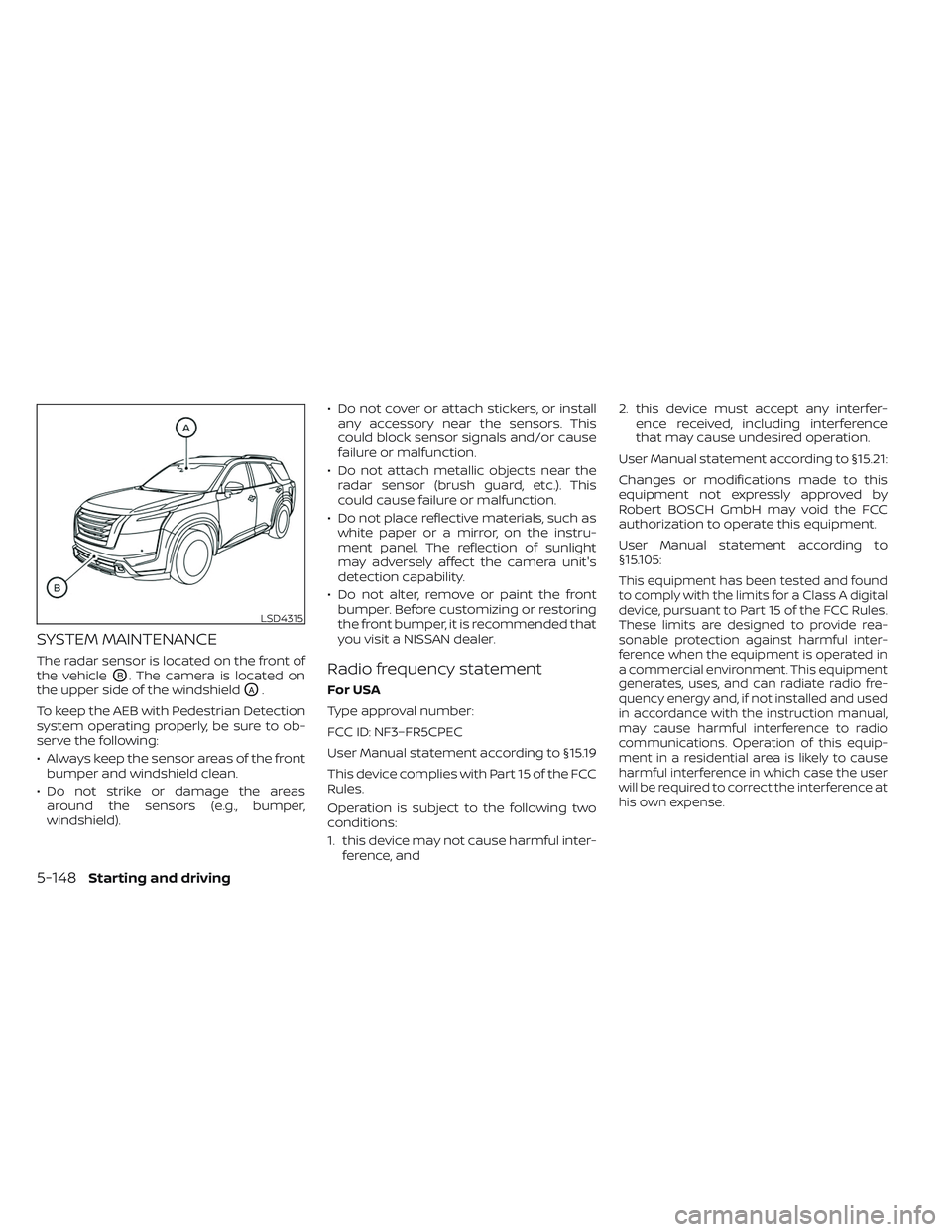
The radar sensor is located on the front of
the vehicle
OB. The camera is located on
the upper side of the windshield
OA.
To keep the AEB with Pedestrian Detection
system operating properly, be sure to ob-
serve the following:
• Always keep the sensor areas of the front bumper and windshield clean.
• Do not strike or damage the areas around the sensors (e.g., bumper,
windshield). • Do not cover or attach stickers, or install
any accessory near the sensors. This
could block sensor signals and/or cause
failure or malfunction.
• Do not attach metallic objects near the radar sensor (brush guard, etc.). This
could cause failure or malfunction.
• Do not place reflective materials, such as white paper or a mirror, on the instru-
ment panel. The reflection of sunlight
may adversely affect the camera unit's
detection capability.
• Do not alter, remove or paint the front bumper. Before customizing or restoring
the front bumper, it is recommended that
you visit a NISSAN dealer.
Radio frequency statement
For USA
Type approval number:
FCC ID: NF3–FR5CPEC
User Manual statement according to §15.19
This device complies with Part 15 of the FCC
Rules.
Operation is subject to the following two
conditions:
1. this device may not cause harmful inter- ference, and 2. this device must accept any interfer-
ence received, including interference
that may cause undesired operation.
User Manual statement according to §15.21:
Changes or modifications made to this
equipment not expressly approved by
Robert BOSCH GmbH may void the FCC
authorization to operate this equipment.
User Manual statement according to
§15.105:
This equipment has been tested and found
to comply with the limits for a Class A digital
device, pursuant to Part 15 of the FCC Rules.
These limits are designed to provide rea-
sonable protection against harmful inter-
ference when the equipment is operated in
a commercial environment. This equipment
generates, uses, and can radiate radio fre-
quency energy and, if not installed and used
in accordance with the instruction manual,
may cause harmful interference to radio
communications. Operation of this equip-
ment in a residential area is likely to cause
harmful interference in which case the user
will be required to correct the interference at
his own expense.
LSD4315
5-148Starting and driving
Page 496 of 647
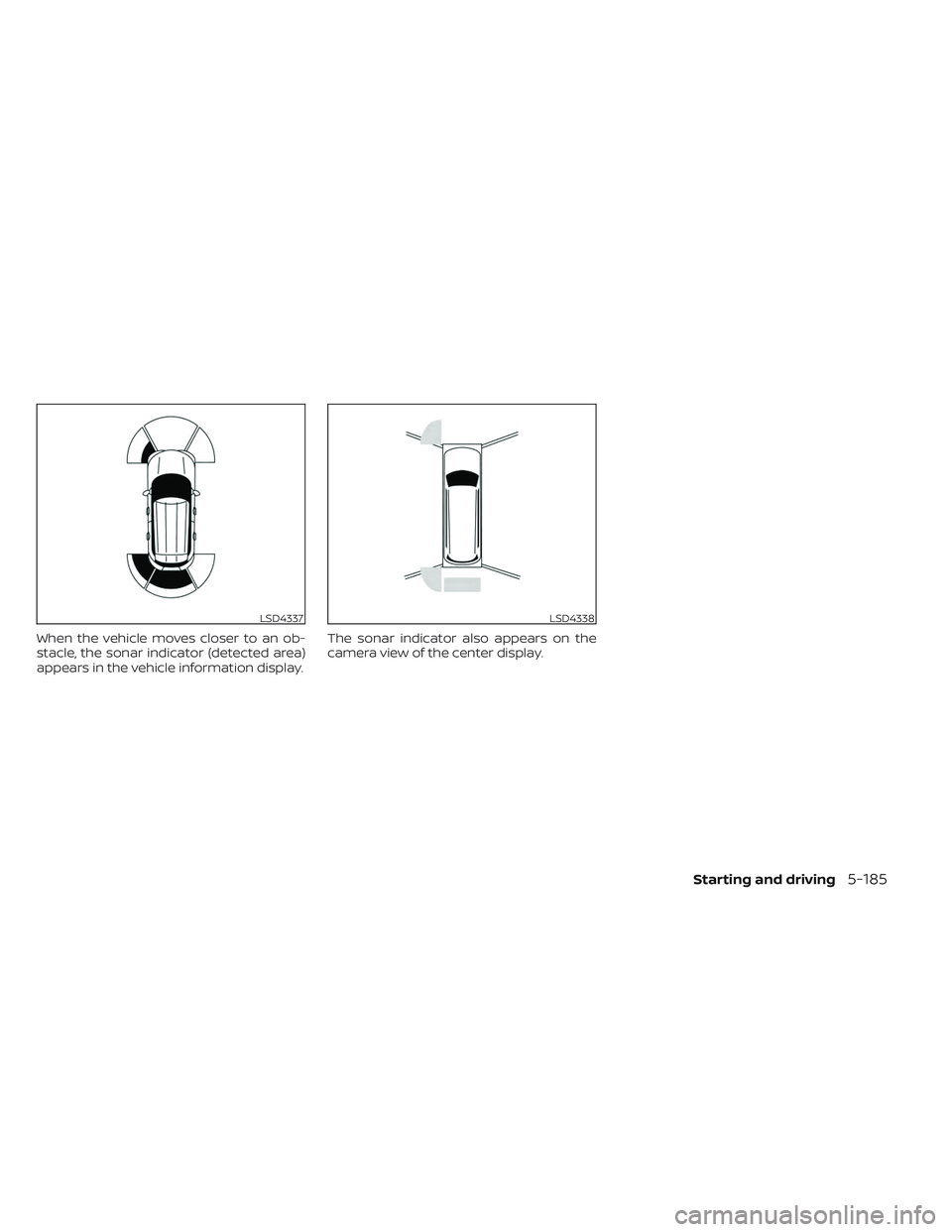
When the vehicle moves closer to an ob-
stacle, the sonar indicator (detected area)
appears in the vehicle information display.The sonar indicator also appears on the
camera view of the center display.
LSD4337LSD4338
Starting and driving5-185
Page 633 of 647

These data can help provide a better un-
derstanding of the circumstances in which
crashes and injuries occur. NOTE: EDR data
are recorded by your vehicle only if a non-
trivial crash situation occurs; no data are
recorded by the EDR under normal driving
conditions and no personal data (e.g.,
name, gender, age, and crash location) are
recorded. However, other parties, such as
law enforcement, could combine the EDR
data with the type of personally identif ying
data routinely acquired during a crash
investigation.
To read data recorded by an EDR, special
equipment is required, and access to the
vehicle or the EDR is needed. In addition to
the vehicle manufacturer and NISSAN
dealer, other parties, such as law enforce-
ment, that have the special equipment, can
read the information if they have access to
the vehicle or the EDR.
EDR data will only be accessed with the
consent of the vehicle owner or lessee or
as otherwise required or permitted by law.ADDITIONAL DATA RECORDING (on
vehicles equipped with optional
ProPILOT Assist)
If your vehicle is equipped with the optional
ProPILOT Assist, it will also be equipped
with a supplemental vehicle data record-
ing function.
The data recording function is designed to
record such data as:
• Driver operational status of accelerator,brakes, steering, etc.
• Detection status of a vehicle ahead and lane markers
• Vehicle information including distance to vehicle ahead and lateral position
• Information on the operation of the Pro- PILOT Assist and other crash avoidance
features
• ProPILOT Assist malfunction diagnosis information
• External images from multi-sensing front camera (Available only when SRS air bag
or AEB with Pedestrian Detection system
is activated)
ProPILOT Assist does not record conversa-
tions, sounds or images of the inside of the
vehicle. To read this vehicle data, special equip-
ment is required and access to the vehicle
or the recording unit is needed. This vehicle
data will only be accessed with the consent
of the vehicle owner or lessee or as other-
wise required or permitted by law.
If downloaded, NISSAN may use the data
recorded for the purpose of improving
NISSAN's vehicle safety performance.
NISSAN will not disclose/provide the re-
corded data to a third party except:
• With the consent of the vehicle owner or
with the consent of the lessee
• In response to an official request from law enforcement, a court order, governmen-
tal agency, or other legally enforceable
requests
• For use as part of NISSAN's defense of litigation
• For research purposes af ter the data is modified such that it is no longer tied to a
specific vehicle or vehicle owner
If you have any questions regarding the
data NISSAN may collect about you,
please visit our Privacy Policy:
https://www.nissanusa.com.
10-36Technical and consumer information
Page 636 of 647
11 Index
2
2nd row bench seat adjustment......1-9
A
Active Ride Control.............5-181Air bag (See supplemental restraint
system).....................1-61Air bag system
Front (See supplemental front impact
air bag system)
..............1-68Air bag warning labels............1-81Air bag warning light.........1-81, 2-16Air bag warning light,
supplemental..............1-81, 2-16Air cleaner...................8-18Air cleaner housing filter..........8-18Air conditionerAir conditioner operation........4-33Air conditioner specification label. .10-13Air conditioner system refrigerant
recommendations............10-8Air conditioner system refrigerant and
oil recommendations..........10-8Heater and air conditioner controls. .4-33Servicing air conditioner........4-39Alarm system (See vehicle security
system).....................2-71Anchor point locations...........1-42
Antenna................... .4-39Anti-lock Braking System (ABS).....5-175Antifreeze...................5-194Armrests.................... .1-9Autolight switch...............2-78Automatic
Automatic power window switch. .2-112Driving with automatic
transmission................5-18Automatic anti-glare inside mirror. . . .3-33Automatic brake hold............5-25Automatic door locks.............3-6Automatic Emergency Braking
(AEB)...................2-16, 2-67Automatic Emergency Braking (AEB) with
Pedestrian Detection............5-136
B
Battery.................5-194, 8-14Charge warning light...........2-14Battery replacement............8-25Key fob...................8-25NISSAN Intelligent Key®.........8-25Before starting the engine.........5-16Belt (See drive belt)..............8-16Blind Spot Warning (BSW).........5-49Booster seats.................1-57Brake
Anti-lock Braking System (ABS). . . .5-175
Brake fluid.................8-12Brake light (See stop light).......8-27Brake system...............5-175Brake warning light............2-13Brake wear indicators.......2-22,8-21Parking brake operation.........5-23Self-adjusting brakes...........8-21Brake Assist.................5-177Brake fluid...................8-12Brake system................5-175Brakes.....................8-21Break-in schedule.............5-169Brightness controlInstrument panel.............2-83Bulb check/instrument panel.......2-13Bulb replacement..............8-27
C
C.M.V.S.S. certification label........10-12Camera Aiding Sonar
(parking sensor)...............4-22Capacities and recommended
fuel/lubricants................10-2Car phone or CB radio...........4-40Cargo (See vehicle loading
information)................ .10-15Cargo area storage bin..........2-108Cargo light..................2-118Chassis control...............5-180