air conditioning NISSAN PATHFINDER 2022 Owner´s Manual
[x] Cancel search | Manufacturer: NISSAN, Model Year: 2022, Model line: PATHFINDER, Model: NISSAN PATHFINDER 2022Pages: 647, PDF Size: 8.48 MB
Page 17 of 647
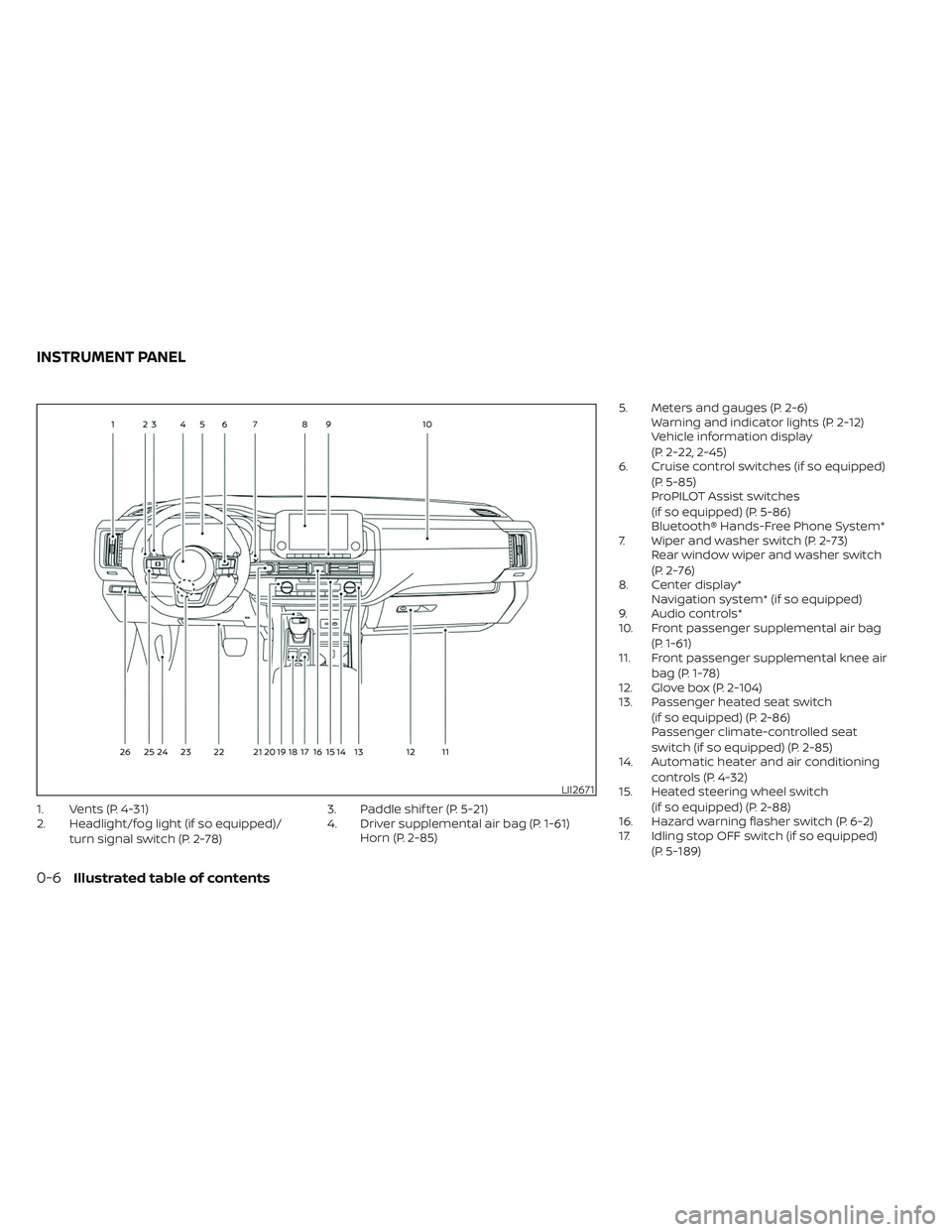
1. Vents (P. 4-31)
2. Headlight/fog light (if so equipped)/turn signal switch (P. 2-78) 3. Paddle shif ter (P. 5-21)
4. Driver supplemental air bag (P. 1-61)
Horn (P. 2-85) 5. Meters and gauges (P. 2-6)
Warning and indicator lights (P. 2-12)
Vehicle information display
(P. 2-22, 2-45)
6. Cruise control switches (if so equipped)
(P. 5-85)
ProPILOT Assist switches
(if so equipped) (P. 5-86)
Bluetooth® Hands-Free Phone System*
7. Wiper and washer switch (P. 2-73) Rear window wiper and washer switch
(P. 2-76)
8. Center display* Navigation system* (if so equipped)
9. Audio controls*
10. Front passenger supplemental air bag
(P. 1-61)
11. Front passenger supplemental knee air
bag (P. 1-78)
12. Glove box (P. 2-104)
13. Passenger heated seat switch
(if so equipped) (P. 2-86)
Passenger climate-controlled seat
switch (if so equipped) (P. 2-85)
14. Automatic heater and air conditioning
controls (P. 4-32)
15. Heated steering wheel switch
(if so equipped) (P. 2-88)
16. Hazard warning flasher switch (P. 6-2)
17. Idling stop OFF switch (if so equipped)
(P. 5-189)
LII2671
INSTRUMENT PANEL
0-6Illustrated table of contents
Page 111 of 647
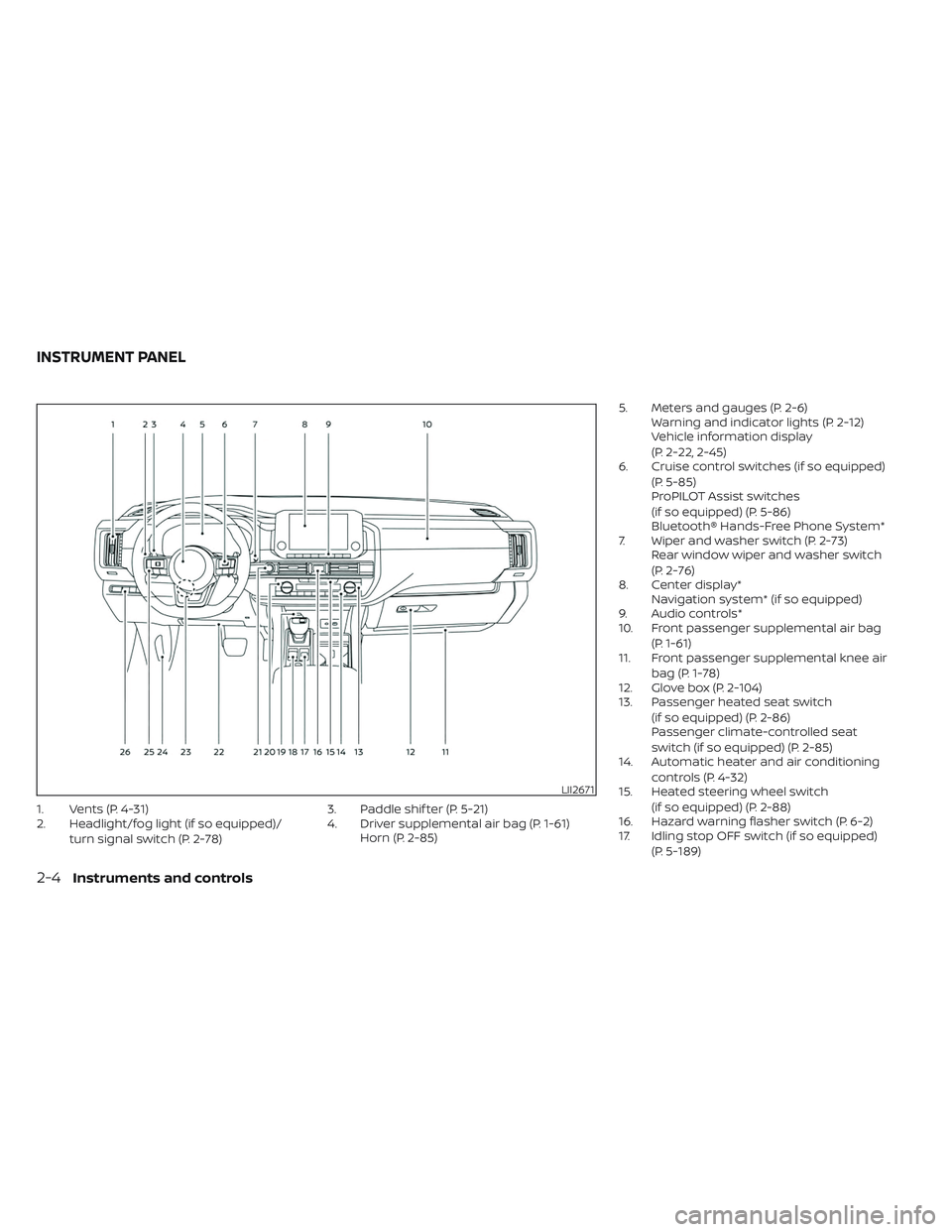
1. Vents (P. 4-31)
2. Headlight/fog light (if so equipped)/turn signal switch (P. 2-78) 3. Paddle shif ter (P. 5-21)
4. Driver supplemental air bag (P. 1-61)
Horn (P. 2-85) 5. Meters and gauges (P. 2-6)
Warning and indicator lights (P. 2-12)
Vehicle information display
(P. 2-22, 2-45)
6. Cruise control switches (if so equipped)
(P. 5-85)
ProPILOT Assist switches
(if so equipped) (P. 5-86)
Bluetooth® Hands-Free Phone System*
7. Wiper and washer switch (P. 2-73) Rear window wiper and washer switch
(P. 2-76)
8. Center display* Navigation system* (if so equipped)
9. Audio controls*
10. Front passenger supplemental air bag
(P. 1-61)
11. Front passenger supplemental knee air
bag (P. 1-78)
12. Glove box (P. 2-104)
13. Passenger heated seat switch
(if so equipped) (P. 2-86)
Passenger climate-controlled seat
switch (if so equipped) (P. 2-85)
14. Automatic heater and air conditioning
controls (P. 4-32)
15. Heated steering wheel switch
(if so equipped) (P. 2-88)
16. Hazard warning flasher switch (P. 6-2)
17. Idling stop OFF switch (if so equipped)
(P. 5-189)
LII2671
INSTRUMENT PANEL
2-4Instruments and controls
Page 137 of 647
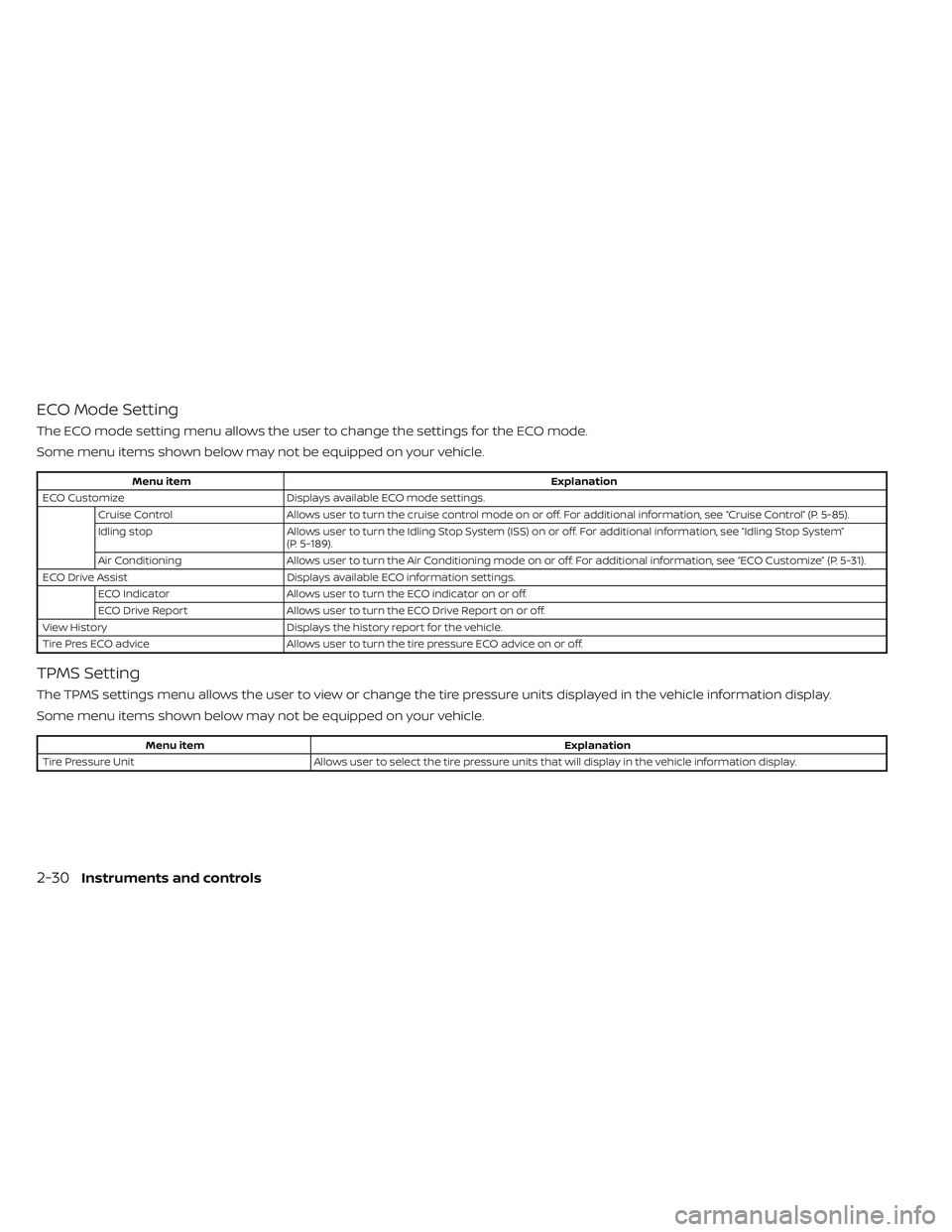
ECO Mode Setting
The ECO mode setting menu allows the user to change the settings for the ECO mode.
Some menu items shown below may not be equipped on your vehicle.
Menu itemExplanation
ECO Customize Displays available ECO mode settings.
Cruise Control Allows user to turn the cruise control mode on or off. For additional information, see “Cruise Control” (P. 5-85).
Idling stop Allows user to turn the Idling Stop System (ISS) on or off. For additional information, see “Idling Stop System”
(P. 5-189).
Air Conditioning Allows user to turn the Air Conditioning mode on or off. For additional information, see “ECO Customize” (P. 5-31).
ECO Drive Assist Displays available ECO information settings.
ECO Indicator Allows user to turn the ECO indicator on or off.
ECO Drive Report Allows user to turn the ECO Drive Report on or off.
View History Displays the history report for the vehicle.
Tire Pres ECO advice Allows user to turn the tire pressure ECO advice on or off.
TPMS Setting
The TPMS settings menu allows the user to view or change the tire pressure units displayed in the vehicle information display.
Some menu items shown below may not be equipped on your vehicle.
Menu item Explanation
Tire Pressure Unit Allows user to select the tire pressure units that will display in the vehicle information display.
2-30Instruments and controls
Page 162 of 647
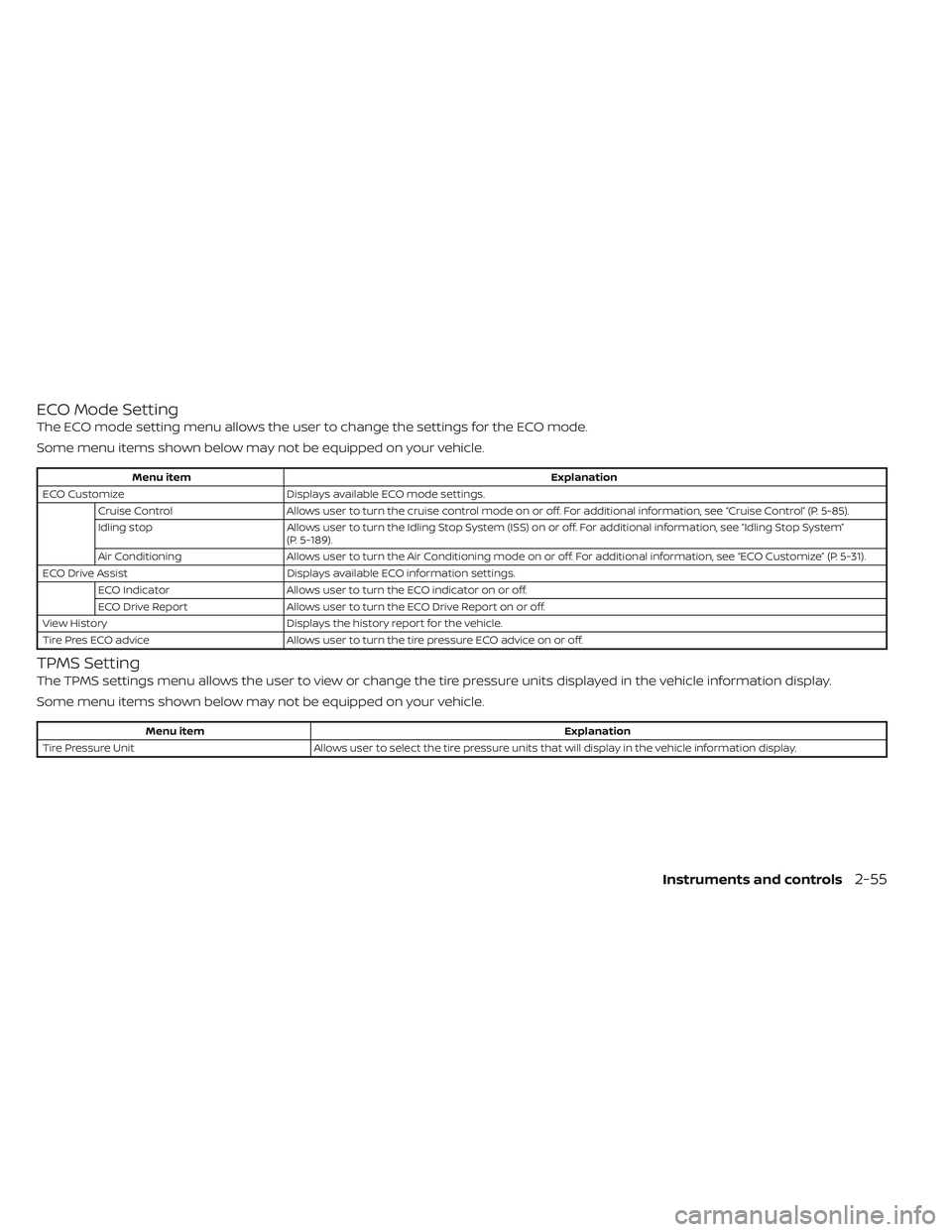
ECO Mode Setting
The ECO mode setting menu allows the user to change the settings for the ECO mode.
Some menu items shown below may not be equipped on your vehicle.
Menu itemExplanation
ECO Customize Displays available ECO mode settings.
Cruise Control Allows user to turn the cruise control mode on or off. For additional information, see “Cruise Control” (P. 5-85).
Idling stop Allows user to turn the Idling Stop System (ISS) on or off. For additional information, see “Idling Stop System”
(P. 5-189).
Air Conditioning Allows user to turn the Air Conditioning mode on or off. For additional information, see “ECO Customize” (P. 5-31).
ECO Drive Assist Displays available ECO information settings.
ECO Indicator Allows user to turn the ECO indicator on or off.
ECO Drive Report Allows user to turn the ECO Drive Report on or off.
View History Displays the history report for the vehicle.
Tire Pres ECO advice Allows user to turn the tire pressure ECO advice on or off.
TPMS Setting
The TPMS settings menu allows the user to view or change the tire pressure units displayed in the vehicle information display.
Some menu items shown below may not be equipped on your vehicle.
Menu item Explanation
Tire Pressure Unit Allows user to select the tire pressure units that will display in the vehicle information display.
Instruments and controls2-55
Page 193 of 647
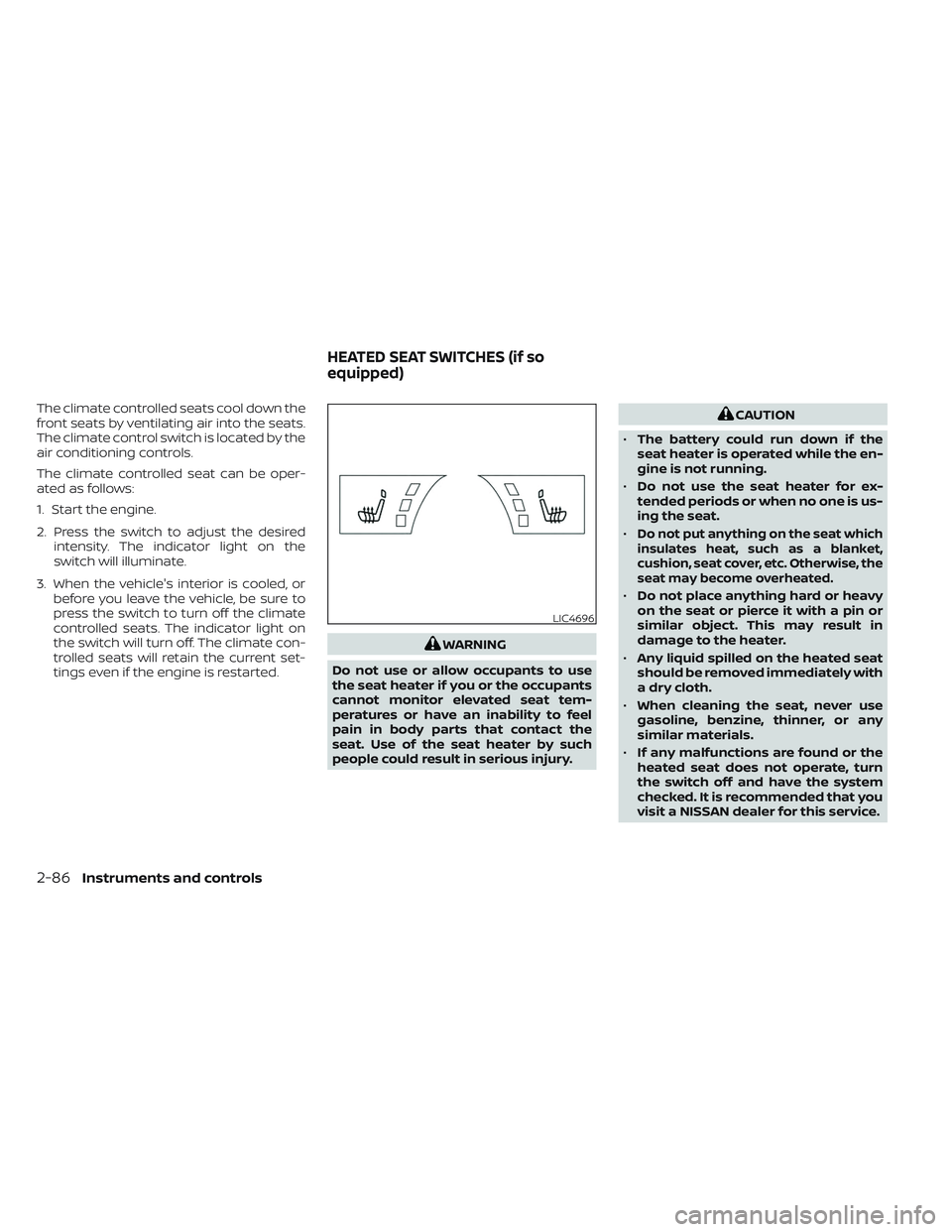
The climate controlled seats cool down the
front seats by ventilating air into the seats.
The climate control switch is located by the
air conditioning controls.
The climate controlled seat can be oper-
ated as follows:
1. Start the engine.
2. Press the switch to adjust the desiredintensity. The indicator light on the
switch will illuminate.
3. When the vehicle's interior is cooled, or before you leave the vehicle, be sure to
press the switch to turn off the climate
controlled seats. The indicator light on
the switch will turn off. The climate con-
trolled seats will retain the current set-
tings even if the engine is restarted.
WARNING
Do not use or allow occupants to use
the seat heater if you or the occupants
cannot monitor elevated seat tem-
peratures or have an inability to feel
pain in body parts that contact the
seat. Use of the seat heater by such
people could result in serious injury.
CAUTION
• The battery could run down if the
seat heater is operated while the en-
gine is not running.
• Do not use the seat heater for ex-
tended periods or when no one is us-
ing the seat.
•
Do not put anything on the seat which
insulates heat, such as a blanket,
cushion, seat cover, etc. Otherwise, the
seat may become overheated.
• Do not place anything hard or heavy
on the seat or pierce it with a pin or
similar object. This may result in
damage to the heater.
• Any liquid spilled on the heated seat
should be removed immediately with
a dry cloth.
• When cleaning the seat, never use
gasoline, benzine, thinner, or any
similar materials.
• If any malfunctions are found or the
heated seat does not operate, turn
the switch off and have the system
checked. It is recommended that you
visit a NISSAN dealer for this service.
LIC4696
HEATED SEAT SWITCHES (if so
equipped)
2-86Instruments and controls
Page 270 of 647

4 Monitor, climate, audio, phone and
voice recognition systems
NissanConnect® Owner’s Manual...............4-2
RearView Monitor (if so equipped) ...............4-3
RearView Monitor system operation ..........4-4
How to read the displayed lines ..............4-4
Difference between predicted and
actual distances .............................4-5
How to park with predicted course
lines ..........................................4-6
Adjusting the screen .........................4-8
How to turn on and off predicted
course lines ..................................4-8
RearView Monitor system limitations .........4-8
System maintenance ........................4-9
Intelligent Around View Monitor
(if so equipped) ................................. 4-10
Intelligent Around View Monitor system
operation .................................... 4-11
Difference between predicted and
actual distances ............................ 4-16
How to park with predicted course
lines ......................................... 4-17
How to switch the display ...................4-18
Adjusting the screen ........................ 4-19
Intelligent Around View Monitor system
limitations .................................. 4-20System maintenance
.......................4-22
Camera aiding sonar (parking sensor)
(if so equipped) ................................. 4-22
Sonar system operation .....................4-23
Turning on and off the sonar function .......4-24
Sonar system limitations ....................4-24
System maintenance .......................4-25
Moving Object Detection (MOD)
(if so equipped) ................................. 4-26
MOD system operation ......................4-27
Turning MOD on and off .....................4-29
MOD system limitations .....................4-29
System maintenance .......................4-30
Vents .......................................... 4-31
Heater and air conditioner (automatic) .........4-32
Automatic operation ........................ 4-33
Manual operation ........................... 4-34
Operating tips ............................... 4-36
Rear automatic air conditioning system .....4-37
Servicing air conditioner ........................4-39
Antenna ........................................ 4-39
Car phone or CB radio .......................... 4-40
iP
od®/iPhone® ................................. 4-40
Page 303 of 647
Remote Engine Start with
Intelligent Climate Control (if so
equipped)
Vehicles equipped with automatic climate
controls and Remote Engine Start function
may go into automatic heating or cooling
mode when Remote Engine Start is acti-
vated depending on outside and cabin
temperatures. During this period, the cli-
mate control display and buttons will be
inoperable until the ignition switch is
turned on. In Remote Engine Start defrost-
ing mode, the rear window defroster,
heated seats (if so equipped) and heated
steering wheel (if so equipped) may be ac-
tivated automatically.
Voice Recognition logic (if so
equipped)
When the climate control system is on, the
front and rear fan speeds may be auto-
matically lowered so that commands are
more easily recognized. Fan speed can be
adjusted using the fan speed decrease and
increase buttons, if desired.
MANUAL OPERATIONFan speed control
Press thefan speed control buttons
to manually control the fan speed.
Press the AUTO button to return to auto-
matic control of the fan speed.
Temperature control dial
The temperature control dial allows you to
adjust the temperature of the outlet air. To
lower the temperature, turn the dial to the
lef t. To increase the temperature, turn the
dial to the right. Temperature can be ad-
justed on the driver’s and passenger’s side.
Air recirculation
Press theair recirculation button to
recirculate interior air inside the vehicle.
The
indicator light on the button will
come on.
The air recirculation cannot be activated
when the air conditioner is in the
front
defrosting mode.
When the outside temperature exceeds
70°F (21°C), the air conditioning system may
default to air recirculation mode automati-
cally to reduce overall power consumption.
To exit air recirculation mode, deselect the
air recirculation button (indicator will turn
off ) to enter fresh air mode.
Fresh air intake
Press thefresh air intake button to
draw outside air into the passenger
compartment.
A/C (air conditioner) button
Start the engine, press thefan speed
control buttons to the desired position and
press the
button to turn on the air
conditioner. To turn off the air conditioner,
press the
button again.
The air conditioner cooling function op-
erates only when the engine is running.
Air flow control
Pressing theair flow control button
manually controls air flow and selects the
air outlet:
— Air flows from center and side
vents.
— Air flows from center and sidevents and foot outlets.
— Air flows mainly from foot out-lets.
— Air flows from defroster and footoutlets.
4-34Monitor, climate, audio, phone and voice recognition systems
Page 306 of 647
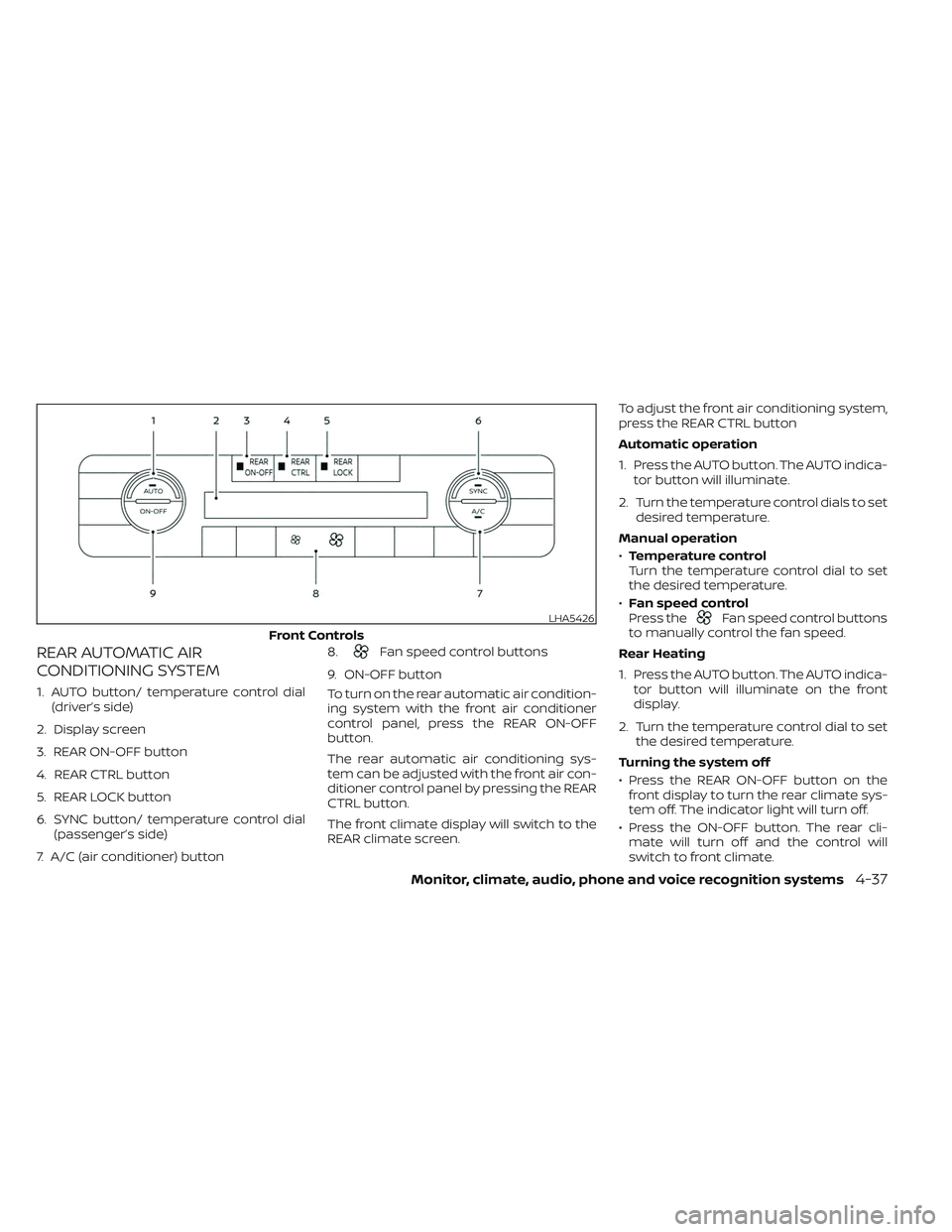
REAR AUTOMATIC AIR
CONDITIONING SYSTEM
1. AUTO button/ temperature control dial(driver’s side)
2. Display screen
3. REAR ON-OFF button
4. REAR CTRL button
5. REAR LOCK button
6. SYNC button/ temperature control dial (passenger’s side)
7. A/C (air conditioner) button 8.
Fan speed control buttons
9. ON-OFF button
To turn on the rear automatic air condition-
ing system with the front air conditioner
control panel, press the REAR ON-OFF
button.
The rear automatic air conditioning sys-
tem can be adjusted with the front air con-
ditioner control panel by pressing the REAR
CTRL button.
The front climate display will switch to the
REAR climate screen. To adjust the front air conditioning system,
press the REAR CTRL button
Automatic operation
1. Press the AUTO button. The AUTO indica-
tor button will illuminate.
2. Turn the temperature control dials to set desired temperature.
Manual operation
• Temperature control
Turn the temperature control dial to set
the desired temperature.
• Fan speed control
Press the
Fan speed control buttons
to manually control the fan speed.
Rear Heating
1. Press the AUTO button. The AUTO indica- tor button will illuminate on the front
display.
2. Turn the temperature control dial to set the desired temperature.
Turning the system off
• Press the REAR ON-OFF button on the front display to turn the rear climate sys-
tem off. The indicator light will turn off.
• Press the ON-OFF button. The rear cli- mate will turn off and the control will
switch to front climate.LHA5426
Front Controls
Monitor, climate, audio, phone and voice recognition systems4-37
Page 307 of 647
Locking the REAR controls
1. Press the REAR LOCK button on the frontclimate control panel. LOCK will be dis-
played on the rear climate display
screen.
2. The rear climate controls will be locked and can only be adjusted using the front
controls.
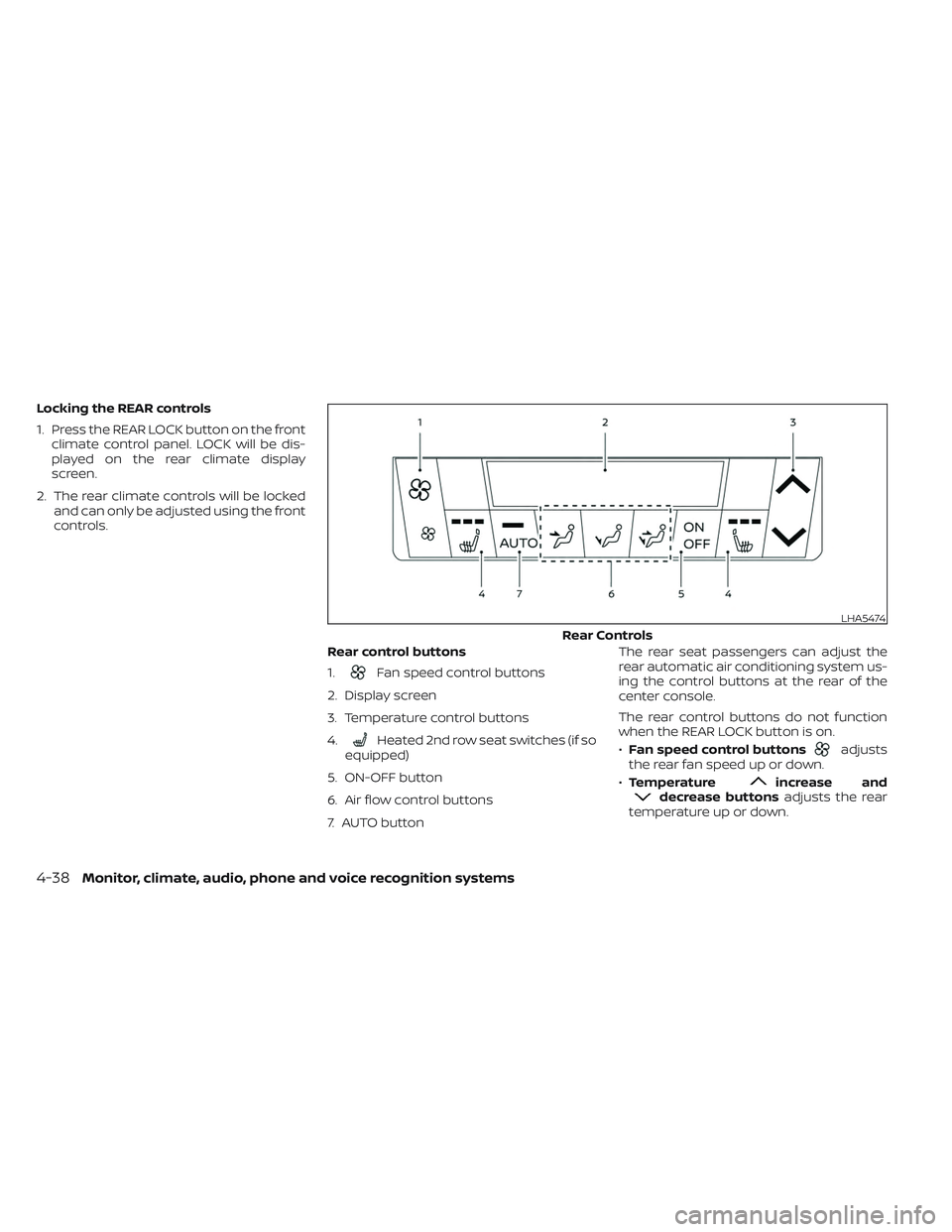
Rear control buttons
1.
Fan speed control buttons
2. Display screen
3. Temperature control buttons
4.
Heated 2nd row seat switches (if so
equipped)
5. ON-OFF button
6. Air flow control buttons
7. AUTO button The rear seat passengers can adjust the
rear automatic air conditioning system us-
ing the control buttons at the rear of the
center console.
The rear control buttons do not function
when the REAR LOCK button is on.
•
Fan speed control buttonsadjusts
the rear fan speed up or down.
• Temperature
increase anddecrease buttons adjusts the rear
temperature up or down.
LHA5474
Rear Controls
4-38Monitor, climate, audio, phone and voice recognition systems
Page 308 of 647
•Heated 2nd row seat switches (if so
equipped) For additional information,
see “Heated 2nd row seat switches (if so
equipped)” (P. 2-87).
• ON-OFF button Turns rear automatic air
conditioning system on and off.
• Air flow control buttons controls air flow
and selects the air outlet.
• AUTO button Turns rear automatic air
conditioning system on, AUTO mode on. The air conditioner system in your NISSAN
vehicle is charged with a refrigerant de-
signed with the environment in mind.
This refrigerant does not harm the
earth's ozone layer.
Special charging equipment and lubricant is
required when servicing your NISSAN air
conditioner. Using improper refrigerants or
lubricants will cause severe damage to your
air conditioner system. For additional infor-
mation, see “Air conditioner system refriger-
ant and oil recommendations” (P. 10-8).
It is recommended that you visit a NISSAN
dealer to service your “environmentally
friendly” air conditioner system.
WARNING
The air conditioner system contains re-
frigerant under high pressure. To avoid
personal injury, any air conditioner ser-
vice should be done only by an experi-
enced technician with proper equipment.
The vehicle is equipped with a shark fin
antenna and an antenna pattern is printed
inside the rear window.
CAUTION
• Do not place metalized film near the
rear window glass or attach any
metal parts to it. This may cause poor
reception or noise.
• When cleaning the inside of the rear
window, be careful not to scratch or
damage the rear window antenna.
Lightly wipe along the antenna with a
dampened sof t cloth.
SERVICING AIR CONDITIONER ANTENNA
Monitor, climate, audio, phone and voice recognition systems4-39