ECU NISSAN PATHFINDER 2023 Service Manual
[x] Cancel search | Manufacturer: NISSAN, Model Year: 2023, Model line: PATHFINDER, Model: NISSAN PATHFINDER 2023Pages: 665, PDF Size: 4.64 MB
Page 228 of 665
AUTOMATIC MOONROOF AND
SUNSHADE
Sliding sunshade and moonroof
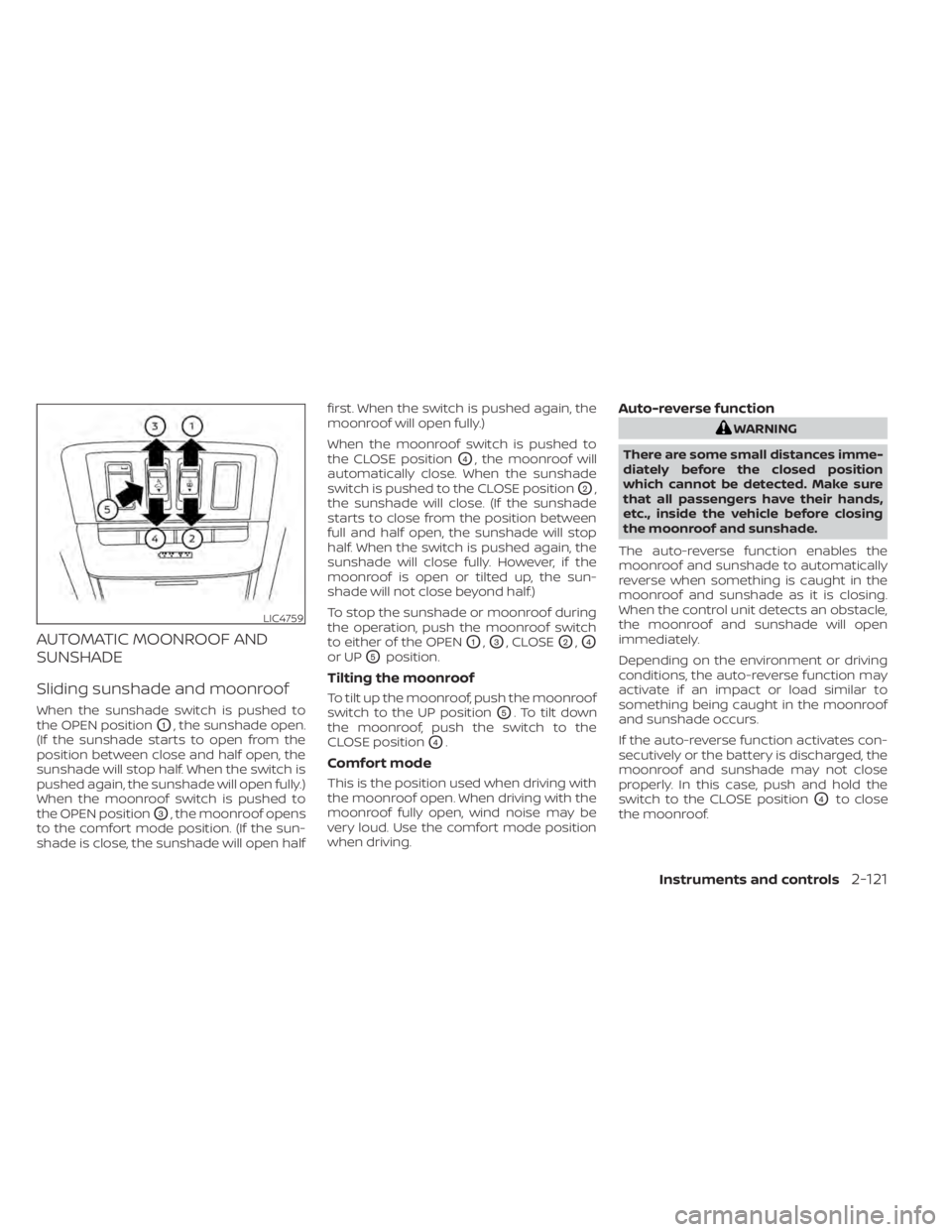
When the sunshade switch is pushed to
the OPEN position
O1, the sunshade open.
(If the sunshade starts to open from the
position between close and half open, the
sunshade will stop half. When the switch is
pushed again, the sunshade will open fully.)
When the moonroof switch is pushed to
the OPEN position
O3, the moonroof opens
to the comfort mode position. (If the sun-
shade is close, the sunshade will open half first. When the switch is pushed again, the
moonroof will open fully.)
When the moonroof switch is pushed to
the CLOSE position
O4, the moonroof will
automatically close. When the sunshade
switch is pushed to the CLOSE position
O2,
the sunshade will close. (If the sunshade
starts to close from the position between
full and half open, the sunshade will stop
half. When the switch is pushed again, the
sunshade will close fully. However, if the
moonroof is open or tilted up, the sun-
shade will not close beyond half.)
To stop the sunshade or moonroof during
the operation, push the moonroof switch
to either of the OPEN
O1,O3, CLOSEO2,O4
or UPO5position.
Tilting the moonroof
To tilt up the moonroof, push the moonroof
switch to the UP position
O5. To tilt down
the moonroof, push the switch to the
CLOSE position
O4.
Comfort mode
This is the position used when driving with
the moonroof open. When driving with the
moonroof fully open, wind noise may be
very loud. Use the comfort mode position
when driving.
Auto-reverse function
WARNING
There are some small distances imme-
diately before the closed position
which cannot be detected. Make sure
that all passengers have their hands,
etc., inside the vehicle before closing
the moonroof and sunshade.
The auto-reverse function enables the
moonroof and sunshade to automatically
reverse when something is caught in the
moonroof and sunshade as it is closing.
When the control unit detects an obstacle,
the moonroof and sunshade will open
immediately.
Depending on the environment or driving
conditions, the auto-reverse function may
activate if an impact or load similar to
something being caught in the moonroof
and sunshade occurs.
If the auto-reverse function activates con-
secutively or the battery is discharged, the
moonroof and sunshade may not close
properly. In this case, push and hold the
switch to the CLOSE position
O4to close
the moonroof.
LIC4759
Instruments and controls2-121
Page 232 of 665
The HomeLink® Universal Transceiver pro-
vides a convenient way to consolidate the
functions of up to three individual hand-
held transmitters into one built-in device.
HomeLink® Universal Transceiver:
• Will operate most Radio Frequency (RF)devices such as garage doors, gates,
home and office lighting, entry door locks
and security systems.
• Is powered by your vehicle's battery. No separate batteries are required. If the ve-
hicle's battery is discharged or is discon-
nected, HomeLink® will retain all
programming.
When the HomeLink® Universal Trans-
ceiver is programmed, retain the original
transmitter for future programming pro-
cedures (Example: new vehicle pur-
chases). Upon sale of the vehicle, the
programmed HomeLink® Universal
Transceiver buttons should be erased for
security purposes. For additional infor-
mation, see “Programming HomeLink®”
(P. 2-125).WARNING
• Do not use the HomeLink® Universal
Transceiver with any garage door
opener that lacks safety stop and re-
verse features as required by federal
safety standards. (These standards
became effective for opener models
manufactured af ter April 1, 1982.) A
garage door opener which cannot
detect an object in the path of a clos-
ing garage door and then automati-
cally stop and reverse does not meet
current federal safety standards. Us-
ing a garage door opener without
these features increases the risk of
serious injury or death.
• During the programming procedure
your garage door or security gate will
open and close (if the transmitter is
within range). Make sure that people
or objects are clear of the garage
door, gate, etc., that you are
programming. •
Your vehicle's engine should be
turned off while programming the
HomeLink® Universal Transceiver. Do
not breathe exhaust gases; they con-
tain colorless and odorless carbon
monoxide. Carbon monoxide is dan-
gerous. It can cause unconscious-
ness or death.
PROGRAMMING HOMELINK®
The following steps show generic instruc-
tions on how to program a Homelink® but-
ton. If you have any questions or are having
difficulty programming your HomeLink®
buttons, refer to the HomeLink® web site at:
www.homelink.com/nissan or call
1-800-355-3515.
NOTE:
It is also recommended that a new bat-
tery be placed in the hand-held trans-
mitter of the device being programmed
to Homelink® for quicker programming
and accurate transmission of the
radio-frequency.
HOMELINK® UNIVERSAL
TRANSCEIVER (if so equipped)
Instruments and controls2-125
Page 234 of 665
5. Press the HomeLink® button and ob-serve the indicator light.
• If the indicator light remains constant green, your device should operate
when the HomeLink® button is
pressed. At this point, if your device
operates, programming is complete.
• If the indicator light rapidly flashes in green, firmly press, hold for two sec-
onds and release the HomeLink® but-
ton up to three times to complete the
programming process. Do not press
the HomeLink® button rapidly. At this
point if your device operates, pro-
gramming is complete. If the device
does not operate, continue with the
next step of the programming
instructions.
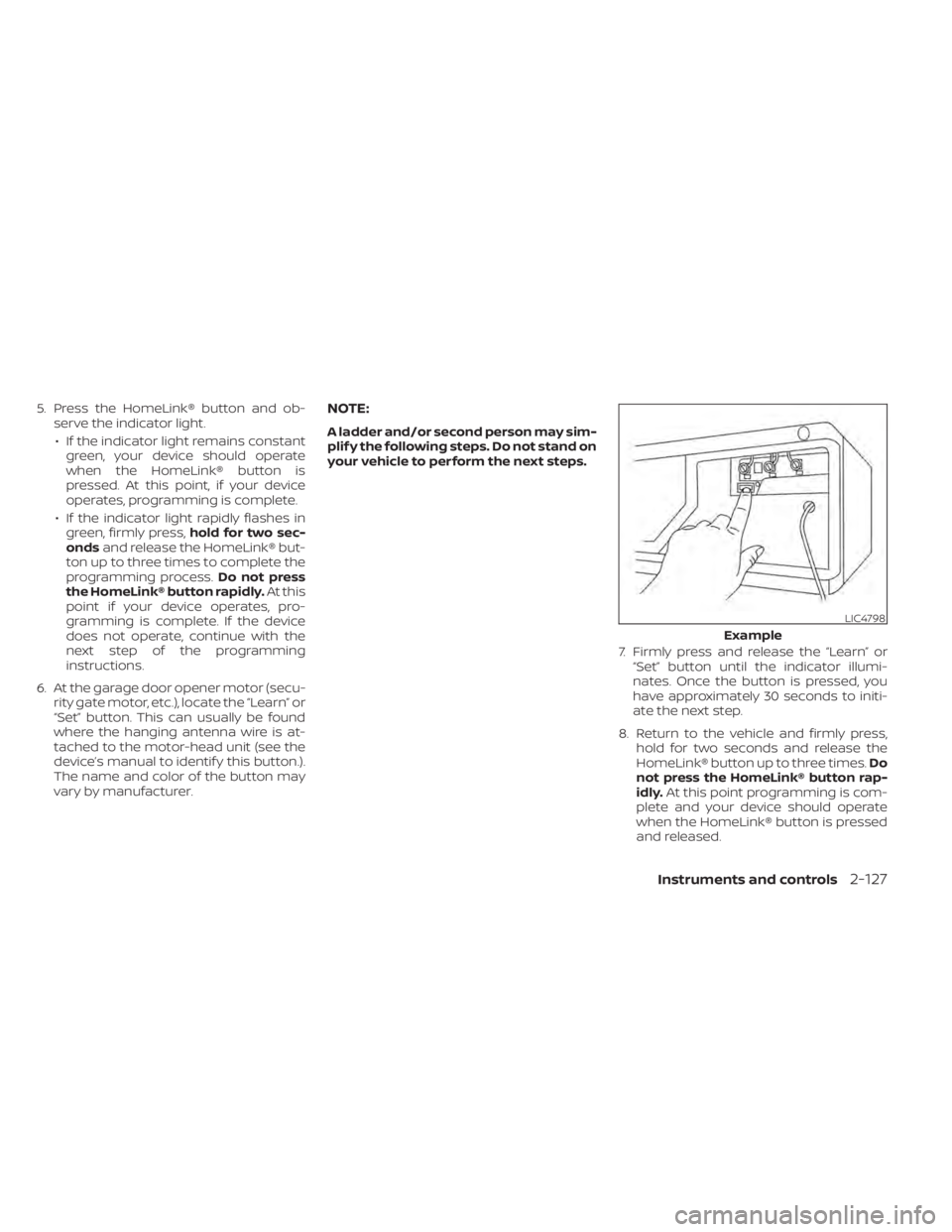
6. At the garage door opener motor (secu- rity gate motor, etc.), locate the “Learn” or
“Set” button. This can usually be found
where the hanging antenna wire is at-
tached to the motor-head unit (see the
device’s manual to identif y this button.).
The name and color of the button may
vary by manufacturer.NOTE:
A ladder and/or second person may sim-
plif y the following steps. Do not stand on
your vehicle to perform the next steps.
7. Firmly press and release the “Learn” or“Set” button until the indicator illumi-
nates. Once the button is pressed, you
have approximately 30 seconds to initi-
ate the next step.
8. Return to the vehicle and firmly press, hold for two seconds and release the
HomeLink® button up to three times. Do
not press the HomeLink® button rap-
idly. At this point programming is com-
plete and your device should operate
when the HomeLink® button is pressed
and released.
LIC4798
Example
Instruments and controls2-127
Page 242 of 665
When the doors are locked using one of the
following methods, the doors cannot be
opened using the inside or outside door
handles. The doors must be unlocked to
open the doors.
WARNING
• Always have the doors locked while
driving. Along with the use of seat
belts, this provides greater safety in
the event of an accident by helping to
prevent persons from being thrown
from the vehicle. This also helps keep
children and others from uninten-
tionally opening the doors, and will
help keep out intruders.
• Before opening any door, always look
for and avoid oncoming traffic. •
To help avoid risk of injury or death
through unintended operation of the
vehicle and/or its systems, including
entrapment in windows or inadver-
tent door lock activation, do not
leave children, people who require
the assistance of others or pets unat-
tended in your vehicle. Additionally,
the temperature inside a closed ve-
hicle on a warm day can quickly be-
come high enough to cause a signifi-
cant risk of injury or death to people
and pets.
LOCKING WITH KEY
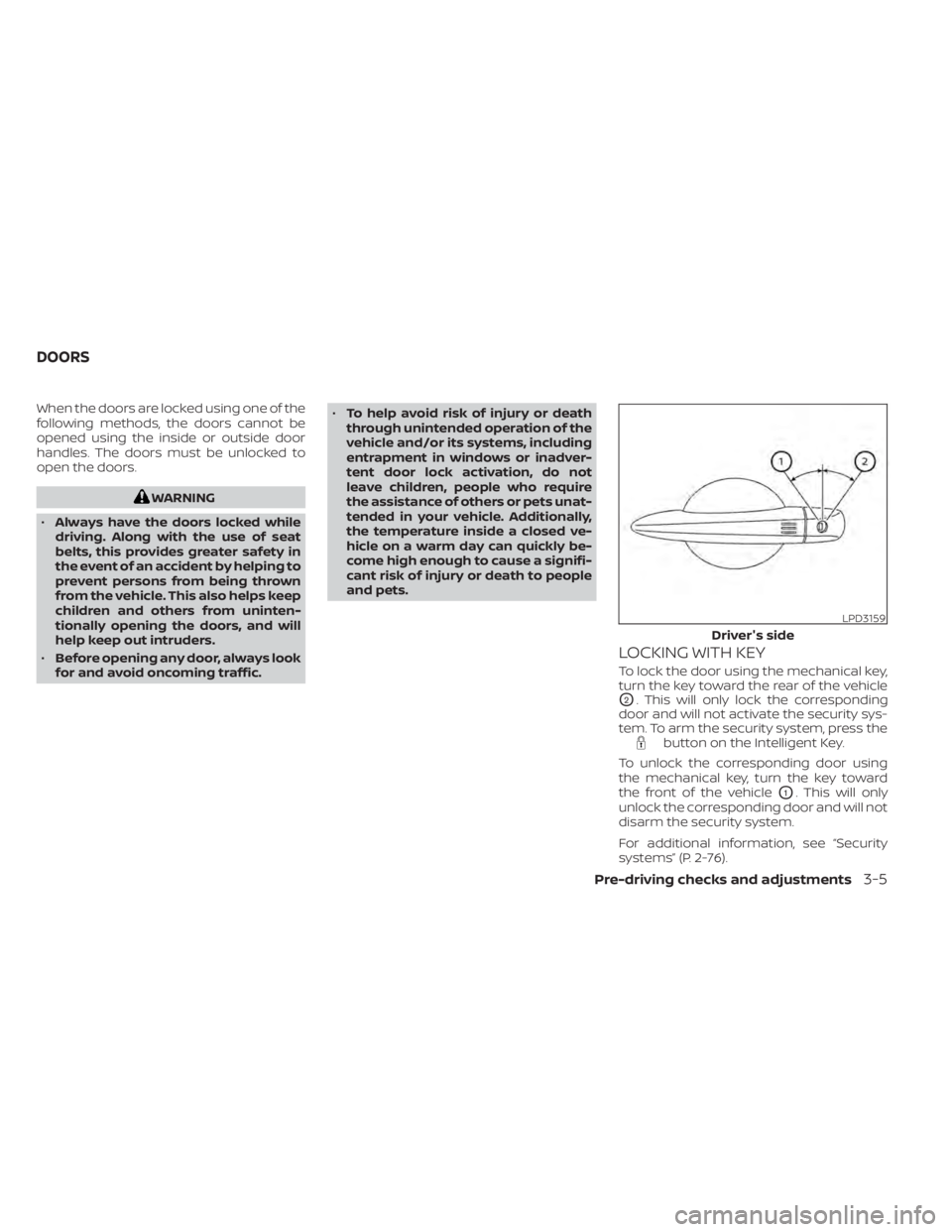
To lock the door using the mechanical key,
turn the key toward the rear of the vehicle
O2. This will only lock the corresponding
door and will not activate the security sys-
tem. To arm the security system, press the
button on the Intelligent Key.
To unlock the corresponding door using
the mechanical key, turn the key toward
the front of the vehicle
O1. This will only
unlock the corresponding door and will not
disarm the security system.
For additional information, see “Security
systems” (P. 2-76).
LPD3159
Driver's side
DOORS
Pre-driving checks and adjustments3-5
Page 246 of 665
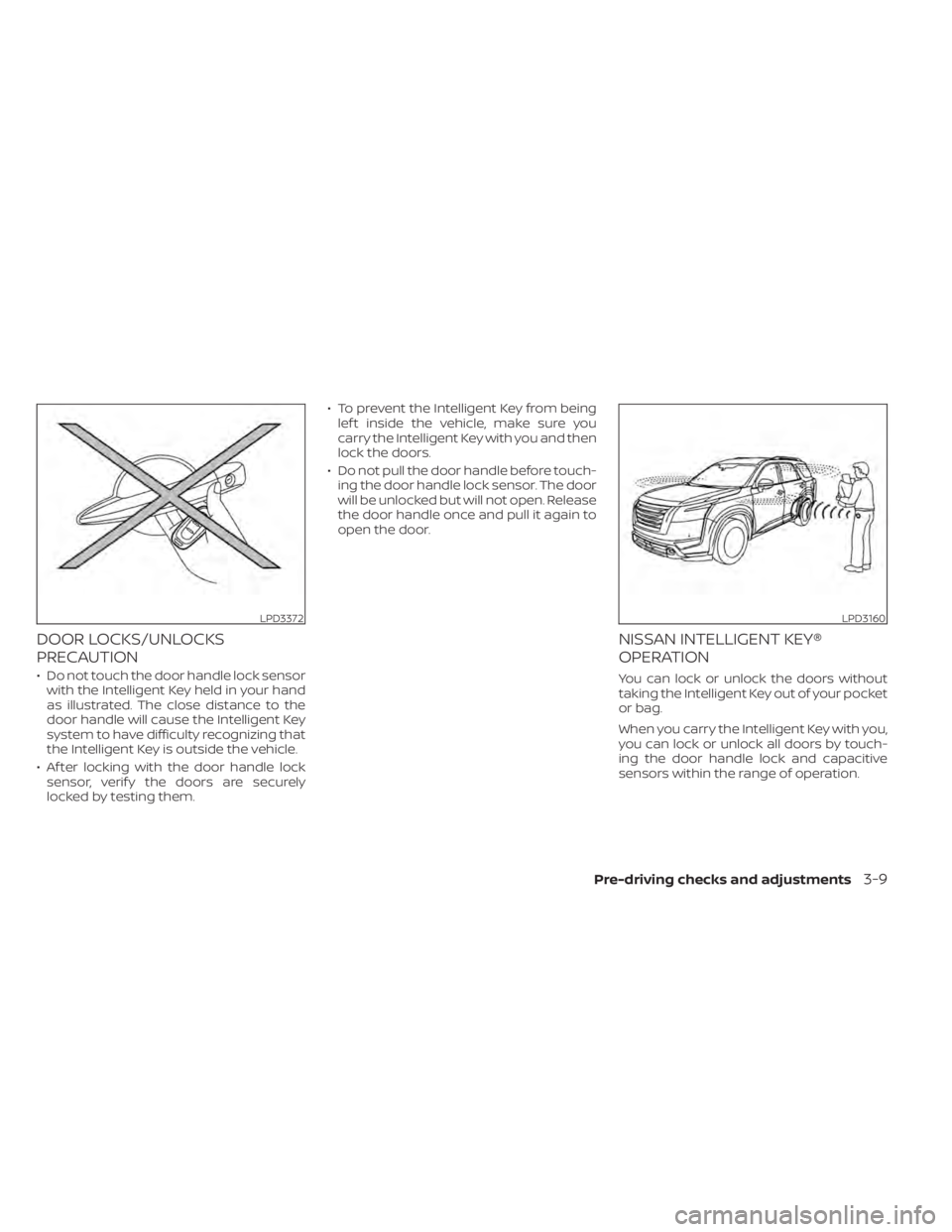
DOOR LOCKS/UNLOCKS
PRECAUTION
• Do not touch the door handle lock sensorwith the Intelligent Key held in your hand
as illustrated. The close distance to the
door handle will cause the Intelligent Key
system to have difficulty recognizing that
the Intelligent Key is outside the vehicle.
• Af ter locking with the door handle lock sensor, verif y the doors are securely
locked by testing them. • To prevent the Intelligent Key from being
lef t inside the vehicle, make sure you
carry the Intelligent Key with you and then
lock the doors.
• Do not pull the door handle before touch- ing the door handle lock sensor. The door
will be unlocked but will not open. Release
the door handle once and pull it again to
open the door.
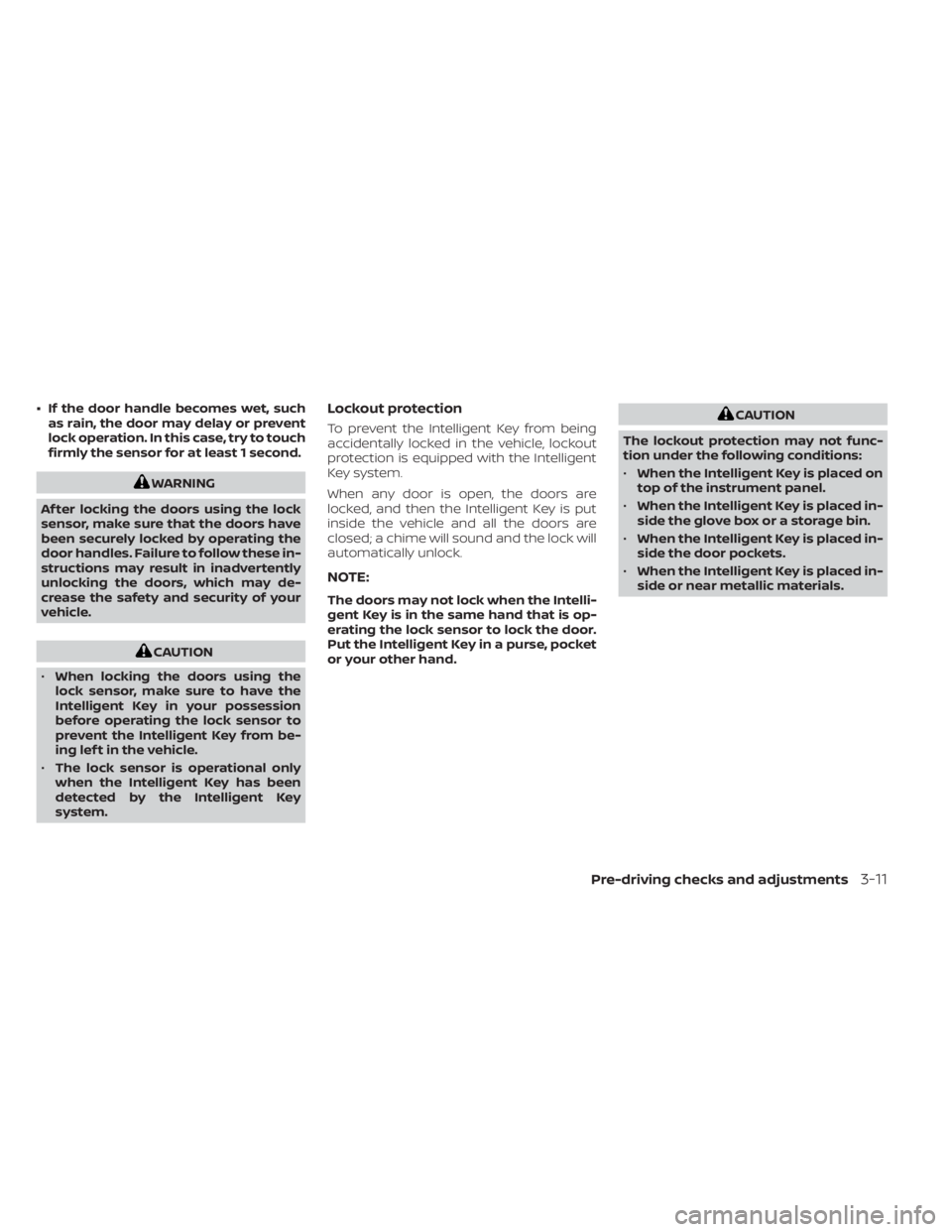
NISSAN INTELLIGENT KEY®
OPERATION
You can lock or unlock the doors without
taking the Intelligent Key out of your pocket
or bag.
When you carry the Intelligent Key with you,
you can lock or unlock all doors by touch-
ing the door handle lock and capacitive
sensors within the range of operation.
LPD3372LPD3160
Pre-driving checks and adjustments3-9
Page 248 of 665
• If the door handle becomes wet, suchas rain, the door may delay or prevent
lock operation. In this case, try to touch
firmly the sensor for at least 1 second.
WARNING
Af ter locking the doors using the lock
sensor, make sure that the doors have
been securely locked by operating the
door handles. Failure to follow these in-
structions may result in inadvertently
unlocking the doors, which may de-
crease the safety and security of your
vehicle.
CAUTION
• When locking the doors using the
lock sensor, make sure to have the
Intelligent Key in your possession
before operating the lock sensor to
prevent the Intelligent Key from be-
ing lef t in the vehicle.
• The lock sensor is operational only
when the Intelligent Key has been
detected by the Intelligent Key
system.
Lockout protection
To prevent the Intelligent Key from being
accidentally locked in the vehicle, lockout
protection is equipped with the Intelligent
Key system.
When any door is open, the doors are
locked, and then the Intelligent Key is put
inside the vehicle and all the doors are
closed; a chime will sound and the lock will
automatically unlock.
NOTE:
The doors may not lock when the Intelli-
gent Key is in the same hand that is op-
erating the lock sensor to lock the door.
Put the Intelligent Key in a purse, pocket
or your other hand.
CAUTION
The lockout protection may not func-
tion under the following conditions:
• When the Intelligent Key is placed on
top of the instrument panel.
• When the Intelligent Key is placed in-
side the glove box or a storage bin.
• When the Intelligent Key is placed in-
side the door pockets.
• When the Intelligent Key is placed in-
side or near metallic materials.
Pre-driving checks and adjustments3-11
Page 250 of 665
If a door handle is pulled while unlocking
the doors, that door may not be unlocked.
Returning the door handle to its original
position will unlock the door. If the door
does not unlock af ter returning the door
handle, touch the door handle lock sensor
to unlock the door.
All doors will be locked automatically un-
less one of the following operations is per-
formed within 1 minute af ter touching the
lock sensor.
• Opening any door.
• Pushing the ignition switch.
Using the interior lights
The interior lights illuminate for a period of
time when a door is unlocked.
The lights can be turned off without waiting
by performing one of the following
operations:
• Placing the ignition switch in the ONposition.
• Locking the doors with the Intelligent Key.
• Switching the interior light switch to the OFF position. • Switching the Auto Room Lamp feature
to the OFF position in the “Vehicle Set-
tings” menu on the vehicle information
display. For additional information, see
“Vehicle information display 7 inch (18 cm)
Type A” (P. 2-23) or “Vehicle information
display 12.3 inch (31 cm) Type B” (P. 2-48).
For additional information, see “Interior
lights” (P. 2-123).
HOW TO USE THE REMOTE
KEYLESS ENTRY FUNCTION
The remote keyless entry function can op-
erate all door locks using the remote key-
less function of the Intelligent Key. The re-
mote keyless function can operate at a
distance of 33 f t (10 m) away from the ve-
hicle. The operating distance depends
upon the conditions around the vehicle.
The remote keyless entry function will not
function under the following conditions:
• When the Intelligent Key is not within the operational range.
• When the doors or the rear lif tgate are open or not closed securely.
• When the Intelligent Key battery is discharged.
CAUTION
When locking the doors using the Intel-
ligent Key, be sure not to leave the key
in the vehicle.
Pre-driving checks and adjustments3-13
Page 252 of 665
Locking doors
1. Place the ignition switch in the LOCKposition.
2. Close all doors.
3. Press the
button on the Intelli-
gent Key.
4. The hazard indicator lights flash twice and the horn beeps once.
5. All doors will be locked.
WARNING
Af ter locking the doors using the Intel-
ligent Key, be sure that the doors have
been securely locked by operating the
door handles. Failure to follow these in-
structions may result in inadvertently
unlocking the doors, which may de-
crease the safety and security of your
vehicle.
Unlocking doors
1. Press thebutton on the Intelligent
Key.
2. The hazard indicator lights flash once and the driver’s door will unlock. 3. Press the
button again within 1
minute to unlock all doors and lif tgate.
NOTE:
The Selective Unlock feature can be
changed using the “Vehicle Settings”
menu on the vehicle information display.
For additional information, see “Vehicle
information display 7 inch (18 cm) Type
A” (P. 2-23) or “Vehicle information dis-
play 12.3 inch (31 cm) Type B” (P. 2-48).
All doors will be locked automatically un-
less one of the following operations is per-
formed within 1 minute af ter pressing the
button:
• Opening any doors.
• Pushing the ignition switch.
Using the interior lights
The interior lights illuminate for a period of
time when a door is unlocked.
The lights can be turned off without waiting
by performing one of the following
operations:
• Placing the ignition switch in the ON position.
• Locking the doors with the Intelligent Key.
• Switching the interior light switch to the OFF position. • Switching the Auto Room Lamp feature
to the OFF position in the “Vehicle Set-
tings” menu on the vehicle information
display. For additional information, see
“Vehicle information display 7 inch (18 cm)
Type A” (P. 2-23) or “Vehicle information
display 12.3 inch (31 cm) Type B” (P. 2-48).
For additional information, see “Interior
lights” (P. 2-123).
Opening windows
The Intelligent Key allows you to simultane-
ously open windows equipped with auto-
matic operation.
All doors must be closed and the key must
be outside the vehicle.
To open the windows, press and hold the
button on the Intelligent Key for lon-
ger than 3 seconds af ter all doors are
unlocked.
The door windows will open while pressing
the
button on the Intelligent Key.
To interrupt opening of the windows, re-
lease the
button.
Pre-driving checks and adjustments3-15
Page 254 of 665
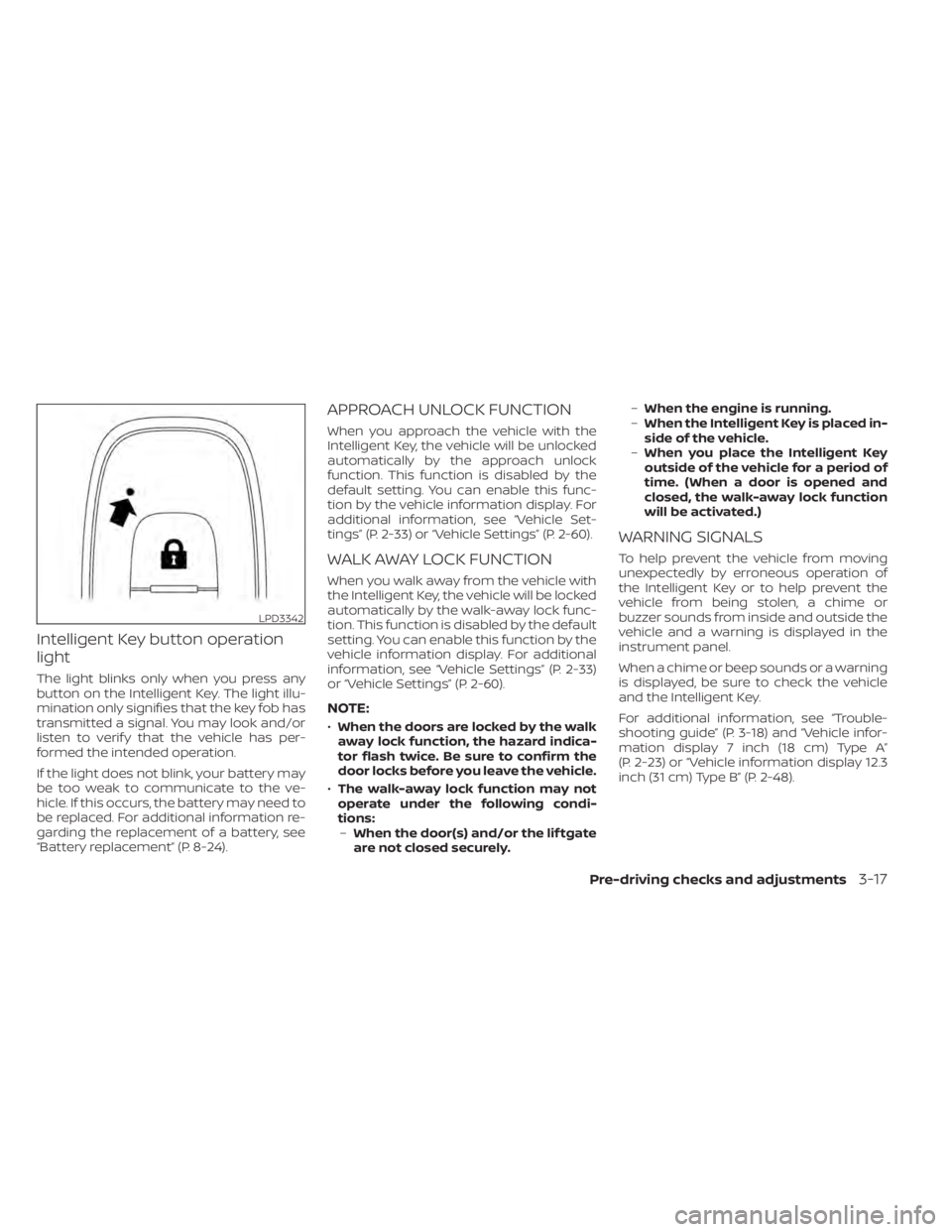
Intelligent Key button operation
light
The light blinks only when you press any
button on the Intelligent Key. The light illu-
mination only signifies that the key fob has
transmitted a signal. You may look and/or
listen to verif y that the vehicle has per-
formed the intended operation.
If the light does not blink, your battery may
be too weak to communicate to the ve-
hicle. If this occurs, the battery may need to
be replaced. For additional information re-
garding the replacement of a battery, see
“Battery replacement” (P. 8-24).
APPROACH UNLOCK FUNCTION
When you approach the vehicle with the
Intelligent Key, the vehicle will be unlocked
automatically by the approach unlock
function. This function is disabled by the
default setting. You can enable this func-
tion by the vehicle information display. For
additional information, see “Vehicle Set-
tings” (P. 2-33) or “Vehicle Settings” (P. 2-60).
WALK AWAY LOCK FUNCTION
When you walk away from the vehicle with
the Intelligent Key, the vehicle will be locked
automatically by the walk-away lock func-
tion. This function is disabled by the default
setting. You can enable this function by the
vehicle information display. For additional
information, see “Vehicle Settings” (P. 2-33)
or “Vehicle Settings” (P. 2-60).
NOTE:
•When the doors are locked by the walk
away lock function, the hazard indica-
tor flash twice. Be sure to confirm the
door locks before you leave the vehicle.
• The walk-away lock function may not
operate under the following condi-
tions: – When the door(s) and/or the lif tgate
are not closed securely. –
When the engine is running.
– When the Intelligent Key is placed in-
side of the vehicle.
– When you place the Intelligent Key
outside of the vehicle for a period of
time. (When a door is opened and
closed, the walk-away lock function
will be activated.)
WARNING SIGNALS
To help prevent the vehicle from moving
unexpectedly by erroneous operation of
the Intelligent Key or to help prevent the
vehicle from being stolen, a chime or
buzzer sounds from inside and outside the
vehicle and a warning is displayed in the
instrument panel.
When a chime or beep sounds or a warning
is displayed, be sure to check the vehicle
and the Intelligent Key.
For additional information, see “Trouble-
shooting guide” (P. 3-18) and “Vehicle infor-
mation display 7 inch (18 cm) Type A”
(P. 2-23) or “Vehicle information display 12.3
inch (31 cm) Type B” (P. 2-48).
LPD3342
Pre-driving checks and adjustments3-17
Page 259 of 665
CONDITIONS THE REMOTE ENGINE
START WILL NOT WORK
The Remote Engine Start will not operate if
any of the following conditions are present:
• The ignition switch is placed in the ONposition.
• The hood is not securely closed.
• The hazard indicator lights are on.
• The engine is still running. The engine must be completely stopped. Wait at
least 6 seconds if the engine goes from
running to off. This is not applicable when
extending engine run time.
• The
button is not pressed and held
for at least 2 seconds.
• The
button is not pressed and held
within 5 seconds of pressing the lock
button.
• The brake is pressed.
• The doors are not closed and locked.
• The lif tgate is open.
• The Key System Error warning message appears in the vehicle information
display.
• The alarm sounds due to illegal entry into the vehicle. • Two Remote Engine Starts, or a single
Remote Engine Start with an extension,
have already been used.
• The vehicle is not in P (Park) position.
• There is a detected registered key already inside of the vehicle.
• The Remote Engine Start feature has been switched to the OFF position using
the “Vehicle Settings” menu on the vehicle
information display. For additional infor-
mation, see “Vehicle information display 7
inch (18 cm) Type A” (P. 2-23) or “Vehicle
information display 12.3 inch (31 cm) Type
B” (P. 2-48).
The Remote Engine Start may display a
warning or indicator in the vehicle informa-
tion display. For additional information, see
“Vehicle information display 7 inch (18 cm)
Type A” (P. 2-23) or “Vehicle information dis-
play 12.3 inch (31 cm) Type B” (P. 2-48).
3-22Pre-driving checks and adjustments