heater NISSAN PATHFINDER 2023 Owners Manual
[x] Cancel search | Manufacturer: NISSAN, Model Year: 2023, Model line: PATHFINDER, Model: NISSAN PATHFINDER 2023Pages: 665, PDF Size: 4.64 MB
Page 19 of 665
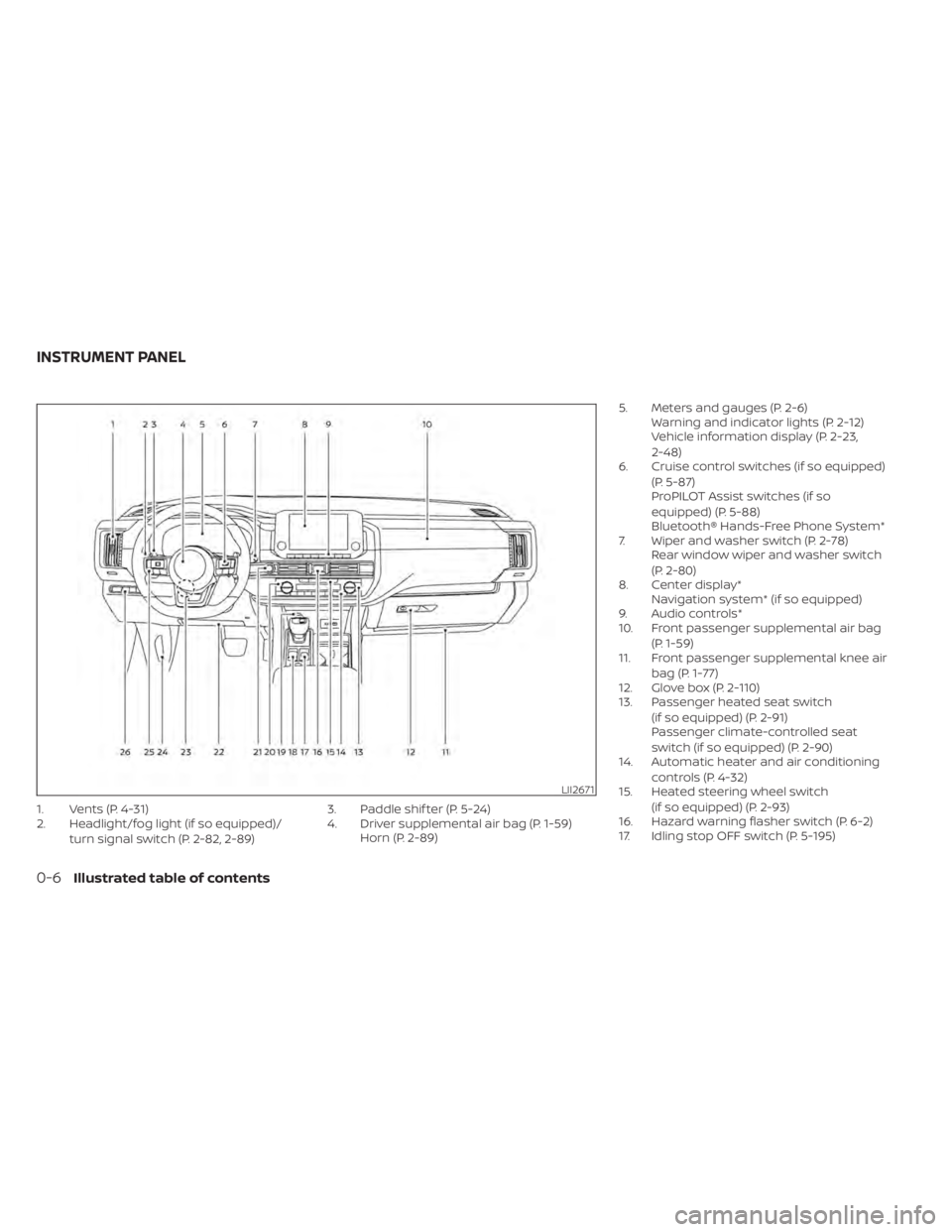
1. Vents (P. 4-31)
2. Headlight/fog light (if so equipped)/turn signal switch (P. 2-82, 2-89) 3. Paddle shif ter (P. 5-24)
4. Driver supplemental air bag (P. 1-59)
Horn (P. 2-89) 5. Meters and gauges (P. 2-6)
Warning and indicator lights (P. 2-12)
Vehicle information display (P. 2-23,
2-48)
6. Cruise control switches (if so equipped)
(P. 5-87)
ProPILOT Assist switches (if so
equipped) (P. 5-88)
Bluetooth® Hands-Free Phone System*
7. Wiper and washer switch (P. 2-78) Rear window wiper and washer switch
(P. 2-80)
8. Center display* Navigation system* (if so equipped)
9. Audio controls*
10. Front passenger supplemental air bag
(P. 1-59)
11. Front passenger supplemental knee air
bag (P. 1-77)
12. Glove box (P. 2-110)
13. Passenger heated seat switch
(if so equipped) (P. 2-91)
Passenger climate-controlled seat
switch (if so equipped) (P. 2-90)
14. Automatic heater and air conditioning
controls (P. 4-32)
15. Heated steering wheel switch
(if so equipped) (P. 2-93)
16. Hazard warning flasher switch (P. 6-2)
17. Idling stop OFF switch (P. 5-195)
LII2671
INSTRUMENT PANEL
0-6Illustrated table of contents
Page 111 of 665
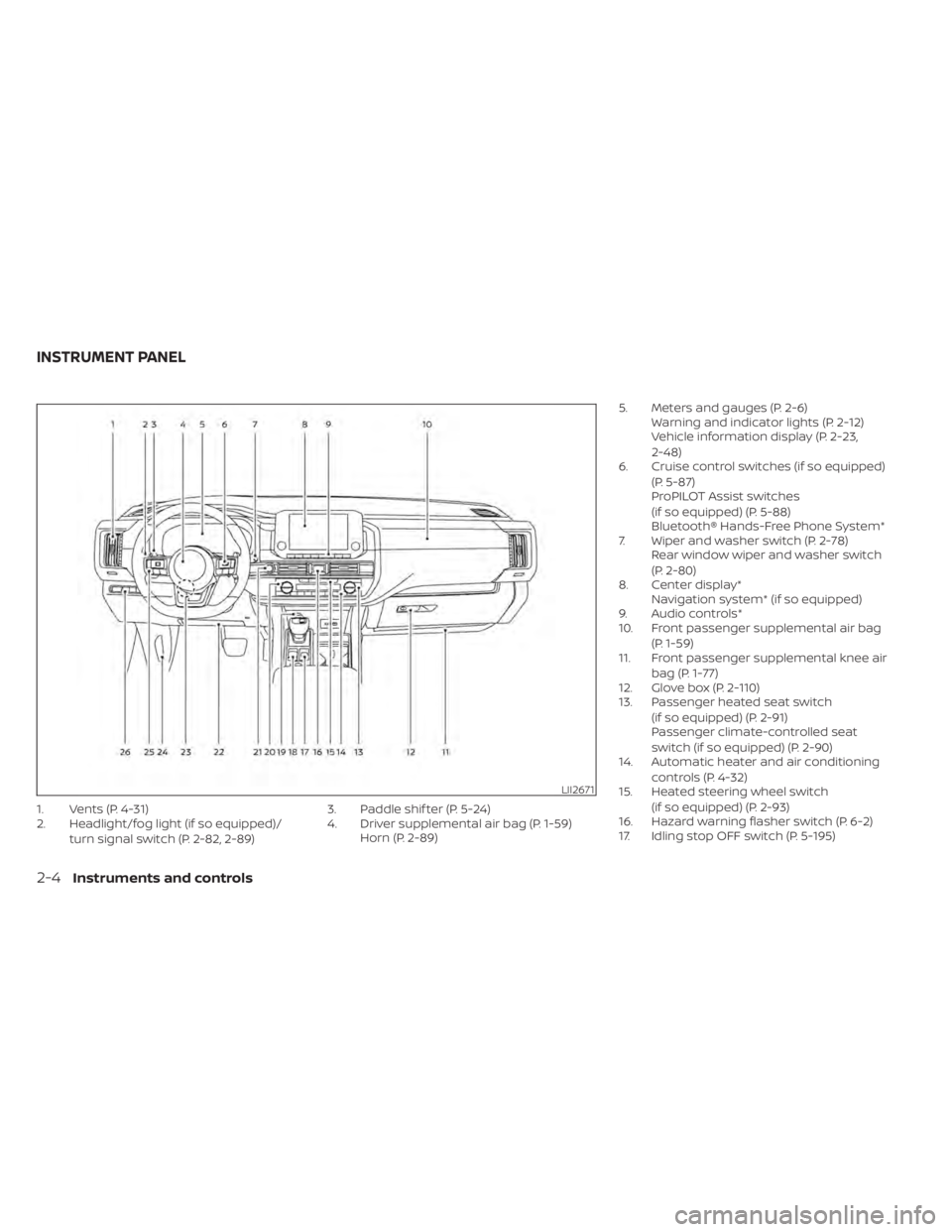
1. Vents (P. 4-31)
2. Headlight/fog light (if so equipped)/turn signal switch (P. 2-82, 2-89) 3. Paddle shif ter (P. 5-24)
4. Driver supplemental air bag (P. 1-59)
Horn (P. 2-89) 5. Meters and gauges (P. 2-6)
Warning and indicator lights (P. 2-12)
Vehicle information display (P. 2-23,
2-48)
6. Cruise control switches (if so equipped)
(P. 5-87)
ProPILOT Assist switches
(if so equipped) (P. 5-88)
Bluetooth® Hands-Free Phone System*
7. Wiper and washer switch (P. 2-78) Rear window wiper and washer switch
(P. 2-80)
8. Center display* Navigation system* (if so equipped)
9. Audio controls*
10. Front passenger supplemental air bag
(P. 1-59)
11. Front passenger supplemental knee air
bag (P. 1-77)
12. Glove box (P. 2-110)
13. Passenger heated seat switch
(if so equipped) (P. 2-91)
Passenger climate-controlled seat
switch (if so equipped) (P. 2-90)
14. Automatic heater and air conditioning
controls (P. 4-32)
15. Heated steering wheel switch
(if so equipped) (P. 2-93)
16. Hazard warning flasher switch (P. 6-2)
17. Idling stop OFF switch (P. 5-195)
LII2671
INSTRUMENT PANEL
2-4Instruments and controls
Page 198 of 665
WARNING
Do not use or allow occupants to use
the seat heater if you or the occupants
cannot monitor elevated seat tem-
peratures or have an inability to feel
pain in body parts that contact the
seat. Use of the seat heater by such
people could result in serious injury.
CAUTION
• The battery could run down if the
seat heater is operated while the en-
gine is not running.
• Do not use the seat heater for ex-
tended periods or when no one is us-
ing the seat.
• Do not put anything on the seat
which insulates heat, such as a blan-
ket, cushion, seat cover, etc. Other-
wise, the seat may become
overheated.
• Do not place anything hard or heavy
on the seat or pierce it with a pin or
similar object. This may result in
damage to the heater.
• Any liquid spilled on the heated seat
should be removed immediately with
a dry cloth.
• When cleaning the seat, never use
gasoline, benzine, thinner, or any
similar materials.
• If any malfunctions are found or the
heated seat does not operate, turn
the switch off and have the system
checked. It is recommended that you
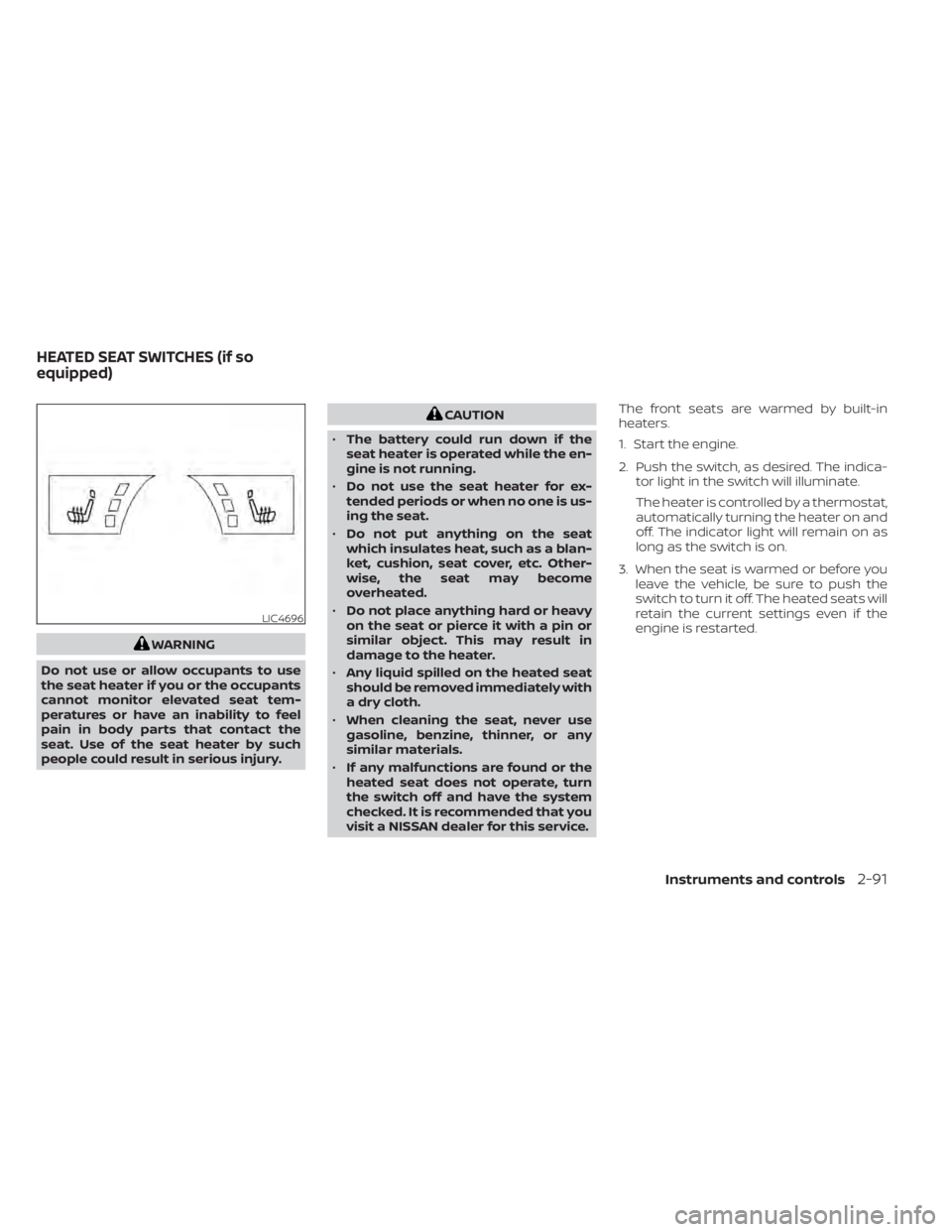
visit a NISSAN dealer for this service. The front seats are warmed by built-in
heaters.
1. Start the engine.
2. Push the switch, as desired. The indica-
tor light in the switch will illuminate.
The heater is controlled by a thermostat,
automatically turning the heater on and
off. The indicator light will remain on as
long as the switch is on.
3. When the seat is warmed or before you leave the vehicle, be sure to push the
switch to turn it off. The heated seats will
retain the current settings even if the
engine is restarted.
LIC4696
HEATED SEAT SWITCHES (if so
equipped)
Instruments and controls2-91
Page 199 of 665
WARNING
Do not use or allow occupants to use
the seat heater if you or the occupants
cannot monitor elevated seat tem-
peratures or have an inability to feel
pain in body parts that contact the
seat. Use of the seat heater by such
people could result in serious injury.
CAUTION
• The battery could run down if the
seat heater is operated while the en-
gine is not running.
• Do not use the seat heater for ex-
tended periods or when no one is us-
ing the seat.
• Do not put anything on the seat
which insulates heat, such as a blan-
ket, cushion, seat cover, etc. Other-
wise, the seat may become
overheated.
• Do not place anything hard or heavy
on the seat or pierce it with a pin or
similar object. This may result in
damage to the heater. •
Any liquid spilled on the heated seat
should be removed immediately with
a dry cloth.
• When cleaning the seat, never use
gasoline, benzine, thinner, or any
similar materials.
• If any malfunctions are found or the
heated seat does not operate, turn
the switch off and have the system
checked. It is recommended that you
visit a NISSAN dealer for this service.
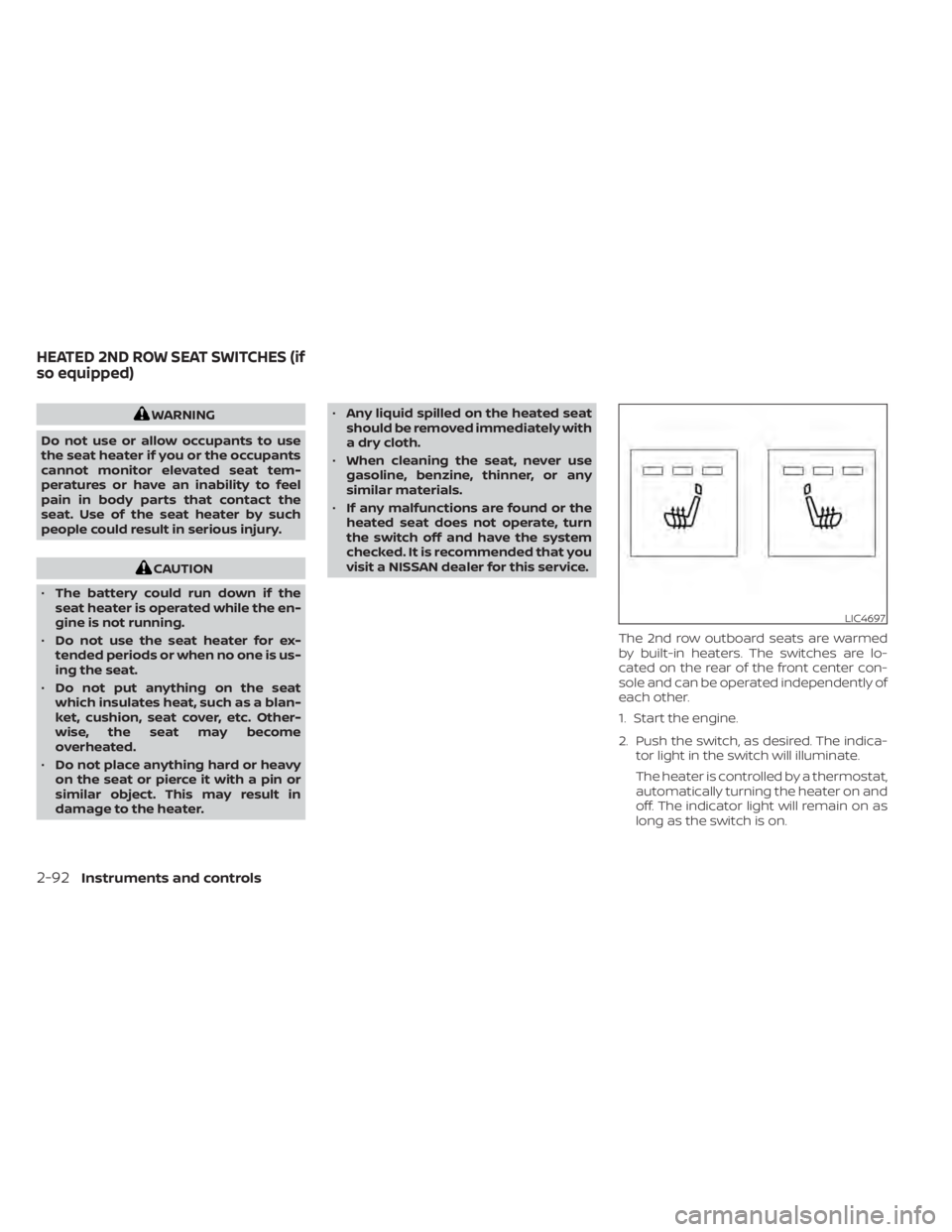
The 2nd row outboard seats are warmed
by built-in heaters. The switches are lo-
cated on the rear of the front center con-
sole and can be operated independently of
each other.
1. Start the engine.
2. Push the switch, as desired. The indica-tor light in the switch will illuminate.
The heater is controlled by a thermostat,
automatically turning the heater on and
off. The indicator light will remain on as
long as the switch is on.
LIC4697
HEATED 2ND ROW SEAT SWITCHES (if
so equipped)
2-92Instruments and controls
Page 280 of 665
Restarting the entry/exit function
If the battery cable is disconnected or if the
fuse opens, the stored memory positions
may be lost and some of the functions will
be restricted.
1. Drive the vehicle over 25 mph (40 km/h).
OR
2. Open and close the driver's door morethan two times with the ignition switch
in the OFF position.
The entry/exit function should now work
properly.
SETTING MEMORY FUNCTION
The position of the following settings can
be linked to the Intelligent Key and the
memorized settings can be available for
each Intelligent Key.
• Climate control system
• Audio system
To use the memory function, set the cli-
mate and audio systems to the driver's
preferred settings. Lock the doors with the
Intelligent Key. Each Intelligent Key may be
set with the driver's individual preferences.
When a new Intelligent Key is used, “Con-
nection with the key has been done” will be displayed on the vehicle information dis-
play and the memorized settings are
available.
To engage the memorized settings, per-
form the following:
1. Carry the Intelligent Key that is linked to
the memorized settings.
2. Unlock the doors by wrapping hand around the capacitive door handle or
the
button on the Intelligent Key.
3. Place the ignition switch in the ON posi- tion. The settings linked to the Intelligent
Key will start.
For additional information on using the cli-
mate control system, see “Heater and air
conditioner (automatic)” (P. 4-32).
SYSTEM OPERATION
The memory seat system will not work or
will stop operating under the following
conditions:
• When the vehicle speed is above 4 mph (7 km/h).
• When any of the memory switches are pushed while the memory seat is
operating. • When the switch for the driver’s seat and
steering wheel is pushed while the
memory seat is operating.
• When the seat has already been moved to the memorized position.
• When no seat position is stored in the memory switch.
• When the shif t position is moved from P (Park) position to any other position.
Pre-driving checks and adjustments3-43
Page 282 of 665
4 Monitor, climate, audio, phone and
voice recognition systems
NissanConnect® Owner’s Manual...............4-2
RearView Monitor (if so equipped) ...............4-3
RearView Monitor system operation ..........4-4
How to read the displayed lines ..............4-4
Difference between predicted and
actual distances .............................4-5
How to park with predicted course
lines ..........................................4-7
Adjusting the screen .........................4-8
How to turn on and off predicted
course lines ..................................4-8
RearView Monitor system limitations .........4-8
System maintenance ........................4-9
Intelligent Around View® Monitor
(if so equipped) ................................. 4-10
Intelligent Around View® Monitor
system operation ............................ 4-11
Difference between predicted and
actual distances ............................ 4-16
How to park with predicted course
lines ......................................... 4-17
How to switch the display ...................4-18
Off-road mode (for 4WD model)
(if so equipped) .............................. 4-19
Adjusting the screen ........................ 4-19
Intelligent Around View® Monitor
system limitations .......................... 4-20System maintenance
.......................4-22
Camera aiding sonar (parking sensor)
(if so equipped) ................................. 4-23
Sonar system operation .....................4-23
Turning on and off the sonar function .......4-24
Sonar system limitations ....................4-25
System maintenance .......................4-25
Moving Object Detection (MOD)
(if so equipped) ................................. 4-26
MOD system operation ......................4-27
Turning MOD on and off .....................4-29
MOD system limitations .....................4-29
System maintenance .......................4-30
Vents .......................................... 4-31
Heater and air conditioner (automatic) .........4-32
Automatic operation ........................ 4-33
Manual operation ........................... 4-34
Operating tips ............................... 4-36
Rear automatic air conditioning system .....4-37
Servicing air conditioner ........................4-39
Antenna ........................................ 4-39
R
oof Mounted Antenna ......................4-39
Car phone or CB radio .......................... 4-40
iPod®/iPhone® ................................. 4-40
Page 313 of 665
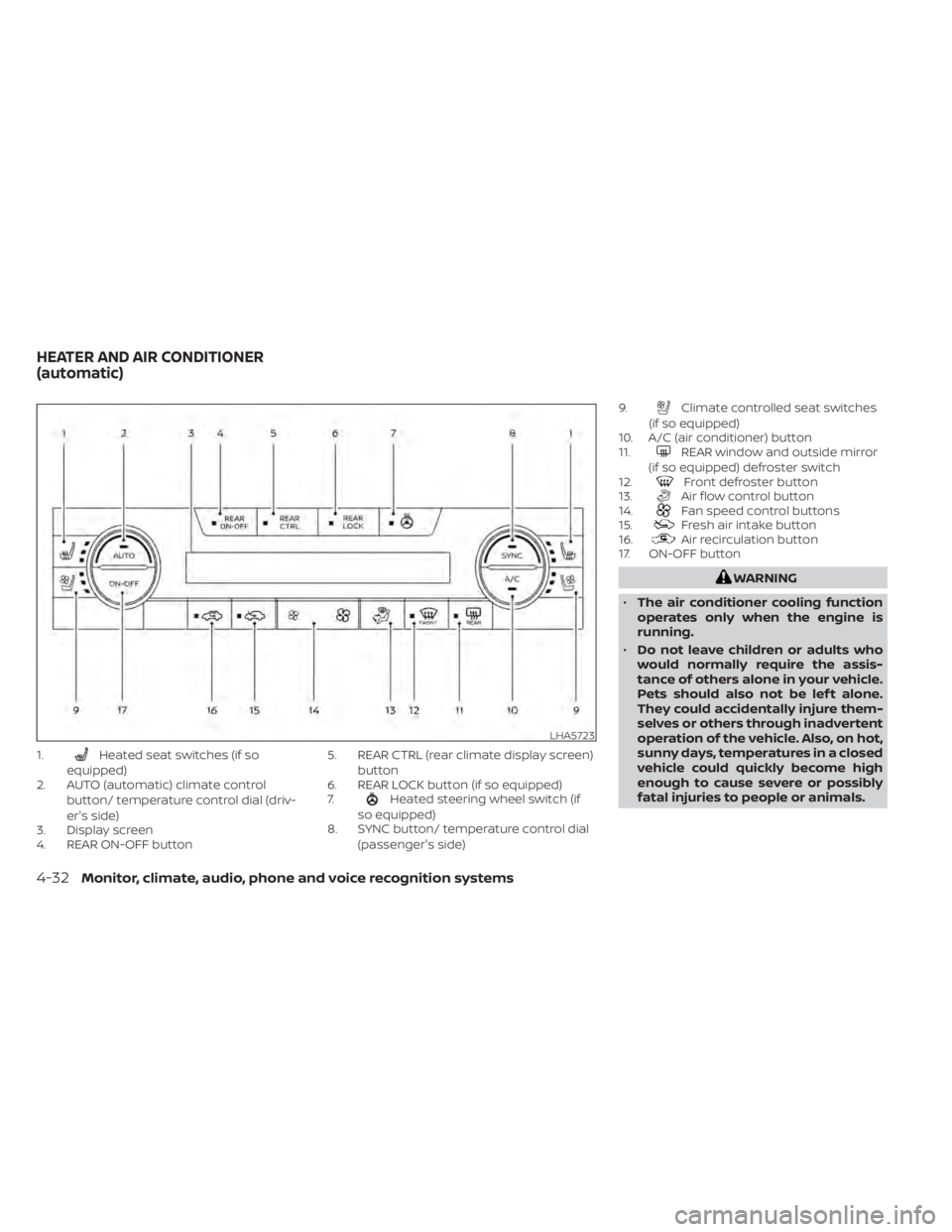
1.Heated seat switches (if so
equipped)
2. AUTO (automatic) climate control
button/ temperature control dial (driv-
er's side)
3. Display screen
4. REAR ON-OFF button 5. REAR CTRL (rear climate display screen)
button
6. REAR LOCK button (if so equipped)
7.
Heated steering wheel switch (if
so equipped)
8. SYNC button/ temperature control dial
(passenger's side) 9.
Climate controlled seat switches
(if so equipped)
10. A/C (air conditioner) button
11.
REAR window and outside mirror
(if so equipped) defroster switch
12.
Front defroster button
13.Air flow control button
14.Fan speed control buttons
15.Fresh air intake button
16.Air recirculation button
17. ON-OFF button
WARNING
• The air conditioner cooling function
operates only when the engine is
running.
• Do not leave children or adults who
would normally require the assis-
tance of others alone in your vehicle.
Pets should also not be lef t alone.
They could accidentally injure them-
selves or others through inadvertent
operation of the vehicle. Also, on hot,
sunny days, temperatures in a closed
vehicle could quickly become high
enough to cause severe or possibly
fatal injuries to people or animals.
LHA5723
HEATER AND AIR CONDITIONER
(automatic)
4-32Monitor, climate, audio, phone and voice recognition systems
Page 314 of 665
•Do not use the recirculation mode for
long periods as it may cause the inte-
rior air to become stale and the win-
dows to fog up.
Start the engine and operate the controls
to activate the air conditioner.
NOTE:
• Odors from inside and outside the ve- hicle can build up in the air conditioner
unit. Odor can enter the passenger
compartment through the vents.
• When parking, set the heater and air conditioner controls to turn off air re-
circulation to allow fresh air into the
passenger compartment. This should
help reduce odors inside the vehicle.
While the engine is stopped by the Idling
Stop System, activating the front defroster
will cause the engine to automatically re-
start. While the engine is running, activating
the front defroster will prevent the Idling
Stop System from automatically stopping
the engine.
When the engine is stopped by the Idling
Stop System, heater and air conditioner
performance may be reduced. To keep full
heater and air conditioner performance,
restart the engine by pushing the Idling Stop OFF switch. For additional informa-
tion, see “Idling Stop System” (P. 5-195).
AUTOMATIC OPERATION
Cooling and/or dehumidified
heating (AUTO)
This mode may be used all year round as
the system automatically works to keep a
constant temperature. Air flow distribution,
air intake control, and fan speed are also
controlled automatically.
1. Press the AUTO button.
2. Turn the temperature control dial to the
lef t or right to set the desired
temperature.
• Adjust the temperature display to about 75°F (24°C) for normal operation.
• The temperature of the passenger com- partment will be maintained automati-
cally. Air flow distribution, air intake con-
trol and fan speed are also controlled
automatically.
• A visible mist may be seen coming from the vents in hot, humid conditions as the
air is cooled rapidly. This does not indicate
a malfunction. 3. You can individually set driver's and front
passenger's side temperature using
each temperature control dial.
• To synchronize the driver’s and front pas- senger’s temperature settings, press the
SYNC button. The SYNC indicator will
illuminate.Heating (A/C off)
The air conditioner does not activate. When
you need to heat only, use this mode.
1. Press the AUTO button.
2. Turn the temperature control dial to set the desired temperature.
• The temperature of the passenger com- partment will be maintained automati-
cally. Air flow distribution, air intake con-
trol and fan speed are also controlled
automatically.
• Not recommended if windows fog up.
Dehumidified defrosting or
defogging
1. Press thefront defroster button.
(The indicator light on the button will
come on.)
2. Turn the temperature control dial to set the desired temperature.
Monitor, climate, audio, phone and voice recognition systems4-33
Page 316 of 665
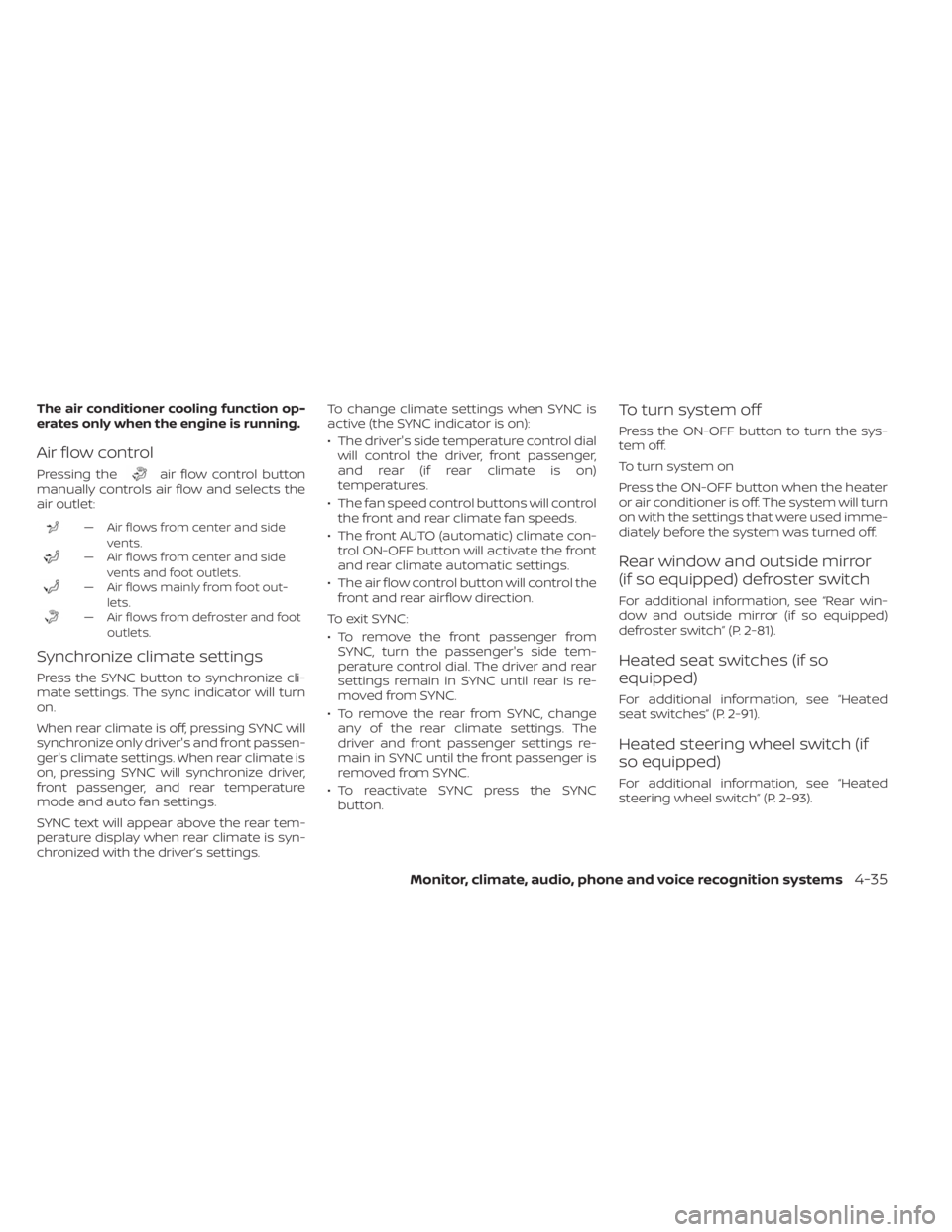
The air conditioner cooling function op-
erates only when the engine is running.
Air flow control
Pressing theair flow control button
manually controls air flow and selects the
air outlet:
— Air flows from center and side
vents.
— Air flows from center and sidevents and foot outlets.
— Air flows mainly from foot out-lets.
— Air flows from defroster and footoutlets.
Synchronize climate settings
Press the SYNC button to synchronize cli-
mate settings. The sync indicator will turn
on.
When rear climate is off, pressing SYNC will
synchronize only driver's and front passen-
ger's climate settings. When rear climate is
on, pressing SYNC will synchronize driver,
front passenger, and rear temperature
mode and auto fan settings.
SYNC text will appear above the rear tem-
perature display when rear climate is syn-
chronized with the driver’s settings. To change climate settings when SYNC is
active (the SYNC indicator is on):
• The driver's side temperature control dial
will control the driver, front passenger,
and rear (if rear climate is on)
temperatures.
• The fan speed control buttons will control the front and rear climate fan speeds.
• The front AUTO (automatic) climate con- trol ON-OFF button will activate the front
and rear climate automatic settings.
• The air flow control button will control the front and rear airflow direction.
To exit SYNC:
• To remove the front passenger from SYNC, turn the passenger's side tem-
perature control dial. The driver and rear
settings remain in SYNC until rear is re-
moved from SYNC.
• To remove the rear from SYNC, change any of the rear climate settings. The
driver and front passenger settings re-
main in SYNC until the front passenger is
removed from SYNC.
• To reactivate SYNC press the SYNC button.
To turn system off
Press the ON-OFF button to turn the sys-
tem off.
To turn system on
Press the ON-OFF button when the heater
or air conditioner is off. The system will turn
on with the settings that were used imme-
diately before the system was turned off.
Rear window and outside mirror
(if so equipped) defroster switch
For additional information, see “Rear win-
dow and outside mirror (if so equipped)
defroster switch” (P. 2-81).
Heated seat switches (if so
equipped)
For additional information, see “Heated
seat switches” (P. 2-91).
Heated steering wheel switch (if
so equipped)
For additional information, see “Heated
steering wheel switch” (P. 2-93).
Monitor, climate, audio, phone and voice recognition systems4-35
Page 326 of 665
Chassis control............................... 5-181
Intelligent Trace Control (I-TC) ..............5-181
Active Ride Control (ARC)
(if so equipped) ............................. 5-181
Hill descent control system (if so equipped) . . . 5-182
Hill start assist system ........................5-183
Front and Rear Sonar System
(if so equipped) ................................ 5-183
System operation .......................... 5-184
How to enable/disable the front and
rear sonar system .......................... 5-186
Sonar limitations ........................... 5-187
System temporarily unavailable ............5-188
System maintenance ......................5-188Idling Stop System
............................ 5-189
Retrograde movement control function ....5-191
Idling Stop System display ..................5-191
Idling Stop OFF switch ......................5-195
Cold weather driving .......................... 5-196
Freeing a frozen door lock ..................5-196
Antifreeze .................................. 5-196
Battery..................................... 5-196
Draining of coolant water ..................5-196
Tire equipment ............................. 5-196
Special winter equipment ..................5-196
Driving on snow or ice ......................5-196
Engine block heater (if so equipped) ........5-197