display NISSAN PATROL 2000 Electronic Owner's Guide
[x] Cancel search | Manufacturer: NISSAN, Model Year: 2000, Model line: PATROL, Model: NISSAN PATROL 2000Pages: 1033, PDF Size: 30.71 MB
Page 690 of 1033
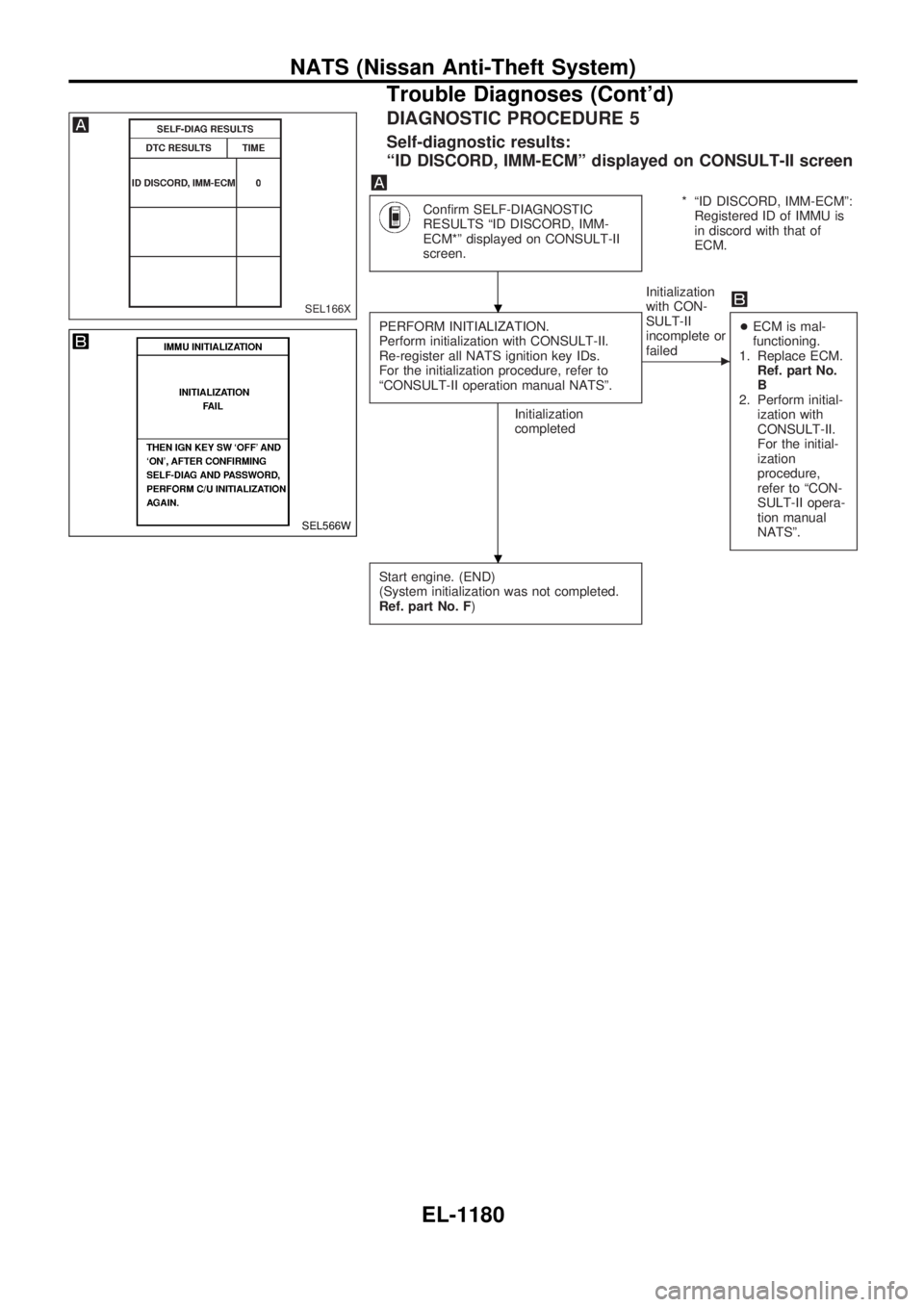
DIAGNOSTIC PROCEDURE 5
Self-diagnostic results:
ªID DISCORD, IMM-ECMº displayed on CONSULT-II screen
Confirm SELF-DIAGNOSTIC
RESULTS ªID DISCORD, IMM-
ECM*º displayed on CONSULT-II
screen.* ªID DISCORD, IMM-ECMº:
Registered ID of IMMU is
in discord with that of
ECM.
PERFORM INITIALIZATION.
Perform initialization with CONSULT-II.
Re-register all NATS ignition key IDs.
For the initialization procedure, refer to
ªCONSULT-II operation manual NATSº.
Initialization
completedInitialization
with CON-
SULT-II
incomplete or
failed
c
+ECM is mal-
functioning.
1. Replace ECM.
Ref. part No.
B
2. Perform initial-
ization with
CONSULT-II.
For the initial-
ization
procedure,
refer to ªCON-
SULT-II opera-
tion manual
NATSº.
Start engine. (END)
(System initialization was not completed.
Ref. part No. F)
SEL166X
SEL566W
.
.
NATS (Nissan Anti-Theft System)
Trouble Diagnoses (Cont'd)
EL-1180
Page 691 of 1033
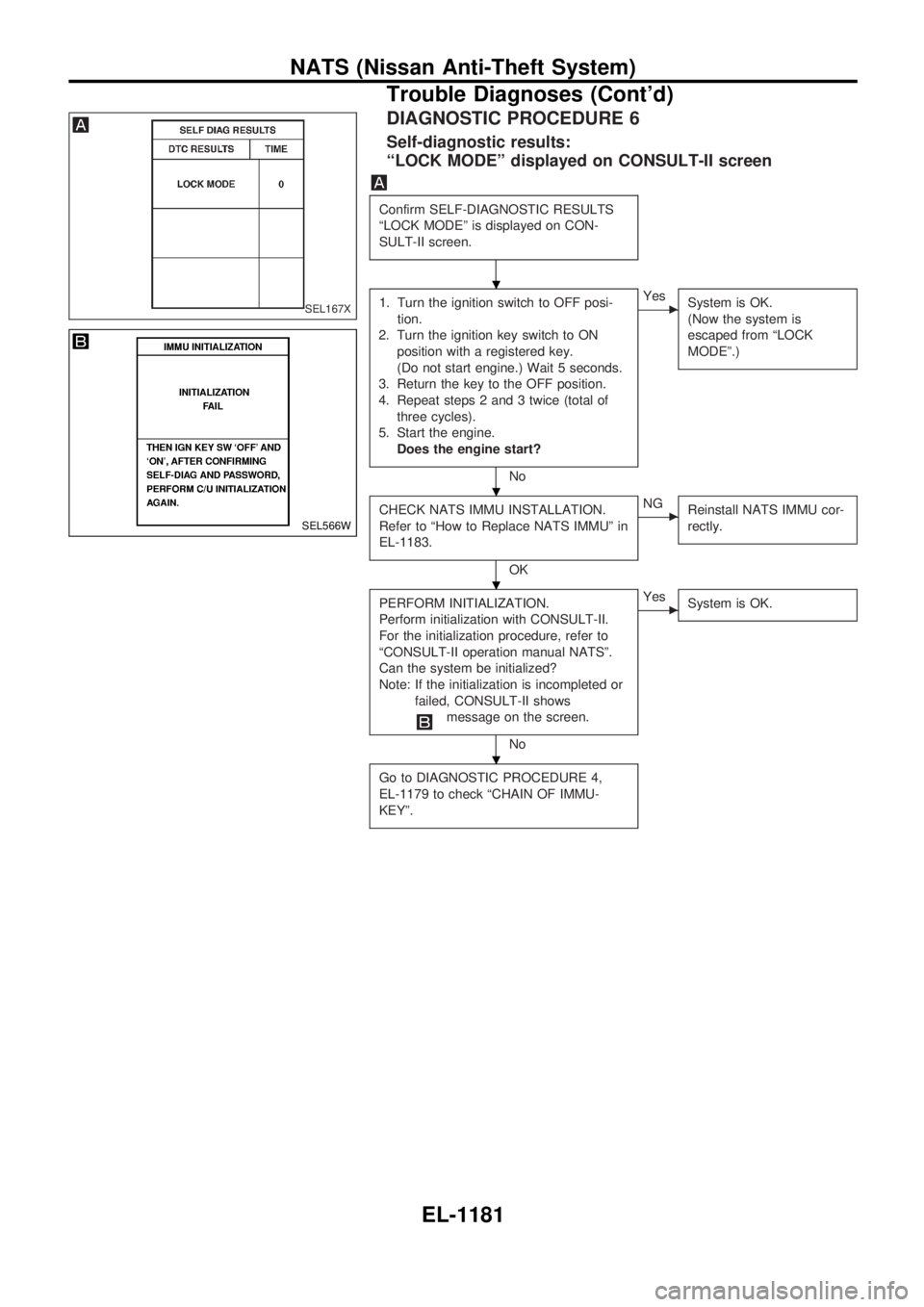
DIAGNOSTIC PROCEDURE 6
Self-diagnostic results:
ªLOCK MODEº displayed on CONSULT-II screen
Confirm SELF-DIAGNOSTIC RESULTS
ªLOCK MODEº is displayed on CON-
SULT-II screen.
1. Turn the ignition switch to OFF posi-
tion.
2. Turn the ignition key switch to ON
position with a registered key.
(Do not start engine.) Wait 5 seconds.
3. Return the key to the OFF position.
4. Repeat steps 2 and 3 twice (total of
three cycles).
5. Start the engine.
Does the engine start?
No
cYes
System is OK.
(Now the system is
escaped from ªLOCK
MODEº.)
CHECK NATS IMMU INSTALLATION.
Refer to ªHow to Replace NATS IMMUº in
EL-1183.
OK
cNG
Reinstall NATS IMMU cor-
rectly.
PERFORM INITIALIZATION.
Perform initialization with CONSULT-II.
For the initialization procedure, refer to
ªCONSULT-II operation manual NATSº.
Can the system be initialized?
Note: If the initialization is incompleted or
failed, CONSULT-II shows
message on the screen.
No
cYes
System is OK.
Go to DIAGNOSTIC PROCEDURE 4,
EL-1179 to check ªCHAIN OF IMMU-
KEYº.
SEL167X
SEL566W
.
.
.
.
NATS (Nissan Anti-Theft System)
Trouble Diagnoses (Cont'd)
EL-1181
Page 991 of 1033
Trouble Diagnoses Introduction
CAUTION:
+Do not use electrical test equipment to check SRS harness connectors unless instructed to in
this Service Manual. SRS wiring harnesses can be identified by yellow harness protector or yel-
low insulation tape before the harness connectors.
+Do not attempt to repair, splice or modify the SRS wiring harness. If the harness is damaged,
replace it with a new one.
+Keep ground portion clean.
DIAGNOSIS FUNCTION
The SRS self-diagnosis results can be read by using ªAIR BAGº warning lamp, ªSEAT BELTº warning lamp
(Models except for Europe) and/or CONSULT-II. The reading of these results is accomplished using one of
two modes Ð ªUser modeº and ªDiagnosis modeº.
The User mode is exclusively prepared for the customer (driver). This mode warns the driver of a system
malfunction through the operation of the ªAIR BAGº warning lamp and/or ªSEAT BELTº warning lamp (Mod-
els except for Europe).
The Diagnosis mode allows the technician to locate and inspect the malfunctioning part.
The mode applications for the ªAIR BAGº warning lamp, ªSEAT BELTº warning lamp (Models except for
Europe) and CONSULT-II are as follows:
User mode Diagnosis mode Display type
ªAIR BAGº warning lamp X X ON-OFF operation
ªSEAT BELTº warning lamp
(Models except for Europe)X Ð ON-OFF operation
CONSULT-II Ð X Monitoring
DIAGNOSIS MODE FOR CONSULT-II
+ªSELF-DIAG [CURRENT]º
A current Self-diagnosis result (also indicated by the warning lamp flashes in the Diagnosis mode) is
displayed on the CONSULT-II screen in real time. This refers to a malfunctioning part requiring repairs.
+ªSELF-DIAG [PAST]º
Diagnosis results previously stored in the memory are displayed on the CONSULT-II screen. The stored
results are not erased until memory erasing is executed.
+ªTROUBLE DIAG RECORDº
With TROUBLE DIAG RECORD, diagnosis results previously erased by a reset operation can be dis-
played on the CONSULT-II screen.
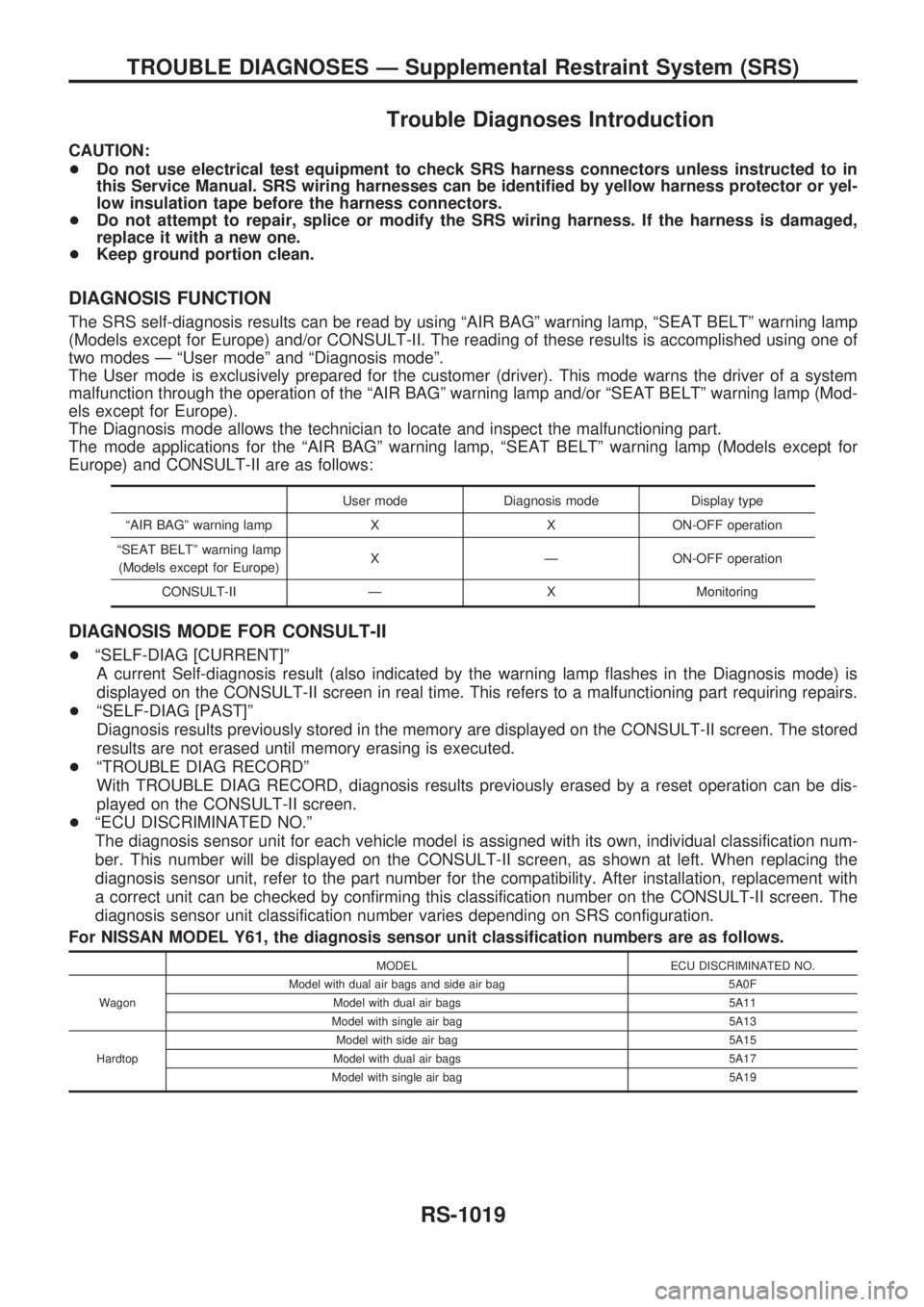
+ªECU DISCRIMINATED NO.º
The diagnosis sensor unit for each vehicle model is assigned with its own, individual classification num-
ber. This number will be displayed on the CONSULT-II screen, as shown at left. When replacing the
diagnosis sensor unit, refer to the part number for the compatibility. After installation, replacement with
a correct unit can be checked by confirming this classification number on the CONSULT-II screen. The
diagnosis sensor unit classification number varies depending on SRS configuration.
For NISSAN MODEL Y61, the diagnosis sensor unit classification numbers are as follows.
MODEL ECU DISCRIMINATED NO.
WagonModel with dual air bags and side air bag 5A0F
Model with dual air bags 5A11
Model with single air bag 5A13
HardtopModel with side air bag 5A15
Model with dual air bags 5A17
Model with single air bag 5A19
TROUBLE DIAGNOSES Ð Supplemental Restraint System (SRS)
RS-1019
Page 993 of 1033
![NISSAN PATROL 2000 Electronic Owners Guide HOW TO ERASE SELF-DIAGNOSIS RESULTS
With CONSULT-II
+ªSELF-DIAG [CURRENT]º
A current Self-diagnosis result is displayed on the CONSULT-II screen in real time. After the malfunc-
tion is repaired com](/img/5/57367/w960_57367-992.png "NISSAN PATROL 2000 Electronic Owners Guide HOW TO ERASE SELF-DIAGNOSIS RESULTS
With CONSULT-II
+ªSELF-DIAG [CURRENT]º
A current Self-diagnosis result is displayed on the CONSULT-II screen in real time. After the malfunc-
tion is repaired com")
HOW TO ERASE SELF-DIAGNOSIS RESULTS
With CONSULT-II
+ªSELF-DIAG [CURRENT]º
A current Self-diagnosis result is displayed on the CONSULT-II screen in real time. After the malfunc-
tion is repaired completely, no malfunction is detected on ªSELF-DIAG [CURRENT]º.
+ªSELF-DIAG [PAST]º
Return to the ªSELF-DIAG [CURRENT]º CONSULT-II screen
by pushing ªBACKº key of CONSULT-II and select ªSELF-
DIAG [CURRENT]º in ªSELECT DIAG MODEº. Touch
ªERASEº in ªSELF-DIAG [CURRENT]º mode.
NOTE:
If the memory of the malfunction in ªSELF-DIAG [PAST]º is
not erased, the User mode shows the system malfunction by
the operation of the warning lamp even if the malfunction is
repaired completely.
+ªTROUBLE DIAG RECORDº
The memory of ªTROUBLE DIAG RECORDº cannot be erased.
Without CONSULT-II
After a malfunction is repaired, return Diagnosis mode to User mode by switching the ignition ªOFFº for at
least 1 second, then back ªONº. At that time, the self-diagnostic result is cleared.
How to Perform Trouble Diagnoses for Quick
and Accurate Repair
A good understanding of the malfunction conditions can make troubleshooting faster and more accurate.
In general, each customer feels differently about a malfunction. It is important to fully understand the symp-
toms or conditions for a customer complaint.
INFORMATION FROM CUSTOMER
WHAT ........ Vehicle model
WHEN ....... Date, Frequencies
WHERE ..... Road conditions
HOW .......... Operating conditions, Symptoms
PRELIMINARY CHECK
Check that the following parts are in good order.
+Battery [Refer to EL section (ªBATTERYº) of Service Manual.]
+Fuse [Refer to EL section (ªFuseº, ªPOWER SUPPLY ROUTINGº) of Service Manual.]
+System component-to-harness connections
SRS701
TROUBLE DIAGNOSES Ð Supplemental Restraint System (SRS)
Trouble Diagnoses Introduction (Cont'd)
RS-1021
Page 1006 of 1033
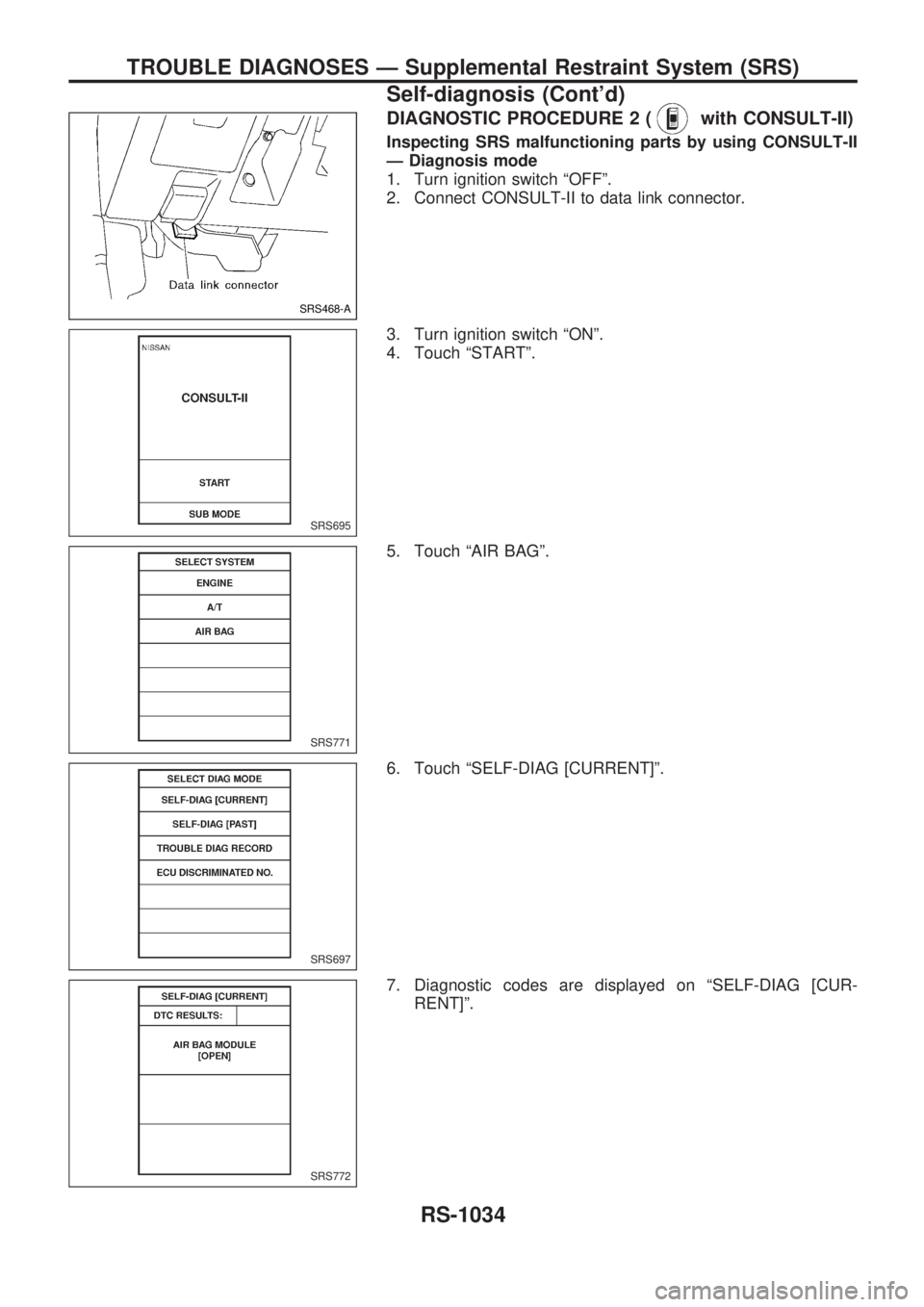
DIAGNOSTIC PROCEDURE 2 (with CONSULT-II)
Inspecting SRS malfunctioning parts by using CONSULT-II
Ð Diagnosis mode
1. Turn ignition switch ªOFFº.
2. Connect CONSULT-II to data link connector.
3. Turn ignition switch ªONº.
4. Touch ªSTARTº.
5. Touch ªAIR BAGº.
6. Touch ªSELF-DIAG [CURRENT]º.
7. Diagnostic codes are displayed on ªSELF-DIAG [CUR-
RENT]º.
SRS468-A
SRS695
SRS771
SRS697
SRS772
TROUBLE DIAGNOSES Ð Supplemental Restraint System (SRS)
Self-diagnosis (Cont'd)
RS-1034
Page 1011 of 1033
![NISSAN PATROL 2000 Electronic Owners Guide 8. Touch ªERASEº.
NOTE:
Touch ªERASEº to clear the memory of the malfunction
(ªSELF-DIAG [PAST]º).
If the memory of the malfunction is ªSELF-DIAG [PAST]º is
not erased, the User mode shows the](/img/5/57367/w960_57367-1010.png "NISSAN PATROL 2000 Electronic Owners Guide 8. Touch ªERASEº.
NOTE:
Touch ªERASEº to clear the memory of the malfunction
(ªSELF-DIAG [PAST]º).
If the memory of the malfunction is ªSELF-DIAG [PAST]º is
not erased, the User mode shows the")
8. Touch ªERASEº.
NOTE:
Touch ªERASEº to clear the memory of the malfunction
(ªSELF-DIAG [PAST]º).
If the memory of the malfunction is ªSELF-DIAG [PAST]º is
not erased, the User mode shows the system malfunction by
the operation of the warning lamp even if the malfunction is
repaired completely.
9. Touch ªBACKº key of CONSULT-II to select ªSELF-DIAG
[PAST]º in the ªSELECT DIAG MODEº screen. Touch ªSELF-
DIAG [PAST]º.
10. Check that no malfunction is detected on ªSELF-DIAG
[PAST]º.
NOTE:
Past malfunction for seat belt pre-tensioner system will not
be displayed on ªSELF-DIAG [PAST]º.
11. Touch ªBACKº key of CONSULT-II until SELECT SYSTEM
appears.
12. Turn ignition switch ªOFFº, then turn off and disconnect
CONSULT-II.
13. Go to DIAGNOSTIC PROCEDURE 1, page RS-1032 to
checkSRS operation by using ªAIR BAGº warning lamp with
User mode.
SRS773
SRS697
SRS702
TROUBLE DIAGNOSES Ð Supplemental Restraint System (SRS)
Self-diagnosis (Cont'd)
RS-1039
Page 1013 of 1033
![NISSAN PATROL 2000 Electronic Owners Guide 6. Touch ªSELF-DIAG [PAST]º.
7. If diagnostic codes are displayed on ªSELF-DIAG [PAST]º,
go to step 10.
If no malfunction is detected on ªSELF-DIAG [PAST]º, touch
ªBACKº and go back to ªSELEC](/img/5/57367/w960_57367-1012.png "NISSAN PATROL 2000 Electronic Owners Guide 6. Touch ªSELF-DIAG [PAST]º.
7. If diagnostic codes are displayed on ªSELF-DIAG [PAST]º,
go to step 10.
If no malfunction is detected on ªSELF-DIAG [PAST]º, touch
ªBACKº and go back to ªSELEC")
6. Touch ªSELF-DIAG [PAST]º.
7. If diagnostic codes are displayed on ªSELF-DIAG [PAST]º,
go to step 10.
If no malfunction is detected on ªSELF-DIAG [PAST]º, touch
ªBACKº and go back to ªSELECT DIAG MODEº.
NOTE:
Past malfunction for seat belt pre-tensioner system will not
be displayed on ªSELF-DIAG [PAST]º.
8. Touch ªTROUBLE DIAG RECORDº.
NOTE:
With ªTROUBLE DIAG RECORDº, diagnosis results previ-
ously erased by a reset operation can be displayed.
9. Diagnostic code is displayed on ªTROUBLE DIAG
RECORDº.
SRS697
SRS700
SRS702
SRS697
SRS704
TROUBLE DIAGNOSES Ð Supplemental Restraint System (SRS)
Self-diagnosis (Cont'd)
RS-1041
Page 1022 of 1033
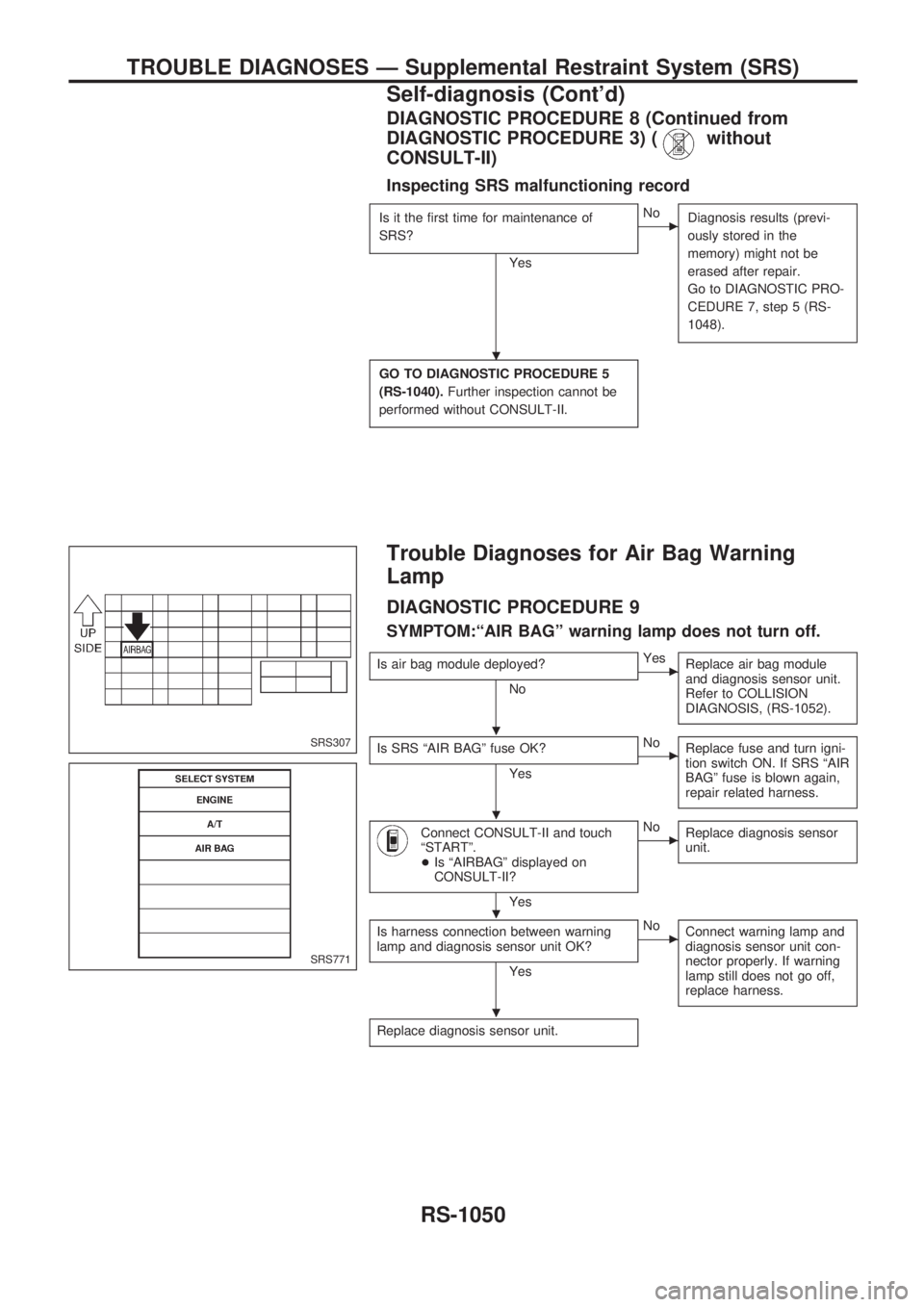
DIAGNOSTIC PROCEDURE 8 (Continued from
DIAGNOSTIC PROCEDURE 3) (
without
CONSULT-II)
Inspecting SRS malfunctioning record
Is it the first time for maintenance of
SRS?
Yes
cNo
Diagnosis results (previ-
ously stored in the
memory) might not be
erased after repair.
Go to DIAGNOSTIC PRO-
CEDURE 7, step 5 (RS-
1048).
GO TO DIAGNOSTIC PROCEDURE 5
(RS-1040).Further inspection cannot be
performed without CONSULT-II.
Trouble Diagnoses for Air Bag Warning
Lamp
DIAGNOSTIC PROCEDURE 9
SYMPTOM:ªAIR BAGº warning lamp does not turn off.
Is air bag module deployed?
No
cYes
Replace air bag module
and diagnosis sensor unit.
Refer to COLLISION
DIAGNOSIS, (RS-1052).
Is SRS ªAIR BAGº fuse OK?
Yes
cNo
Replace fuse and turn igni-
tion switch ON. If SRS ªAIR
BAGº fuse is blown again,
repair related harness.
Connect CONSULT-II and touch
ªSTARTº.
+Is ªAIRBAGº displayed on
CONSULT-II?
Yes
cNo
Replace diagnosis sensor
unit.
Is harness connection between warning
lamp and diagnosis sensor unit OK?
Yes
cNo
Connect warning lamp and
diagnosis sensor unit con-
nector properly. If warning
lamp still does not go off,
replace harness.
Replace diagnosis sensor unit.
SRS307
SRS771
.
.
.
.
.
TROUBLE DIAGNOSES Ð Supplemental Restraint System (SRS)
Self-diagnosis (Cont'd)
RS-1050