sensor NISSAN PATROL 2004 Electronic User Guide
[x] Cancel search | Manufacturer: NISSAN, Model Year: 2004, Model line: PATROL, Model: NISSAN PATROL 2004Pages: 579, PDF Size: 26.61 MB
Page 79 of 579
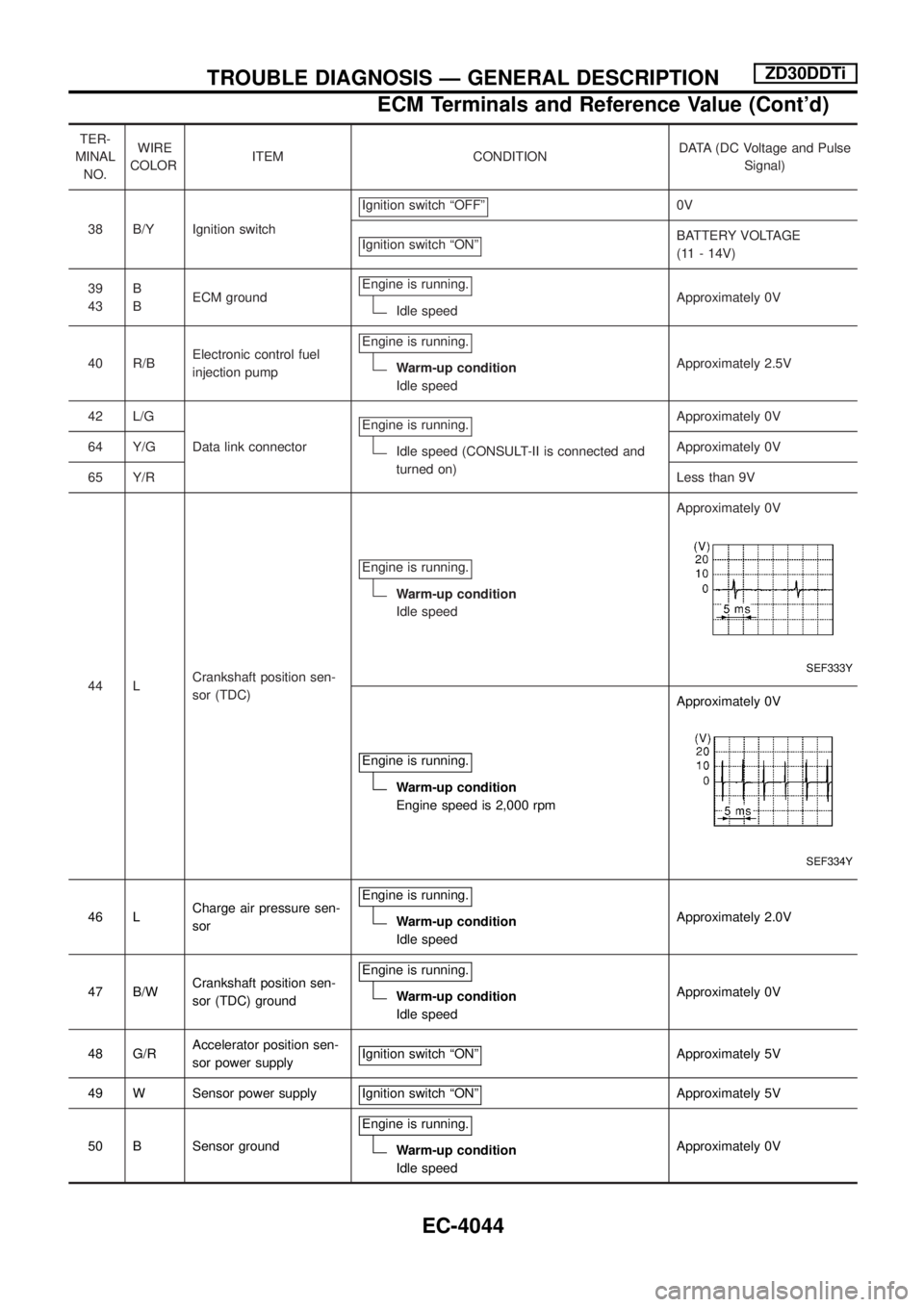
TER-
MINAL
NO.WIRE
COLORITEM CONDITIONDATA (DC Voltage and Pulse
Signal)
38 B/Y Ignition switchIgnition switch ªOFFº
0V
Ignition switch ªONº
BATTERY VOLTAGE
(11 - 14V)
39
43B
BECM groundEngine is running.
Idle speedApproximately 0V
40 R/BElectronic control fuel
injection pumpEngine is running.
Warm-up condition
Idle speedApproximately 2.5V
42 L/G
Data link connectorEngine is running.
Idle speed (CONSULT-II is connected and
turned on)Approximately 0V
64 Y/GApproximately 0V
65 Y/RLess than 9V
44 LCrankshaft position sen-
sor (TDC)Engine is running.
Warm-up condition
Idle speedApproximately 0V
SEF333Y
Engine is running.
Warm-up condition
Engine speed is 2,000 rpmApproximately 0V
SEF334Y
46 LCharge air pressure sen-
sorEngine is running.Warm-up condition
Idle speedApproximately 2.0V
47 B/WCrankshaft position sen-
sor (TDC) groundEngine is running.
Warm-up condition
Idle speedApproximately 0V
48 G/RAccelerator position sen-
sor power supplyIgnition switch ªONº
Approximately 5V
49 W Sensor power supply Ignition switch ªONº
Approximately 5V
50 B Sensor groundEngine is running.
Warm-up condition
Idle speedApproximately 0V
TROUBLE DIAGNOSIS Ð GENERAL DESCRIPTIONZD30DDTi
ECM Terminals and Reference Value (Cont'd)
EC-4044
Page 82 of 579
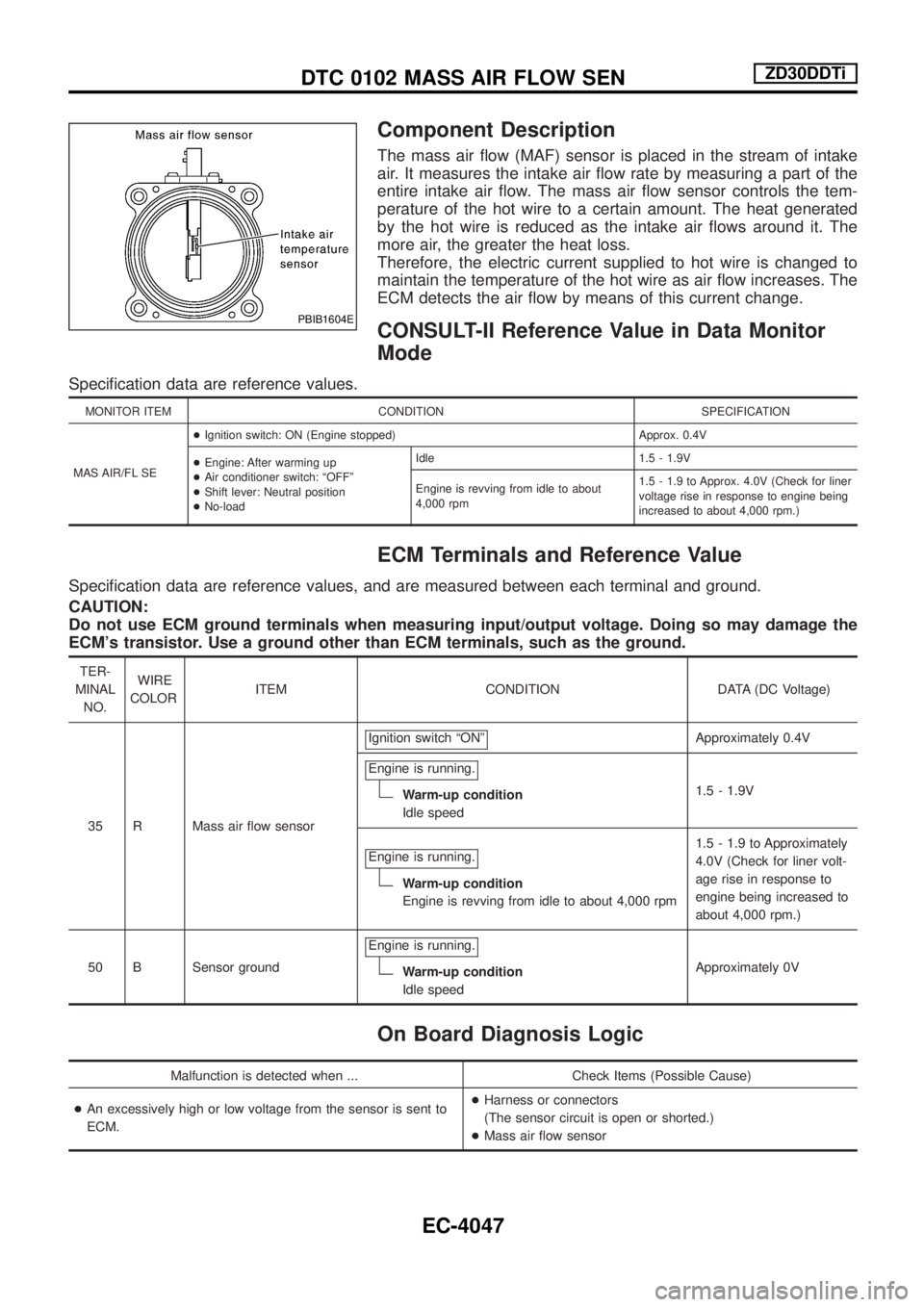
Component Description
The mass air ¯ow (MAF) sensor is placed in the stream of intake
air. It measures the intake air ¯ow rate by measuring a part of the
entire intake air ¯ow. The mass air ¯ow sensor controls the tem-
perature of the hot wire to a certain amount. The heat generated
by the hot wire is reduced as the intake air ¯ows around it. The
more air, the greater the heat loss.
Therefore, the electric current supplied to hot wire is changed to
maintain the temperature of the hot wire as air ¯ow increases. The
ECM detects the air ¯ow by means of this current change.
CONSULT-II Reference Value in Data Monitor
Mode
Speci®cation data are reference values.
MONITOR ITEM CONDITION SPECIFICATION
MAS AIR/FL SE+Ignition switch: ON (Engine stopped) Approx. 0.4V
+Engine: After warming up
+Air conditioner switch: ªOFFº
+Shift lever: Neutral position
+No-loadIdle 1.5 - 1.9V
Engine is revving from idle to about
4,000 rpm1.5 - 1.9 to Approx. 4.0V (Check for liner
voltage rise in response to engine being
increased to about 4,000 rpm.)
ECM Terminals and Reference Value
Speci®cation data are reference values, and are measured between each terminal and ground.
CAUTION:
Do not use ECM ground terminals when measuring input/output voltage. Doing so may damage the
ECM's transistor. Use a ground other than ECM terminals, such as the ground.
TER-
MINAL
NO.WIRE
COLORITEM CONDITION DATA (DC Voltage)
35 R Mass air ¯ow sensorIgnition switch ªONº
Approximately 0.4V
Engine is running.
Warm-up condition
Idle speed1.5 - 1.9V
Engine is running.
Warm-up condition
Engine is revving from idle to about 4,000 rpm1.5 - 1.9 to Approximately
4.0V (Check for liner volt-
age rise in response to
engine being increased to
about 4,000 rpm.)
50 B Sensor groundEngine is running.
Warm-up condition
Idle speedApproximately 0V
On Board Diagnosis Logic
Malfunction is detected when ... Check Items (Possible Cause)
+An excessively high or low voltage from the sensor is sent to
ECM.+Harness or connectors
(The sensor circuit is open or shorted.)
+Mass air ¯ow sensor
PBIB1604E
DTC 0102 MASS AIR FLOW SENZD30DDTi
EC-4047
Page 85 of 579

Diagnostic Procedure
1 CHECK MAF SENSOR POWER SUPPLY CIRCUIT
1. Turn ignition switch ªOFFº.
2. Disconnect mass air ¯ow sensor harness connector.
SEF226Z
3. Turn ignition switch ªONº.
4. Check voltage between mass air ¯ow sensor terminal 2 and ground with CONSULT-II or tester.
SEC015E
OK or NG
OKcGO TO 3.
NGcGO TO 2.
2 DETECT MALFUNCTIONING PART
Check the following.
+Harness connectors E230, F12
+Harness connectors M50, F5
+Harness for open or short between mass air ¯ow sensor and ECM
+Harness for open or short between mass air ¯ow sensor and ECM relay
cRepair open circuit or short to ground or short to power in harness or connector.
DTC 0102 MASS AIR FLOW SENZD30DDTi
EC-4050
Page 86 of 579

3 CHECK MAF SENSOR GROUND CIRCUIT FOR OPEN AND SHORT
1. Turn ignition switch ªOFFº.
2. Loosen and retighten engine ground screws.
SEF227Z
3. Disconnect ECM harness connector.
4. Disconnect TCM harness connector.
5. Check harness continuity between mass air ¯ow sensor terminal 3 and ECM terminal 50, TCM terminal 42. Refer to Wiring Dia-
gram.
Continuity should exist.
6. Also check harness for short to ground and short to power.
OK or NG
OKcGO TO 5.
NGcGO TO 4.
4 DETECT MALFUNCTIONING PART
Check the following.
+Harness connectors E230, F12
+Harness connectors M51, F6
+Harness connectors E106, M88
+Harness for open or short between mass air ¯ow sensor and ECM
+Harness for open or short between mass air ¯ow sensor and TCM (Transmission control module)
cRepair open circuit or short to ground or short to power in harness or connectors.
5 CHECK MAF SENSOR INPUT SIGNAL CIRCUIT FOR OPEN AND SHORT
1. Check harness continuity between mass air ¯ow sensor terminal 4 and ECM terminal 35. Refer to Wiring Diagram.
Continuity should exist.
2. Also check harness for short to ground and short to power.
OK or NG
OKcGO TO 7.
NGcGO TO 6.
6 DETECT MALFUNCTIONING PART
Check the following.
+Harness connectors E230, F12
+Harness for open or short between mass air ¯ow sensor and ECM
cRepair open circuit or short to ground or short to power in harness or connectors.
DTC 0102 MASS AIR FLOW SENZD30DDTi
Diagnostic Procedure (Cont'd)
EC-4051
Page 87 of 579
7 CHECK SHIELD CIRCUIT
1. Disconnect harness connectors E230, F12.
2. Check harness continuity between harness connector F12 terminal 5 and ground.
Refer to Wiring Diagram.
Continuity should exist.
3. Also check harness for short to power.
OK or NG
OKcGO TO 9.
NGcGO TO 8.
8 DETECT MALFUNCTIONING PART
Check the following.
+Joint connector-4
+Harness for open or short between harness connector F12 and ground
cRepair open circuit or short to power in harness or connectors.
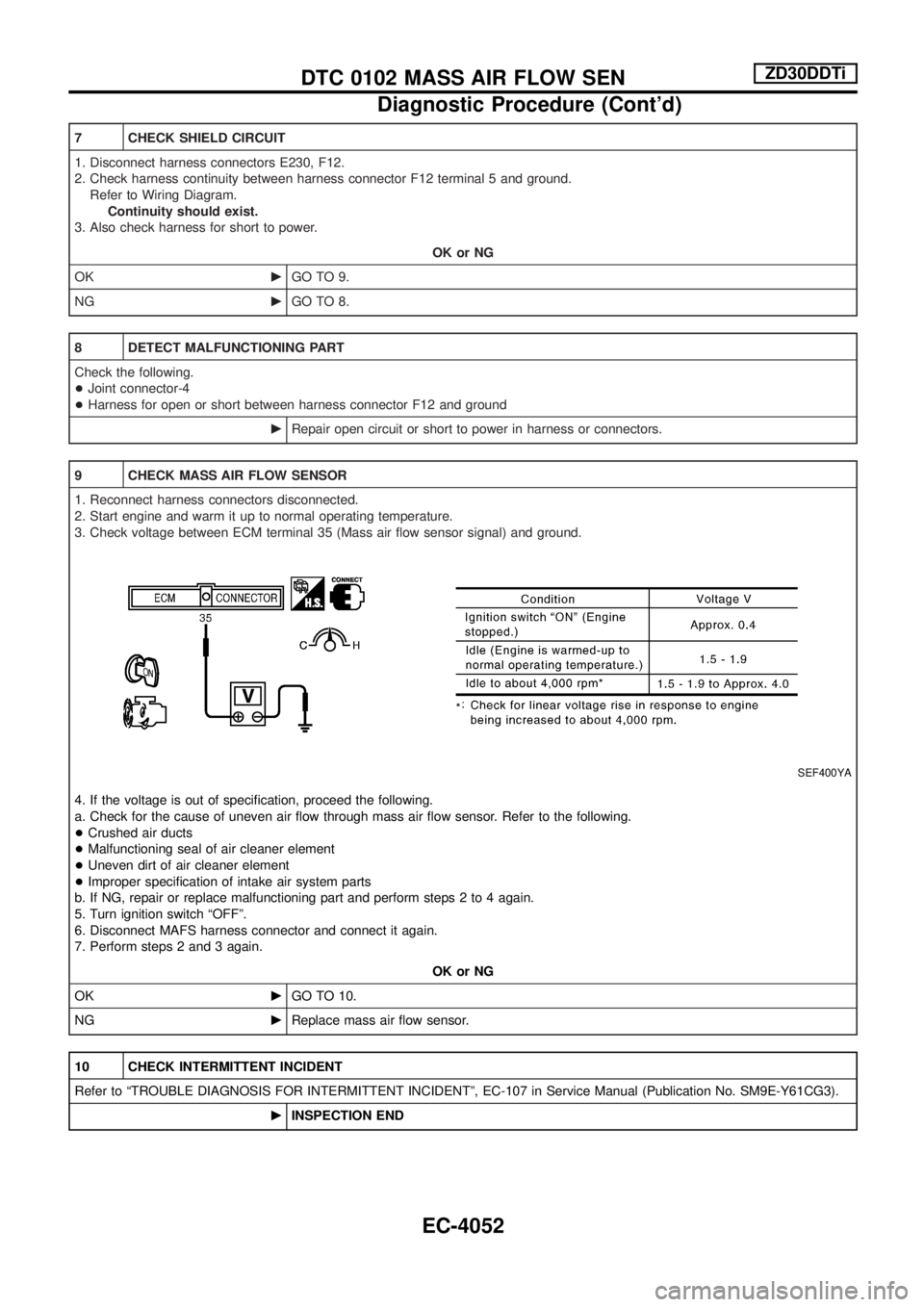
9 CHECK MASS AIR FLOW SENSOR
1. Reconnect harness connectors disconnected.
2. Start engine and warm it up to normal operating temperature.
3. Check voltage between ECM terminal 35 (Mass air ¯ow sensor signal) and ground.
SEF400YA
4. If the voltage is out of speci®cation, proceed the following.
a. Check for the cause of uneven air ¯ow through mass air ¯ow sensor. Refer to the following.
+Crushed air ducts
+Malfunctioning seal of air cleaner element
+Uneven dirt of air cleaner element
+Improper speci®cation of intake air system parts
b. If NG, repair or replace malfunctioning part and perform steps 2 to 4 again.
5. Turn ignition switch ªOFFº.
6. Disconnect MAFS harness connector and connect it again.
7. Perform steps 2 and 3 again.
OK or NG
OKcGO TO 10.
NGcReplace mass air ¯ow sensor.
10 CHECK INTERMITTENT INCIDENT
Refer to ªTROUBLE DIAGNOSIS FOR INTERMITTENT INCIDENTº, EC-107 in Service Manual (Publication No. SM9E-Y61CG3).
cINSPECTION END
DTC 0102 MASS AIR FLOW SENZD30DDTi
Diagnostic Procedure (Cont'd)
EC-4052
Page 95 of 579

Vehicle Speed Sensor (VSS)
TEC540M
TROUBLE DIAGNOSES FOR NON-DETECTABLE ITEMSTD42Ti
EC-4060
Page 257 of 579
System Description
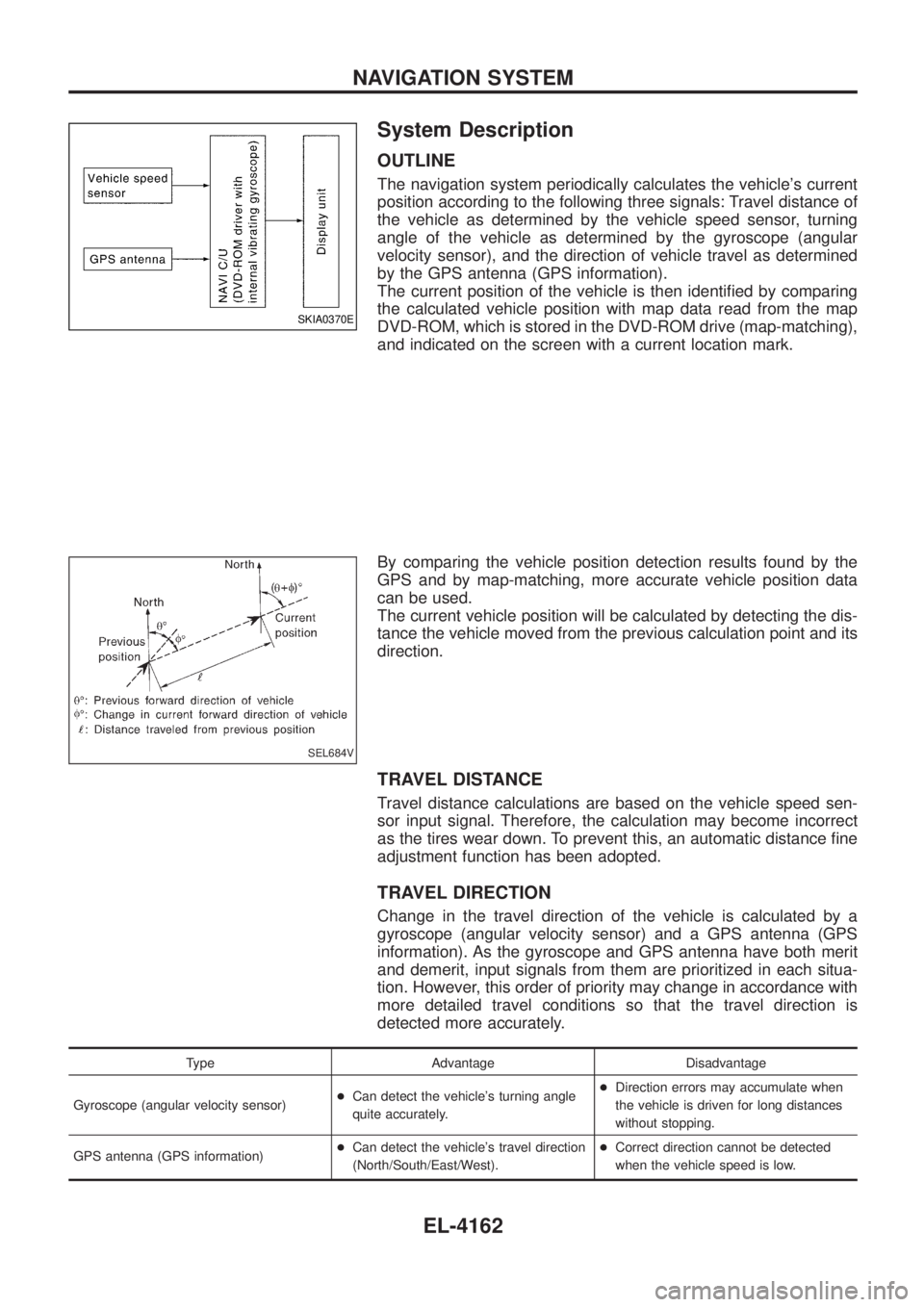
OUTLINE
The navigation system periodically calculates the vehicle's current
position according to the following three signals: Travel distance of
the vehicle as determined by the vehicle speed sensor, turning
angle of the vehicle as determined by the gyroscope (angular
velocity sensor), and the direction of vehicle travel as determined
by the GPS antenna (GPS information).
The current position of the vehicle is then identi®ed by comparing
the calculated vehicle position with map data read from the map
DVD-ROM, which is stored in the DVD-ROM drive (map-matching),
and indicated on the screen with a current location mark.
By comparing the vehicle position detection results found by the
GPS and by map-matching, more accurate vehicle position data
can be used.
The current vehicle position will be calculated by detecting the dis-
tance the vehicle moved from the previous calculation point and its
direction.
TRAVEL DISTANCE
Travel distance calculations are based on the vehicle speed sen-
sor input signal. Therefore, the calculation may become incorrect
as the tires wear down. To prevent this, an automatic distance ®ne
adjustment function has been adopted.
TRAVEL DIRECTION
Change in the travel direction of the vehicle is calculated by a
gyroscope (angular velocity sensor) and a GPS antenna (GPS
information). As the gyroscope and GPS antenna have both merit
and demerit, input signals from them are prioritized in each situa-
tion. However, this order of priority may change in accordance with
more detailed travel conditions so that the travel direction is
detected more accurately.
Type Advantage Disadvantage
Gyroscope (angular velocity sensor) +
Can detect the vehicle's turning angle
quite accurately. +
Direction errors may accumulate when
the vehicle is driven for long distances
without stopping.
GPS antenna (GPS information) +
Can detect the vehicle's travel direction
(North/South/East/West). +
Correct direction cannot be detected
when the vehicle speed is low.
SKIA0370E
SEL684V
NAVIGATION SYSTEM
EL-4162
Page 259 of 579
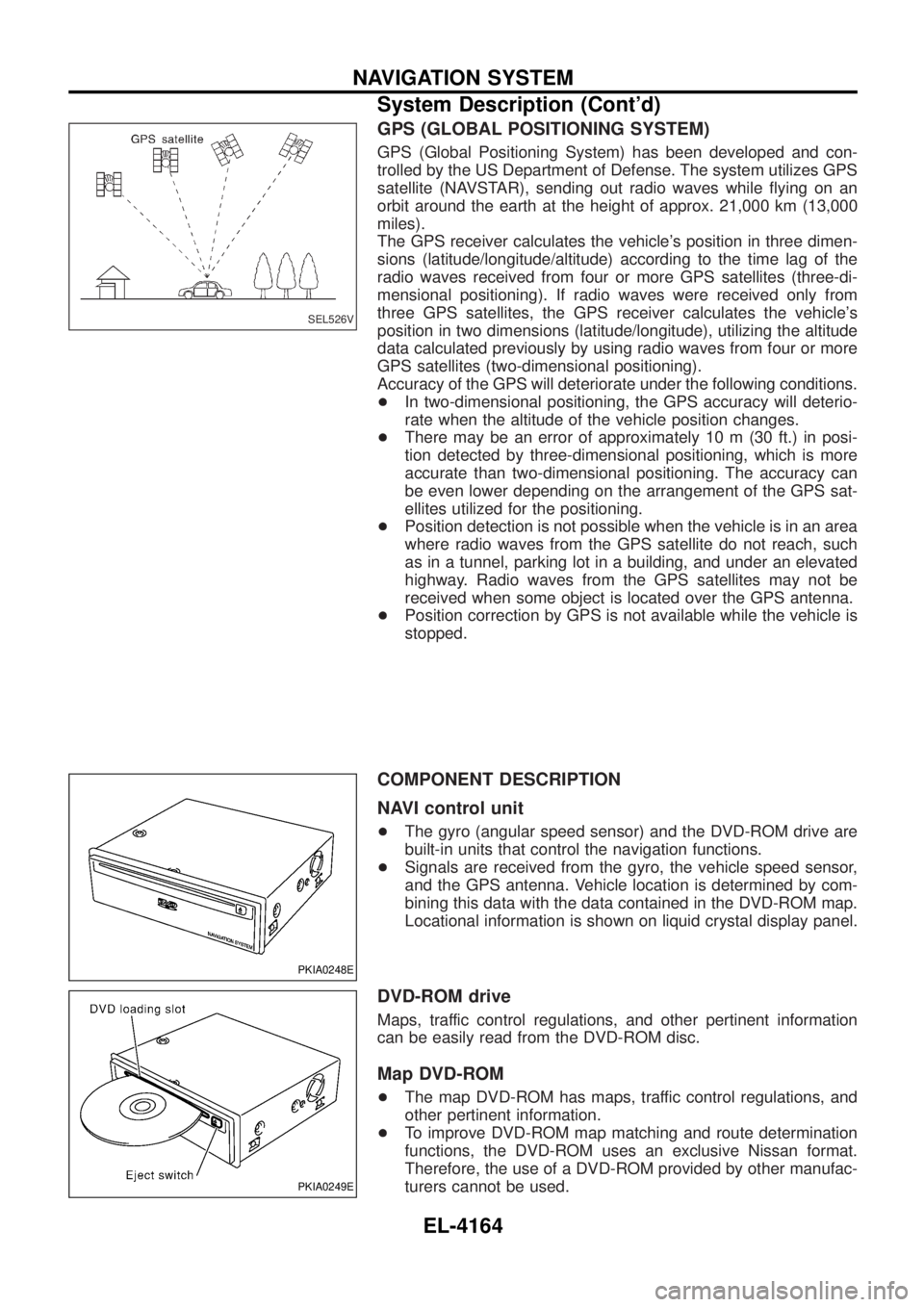
GPS (GLOBAL POSITIONING SYSTEM)
GPS (Global Positioning System) has been developed and con-
trolled by the US Department of Defense. The system utilizes GPS
satellite (NAVSTAR), sending out radio waves while ¯ying on an
orbit around the earth at the height of approx. 21,000 km (13,000
miles).
The GPS receiver calculates the vehicle's position in three dimen-
sions (latitude/longitude/altitude) according to the time lag of the
radio waves received from four or more GPS satellites (three-di-
mensional positioning). If radio waves were received only from
three GPS satellites, the GPS receiver calculates the vehicle's
position in two dimensions (latitude/longitude), utilizing the altitude
data calculated previously by using radio waves from four or more
GPS satellites (two-dimensional positioning).
Accuracy of the GPS will deteriorate under the following conditions.
+In two-dimensional positioning, the GPS accuracy will deterio-
rate when the altitude of the vehicle position changes.
+ There may be an error of approximately 10 m (30 ft.) in posi-
tion detected by three-dimensional positioning, which is more
accurate than two-dimensional positioning. The accuracy can
be even lower depending on the arrangement of the GPS sat-
ellites utilized for the positioning.
+ Position detection is not possible when the vehicle is in an area
where radio waves from the GPS satellite do not reach, such
as in a tunnel, parking lot in a building, and under an elevated
highway. Radio waves from the GPS satellites may not be
received when some object is located over the GPS antenna.
+ Position correction by GPS is not available while the vehicle is
stopped.
COMPONENT DESCRIPTION
NAVI control unit
+The gyro (angular speed sensor) and the DVD-ROM drive are
built-in units that control the navigation functions.
+ Signals are received from the gyro, the vehicle speed sensor,
and the GPS antenna. Vehicle location is determined by com-
bining this data with the data contained in the DVD-ROM map.
Locational information is shown on liquid crystal display panel.
DVD-ROM drive
Maps, traffic control regulations, and other pertinent information
can be easily read from the DVD-ROM disc.
Map DVD-ROM
+The map DVD-ROM has maps, traffic control regulations, and
other pertinent information.
+ To improve DVD-ROM map matching and route determination
functions, the DVD-ROM uses an exclusive Nissan format.
Therefore, the use of a DVD-ROM provided by other manufac-
turers cannot be used.
SEL526V
PKIA0248E
PKIA0249E
NAVIGATION SYSTEM
System Description (Cont'd)
EL-4164
Page 260 of 579
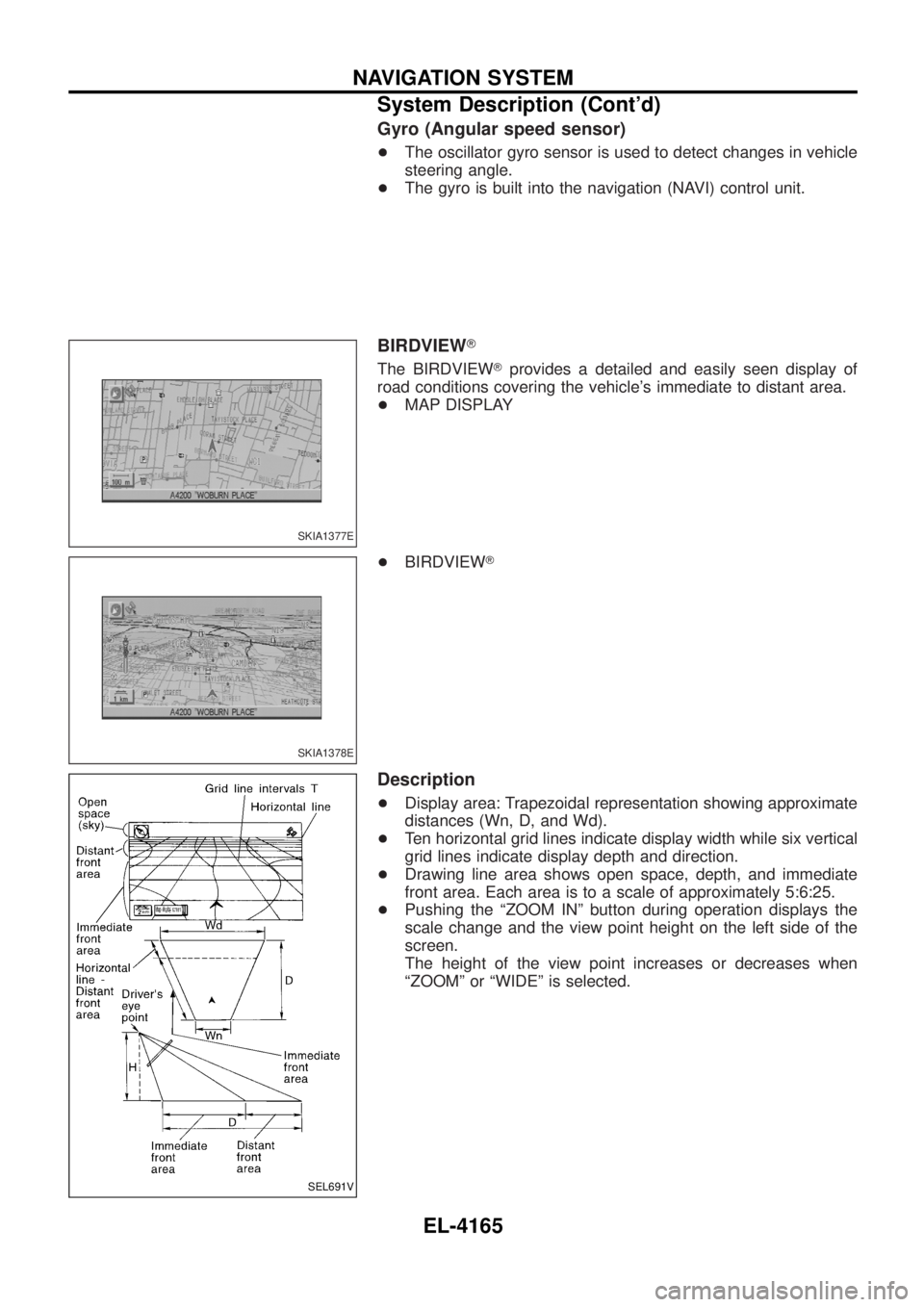
Gyro (Angular speed sensor)
+The oscillator gyro sensor is used to detect changes in vehicle
steering angle.
+ The gyro is built into the navigation (NAVI) control unit.
BIRDVIEW T
The BIRDVIEW Tprovides a detailed and easily seen display of
road conditions covering the vehicle's immediate to distant area.
+ MAP DISPLAY
+ BIRDVIEW T
Description
+Display area: Trapezoidal representation showing approximate
distances (Wn, D, and Wd).
+ Ten horizontal grid lines indicate display width while six vertical
grid lines indicate display depth and direction.
+ Drawing line area shows open space, depth, and immediate
front area. Each area is to a scale of approximately 5:6:25.
+ Pushing the ªZOOM INº button during operation displays the
scale change and the view point height on the left side of the
screen.
The height of the view point increases or decreases when
ªZOOMº or ªWIDEº is selected.
SKIA1377E
SKIA1378E
SEL691V
NAVIGATION SYSTEM
System Description (Cont'd)
EL-4165
Page 291 of 579
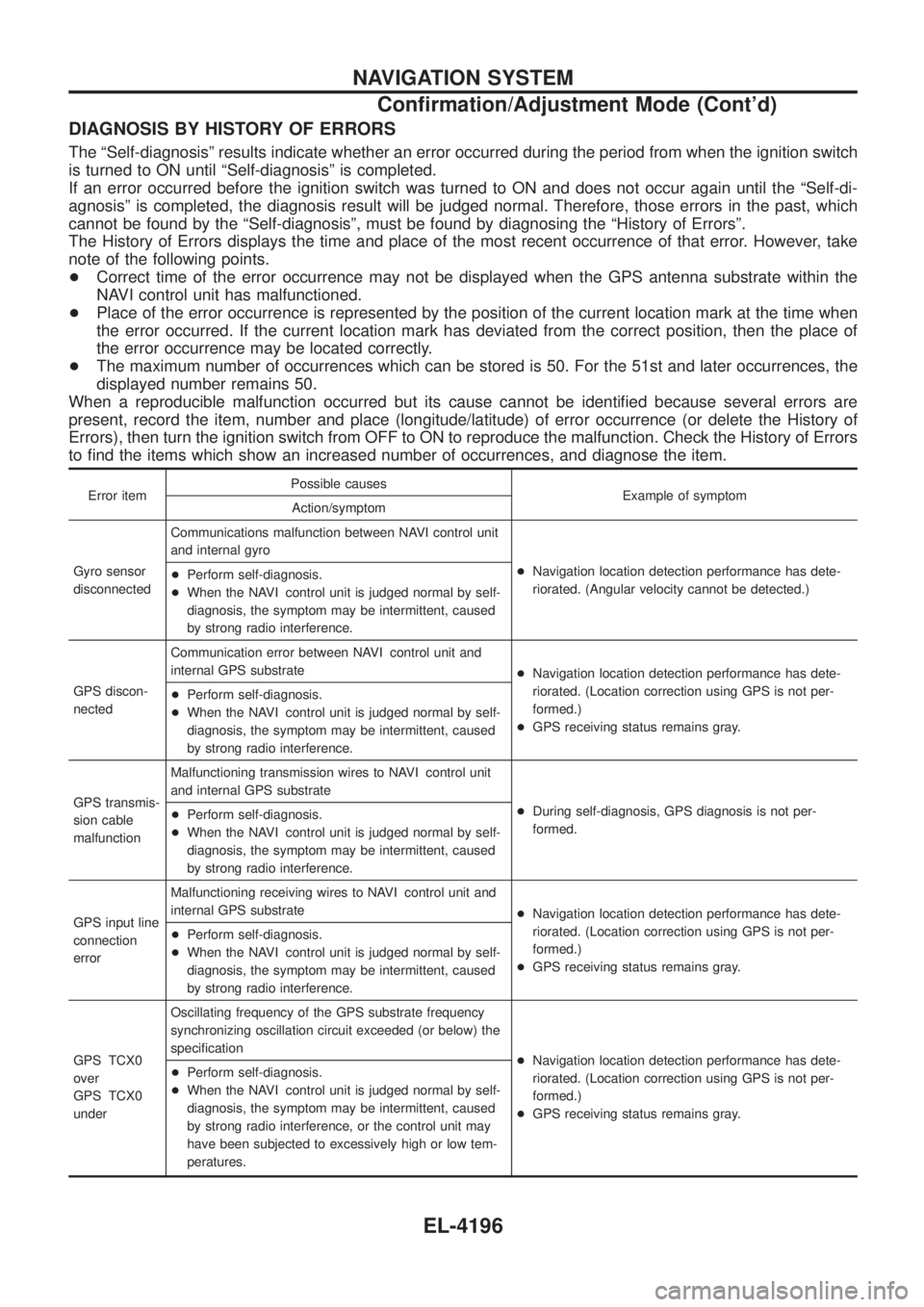
DIAGNOSIS BY HISTORY OF ERRORS
The ªSelf-diagnosisº results indicate whether an error occurred during the period from when the ignition switch
is turned to ON until ªSelf-diagnosisº is completed.
If an error occurred before the ignition switch was turned to ON and does not occur again until the ªSelf-di-
agnosisº is completed, the diagnosis result will be judged normal. Therefore, those errors in the past, which
cannot be found by the ªSelf-diagnosisº, must be found by diagnosing the ªHistory of Errorsº.
The History of Errors displays the time and place of the most recent occurrence of that error. However, take
note of the following points.
+Correct time of the error occurrence may not be displayed when the GPS antenna substrate within the
NAVI control unit has malfunctioned.
+ Place of the error occurrence is represented by the position of the current location mark at the time when
the error occurred. If the current location mark has deviated from the correct position, then the place of
the error occurrence may be located correctly.
+ The maximum number of occurrences which can be stored is 50. For the 51st and later occurrences, the
displayed number remains 50.
When a reproducible malfunction occurred but its cause cannot be identi®ed because several errors are
present, record the item, number and place (longitude/latitude) of error occurrence (or delete the History of
Errors), then turn the ignition switch from OFF to ON to reproduce the malfunction. Check the History of Errors
to ®nd the items which show an increased number of occurrences, and diagnose the item.
Error item Possible causes
Example of symptom
Action/symptom
Gyro sensor
disconnected Communications malfunction between NAVI control unit
and internal gyro
+Navigation location detection performance has dete-
riorated. (Angular velocity cannot be detected.)
+
Perform self-diagnosis.
+ When the NAVI control unit is judged normal by self-
diagnosis, the symptom may be intermittent, caused
by strong radio interference.
GPS discon-
nected Communication error between NAVI control unit and
internal GPS substrate
+Navigation location detection performance has dete-
riorated. (Location correction using GPS is not per-
formed.)
+ GPS receiving status remains gray.
+
Perform self-diagnosis.
+ When the NAVI control unit is judged normal by self-
diagnosis, the symptom may be intermittent, caused
by strong radio interference.
GPS transmis-
sion cable
malfunction Malfunctioning transmission wires to NAVI control unit
and internal GPS substrate
+During self-diagnosis, GPS diagnosis is not per-
formed.
+
Perform self-diagnosis.
+ When the NAVI control unit is judged normal by self-
diagnosis, the symptom may be intermittent, caused
by strong radio interference.
GPS input line
connection
error Malfunctioning receiving wires to NAVI control unit and
internal GPS substrate
+Navigation location detection performance has dete-
riorated. (Location correction using GPS is not per-
formed.)
+ GPS receiving status remains gray.
+
Perform self-diagnosis.
+ When the NAVI control unit is judged normal by self-
diagnosis, the symptom may be intermittent, caused
by strong radio interference.
GPS TCX0
over
GPS TCX0
under Oscillating frequency of the GPS substrate frequency
synchronizing oscillation circuit exceeded (or below) the
speci®cation
+Navigation location detection performance has dete-
riorated. (Location correction using GPS is not per-
formed.)
+ GPS receiving status remains gray.
+
Perform self-diagnosis.
+ When the NAVI control unit is judged normal by self-
diagnosis, the symptom may be intermittent, caused
by strong radio interference, or the control unit may
have been subjected to excessively high or low tem-
peratures.
NAVIGATION SYSTEM
Con®rmation/Adjustment Mode (Cont'd)
EL-4196