sensor NISSAN PATROL 2004 Electronic Owner's Manual
[x] Cancel search | Manufacturer: NISSAN, Model Year: 2004, Model line: PATROL, Model: NISSAN PATROL 2004Pages: 579, PDF Size: 26.61 MB
Page 312 of 579
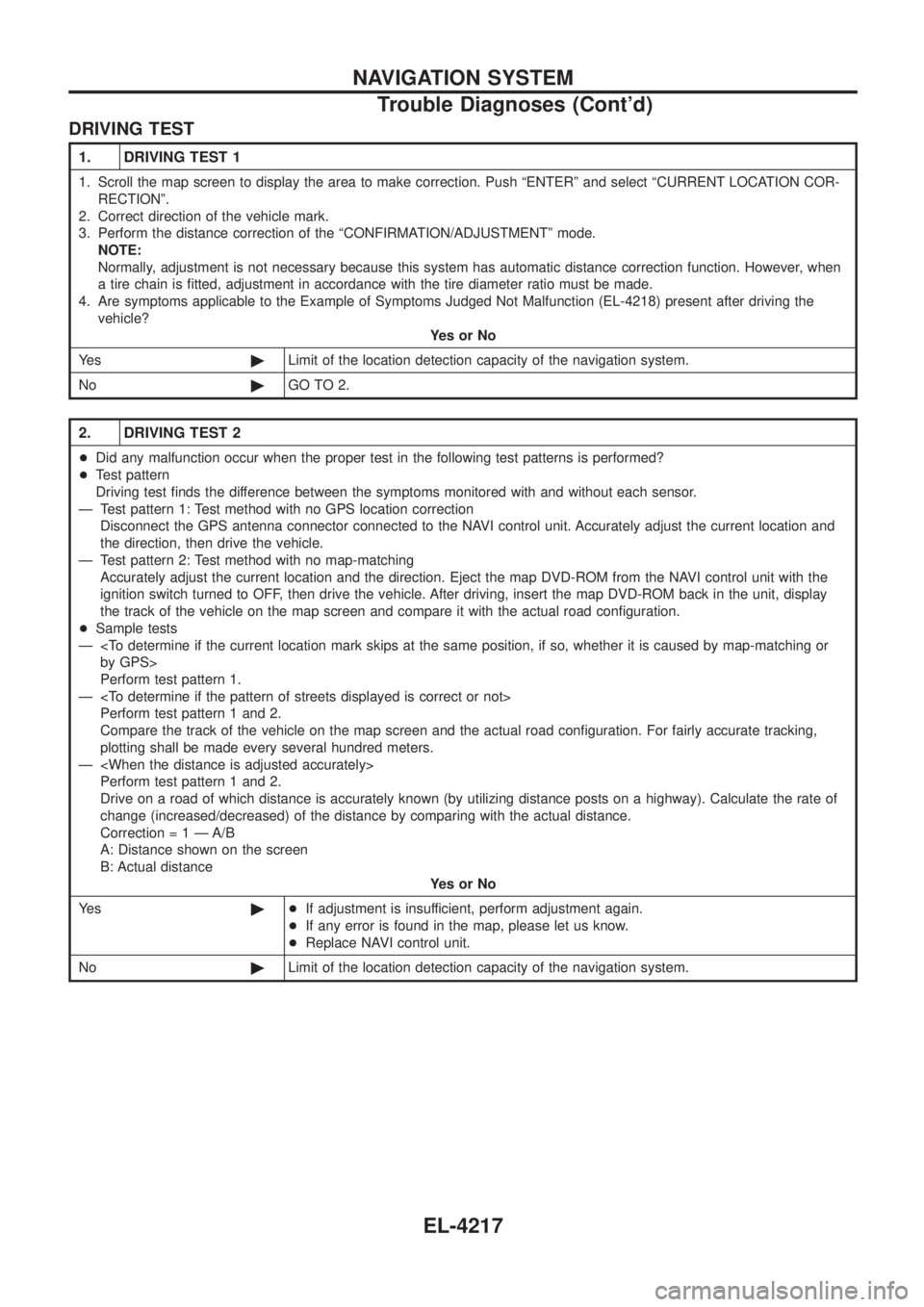
DRIVING TEST
1. DRIVING TEST 1
1. Scroll the map screen to display the area to make correction. Push ªENTERº and select ªCURRENT LOCATION COR-RECTIONº.
2. Correct direction of the vehicle mark.
3. Perform the distance correction of the ªCONFIRMATION/ADJUSTMENTº mode. NOTE:
Normally, adjustment is not necessary because this system has automatic distance correction function. However, when
a tire chain is ®tted, adjustment in accordance with the tire diameter ratio must be made.
4. Are symptoms applicable to the Example of Symptoms Judged Not Malfunction (EL-4218) present after driving the vehicle? YesorNo
Ye s ©Limit of the location detection capacity of the navigation system.
No ©GO TO 2.
2. DRIVING TEST 2
+Did any malfunction occur when the proper test in the following test patterns is performed?
+ Test pattern
Driving test ®nds the difference between the symptoms monitored with and without each sensor.
Ð Test pattern 1: Test method with no GPS location correction Disconnect the GPS antenna connector connected to the NAVI control unit. Accurately adjust the current location and
the direction, then drive the vehicle.
Ð Test pattern 2: Test method with no map-matching Accurately adjust the current location and the direction. Eject the map DVD-ROM from the NAVI control unit with the
ignition switch turned to OFF, then drive the vehicle. After driving, insert the map DVD-ROM back in the unit, display
the track of the vehicle on the map screen and compare it with the actual road con®guration.
+ Sample tests
Ð
Perform test pattern 1.
Ð
Compare the track of the vehicle on the map screen and the actual road con®guration. For fairly accurate tracking,
plotting shall be made every several hundred meters.
Ð
Drive on a road of which distance is accurately known (by utilizing distance posts on a highway). Calculate the rate of
change (increased/decreased) of the distance by comparing with the actual distance.
Correctio n=1ÐA/B
A: Distance shown on the screen
B: Actual distance YesorNo
Ye s ©+If adjustment is insufficient, perform adjustment again.
+ If any error is found in the map, please let us know.
+ Replace NAVI control unit.
No ©Limit of the location detection capacity of the navigation system.
NAVIGATION SYSTEM
Trouble Diagnoses (Cont'd)
EL-4217
Page 317 of 579

Cause (condition) Driving condition Remarks (correction, etc.)
Road con®gu-
ration Y-intersections
ELK0192D
At a Y intersection or similar gradual
division of roads, error the direction
of travel deduced by the sensor may
result in the current location mark
appearing on the wrong road.
If after travelling about 10 km (6
miles) the correct location has not
been restored, perform location cor-
rection and, if necessary, direction
correction.
Spiral roads
ELK0193D
When driving on a large, continuous
spiral road (such as loop bridge),
turning angle error is accumulated
and the vehicle mark may deviate
from the correct location.
Straight roads
ELK0194D
When driving on a long, straight road
and slow curve without stopping,
map-matching does not work effec-
tively enough and distance errors
may accumulate. As a result, the
vehicle mark may deviate from the
correct location when the vehicle
turned at a corner.
Zigzag roads
ELK0195D
When driving on a zigzag road, the
map may be matched to other roads
in the similar direction nearby at
every turn, and the vehicle mark may
deviate from the correct location.
Roads laid out in a grid pattern
ELK0196D
When driving at where roads are laid
out in a grid pattern, where many
roads are running in the similar
direction nearby, the map may be
matched to them by mistake and the
vehicle mark may deviate from the
correct location.
Parallel roads
ELK0197D
When two roads are running in paral-
lel (such as highway and sideway),
the map may be matched to the
other road by mistake and the
vehicle mark may deviate from the
correct location.
NAVIGATION SYSTEM
Example of Symptoms Judged Not Malfunction
(Cont'd)
EL-4222
Page 318 of 579
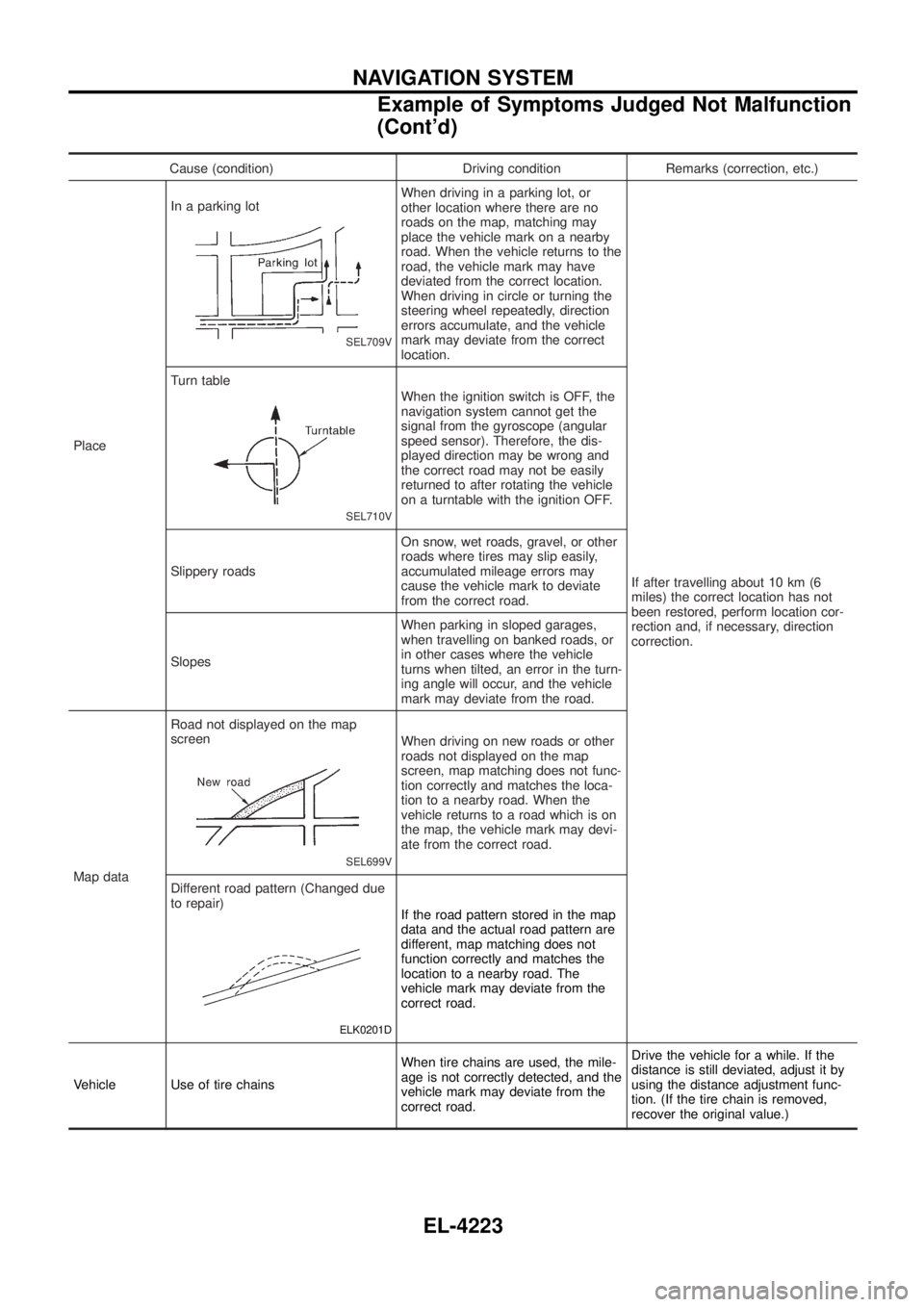
Cause (condition) Driving condition Remarks (correction, etc.)
Place In a parking lot
SEL709V
When driving in a parking lot, or
other location where there are no
roads on the map, matching may
place the vehicle mark on a nearby
road. When the vehicle returns to the
road, the vehicle mark may have
deviated from the correct location.
When driving in circle or turning the
steering wheel repeatedly, direction
errors accumulate, and the vehicle
mark may deviate from the correct
location.
If after travelling about 10 km (6
miles) the correct location has not
been restored, perform location cor-
rection and, if necessary, direction
correction.
Turn table
SEL710V
When the ignition switch is OFF, the
navigation system cannot get the
signal from the gyroscope (angular
speed sensor). Therefore, the dis-
played direction may be wrong and
the correct road may not be easily
returned to after rotating the vehicle
on a turntable with the ignition OFF.
Slippery roads On snow, wet roads, gravel, or other
roads where tires may slip easily,
accumulated mileage errors may
cause the vehicle mark to deviate
from the correct road.
Slopes When parking in sloped garages,
when travelling on banked roads, or
in other cases where the vehicle
turns when tilted, an error in the turn-
ing angle will occur, and the vehicle
mark may deviate from the road.
Map data Road not displayed on the map
screen
SEL699V
When driving on new roads or other
roads not displayed on the map
screen, map matching does not func-
tion correctly and matches the loca-
tion to a nearby road. When the
vehicle returns to a road which is on
the map, the vehicle mark may devi-
ate from the correct road.
Different road pattern (Changed due
to repair)
ELK0201D
If the road pattern stored in the map
data and the actual road pattern are
different, map matching does not
function correctly and matches the
location to a nearby road. The
vehicle mark may deviate from the
correct road.
Vehicle Use of tire chains When tire chains are used, the mile-
age is not correctly detected, and the
vehicle mark may deviate from the
correct road.Drive the vehicle for a while. If the
distance is still deviated, adjust it by
using the distance adjustment func-
tion. (If the tire chain is removed,
recover the original value.)
NAVIGATION SYSTEM
Example of Symptoms Judged Not Malfunction
(Cont'd)
EL-4223
Page 319 of 579
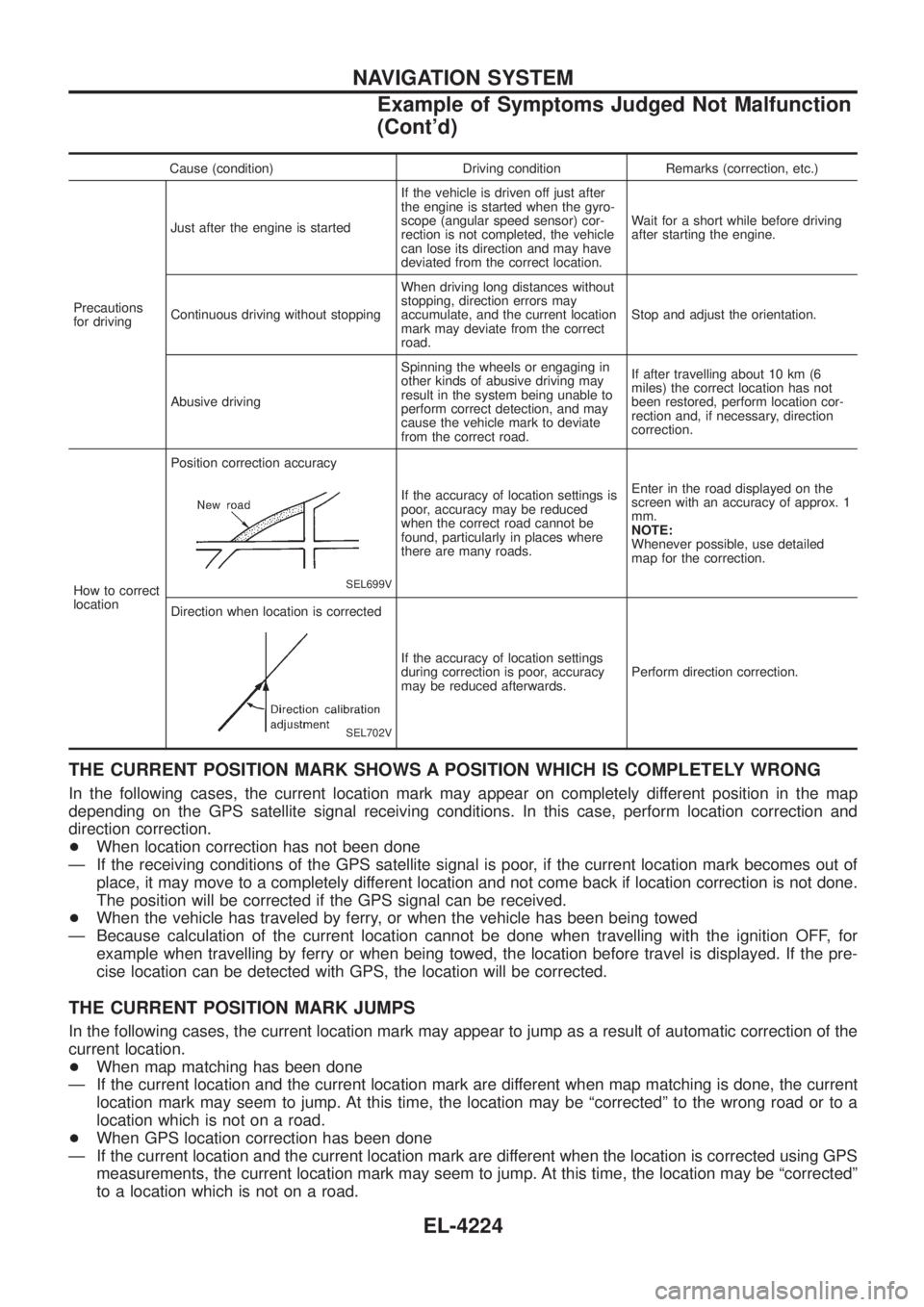
Cause (condition) Driving condition Remarks (correction, etc.)
Precautions
for driving Just after the engine is started
If the vehicle is driven off just after
the engine is started when the gyro-
scope (angular speed sensor) cor-
rection is not completed, the vehicle
can lose its direction and may have
deviated from the correct location.Wait for a short while before driving
after starting the engine.
Continuous driving without stopping When driving long distances without
stopping, direction errors may
accumulate, and the current location
mark may deviate from the correct
road.Stop and adjust the orientation.
Abusive driving Spinning the wheels or engaging in
other kinds of abusive driving may
result in the system being unable to
perform correct detection, and may
cause the vehicle mark to deviate
from the correct road.If after travelling about 10 km (6
miles) the correct location has not
been restored, perform location cor-
rection and, if necessary, direction
correction.
How to correct
location Position correction accuracy
SEL699V
If the accuracy of location settings is
poor, accuracy may be reduced
when the correct road cannot be
found, particularly in places where
there are many roads.
Enter in the road displayed on the
screen with an accuracy of approx. 1
mm.
NOTE:
Whenever possible, use detailed
map for the correction.
Direction when location is corrected
SEL702V
If the accuracy of location settings
during correction is poor, accuracy
may be reduced afterwards. Perform direction correction.
THE CURRENT POSITION MARK SHOWS A POSITION WHICH IS COMPLETELY WRONG
In the following cases, the current location mark may appear on completely different position in the map
depending on the GPS satellite signal receiving conditions. In this case, perform location correction and
direction correction.
+
When location correction has not been done
Ð If the receiving conditions of the GPS satellite signal is poor, if the current location mark becomes out of place, it may move to a completely different location and not come back if location correction is not done.
The position will be corrected if the GPS signal can be received.
+ When the vehicle has traveled by ferry, or when the vehicle has been being towed
Ð Because calculation of the current location cannot be done when travelling with the ignition OFF, for example when travelling by ferry or when being towed, the location before travel is displayed. If the pre-
cise location can be detected with GPS, the location will be corrected.
THE CURRENT POSITION MARK JUMPS
In the following cases, the current location mark may appear to jump as a result of automatic correction of the
current location.
+When map matching has been done
Ð If the current location and the current location mark are different when map matching is done, the current location mark may seem to jump. At this time, the location may be ªcorrectedº to the wrong road or to a
location which is not on a road.
+ When GPS location correction has been done
Ð If the current location and the current location mark are different when the location is corrected using GPS measurements, the current location mark may seem to jump. At this time, the location may be ªcorrectedº
to a location which is not on a road.
NAVIGATION SYSTEM
Example of Symptoms Judged Not Malfunction
(Cont'd)
EL-4224
Page 320 of 579
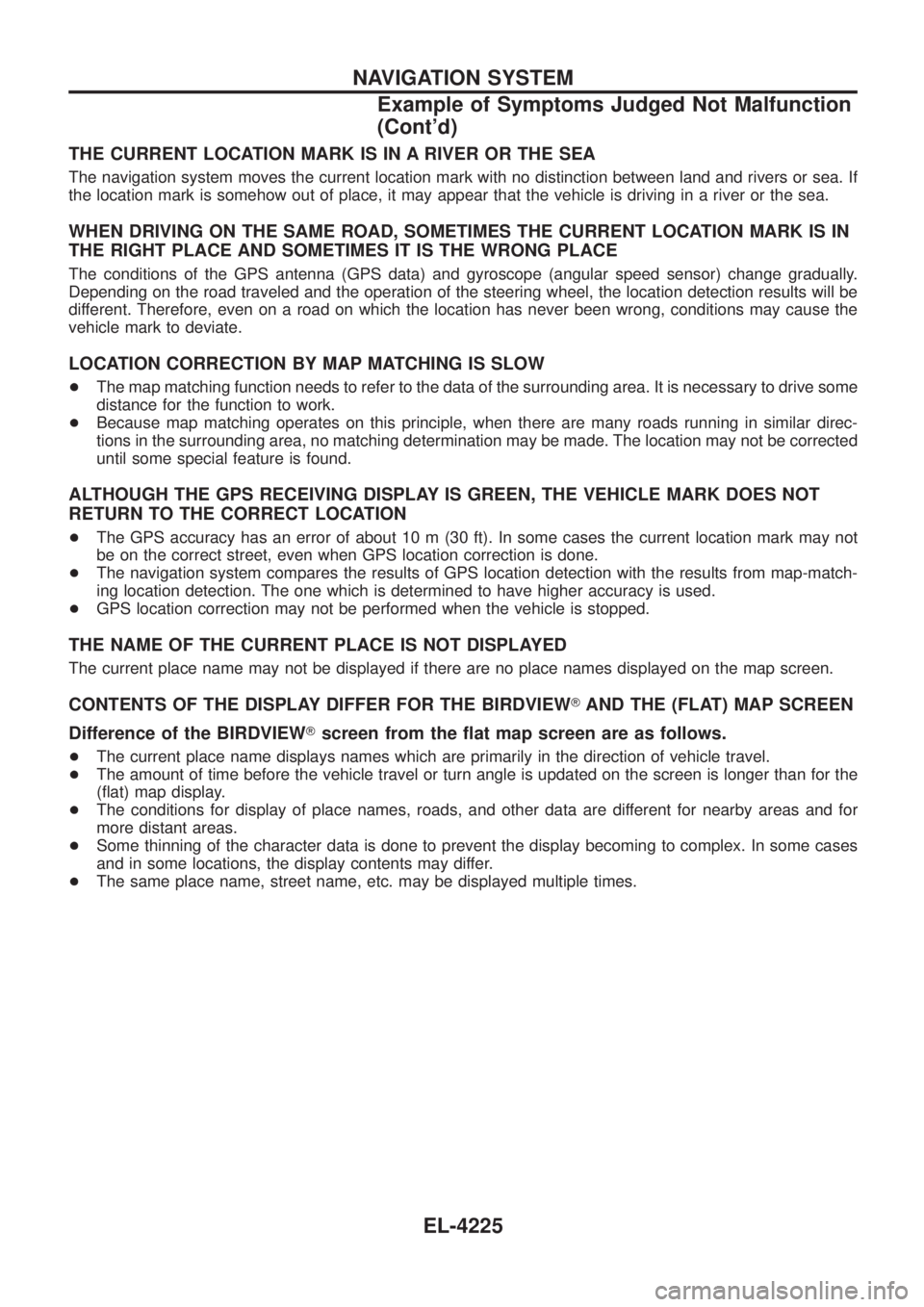
THE CURRENT LOCATION MARK IS IN A RIVER OR THE SEA
The navigation system moves the current location mark with no distinction between land and rivers or sea. If
the location mark is somehow out of place, it may appear that the vehicle is driving in a river or the sea.
WHEN DRIVING ON THE SAME ROAD, SOMETIMES THE CURRENT LOCATION MARK IS IN
THE RIGHT PLACE AND SOMETIMES IT IS THE WRONG PLACE
The conditions of the GPS antenna (GPS data) and gyroscope (angular speed sensor) change gradually.
Depending on the road traveled and the operation of the steering wheel, the location detection results will be
different. Therefore, even on a road on which the location has never been wrong, conditions may cause the
vehicle mark to deviate.
LOCATION CORRECTION BY MAP MATCHING IS SLOW
+The map matching function needs to refer to the data of the surrounding area. It is necessary to drive some
distance for the function to work.
+ Because map matching operates on this principle, when there are many roads running in similar direc-
tions in the surrounding area, no matching determination may be made. The location may not be corrected
until some special feature is found.
ALTHOUGH THE GPS RECEIVING DISPLAY IS GREEN, THE VEHICLE MARK DOES NOT
RETURN TO THE CORRECT LOCATION
+The GPS accuracy has an error of about 10 m (30 ft). In some cases the current location mark may not
be on the correct street, even when GPS location correction is done.
+ The navigation system compares the results of GPS location detection with the results from map-match-
ing location detection. The one which is determined to have higher accuracy is used.
+ GPS location correction may not be performed when the vehicle is stopped.
THE NAME OF THE CURRENT PLACE IS NOT DISPLAYED
The current place name may not be displayed if there are no place names displayed on the map screen.
CONTENTS OF THE DISPLAY DIFFER FOR THE BIRDVIEW TAND THE (FLAT) MAP SCREEN
Difference of the BIRDVIEW Tscreen from the ¯at map screen are as follows.
+ The current place name displays names which are primarily in the direction of vehicle travel.
+ The amount of time before the vehicle travel or turn angle is updated on the screen is longer than for the
(¯at) map display.
+ The conditions for display of place names, roads, and other data are different for nearby areas and for
more distant areas.
+ Some thinning of the character data is done to prevent the display becoming to complex. In some cases
and in some locations, the display contents may differ.
+ The same place name, street name, etc. may be displayed multiple times.
NAVIGATION SYSTEM
Example of Symptoms Judged Not Malfunction
(Cont'd)
EL-4225
Page 442 of 579

Wiring Diagram Codes (Cell Codes)
Use the chart below to ®nd out what each wiring diagram code
stands for.
Refer to the wiring diagram code in the alphabetical index to ®nd
the location (Page number) of each wiring diagram.
Code Section Wiring Diagram Name
A/C, A HA Auto Air Conditioner
A/C, M HA Manual Air Conditioner
A/CCUT EC Air Conditioner Control
A/T AT A/T
ASCD EL Automatic Speed Control Device
AUDIO EL Audio
BACK/L EL Back-up Lamp
CD/CHG EL CD Auto Changer
CHIME EL Warning Chime
COMPAS EL Compass and Thermometer
COOL/B HA Cool Box
D/LOCK EL Power Door Lock
DEF EL Rear Window Defogger
DEICER EL Wiper Deicer
DTRL EL Headlamp Ð Daytime Light System
F/FOG EL Front Fog Lamp
FICD EC IACV-FICD Solenoid Valve
GLOW EC Quick Glow System
H/AIM EL Headlamp Aiming Control System
H/LAMP EL Headlamp
HEATUP EC Heat Up Switch
HLC EL Headlamp Washer
HORN EL Horn
HSEAT EL Heated Seat
ILL EL Illumination
LOAD EC Electrical Load Signal
MAFS EC Mass Air Flow Sensor
METER EL Meter and Gauges
MIRROR EL Door Mirror
MULTI EL Multi-remote Control System
NATS EL Nissan Anti-Theft System
NAVI EL Navigation System
NONDTC AT Non-detective Items
P/ANT EL Power Antenna
PHONE EL Telephone
POWER EL Power Supply Routing
R/COOL HA Rear Cooler System
R/FOG EL Rear Fog LampCode Section Wiring Diagram Name
R/HEAT HA Rear Heater System
REMOTE EL Audio (Remote Control Switch)
ROOM/L EL Interior Room Lamp
S/LOCK EL Power Door Lock Ð Super Lock
S/TANK FE Sub Fuel Tank Control System
SRS RS Supplemental Restraint System
STAB RA Stabilizer Release Device
STOP/L EL Stop Lamp
TAIL/L EL Parking, License and Tail Lamps
THEFT EL Theft Warning System
TRQ/SG EC Engine Torque Control Signal
TURN EL Turn Signal and Hazard Warning
Lamps
VSS EC Vehicle Speed Sensor
WARN EL Warning Lamps
WINDOW EL Power Window
WIP/R EL Rear Wiper and Washer
WIPER EL Front Wiper and Washer
WIRING DIAGRAM CODES (CELL CODES)
EL-4347
Page 451 of 579
Removal
1. Remove the following parts.
+Undercover
+Engine oil (Drain)
+Engine coolant (Drain)
+Engine cover
+Intercooler
+Air inlet pipe
+Air cleaner case
+Throttle body
+Swirl and intake air control valve control solenoid valve and
bracket
+Vacuum tank
+Glow plate
+Rocker cover
+Spill tube
+Radiator shrouds (Rear and Lower)
+Cooling fan
+Radiator hose (Upper and Lower)
+Auxiliary belt and auto tensioner.
2. Remove the alternator.
3. Remove the A/C compressor and bracket with piping con-
nected. Move and support it at the LH side of engine bay with
a rope to avoid putting load on piping.
Refer to HA section in NISSAN Service Manual (Publication No.
SM9E-Y61CG2 or SM9E-Y61CG3).
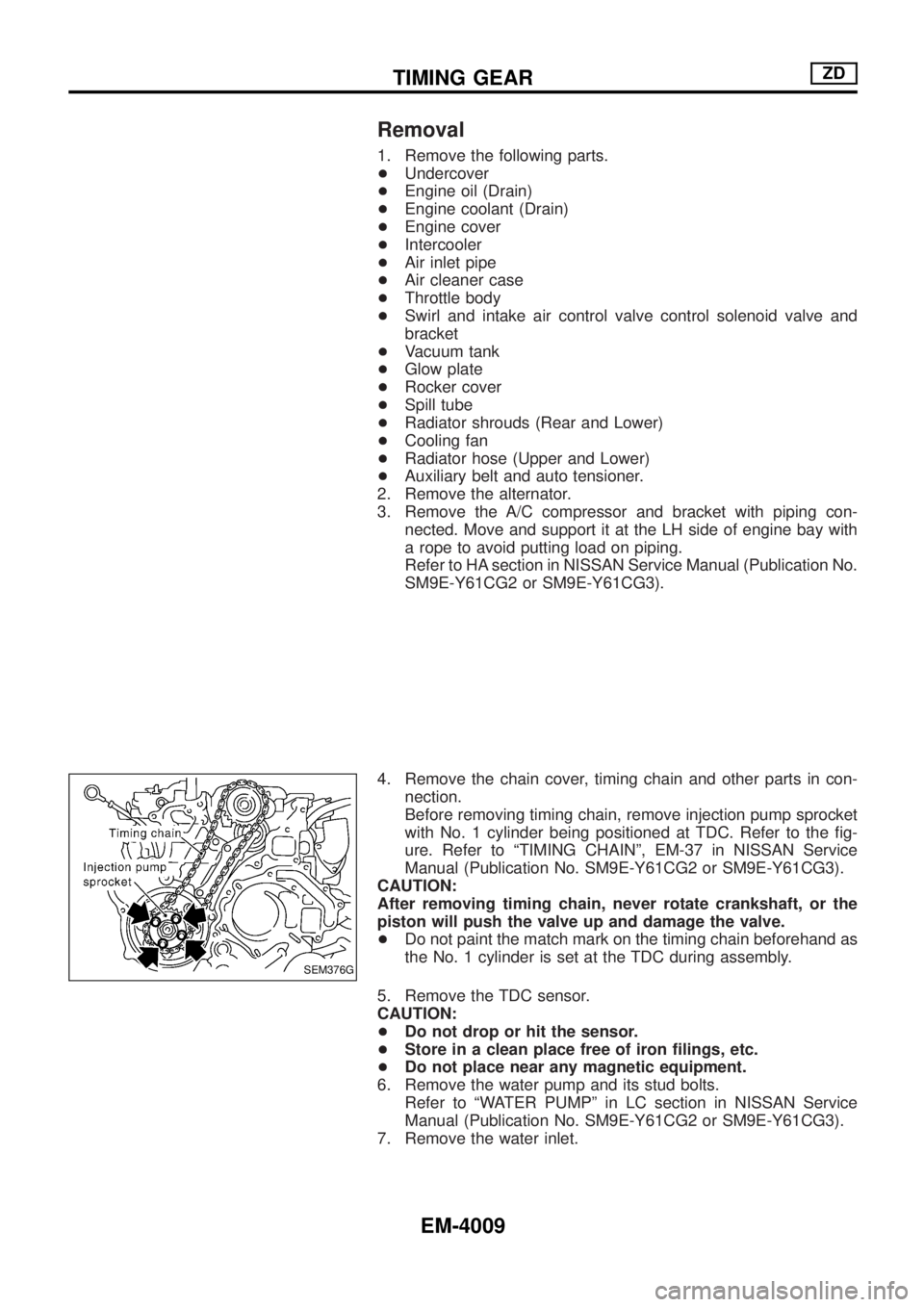
4. Remove the chain cover, timing chain and other parts in con-
nection.
Before removing timing chain, remove injection pump sprocket
with No. 1 cylinder being positioned at TDC. Refer to the ®g-
ure. Refer to ªTIMING CHAINº, EM-37 in NISSAN Service
Manual (Publication No. SM9E-Y61CG2 or SM9E-Y61CG3).
CAUTION:
After removing timing chain, never rotate crankshaft, or the
piston will push the valve up and damage the valve.
+Do not paint the match mark on the timing chain beforehand as
the No. 1 cylinder is set at the TDC during assembly.
5. Remove the TDC sensor.
CAUTION:
+Do not drop or hit the sensor.
+Store in a clean place free of iron ®lings, etc.
+Do not place near any magnetic equipment.
6. Remove the water pump and its stud bolts.
Refer to ªWATER PUMPº in LC section in NISSAN Service
Manual (Publication No. SM9E-Y61CG2 or SM9E-Y61CG3).
7. Remove the water inlet.
SEM376G
TIMING GEARZD
EM-4009
Page 456 of 579
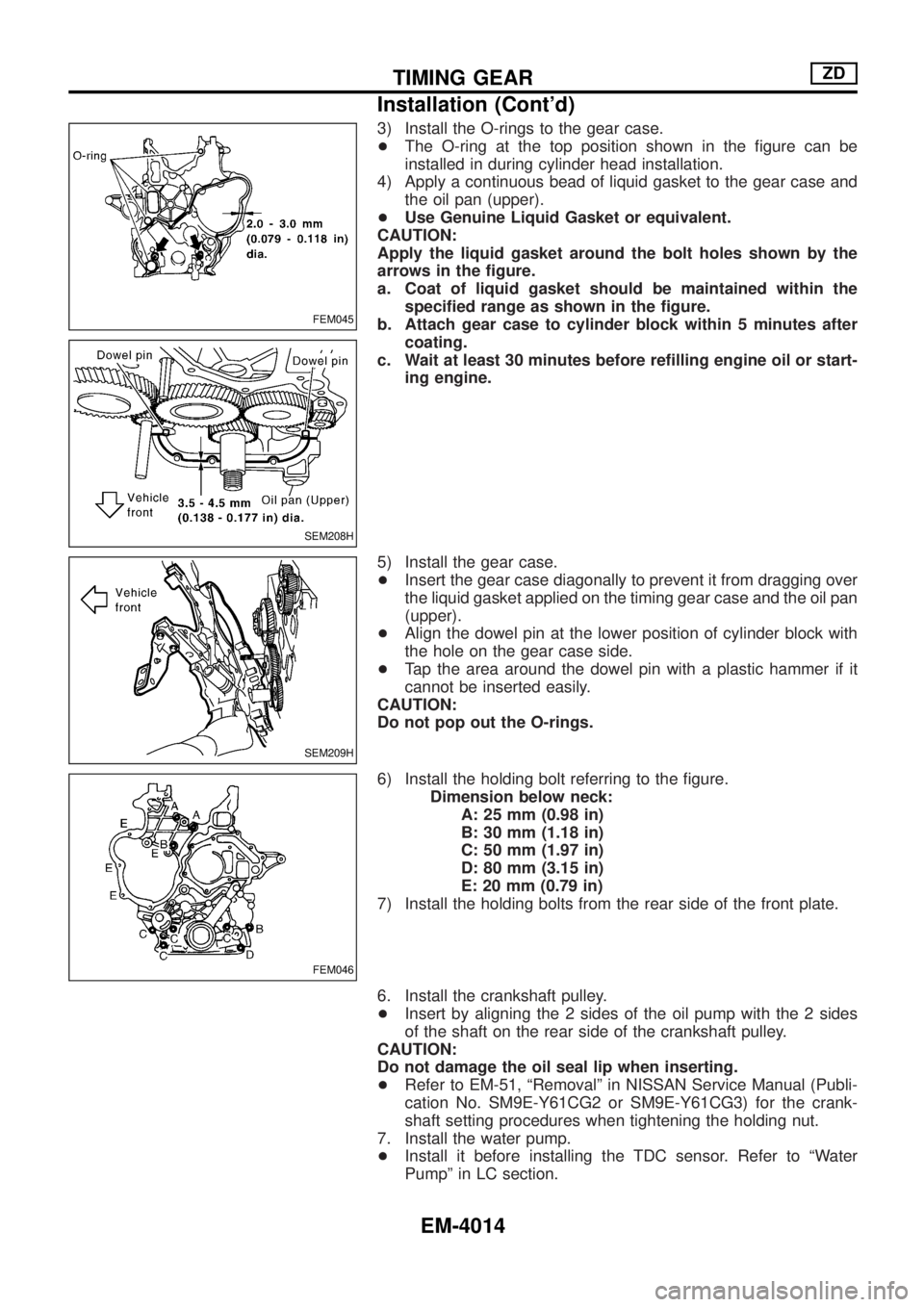
3) Install the O-rings to the gear case.
+The O-ring at the top position shown in the ®gure can be
installed in during cylinder head installation.
4) Apply a continuous bead of liquid gasket to the gear case and
the oil pan (upper).
+Use Genuine Liquid Gasket or equivalent.
CAUTION:
Apply the liquid gasket around the bolt holes shown by the
arrows in the ®gure.
a. Coat of liquid gasket should be maintained within the
speci®ed range as shown in the ®gure.
b. Attach gear case to cylinder block within 5 minutes after
coating.
c. Wait at least 30 minutes before re®lling engine oil or start-
ing engine.
5) Install the gear case.
+Insert the gear case diagonally to prevent it from dragging over
the liquid gasket applied on the timing gear case and the oil pan
(upper).
+Align the dowel pin at the lower position of cylinder block with
the hole on the gear case side.
+Tap the area around the dowel pin with a plastic hammer if it
cannot be inserted easily.
CAUTION:
Do not pop out the O-rings.
6) Install the holding bolt referring to the ®gure.
Dimension below neck:
A: 25 mm (0.98 in)
B: 30 mm (1.18 in)
C: 50 mm (1.97 in)
D: 80 mm (3.15 in)
E: 20 mm (0.79 in)
7) Install the holding bolts from the rear side of the front plate.
6. Install the crankshaft pulley.
+Insert by aligning the 2 sides of the oil pump with the 2 sides
of the shaft on the rear side of the crankshaft pulley.
CAUTION:
Do not damage the oil seal lip when inserting.
+Refer to EM-51, ªRemovalº in NISSAN Service Manual (Publi-
cation No. SM9E-Y61CG2 or SM9E-Y61CG3) for the crank-
shaft setting procedures when tightening the holding nut.
7. Install the water pump.
+Install it before installing the TDC sensor. Refer to ªWater
Pumpº in LC section.
FEM045
SEM208H
SEM209H
FEM046
TIMING GEARZD
Installation (Cont'd)
EM-4014
Page 457 of 579
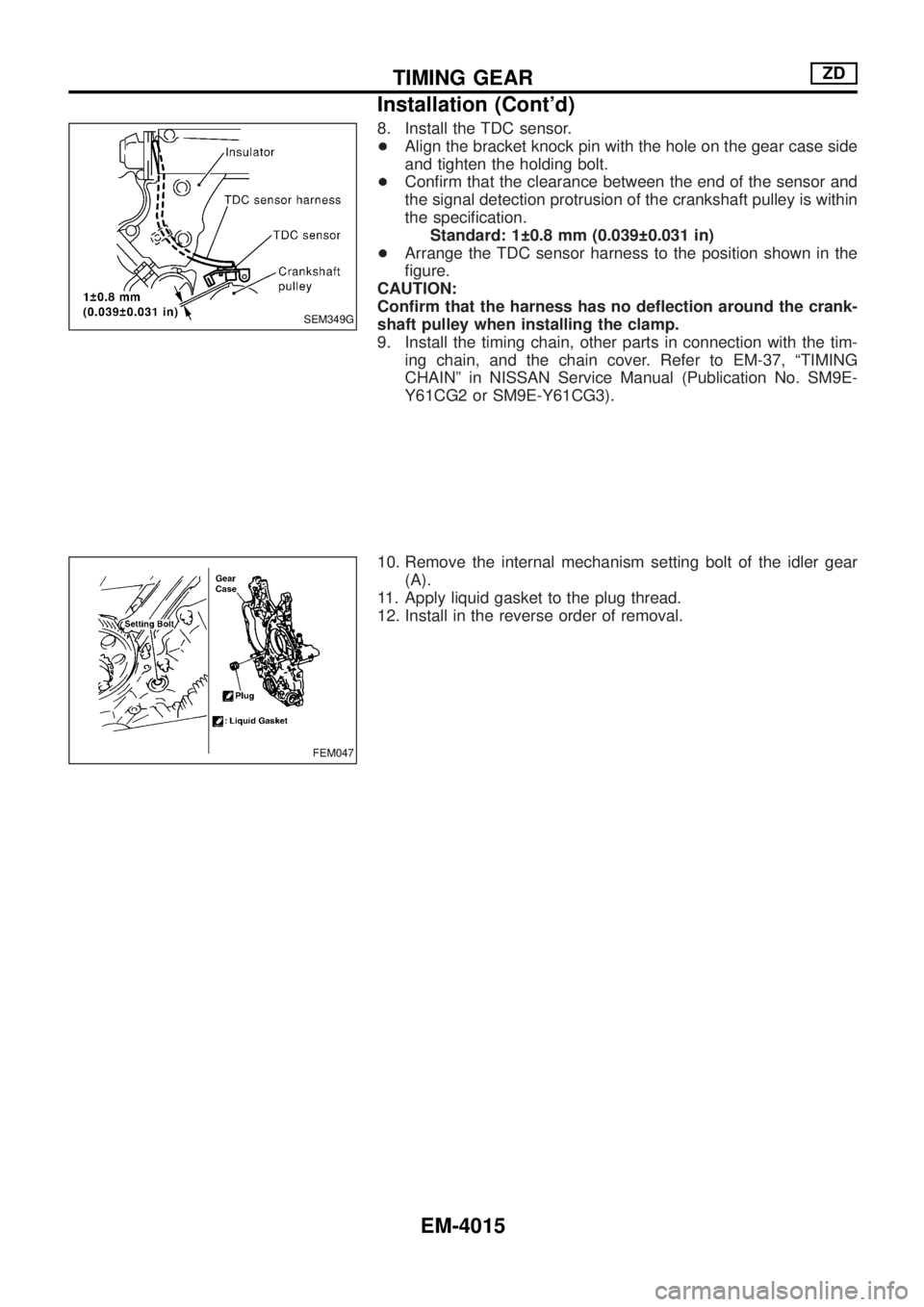
8. Install the TDC sensor.
+Align the bracket knock pin with the hole on the gear case side
and tighten the holding bolt.
+Con®rm that the clearance between the end of the sensor and
the signal detection protrusion of the crankshaft pulley is within
the speci®cation.
Standard: 1 0.8 mm (0.039 0.031 in)
+Arrange the TDC sensor harness to the position shown in the
®gure.
CAUTION:
Con®rm that the harness has no de¯ection around the crank-
shaft pulley when installing the clamp.
9. Install the timing chain, other parts in connection with the tim-
ing chain, and the chain cover. Refer to EM-37, ªTIMING
CHAINº in NISSAN Service Manual (Publication No. SM9E-
Y61CG2 or SM9E-Y61CG3).
10. Remove the internal mechanism setting bolt of the idler gear
(A).
11. Apply liquid gasket to the plug thread.
12. Install in the reverse order of removal.
SEM349G
FEM047
TIMING GEARZD
Installation (Cont'd)
EM-4015
Page 481 of 579
Features (TB48 Engine Models)
CAN COMMUNICATION SYSTEM DESCRIPTION
CAN (Controller Area Network) is a serial communication line for real time application. It is an on-vehicle mul-
tiplex communication line with high data communication speed and excellent error detection ability. Many
electronic control units are equipped onto a vehicle, and each control unit shares information and links with
other control units during operation (not independent). In CAN communication, control units are connected with
2 communication lines (CAN H line, CAN L line) allowing a high rate of information transmission with less wir-
ing. Each control unit transmits/receives data but selectively reads required data only.
SYSTEM CONSTRUCTION
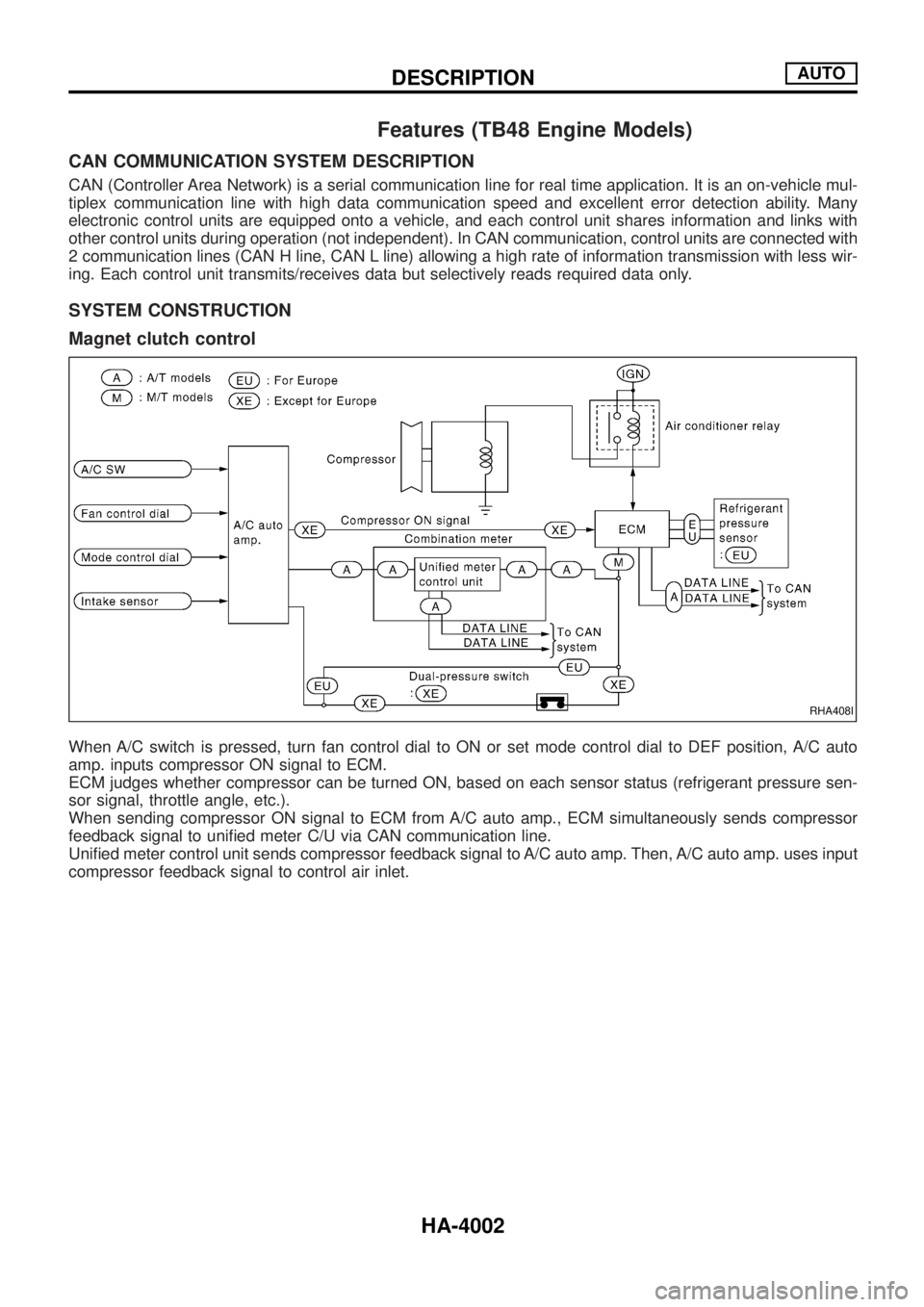
Magnet clutch control
When A/C switch is pressed, turn fan control dial to ON or set mode control dial to DEF position, A/C auto
amp. inputs compressor ON signal to ECM.
ECM judges whether compressor can be turned ON, based on each sensor status (refrigerant pressure sen-
sor signal, throttle angle, etc.).
When sending compressor ON signal to ECM from A/C auto amp., ECM simultaneously sends compressor
feedback signal to uni®ed meter C/U via CAN communication line.
Uni®ed meter control unit sends compressor feedback signal to A/C auto amp. Then, A/C auto amp. uses input
compressor feedback signal to control air inlet.
RHA408I
DESCRIPTIONAUTO
HA-4002