display NISSAN PRIMERA 1999 Electronic User Guide
[x] Cancel search | Manufacturer: NISSAN, Model Year: 1999, Model line: PRIMERA, Model: NISSAN PRIMERA 1999Pages: 2267, PDF Size: 35.74 MB
Page 27 of 2267
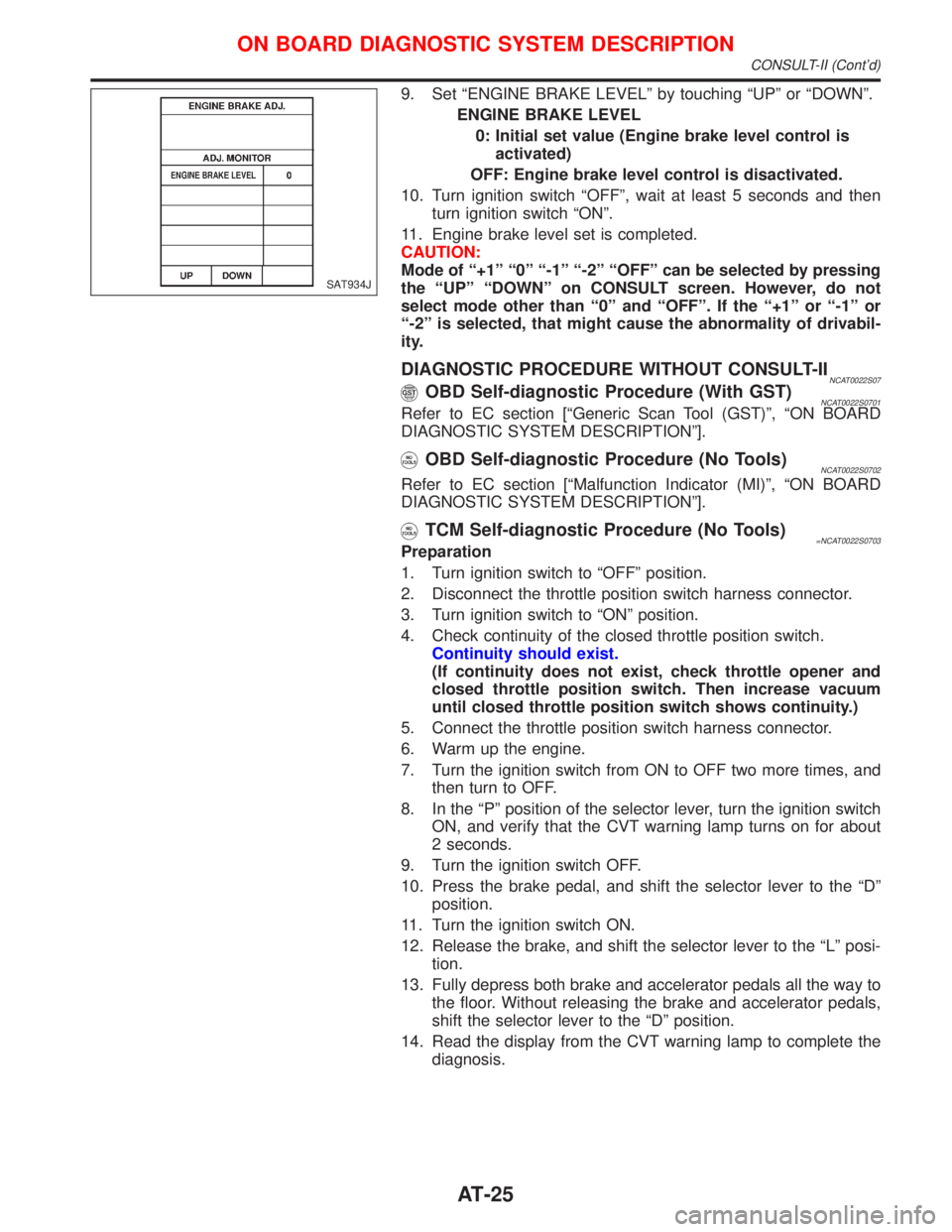
9. Set ªENGINE BRAKE LEVELº by touching ªUPº or ªDOWNº.
ENGINE BRAKE LEVEL
0: Initial set value (Engine brake level control is
activated)
OFF: Engine brake level control is disactivated.
10. Turn ignition switch ªOFFº, wait at least 5 seconds and then
turn ignition switch ªONº.
11. Engine brake level set is completed.
CAUTION:
Mode of ª+1º ª0º ª-1º ª-2º ªOFFº can be selected by pressing
the ªUPº ªDOWNº on CONSULT screen. However, do not
select mode other than ª0º and ªOFFº. If the ª+1º or ª-1º or
ª-2º is selected, that might cause the abnormality of drivabil-
ity.
DIAGNOSTIC PROCEDURE WITHOUT CONSULT-IINCAT0022S07OBD Self-diagnostic Procedure (With GST)NCAT0022S0701Refer to EC section [ªGeneric Scan Tool (GST)º, ªON BOARD
DIAGNOSTIC SYSTEM DESCRIPTIONº].
OBD Self-diagnostic Procedure (No Tools)NCAT0022S0702
Refer to EC section [ªMalfunction Indicator (MI)º, ªON BOARD
DIAGNOSTIC SYSTEM DESCRIPTIONº].
TCM Self-diagnostic Procedure (No Tools)=NCAT0022S0703Preparation
1. Turn ignition switch to ªOFFº position.
2. Disconnect the throttle position switch harness connector.
3. Turn ignition switch to ªONº position.
4. Check continuity of the closed throttle position switch.
Continuity should exist.
(If continuity does not exist, check throttle opener and
closed throttle position switch. Then increase vacuum
until closed throttle position switch shows continuity.)
5. Connect the throttle position switch harness connector.
6. Warm up the engine.
7. Turn the ignition switch from ON to OFF two more times, and
then turn to OFF.
8. In the ªPº position of the selector lever, turn the ignition switch
ON, and verify that the CVT warning lamp turns on for about
2 seconds.
9. Turn the ignition switch OFF.
10. Press the brake pedal, and shift the selector lever to the ªDº
position.
11. Turn the ignition switch ON.
12. Release the brake, and shift the selector lever to the ªLº posi-
tion.
13. Fully depress both brake and accelerator pedals all the way to
the floor. Without releasing the brake and accelerator pedals,
shift the selector lever to the ªDº position.
14. Read the display from the CVT warning lamp to complete the
diagnosis.
SAT934J
ON BOARD DIAGNOSTIC SYSTEM DESCRIPTION
CONSULT-II (Cont'd)
AT-25
Page 29 of 2267
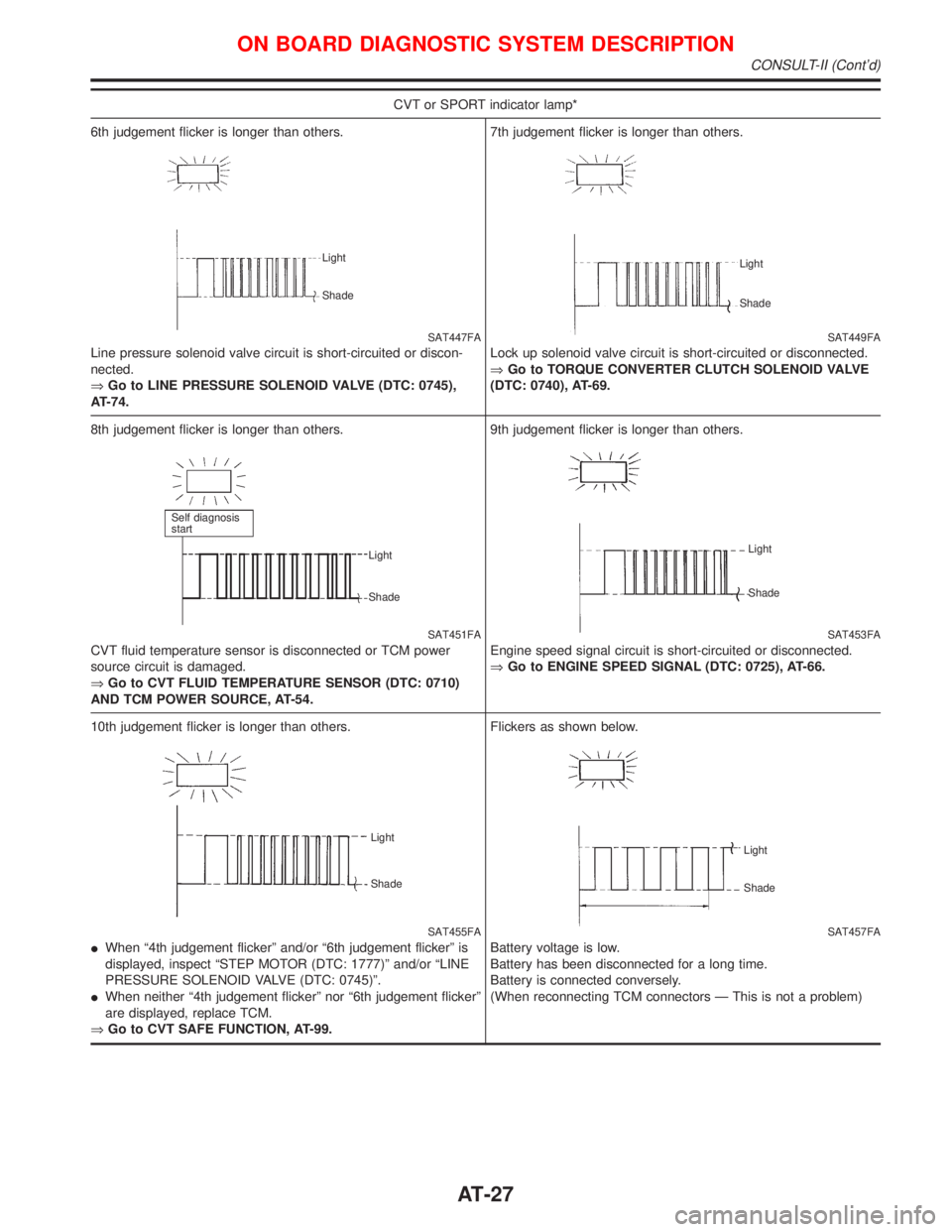
CVT or SPORT indicator lamp*
6th judgement flicker is longer than others.
SAT447FA
Line pressure solenoid valve circuit is short-circuited or discon-
nected.
ÞGo to LINE PRESSURE SOLENOID VALVE (DTC: 0745),
AT-74.
Light
Shade
7th judgement flicker is longer than others.
SAT449FA
Lock up solenoid valve circuit is short-circuited or disconnected.
ÞGo to TORQUE CONVERTER CLUTCH SOLENOID VALVE
(DTC: 0740), AT-69.
Light
Shade
8th judgement flicker is longer than others.
SAT451FA
CVT fluid temperature sensor is disconnected or TCM power
source circuit is damaged.
ÞGo to CVT FLUID TEMPERATURE SENSOR (DTC: 0710)
AND TCM POWER SOURCE, AT-54.
Self diagnosis
start
Light
Shade
9th judgement flicker is longer than others.
SAT453FA
Engine speed signal circuit is short-circuited or disconnected.
ÞGo to ENGINE SPEED SIGNAL (DTC: 0725), AT-66.
Light
Shade
10th judgement flicker is longer than others.
SAT455FA Light
Shade
IWhen ª4th judgement flickerº and/or ª6th judgement flickerº is
displayed, inspect ªSTEP MOTOR (DTC: 1777)º and/or ªLINE
PRESSURE SOLENOID VALVE (DTC: 0745)º.
IWhen neither ª4th judgement flickerº nor ª6th judgement flickerº
are displayed, replace TCM.
ÞGo to CVT SAFE FUNCTION, AT-99.Flickers as shown below.
SAT457FA
Battery voltage is low.
Battery has been disconnected for a long time.
Battery is connected conversely.
(When reconnecting TCM connectors Ð This is not a problem)
Light
Shade
ON BOARD DIAGNOSTIC SYSTEM DESCRIPTION
CONSULT-II (Cont'd)
AT-27
Page 40 of 2267
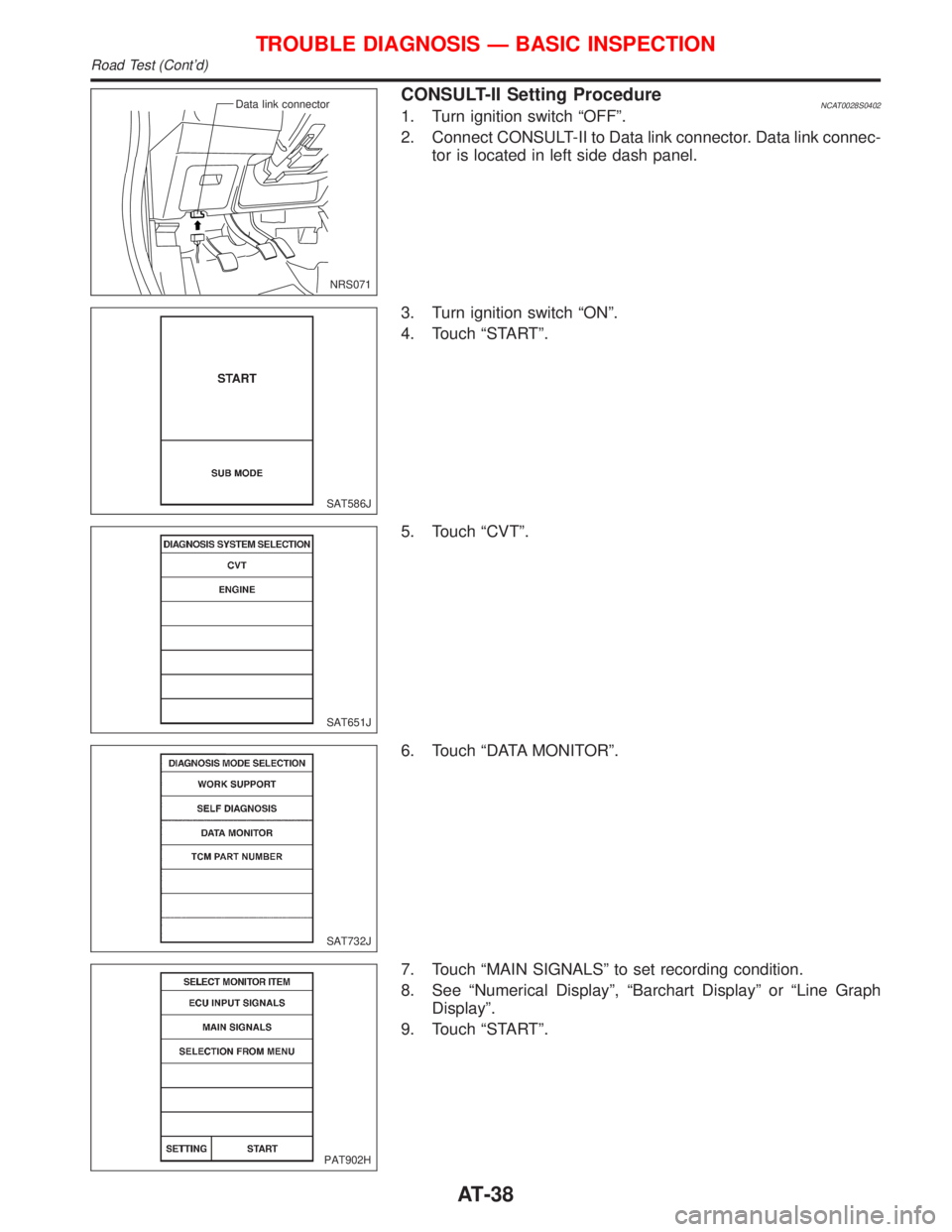
CONSULT-II Setting ProcedureNCAT0028S04021. Turn ignition switch ªOFFº.
2. Connect CONSULT-II to Data link connector. Data link connec-
tor is located in left side dash panel.
3. Turn ignition switch ªONº.
4. Touch ªSTARTº.
5. Touch ªCVTº.
6. Touch ªDATA MONITORº.
7. Touch ªMAIN SIGNALSº to set recording condition.
8. See ªNumerical Displayº, ªBarchart Displayº or ªLine Graph
Displayº.
9. Touch ªSTARTº.
NRS071 Data link connector
SAT586J
SAT651J
SAT732J
PAT902H
TROUBLE DIAGNOSIS Ð BASIC INSPECTION
Road Test (Cont'd)
AT-38
Page 41 of 2267
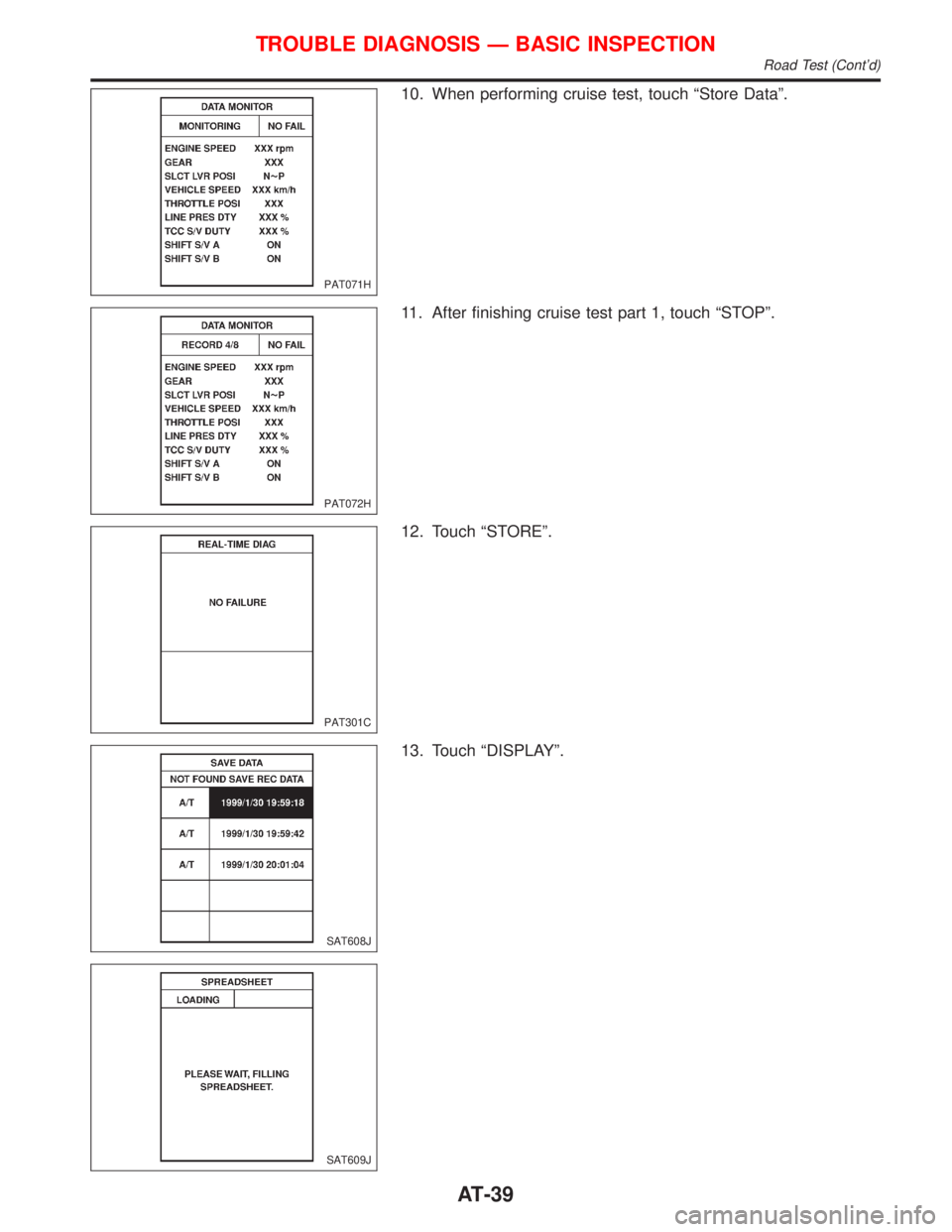
10. When performing cruise test, touch ªStore Dataº.
11. After finishing cruise test part 1, touch ªSTOPº.
12. Touch ªSTOREº.
13. Touch ªDISPLAYº.
PAT071H
PAT072H
PAT301C
SAT608J
SAT609J
TROUBLE DIAGNOSIS Ð BASIC INSPECTION
Road Test (Cont'd)
AT-39
Page 102 of 2267
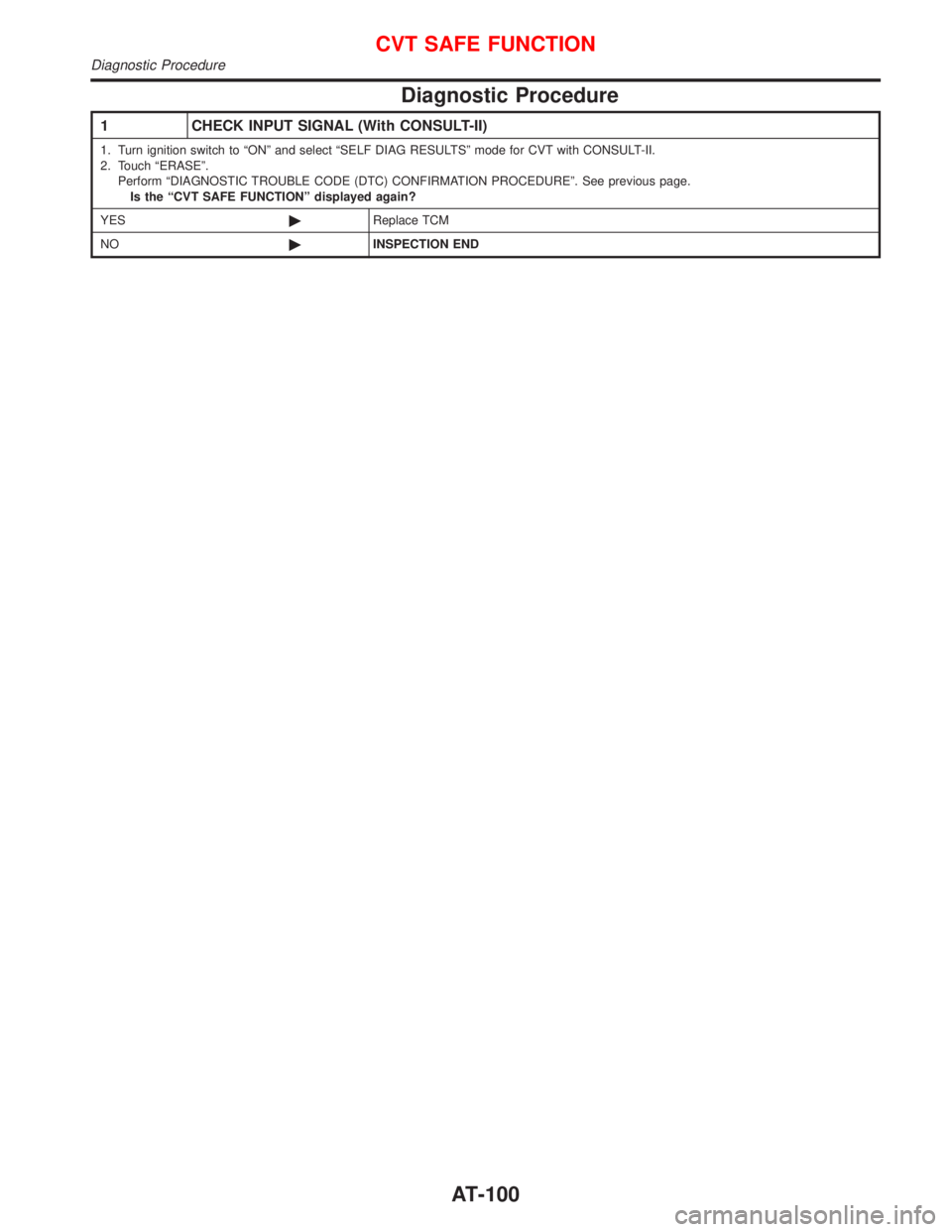
Diagnostic Procedure
1 CHECK INPUT SIGNAL (With CONSULT-II)
1. Turn ignition switch to ªONº and select ªSELF DIAG RESULTSº mode for CVT with CONSULT-II.
2. Touch ªERASEº.
Perform ªDIAGNOSTIC TROUBLE CODE (DTC) CONFIRMATION PROCEDUREº. See previous page.
Is the ªCVT SAFE FUNCTIONº displayed again?
YES©Replace TCM
NO©INSPECTION END
CVT SAFE FUNCTION
Diagnostic Procedure
AT-100
Page 104 of 2267

Diagnostic Procedure=NCAT0240
1 CHECK DTC
With CONSULT-II
1. Turn ignition switch ªONº and select ªSELF DIAG RESULTSº mode for CVT with CONSULT-II.
2. Touch ªERASEº.
PERFORM DIAGNOSTIC TROUBLE CODE (DTC) CONFIRMATION PROCEDURE.
See previous page.
Is the ªCONTROL UNIT (RAM) or CONTROL UNIT (ROM)º displayed again?
Ye s©Replace TCM.
No©INSPECTION END
CONTROL UNIT (RAM), CONTROL UNIT (ROM)
Diagnostic Procedure
AT-102
Page 106 of 2267
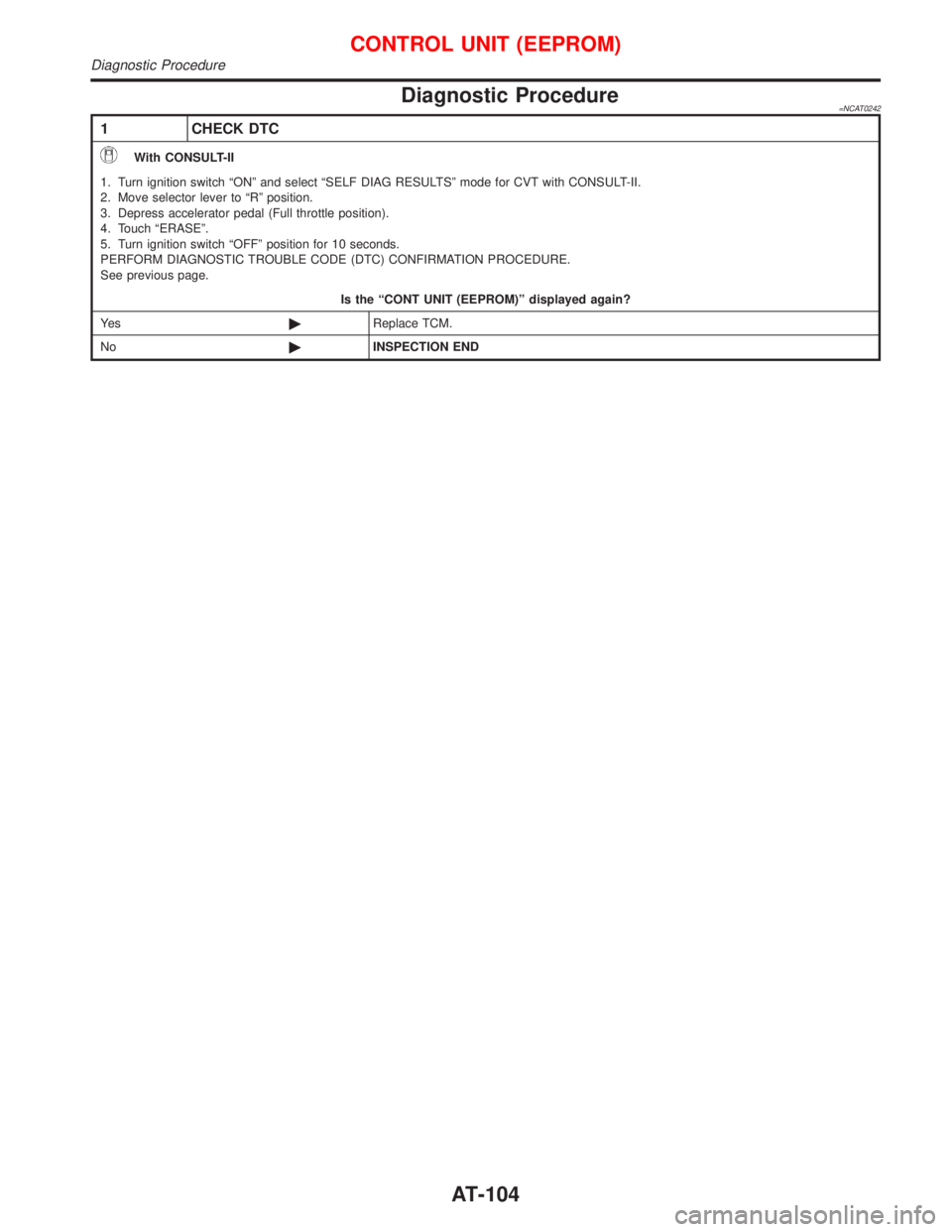
Diagnostic Procedure=NCAT0242
1 CHECK DTC
With CONSULT-II
1. Turn ignition switch ªONº and select ªSELF DIAG RESULTSº mode for CVT with CONSULT-II.
2. Move selector lever to ªRº position.
3. Depress accelerator pedal (Full throttle position).
4. Touch ªERASEº.
5. Turn ignition switch ªOFFº position for 10 seconds.
PERFORM DIAGNOSTIC TROUBLE CODE (DTC) CONFIRMATION PROCEDURE.
See previous page.
Is the ªCONT UNIT (EEPROM)º displayed again?
Ye s©Replace TCM.
No©INSPECTION END
CONTROL UNIT (EEPROM)
Diagnostic Procedure
AT-104
Page 191 of 2267
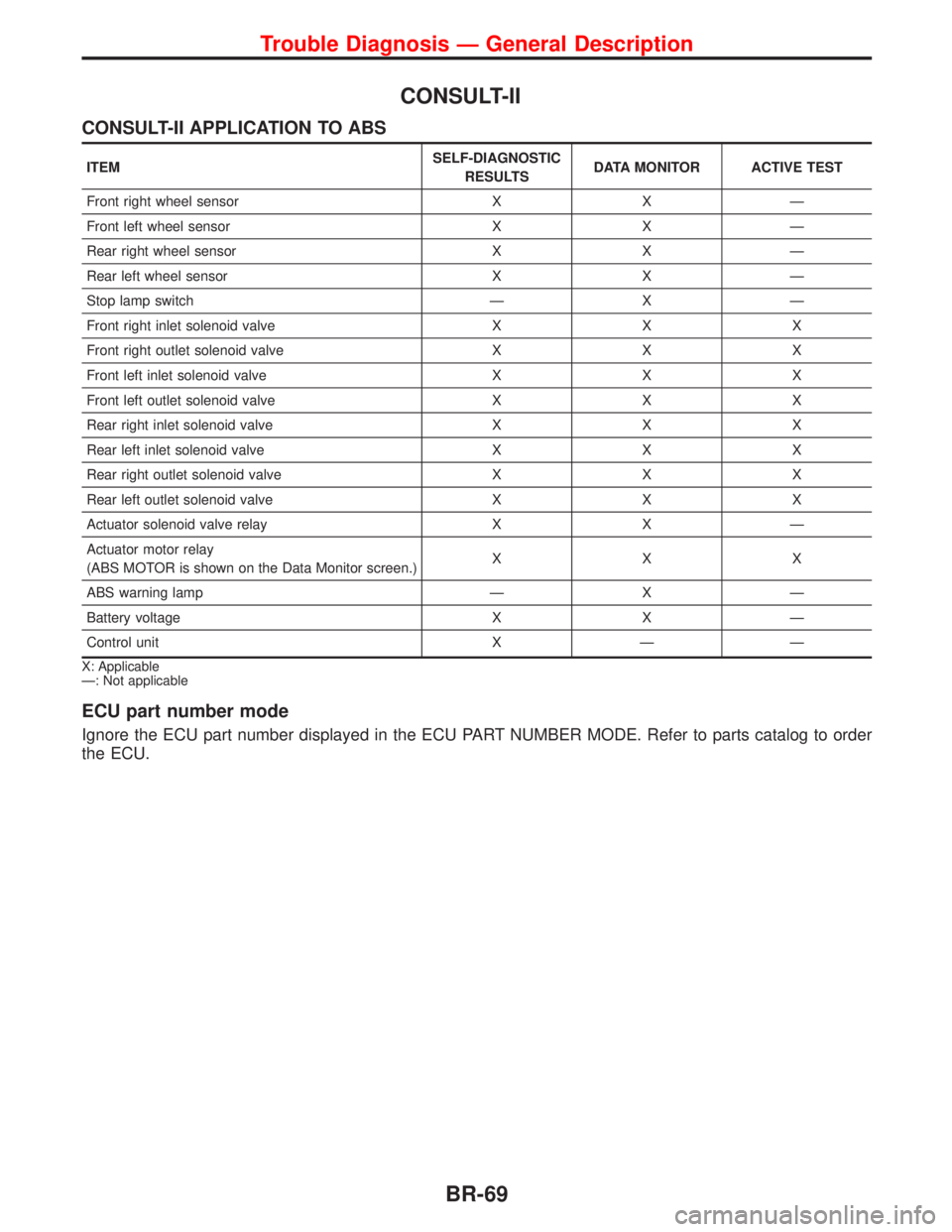
CONSULT-II
CONSULT-II APPLICATION TO ABS
ITEMSELF-DIAGNOSTIC
RESULTSDATA MONITOR ACTIVE TEST
Front right wheel sensor X X Ð
Front left wheel sensor X X Ð
Rear right wheel sensor X X Ð
Rear left wheel sensor X X Ð
Stop lamp switch Ð X Ð
Front right inlet solenoid valve X X X
Front right outlet solenoid valve X X X
Front left inlet solenoid valve X X X
Front left outlet solenoid valve X X X
Rear right inlet solenoid valve X X X
Rear left inlet solenoid valve X X X
Rear right outlet solenoid valve X X X
Rear left outlet solenoid valve X X X
Actuator solenoid valve relay X X Ð
Actuator motor relay
(ABS MOTOR is shown on the Data Monitor screen.)XXX
ABS warning lamp Ð X Ð
Battery voltage X X Ð
Control unit X Ð Ð
X: Applicable
Ð: Not applicable
ECU part number mode
Ignore the ECU part number displayed in the ECU PART NUMBER MODE. Refer to parts catalog to order
the ECU.
Trouble Diagnosis Ð General Description
BR-69
Page 301 of 2267
Precautions
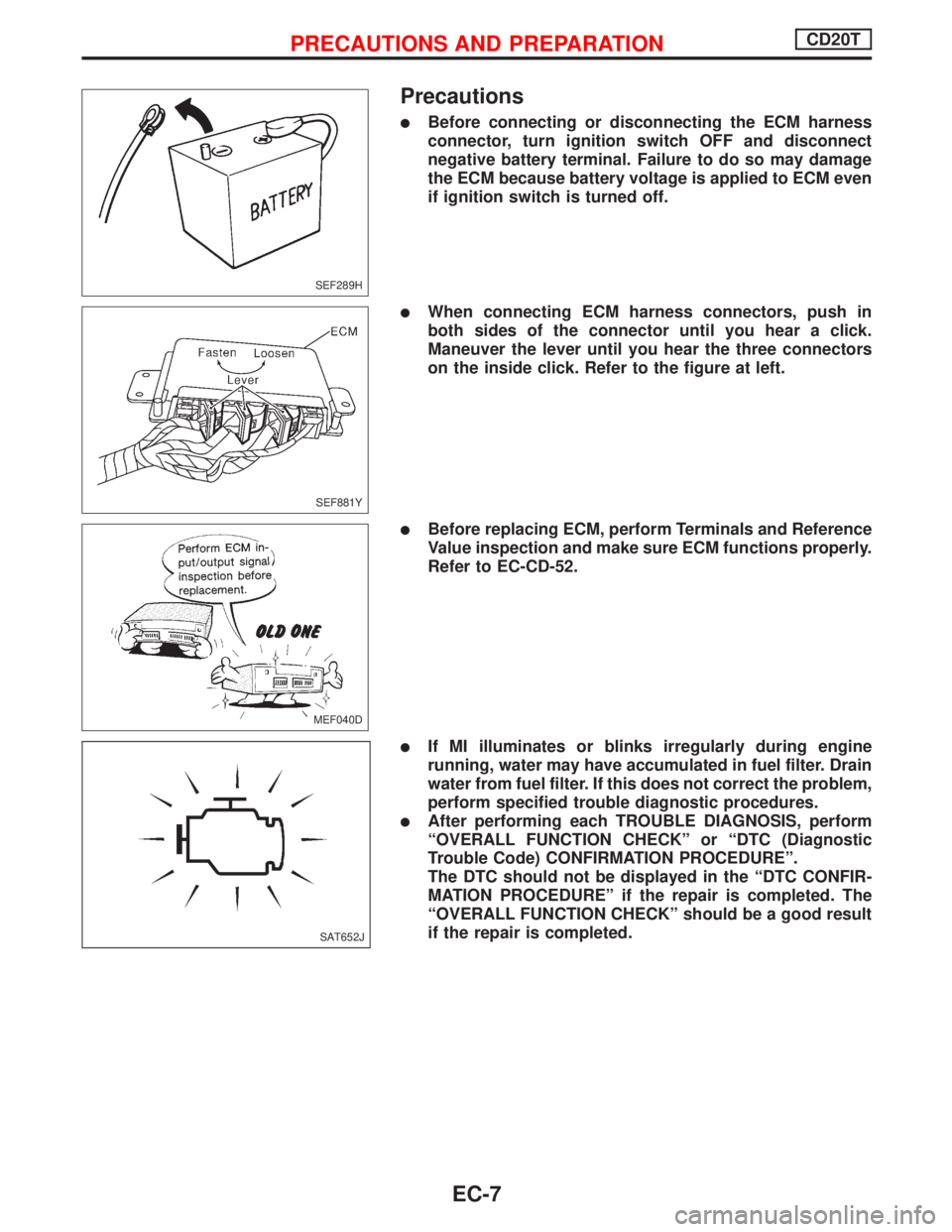
lBefore connecting or disconnecting the ECM harness
connector, turn ignition switch OFF and disconnect
negative battery terminal. Failure to do so may damage
the ECM because battery voltage is applied to ECM even
if ignition switch is turned off.
lWhen connecting ECM harness connectors, push in
both sides of the connector until you hear a click.
Maneuver the lever until you hear the three connectors
on the inside click. Refer to the figure at left.
lBefore replacing ECM, perform Terminals and Reference
Value inspection and make sure ECM functions properly.
Refer to EC-CD-52.
lIf MI illuminates or blinks irregularly during engine
running, water may have accumulated in fuel filter. Drain
water from fuel filter. If this does not correct the problem,
perform specified trouble diagnostic procedures.
lAfter performing each TROUBLE DIAGNOSIS, perform
ªOVERALL FUNCTION CHECKº or ªDTC (Diagnostic
Trouble Code) CONFIRMATION PROCEDUREº.
The DTC should not be displayed in the ªDTC CONFIR-
MATION PROCEDUREº if the repair is completed. The
ªOVERALL FUNCTION CHECKº should be a good result
if the repair is completed.
SEF289H
SEF881Y
MEF040D
SAT652J
PRECAUTIONS AND PREPARATIONCD20T
EC-7
Page 322 of 2267
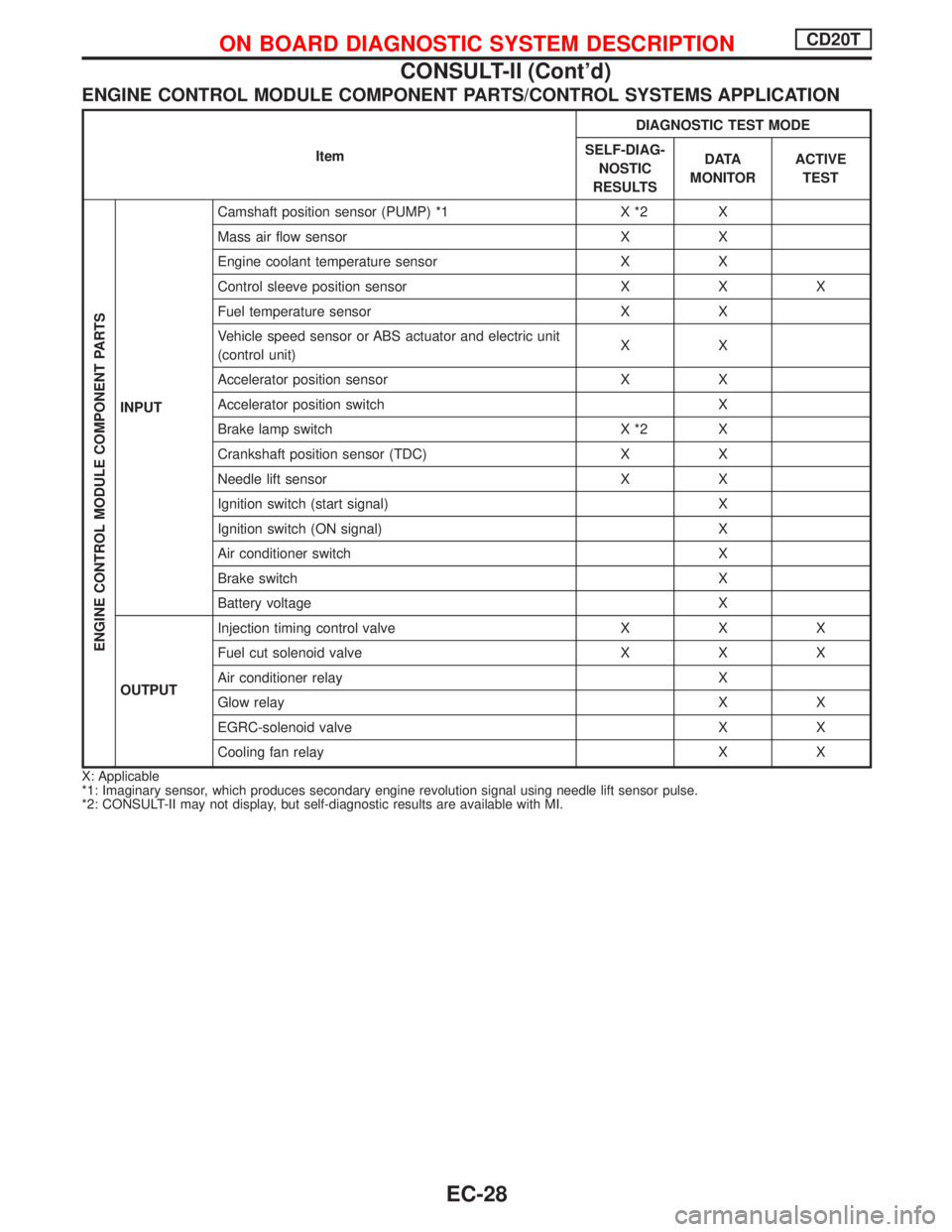
ENGINE CONTROL MODULE COMPONENT PARTS/CONTROL SYSTEMS APPLICATION
ItemDIAGNOSTIC TEST MODE
SELF-DIAG-
NOSTIC
RESULTSD ATA
MONITORACTIVE
TEST
ENGINE CONTROL MODULE COMPONENT PARTS
INPUTCamshaft position sensor (PUMP) *1 X *2 X
Mass air flow sensor X X
Engine coolant temperature sensor X X
Control sleeve position sensor X X X
Fuel temperature sensor X X
Vehicle speed sensor or ABS actuator and electric unit
(control unit)XX
Accelerator position sensor X X
Accelerator position switch X
Brake lamp switch X *2 X
Crankshaft position sensor (TDC) X X
Needle lift sensor X X
Ignition switch (start signal) X
Ignition switch (ON signal) X
Air conditioner switch X
Brake switch X
Battery voltage X
OUTPUTInjection timing control valve X X X
Fuel cut solenoid valve X X X
Air conditioner relay X
Glow relay X X
EGRC-solenoid valve X X
Cooling fan relay X X
X: Applicable
*1: Imaginary sensor, which produces secondary engine revolution signal using needle lift sensor pulse.
*2: CONSULT-II may not display, but self-diagnostic results are available with MI.
ON BOARD DIAGNOSTIC SYSTEM DESCRIPTIONCD20T
CONSULT-II (Cont'd)
EC-28