dtc 34 NISSAN PRIMERA 1999 Electronic Repair Manual
[x] Cancel search | Manufacturer: NISSAN, Model Year: 1999, Model line: PRIMERA, Model: NISSAN PRIMERA 1999Pages: 2267, PDF Size: 35.74 MB
Page 1088 of 2267
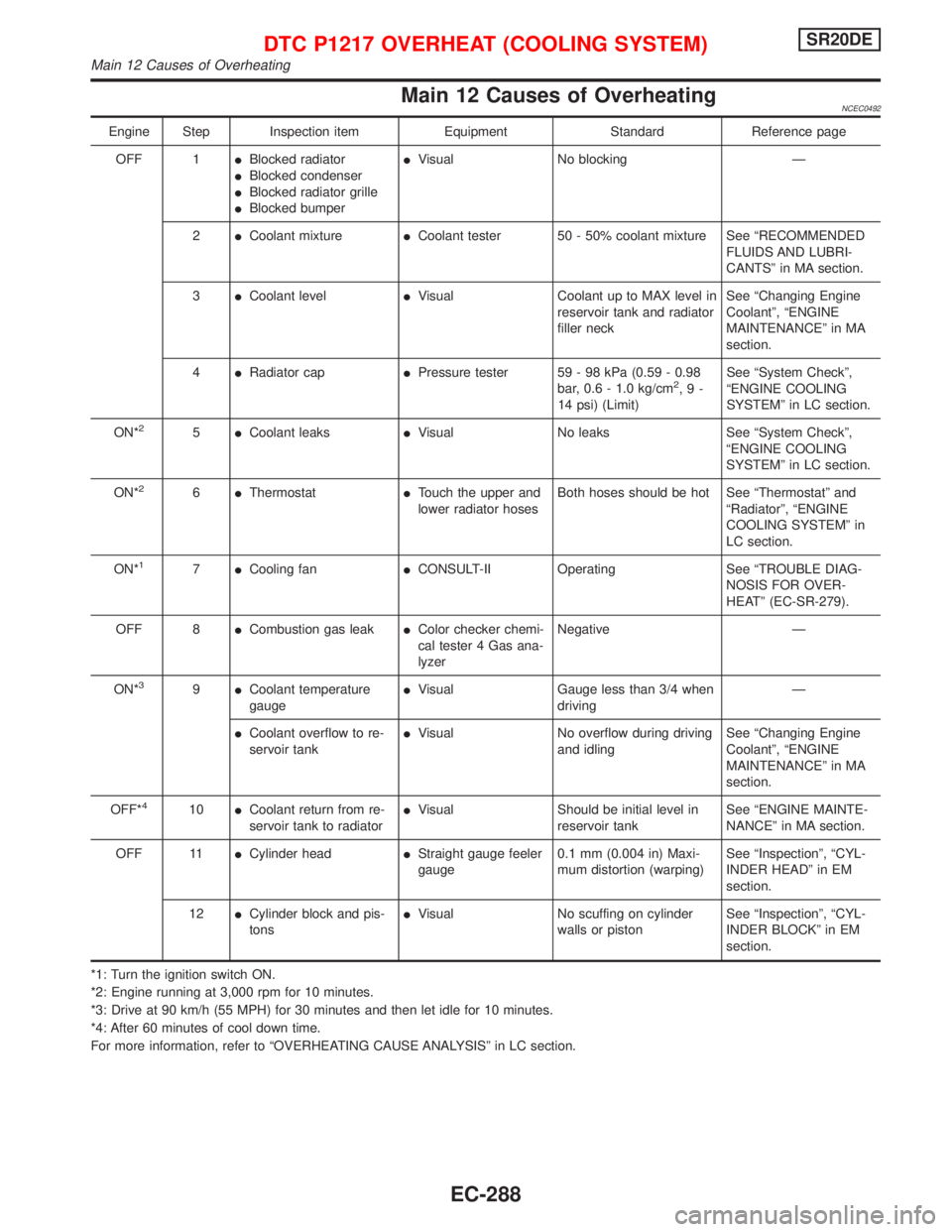
Main 12 Causes of OverheatingNCEC0492
Engine Step Inspection item Equipment Standard Reference page
OFF 1IBlocked radiator
IBlocked condenser
IBlocked radiator grille
IBlocked bumperIVisual No blocking Ð
2ICoolant mixtureICoolant tester 50 - 50% coolant mixture See ªRECOMMENDED
FLUIDS AND LUBRI-
CANTSº in MA section.
3ICoolant levelIVisual Coolant up to MAX level in
reservoir tank and radiator
filler neckSee ªChanging Engine
Coolantº, ªENGINE
MAINTENANCEº in MA
section.
4IRadiator capIPressure tester 59 - 98 kPa (0.59 - 0.98
bar, 0.6 - 1.0 kg/cm
2,9-
14 psi) (Limit)See ªSystem Checkº,
ªENGINE COOLING
SYSTEMº in LC section.
ON*
25ICoolant leaksIVisual No leaks See ªSystem Checkº,
ªENGINE COOLING
SYSTEMº in LC section.
ON*
26IThermostatITouch the upper and
lower radiator hosesBoth hoses should be hot See ªThermostatº and
ªRadiatorº, ªENGINE
COOLING SYSTEMº in
LC section.
ON*
17ICooling fanICONSULT-II Operating See ªTROUBLE DIAG-
NOSIS FOR OVER-
HEATº (EC-SR-279).
OFF 8ICombustion gas leakIColor checker chemi-
cal tester 4 Gas ana-
lyzerNegative Ð
ON*
39ICoolant temperature
gaugeIVisual Gauge less than 3/4 when
drivingÐ
ICoolant overflow to re-
servoir tankIVisual No overflow during driving
and idlingSee ªChanging Engine
Coolantº, ªENGINE
MAINTENANCEº in MA
section.
OFF*
410ICoolant return from re-
servoir tank to radiatorIVisual Should be initial level in
reservoir tankSee ªENGINE MAINTE-
NANCEº in MA section.
OFF 11ICylinder headIStraight gauge feeler
gauge0.1 mm (0.004 in) Maxi-
mum distortion (warping)See ªInspectionº, ªCYL-
INDER HEADº in EM
section.
12ICylinder block and pis-
tonsIVisual No scuffing on cylinder
walls or pistonSee ªInspectionº, ªCYL-
INDER BLOCKº in EM
section.
*1: Turn the ignition switch ON.
*2: Engine running at 3,000 rpm for 10 minutes.
*3: Drive at 90 km/h (55 MPH) for 30 minutes and then let idle for 10 minutes.
*4: After 60 minutes of cool down time.
For more information, refer to ªOVERHEATING CAUSE ANALYSISº in LC section.
DTC P1217 OVERHEAT (COOLING SYSTEM)SR20DE
Main 12 Causes of Overheating
EC-288
Page 1089 of 2267
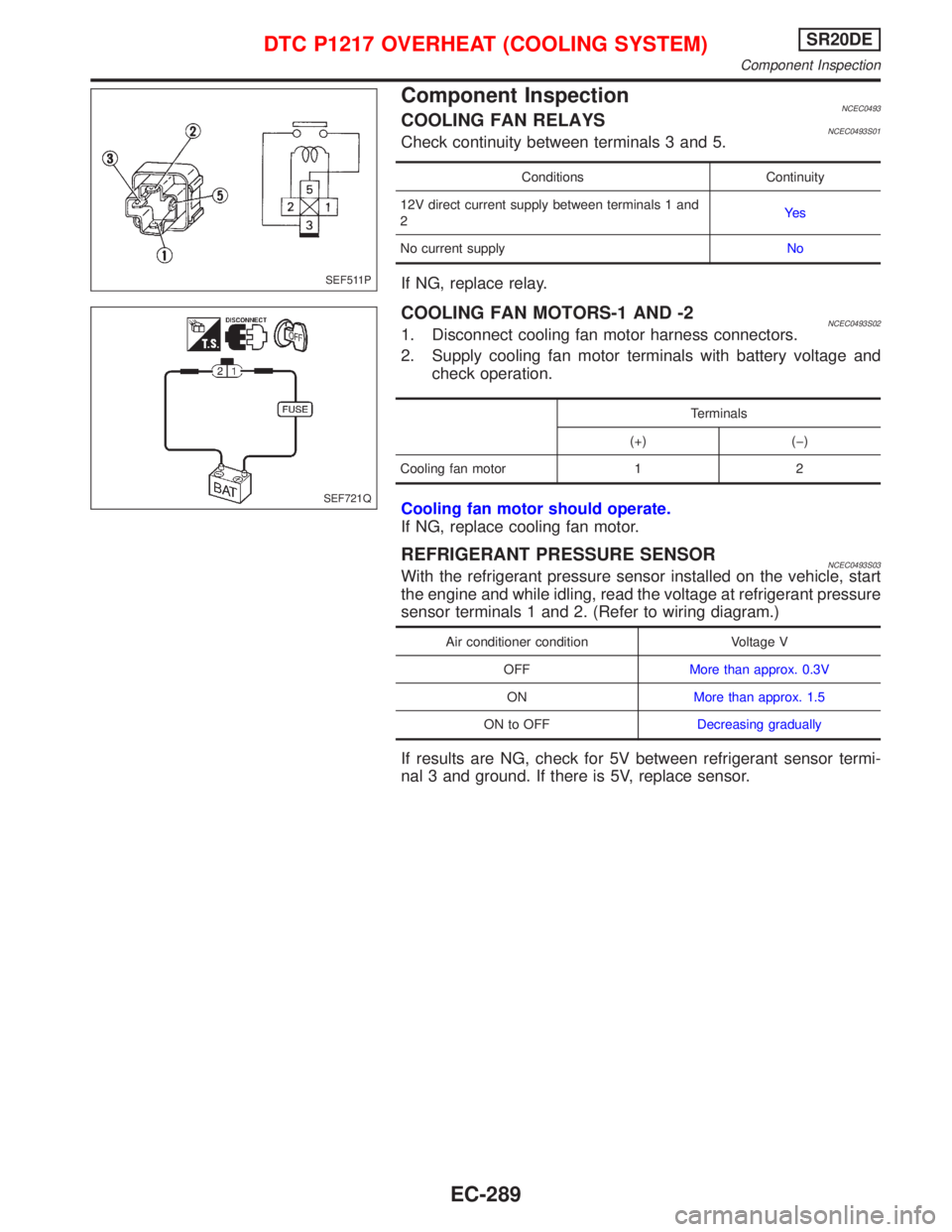
Component InspectionNCEC0493COOLING FAN RELAYSNCEC0493S01Check continuity between terminals 3 and 5.
Conditions Continuity
12V direct current supply between terminals 1 and
2Ye s
No current supplyNo
If NG, replace relay.
COOLING FAN MOTORS-1 AND -2NCEC0493S021. Disconnect cooling fan motor harness connectors.
2. Supply cooling fan motor terminals with battery voltage and
check operation.
Terminals
(+) (þ)
Cooling fan motor 1 2
Cooling fan motor should operate.
If NG, replace cooling fan motor.
REFRIGERANT PRESSURE SENSORNCEC0493S03With the refrigerant pressure sensor installed on the vehicle, start
the engine and while idling, read the voltage at refrigerant pressure
sensor terminals 1 and 2. (Refer to wiring diagram.)
Air conditioner condition Voltage V
OFFMore than approx. 0.3V
ONMore than approx. 1.5
ON to OFFDecreasing gradually
If results are NG, check for 5V between refrigerant sensor termi-
nal 3 and ground. If there is 5V, replace sensor.
SEF511P
SEF721Q
DTC P1217 OVERHEAT (COOLING SYSTEM)SR20DE
Component Inspection
EC-289
Page 1090 of 2267
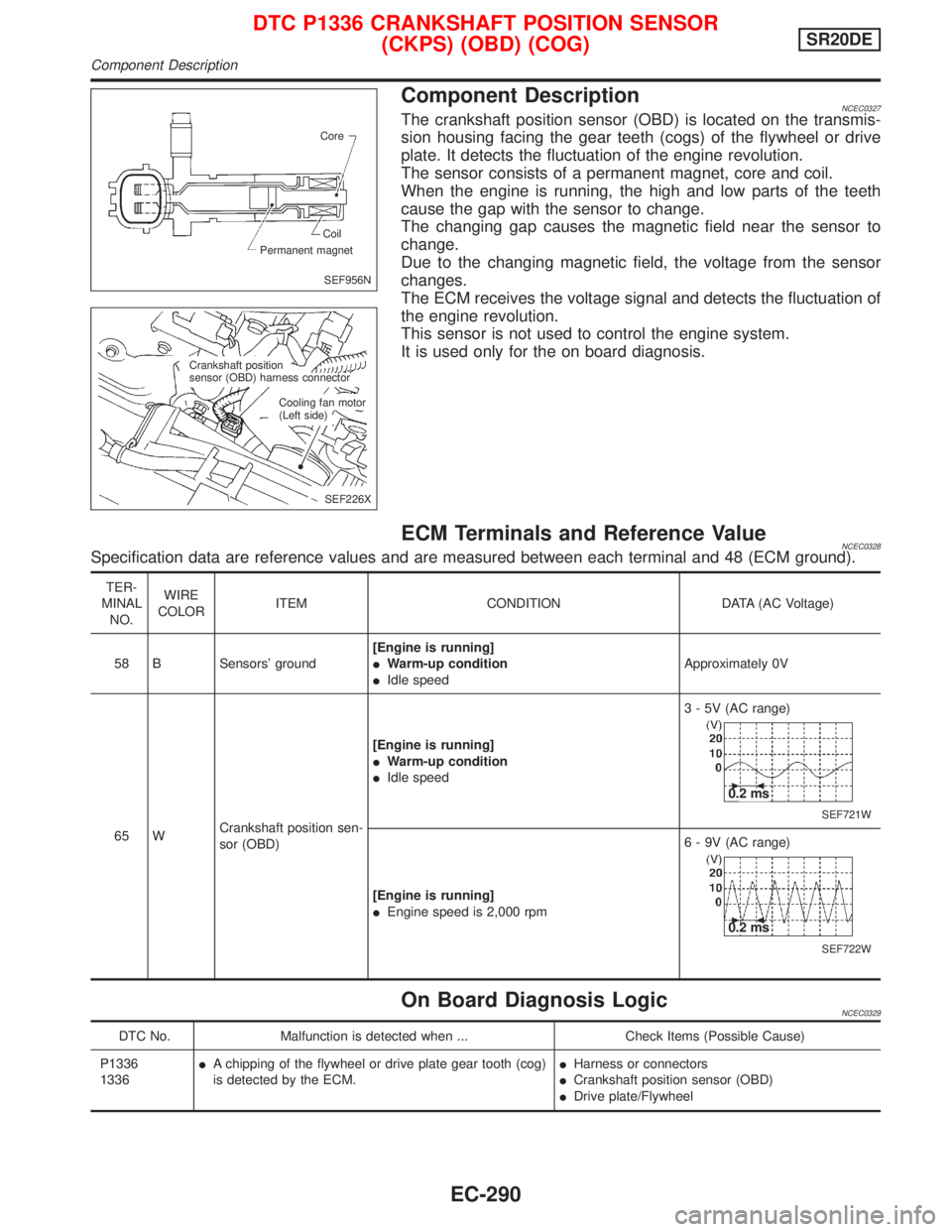
Component DescriptionNCEC0327The crankshaft position sensor (OBD) is located on the transmis-
sion housing facing the gear teeth (cogs) of the flywheel or drive
plate. It detects the fluctuation of the engine revolution.
The sensor consists of a permanent magnet, core and coil.
When the engine is running, the high and low parts of the teeth
cause the gap with the sensor to change.
The changing gap causes the magnetic field near the sensor to
change.
Due to the changing magnetic field, the voltage from the sensor
changes.
The ECM receives the voltage signal and detects the fluctuation of
the engine revolution.
This sensor is not used to control the engine system.
It is used only for the on board diagnosis.
ECM Terminals and Reference ValueNCEC0328Specification data are reference values and are measured between each terminal and 48 (ECM ground).
TER-
MINAL
NO.WIRE
COLORITEM CONDITION DATA (AC Voltage)
58 B Sensors' ground[Engine is running]
IWarm-up condition
IIdle speedApproximately 0V
65 WCrankshaft position sen-
sor (OBD)[Engine is running]
IWarm-up condition
IIdle speed3 - 5V (AC range)
SEF721W
0.2 ms
[Engine is running]
IEngine speed is 2,000 rpm6 - 9V (AC range)
SEF722W
0.2 ms
On Board Diagnosis LogicNCEC0329
DTC No. Malfunction is detected when ... Check Items (Possible Cause)
P1336
1336IA chipping of the flywheel or drive plate gear tooth (cog)
is detected by the ECM.IHarness or connectors
ICrankshaft position sensor (OBD)
IDrive plate/Flywheel
SEF956N Core
Permanent magnetCoil
SEF226X Crankshaft position
sensor (OBD) harness connector
Cooling fan motor
(Left side)
DTC P1336 CRANKSHAFT POSITION SENSOR
(CKPS) (OBD) (COG)SR20DE
Component Description
EC-290
Page 1091 of 2267
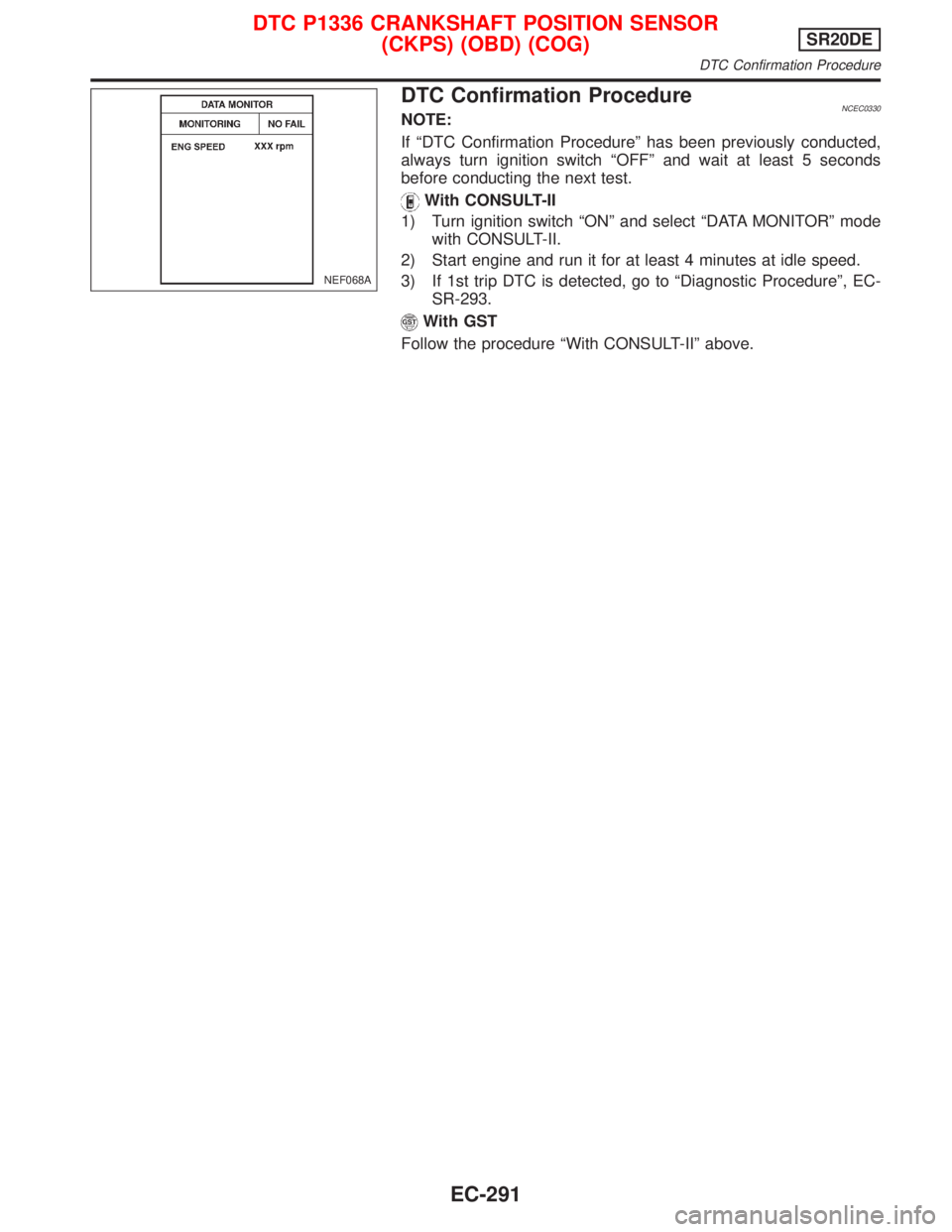
DTC Confirmation ProcedureNCEC0330NOTE:
If ªDTC Confirmation Procedureº has been previously conducted,
always turn ignition switch ªOFFº and wait at least 5 seconds
before conducting the next test.
With CONSULT-II
1) Turn ignition switch ªONº and select ªDATA MONITORº mode
with CONSULT-II.
2) Start engine and run it for at least 4 minutes at idle speed.
3) If 1st trip DTC is detected, go to ªDiagnostic Procedureº, EC-
SR-293.
With GST
Follow the procedure ªWith CONSULT-IIº above.
NEF068A
DTC P1336 CRANKSHAFT POSITION SENSOR
(CKPS) (OBD) (COG)SR20DE
DTC Confirmation Procedure
EC-291
Page 1092 of 2267
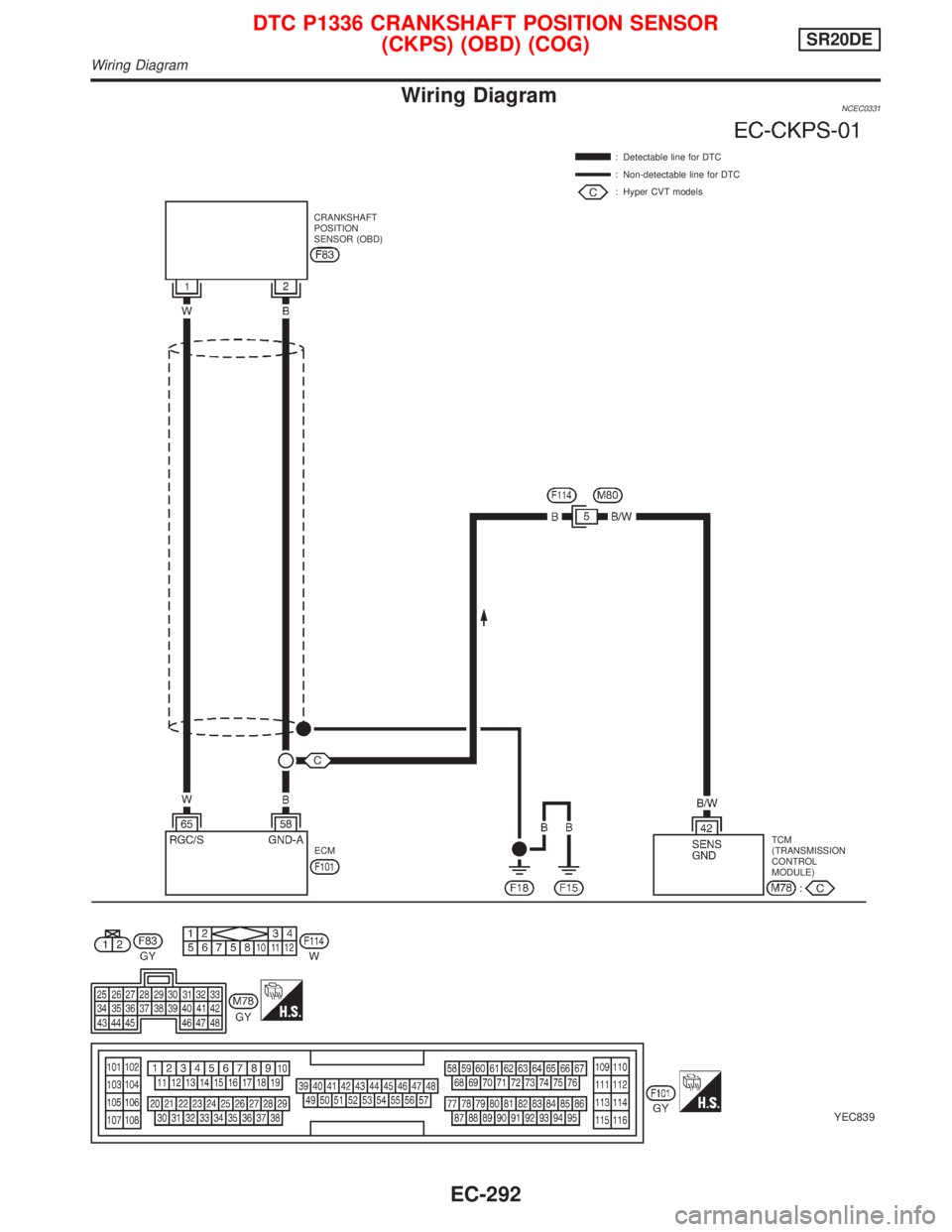
Wiring DiagramNCEC0331
YEC839
: Detectable line for DTC
: Non-detectable line for DTC
: Hyper CVT models
ECMTCM
(TRANSMISSION
CONTROL
MODULE) CRANKSHAFT
POSITION
SENSOR (OBD)
DTC P1336 CRANKSHAFT POSITION SENSOR
(CKPS) (OBD) (COG)SR20DE
Wiring Diagram
EC-292
Page 1093 of 2267
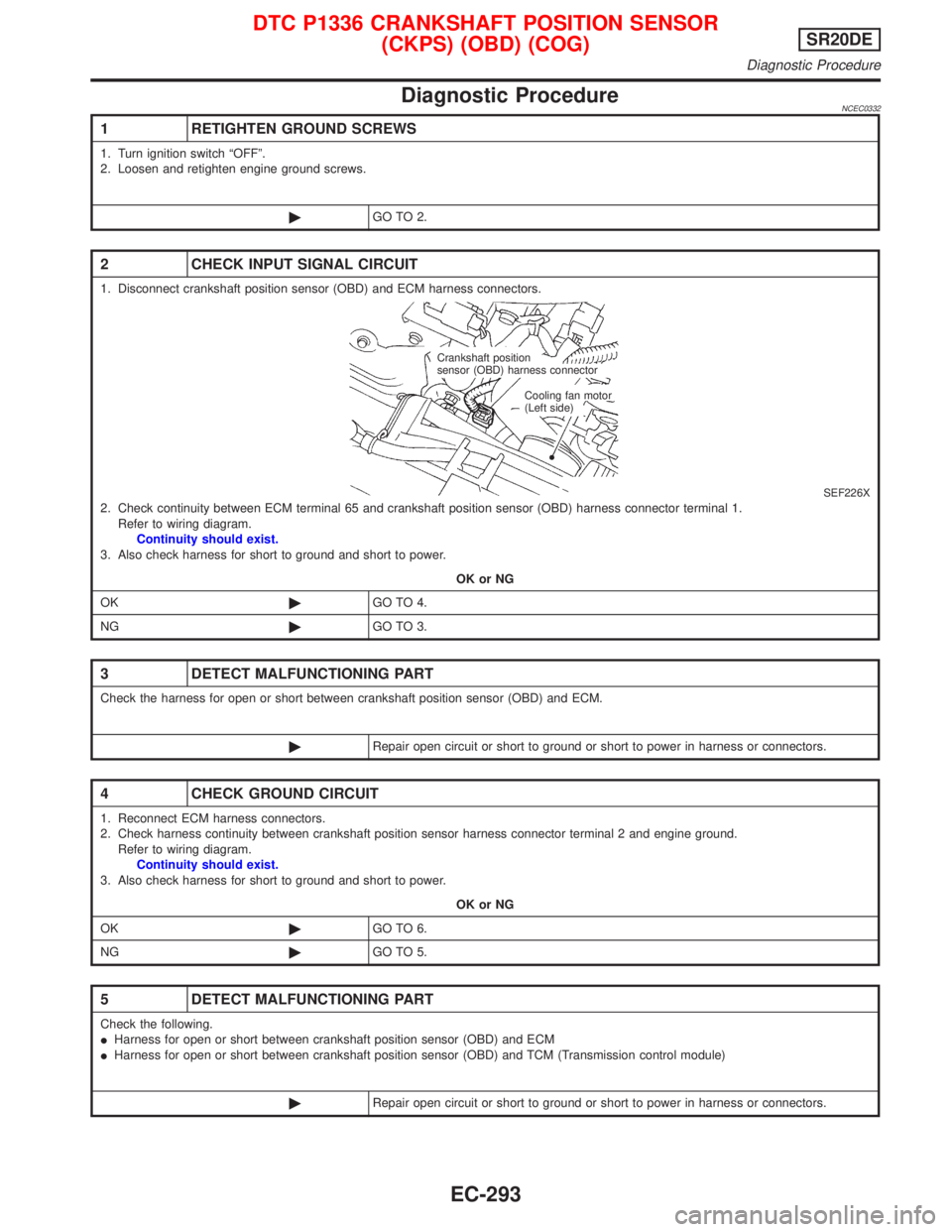
Diagnostic ProcedureNCEC0332
1 RETIGHTEN GROUND SCREWS
1. Turn ignition switch ªOFFº.
2. Loosen and retighten engine ground screws.
©GO TO 2.
2 CHECK INPUT SIGNAL CIRCUIT
1. Disconnect crankshaft position sensor (OBD) and ECM harness connectors.
SEF226X2. Check continuity between ECM terminal 65 and crankshaft position sensor (OBD) harness connector terminal 1.
Refer to wiring diagram.
Continuity should exist.
3. Also check harness for short to ground and short to power.
OK or NG
OK©GO TO 4.
NG©GO TO 3.
3 DETECT MALFUNCTIONING PART
Check the harness for open or short between crankshaft position sensor (OBD) and ECM.
©Repair open circuit or short to ground or short to power in harness or connectors.
4 CHECK GROUND CIRCUIT
1. Reconnect ECM harness connectors.
2. Check harness continuity between crankshaft position sensor harness connector terminal 2 and engine ground.
Refer to wiring diagram.
Continuity should exist.
3. Also check harness for short to ground and short to power.
OK or NG
OK©GO TO 6.
NG©GO TO 5.
5 DETECT MALFUNCTIONING PART
Check the following.
IHarness for open or short between crankshaft position sensor (OBD) and ECM
IHarness for open or short between crankshaft position sensor (OBD) and TCM (Transmission control module)
©Repair open circuit or short to ground or short to power in harness or connectors.
Crankshaft position
sensor (OBD) harness connector
Cooling fan motor
(Left side)
DTC P1336 CRANKSHAFT POSITION SENSOR
(CKPS) (OBD) (COG)SR20DE
Diagnostic Procedure
EC-293
Page 1094 of 2267
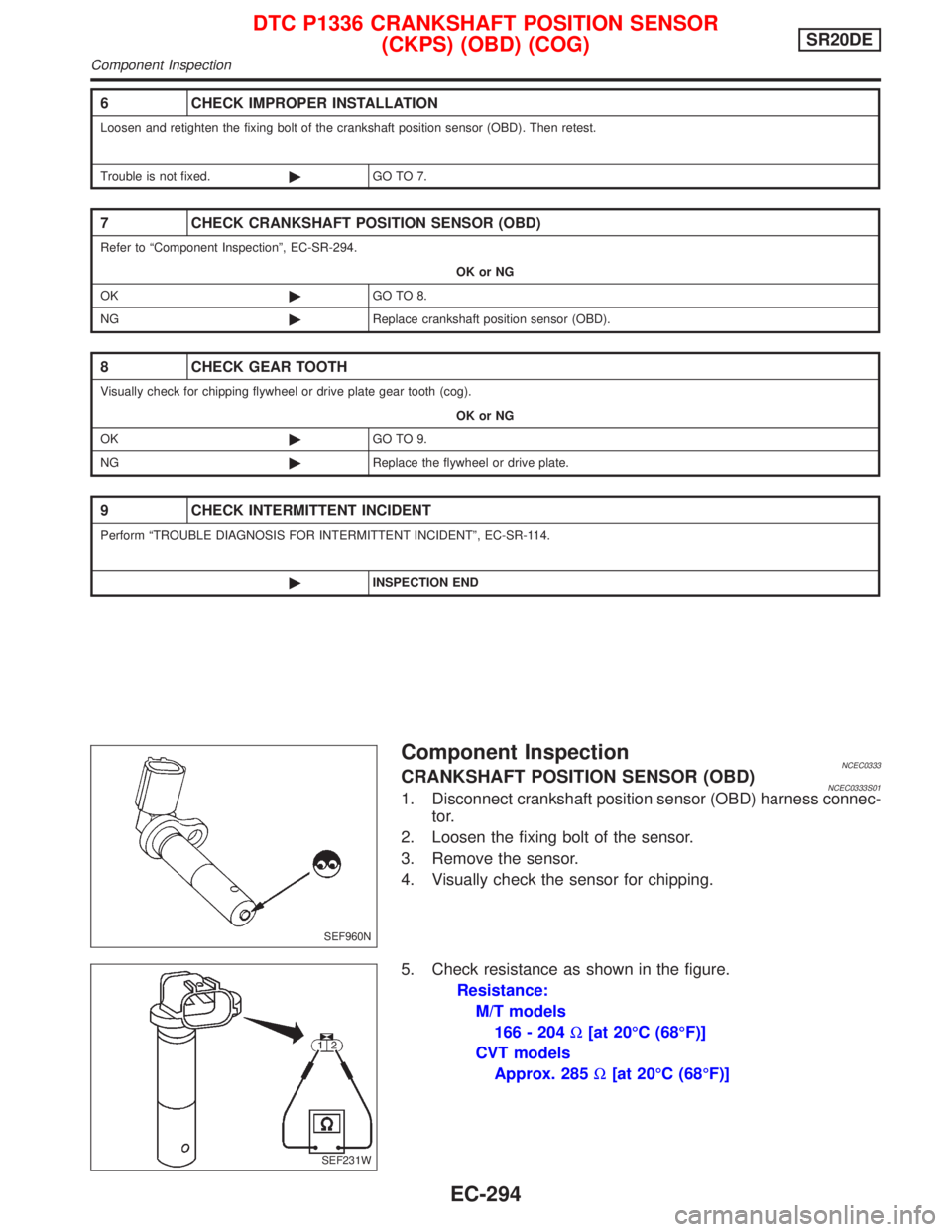
Component InspectionNCEC0333CRANKSHAFT POSITION SENSOR (OBD)NCEC0333S011. Disconnect crankshaft position sensor (OBD) harness connec-
tor.
2. Loosen the fixing bolt of the sensor.
3. Remove the sensor.
4. Visually check the sensor for chipping.
5. Check resistance as shown in the figure.
Resistance:
M/T models
166 - 204W[at 20ÉC (68ÉF)]
CVT models
Approx. 285W[at 20ÉC (68ÉF)]
6 CHECK IMPROPER INSTALLATION
Loosen and retighten the fixing bolt of the crankshaft position sensor (OBD). Then retest.
Trouble is not fixed.©GO TO 7.
7 CHECK CRANKSHAFT POSITION SENSOR (OBD)
Refer to ªComponent Inspectionº, EC-SR-294.
OK or NG
OK©GO TO 8.
NG©Replace crankshaft position sensor (OBD).
8 CHECK GEAR TOOTH
Visually check for chipping flywheel or drive plate gear tooth (cog).
OK or NG
OK©GO TO 9.
NG©Replace the flywheel or drive plate.
9 CHECK INTERMITTENT INCIDENT
Perform ªTROUBLE DIAGNOSIS FOR INTERMITTENT INCIDENTº, EC-SR-114.
©INSPECTION END
SEF960N
SEF231W
DTC P1336 CRANKSHAFT POSITION SENSOR
(CKPS) (OBD) (COG)SR20DE
Component Inspection
EC-294
Page 1095 of 2267
System DescriptionNCEC0560The malfunction information related to CVT is transferred through the line (circuit) from TCM (Transmission
Control Module) to ECM. Therefore, be sure to erase the malfunction information such as DTC not only in TCM
(Transmission Control Module) but also ECM after the CVT related repair.
ECM Terminals and Reference ValueNCEC0561Specification data are reference values and are measured between each terminal and 48 (ECM ground).
TER-
MINAL
NO.WIRE
COLORITEM CONDITION DATA (DC Voltage)
91 PU/Y CVT check signal[Ignition switch ªONº]
[Engine is running]0 - Approximately 5V
On Board Diagnosis LogicNCEC0562
DTC No. Malfunction is detected when ... Check Items (Possible Cause)
P1605
1605IAn incorrect signal from TCM (Transmission Control
Module) is sent to ECM.IHarness or connectors
[The communication line circuit between ECM and
TCM (Transmission Control Module) is open or
shorted.]
IDead (Weak) battery
ITCM (Transmission Control Module)
DTC Confirmation ProcedureNCEC0563NOTE:
If ªDTC CONFIRMATION PROCEDUREº has been previously
conducted, always turn ignition switch ªOFFº and wait at least 9
seconds before conducting the next test.
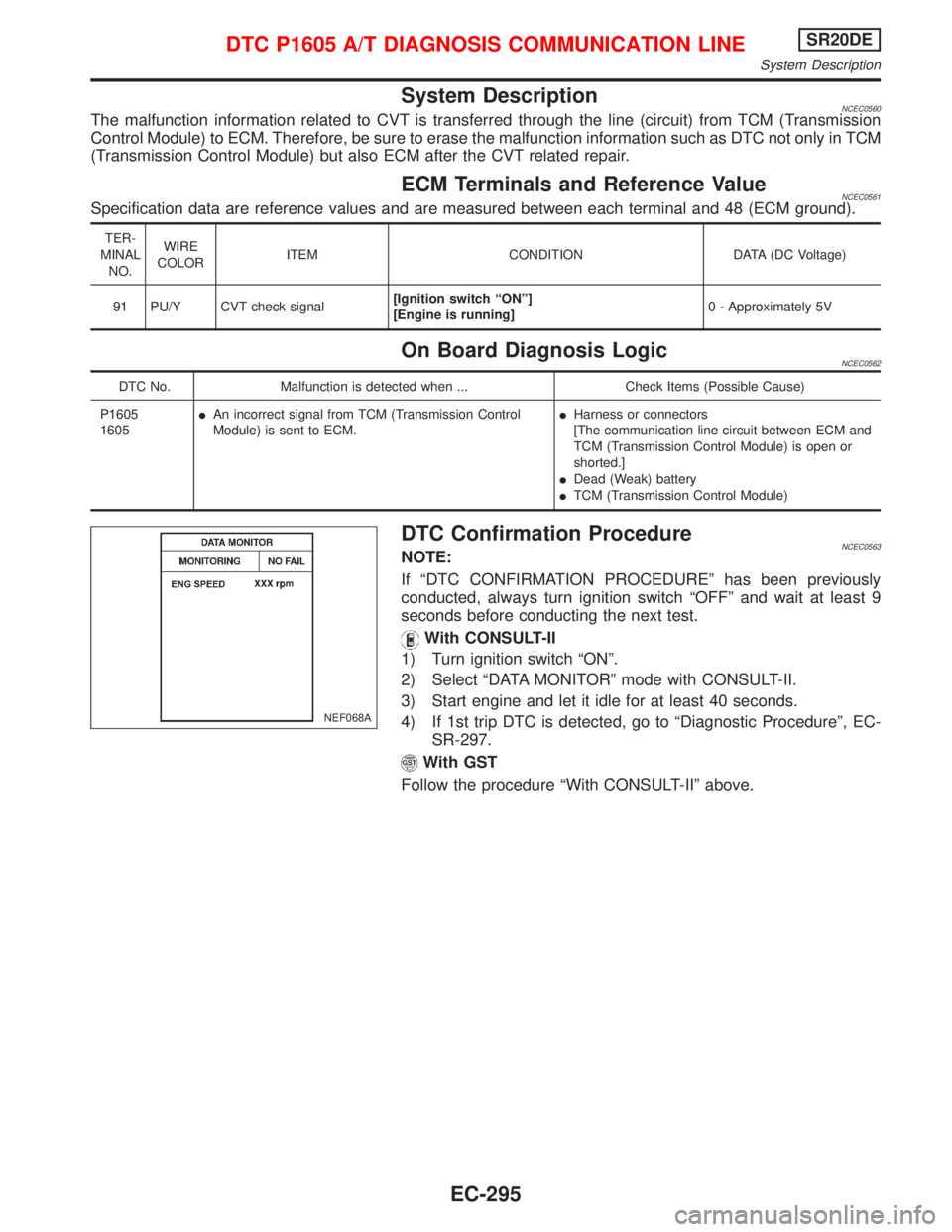
With CONSULT-II
1) Turn ignition switch ªONº.
2) Select ªDATA MONITORº mode with CONSULT-II.
3) Start engine and let it idle for at least 40 seconds.
4) If 1st trip DTC is detected, go to ªDiagnostic Procedureº, EC-
SR-297.
With GST
Follow the procedure ªWith CONSULT-IIº above.
NEF068A
DTC P1605 A/T DIAGNOSIS COMMUNICATION LINESR20DE
System Description
EC-295
Page 1096 of 2267
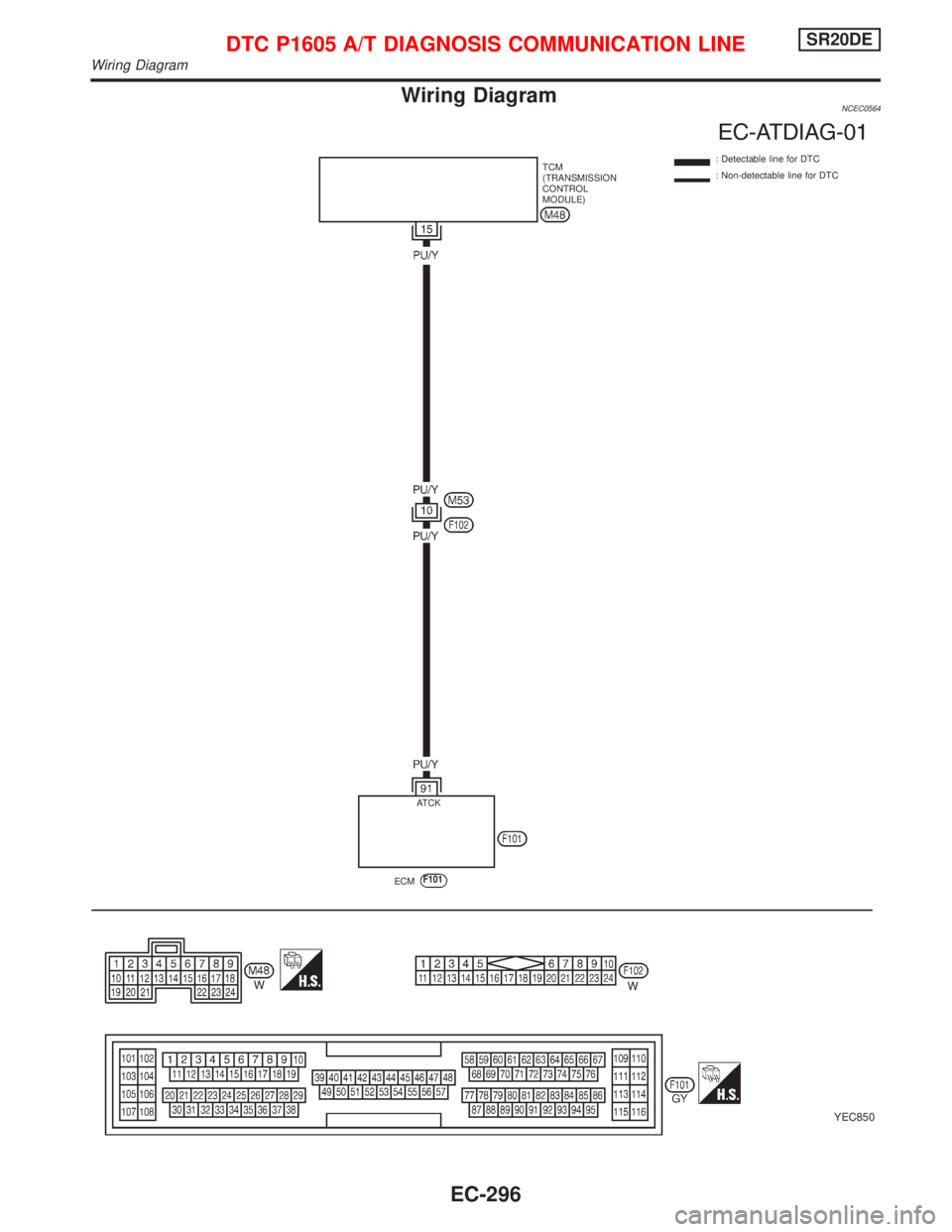
Wiring DiagramNCEC0564
YEC850
: Detectable line for DTC
: Non-detectable line for DTC TCM
(TRANSMISSION
CONTROL
MODULE)
ECM
F101
.ATCK
DTC P1605 A/T DIAGNOSIS COMMUNICATION LINESR20DE
Wiring Diagram
EC-296
Page 1097 of 2267
Diagnostic ProcedureNCEC0565
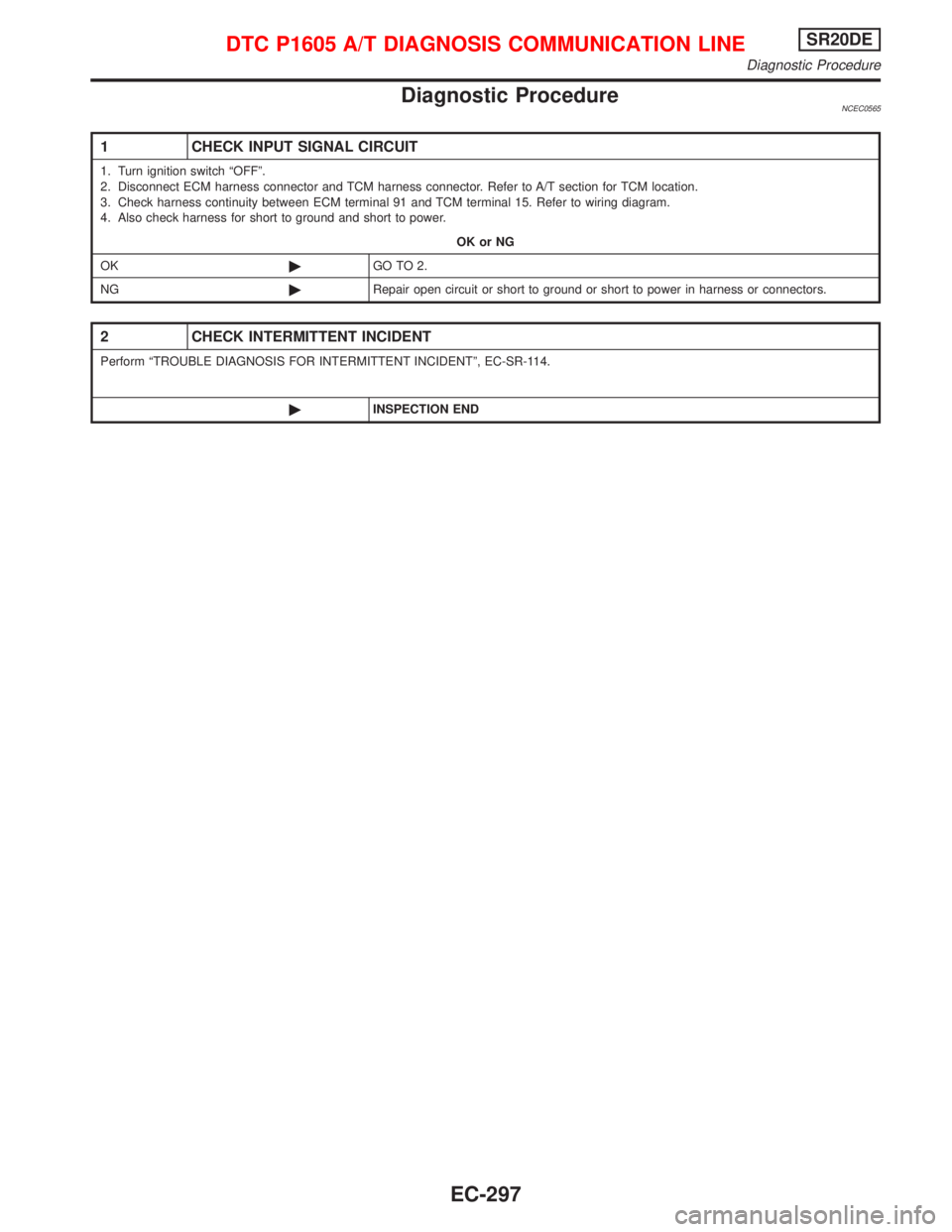
1 CHECK INPUT SIGNAL CIRCUIT
1. Turn ignition switch ªOFFº.
2. Disconnect ECM harness connector and TCM harness connector. Refer to A/T section for TCM location.
3. Check harness continuity between ECM terminal 91 and TCM terminal 15. Refer to wiring diagram.
4. Also check harness for short to ground and short to power.
OK or NG
OK©GO TO 2.
NG©Repair open circuit or short to ground or short to power in harness or connectors.
2 CHECK INTERMITTENT INCIDENT
Perform ªTROUBLE DIAGNOSIS FOR INTERMITTENT INCIDENTº, EC-SR-114.
©INSPECTION END
DTC P1605 A/T DIAGNOSIS COMMUNICATION LINESR20DE
Diagnostic Procedure
EC-297