key fob NISSAN QASHQAI 2014 Owner´s Manual
[x] Cancel search | Manufacturer: NISSAN, Model Year: 2014, Model line: QASHQAI, Model: NISSAN QASHQAI 2014Pages: 338, PDF Size: 4.87 MB
Page 121 of 338
–Intelligent Key models:If the Intelligent Key has
been left inside the vehicle, all doors will unlock
and an audible warning will sound.
Super Lock equipped models (RHD
models)
If the doors are locked using the integrated keyfob
lock button () or a request button (Intelligent Key
models), the Super Lock system will be activated.
The
indicator light in the centre console comes
on to indicate that all doors are locked, but it will not
be possible to use the
button of the power door
lock switch to unlock the doors.
Locking the doors with the power door lock switch
will not activate the Super Lock system.
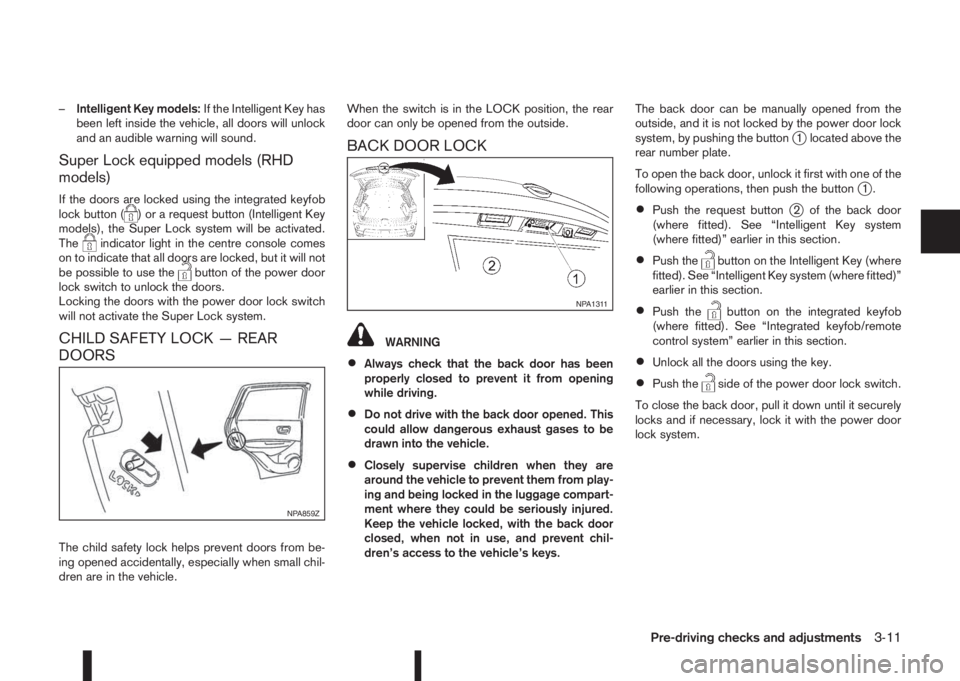
CHILD SAFETY LOCK — REAR
DOORS
The child safety lock helps prevent doors from be-
ing opened accidentally, especially when small chil-
dren are in the vehicle.When the switch is in the LOCK position, the rear
door can only be opened from the outside.
BACK DOOR LOCK
WARNING
•Always check that the back door has been
properly closed to prevent it from opening
while driving.
•Do not drive with the back door opened. This
could allow dangerous exhaust gases to be
drawn into the vehicle.
•Closely supervise children when they are
around the vehicle to prevent them from play-
ing and being locked in the luggage compart-
ment where they could be seriously injured.
Keep the vehicle locked, with the back door
closed, when not in use, and prevent chil-
dren’s access to the vehicle’s keys.The back door can be manually opened from the
outside, and it is not locked by the power door lock
system, by pushing the button
j1 located above the
rear number plate.
To open the back door, unlock it first with one of the
following operations, then push the button
j1.
•Push the request buttonj2 of the back door
(where fitted). See “Intelligent Key system
(where fitted)” earlier in this section.
•Push thebutton on the Intelligent Key (where
fitted). See “Intelligent Key system (where fitted)”
earlier in this section.
•Push thebutton on the integrated keyfob
(where fitted). See “Integrated keyfob/remote
control system” earlier in this section.
•Unlock all the doors using the key.
•Push theside of the power door lock switch.
To close the back door, pull it down until it securely
locks and if necessary, lock it with the power door
lock system.
NPA859Z
NPA1311
Pre-driving checks and adjustments3-11
Page 122 of 338
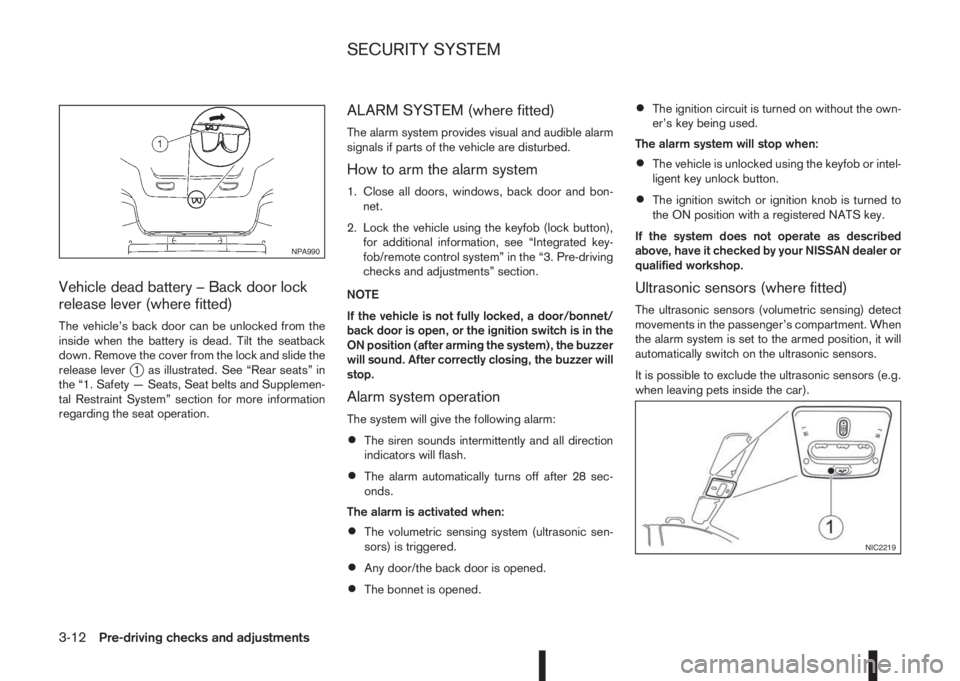
Vehicle dead battery – Back door lock
release lever (where fitted)
The vehicle’s back door can be unlocked from the
inside when the battery is dead. Tilt the seatback
down. Remove the cover from the lock and slide the
release lever
j1 as illustrated. See “Rear seats” in
the “1. Safety — Seats, Seat belts and Supplemen-
tal Restraint System” section for more information
regarding the seat operation.
ALARM SYSTEM (where fitted)
The alarm system provides visual and audible alarm
signals if parts of the vehicle are disturbed.
How to arm the alarm system
1. Close all doors, windows, back door and bon-
net.
2. Lock the vehicle using the keyfob (lock button),
for additional information, see “Integrated key-
fob/remote control system” in the “3. Pre-driving
checks and adjustments” section.
NOTE
If the vehicle is not fully locked, a door/bonnet/
back door is open, or the ignition switch is in the
ON position (after arming the system), the buzzer
will sound. After correctly closing, the buzzer will
stop.
Alarm system operation
The system will give the following alarm:
•The siren sounds intermittently and all direction
indicators will flash.
•The alarm automatically turns off after 28 sec-
onds.
The alarm is activated when:
•The volumetric sensing system (ultrasonic sen-
sors) is triggered.
•Any door/the back door is opened.
•The bonnet is opened.
•The ignition circuit is turned on without the own-
er’s key being used.
The alarm system will stop when:
•The vehicle is unlocked using the keyfob or intel-
ligent key unlock button.
•The ignition switch or ignition knob is turned to
the ON position with a registered NATS key.
If the system does not operate as described
above, have it checked by your NISSAN dealer or
qualified workshop.
Ultrasonic sensors (where fitted)
The ultrasonic sensors (volumetric sensing) detect
movements in the passenger’s compartment. When
the alarm system is set to the armed position, it will
automatically switch on the ultrasonic sensors.
It is possible to exclude the ultrasonic sensors (e.g.
when leaving pets inside the car).
NPA990
NIC2219
SECURITY SYSTEM
3-12Pre-driving checks and adjustments
Page 123 of 338
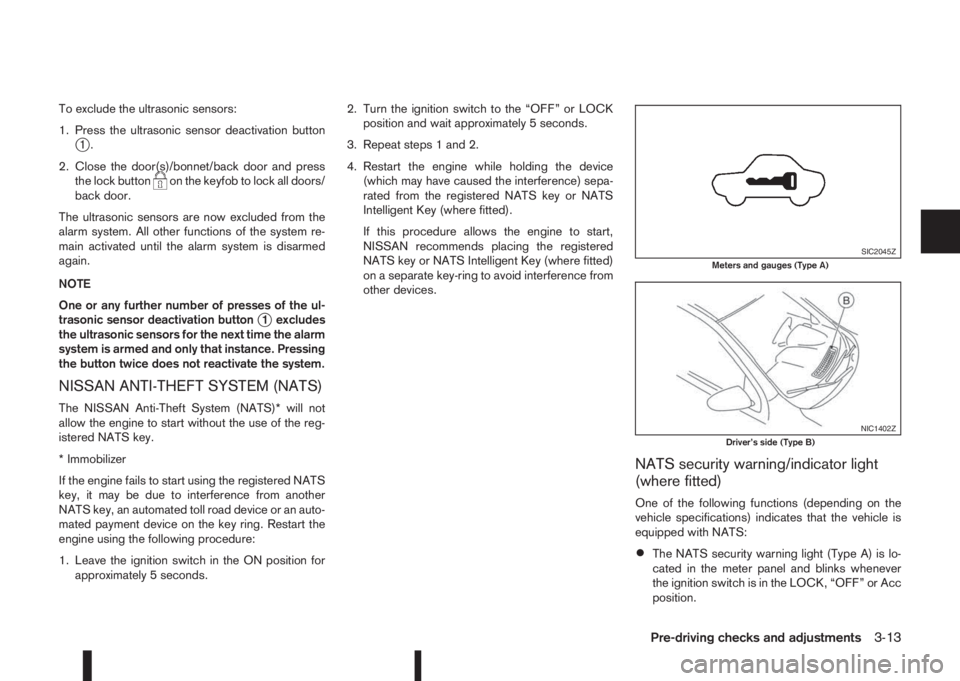
To exclude the ultrasonic sensors:
1. Press the ultrasonic sensor deactivation button
j1.
2. Close the door(s)/bonnet/back door and press
the lock button
on the keyfob to lock all doors/
back door.
The ultrasonic sensors are now excluded from the
alarm system. All other functions of the system re-
main activated until the alarm system is disarmed
again.
NOTE
One or any further number of presses of the ul-
trasonic sensor deactivation button
j1 excludes
the ultrasonic sensors for the next time the alarm
system is armed and only that instance. Pressing
the button twice does not reactivate the system.
NISSAN ANTI-THEFT SYSTEM (NATS)
The NISSAN Anti-Theft System (NATS)* will not
allow the engine to start without the use of the reg-
istered NATS key.
* Immobilizer
If the engine fails to start using the registered NATS
key, it may be due to interference from another
NATS key, an automated toll road device or an auto-
mated payment device on the key ring. Restart the
engine using the following procedure:
1. Leave the ignition switch in the ON position for
approximately 5 seconds.2. Turn the ignition switch to the “OFF” or LOCK
position and wait approximately 5 seconds.
3. Repeat steps 1 and 2.
4. Restart the engine while holding the device
(which may have caused the interference) sepa-
rated from the registered NATS key or NATS
Intelligent Key (where fitted).
If this procedure allows the engine to start,
NISSAN recommends placing the registered
NATS key or NATS Intelligent Key (where fitted)
on a separate key-ring to avoid interference from
other devices.
NATS security warning/indicator light
(where fitted)
One of the following functions (depending on the
vehicle specifications) indicates that the vehicle is
equipped with NATS:
•The NATS security warning light (Type A) is lo-
cated in the meter panel and blinks whenever
the ignition switch is in the LOCK, “OFF” or Acc
position.
SIC2045ZMeters and gauges (Type A)
NIC1402ZDriver’s side (Type B)
Pre-driving checks and adjustments3-13
Page 190 of 338
If the battery of the vehicle is discharged, the push-
button ignition switch cannot be moved from the
LOCK position.
OFF position
The ignition switch is in the OFF position when the
engine is turned off using the ignition switch. No
lights will illuminate on the ignition switch.
ACC position
With the vehicle in the P (Park) position, the Intelli-
gent key with you and the ignition placed from ON
to OFF, the radio can still be used for a period of
time, or until the driver’s door is opened.
After a period of time, functions such as radio, navi-
gation, and Bluetooth® Hands-Free Phone System
may be restarted by pressing the “POWER button/
VOLUME control knob” (See “Monitor, climate, au-
dio, phone and voice recognition systems” in this
manual) or the keyfob unlock button up to a total of
30 minutes.
EMERGENCY ENGINE SHUT OFF
To shut off the engine in an emergency situation
while driving, perform the following procedure:
•Rapidly push the push-button ignition switch 3
consecutive times in less than 1.5 seconds, or
•Push and hold the push-button ignition switch
for more than 2 seconds.
STEERING LOCK
The ignition switch is equipped with an anti-theft
steering lock device.
To lock steering wheel
1. Push the ignition switch to the “OFF” position
where the ignition switch position indicator will
not illuminate.
2. Open or close the door. The ignition switch turns
to the “LOCK” position.
3. Turn the steering wheel 1/6 of a turn to the right
or left from the straight up position.
To unlock steering wheel
Push the ignition switch to “ACC”, and the steering
wheel will be automatically unlocked.
CAUTION
•If the battery of the vehicle is discharged, the
push-button ignition switch cannot be
switched from the “LOCK” position.
•If the ignition switch position does not change
from the “LOCK” position, push the ignition
switch again while rotating the steering wheel
slightly to the right and left.
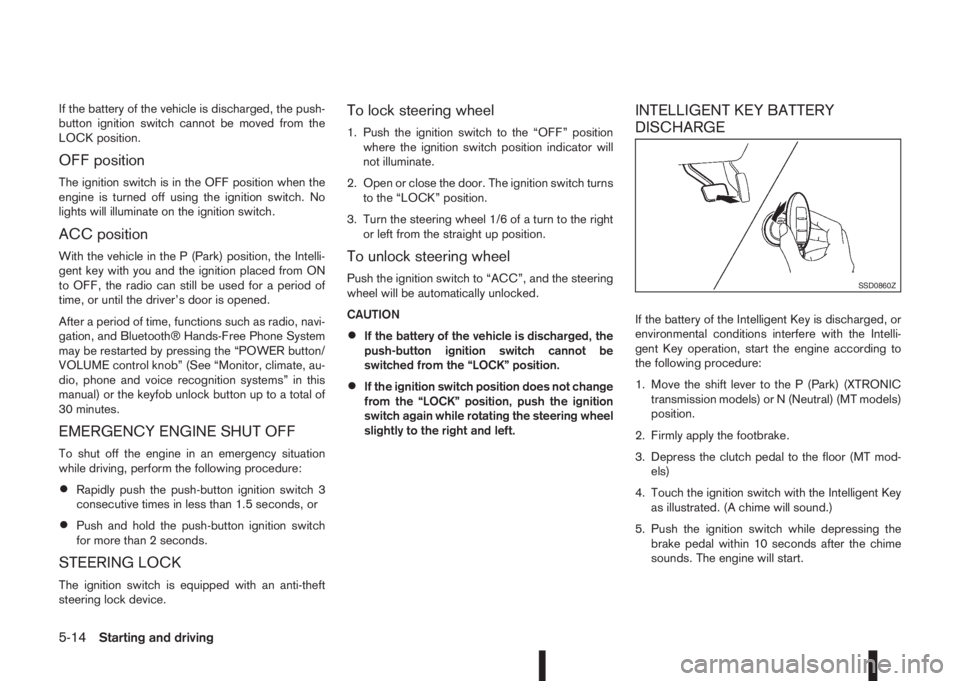
INTELLIGENT KEY BATTERY
DISCHARGE
If the battery of the Intelligent Key is discharged, or
environmental conditions interfere with the Intelli-
gent Key operation, start the engine according to
the following procedure:
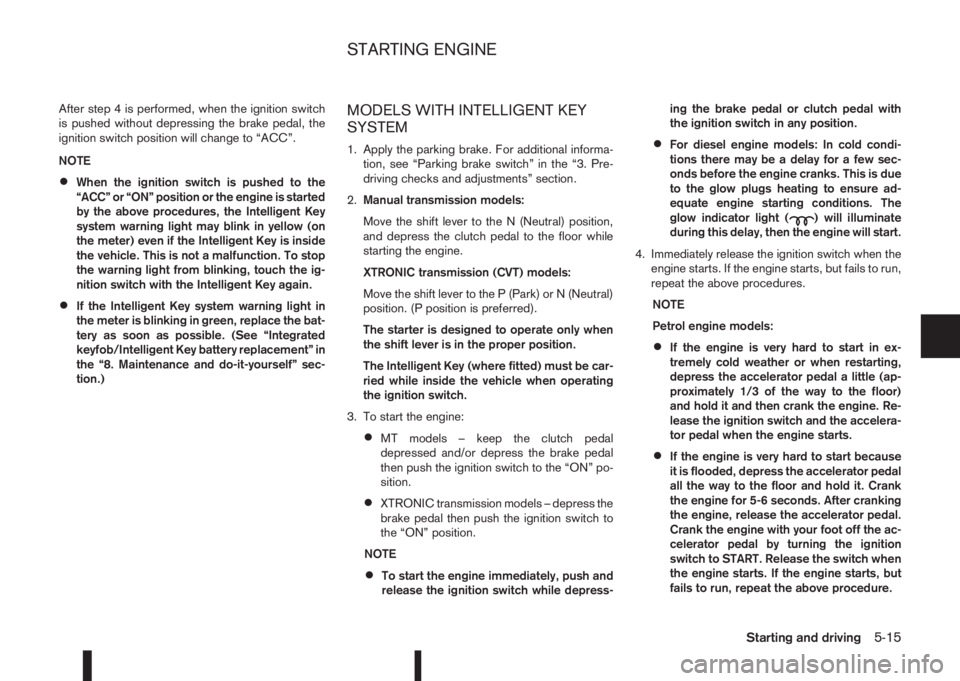
1. Move the shift lever to the P (Park) (XTRONIC
transmission models) or N (Neutral) (MT models)
position.
2. Firmly apply the footbrake.
3. Depress the clutch pedal to the floor (MT mod-
els)
4. Touch the ignition switch with the Intelligent Key
as illustrated. (A chime will sound.)
5. Push the ignition switch while depressing the
brake pedal within 10 seconds after the chime
sounds. The engine will start.
SSD0860Z
5-14Starting and driving
Page 191 of 338
After step 4 is performed, when the ignition switch
is pushed without depressing the brake pedal, the
ignition switch position will change to “ACC”.
NOTE
•When the ignition switch is pushed to the
“ACC” or “ON” position or the engine is started
by the above procedures, the Intelligent Key
system warning light may blink in yellow (on
the meter) even if the Intelligent Key is inside
the vehicle. This is not a malfunction. To stop
the warning light from blinking, touch the ig-
nition switch with the Intelligent Key again.
•If the Intelligent Key system warning light in
the meter is blinking in green, replace the bat-
tery as soon as possible. (See “Integrated
keyfob/Intelligent Key battery replacement” in
the “8. Maintenance and do-it-yourself” sec-
tion.)
MODELS WITH INTELLIGENT KEY
SYSTEM
1. Apply the parking brake. For additional informa-
tion, see “Parking brake switch” in the “3. Pre-
driving checks and adjustments” section.
2.Manual transmission models:
Move the shift lever to the N (Neutral) position,
and depress the clutch pedal to the floor while
starting the engine.
XTRONIC transmission (CVT) models:
Move the shift lever to the P (Park) or N (Neutral)
position. (P position is preferred).
The starter is designed to operate only when
the shift lever is in the proper position.
The Intelligent Key (where fitted) must be car-
ried while inside the vehicle when operating
the ignition switch.
3. To start the engine:
•MT models – keep the clutch pedal
depressed and/or depress the brake pedal
then push the ignition switch to the “ON” po-
sition.
•XTRONIC transmission models – depress the
brake pedal then push the ignition switch to
the “ON” position.
NOTE
•To start the engine immediately, push and
release the ignition switch while depress-ing the brake pedal or clutch pedal with
the ignition switch in any position.
•For diesel engine models: In cold condi-
tions there may be a delay for a few sec-
onds before the engine cranks. This is due
to the glow plugs heating to ensure ad-
equate engine starting conditions. The
glow indicator light (
) will illuminate
during this delay, then the engine will start.
4. Immediately release the ignition switch when the
engine starts. If the engine starts, but fails to run,
repeat the above procedures.
NOTE
Petrol engine models:
•If the engine is very hard to start in ex-
tremely cold weather or when restarting,
depress the accelerator pedal a little (ap-
proximately 1/3 of the way to the floor)
and hold it and then crank the engine. Re-
lease the ignition switch and the accelera-
tor pedal when the engine starts.
•If the engine is very hard to start because
it is flooded, depress the accelerator pedal
all the way to the floor and hold it. Crank
the engine for 5-6 seconds. After cranking
the engine, release the accelerator pedal.
Crank the engine with your foot off the ac-
celerator pedal by turning the ignition
switch to START. Release the switch when
the engine starts. If the engine starts, but
fails to run, repeat the above procedure.
STARTING ENGINE
Starting and driving5-15
Page 268 of 338
8Maintenance and do-it-yourselfMaintenance and do-it-yourself
Maintenance requirements ....................................... 8-2
Scheduled maintenance...................................... 8-2
General maintenance .......................................... 8-2
Where to go for service ...................................... 8-2
General maintenance ............................................... 8-2
Explanation of general maintenance items ........... 8-2
Maintenance precautions ......................................... 8-4
Engine compartment ................................................ 8-5
Engine cooling system ............................................. 8-6
Checking engine coolant level............................. 8-6
Changing engine coolant .................................... 8-6
Engine oil................................................................. 8-8
Checking engine oil level .................................... 8-8
Changing engine oil ............................................ 8-9
Changing engine oil filter .................................... 8-10
Protect the environment ...................................... 8-12
Fuel filter (Diesel engine models) ............................. 8-13
Draining water .................................................... 8-13
Bleeding the fuel system ..................................... 8-13
XTRONIC Continuously variable transmission
(CVT) fluid ............................................................... 8-13
Brakes ..................................................................... 8-13
Checking parking brake ...................................... 8-13
Checking brake pedal......................................... 8-13
Brake booster ..................................................... 8-14
Brake and clutch fluid .............................................. 8-14
Window washer fluid/headlight cleaner fluid
(where fitted) ........................................................... 8-15
Battery..................................................................... 8-16
Vehicle battery .................................................... 8-16Jump-starting ...................................................... 8-18
Integrated keyfob/Intelligent Key battery
replacement........................................................ 8-18
Drive belts ............................................................... 8-20
Spark plugs (Petrol engine models).......................... 8-21
Air duct removal....................................................... 8-21
Air cleaner filter........................................................ 8-23
Viscous paper type ............................................. 8-23
Dry paper type (where fitted) .............................. 8-23
Wiper blades ........................................................... 8-24
Cleaning ............................................................. 8-24
Front window wiper replacement ........................ 8-24
Back door window wiper replacement ................ 8-24
Windscreen washer nozzle ................................. 8-25
Fuses ...................................................................... 8-25
Passenger compartment ..................................... 8-25
Engine compartment ........................................... 8-26
Lights ...................................................................... 8-27
Headlights .......................................................... 8-28
Exterior lights ...................................................... 8-29
Interior lights....................................................... 8-29
Light locations .................................................... 8-30
Wheels and tyres ..................................................... 8-33
Tyre inflation pressure......................................... 8-33
Types of tyres ..................................................... 8-33
Snow chains....................................................... 8-34
Tyre rotation ....................................................... 8-34
Tyre wear and damage ....................................... 8-35
Tyre age ............................................................. 8-35
Changing tyres and wheels................................. 8-35
Page 286 of 338
JUMP-STARTING
If jump-starting is necessary, see “Jump-starting” in
the “6. In case of emergency” section. If the engine
does not start by jump starting, the battery may have
to be replaced. Contact a NISSAN dealer or quali-
fied workshop.
INTEGRATED KEYFOB/INTELLIGENT
KEY BATTERY REPLACEMENT
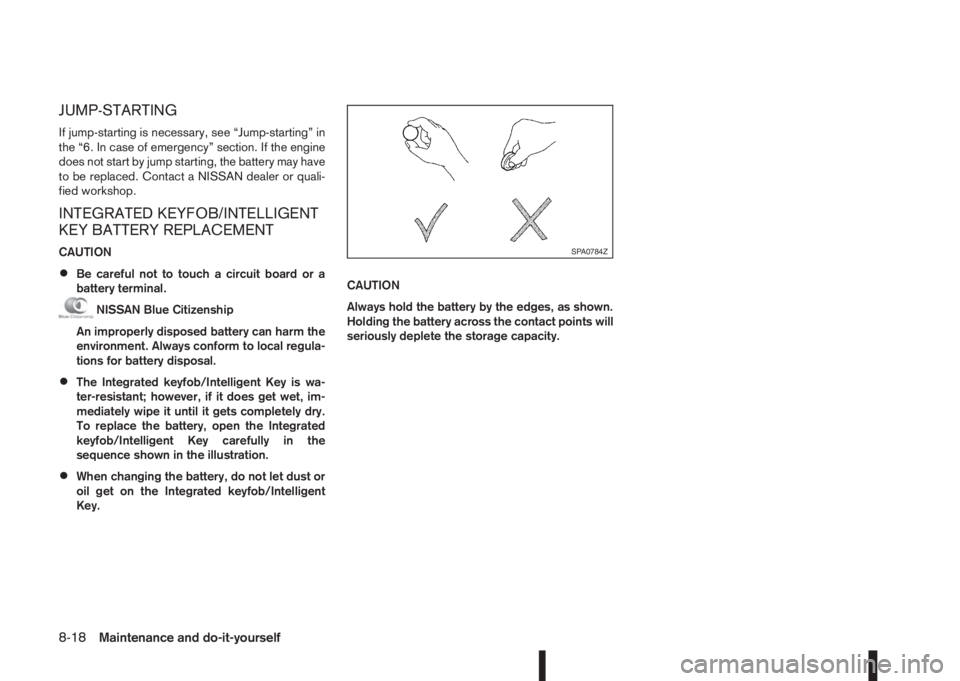
CAUTION
•Be careful not to touch a circuit board or a
battery terminal.
NISSAN Blue Citizenship
An improperly disposed battery can harm the
environment. Always conform to local regula-
tions for battery disposal.
•The Integrated keyfob/Intelligent Key is wa-
ter-resistant; however, if it does get wet, im-
mediately wipe it until it gets completely dry.
To replace the battery, open the Integrated
keyfob/Intelligent Key carefully in the
sequence shown in the illustration.
•When changing the battery, do not let dust or
oil get on the Integrated keyfob/Intelligent
Key.CAUTION
Always hold the battery by the edges, as shown.
Holding the battery across the contact points will
seriously deplete the storage capacity.
SPA0784Z
8-18Maintenance and do-it-yourself
Page 287 of 338
Replacement
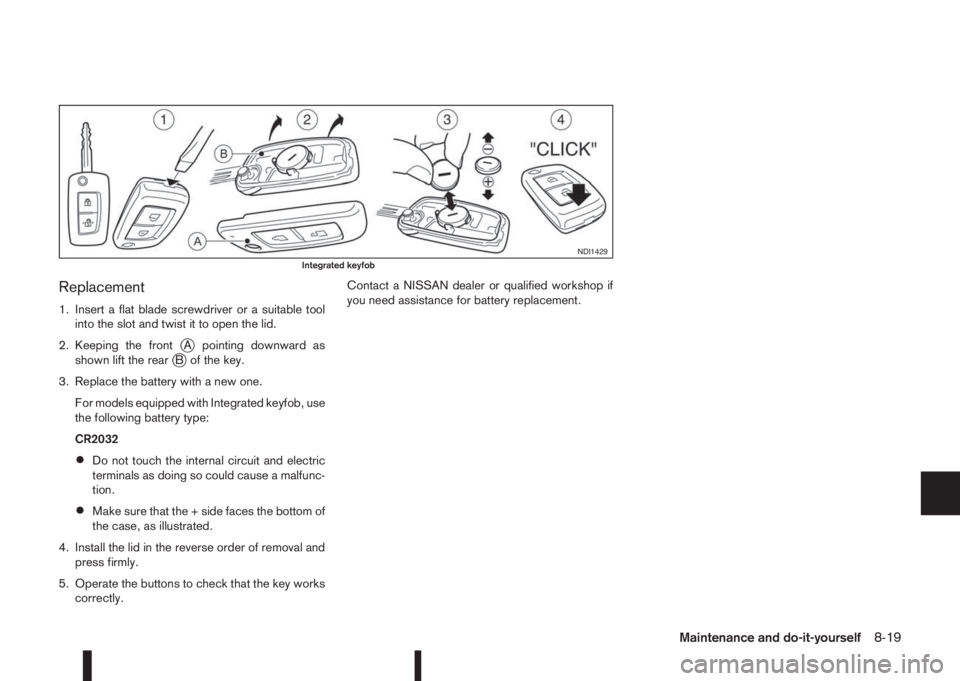
1. Insert a flat blade screwdriver or a suitable tool
into the slot and twist it to open the lid.
2. Keeping the front
jA pointing downward as
shown lift the rearjB of the key.
3. Replace the battery with a new one.
For models equipped with Integrated keyfob, use
the following battery type:
CR2032
•Do not touch the internal circuit and electric
terminals as doing so could cause a malfunc-
tion.
•Make sure that the + side faces the bottom of
the case, as illustrated.
4. Install the lid in the reverse order of removal and
press firmly.
5. Operate the buttons to check that the key works
correctly.Contact a NISSAN dealer or qualified workshop if
you need assistance for battery replacement.
NDI1429Integrated keyfob
Maintenance and do-it-yourself8-19
Page 321 of 338
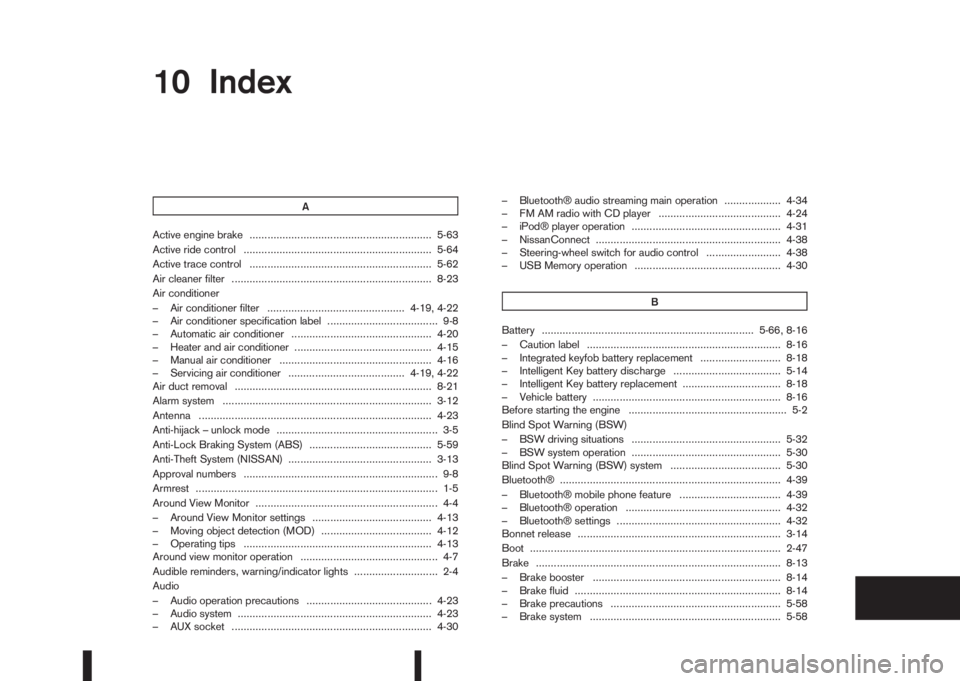
10IndexIndex
A
Active engine brake ............................................................. 5-63
Active ride control ............................................................... 5-64
Active trace control ............................................................. 5-62
Air cleaner filter ................................................................... 8-23
Air conditioner
– Air conditioner filter .............................................. 4-19, 4-22
– Air conditioner specification label ..................................... 9-8
– Automatic air conditioner ............................................... 4-20
– Heater and air conditioner .............................................. 4-15
– Manual air conditioner ................................................... 4-16
– Servicing air conditioner ....................................... 4-19, 4-22
Air duct removal .................................................................. 8-21
Alarm system ...................................................................... 3-12
Antenna .............................................................................. 4-23
Anti-hijack – unlock mode ...................................................... 3-5
Anti-Lock Braking System (ABS) ......................................... 5-59
Anti-Theft System (NISSAN) ................................................ 3-13
Approval numbers ................................................................. 9-8
Armrest ................................................................................. 1-5
Around View Monitor ............................................................. 4-4
– Around View Monitor settings ........................................ 4-13
– Moving object detection (MOD) ..................................... 4-12
– Operating tips ............................................................... 4-13
Around view monitor operation .............................................. 4-7
Audible reminders, warning/indicator lights ............................ 2-4
Audio
– Audio operation precautions .......................................... 4-23
– Audio system ................................................................. 4-23
– AUX socket ................................................................... 4-30– Bluetooth® audio streaming main operation ................... 4-34
– FM AM radio with CD player ......................................... 4-24
– iPod® player operation .................................................. 4-31
– NissanConnect .............................................................. 4-38
– Steering-wheel switch for audio control ......................... 4-38
– USB Memory operation ................................................. 4-30
B
Battery ....................................................................... 5-66, 8-16
– Caution label ................................................................. 8-16
– Integrated keyfob battery replacement ........................... 8-18
– Intelligent Key battery discharge .................................... 5-14
– Intelligent Key battery replacement ................................. 8-18
– Vehicle battery ............................................................... 8-16
Before starting the engine ..................................................... 5-2
Blind Spot Warning (BSW)
– BSW driving situations .................................................. 5-32
– BSW system operation .................................................. 5-30
Blind Spot Warning (BSW) system ..................................... 5-30
Bluetooth® .......................................................................... 4-39
– Bluetooth® mobile phone feature .................................. 4-39
– Bluetooth® operation .................................................... 4-32
– Bluetooth® settings ....................................................... 4-32
Bonnet release .................................................................... 3-14
Boot .................................................................................... 2-47
Brake .................................................................................. 8-13
– Brake booster ............................................................... 8-14
– Brake fluid ..................................................................... 8-14
– Brake precautions ......................................................... 5-58
– Brake system ................................................................ 5-58
Page 324 of 338
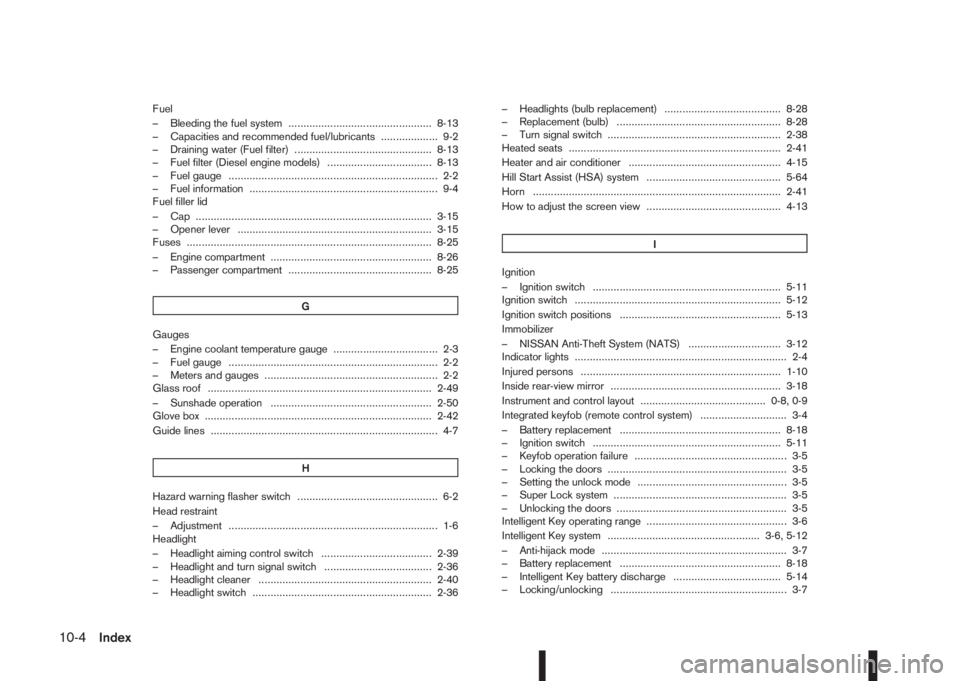
Fuel
– Bleeding the fuel system ................................................ 8-13
– Capacities and recommended fuel/lubricants ................... 9-2
– Draining water (Fuel filter) .............................................. 8-13
– Fuel filter (Diesel engine models) ................................... 8-13
– Fuel gauge ...................................................................... 2-2
– Fuel information ............................................................... 9-4
Fuel filler lid
– Cap ............................................................................... 3-15
– Opener lever ................................................................. 3-15
Fuses .................................................................................. 8-25
– Engine compartment ...................................................... 8-26
– Passenger compartment ................................................ 8-25
G
Gauges
– Engine coolant temperature gauge ................................... 2-3
– Fuel gauge ...................................................................... 2-2
– Meters and gauges .......................................................... 2-2
Glass roof ........................................................................... 2-49
– Sunshade operation ...................................................... 2-50
Glove box ............................................................................ 2-42
Guide lines ............................................................................ 4-7
H
Hazard warning flasher switch ............................................... 6-2
Head restraint
– Adjustment ...................................................................... 1-6
Headlight
– Headlight aiming control switch ..................................... 2-39
– Headlight and turn signal switch .................................... 2-36
– Headlight cleaner .......................................................... 2-40
– Headlight switch ............................................................ 2-36– Headlights (bulb replacement) ....................................... 8-28
– Replacement (bulb) ....................................................... 8-28
– Turn signal switch .......................................................... 2-38
Heated seats ....................................................................... 2-41
Heater and air conditioner ................................................... 4-15
Hill Start Assist (HSA) system ............................................. 5-64
Horn ................................................................................... 2-41
How to adjust the screen view ............................................. 4-13
I
Ignition
– Ignition switch ............................................................... 5-11
Ignition switch ..................................................................... 5-12
Ignition switch positions ...................................................... 5-13
Immobilizer
– NISSAN Anti-Theft System (NATS) ............................... 3-12
Indicator lights ....................................................................... 2-4
Injured persons ................................................................... 1-10
Inside rear-view mirror ......................................................... 3-18
Instrument and control layout .......................................... 0-8, 0-9
Integrated keyfob (remote control system) ............................. 3-4
– Battery replacement ...................................................... 8-18
– Ignition switch ............................................................... 5-11
– Keyfob operation failure ................................................... 3-5
– Locking the doors ............................................................ 3-5
– Setting the unlock mode .................................................. 3-5
– Super Lock system .......................................................... 3-5
– Unlocking the doors ......................................................... 3-5
Intelligent Key operating range ............................................... 3-6
Intelligent Key system ................................................... 3-6, 5-12
– Anti-hijack mode .............................................................. 3-7
– Battery replacement ...................................................... 8-18
– Intelligent Key battery discharge .................................... 5-14
– Locking/unlocking ........................................................... 3-7
10-4Index