reset NISSAN QASHQAI 2014 Owner´s Manual
[x] Cancel search | Manufacturer: NISSAN, Model Year: 2014, Model line: QASHQAI, Model: NISSAN QASHQAI 2014Pages: 338, PDF Size: 4.87 MB
Page 78 of 338
![NISSAN QASHQAI 2014 Owner´s Manual [Calibrate]:
The tyre pressure is affected by the temperature of
the tyre; the tyre temperature increases when the
vehicle is driven. The TPMS system uses tempera-
ture sensors in the tyres to compens](/img/5/40326/w960_40326-77.png "NISSAN QASHQAI 2014 Owner´s Manual [Calibrate]:
The tyre pressure is affected by the temperature of
the tyre; the tyre temperature increases when the
vehicle is driven. The TPMS system uses tempera-
ture sensors in the tyres to compens")
[Calibrate]:
The tyre pressure is affected by the temperature of
the tyre; the tyre temperature increases when the
vehicle is driven. The TPMS system uses tempera-
ture sensors in the tyres to compensate for changes
in temperature in order to prevent false TPMS warn-
ings.
The [CALIBRATE] function resets the previously
stored temperature value. It is recommended that
this function is performed after the tyre pressures
are adjusted.
See “Tyre Pressure Monitoring System (TPMS)” in
the “5. Starting and driving” section
Use the
orand the ENTER buttons to start or
cancel the calibration process. While the calibration
process is active, the message: [Resetting tyre pres-
sure system] will be displayed.
[Units]
•[Distance/Fuel]
•[Tyre pressures]
•[Temperature]
[Distance/Fuel]:
The unit for the distance and fuel consumption that
displays in the vehicle information display can be
changed to:
•miles, MPG
•km, km/l
•km, l/100kmUse the
orand the ENTER buttons to select
and change the unit.
[Tyre pressures]:
The unit for tyre pressure that displays in the vehicle
information display can be changed to:
•Kgf/cm2
•kPa
•bar
•psi
Use the
orand the ENTER buttons to select
and change the unit.
[Temperature]:
The temperature that displays in the vehicle informa-
tion display can be changed from:
•°C (Celsius)
•°F (Fahrenheit)
Use the ENTER button to toggle choices.
[Language]
The [language] of the vehicle information display
can be changed to:
•[English]
•[French]
•[German]
•[Italian]
•[Portuguese]
•[Dutch]
•[Spanish]
•[Turkish]
•[Russian]
Use the
orand the ENTER buttons to select
and change the language of the vehicle information
display.
[Factory reset]
The settings in the vehicle information display can
be reset back to the factory default. To reset the
vehicle information display:
1. Use the
orbuttons to select [Settings], and
press the ENTER button
2. Select [Factory Reset] using the
orbuttons
and press the ENTER button
3. Select [YES] to return all settings back to default
by pressing the ENTER button
2-20Instruments and controls
Page 83 of 338
![NISSAN QASHQAI 2014 Owner´s Manual 25. [Reminder turn off headlights]
warning
This warning appears when the driver side door is
opened while the headlight switch is left ON and the
ignition switch is placed in the ACC, “OFF” or
LOC](/img/5/40326/w960_40326-82.png "NISSAN QASHQAI 2014 Owner´s Manual 25. [Reminder turn off headlights]
warning
This warning appears when the driver side door is
opened while the headlight switch is left ON and the
ignition switch is placed in the ACC, “OFF” or
LOC")
25. [Reminder turn off headlights]
warning
This warning appears when the driver side door is
opened while the headlight switch is left ON and the
ignition switch is placed in the ACC, “OFF” or
LOCK position. Place the headlight switch in “OFF”
or “AUTO” position. For additional information, see
“Headlight and turn signal switch” later in this sec-
tion.
26. [Time for a driver break?] indicator
This indicator appears when the set “TIMER” indi-
cator activates. You can set the time for up to 6
hours.
27. [Low outside temperature] warning
This warning appears if the outside temperature is
below 3°C (37°F). The warning can be set not to be
displayed. (See “[Clock] and [outside air
temperature]” later in this section or the separate
NissanConnect Owner’s manual.)
28. [Chassis control system fault]
warning
This warning appears if the chassis control module
detects an error in the Chassis Control System
(where fitted). Have the system checked by a
NISSAN dealer or qualified workshop. (See “Chas-
sis control” in the “5. Starting and driving” section.)
29. Cruise control indicator
This indicator shows the cruise control system sta-
tus. The status is shown by the colour.
See “Cruise control (where fitted)” in the “5. Start-
ing and driving” section for details.
30. Speed limiter indicator
This indicator shows the status of the speed limiter
system . If the system is in turned on and in use, the
speed that the speed limiter is set to is also dis-
played.
See “Speed limiter (where fitted)” in the “5. Starting
and driving” section for details.
31. Shift lever position indicator
This indicator shows the shift lever position.
See “Shift lever indicator (where fitted)” in the
“5. Starting and driving” section for further details.
32. [Tyre Pressure System Fault]
warning
This warning illuminates when there is a problem
with the Tyre Pressure Monitoring System (TPMS).
If this warning comes on, have the system checked
by a NISSAN dealer or qualified workshop. See
“Tyre Pressure Monitoring System (TPMS)” in the
“5. Starting and driving” section for further details.
33. [Resetting Tyre Pressure System]
indicator
This warning illuminates when the TPMS tempera-
ture calibration is in progress. See “TPMS tempera-
ture calibration” in the “5. Starting and driving” sec-
tion for further details.
34. [Parking Sensor System Fault]
warning (where fitted)
This warning illuminates when there is a problem
with the parking sensor system. If this warning
comes on, have the system checked by a NISSAN
dealer or qualified workshop.
35. [Vehicle Overheating Stop Vehicle]
warning
This warning illuminates is the engine coolant tem-
perature is too high, indicating that the engine is
overheating. See “Engine overheat” in the “6. In
case of emergency” section for further details.
36. [CVT System Fault] warning
(where fitted)
This warning illuminates when there is a problem
with the XTRONIC transmission (CVT) system. If
this warning comes on, have the system checked by
a NISSAN dealer or qualified workshop.
Instruments and controls2-25
Page 86 of 338
![NISSAN QASHQAI 2014 Owner´s Manual 1. [Fuel economy] (l (litre)/100 km,
km/l(litre) or MPG)
Current fuel consumption:
The current fuel consumption mode shows the cur-
rent fuel consumption.
Average fuel consumption:
The average fuel co](/img/5/40326/w960_40326-85.png "NISSAN QASHQAI 2014 Owner´s Manual 1. [Fuel economy] (l (litre)/100 km,
km/l(litre) or MPG)
Current fuel consumption:
The current fuel consumption mode shows the cur-
rent fuel consumption.
Average fuel consumption:
The average fuel co")
1. [Fuel economy] (l (litre)/100 km,
km/l(litre) or MPG)
Current fuel consumption:
The current fuel consumption mode shows the cur-
rent fuel consumption.
Average fuel consumption:
The average fuel consumption mode shows the av-
erage fuel consumption since the last reset. Push
the ENTER switch for longer than 1 second to enter
the Reset menu.
The display is updated every 30 seconds. For about
the first 500 m (1/3 mile) after a reset, the display
shows “——”.
Push ENTER briefly to show the second Fuel
Economy page.
2. [Speed] and [Average speed] (km/h
or MPH)
The (digital) speed shows the current speed at
which the vehicle is travelling.
The average speed mode shows the average ve-
hicle speed since the last reset. Push the ENTER
switch for longer than 1 second to enter the Reset
menu.
The display is updated every 30 seconds. The first
30 seconds after a reset, the display shows “——”.
3. [Range] (dte — km or mile)
The distance to empty (dte) mode provides you with
an estimation of the distance that can be driven
before refuelling. The dte is constantly being calcu-
lated, based on the amount of fuel in the fuel tank
and the actual fuel consumption.
The display is updated every 30 seconds.
The dte mode includes a low range warning feature.
If the fuel level is low, the warning is displayed on
the screen.
When the fuel level drops even lower, the dte dis-
play will change to “——”.
•If the amount of fuel added is small, the display
just before the ignition switch is placed in the
“OFF” position may continue to be displayed.
•When driving uphill or rounding curves, the fuel
in the tank shifts, which may momentarily change
the display.
4. Elapsed [time] and [trip distance] (km
or mile)
Elapsed [time]:
The elapsed time mode shows the time since the
last reset. Push the ENTER switch for longer than 1
second to enter the Reset menu. (The trip odometer
is also reset at the same time.)[Trip distance]:
The trip odometer mode shows the total distance
the vehicle has been driven since the last reset.
Push the ENTER switch for longer than 1 second to
enter the Reset menu. (The elapsed time is also
reset at the same time.)
5. Navigation (where fitted)
When the route guidance is set in the navigation
system, this item shows the navigation route infor-
mation.
For more details, see the separately provided Nis-
sanConnect Owner’s manual.
6. Audio
The audio mode shows the status of audio informa-
tion.
For more details, see “FM AM radio with CD player
(where fitted)” in the “4. Display screen, heater and
air conditioner, and audio system” section or the
separately provided NissanConnect Owner’s
manual.
7. [Driving aids] (where fitted)
The driving aids mode shows the operating condi-
tion for the following systems.
•Lane Departure Warning (LDW)
•Blind Spot Warning (BSW)
•Forward Emergency Braking
Push ENTER to access the driving aids setting
menu.
2-28Instruments and controls
Page 87 of 338
For more details, see “Blind Spot Warning (BSW)
system (where fitted)” in the “5. Starting and driving”
section, “Lane Departure Warning (LDW) system
(where fitted)” in the “5. Starting and driving” sec-
tion, and/or “Forward emergency braking system
(where fitted)” in the “5. Starting and driving” sec-
tion.
8. [Tyre pressures] (where fitted)
The tyre pressure mode shows the pressure of all
four tyres. The displayed values are only available
while the vehicle is being driven.
When the [Low Tyre Pressure] warning appears,
the display can be switched to the tyre pressure
mode by pushing the ENTER switch to reveal addi-
tional details on the displayed warning.
9. [Chassis control]
When either the Active Trace Control (where fitted),
Active Engine Brake (where fitted), Hill start Assist
(where fitted) or the Active Ride Control system is
operated, it shows the operating condition. See
“Chassis control” in the “5. Starting and driving”
section and “Hill Start Assist (HSA) system” in the
“5. Starting and driving” section for more details.
10. [Stop/Start] system (where fitted)
The Stop/Start system mode shows the CO2 sav-
ings and the engine stop time. (See “Stop/Start Sys-
tem (where fitted)” in the “5. Starting and driving”
section.)[Trip CO2 saving] and engine stop time:
The trip CO2 saving and engine stop time mode
shows the CO2 saving and engine stop time since
the last reset.
The CO2 saving and engine stop time can be reset
by pushing the ENTER switch for longer than 1 sec-
ond.
[Total CO2 saving] and engine stop time:
The total CO2 saving and engine stop time mode
shows:
•The estimated CO2 exhaust emissions
prevented.
•The engine stop time that the engine has been
stopped by the Stop/Start System.
NOTE
The Total CO2 saving and engine stop time val-
ues cannot be reset and show accumulated
Stop/Start System information since the vehicle
was built.
11. Warning check
The current warnings are displayed. If no warning is
present, “No Warnings” is displayed.
[CLOCK] AND [OUTSIDE AIR
TEMPERATURE]
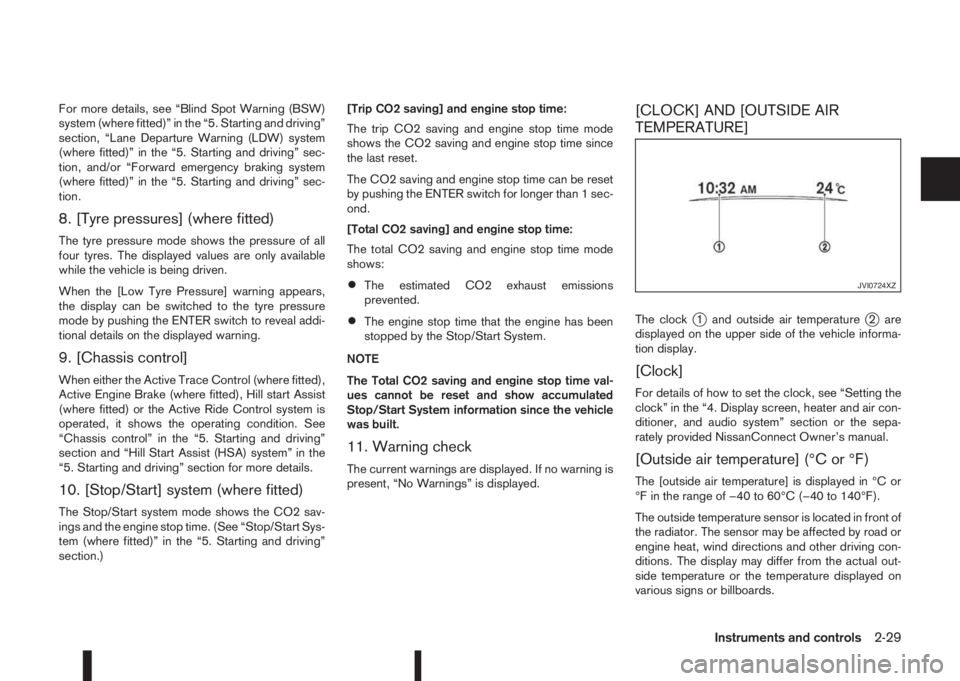
The clockj1 and outside air temperaturej2 are
displayed on the upper side of the vehicle informa-
tion display.
[Clock]
For details of how to set the clock, see “Setting the
clock” in the “4. Display screen, heater and air con-
ditioner, and audio system” section or the sepa-
rately provided NissanConnect Owner’s manual.
[Outside air temperature] (°C or °F)
The [outside air temperature] is displayed in °C or
°F in the range of −40 to 60°C (−40 to 140°F).
The outside temperature sensor is located in front of
the radiator. The sensor may be affected by road or
engine heat, wind directions and other driving con-
ditions. The display may differ from the actual out-
side temperature or the temperature displayed on
various signs or billboards.
JVI0724XZ
Instruments and controls2-29
Page 154 of 338
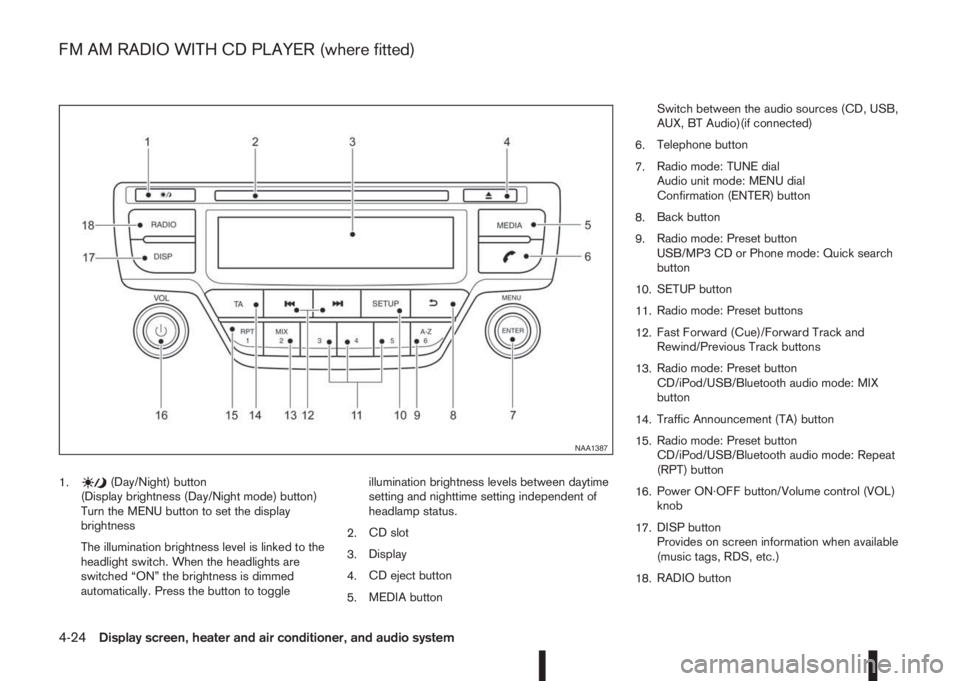
1.(Day/Night) button
(Display brightness (Day/Night mode) button)
Turn the MENU button to set the display
brightness
The illumination brightness level is linked to the
headlight switch. When the headlights are
switched “ON” the brightness is dimmed
automatically. Press the button to toggleillumination brightness levels between daytime
setting and nighttime setting independent of
headlamp status.
2.CD slot
3.Display
4.CD eject button
5.MEDIA buttonSwitch between the audio sources (CD, USB,
AUX, BT Audio)(if connected)
6.Telephone button
7.Radio mode: TUNE dial
Audio unit mode: MENU dial
Confirmation (ENTER) button
8.Back button
9.Radio mode: Preset button
USB/MP3 CD or Phone mode: Quick search
button
10.SETUP button
11.Radio mode: Preset buttons
12.Fast Forward (Cue)/Forward Track and
Rewind/Previous Track buttons
13.Radio mode: Preset button
CD/iPod/USB/Bluetooth audio mode: MIX
button
14.Traffic Announcement (TA) button
15.Radio mode: Preset button
CD/iPod/USB/Bluetooth audio mode: Repeat
(RPT) button
16.Power ON·OFF button/Volume control (VOL)
knob
17.DISP button
Provides on screen information when available
(music tags, RDS, etc.)
18.RADIO button
NAA1387
FM AM RADIO WITH CD PLAYER (where fitted)
4-24Display screen, heater and air conditioner, and audio system
Page 155 of 338
AUDIO MAIN OPERATION
The audio unit operates when the ignition switch is
in Acc or ON position.
mPower ON/OFF button
Press thebutton to switch on the audio unit. If
the audio unit was switched off using the ignition
switch, it can also be switched on with the ignition
switch. The source that was playing immediately
before the unit was switched off will resume playing
and the volume will be set to the previous volume
level.
The audio unit can be switched off by pressing
,
or by turning the ignition switch to the “OFF” or
LOCK position.
mVolume (VOL) level control
Turn the
adjust the volume level.
The audio unit is equipped with a speed control vol-
ume function, this means that the audio system au-
tomatically adjusts the volume level in relation to
vehicle speed. For details, see “[Speed Volume]
menu” later in this section.
RADIO OPERATION
When the(power ON/OFF) button is pressed,
the audio unit will switch on with the last received
radio station, if the audio unit was previously
switched off in radio mode.The radio is able to receive multiple kinds of audio
transmissions:
–FM
–AM
Radio band select buttons
Press the
transmission source as follows:
FM1→FM2→AM→FM1
When
come on at the last received radio station. If audio is
already playing using one of the other input sources
(iPod, Bluetooth, CD, USB, AUX-in) pressing the
mode and the last received radio station will be se-
lected.
Setting preset stations
Auto populating the [FM List]:
When the
1.5 seconds the six stations with the strongest sig-
nals are stored in the preset (1 to 6) buttons of the
band. During the search, a notification message
[Updating FM List] appears in the display and the
sound is muted until the operation is complete. Once
completed, the radio reverts to the previously se-
lected radio station.
Manual tuning
When adjusting the broadcasting station frequency
manually access the [FM List] and turn the
Page 156 of 338
![NISSAN QASHQAI 2014 Owner´s Manual Pressing a preset button for more than 2 seconds
while in the [FM list] or radio main screen will cause
the station currently being received to be stored
against that preset button.
•Twelve stations](/img/5/40326/w960_40326-155.png "NISSAN QASHQAI 2014 Owner´s Manual Pressing a preset button for more than 2 seconds
while in the [FM list] or radio main screen will cause
the station currently being received to be stored
against that preset button.
•Twelve stations")
Pressing a preset button for more than 2 seconds
while in the [FM list] or radio main screen will cause
the station currently being received to be stored
against that preset button.
•Twelve stations (if available) can be stored in the
FM bands. (Six each for FM1 and FM2)
•Six stations (if available) can be set for the AM
band.
If the battery is disconnected, or if the fuse blows,
the radio memory will be erased. In that case, reset
the desired stations after battery connection or fuse
replacement.
Radio Data System (RDS) operation
(where fitted)
The RDS is a system through which encoded digital
information is transmitted by FM radio stations in
addition to the normal FM radio broadcasting. The
RDS provides information services such as station
name, traffic information, or news.
NOTE
•In some countries or regions, some of these
services may not be available.
Alternative Frequency (AF) mode:
The AF mode operates in the FM (radio) mode.
•The AF mode operates in the FM (radio), AUX or
CD mode (if FM was previously selected in the
radio mode).
•The AF function compares signal strengths and
selects the station with the optimum reception
conditions for the currently tuned-in station.
RDS functions
Programme Service (PS) function (station name
display function):
– FM:
When an RDS station is tuned in with seek or
manual tuning, the RDS data is received and the
PS name is displayed.
TA Traffic announcement
This function operates in FM (Radio) mode. This
function will still operate in the background if any
media source is selected (CD, USB or MEDIA
mode).
•Pressing the
The TA indicator is displayed while TA mode is
on.
•When
switched off and the TA indicator will disappear
from the display.
Traffic announcement interrupt function:
When a traffic announcement is received, the an-
nouncement is tuned in and the display shows a
notification message with the radio station name e.g.
[TA: Radio 1].
Once the traffic announcement has finished, the unit
returns to the source that was active before the traf-
fic announcement started.If
the traffic announcement interrupt mode is can-
celled. The TA mode returns to the standby mode
and the audio unit returns to the previous source.
SETUP BUTTON
To configure [Audio], [Clock], [Radio], and [Lan-
guage] settings, perform the following procedure:
1. Press the
2. Turn the
Page 157 of 338
![NISSAN QASHQAI 2014 Owner´s Manual [Sound] menu:
Submenus in the sound menu:
[Bass] Use this control to enhance or
attenuate bass response sound.
Turn the<MENU>dial clockwise
or anticlockwise to adjust the bass
settings then press<ENTE](/img/5/40326/w960_40326-156.png "NISSAN QASHQAI 2014 Owner´s Manual [Sound] menu:
Submenus in the sound menu:
[Bass] Use this control to enhance or
attenuate bass response sound.
Turn the<MENU>dial clockwise
or anticlockwise to adjust the bass
settings then press<ENTE")
[Sound] menu:
Submenus in the sound menu:
[Bass] Use this control to enhance or
attenuate bass response sound.
Turn the
Page 158 of 338
![NISSAN QASHQAI 2014 Owner´s Manual [Format]:
Set the clock display between 24-hour mode and
12-hour clock mode.
[Radio] menu
For activation or deactivation details, see “SETUP
button” later in this section.
Language settings
Select](/img/5/40326/w960_40326-157.png "NISSAN QASHQAI 2014 Owner´s Manual [Format]:
Set the clock display between 24-hour mode and
12-hour clock mode.
[Radio] menu
For activation or deactivation details, see “SETUP
button” later in this section.
Language settings
Select")
[Format]:
Set the clock display between 24-hour mode and
12-hour clock mode.
[Radio] menu
For activation or deactivation details, see “SETUP
button” later in this section.
Language settings
Select the appropriate language and press the
automatically adapt the language setting.
•[AUTO]
(Factory preset language connected with the
meter language)
•[Chinese]
•[Chinese Simplified]
•[Deutsch]
•[Español]
•[Français]
•[Italiano]
•[Nederlands]
•[Polski]
•[Português]
•[Türkçe]
•[UK English]
•[русский]
COMPACT DISC (CD) OPERATION
The CD player can play a music CD or an encoded
MP3/WMA CD and while listening to those CD’s
music information tags (track and artist information)
can be displayed (when CD encoded with text is
being used).
Press the
will start to play.
When
source mode is already operating, it will automati-
cally turn off the playing source and the CD play
mode will start.
CAUTION
•Do not force the CD into the slot. This could
damage the player.
•Do not use 8 cm (3.1 in) discs.
CD insert (CD player)
Insert the CD disc into the slot with the label side
facing up. The disc will be guided automatically into
the slot and will start playing. After loading the disc,
track information will be displayed.
NOTE
•The CD player accepts normal audio CD or
CD recorded with MP3/WMA files.
•Inserting a CD recorded with MP3/WMA files,
the audio unit will automatically detect and
[MP3CD] will be indicated.
•An error notification message will be
displayed when inserting a wrong disc type
(e.g. DVD), or the player cannot read the CD
disc. Eject the disc and insert another disc.
MEDIA button
Load a CD disc. After a short loading period the CD
starts playing.
If the disc was already loaded:
Press the
connected audio sources if necessary multiple
times) to select CD. Playing starts from the track
that was being played when the CD play mode was
switched off.
Audio main operation
List view:
While the track is being played, either press the
the available tracks in a listed view mode. To select
a track from the list, or a track to start listening from,
turn the
Page 168 of 338
For details, see the separately provided NissanCon-
nect Owner’s Manual.
MAIN OPERATION
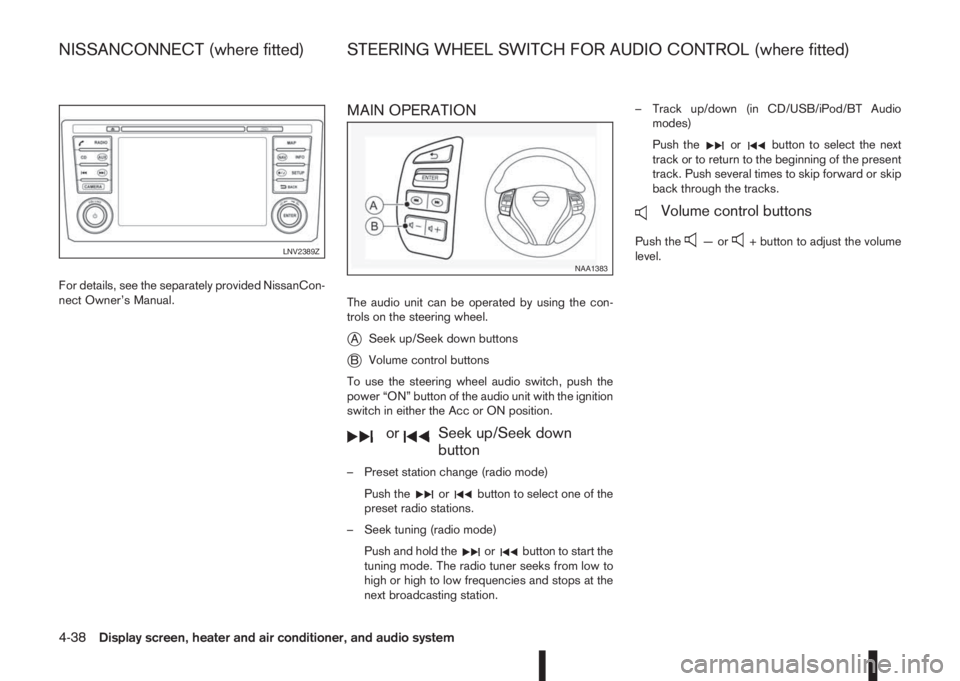
The audio unit can be operated by using the con-
trols on the steering wheel.
jASeek up/Seek down buttons
jBVolume control buttons
To use the steering wheel audio switch, push the
power “ON” button of the audio unit with the ignition
switch in either the Acc or ON position.
mormSeek up/Seek down
button
– Preset station change (radio mode)
Push the
orbutton to select one of the
preset radio stations.
– Seek tuning (radio mode)
Push and hold the
orbutton to start the
tuning mode. The radio tuner seeks from low to
high or high to low frequencies and stops at the
next broadcasting station.– Track up/down (in CD/USB/iPod/BT Audio
modes)
Push the
orbutton to select the next
track or to return to the beginning of the present
track. Push several times to skip forward or skip
back through the tracks.
mVolume control buttons
Push the—or+ button to adjust the volume
level.LNV2389Z
NAA1383
NISSANCONNECT (where fitted) STEERING WHEEL SWITCH FOR AUDIO CONTROL (where fitted)
4-38Display screen, heater and air conditioner, and audio system