sensor NISSAN QASHQAI 2014 Owner´s Manual
[x] Cancel search | Manufacturer: NISSAN, Model Year: 2014, Model line: QASHQAI, Model: NISSAN QASHQAI 2014Pages: 338, PDF Size: 4.87 MB
Page 177 of 338
Lane Departure Warning (LDW) system (where
fitted) ....................................................................... 5-33
LDW system operation ....................................... 5-34
LDW temporary disabled status .......................... 5-35
LDW automatic deactivation ............................... 5-35
LDW malfunction ................................................ 5-35
Multi-sensing camera unit maintenance ............... 5-35
Cruise control (where fitted) .................................... 5-36
Precautions on cruise control .............................. 5-36
Cruise control system operations ........................ 5-37
Speed limiter (where fitted) ...................................... 5-38
Speed limiter operations ..................................... 5-39
Forward emergency braking system (where fitted) ... 5-40
System operation ................................................ 5-41
Parking .................................................................... 5-43
Ultrasonic Parking Sensors (where fitted)................. 5-45
Operation ........................................................... 5-45
Intelligent Parking Assist (IPA) (where fitted) ............ 5-46
Deactivation of the IPA system ............................ 5-47
Parking procedure using the IPA system ............. 5-48
Operating tips..................................................... 5-52
Trailer towing ........................................................... 5-54
Operating precautions ........................................ 5-54
Maximum load limits (for Australia) ...................... 5-55
Tyre pressure ..................................................... 5-55
Safety chains ...................................................... 5-55
Trailer brakes...................................................... 5-55
Trailer detection (where fitted) ............................ 5-56Installation of coupling device (except for
Australia) ............................................................ 5-56
Vehicle security........................................................ 5-57
Electric power steering system ................................ 5-57
Brake system ........................................................... 5-58
Brake precautions .............................................. 5-58
Anti-lock Braking System (ABS)............................... 5-59
Using system ...................................................... 5-59
Self-test feature .................................................. 5-59
Normal operation ................................................ 5-60
Electronic Stability Programme (ESP) system
(where fitted) ........................................................... 5-60
Electronic Stability Programme (ESP) OFF
switch................................................................. 5-61
Chassis control........................................................ 5-62
Active trace control ............................................. 5-62
Active engine brake (for XTRONIC (CVT)
models only) ....................................................... 5-63
Active ride control ............................................... 5-64
Hill Start Assist (HSA) system .................................. 5-64
ECO mode system (where fitted) ............................. 5-65
Cold weather driving................................................ 5-66
Battery ............................................................... 5-66
Engine coolant .................................................... 5-66
Tyre equipment ................................................... 5-66
Special winter equipment.................................... 5-67
Corrosion protection ........................................... 5-67
Page 180 of 338
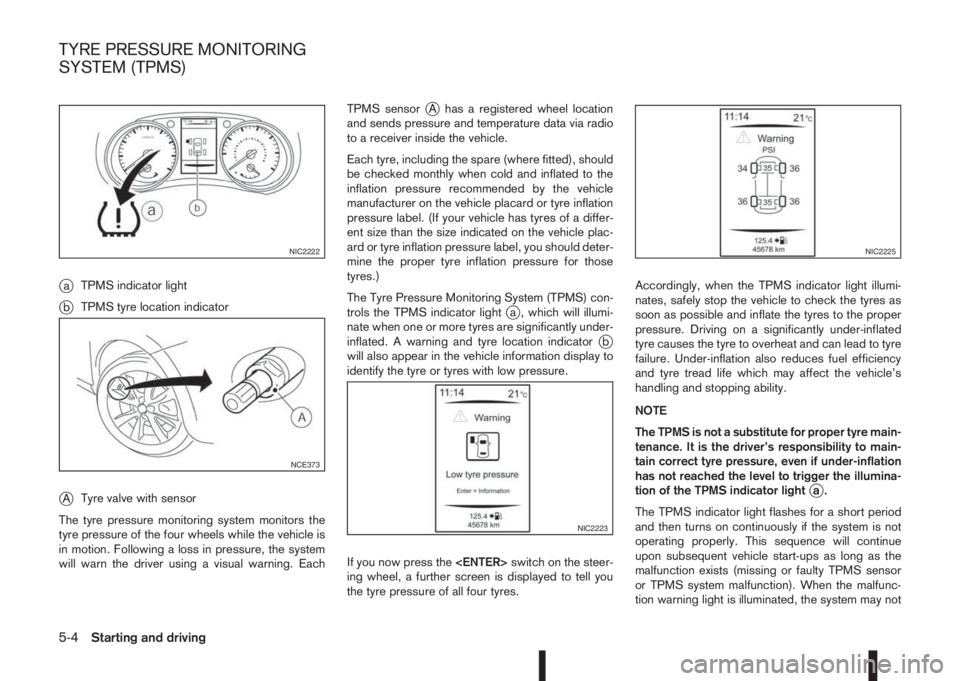
jaTPMS indicator light
jbTPMS tyre location indicator
jATyre valve with sensor
The tyre pressure monitoring system monitors the
tyre pressure of the four wheels while the vehicle is
in motion. Following a loss in pressure, the system
will warn the driver using a visual warning. EachTPMS sensor
jA has a registered wheel location
and sends pressure and temperature data via radio
to a receiver inside the vehicle.
Each tyre, including the spare (where fitted), should
be checked monthly when cold and inflated to the
inflation pressure recommended by the vehicle
manufacturer on the vehicle placard or tyre inflation
pressure label. (If your vehicle has tyres of a differ-
ent size than the size indicated on the vehicle plac-
ard or tyre inflation pressure label, you should deter-
mine the proper tyre inflation pressure for those
tyres.)
The Tyre Pressure Monitoring System (TPMS) con-
trols the TPMS indicator light
ja , which will illumi-
nate when one or more tyres are significantly under-
inflated. A warning and tyre location indicator
jb
will also appear in the vehicle information display to
identify the tyre or tyres with low pressure.
If you now press the
ing wheel, a further screen is displayed to tell you
the tyre pressure of all four tyres.Accordingly, when the TPMS indicator light illumi-
nates, safely stop the vehicle to check the tyres as
soon as possible and inflate the tyres to the proper
pressure. Driving on a significantly under-inflated
tyre causes the tyre to overheat and can lead to tyre
failure. Under-inflation also reduces fuel efficiency
and tyre tread life which may affect the vehicle’s
handling and stopping ability.
NOTE
The TPMS is not a substitute for proper tyre main-
tenance. It is the driver’s responsibility to main-
tain correct tyre pressure, even if under-inflation
has not reached the level to trigger the illumina-
tion of the TPMS indicator light
ja.
The TPMS indicator light flashes for a short period
and then turns on continuously if the system is not
operating properly. This sequence will continue
upon subsequent vehicle start-ups as long as the
malfunction exists (missing or faulty TPMS sensor
or TPMS system malfunction). When the malfunc-
tion warning light is illuminated, the system may not
NIC2222
NCE373
NIC2223
NIC2225
TYRE PRESSURE MONITORING
SYSTEM (TPMS)
5-4Starting and driving
Page 181 of 338
be able to detect or signal low tyre pressure as
intended. TPMS malfunctions may occur for a vari-
ety of reasons including the installation of replace-
ment or alternate tyres or wheels on the vehicle that
prevent the TPMS from functioning properly. Always
check the TPMS indicator light after replacing one
or more tyres or wheels on your vehicle to ensure
that the replacement or alternate tyres and wheels
allow the TPMS to continue to function properly.
•The TPMS does not monitor the tyre pressure of
the spare tyre.
•The TPMS will activate only when the vehicle is
driven at speeds above 25 km/h (16 MPH). Also,
this system may not detect a sudden drop in tyre
pressure (for example a flat tyre while driving).
•The TPMS indicator light may not automatically
turn off when the tyre pressure is adjusted.After
the tyre is inflated to the recommended COLD
tyre pressure, drive the vehicle at speeds above
25 km/h (16 MPH) to activate the TPMS. See
“TPMS sensor ID and position recognition” later
in this section
•Following a change in the outside temperature,
the TPMS indicator light may illuminate even if
the tyre pressure has been adjusted properly.
Adjust the tyre pressure to the recommended
COLD tyre pressure again when the tyres are
cold, and reset the TPMS.
For additional information, see “[Check cold tyre]
message” later in this section.
WARNING
•If the TPMS indicator light illuminates while
driving:
– avoid sudden steering manoeuvres
– avoid abrupt braking
– reduce vehicle speed
– pull off the road to a safe location
– stop the vehicle as soon as possible
•Driving with under-inflated tyres may perma-
nently damage the tyres and increase the like-
lihood of tyre failure. Serious vehicle damage
could occur which may lead to an accident
and could result in serious personal injury.
•Check the tyre pressure for all four tyres. Ad-
just the tyre pressure to the recommended
COLD tyre pressure shown on the tyre plac-
ard to turn the TPMS indicator light “OFF”. In
case of a flat tyre, replace it with a spare tyre
as soon as possible. (See “Flat tyre” in the
“6. In case of emergency” section for chang-
ing a flat tyre.)
•When a spare tyre is mounted or a wheel is
replaced, the TPMS will not function and the
TPMS indicator light will flash for approxi-
mately 1 minute. The light will remain on after
1 minute. Be sure to follow all instructions for
wheel replacement and mount the TPMS sys-
tem correctly.
•Replacing tyres with those not originally speci-
fied by NISSAN could affect the proper opera-
tion of the TPMS.
•The Genuine NISSAN Emergency Tyre Repair
Sealant or equivalent can be used for tempo-
rarily repairing a tyre. Do not inject any other
tyre liquid or aerosol tyre sealant into the
tyres, as this may cause a malfunction of the
tyre pressure sensors.
•NISSAN recommends using only Genuine
NISSAN Emergency Tyre Sealant provided
with your vehicle. Other tyre sealants may
damage the valve stem seal which can cause
the tyre to lose air pressure. Visit a NISSAN
dealer or qualified workshop as soon as pos-
sible after using tyre repair sealant (for mod-
els equipped with the emergency tyre punc-
ture repair kit).
CAUTION
•The TPMS may not function properly when the
wheels are equipped with tyre chains or the
wheels are buried in snow.
•Do not place metalised film or any metal parts
(antenna, etc.) on the windows. This may
cause poor reception of the signals from the
tyre pressure sensors, and the TPMS will not
function properly.
Starting and driving5-5
Page 182 of 338
Some devices and transmitters may tempo-
rarily interfere with the operation of the TPMS
and cause the TPMS indicator light to illumi-
nate. Some examples are:
– Facilities or electric devices using similar
radio frequencies are near the vehicle.
– If a transmitter set to similar frequencies is
being used in or near the vehicle.
– If a computer (or similar equipment) or a
DC/AC converter is being used in or near
the vehicle.
– If devices which transmit electrical noise
are connected to the vehicle’s 12V power
supply.
•When inflating the tyres and checking the tyre
pressure, never bend the valves.
•Special aluminium valves are fitted to mount
the TPMS sensors on the wheels. The TPMS
sensor is fixed at the wheels by a nut. The nut
needs to be correctly fitted at a torque setting
of 7.5 ± 0.5 N•m. If the TPMS sensor is tight-
ened exceeding the limit, there is a possibility
the sensor grommet will be damaged. If the
sensor is tightened under the limit, there is a
possibility of causing an air leak.
•Use Genuine NISSAN valve caps that comply
with the factory-fitted valve cap specifications.
•Do not use metal valve caps.
•Fit the valve caps properly. Without the valve
caps the valve and tyre pressure monitor sen-
sors could be damaged.
•Do not damage the valves and sensors when
storing the wheels or fitting different tyres.
•Replace the sensor grommet and washer dur-
ing a tyre change. Once they have been re-
moved, the sensor grommet and washer can-
not be reused and must be replaced. The
TPMS sensors can be used again.
•Use caution when using tyre inflation equip-
ment with a rigid air supply tube, as leverage
applied by the long nozzle can damage the
valve stem.
5-6Starting and driving
Page 183 of 338
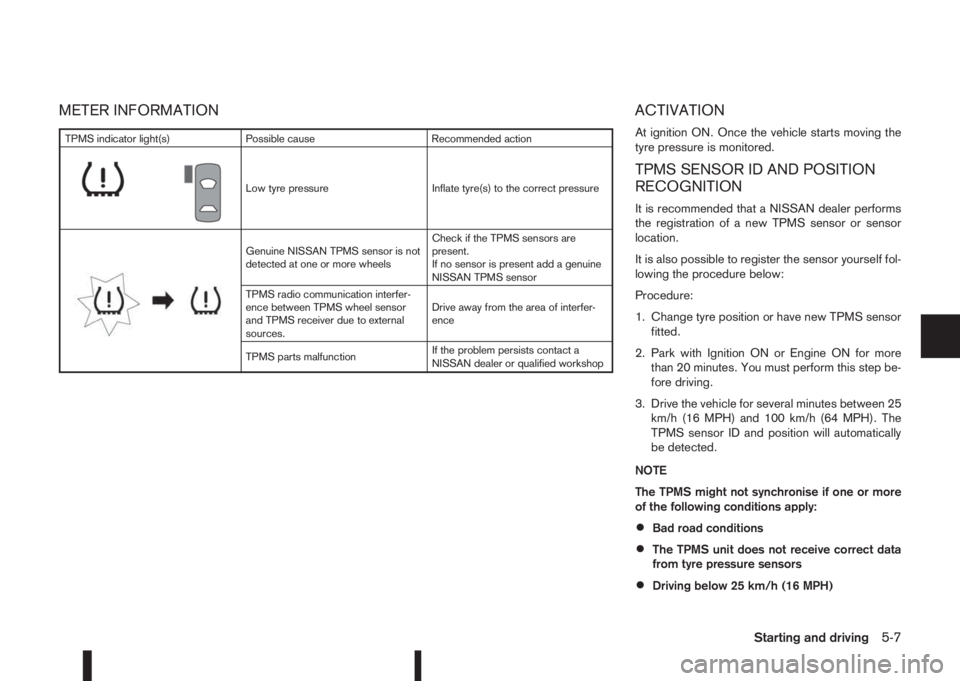
METER INFORMATION ACTIVATION
At ignition ON. Once the vehicle starts moving the
tyre pressure is monitored.
TPMS SENSOR ID AND POSITION
RECOGNITION
It is recommended that a NISSAN dealer performs
the registration of a new TPMS sensor or sensor
location.
It is also possible to register the sensor yourself fol-
lowing the procedure below:
Procedure:
1. Change tyre position or have new TPMS sensor
fitted.
2. Park with Ignition ON or Engine ON for more
than 20 minutes. You must perform this step be-
fore driving.
3. Drive the vehicle for several minutes between 25
km/h (16 MPH) and 100 km/h (64 MPH). The
TPMS sensor ID and position will automatically
be detected.
NOTE
The TPMS might not synchronise if one or more
of the following conditions apply:
•Bad road conditions
•The TPMS unit does not receive correct data
from tyre pressure sensors
•Driving below 25 km/h (16 MPH)
TPMS indicator light(s) Possible cause Recommended action
m
Low tyre pressure Inflate tyre(s) to the correct pressure
m
Genuine NISSAN TPMS sensor is not
detected at one or more wheelsCheck if the TPMS sensors are
present.
If no sensor is present add a genuine
NISSAN TPMS sensor
TPMS radio communication interfer-
ence between TPMS wheel sensor
and TPMS receiver due to external
sources.Drive away from the area of interfer-
ence
TPMS parts malfunctionIf the problem persists contact a
NISSAN dealer or qualified workshop
Starting and driving5-7
Page 184 of 338
•Driving above 100 km/h (64 MPH)
•High acceleration
•High deceleration
•In stop and go traffic or traffic waves
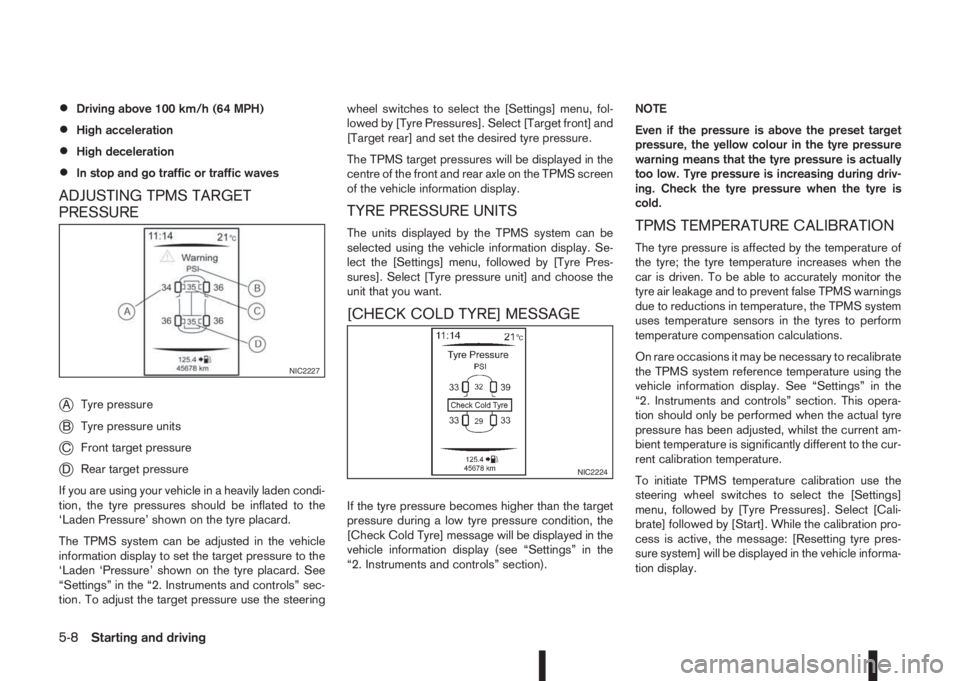
ADJUSTING TPMS TARGET
PRESSURE
j
ATyre pressure
jBTyre pressure units
jCFront target pressure
jDRear target pressure
If you are using your vehicle in a heavily laden condi-
tion, the tyre pressures should be inflated to the
‘Laden Pressure’ shown on the tyre placard.
The TPMS system can be adjusted in the vehicle
information display to set the target pressure to the
‘Laden ‘Pressure’ shown on the tyre placard. See
“Settings” in the “2. Instruments and controls” sec-
tion. To adjust the target pressure use the steeringwheel switches to select the [Settings] menu, fol-
lowed by [Tyre Pressures]. Select [Target front] and
[Target rear] and set the desired tyre pressure.
The TPMS target pressures will be displayed in the
centre of the front and rear axle on the TPMS screen
of the vehicle information display.
TYRE PRESSURE UNITS
The units displayed by the TPMS system can be
selected using the vehicle information display. Se-
lect the [Settings] menu, followed by [Tyre Pres-
sures]. Select [Tyre pressure unit] and choose the
unit that you want.
[CHECK COLD TYRE] MESSAGE
If the tyre pressure becomes higher than the target
pressure during a low tyre pressure condition, the
[Check Cold Tyre] message will be displayed in the
vehicle information display (see “Settings” in the
“2. Instruments and controls” section).NOTE
Even if the pressure is above the preset target
pressure, the yellow colour in the tyre pressure
warning means that the tyre pressure is actually
too low. Tyre pressure is increasing during driv-
ing. Check the tyre pressure when the tyre is
cold.
TPMS TEMPERATURE CALIBRATION
The tyre pressure is affected by the temperature of
the tyre; the tyre temperature increases when the
car is driven. To be able to accurately monitor the
tyre air leakage and to prevent false TPMS warnings
due to reductions in temperature, the TPMS system
uses temperature sensors in the tyres to perform
temperature compensation calculations.
On rare occasions it may be necessary to recalibrate
the TPMS system reference temperature using the
vehicle information display. See “Settings” in the
“2. Instruments and controls” section. This opera-
tion should only be performed when the actual tyre
pressure has been adjusted, whilst the current am-
bient temperature is significantly different to the cur-
rent calibration temperature.
To initiate TPMS temperature calibration use the
steering wheel switches to select the [Settings]
menu, followed by [Tyre Pressures]. Select [Cali-
brate] followed by [Start]. While the calibration pro-
cess is active, the message: [Resetting tyre pres-
sure system] will be displayed in the vehicle informa-
tion display.
NIC2227
NIC2224
5-8Starting and driving
Page 194 of 338
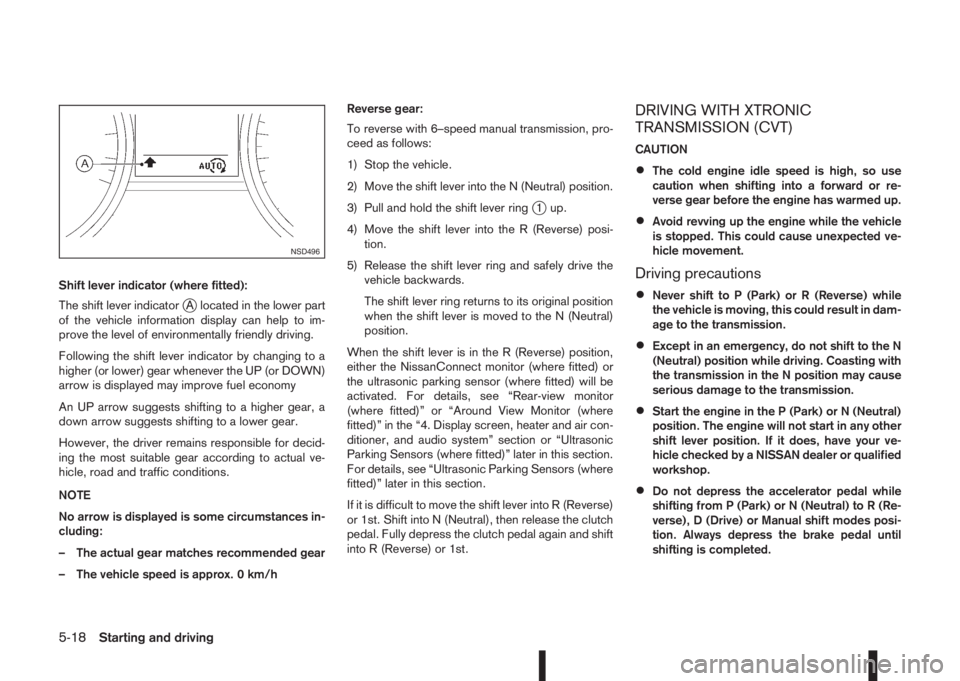
Shift lever indicator (where fitted):
The shift lever indicator
jA located in the lower part
of the vehicle information display can help to im-
prove the level of environmentally friendly driving.
Following the shift lever indicator by changing to a
higher (or lower) gear whenever the UP (or DOWN)
arrow is displayed may improve fuel economy
An UP arrow suggests shifting to a higher gear, a
down arrow suggests shifting to a lower gear.
However, the driver remains responsible for decid-
ing the most suitable gear according to actual ve-
hicle, road and traffic conditions.
NOTE
No arrow is displayed is some circumstances in-
cluding:
– The actual gear matches recommended gear
– The vehicle speed is approx. 0 km/hReverse gear:
To reverse with 6–speed manual transmission, pro-
ceed as follows:
1) Stop the vehicle.
2) Move the shift lever into the N (Neutral) position.
3) Pull and hold the shift lever ring
j1 up.
4) Move the shift lever into the R (Reverse) posi-
tion.
5) Release the shift lever ring and safely drive the
vehicle backwards.
The shift lever ring returns to its original position
when the shift lever is moved to the N (Neutral)
position.
When the shift lever is in the R (Reverse) position,
either the NissanConnect monitor (where fitted) or
the ultrasonic parking sensor (where fitted) will be
activated. For details, see “Rear-view monitor
(where fitted)” or “Around View Monitor (where
fitted)” in the “4. Display screen, heater and air con-
ditioner, and audio system” section or “Ultrasonic
Parking Sensors (where fitted)” later in this section.
For details, see “Ultrasonic Parking Sensors (where
fitted)” later in this section.
If it is difficult to move the shift lever into R (Reverse)
or 1st. Shift into N (Neutral), then release the clutch
pedal. Fully depress the clutch pedal again and shift
into R (Reverse) or 1st.
DRIVING WITH XTRONIC
TRANSMISSION (CVT)
CAUTION
•The cold engine idle speed is high, so use
caution when shifting into a forward or re-
verse gear before the engine has warmed up.
•Avoid revving up the engine while the vehicle
is stopped. This could cause unexpected ve-
hicle movement.
Driving precautions
•Never shift to P (Park) or R (Reverse) while
the vehicle is moving, this could result in dam-
age to the transmission.
•Except in an emergency, do not shift to the N
(Neutral) position while driving. Coasting with
the transmission in the N position may cause
serious damage to the transmission.
•Start the engine in the P (Park) or N (Neutral)
position. The engine will not start in any other
shift lever position. If it does, have your ve-
hicle checked by a NISSAN dealer or qualified
workshop.
•Do not depress the accelerator pedal while
shifting from P (Park) or N (Neutral) to R (Re-
verse), D (Drive) or Manual shift modes posi-
tion. Always depress the brake pedal until
shifting is completed.
NSD496
5-18Starting and driving
Page 196 of 338
P (Park):
Use this position when the vehicle is parked or when
starting the engine. Always make sure that the ve-
hicle is completely stopped before moving the shift
lever into the P (Park) position. For maximum safety,
the footbrake pedal must be depressed before mov-
ing the shift lever into the P (Park) position. Use this
position together with the parking brake. When park-
ing on a hill, first depress the footbrake pedal, apply
the parking brake and then shift into the P (Park)
position.
R (Reverse):
CAUTION
Shift into this position only after the vehicle has
completely stopped.
Use this position to reverse the vehicle.
When the shift lever is in the R (Reverse) position,
either the NissanConnect monitor (where fitted) or
the ultrasonic parking sensor (where fitted) will be
activated. For details, see “Rear-view monitor
(where fitted)” or “Around View Monitor (where
fitted)” in the “4. Display screen, heater and air con-
ditioner, and audio system” section or “Ultrasonic
Parking Sensors (where fitted)” later in this section.
N (Neutral):
Neither forward nor reverse gear is engaged. The
engine can be started in this position. You may shift
to N and restart a stalled engine while driving the
vehicle.D (Drive):
Use this position for all normal forward driving.
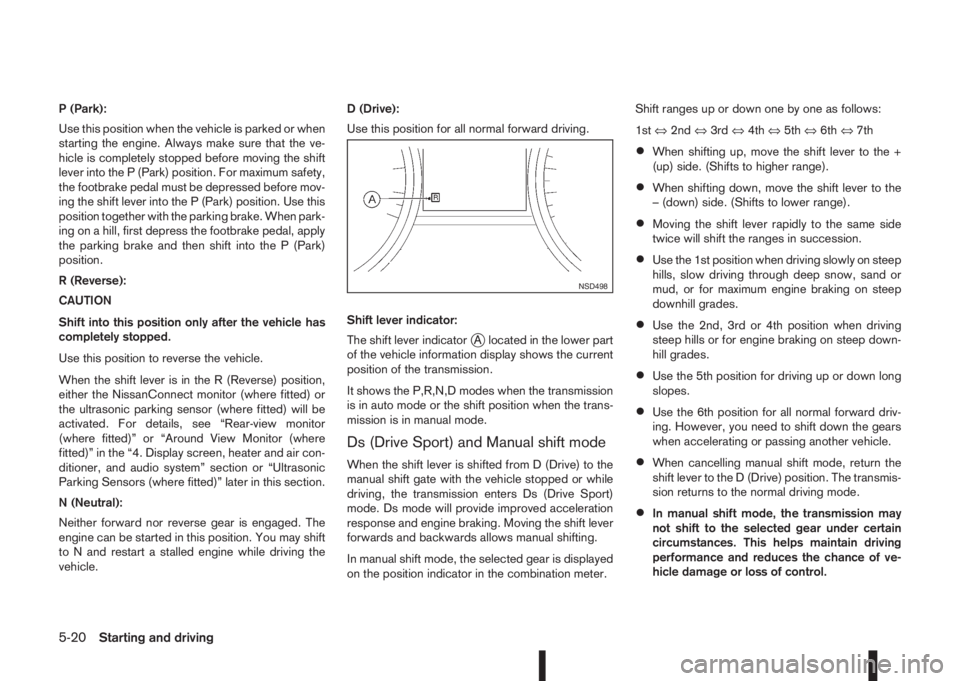
Shift lever indicator:
The shift lever indicator
jA located in the lower part
of the vehicle information display shows the current
position of the transmission.
It shows the P,R,N,D modes when the transmission
is in auto mode or the shift position when the trans-
mission is in manual mode.
Ds (Drive Sport) and Manual shift mode
When the shift lever is shifted from D (Drive) to the
manual shift gate with the vehicle stopped or while
driving, the transmission enters Ds (Drive Sport)
mode. Ds mode will provide improved acceleration
response and engine braking. Moving the shift lever
forwards and backwards allows manual shifting.
In manual shift mode, the selected gear is displayed
on the position indicator in the combination meter.Shift ranges up or down one by one as follows:
1st⇔2nd⇔3rd⇔4th⇔5th⇔6th⇔7th
•When shifting up, move the shift lever to the +
(up) side. (Shifts to higher range).
•When shifting down, move the shift lever to the
– (down) side. (Shifts to lower range).
•Moving the shift lever rapidly to the same side
twice will shift the ranges in succession.
•Use the 1st position when driving slowly on steep
hills, slow driving through deep snow, sand or
mud, or for maximum engine braking on steep
downhill grades.
•Use the 2nd, 3rd or 4th position when driving
steep hills or for engine braking on steep down-
hill grades.
•Use the 5th position for driving up or down long
slopes.
•Use the 6th position for all normal forward driv-
ing. However, you need to shift down the gears
when accelerating or passing another vehicle.
•When cancelling manual shift mode, return the
shift lever to the D (Drive) position. The transmis-
sion returns to the normal driving mode.
•In manual shift mode, the transmission may
not shift to the selected gear under certain
circumstances. This helps maintain driving
performance and reduces the chance of ve-
hicle damage or loss of control.
NSD498
5-20Starting and driving
Page 216 of 338
WARNING
•The vehicle may accelerate when the speed
limiter cancels.
•When additional floor mats are used, be sure
that they are correctly secured and that they
cannot interfere with the accelerator pedal.
Mats not adapted to the vehicle may prevent
proper operation of the speed limiter.
Fully depress the accelerator pedal beyond the re-
sistance point. The speed limiter will be suspended
to allow driving above the set speed. The set speed
value
j5 will flash and an audible warning will sound.
The speed limiter will automatically resume when
the vehicle speed drops below the set speed limit.
Resuming a previous set speed
If a set speed limit has been cancelled, the set speed
will be stored in the speed limiter memory.
This speed limit can be reactivated by pressing the
RES (Resume) switch
jA upwards .
If the current vehicle speed is higher than the previ-
ous set speed, the accelerator pedal will not work
and the set speed value
j5 will flash until the vehicle
speed drops below the set speed limit.
When the actual vehicle speed exceeds the set
speed, an audible warning will be heard a short time
after the set speed is exceeded and driver interven-
tion is not detected.
Turning the speed limiter off
The speed limiter system will be turned off when
one of the following operations is performed:
•Push the speed limiter main “ON/OFF” switchj3 . The speed limiter symbolj4 and the set
speed valuej5 in the vehicle information display
will be turned off.
•Push the cruise control main “ON/OFF” switchj2 . The speed limiter information in the vehicle
information will be replaced with the cruise con-
trol information. For details see “Cruise control
(where fitted)” earlier in this section.
•When the vehicle is stopped and the ignition is
turned to the off position.
Turning off the speed limiter will erase the set
speed limit memory.
Speed limiter malfunction
If the speed limiter malfunctions, the speed limiter
symbolj4 in the vehicle information display will
flash.
Turn the speed limiter off by pushing the speed lim-
iter main “ON/OFF” switch
j3 and have the system
checked by a NISSAN dealer or qualified workshop.The forward emergency braking system can assist
the driver when there is a risk of a forward collision
with the vehicle ahead in the travelling lane.
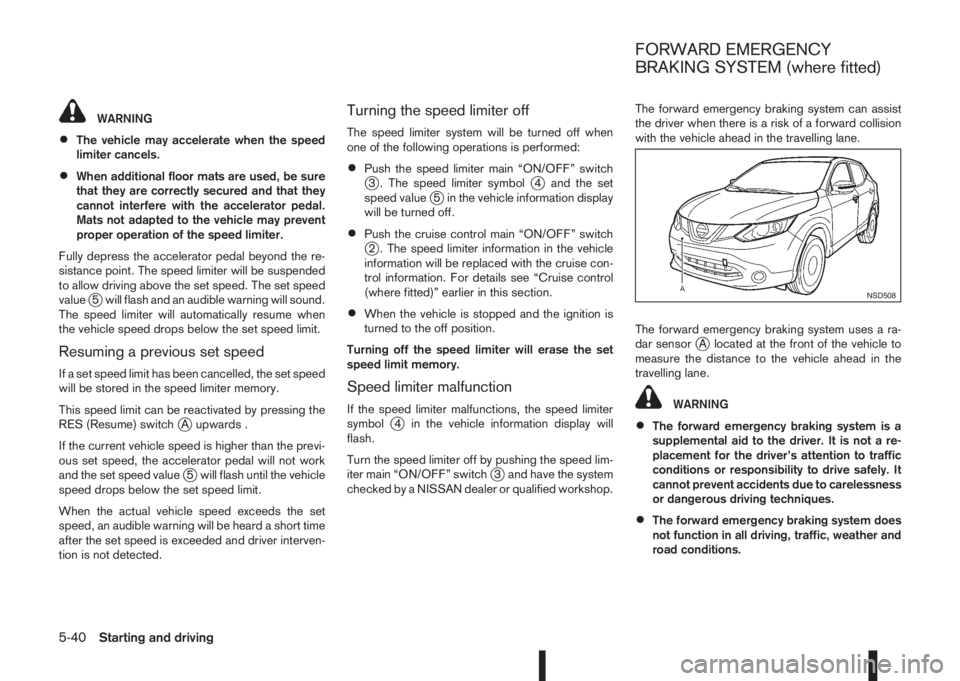
The forward emergency braking system uses a ra-
dar sensor
jA located at the front of the vehicle to
measure the distance to the vehicle ahead in the
travelling lane.
WARNING
•The forward emergency braking system is a
supplemental aid to the driver. It is not a re-
placement for the driver’s attention to traffic
conditions or responsibility to drive safely. It
cannot prevent accidents due to carelessness
or dangerous driving techniques.
•The forward emergency braking system does
not function in all driving, traffic, weather and
road conditions.
NSD508
FORWARD EMERGENCY
BRAKING SYSTEM (where fitted)
5-40Starting and driving
Page 217 of 338
SYSTEM OPERATION
The forward emergency braking system will func-
tion when your vehicle is driven at speeds above
approximately 5 km/h (3 MPH).
If a risk of a forward collision is detected, the for-
ward emergency braking system will provide the
first warning to the driver by flashing the forward
collision warning light (orange) and providing an au-
dible warning.
If the driver applies the brakes quickly and forcefully
after the warning, and the forward emergency brak-
ing system detects that there is still the possibility of
a forward collision, the system will automatically in-
crease the braking force.
If the driver does not take action, the forward emer-
gency braking system issues the second visual
warning (red) and audible warning. If the driver re-
leases the accelerator pedal, then the system ap-
plies partial braking
If the risk of a collision becomes imminent, the for-
ward emergency braking system applies harder
braking automatically.
NOTE
The vehicle’s brake lights come on when braking
is performed by the forward emergency braking
system.
Depending on vehicle speed and distance to the
vehicle ahead, as well as driving and roadway con-
ditions, the system may help the driver avoid a for-ward collision or may help mitigate the
consequences if a collision should one be unavoid-
able.
If the driver is handling the steering wheel, acceler-
ating or braking, the forward emergency braking
system will function later or will not function.
The automatic braking will cease under the follow-
ing conditions:
•When the steering wheel is turned as far as nec-
essary to avoid a collision.
•When the accelerator pedal is depressed.
•When there is no longer a vehicle detected
ahead.
If the forward emergency braking system has
stopped the vehicle, the vehicle will remain at a
standstill for approximately 2 seconds before the
brakes are released.
WARNING
•The radar sensor does not detect the follow-
ing objects:
– Pedestrians, animals or obstacles in the
roadway
– Oncoming vehicles
– Crossing vehicles
•The radar sensor has some performance limi-
tations. If a stationary vehicle is in the vehi-
cle’s path, the forward emergency brakingsystem will not function when the vehicle is
driven at speeds over approximately 45 MPH
(70 km/h).
•The radar sensor may not detect a vehicle
ahead in the following conditions:
– Dirt, ice, snow or other material covering
the radar sensor.
– Interference by other radar sources.
– Snow or road spray from travelling
vehicles.
– If the vehicle ahead is narrow (e.g. motor-
cycle).
– When driving on a steep downhill slope or
roads with sharp curves.
– When towing a trailer.
•In some road or traffic conditions, the forward
emergency braking system may unexpectedly
apply partial braking. When acceleration is
necessary, continue to depress the accelera-
tor pedal to override the system.
•Braking distances increase on slippery sur-
faces.
•Excessive noise will interfere with the warn-
ing chime sound, and the chime may not be
heard.
•The system is designed to automatically
check the sensor’s functionality, within cer-
tain limitations. The system may not detect
some forms of obstruction of the sensor area
Starting and driving5-41