light NISSAN QASHQAI 2014 Owner´s Manual
[x] Cancel search | Manufacturer: NISSAN, Model Year: 2014, Model line: QASHQAI, Model: NISSAN QASHQAI 2014Pages: 338, PDF Size: 4.87 MB
Page 126 of 338
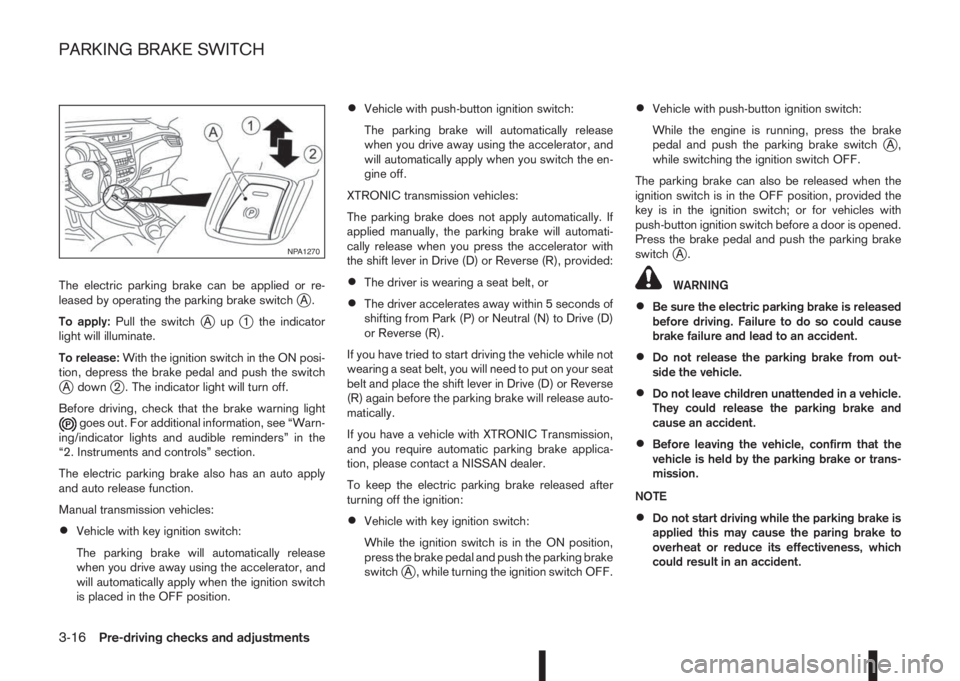
The electric parking brake can be applied or re-
leased by operating the parking brake switchjA.
To apply:Pull the switch
jAupj1 the indicator
light will illuminate.
To release:With the ignition switch in the ON posi-
tion, depress the brake pedal and push the switch
jA downj2 . The indicator light will turn off.
Before driving, check that the brake warning light
goes out. For additional information, see “Warn-
ing/indicator lights and audible reminders” in the
“2. Instruments and controls” section.
The electric parking brake also has an auto apply
and auto release function.
Manual transmission vehicles:
•Vehicle with key ignition switch:
The parking brake will automatically release
when you drive away using the accelerator, and
will automatically apply when the ignition switch
is placed in the OFF position.
•Vehicle with push-button ignition switch:
The parking brake will automatically release
when you drive away using the accelerator, and
will automatically apply when you switch the en-
gine off.
XTRONIC transmission vehicles:
The parking brake does not apply automatically. If
applied manually, the parking brake will automati-
cally release when you press the accelerator with
the shift lever in Drive (D) or Reverse (R), provided:
•The driver is wearing a seat belt, or
•The driver accelerates away within 5 seconds of
shifting from Park (P) or Neutral (N) to Drive (D)
or Reverse (R).
If you have tried to start driving the vehicle while not
wearing a seat belt, you will need to put on your seat
belt and place the shift lever in Drive (D) or Reverse
(R) again before the parking brake will release auto-
matically.
If you have a vehicle with XTRONIC Transmission,
and you require automatic parking brake applica-
tion, please contact a NISSAN dealer.
To keep the electric parking brake released after
turning off the ignition:
•Vehicle with key ignition switch:
While the ignition switch is in the ON position,
press the brake pedal and push the parking brake
switch
jA , while turning the ignition switch OFF.
•Vehicle with push-button ignition switch:
While the engine is running, press the brake
pedal and push the parking brake switch
jA,
while switching the ignition switch OFF.
The parking brake can also be released when the
ignition switch is in the OFF position, provided the
key is in the ignition switch; or for vehicles with
push-button ignition switch before a door is opened.
Press the brake pedal and push the parking brake
switch
jA.
WARNING
•Be sure the electric parking brake is released
before driving. Failure to do so could cause
brake failure and lead to an accident.
•Do not release the parking brake from out-
side the vehicle.
•Do not leave children unattended in a vehicle.
They could release the parking brake and
cause an accident.
•Before leaving the vehicle, confirm that the
vehicle is held by the parking brake or trans-
mission.
NOTE
•Do not start driving while the parking brake is
applied this may cause the paring brake to
overheat or reduce its effectiveness, which
could result in an accident.
NPA1270
PARKING BRAKE SWITCH
3-16Pre-driving checks and adjustments
Page 127 of 338
•A buzzer will sound if the vehicle is driven
without releasing the parking brake. See “Au-
dible reminders” in the “2. Instruments and
controls” section.
•While the electric parking brake is applied or
released, an operating sound is heard from
the lower side of the rear seat. This is normal
and does not indicate a malfunction.
•When the electric parking brake is frequently
applied and released in a short period of time,
the parking brake may not operate in order to
prevent the parking brake system from over-
heating. If this occurs, operate the electric
parking brake switch again after waiting ap-
proximately 1 minute.
•The electric parking brake can only be re-
leased with the ignition switch in the ON posi-
tion.
•If the electric parking brake must be applied
while driving in an emergency, pull up and
hold the parking brake switch. When you re-
lease the parking brake switch, the parking
brake will be released.
•While pulling up the electric parking brake
switch while driving, the parking brake is ap-
plied and a chime sounds. The parking brake
indicator light in the meter and in the parking
brake switch illuminate. This does not indi-
cate a malfunction. The electric parking brake
indicator lights in the meter and in the parking
brake switch turn off when the parking brake
is released.
•Pull up the electric parking brake switch twice
so that the maximum electric parking brake
force is applied to the vehicle.
•When pulling the electric parking brake switch
up with the ignition switch in the OFF or ACC
position, the parking brake switch indicator
light will continue to illuminate for a short pe-
riod of time.
CAUTION
To park the vehicle in cold climates place the
shift lever in 1st (1) or Reverse (R) (or in Park (P)
for automatic (AT) vehicles), and place suitable
chocks at both the front and back of a wheel with
the electric parking brake released. If the electric
parking brake is applied in cold climates, the
brake may become frozen and cannot be re-
leased.
DRIVING AWAY WHEN TOWING A
TRAILER
Please note the following points to prevent the ve-
hicle from rolling back unintentionally on a gradient.
•Pull and hold the parking brake switch and press
the accelerator. The parking brake will remain
engaged and prevent any tendency to roll back
down the slope.
•You can release the parking brake switch as
soon as the engine is delivering enough power
to the wheels.
Depending on the weight of the vehicle and trailer
and the steepness of the slope, there may be a ten-dency to roll back downhill when driving away from
a standstill. You can prevent this by pulling up the
parking brake switch as you press the accelerator
(in the same way as with a conventional handbrake).
Pre-driving checks and adjustments3-17
Page 128 of 338
WARNING
Do not adjust the steering wheel while driving.
You could lose control of your vehicle and cause
an accident.
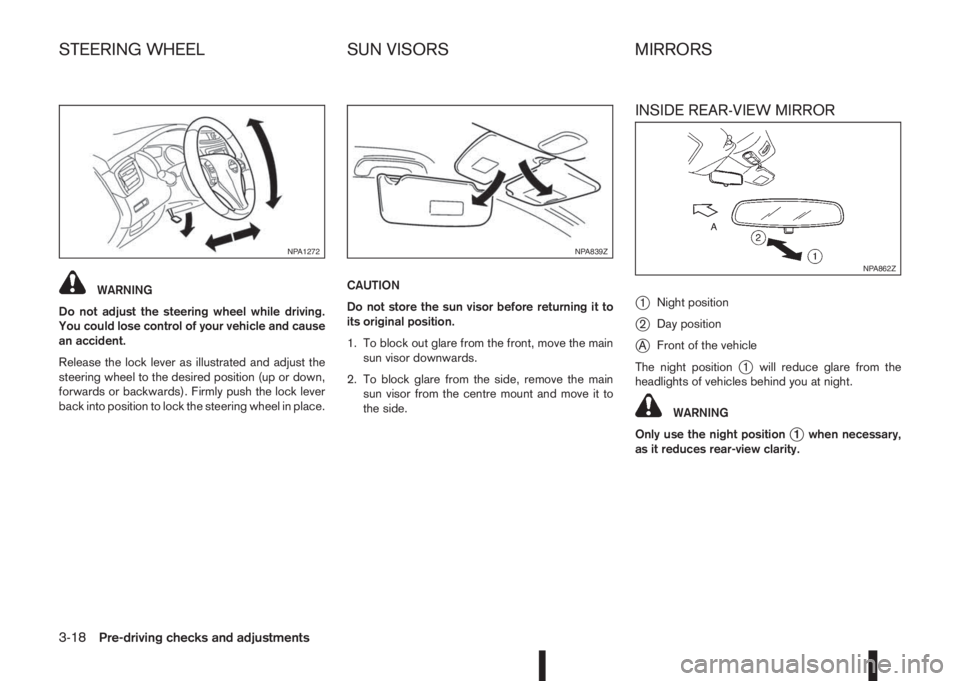
Release the lock lever as illustrated and adjust the
steering wheel to the desired position (up or down,
forwards or backwards). Firmly push the lock lever
back into position to lock the steering wheel in place.CAUTION
Do not store the sun visor before returning it to
its original position.
1. To block out glare from the front, move the main
sun visor downwards.
2. To block glare from the side, remove the main
sun visor from the centre mount and move it to
the side.
INSIDE REAR-VIEW MIRROR
j
1Night position
j2Day position
jAFront of the vehicle
The night position
j1 will reduce glare from the
headlights of vehicles behind you at night.
WARNING
Only use the night position
j1 when necessary,
as it reduces rear-view clarity.
NPA1272NPA839Z
NPA862Z
STEERING WHEEL SUN VISORS MIRRORS
3-18Pre-driving checks and adjustments
Page 129 of 338
AUTOMATIC ANTI-DAZZLING INSIDE
MIRROR (where fitted)
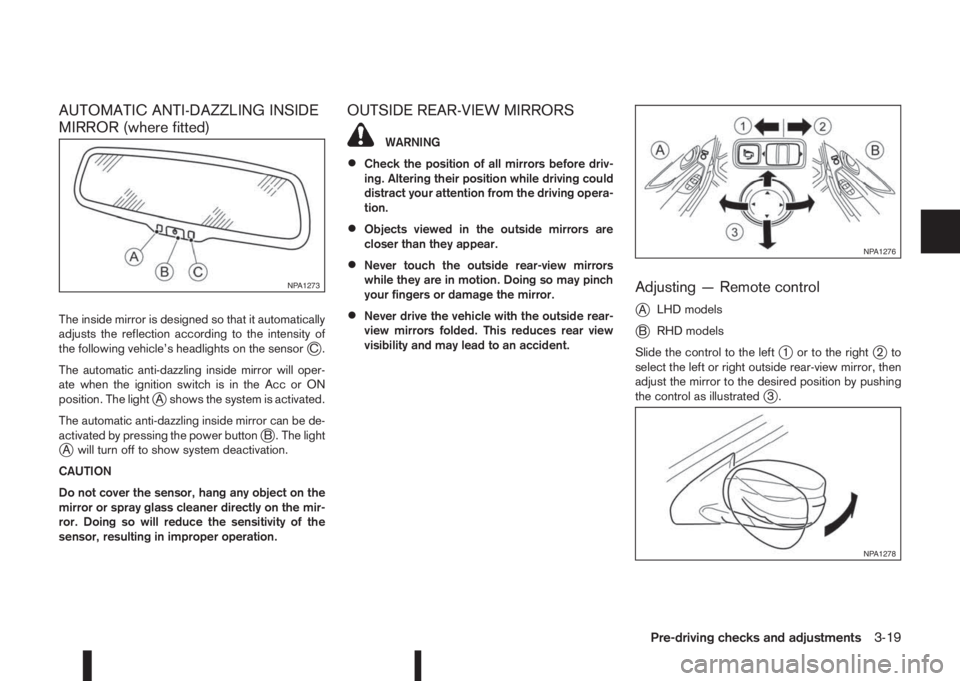
The inside mirror is designed so that it automatically
adjusts the reflection according to the intensity of
the following vehicle’s headlights on the sensor
jC.
The automatic anti-dazzling inside mirror will oper-
ate when the ignition switch is in the Acc or ON
position. The light
jA shows the system is activated.
The automatic anti-dazzling inside mirror can be de-
activated by pressing the power button
jB . The lightjA will turn off to show system deactivation.
CAUTION
Do not cover the sensor, hang any object on the
mirror or spray glass cleaner directly on the mir-
ror. Doing so will reduce the sensitivity of the
sensor, resulting in improper operation.
OUTSIDE REAR-VIEW MIRRORS
WARNING
•Check the position of all mirrors before driv-
ing. Altering their position while driving could
distract your attention from the driving opera-
tion.
•Objects viewed in the outside mirrors are
closer than they appear.
•Never touch the outside rear-view mirrors
while they are in motion. Doing so may pinch
your fingers or damage the mirror.
•Never drive the vehicle with the outside rear-
view mirrors folded. This reduces rear view
visibility and may lead to an accident.
Adjusting — Remote control
j
ALHD models
jBRHD models
Slide the control to the left
j1 or to the rightj2to
select the left or right outside rear-view mirror, then
adjust the mirror to the desired position by pushing
the control as illustrated
j3.
NPA1273
NPA1276
NPA1278
Pre-driving checks and adjustments3-19
Page 133 of 338
HOW TO READ THE DISPLAYED
LINES
WARNING
•Use the displayed lines as a reference. The
lines are highly affected by the number of oc-
cupants, fuel level, vehicle position, road con-
dition and road grade. Always check with your
eyes directly around the vehicle while revers-
ing.
•The distance guide line and the vehicle width
line should be used as a reference only when
the vehicle is on a level paved surface. The
distance viewed on the monitor is for refer-
ence only and may be different than the ac-
tual distance between the vehicle and dis-
played objects.
•When reversing the vehicle up a hill, objects
viewed in the monitor are further than they
appear. When reversing the vehicle down a
hill, objects viewed in the monitor are closerthan they appear. Use the inside mirror or
glance over your shoulder to properly judge
distances to other objects.
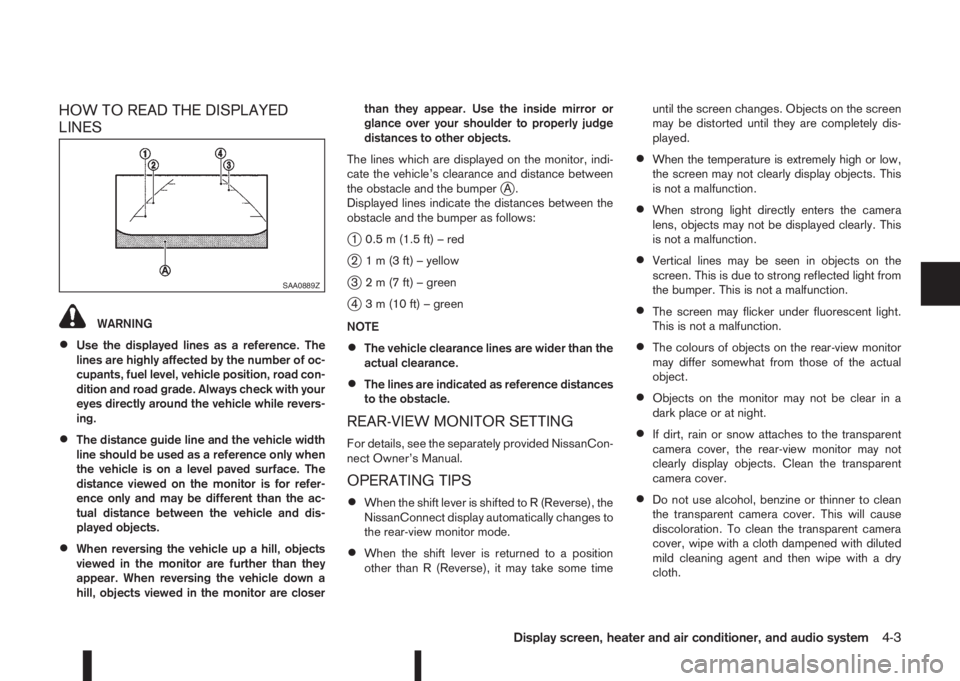
The lines which are displayed on the monitor, indi-
cate the vehicle’s clearance and distance between
the obstacle and the bumper
jA.
Displayed lines indicate the distances between the
obstacle and the bumper as follows:
j1 0.5 m (1.5 ft) – red
j2 1 m (3 ft) – yellow
j3 2 m (7 ft) – green
j4 3 m (10 ft) – green
NOTE
•The vehicle clearance lines are wider than the
actual clearance.
•The lines are indicated as reference distances
to the obstacle.
REAR-VIEW MONITOR SETTING
For details, see the separately provided NissanCon-
nect Owner’s Manual.
OPERATING TIPS
•When the shift lever is shifted to R (Reverse), the
NissanConnect display automatically changes to
the rear-view monitor mode.
•When the shift lever is returned to a position
other than R (Reverse), it may take some timeuntil the screen changes. Objects on the screen
may be distorted until they are completely dis-
played.
•When the temperature is extremely high or low,
the screen may not clearly display objects. This
is not a malfunction.
•When strong light directly enters the camera
lens, objects may not be displayed clearly. This
is not a malfunction.
•Vertical lines may be seen in objects on the
screen. This is due to strong reflected light from
the bumper. This is not a malfunction.
•The screen may flicker under fluorescent light.
This is not a malfunction.
•The colours of objects on the rear-view monitor
may differ somewhat from those of the actual
object.
•Objects on the monitor may not be clear in a
dark place or at night.
•If dirt, rain or snow attaches to the transparent
camera cover, the rear-view monitor may not
clearly display objects. Clean the transparent
camera cover.
•Do not use alcohol, benzine or thinner to clean
the transparent camera cover. This will cause
discoloration. To clean the transparent camera
cover, wipe with a cloth dampened with diluted
mild cleaning agent and then wipe with a dry
cloth.
SAA0889Z
Display screen, heater and air conditioner, and audio system4-3
Page 135 of 338
NOTE
At first operation, the corner lines are blinking
yellow for about 3 seconds. This is not a malfunc-
tion but a reminder to be cautious.
Available views:
•Bird’s-eye View
The surrounding view of the vehicle.
•Front-side View
The view around and ahead of the front passen-
ger’s side wheel.
•Front view
The view to the front of the vehicle.
•Rear view
The view to the rear of the vehicle.
•Full screen rear view
The view to the rear of the vehicle (which is a
little wider than the standard rear view)
The system is designed as an aid to the driver in
situations such as slot parking or parallel parking.
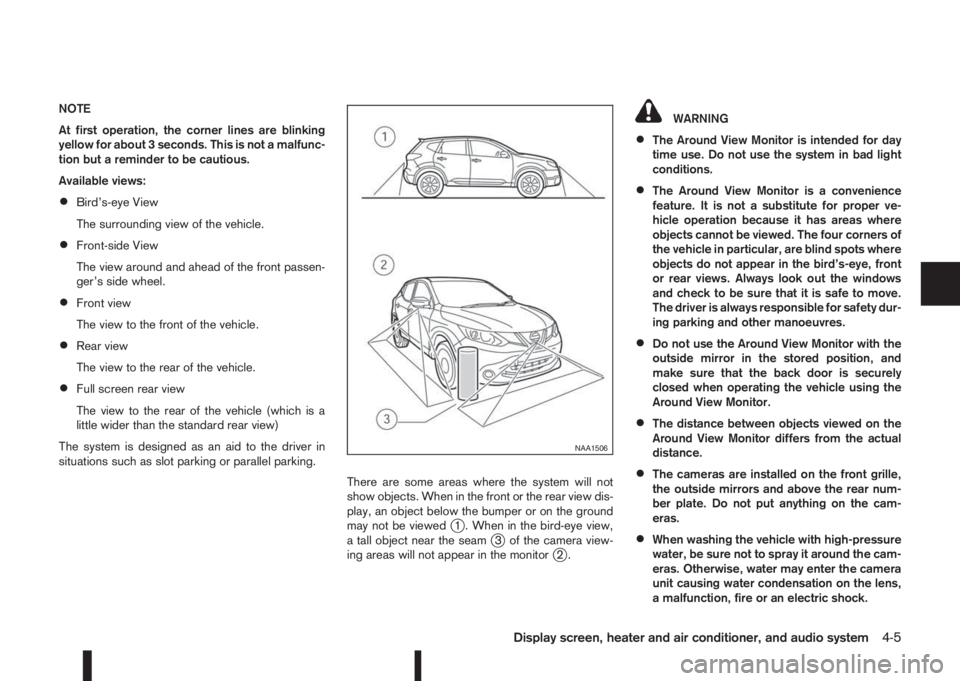
There are some areas where the system will not
show objects. When in the front or the rear view dis-
play, an object below the bumper or on the ground
may not be viewed
j1 . When in the bird-eye view,
a tall object near the seamj3 of the camera view-
ing areas will not appear in the monitorj2.
WARNING
•The Around View Monitor is intended for day
time use. Do not use the system in bad light
conditions.
•The Around View Monitor is a convenience
feature. It is not a substitute for proper ve-
hicle operation because it has areas where
objects cannot be viewed. The four corners of
the vehicle in particular, are blind spots where
objects do not appear in the bird’s-eye, front
or rear views. Always look out the windows
and check to be sure that it is safe to move.
The driver is always responsible for safety dur-
ing parking and other manoeuvres.
•Do not use the Around View Monitor with the
outside mirror in the stored position, and
make sure that the back door is securely
closed when operating the vehicle using the
Around View Monitor.
•The distance between objects viewed on the
Around View Monitor differs from the actual
distance.
•The cameras are installed on the front grille,
the outside mirrors and above the rear num-
ber plate. Do not put anything on the cam-
eras.
•When washing the vehicle with high-pressure
water, be sure not to spray it around the cam-
eras. Otherwise, water may enter the camera
unit causing water condensation on the lens,
a malfunction, fire or an electric shock.
NAA1506
Display screen, heater and air conditioner, and audio system4-5
Page 138 of 338
Guiding lines
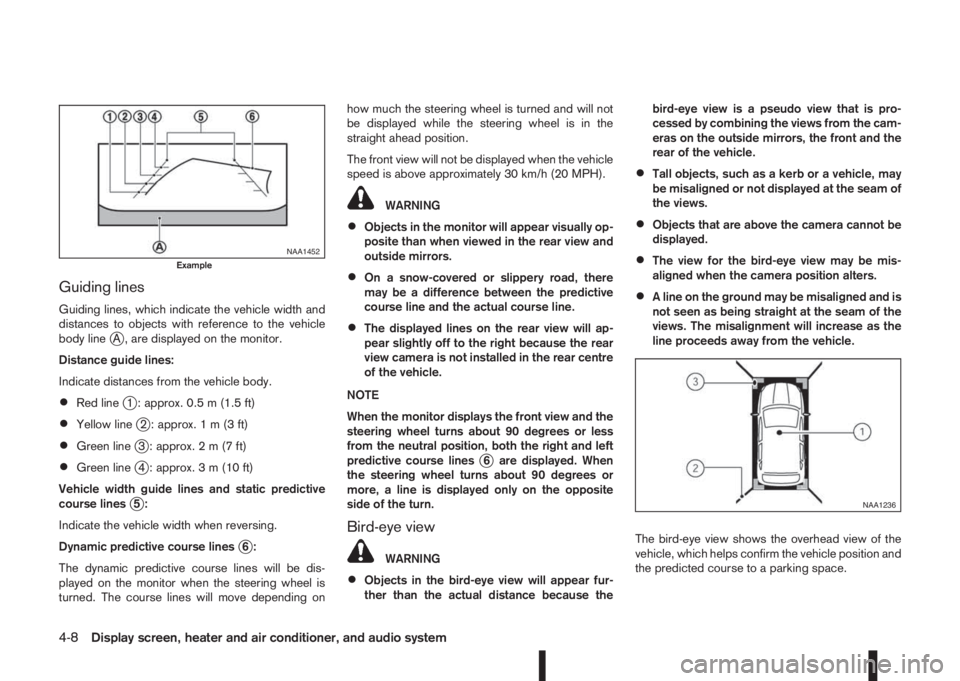
Guiding lines, which indicate the vehicle width and
distances to objects with reference to the vehicle
body line
jA , are displayed on the monitor.
Distance guide lines:
Indicate distances from the vehicle body.
•Red linej1 : approx. 0.5 m (1.5 ft)
•Yellow linej2 : approx.1m(3ft)
•Green linej3 : approx.2m(7ft)
•Green linej4 : approx. 3 m (10 ft)
Vehicle width guide lines and static predictive
course lines
j5:
Indicate the vehicle width when reversing.
Dynamic predictive course lines
j6:
The dynamic predictive course lines will be dis-
played on the monitor when the steering wheel is
turned. The course lines will move depending onhow much the steering wheel is turned and will not
be displayed while the steering wheel is in the
straight ahead position.
The front view will not be displayed when the vehicle
speed is above approximately 30 km/h (20 MPH).
WARNING
•Objects in the monitor will appear visually op-
posite than when viewed in the rear view and
outside mirrors.
•On a snow-covered or slippery road, there
may be a difference between the predictive
course line and the actual course line.
•The displayed lines on the rear view will ap-
pear slightly off to the right because the rear
view camera is not installed in the rear centre
of the vehicle.
NOTE
When the monitor displays the front view and the
steering wheel turns about 90 degrees or less
from the neutral position, both the right and left
predictive course lines
j6 are displayed. When
the steering wheel turns about 90 degrees or
more, a line is displayed only on the opposite
side of the turn.
Bird-eye view
WARNING
•Objects in the bird-eye view will appear fur-
ther than the actual distance because thebird-eye view is a pseudo view that is pro-
cessed by combining the views from the cam-
eras on the outside mirrors, the front and the
rear of the vehicle.
•Tall objects, such as a kerb or a vehicle, may
be misaligned or not displayed at the seam of
the views.
•Objects that are above the camera cannot be
displayed.
•The view for the bird-eye view may be mis-
aligned when the camera position alters.
•A line on the ground may be misaligned and is
not seen as being straight at the seam of the
views. The misalignment will increase as the
line proceeds away from the vehicle.
The bird-eye view shows the overhead view of the
vehicle, which helps confirm the vehicle position and
the predicted course to a parking space.
NAA1452Example
NAA1236
4-8Display screen, heater and air conditioner, and audio system
Page 142 of 338
MOVING OBJECT DETECTION (MOD)
The Moving Object Detection (MOD) system can
inform the driver of the moving objects surrounding
the vehicle.
The MOD system detects moving objects by using
image processing technology on the image shown
on the Around View Monitor display.
The MOD system operates in the following condi-
tions when the camera view is displayed:
•When the shift lever is in the N (Neutral) position
(XTRONIC and MT models) or P (Park) position
(XTRONIC models) and the vehicle is stopped,
the MOD system detects the moving objects in
the bird-eye view.
•When the shift lever is in the any position other
than R (Reverse) position and the vehicle speed
is above 0 km/h and below approximately 8 km/h
(5 MPH), the MOD system detects moving ob-
jects in the front view.
•When the shift lever is in the R (Reverse) posi-
tion and the vehicle speed is below approximately
8 km/h (5 MPH), the MOD system detects mov-
ing objects in the rear view. The MOD system
will not operate correctly if the back door is open.
The MOD icon will change to blue to show which
view is currently active.
The MOD system does not detect moving objects in
the front-side view. The MOD icon is not displayed
on the screen when in this view.
WARNING
•The MOD system is not a substitute for proper
vehicle operation and is not designed to pre-
vent contact with the objects surrounding the
vehicle. When manoeuvring, always use the
outside mirror and rear view mirror and turn
and check the surroundings to ensure it is
safe to manoeuvre.
•The MOD system does not have the function
to detect the surrounding stationary objects.
*: For the Right-Hand Drive (RHD) model, the screen
layout will be opposite.
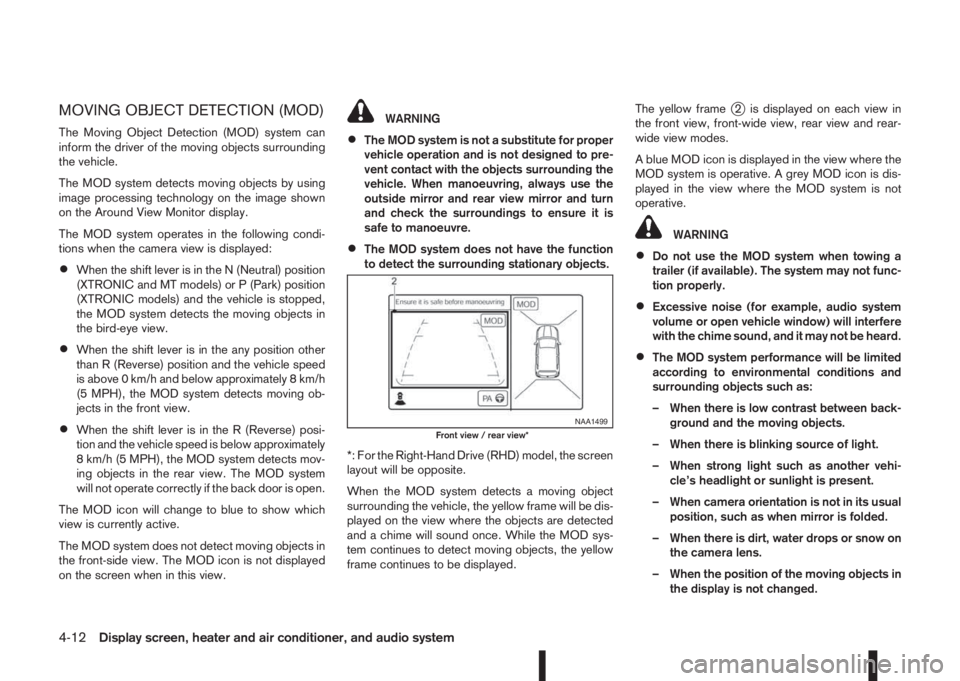
When the MOD system detects a moving object
surrounding the vehicle, the yellow frame will be dis-
played on the view where the objects are detected
and a chime will sound once. While the MOD sys-
tem continues to detect moving objects, the yellow
frame continues to be displayed.The yellow frame
j2 is displayed on each view in
the front view, front-wide view, rear view and rear-
wide view modes.
A blue MOD icon is displayed in the view where the
MOD system is operative. A grey MOD icon is dis-
played in the view where the MOD system is not
operative.
WARNING
•Do not use the MOD system when towing a
trailer (if available). The system may not func-
tion properly.
•Excessive noise (for example, audio system
volume or open vehicle window) will interfere
with the chime sound, and it may not be heard.
•The MOD system performance will be limited
according to environmental conditions and
surrounding objects such as:
– When there is low contrast between back-
ground and the moving objects.
– When there is blinking source of light.
– When strong light such as another vehi-
cle’s headlight or sunlight is present.
– When camera orientation is not in its usual
position, such as when mirror is folded.
– When there is dirt, water drops or snow on
the camera lens.
– When the position of the moving objects in
the display is not changed.
NAA1499Front view / rear view*
4-12Display screen, heater and air conditioner, and audio system
Page 144 of 338
•When strong light shines directly on to the cam-
era, objects may not be displayed clearly. This is
not a malfunction.
•The screen may flicker under fluorescent light.
This is not a malfunction.
•The colours of objects on the Around View Moni-
tor may differ somewhat from the actual colour
of objects. This is not a malfunction.
•Objects on the monitor may not be clear and the
colour of the object may differ in a dark environ-
ment. This is not a malfunction.
•There may be differences in sharpness between
each camera view of the bird-eye view.
•If dirt, rain or snow accumulates on the camera,
the Around View Monitor may not display ob-
jects clearly. Clean the camera.
•Do not use alcohol, benzine or thinner to clean
the camera. This will cause discoloration. To
clean the camera, wipe with a cloth that has
been dampened with a diluted mild cleaning
agent and then wipe with a dry cloth.
•Do not damage the camera because the monitor
screen may be adversely affected.
•Do not use wax on the camera lens. Wipe off any
wax with a clean cloth that has been dampened
with a mild detergent diluted with water.
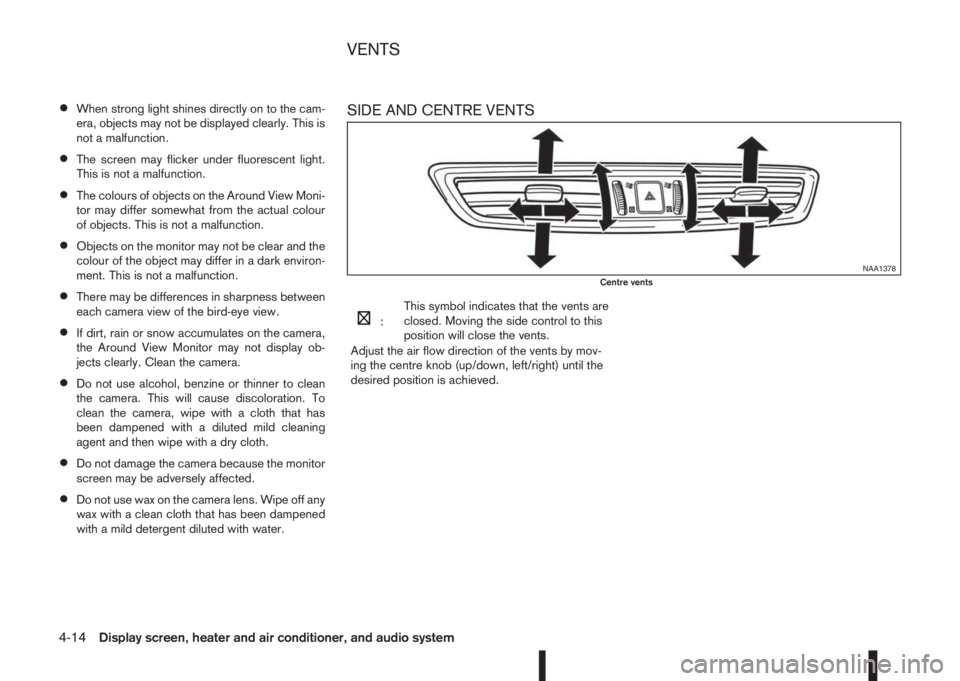
SIDE AND CENTRE VENTS
m:This symbol indicates that the vents are
closed. Moving the side control to this
position will close the vents.
Adjust the air flow direction of the vents by mov-
ing the centre knob (up/down, left/right) until the
desired position is achieved.
NAA1378Centre vents
VENTS
4-14Display screen, heater and air conditioner, and audio system
Page 146 of 338
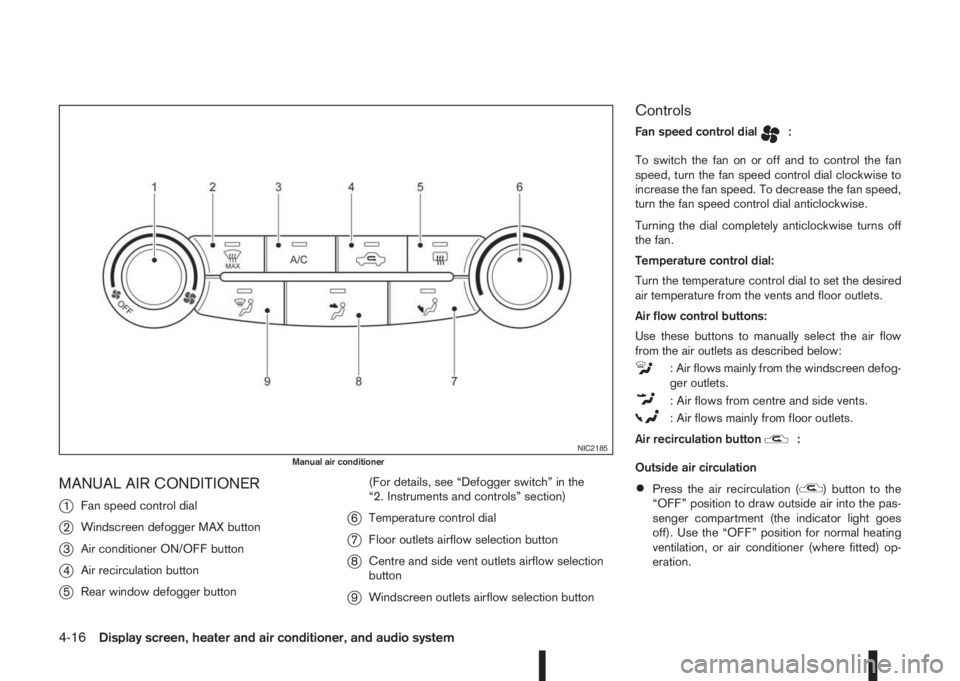
MANUAL AIR CONDITIONER
j
1Fan speed control dial
j2Windscreen defogger MAX button
j3Air conditioner ON/OFF button
j4Air recirculation button
j5Rear window defogger button(For details, see “Defogger switch” in the
“2. Instruments and controls” section)
j6Temperature control dial
j7Floor outlets airflow selection button
j8Centre and side vent outlets airflow selection
button
j9Windscreen outlets airflow selection button
Controls
Fan speed control dialm:
To switch the fan on or off and to control the fan
speed, turn the fan speed control dial clockwise to
increase the fan speed. To decrease the fan speed,
turn the fan speed control dial anticlockwise.
Turning the dial completely anticlockwise turns off
the fan.
Temperature control dial:
Turn the temperature control dial to set the desired
air temperature from the vents and floor outlets.
Air flow control buttons:
Use these buttons to manually select the air flow
from the air outlets as described below:
: Air flows mainly from the windscreen defog-
ger outlets.
: Air flows from centre and side vents.
: Air flows mainly from floor outlets.
Air recirculation button
m:
Outside air circulation
•Press the air recirculation () button to the
“OFF” position to draw outside air into the pas-
senger compartment (the indicator light goes
off). Use the “OFF” position for normal heating
ventilation, or air conditioner (where fitted) op-
eration.
NIC2185Manual air conditioner
4-16Display screen, heater and air conditioner, and audio system