engine NISSAN QASHQAI 2014 Owner´s Manual
[x] Cancel search | Manufacturer: NISSAN, Model Year: 2014, Model line: QASHQAI, Model: NISSAN QASHQAI 2014Pages: 338, PDF Size: 4.87 MB
Page 205 of 338
•If the engine of the vehicle stalls or you cannot
make it to the top of a steep grade, never at-
tempt to turn around. Your vehicle could tip or
roll over. Always drive backwards and straight
down in R (reverse) gear.
Never drive backwards with the shift lever in N
(Neutral) and/or with the clutch depressed and
using the brake as this could result in loss of
control.
•Heavy braking down a hill could cause your
brakes to overheat and fade, resulting in loss of
control and an accident. Apply the brakes lightly
and use a low gear to control your vehicle speed.
•Unsecured cargo can be thrown around when
driving over rough terrain. Properly secure it so
that it will not be thrown forwards and cause
injury to you or your passengers.
•To avoid raising the centre of gravity excessively,
do not exceed the rated capacity of the roof rack/
gear bin (where fitted) and evenly distribute the
load. Secure heavy loads in the luggage area as
far forwards and as low as possible. Do not equip
the vehicle with tyres larger than specified. This
could cause your vehicle to roll over.
•Accelerating quickly, sharp steering manoeuvres
or sudden braking may cause loss of control.
•Do not drive beyond the performance of the
tyres, even with 4WD. Sudden acceleration,
steering or braking may result in loss of control
and could cause the vehicle to become stuck.
•If at all possible, avoid sharp turning manoeuvres,
particularly at high speeds. Your 4WD vehicle
has a higher centre of gravity than a 2WD ve-
hicle and can tip over more easily. The vehicle is
not designed for cornering at the same speeds
as conventional 2WD models any more than low
sports cars are designed to perform satisfacto-
rily under off-road conditions. Failure to operate
this vehicle correctly could result in loss of con-
trol and/or a rollover accident.
•Do not grip the inside or spokes of the steering
wheel when driving off-road. The steering wheel
could jerk and injure your hands. Instead, drive
with your fingers and thumbs on the outside of
the rim.
•Before operating the vehicle, ensure that the
driver and all passengers have their seat belts
fastened.
•Always drive with the floor mats in place as the
floor may become very hot. Particular care
should be taken if you are barefoot.
•Lower your speed when encountering strong
crosswinds. With its higher centre of gravity your
NISSAN is more affected by gusty side winds.
Slower speeds ensure better vehicle control.
•Be sure to check the brakes immediately after
driving in mud or water as specified in “Wet
brakes” later in this section.
•Whenever you drive off-road through sand, mud
or water as deep as the wheel hub, more fre-quent maintenance may be required. For details,
refer to the separately provided Warranty Infor-
mation and Maintenance Booklet.
•Rinse the underside of the vehicle with fresh
water after driving through mud or sand. Re-
move any brush or sticks that are trapped.
•Install the same size of winter tyres on all four (4)
wheels (such as studless tyres) or install snow
chains to the front wheels when driving on slip-
pery roads (e.g. after a snowfall) and drive care-
fully using 4WD.
•Avoid parking your vehicle on steep hills. If you
get out of the vehicle and it rolls forwards, back-
wards or sideways, you could be injured.
Starting and driving5-29
Page 209 of 338
When the above conditions are corrected, the BSW
system will resume automatically.
BSW AUTOMATIC DEACTIVATION
When dirt, rain or snow accumulates on the rear
camera, or the windscreen in front of the multi-sens-
ing camera, the BSW system will be turned off auto-
matically. The BSW light will blink.
Action to take:
If the message appears, park the vehicle in a safe
place, clean the camera unit and/or windscreen with
a soft cloth. Then turn off and restart the engine.
BSW MALFUNCTION
If the BSW system malfunctions, it will be turned off
automatically and the BSW light (orange) will illumi-
nate.
Action to take:
Stop the vehicle in a safe location, turn off and re-
start the engine. If the BSW light (orange) continues
to illuminate, have the BSW system checked by a
NISSAN dealer or qualified workshop.
BSW CAMERA UNIT MAINTENANCE
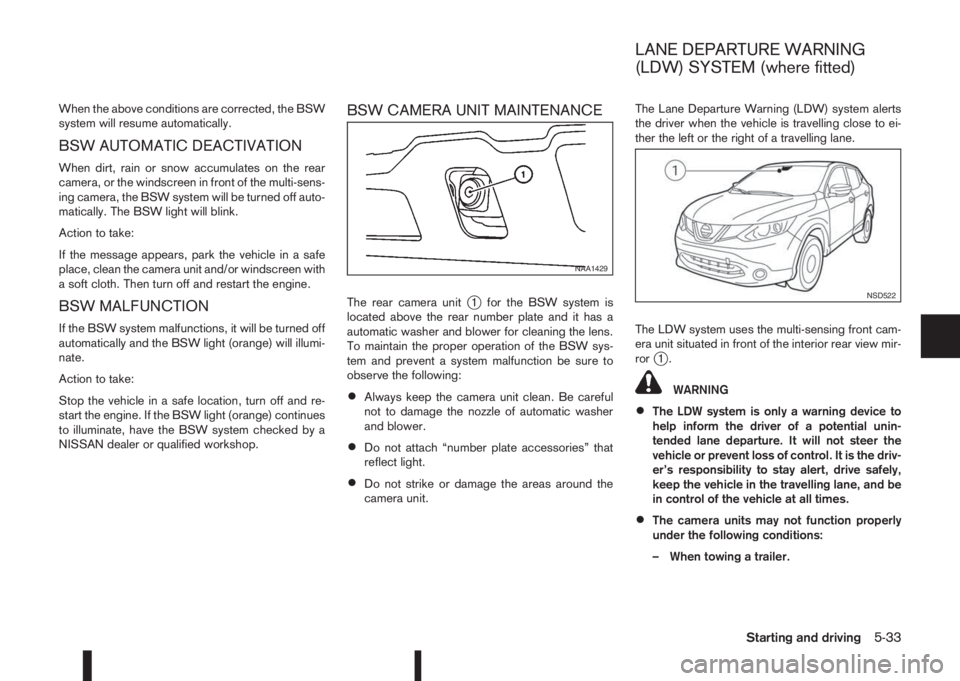
The rear camera unitj1 for the BSW system is
located above the rear number plate and it has a
automatic washer and blower for cleaning the lens.
To maintain the proper operation of the BSW sys-
tem and prevent a system malfunction be sure to
observe the following:
•Always keep the camera unit clean. Be careful
not to damage the nozzle of automatic washer
and blower.
•Do not attach “number plate accessories” that
reflect light.
•Do not strike or damage the areas around the
camera unit.The Lane Departure Warning (LDW) system alerts
the driver when the vehicle is travelling close to ei-
ther the left or the right of a travelling lane.
The LDW system uses the multi-sensing front cam-
era unit situated in front of the interior rear view mir-
ror
j1.
WARNING
•The LDW system is only a warning device to
help inform the driver of a potential unin-
tended lane departure. It will not steer the
vehicle or prevent loss of control. It is the driv-
er’s responsibility to stay alert, drive safely,
keep the vehicle in the travelling lane, and be
in control of the vehicle at all times.
•The camera units may not function properly
under the following conditions:
– When towing a trailer.
NAA1429
NSD522
LANE DEPARTURE WARNING
(LDW) SYSTEM (where fitted)
Starting and driving5-33
Page 211 of 338
or not painted clearly; yellow painted lane
markers; non-standard lane markers; or
lane markers covered with water, dirt,
snow, etc.
– On roads where the discontinued lane
markers are still detectable.
– On roads where there are sharp curves.
– On roads where there are sharply contrast-
ing objects, such as shadows, snow, wa-
ter, wheel ruts, seams or lines remaining
after road repairs. (The LDW system could
detect these items as lane markers.)
– On roads where the travelling lane merges
or separates.
– When the vehicle’s travelling direction
does not align with the lane marker.
– When the road surface is very dark due to
weak ambient light or impaired lamps.
– When rain, snow or dirt adheres to the
windscreen in front of the LDW camera
unit.
•When driving on a curved road, warning will
be late on the outside of the curve.
LDW TEMPORARY DISABLED
STATUS
The LDW system is turned off temporarily, and the
LDW light will blink when rain, snow, or dirt has
adhered to the windscreen in front of the multi-sens-ing camera unit. When this condition is corrected,
the LDW system will resume automatically.
LDW AUTOMATIC DEACTIVATION
When dirt, rain, or snow accumulates on the wind-
screen in front of the multi-sensing camera unit, the
LDW system will be turned off automatically. The
LDW light will blink.
Action to take:
If the message appears, park the vehicle in a safe
place, clean the camera unit and/or windscreen with
a soft cloth. Then turn off and restart the engine.
LDW MALFUNCTION
When the LDW system malfunctions, it will be
turned off automatically and the LDW light (orange)
will illuminate.
Action to take:
Stop the vehicle in a safe location, turn off and re-
start the engine. If the LDW light (orange) continues
to illuminate, have the LDW system checked by a
NISSAN dealer or qualified workshop.
MULTI-SENSING CAMERA UNIT
MAINTENANCE
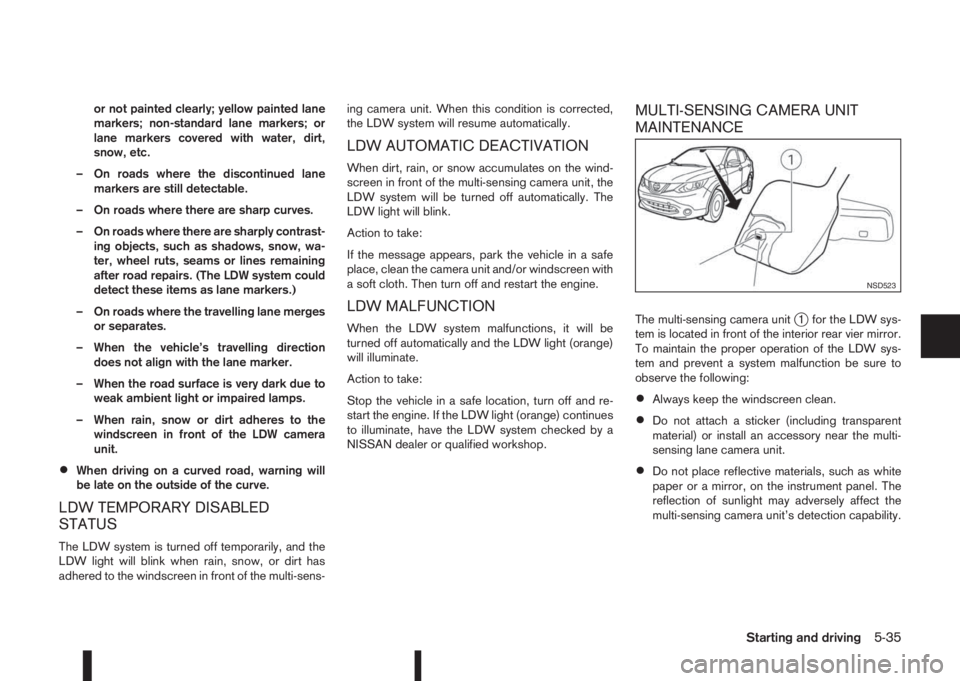
The multi-sensing camera unitj1 for the LDW sys-
tem is located in front of the interior rear vier mirror.
To maintain the proper operation of the LDW sys-
tem and prevent a system malfunction be sure to
observe the following:
•Always keep the windscreen clean.
•Do not attach a sticker (including transparent
material) or install an accessory near the multi-
sensing lane camera unit.
•Do not place reflective materials, such as white
paper or a mirror, on the instrument panel. The
reflection of sunlight may adversely affect the
multi-sensing camera unit’s detection capability.
NSD523
Starting and driving5-35
Page 212 of 338
•Do not strike or damage the areas around the
multi-sensing lane camera unit. Do not touch the
camera lens or remove the screw located on the
camera unit. If the camera unit is damaged due
to an accident, contact a NISSAN dealer or
qualified workshop.The cruise control system allows driving at constant
speeds without keeping your foot on the accelerator
pedal.
WARNING
•The cruise control system ONLY maintains a
constant vehicle speed, it does not replace
the driver.
•Always observe the posted speed limits and
do not set the speed above them.
•Do not use the cruise control system when
driving under the following conditions. Doing
so could cause a loss of vehicle control and
result in an accident.
– When it is not possible to keep the vehicle
at a constant speed
– When driving in heavy traffic
– When driving in traffic that varies speed
– When driving in windy areas
– When driving on winding or hilly roads
– When driving on slippery (rain, snow, ice,
etc.) roads
CAUTION
On manual transmission models, do not shift into
N (Neutral) without depressing the clutch pedal
when the cruise control is set. Should this occur,
depress the clutch pedal and turn the cruise con-
trol main switch off immediately. Failure to do so
may cause engine damage.When the cruise control system is on the speed lim-
iter cannot be operated.
The cruise control system operation switches are
located on the steering wheel (right side).
The cruise control system operating condition is
shown in the vehicle information display.
PRECAUTIONS ON CRUISE
CONTROL
•The cruise control system will be automatically
cancelled when there is a malfunction. Have the
system checked by a NISSAN dealer or quali-
fied workshop.
•To properly set the cruise control system, per-
form the steps as described in “Setting a cruis-
ing speed” later in this section.
CRUISE CONTROL (where fitted)
5-36Starting and driving
Page 215 of 338
•When additional floor mats are used, be sure
that they are correctly secured and that they
cannot interfere with the accelerator pedal.
Mats not adapted to the vehicle may prevent
proper operation of the speed limiter.
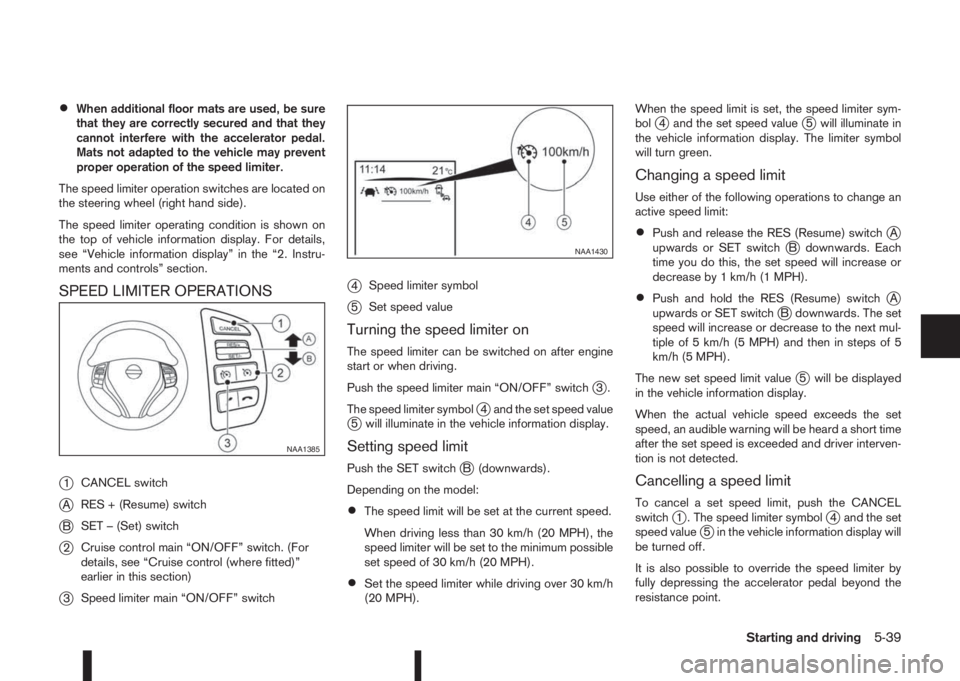
The speed limiter operation switches are located on
the steering wheel (right hand side).
The speed limiter operating condition is shown on
the top of vehicle information display. For details,
see “Vehicle information display” in the “2. Instru-
ments and controls” section.
SPEED LIMITER OPERATIONS
j
1CANCEL switch
jARES + (Resume) switch
jBSET – (Set) switch
j2Cruise control main “ON/OFF” switch. (For
details, see “Cruise control (where fitted)”
earlier in this section)
j3Speed limiter main “ON/OFF” switch
j4Speed limiter symbol
j5Set speed value
Turning the speed limiter on
The speed limiter can be switched on after engine
start or when driving.
Push the speed limiter main “ON/OFF” switch
j3.
The speed limiter symbol
j4 and the set speed valuej5 will illuminate in the vehicle information display.
Setting speed limit
Push the SET switchjB (downwards).
Depending on the model:
•The speed limit will be set at the current speed.
When driving less than 30 km/h (20 MPH), the
speed limiter will be set to the minimum possible
set speed of 30 km/h (20 MPH).
•Set the speed limiter while driving over 30 km/h
(20 MPH).When the speed limit is set, the speed limiter sym-
bol
j4 and the set speed valuej5 will illuminate in
the vehicle information display. The limiter symbol
will turn green.
Changing a speed limit
Use either of the following operations to change an
active speed limit:
•Push and release the RES (Resume) switchjA
upwards or SET switchjB downwards. Each
time you do this, the set speed will increase or
decrease by 1 km/h (1 MPH).
•Push and hold the RES (Resume) switchjA
upwards or SET switchjB downwards. The set
speed will increase or decrease to the next mul-
tiple of 5 km/h (5 MPH) and then in steps of 5
km/h (5 MPH).
The new set speed limit value
j5 will be displayed
in the vehicle information display.
When the actual vehicle speed exceeds the set
speed, an audible warning will be heard a short time
after the set speed is exceeded and driver interven-
tion is not detected.
Cancelling a speed limit
To cancel a set speed limit, push the CANCEL
switchj1 . The speed limiter symbolj4 and the set
speed valuej5 in the vehicle information display will
be turned off.
It is also possible to override the speed limiter by
fully depressing the accelerator pedal beyond the
resistance point.
NAA1385
NAA1430
Starting and driving5-39
Page 218 of 338
of the front bumper such as ice, snow, stick-
ers, for example. In these cases, the system
may not be able to warn the driver properly.
Be sure that you check, clean and clear the
sensor area of the front bumper regularly
Turning the forward emergency braking
system ON/OFF
Perform the following steps to turn the forward
emergency braking system ON or OFF.
1. Using the
orswitches and the ENTER but-
ton on the left side of the steering wheel, select
the Settings menu in the vehicle information dis-
play. (See “Settings” in the “2. Instruments and
controls” section
2. Using the
orswitches and the ENTER but-
ton, navigate to the [Driver Assistance] menu,
followed by the [Driving Aids] menu.
3. In the [Driving Aids] menu, highlight the [Emer-
gency Brake] item and use the ENTER button to
toggle between ON (enabled) or OFF (disabled).When the forward emergency braking system is
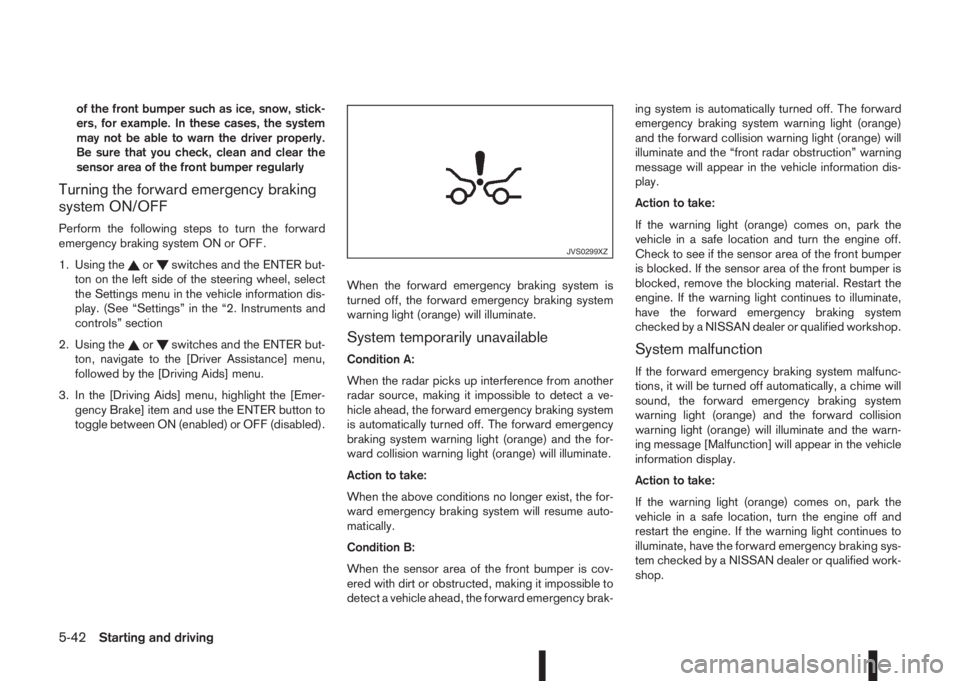
turned off, the forward emergency braking system
warning light (orange) will illuminate.System temporarily unavailable
Condition A:
When the radar picks up interference from another
radar source, making it impossible to detect a ve-
hicle ahead, the forward emergency braking system
is automatically turned off. The forward emergency
braking system warning light (orange) and the for-
ward collision warning light (orange) will illuminate.
Action to take:
When the above conditions no longer exist, the for-
ward emergency braking system will resume auto-
matically.
Condition B:
When the sensor area of the front bumper is cov-
ered with dirt or obstructed, making it impossible to
detect a vehicle ahead, the forward emergency brak-ing system is automatically turned off. The forward
emergency braking system warning light (orange)
and the forward collision warning light (orange) will
illuminate and the “front radar obstruction” warning
message will appear in the vehicle information dis-
play.
Action to take:
If the warning light (orange) comes on, park the
vehicle in a safe location and turn the engine off.
Check to see if the sensor area of the front bumper
is blocked. If the sensor area of the front bumper is
blocked, remove the blocking material. Restart the
engine. If the warning light continues to illuminate,
have the forward emergency braking system
checked by a NISSAN dealer or qualified workshop.System malfunction
If the forward emergency braking system malfunc-
tions, it will be turned off automatically, a chime will
sound, the forward emergency braking system
warning light (orange) and the forward collision
warning light (orange) will illuminate and the warn-
ing message [Malfunction] will appear in the vehicle
information display.
Action to take:
If the warning light (orange) comes on, park the
vehicle in a safe location, turn the engine off and
restart the engine. If the warning light continues to
illuminate, have the forward emergency braking sys-
tem checked by a NISSAN dealer or qualified work-
shop.
JVS0299XZ
5-42Starting and driving
Page 219 of 338
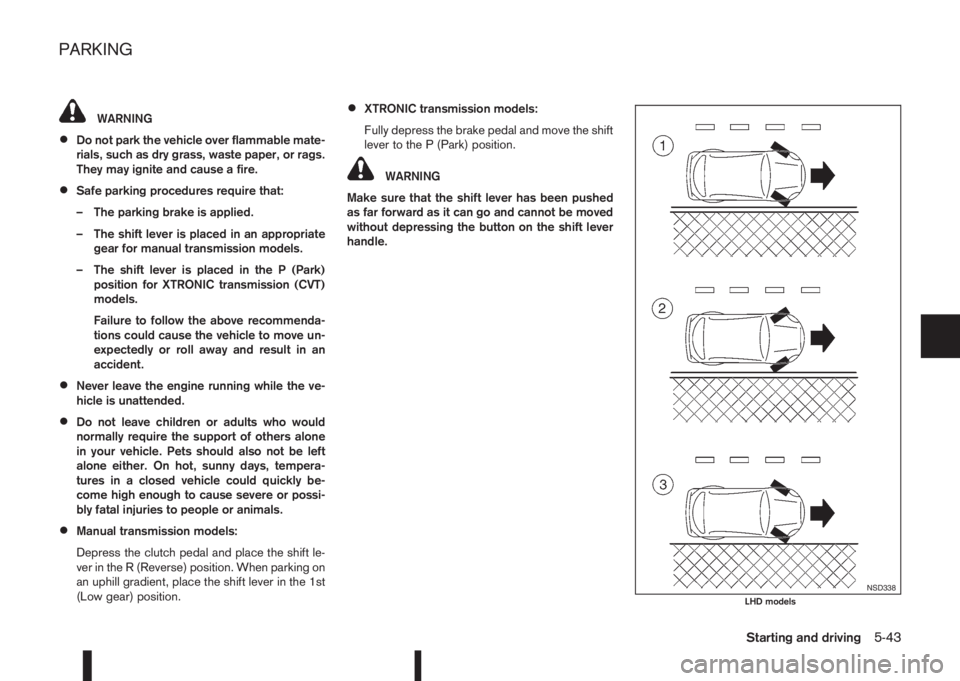
WARNING
•Do not park the vehicle over flammable mate-
rials, such as dry grass, waste paper, or rags.
They may ignite and cause a fire.
•Safe parking procedures require that:
– The parking brake is applied.
– The shift lever is placed in an appropriate
gear for manual transmission models.
– The shift lever is placed in the P (Park)
position for XTRONIC transmission (CVT)
models.
Failure to follow the above recommenda-
tions could cause the vehicle to move un-
expectedly or roll away and result in an
accident.
•Never leave the engine running while the ve-
hicle is unattended.
•Do not leave children or adults who would
normally require the support of others alone
in your vehicle. Pets should also not be left
alone either. On hot, sunny days, tempera-
tures in a closed vehicle could quickly be-
come high enough to cause severe or possi-
bly fatal injuries to people or animals.
•Manual transmission models:
Depress the clutch pedal and place the shift le-
ver in the R (Reverse) position. When parking on
an uphill gradient, place the shift lever in the 1st
(Low gear) position.
•XTRONIC transmission models:
Fully depress the brake pedal and move the shift
lever to the P (Park) position.
WARNING
Make sure that the shift lever has been pushed
as far forward as it can go and cannot be moved
without depressing the button on the shift lever
handle.
NSD338LHD models
PARKING
Starting and driving5-43
Page 229 of 338
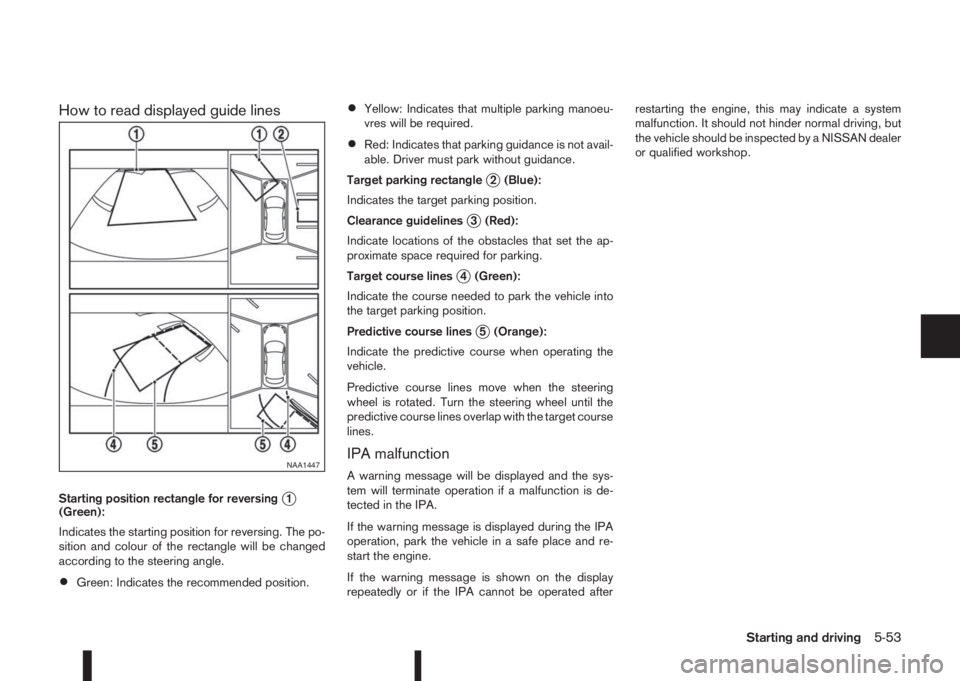
How to read displayed guide lines
Starting position rectangle for reversingj1
(Green):
Indicates the starting position for reversing. The po-
sition and colour of the rectangle will be changed
according to the steering angle.
•Green: Indicates the recommended position.
•Yellow: Indicates that multiple parking manoeu-
vres will be required.
•Red: Indicates that parking guidance is not avail-
able. Driver must park without guidance.
Target parking rectangle
j2 (Blue):
Indicates the target parking position.
Clearance guidelines
j3 (Red):
Indicate locations of the obstacles that set the ap-
proximate space required for parking.
Target course lines
j4 (Green):
Indicate the course needed to park the vehicle into
the target parking position.
Predictive course lines
j5 (Orange):
Indicate the predictive course when operating the
vehicle.
Predictive course lines move when the steering
wheel is rotated. Turn the steering wheel until the
predictive course lines overlap with the target course
lines.
IPA malfunction
A warning message will be displayed and the sys-
tem will terminate operation if a malfunction is de-
tected in the IPA.
If the warning message is displayed during the IPA
operation, park the vehicle in a safe place and re-
start the engine.
If the warning message is shown on the display
repeatedly or if the IPA cannot be operated afterrestarting the engine, this may indicate a system
malfunction. It should not hinder normal driving, but
the vehicle should be inspected by a NISSAN dealer
or qualified workshop.NAA1447
Starting and driving5-53
Page 230 of 338
Your new vehicle was designed to be used primarily
to carry passengers and luggage.
Remember that towing a trailer will place additional
loads on your vehicle’s engine, drive-train, steering,
braking and other systems. Towing a trailer will also
exaggerate other conditions, such as sway caused
by crosswinds, rough road surfaces or passing
trucks. Driving style and speed must be adjusted
according to the circumstances. Before towing a
trailer, see a NISSAN dealer or qualified workshop
for an explanation of towing equipment and its
proper use.
OPERATING PRECAUTIONS
•Avoid towing a trailer during the running-in
schedule.
•Choose proper coupling devices (trailer hitch,
safety chain, roof carrier, etc.) for your vehicle
and trailer. These devices are available from a
NISSAN dealer or qualified workshop where you
can also obtain more detailed information about
trailer towing.
Heavy-duty kits are available at a NISSAN dealer
or qualified workshop.
•It is advisable to contact a NISSAN dealer or
qualified workshop for towing details, before
towing a trailer up steep slopes for long dis-
tances.
•Never allow the total trailer load (trailer weight
plus its cargo weight) to exceed the maximum
set for the coupling device.Contact a NISSAN dealer or qualified workshop
for more information on this matter.
•The trailer must be loaded so that heavy goods
are distributed over the axle and as low in the
trailer as possible. Poor load distribution can se-
riously affect the stability of the trailer and tow
vehicle.
•Do not exceed the maximum permitted vertical
load on the trailer hitch.
•Before driving, make sure that the lighting sys-
tem of the trailer works properly.
•When towing with 4WD models, the 4WD mode
switch should be in the AUTO position. Using
the vehicle in AUTO mode gives better traction,
particularly when moving off from stationary and/
or on an incline, as the vehicle is less likely to
wheel spin.
•Avoid abrupt starts, accelerations and stops.
•Avoid sharp turns and lane changes.
•Always drive your vehicle at a moderate speed.
•Always block the wheels on both vehicle and
trailer when parking. Apply the handbrake (where
fitted) on the trailer. Parking on a steep slope is
not recommended.
If parking on a steep slope is unavoidable it is
also advisable to put the vehicle into gear, or
select P (Park (XTRONIC models)), and turn the
front wheels into the kerb (in addition to the other
precautions described). Before parking on asteep slope consider the incline (the towing
weights quoted are for a 12% slope).
•Follow the trailer manufacturer’s instructions.
•Have your vehicle serviced more often than at
the intervals specified in the separately provided
Warranty Information and Maintenance booklet.
•Trailer towing requires more fuel than under nor-
mal circumstances because of a considerable
increase in traction power required and resis-
tance.
•When towing a trailer, observe the following re-
stricted towing speed:
Speed: below 100 km/h (62 MPH)
•Observe the legal maximum speeds for trailer
operation.
CAUTION
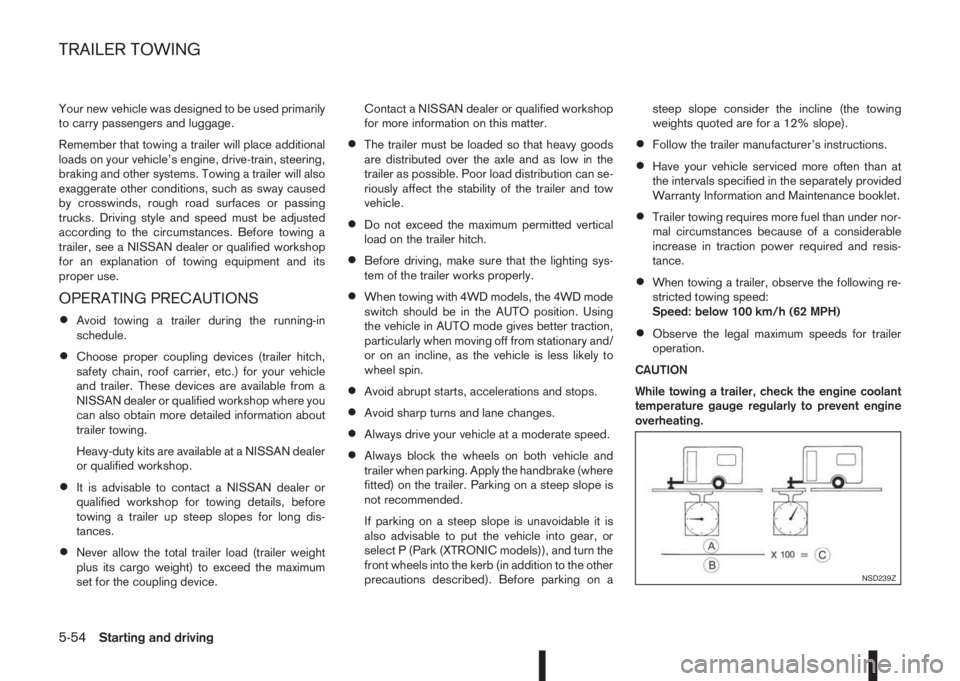
While towing a trailer, check the engine coolant
temperature gauge regularly to prevent engine
overheating.
NSD239Z
TRAILER TOWING
5-54Starting and driving
Page 231 of 338
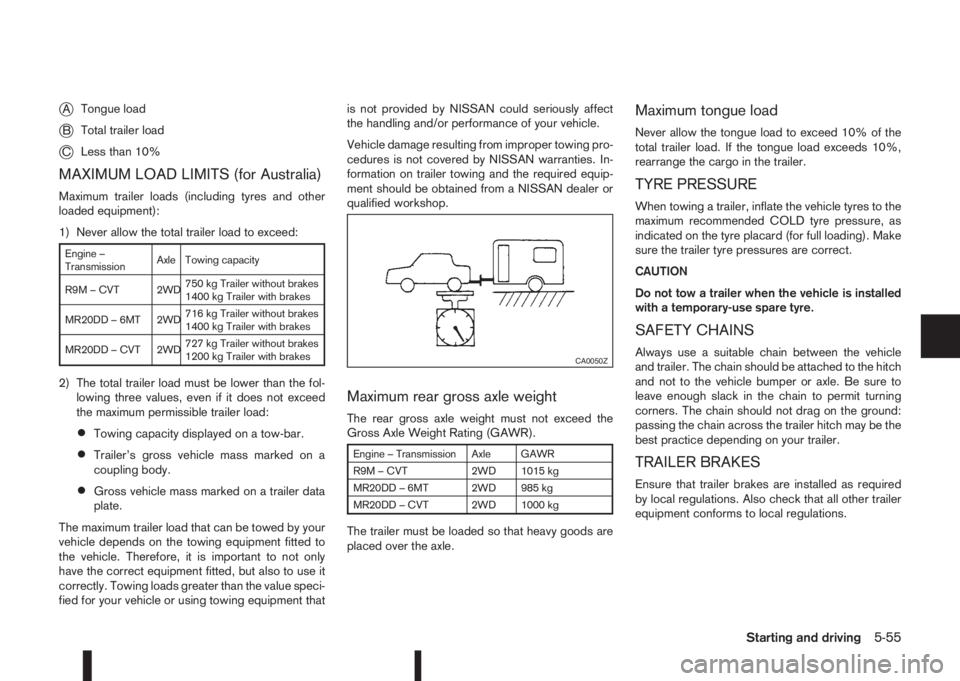
jATongue load
jBTotal trailer load
jCLess than 10%
MAXIMUM LOAD LIMITS (for Australia)
Maximum trailer loads (including tyres and other
loaded equipment):
1) Never allow the total trailer load to exceed:
Engine –
TransmissionAxle Towing capacity
R9M – CVT 2WD750 kg Trailer without brakes
1400 kg Trailer with brakes
MR20DD – 6MT 2WD716 kg Trailer without brakes
1400 kg Trailer with brakes
MR20DD – CVT 2WD727 kg Trailer without brakes
1200 kg Trailer with brakes
2) The total trailer load must be lower than the fol-
lowing three values, even if it does not exceed
the maximum permissible trailer load:
•Towing capacity displayed on a tow-bar.
•Trailer’s gross vehicle mass marked on a
coupling body.
•Gross vehicle mass marked on a trailer data
plate.
The maximum trailer load that can be towed by your
vehicle depends on the towing equipment fitted to
the vehicle. Therefore, it is important to not only
have the correct equipment fitted, but also to use it
correctly. Towing loads greater than the value speci-
fied for your vehicle or using towing equipment thatis not provided by NISSAN could seriously affect
the handling and/or performance of your vehicle.
Vehicle damage resulting from improper towing pro-
cedures is not covered by NISSAN warranties. In-
formation on trailer towing and the required equip-
ment should be obtained from a NISSAN dealer or
qualified workshop.
Maximum rear gross axle weight
The rear gross axle weight must not exceed the
Gross Axle Weight Rating (GAWR).
Engine – Transmission Axle GAWR
R9M – CVT 2WD 1015 kg
MR20DD – 6MT 2WD 985 kg
MR20DD – CVT 2WD 1000 kg
The trailer must be loaded so that heavy goods are
placed over the axle.
Maximum tongue load
Never allow the tongue load to exceed 10% of the
total trailer load. If the tongue load exceeds 10%,
rearrange the cargo in the trailer.
TYRE PRESSURE
When towing a trailer, inflate the vehicle tyres to the
maximum recommended COLD tyre pressure, as
indicated on the tyre placard (for full loading). Make
sure the trailer tyre pressures are correct.
CAUTION
Do not tow a trailer when the vehicle is installed
with a temporary-use spare tyre.
SAFETY CHAINS
Always use a suitable chain between the vehicle
and trailer. The chain should be attached to the hitch
and not to the vehicle bumper or axle. Be sure to
leave enough slack in the chain to permit turning
corners. The chain should not drag on the ground:
passing the chain across the trailer hitch may be the
best practice depending on your trailer.
TRAILER BRAKES
Ensure that trailer brakes are installed as required
by local regulations. Also check that all other trailer
equipment conforms to local regulations.
CA0050Z
Starting and driving5-55