display NISSAN QASHQAI 2015 Owner´s Manual
[x] Cancel search | Manufacturer: NISSAN, Model Year: 2015, Model line: QASHQAI, Model: NISSAN QASHQAI 2015Pages: 338, PDF Size: 4.88 MB
Page 200 of 338
•When the driver’s seat belt is released or the
driver’s door is open. (XTRONIC transmission
models)
Use this system while waiting at stoplight, etc. When
the vehicle is stopped for long periods of time, turn
off the engine.
When the engine bonnet is opened with the Stop/
Start System on, the engine will be in the normal
stopped state with the buzzer sounding. In this case,
restart the engine with the ignition switch.
When the engine is stopped by the Stop/Start Sys-
tem, heating, cooling and dehumidifying functions
will be deactivated. To avoid the air conditioning
functions from being deactivated, turn off the Stop/
Start System by pressing the Stop/Start System
OFF switch.
The Stop/Start System is always engaged at the
start of a journey (once the engine has been started).
The engine is automatically stopped and restarted
during the journey if conditions are suitable
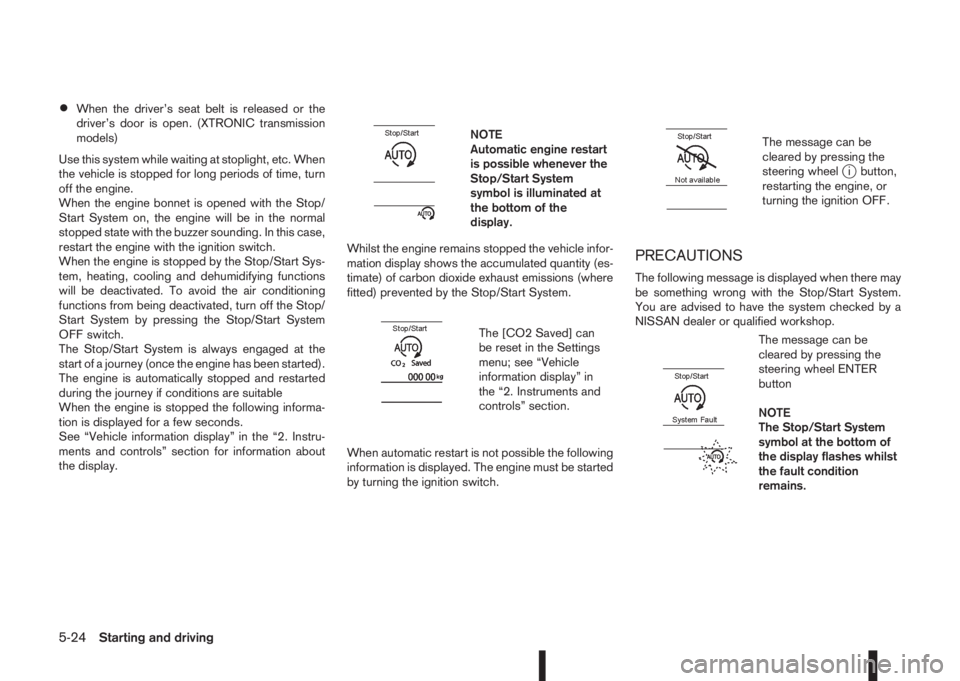
When the engine is stopped the following informa-
tion is displayed for a few seconds.
See “Vehicle information display” in the “2. Instru-
ments and controls” section for information about
the display.
m
NOTE
Automatic engine restart
is possible whenever the
Stop/Start System
symbol is illuminated at
the bottom of the
display.
Whilst the engine remains stopped the vehicle infor-
mation display shows the accumulated quantity (es-
timate) of carbon dioxide exhaust emissions (where
fitted) prevented by the Stop/Start System.
m
The [CO2 Saved] can
be reset in the Settings
menu; see “Vehicle
information display” in
the “2. Instruments and
controls” section.
When automatic restart is not possible the following
information is displayed. The engine must be started
by turning the ignition switch.
m
The message can be
cleared by pressing the
steering wheel
ji button,
restarting the engine, or
turning the ignition OFF.
PRECAUTIONS
The following message is displayed when there may
be something wrong with the Stop/Start System.
You are advised to have the system checked by a
NISSAN dealer or qualified workshop.
m
The message can be
cleared by pressing the
steering wheel ENTER
button
NOTE
The Stop/Start System
symbol at the bottom of
the display flashes whilst
the fault condition
remains.
5-24Starting and driving
Page 201 of 338
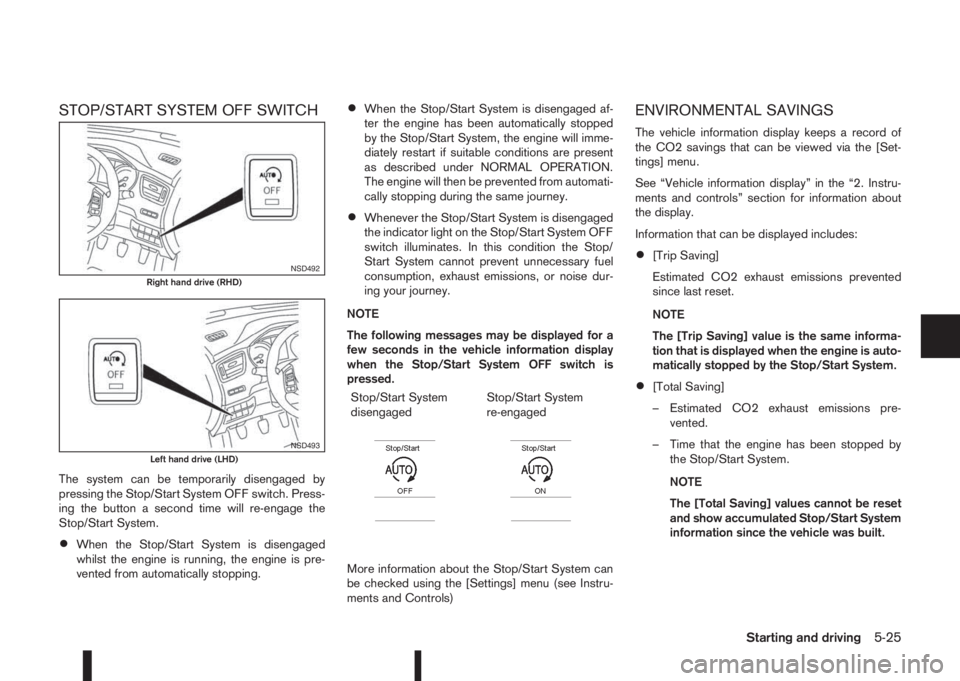
STOP/START SYSTEM OFF SWITCH
The system can be temporarily disengaged by
pressing the Stop/Start System OFF switch. Press-
ing the button a second time will re-engage the
Stop/Start System.
•When the Stop/Start System is disengaged
whilst the engine is running, the engine is pre-
vented from automatically stopping.
•When the Stop/Start System is disengaged af-
ter the engine has been automatically stopped
by the Stop/Start System, the engine will imme-
diately restart if suitable conditions are present
as described under NORMAL OPERATION.
The engine will then be prevented from automati-
cally stopping during the same journey.
•Whenever the Stop/Start System is disengaged
the indicator light on the Stop/Start System OFF
switch illuminates. In this condition the Stop/
Start System cannot prevent unnecessary fuel
consumption, exhaust emissions, or noise dur-
ing your journey.
NOTE
The following messages may be displayed for a
few seconds in the vehicle information display
when the Stop/Start System OFF switch is
pressed.
Stop/Start System
disengaged
m
Stop/Start System
re-engaged
m
More information about the Stop/Start System can
be checked using the [Settings] menu (see Instru-
ments and Controls)
ENVIRONMENTAL SAVINGS
The vehicle information display keeps a record of
the CO2 savings that can be viewed via the [Set-
tings] menu.
See “Vehicle information display” in the “2. Instru-
ments and controls” section for information about
the display.
Information that can be displayed includes:
•[Trip Saving]
Estimated CO2 exhaust emissions prevented
since last reset.
NOTE
The [Trip Saving] value is the same informa-
tion that is displayed when the engine is auto-
matically stopped by the Stop/Start System.
•[Total Saving]
– Estimated CO2 exhaust emissions pre-
vented.
– Time that the engine has been stopped by
the Stop/Start System.
NOTE
The [Total Saving] values cannot be reset
and show accumulated Stop/Start System
information since the vehicle was built.
NSD492Right hand drive (RHD)
NSD493Left hand drive (LHD)
Starting and driving5-25
Page 203 of 338
4WD MODE OPERATIONSCAUTION
Depending on the driving conditions, the 4WD
mode may automatically change from 2WD to
4WD even when the 2WD mode is selected.
If this occurs while driving, the 4WD mode indi-
cator light will not illuminate.
Do not start the engine while in the 2WD, AUTO,
or LOCK mode:
•When on free-roller or jacking the front tyres
with the rear tyres on the ground.
•When towing with the rear tyres raised from
the ground.
4WD SHIFT TIPS
•If the 4WD mode control is operated while cor-
nering, accelerating or decelerating, or if the ig-
nition is turned OFF while in the AUTO or LOCK
position you may feel a jolt - this is normal.
•The oil temperature of power train parts will in-
crease if the vehicle is continuously operated
under conditions where the difference in rotation
between the front and rear wheels is large (wheel
slip), such as when driving the vehicle on rough
roads through sand or mud, or when freeing a
stuck vehicle. In these cases, the message [4WD
High Temp. Stop Vehicle] will appear in the ve-
hicle information display and the 4WD mode
changes to the 2WD condition to protect the
power train parts. If you stop the vehicle, with
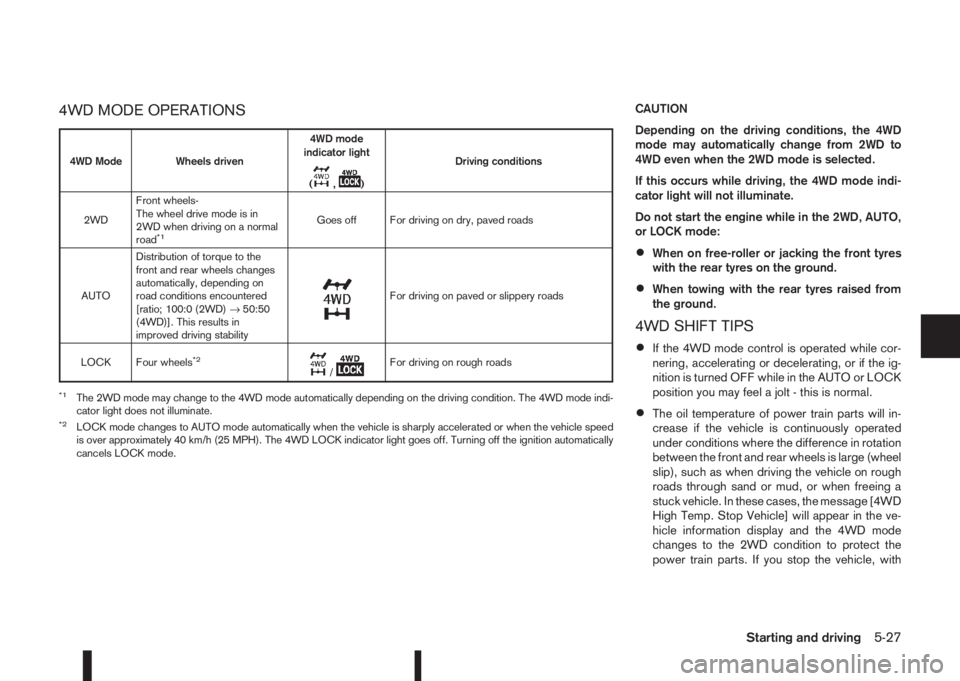
4WD Mode Wheels driven4WD mode
indicator light
(
m,m)Driving conditions
2WDFront wheels-
The wheel drive mode is in
2WD when driving on a normal
road
*1Goes off For driving on dry, paved roads
AUTODistribution of torque to the
front and rear wheels changes
automatically, depending on
road conditions encountered
[ratio; 100:0 (2WD)→50:50
(4WD)]. This results in
improved driving stability
m
For driving on paved or slippery roads
LOCK Four wheels
*2m/mFor driving on rough roads
*1The 2WD mode may change to the 4WD mode automatically depending on the driving condition. The 4WD mode indi-
cator light does not illuminate.
*2LOCK mode changes to AUTO mode automatically when the vehicle is sharply accelerated or when the vehicle speed
is over approximately 40 km/h (25 MPH). The 4WD LOCK indicator light goes off. Turning off the ignition automatically
cancels LOCK mode.
Starting and driving5-27
Page 204 of 338
the engine idling, and wait until the warning mes-
sage is no longer displayed, the 4WD mode re-
turns to the AUTO mode.
•Braking distance in 4WD mode is the same as in
2WD mode.
•Even if the mode automatically changes to AUTO
mode, when driving in the LOCK mode, the indi-
cator light stays in the LOCK mode.
CAUTION
•Only use the 4WD mode control when driving
in a straight direction (to select 2WD, AUTO or
LOCK).
•Do not use the 4WD mode control when turn-
ing or reversing.
•Do not use the 4WD mode control with the
front wheels spinning (to select 2WD, AUTO,
or LOCK).
•Be especially careful when starting or driving
on slippery surfaces with the 4WD mode set
to AUTO.
•Never drive on dry hard surface roads in the
LOCK position as this will overload the power
train and may cause serious malfunctions.
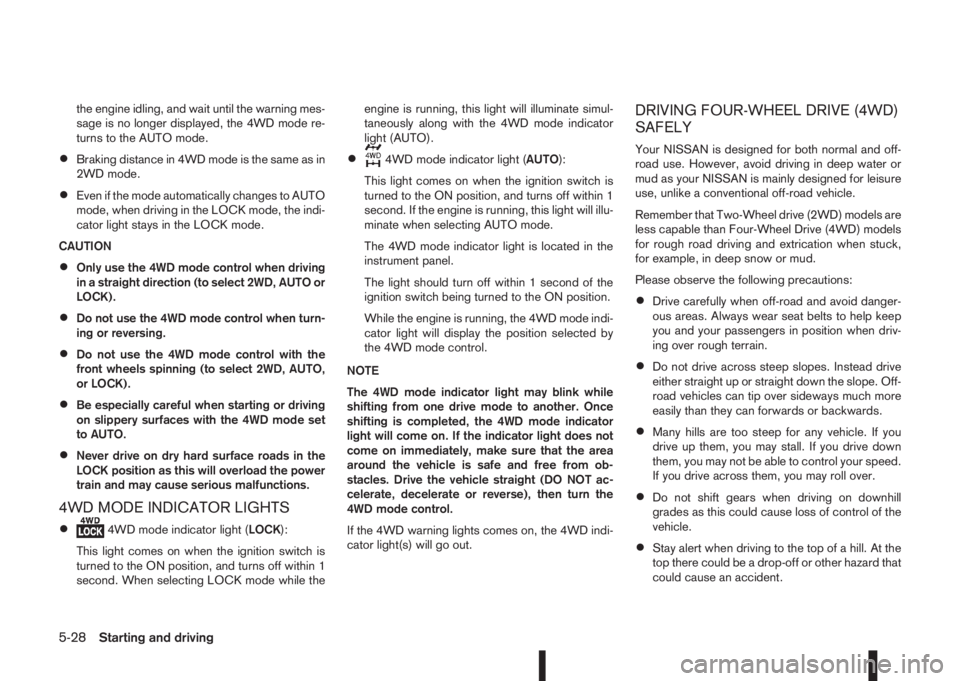
4WD MODE INDICATOR LIGHTS
•4WD mode indicator light (LOCK):
This light comes on when the ignition switch is
turned to the ON position, and turns off within 1
second. When selecting LOCK mode while theengine is running, this light will illuminate simul-
taneously along with the 4WD mode indicator
light (AUTO).
•4WD mode indicator light (AUTO):
This light comes on when the ignition switch is
turned to the ON position, and turns off within 1
second. If the engine is running, this light will illu-
minate when selecting AUTO mode.
The 4WD mode indicator light is located in the
instrument panel.
The light should turn off within 1 second of the
ignition switch being turned to the ON position.
While the engine is running, the 4WD mode indi-
cator light will display the position selected by
the 4WD mode control.
NOTE
The 4WD mode indicator light may blink while
shifting from one drive mode to another. Once
shifting is completed, the 4WD mode indicator
light will come on. If the indicator light does not
come on immediately, make sure that the area
around the vehicle is safe and free from ob-
stacles. Drive the vehicle straight (DO NOT ac-
celerate, decelerate or reverse), then turn the
4WD mode control.
If the 4WD warning lights comes on, the 4WD indi-
cator light(s) will go out.
DRIVING FOUR-WHEEL DRIVE (4WD)
SAFELY
Your NISSAN is designed for both normal and off-
road use. However, avoid driving in deep water or
mud as your NISSAN is mainly designed for leisure
use, unlike a conventional off-road vehicle.
Remember that Two-Wheel drive (2WD) models are
less capable than Four-Wheel Drive (4WD) models
for rough road driving and extrication when stuck,
for example, in deep snow or mud.
Please observe the following precautions:
•Drive carefully when off-road and avoid danger-
ous areas. Always wear seat belts to help keep
you and your passengers in position when driv-
ing over rough terrain.
•Do not drive across steep slopes. Instead drive
either straight up or straight down the slope. Off-
road vehicles can tip over sideways much more
easily than they can forwards or backwards.
•Many hills are too steep for any vehicle. If you
drive up them, you may stall. If you drive down
them, you may not be able to control your speed.
If you drive across them, you may roll over.
•Do not shift gears when driving on downhill
grades as this could cause loss of control of the
vehicle.
•Stay alert when driving to the top of a hill. At the
top there could be a drop-off or other hazard that
could cause an accident.
5-28Starting and driving
Page 206 of 338
While driving, the Blind Spot Warning (BSW) sys-
tem helps alert the driver to the presence of other
vehicles in adjacent lanes.
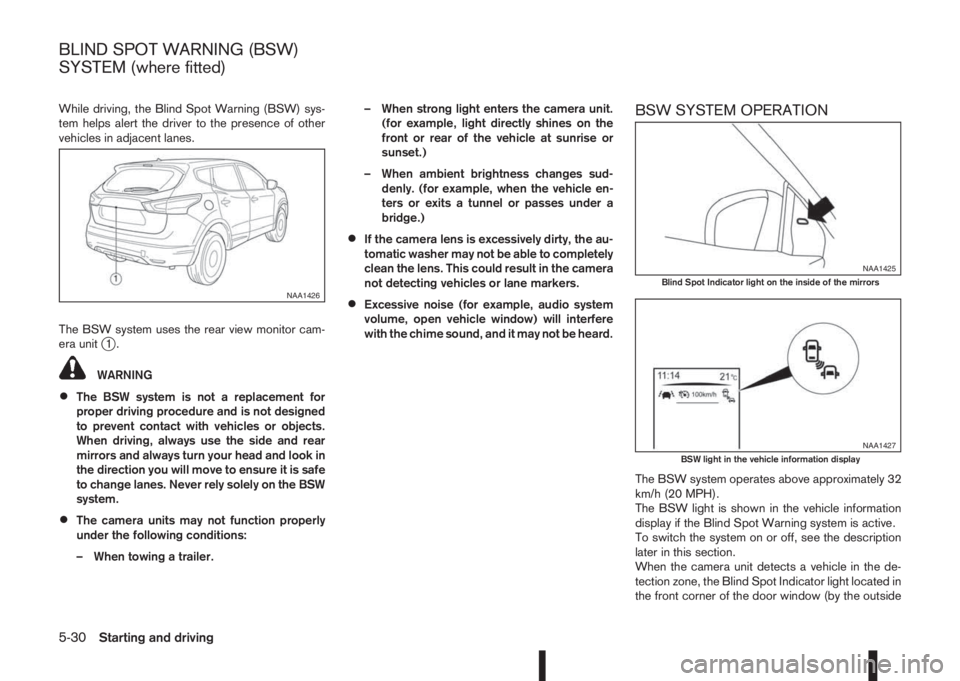
The BSW system uses the rear view monitor cam-
era unit
j1.
WARNING
•The BSW system is not a replacement for
proper driving procedure and is not designed
to prevent contact with vehicles or objects.
When driving, always use the side and rear
mirrors and always turn your head and look in
the direction you will move to ensure it is safe
to change lanes. Never rely solely on the BSW
system.
•The camera units may not function properly
under the following conditions:
– When towing a trailer.– When strong light enters the camera unit.
(for example, light directly shines on the
front or rear of the vehicle at sunrise or
sunset.)
– When ambient brightness changes sud-
denly. (for example, when the vehicle en-
ters or exits a tunnel or passes under a
bridge.)
•If the camera lens is excessively dirty, the au-
tomatic washer may not be able to completely
clean the lens. This could result in the camera
not detecting vehicles or lane markers.
•Excessive noise (for example, audio system
volume, open vehicle window) will interfere
with the chime sound, and it may not be heard.
BSW SYSTEM OPERATION
The BSW system operates above approximately 32
km/h (20 MPH).
The BSW light is shown in the vehicle information
display if the Blind Spot Warning system is active.
To switch the system on or off, see the description
later in this section.
When the camera unit detects a vehicle in the de-
tection zone, the Blind Spot Indicator light located in
the front corner of the door window (by the outside
NAA1426
NAA1425Blind Spot Indicator light on the inside of the mirrors
NAA1427BSW light in the vehicle information display
BLIND SPOT WARNING (BSW)
SYSTEM (where fitted)
5-30Starting and driving
Page 207 of 338
mirrors) will illuminate. If the turn signal is then acti-
vated, the system chimes (twice) and the Blind spot
indicator light will start flashing bright orange to alert
you to the presence of vehicle(s) in the adjacent
lane.
The Blind spot indicator light continues to flash until
the detected vehicle(s) leave the detection zone.
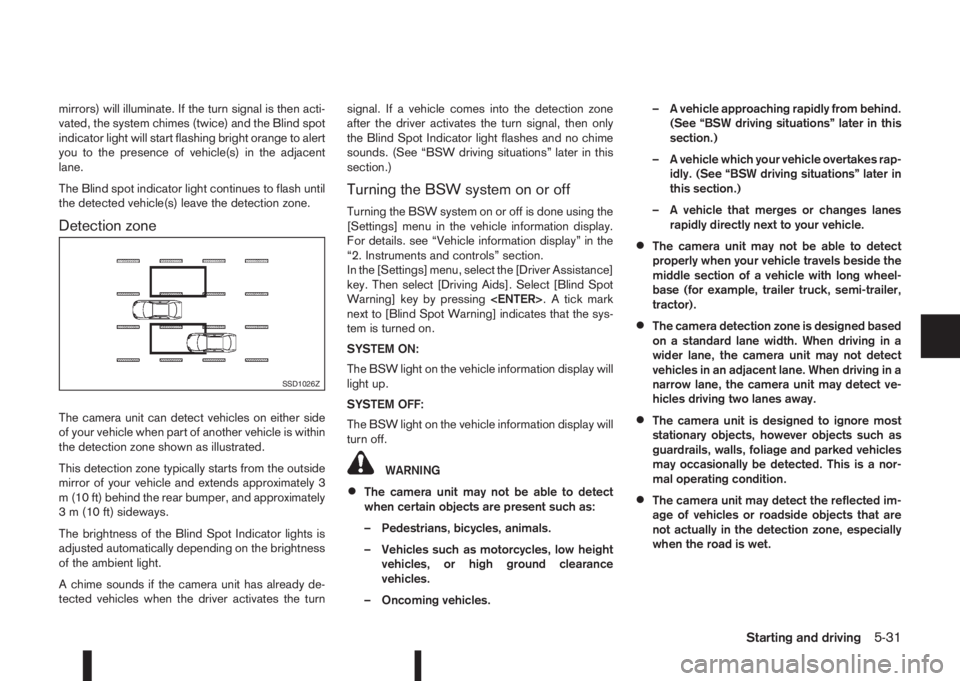
Detection zone
The camera unit can detect vehicles on either side
of your vehicle when part of another vehicle is within
the detection zone shown as illustrated.
This detection zone typically starts from the outside
mirror of your vehicle and extends approximately 3
m (10 ft) behind the rear bumper, and approximately
3 m (10 ft) sideways.
The brightness of the Blind Spot Indicator lights is
adjusted automatically depending on the brightness
of the ambient light.
A chime sounds if the camera unit has already de-
tected vehicles when the driver activates the turnsignal. If a vehicle comes into the detection zone
after the driver activates the turn signal, then only
the Blind Spot Indicator light flashes and no chime
sounds. (See “BSW driving situations” later in this
section.)
Turning the BSW system on or off
Turning the BSW system on or off is done using the
[Settings] menu in the vehicle information display.
For details. see “Vehicle information display” in the
“2. Instruments and controls” section.
In the [Settings] menu, select the [Driver Assistance]
key. Then select [Driving Aids]. Select [Blind Spot
Warning] key by pressing
next to [Blind Spot Warning] indicates that the sys-
tem is turned on.
SYSTEM ON:
The BSW light on the vehicle information display will
light up.
SYSTEM OFF:
The BSW light on the vehicle information display will
turn off.
WARNING
•The camera unit may not be able to detect
when certain objects are present such as:
– Pedestrians, bicycles, animals.
– Vehicles such as motorcycles, low height
vehicles, or high ground clearance
vehicles.
– Oncoming vehicles.– A vehicle approaching rapidly from behind.
(See “BSW driving situations” later in this
section.)
– A vehicle which your vehicle overtakes rap-
idly. (See “BSW driving situations” later in
this section.)
– A vehicle that merges or changes lanes
rapidly directly next to your vehicle.
•The camera unit may not be able to detect
properly when your vehicle travels beside the
middle section of a vehicle with long wheel-
base (for example, trailer truck, semi-trailer,
tractor).
•The camera detection zone is designed based
on a standard lane width. When driving in a
wider lane, the camera unit may not detect
vehicles in an adjacent lane. When driving in a
narrow lane, the camera unit may detect ve-
hicles driving two lanes away.
•The camera unit is designed to ignore most
stationary objects, however objects such as
guardrails, walls, foliage and parked vehicles
may occasionally be detected. This is a nor-
mal operating condition.
•The camera unit may detect the reflected im-
age of vehicles or roadside objects that are
not actually in the detection zone, especially
when the road is wet.
SSD1026Z
Starting and driving5-31
Page 210 of 338
– When strong light enters the camera unit.
(for example, light directly shines on the
front or rear of the vehicle at sunrise or
sunset.)
– When ambient brightness changes sud-
denly. (for example, when the vehicle en-
ters or exits a tunnel or passes under a
bridge.)
•Excessive noise (for example, audio system
volume, open vehicle window) will interfere
with the chime sound, and it may not be heard.
LDW SYSTEM OPERATION
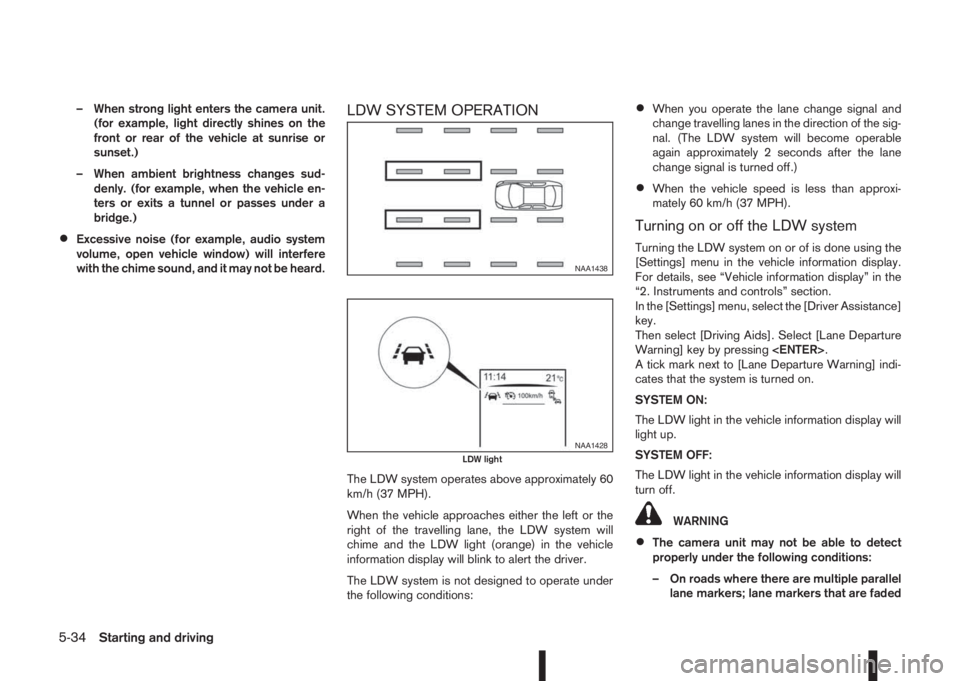
The LDW system operates above approximately 60
km/h (37 MPH).
When the vehicle approaches either the left or the
right of the travelling lane, the LDW system will
chime and the LDW light (orange) in the vehicle
information display will blink to alert the driver.
The LDW system is not designed to operate under
the following conditions:
•When you operate the lane change signal and
change travelling lanes in the direction of the sig-
nal. (The LDW system will become operable
again approximately 2 seconds after the lane
change signal is turned off.)
•When the vehicle speed is less than approxi-
mately 60 km/h (37 MPH).
Turning on or off the LDW system
Turning the LDW system on or of is done using the
[Settings] menu in the vehicle information display.
For details, see “Vehicle information display” in the
“2. Instruments and controls” section.
In the [Settings] menu, select the [Driver Assistance]
key.
Then select [Driving Aids]. Select [Lane Departure
Warning] key by pressing
A tick mark next to [Lane Departure Warning] indi-
cates that the system is turned on.
SYSTEM ON:
The LDW light in the vehicle information display will
light up.
SYSTEM OFF:
The LDW light in the vehicle information display will
turn off.
WARNING
•The camera unit may not be able to detect
properly under the following conditions:
– On roads where there are multiple parallel
lane markers; lane markers that are faded
NAA1438
NAA1428LDW light
5-34Starting and driving
Page 212 of 338
•Do not strike or damage the areas around the
multi-sensing lane camera unit. Do not touch the
camera lens or remove the screw located on the
camera unit. If the camera unit is damaged due
to an accident, contact a NISSAN dealer or
qualified workshop.The cruise control system allows driving at constant
speeds without keeping your foot on the accelerator
pedal.
WARNING
•The cruise control system ONLY maintains a
constant vehicle speed, it does not replace
the driver.
•Always observe the posted speed limits and
do not set the speed above them.
•Do not use the cruise control system when
driving under the following conditions. Doing
so could cause a loss of vehicle control and
result in an accident.
– When it is not possible to keep the vehicle
at a constant speed
– When driving in heavy traffic
– When driving in traffic that varies speed
– When driving in windy areas
– When driving on winding or hilly roads
– When driving on slippery (rain, snow, ice,
etc.) roads
CAUTION
On manual transmission models, do not shift into
N (Neutral) without depressing the clutch pedal
when the cruise control is set. Should this occur,
depress the clutch pedal and turn the cruise con-
trol main switch off immediately. Failure to do so
may cause engine damage.When the cruise control system is on the speed lim-
iter cannot be operated.
The cruise control system operation switches are
located on the steering wheel (right side).
The cruise control system operating condition is
shown in the vehicle information display.
PRECAUTIONS ON CRUISE
CONTROL
•The cruise control system will be automatically
cancelled when there is a malfunction. Have the
system checked by a NISSAN dealer or quali-
fied workshop.
•To properly set the cruise control system, per-
form the steps as described in “Setting a cruis-
ing speed” later in this section.
CRUISE CONTROL (where fitted)
5-36Starting and driving
Page 213 of 338
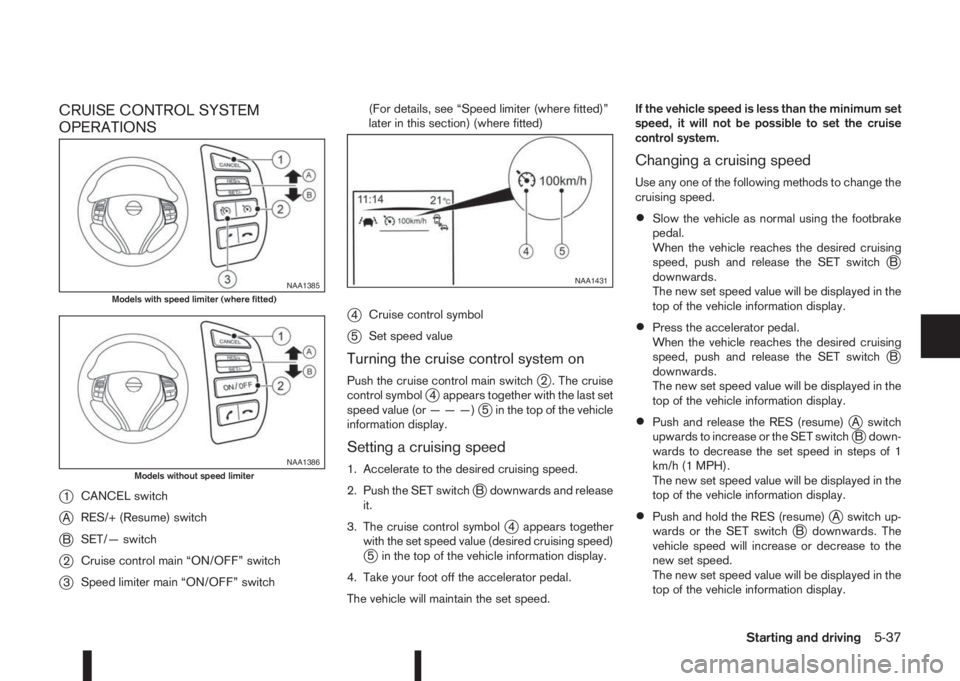
CRUISE CONTROL SYSTEM
OPERATIONS
j
1CANCEL switch
jARES/+ (Resume) switch
jBSET/— switch
j2Cruise control main “ON/OFF” switch
j3Speed limiter main “ON/OFF” switch(For details, see “Speed limiter (where fitted)”
later in this section) (where fitted)
j4Cruise control symbol
j5Set speed value
Turning the cruise control system on
Push the cruise control main switchj2 . The cruise
control symbolj4 appears together with the last set
speed value (or———)j5 in the top of the vehicle
information display.
Setting a cruising speed
1. Accelerate to the desired cruising speed.
2. Push the SET switch
jB downwards and release
it.
3. The cruise control symbol
j4 appears together
with the set speed value (desired cruising speed)
j5 in the top of the vehicle information display.
4. Take your foot off the accelerator pedal.
The vehicle will maintain the set speed.If the vehicle speed is less than the minimum set
speed, it will not be possible to set the cruise
control system.
Changing a cruising speed
Use any one of the following methods to change the
cruising speed.
•Slow the vehicle as normal using the footbrake
pedal.
When the vehicle reaches the desired cruising
speed, push and release the SET switch
jB
downwards.
The new set speed value will be displayed in the
top of the vehicle information display.
•Press the accelerator pedal.
When the vehicle reaches the desired cruising
speed, push and release the SET switch
jB
downwards.
The new set speed value will be displayed in the
top of the vehicle information display.
•Push and release the RES (resume)jA switch
upwards to increase or the SET switchjB down-
wards to decrease the set speed in steps of 1
km/h (1 MPH).
The new set speed value will be displayed in the
top of the vehicle information display.
•Push and hold the RES (resume)jA switch up-
wards or the SET switchjB downwards. The
vehicle speed will increase or decrease to the
new set speed.
The new set speed value will be displayed in the
top of the vehicle information display.
NAA1385Models with speed limiter (where fitted)
NAA1386Models without speed limiter
NAA1431
Starting and driving5-37
Page 214 of 338
Passing another vehicle
Depress the accelerator pedal to accelerate. After
releasing the accelerator pedal, the vehicle will re-
turn to the previously set speed.
The set speed value
j5 will flash until the vehicle
returns to the previously set speed.
Cancelling the cruise control system
To cancel a set speed limit, push the CANCEL
switchj1.
The cruise control symbolj4 and the set speed
valuej5 disappear from the top of the vehicle infor-
mation display.
The cruise control system will also be cancelled
automatically by any of the following:
•Pressing the footbrake pedal.
•Pressing the clutch pedal.
•Shifting the shift lever to the N (Neutral) position.
First depress clutch pedal
•If the vehicle slows down more than approxi-
mately 12 km/h (8 MPH) below the set speed.
Resuming a previous cruising speed
If the cruising speed has been cancelled, the last
set speed value will be stored in the cruise control
system memory. This cruising speed can be reacti-
vated by pressing the RES (Resume) switch
jA
upwards.
If the vehicle speed is less than a minimum set
speed, it will not be possible to resume to thecruising speed.
Pressing the CANCEL switch prevents resuming
to the previous cruising speed.
Turn the cruise control system off
The cruise control system will be turned off when
one of the following operations is performed:
•Push the cruise control main “ON/OFF” switchj2 . The cruise control symbolj4 and the set
speed valuej5 will turn off in the combination
meter display
•Push the speed limiter main “ON/OFF” switchj3 . The cruise control system information in the
combination meter will be replaced with the
speed limiter information. For details see “Speed
limiter (where fitted)” later in this section.
•When the vehicle is stopped and the ignition is
turned to the off position.
Turning off the cruise control system will erase
the cruise control system memory.The speed limiter allows you to set the desired ve-
hicle speed limit. While the speed limiter is acti-
vated, you can perform normal braking and accel-
eration, but the vehicle will not exceed the set speed.
When the vehicle reaches the set speed limit or if
the set speed limit is lower than the actual vehicle
speed, the accelerator pedal will not work until the
vehicle speed drops below the set speed limit.
When the actual vehicle speed exceeds the set
speed, an audible warning will be heard a short time
after the set speed is exceeded and driver interven-
tion is not detected.
When the speed limiter is on the cruise control sys-
tem cannot be operated.WARNING
•The speed limiter will not automatically brake
the vehicle to the set speed limit.
•Always observe posted speed limits. Do not
set the speed above them.
•Always confirm the setting status of the speed
limiter in the vehicle information display.
•When the speed limiter is set, avoid hard ac-
celeration to reach the set limit to ensure that
the system can limit the speed of the vehicle
correctly.
SPEED LIMITER (where fitted)
5-38Starting and driving