display NISSAN QASHQAI 2015 Owner´s Manual
[x] Cancel search | Manufacturer: NISSAN, Model Year: 2015, Model line: QASHQAI, Model: NISSAN QASHQAI 2015Pages: 338, PDF Size: 4.88 MB
Page 215 of 338
•When additional floor mats are used, be sure
that they are correctly secured and that they
cannot interfere with the accelerator pedal.
Mats not adapted to the vehicle may prevent
proper operation of the speed limiter.
The speed limiter operation switches are located on
the steering wheel (right hand side).
The speed limiter operating condition is shown on
the top of vehicle information display. For details,
see “Vehicle information display” in the “2. Instru-
ments and controls” section.
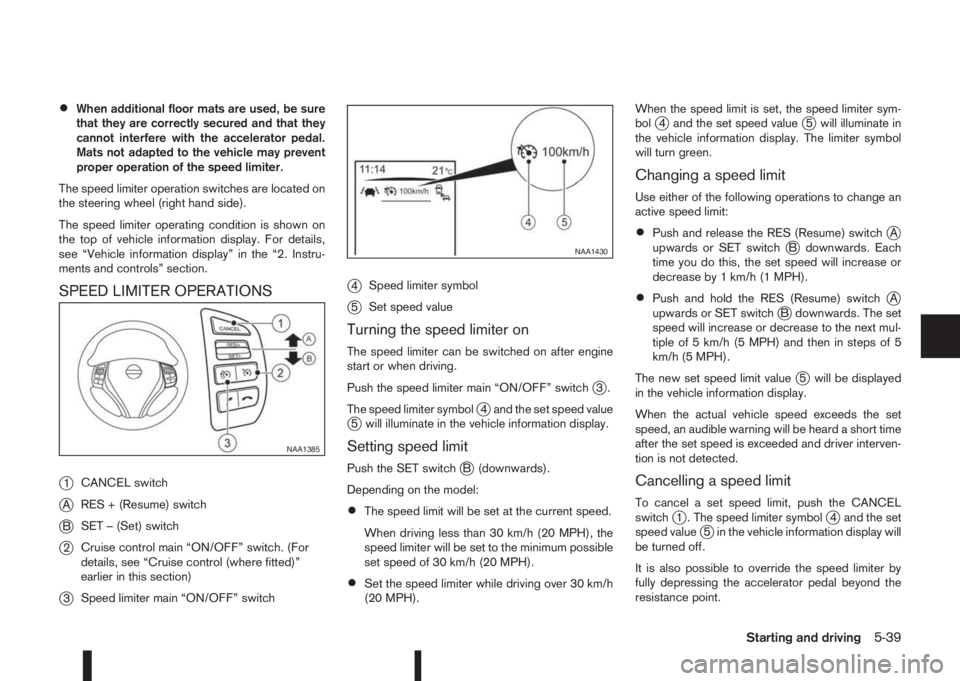
SPEED LIMITER OPERATIONS
j
1CANCEL switch
jARES + (Resume) switch
jBSET – (Set) switch
j2Cruise control main “ON/OFF” switch. (For
details, see “Cruise control (where fitted)”
earlier in this section)
j3Speed limiter main “ON/OFF” switch
j4Speed limiter symbol
j5Set speed value
Turning the speed limiter on
The speed limiter can be switched on after engine
start or when driving.
Push the speed limiter main “ON/OFF” switch
j3.
The speed limiter symbol
j4 and the set speed valuej5 will illuminate in the vehicle information display.
Setting speed limit
Push the SET switchjB (downwards).
Depending on the model:
•The speed limit will be set at the current speed.
When driving less than 30 km/h (20 MPH), the
speed limiter will be set to the minimum possible
set speed of 30 km/h (20 MPH).
•Set the speed limiter while driving over 30 km/h
(20 MPH).When the speed limit is set, the speed limiter sym-
bol
j4 and the set speed valuej5 will illuminate in
the vehicle information display. The limiter symbol
will turn green.
Changing a speed limit
Use either of the following operations to change an
active speed limit:
•Push and release the RES (Resume) switchjA
upwards or SET switchjB downwards. Each
time you do this, the set speed will increase or
decrease by 1 km/h (1 MPH).
•Push and hold the RES (Resume) switchjA
upwards or SET switchjB downwards. The set
speed will increase or decrease to the next mul-
tiple of 5 km/h (5 MPH) and then in steps of 5
km/h (5 MPH).
The new set speed limit value
j5 will be displayed
in the vehicle information display.
When the actual vehicle speed exceeds the set
speed, an audible warning will be heard a short time
after the set speed is exceeded and driver interven-
tion is not detected.
Cancelling a speed limit
To cancel a set speed limit, push the CANCEL
switchj1 . The speed limiter symbolj4 and the set
speed valuej5 in the vehicle information display will
be turned off.
It is also possible to override the speed limiter by
fully depressing the accelerator pedal beyond the
resistance point.
NAA1385
NAA1430
Starting and driving5-39
Page 216 of 338
WARNING
•The vehicle may accelerate when the speed
limiter cancels.
•When additional floor mats are used, be sure
that they are correctly secured and that they
cannot interfere with the accelerator pedal.
Mats not adapted to the vehicle may prevent
proper operation of the speed limiter.
Fully depress the accelerator pedal beyond the re-
sistance point. The speed limiter will be suspended
to allow driving above the set speed. The set speed
value
j5 will flash and an audible warning will sound.
The speed limiter will automatically resume when
the vehicle speed drops below the set speed limit.
Resuming a previous set speed
If a set speed limit has been cancelled, the set speed
will be stored in the speed limiter memory.
This speed limit can be reactivated by pressing the
RES (Resume) switch
jA upwards .
If the current vehicle speed is higher than the previ-
ous set speed, the accelerator pedal will not work
and the set speed value
j5 will flash until the vehicle
speed drops below the set speed limit.
When the actual vehicle speed exceeds the set
speed, an audible warning will be heard a short time
after the set speed is exceeded and driver interven-
tion is not detected.
Turning the speed limiter off
The speed limiter system will be turned off when
one of the following operations is performed:
•Push the speed limiter main “ON/OFF” switchj3 . The speed limiter symbolj4 and the set
speed valuej5 in the vehicle information display
will be turned off.
•Push the cruise control main “ON/OFF” switchj2 . The speed limiter information in the vehicle
information will be replaced with the cruise con-
trol information. For details see “Cruise control
(where fitted)” earlier in this section.
•When the vehicle is stopped and the ignition is
turned to the off position.
Turning off the speed limiter will erase the set
speed limit memory.
Speed limiter malfunction
If the speed limiter malfunctions, the speed limiter
symbolj4 in the vehicle information display will
flash.
Turn the speed limiter off by pushing the speed lim-
iter main “ON/OFF” switch
j3 and have the system
checked by a NISSAN dealer or qualified workshop.The forward emergency braking system can assist
the driver when there is a risk of a forward collision
with the vehicle ahead in the travelling lane.
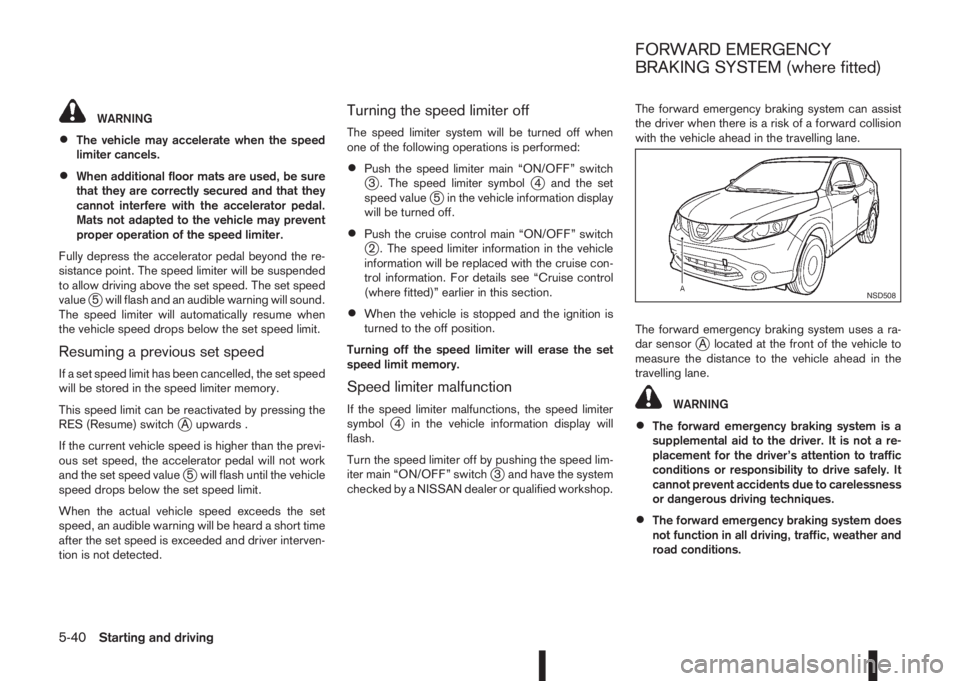
The forward emergency braking system uses a ra-
dar sensor
jA located at the front of the vehicle to
measure the distance to the vehicle ahead in the
travelling lane.
WARNING
•The forward emergency braking system is a
supplemental aid to the driver. It is not a re-
placement for the driver’s attention to traffic
conditions or responsibility to drive safely. It
cannot prevent accidents due to carelessness
or dangerous driving techniques.
•The forward emergency braking system does
not function in all driving, traffic, weather and
road conditions.
NSD508
FORWARD EMERGENCY
BRAKING SYSTEM (where fitted)
5-40Starting and driving
Page 218 of 338
of the front bumper such as ice, snow, stick-
ers, for example. In these cases, the system
may not be able to warn the driver properly.
Be sure that you check, clean and clear the
sensor area of the front bumper regularly
Turning the forward emergency braking
system ON/OFF
Perform the following steps to turn the forward
emergency braking system ON or OFF.
1. Using the
orswitches and the ENTER but-
ton on the left side of the steering wheel, select
the Settings menu in the vehicle information dis-
play. (See “Settings” in the “2. Instruments and
controls” section
2. Using the
orswitches and the ENTER but-
ton, navigate to the [Driver Assistance] menu,
followed by the [Driving Aids] menu.
3. In the [Driving Aids] menu, highlight the [Emer-
gency Brake] item and use the ENTER button to
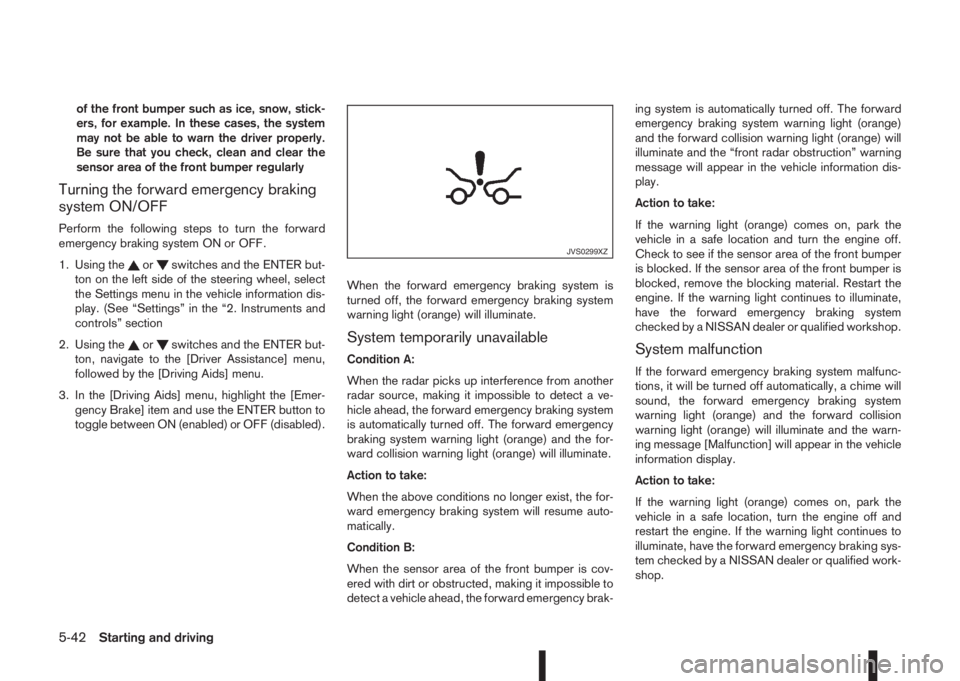
toggle between ON (enabled) or OFF (disabled).When the forward emergency braking system is
turned off, the forward emergency braking system
warning light (orange) will illuminate.System temporarily unavailable
Condition A:
When the radar picks up interference from another
radar source, making it impossible to detect a ve-
hicle ahead, the forward emergency braking system
is automatically turned off. The forward emergency
braking system warning light (orange) and the for-
ward collision warning light (orange) will illuminate.
Action to take:
When the above conditions no longer exist, the for-
ward emergency braking system will resume auto-
matically.
Condition B:
When the sensor area of the front bumper is cov-
ered with dirt or obstructed, making it impossible to
detect a vehicle ahead, the forward emergency brak-ing system is automatically turned off. The forward
emergency braking system warning light (orange)
and the forward collision warning light (orange) will
illuminate and the “front radar obstruction” warning
message will appear in the vehicle information dis-
play.
Action to take:
If the warning light (orange) comes on, park the
vehicle in a safe location and turn the engine off.
Check to see if the sensor area of the front bumper
is blocked. If the sensor area of the front bumper is
blocked, remove the blocking material. Restart the
engine. If the warning light continues to illuminate,
have the forward emergency braking system
checked by a NISSAN dealer or qualified workshop.System malfunction
If the forward emergency braking system malfunc-
tions, it will be turned off automatically, a chime will
sound, the forward emergency braking system
warning light (orange) and the forward collision
warning light (orange) will illuminate and the warn-
ing message [Malfunction] will appear in the vehicle
information display.
Action to take:
If the warning light (orange) comes on, park the
vehicle in a safe location, turn the engine off and
restart the engine. If the warning light continues to
illuminate, have the forward emergency braking sys-
tem checked by a NISSAN dealer or qualified work-
shop.
JVS0299XZ
5-42Starting and driving
Page 221 of 338
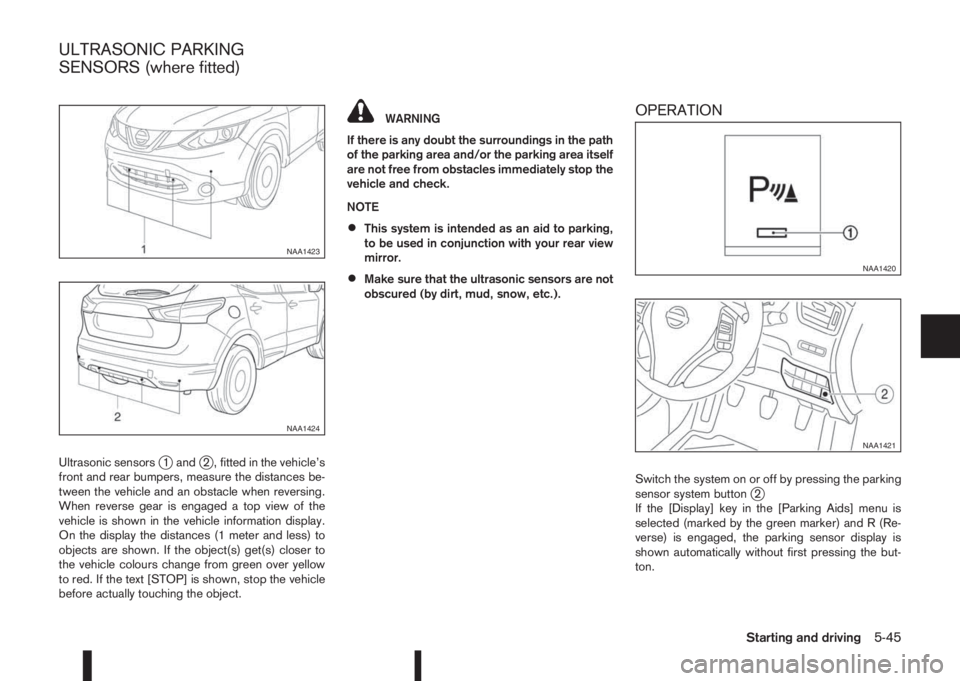
Ultrasonic sensorsj1 andj2 , fitted in the vehicle’s
front and rear bumpers, measure the distances be-
tween the vehicle and an obstacle when reversing.
When reverse gear is engaged a top view of the
vehicle is shown in the vehicle information display.
On the display the distances (1 meter and less) to
objects are shown. If the object(s) get(s) closer to
the vehicle colours change from green over yellow
to red. If the text [STOP] is shown, stop the vehicle
before actually touching the object.
WARNING
If there is any doubt the surroundings in the path
of the parking area and/or the parking area itself
are not free from obstacles immediately stop the
vehicle and check.
NOTE
•This system is intended as an aid to parking,
to be used in conjunction with your rear view
mirror.
•Make sure that the ultrasonic sensors are not
obscured (by dirt, mud, snow, etc.).
OPERATION
Switch the system on or off by pressing the parking
sensor system buttonj2
If the [Display] key in the [Parking Aids] menu is
selected (marked by the green marker) and R (Re-
verse) is engaged, the parking sensor display is
shown automatically without first pressing the but-
ton.
NAA1423
NAA1424
NAA1420
NAA1421
ULTRASONIC PARKING
SENSORS (where fitted)
Starting and driving5-45
Page 222 of 338
![NISSAN QASHQAI 2015 Owner´s Manual Using the settings menu
The settings of the parking sensor system can be
changed.
At ignition on (the [Settings] menu is shown in the
display), select
[Driver Assistance] —> [Parking Aids]
or when t](/img/5/40325/w960_40325-221.png "NISSAN QASHQAI 2015 Owner´s Manual Using the settings menu
The settings of the parking sensor system can be
changed.
At ignition on (the [Settings] menu is shown in the
display), select
[Driver Assistance] —> [Parking Aids]
or when t")
Using the settings menu
The settings of the parking sensor system can be
changed.
At ignition on (the [Settings] menu is shown in the
display), select
[Driver Assistance] —> [Parking Aids]
or when the parking sensor screen is displayed,
press the
jB on the steering
wheel. Press the BACK switchjA to return to the
previous item.
The settings menu is shown
Set the following items on or off by selecting (high-
lighted) and pressing the
jB switch on
the steering wheel. When selected a green marker
is shown.
– [Front sensor]:
Switch the front sensors on or off
– [Rear sensor]:
Switch the rear sensors on or off– [Display]:
Switch the parking sensor system automatically
on or off when selecting R (Reverse) gear.
By highlighting the colour of the to be set item:
– Set the volume of the parking sensor system
Select [Volume] and press
•High
•Med.
•Low
– Set the range sensitivity
Select [Range] and press
•Far
•Mid.
•Near
WARNING
Intelligent Parking Assist (IPA) is a guidance sys-
tem for parking procedures. It does not prevent
collisions with objects. Always look through the
windows and check to be sure that it is safe to
move.
The Intelligent Parking Assist (IPA) system controls
steering, guiding the vehicle when parking:
– In a bay
– Parallel to the road
NOTE
The IPA system instructs you to stop, drive for-
wards or drive backwards. Follow the instructions
given by the system.
The IPA system is not able to support parking when
the vehicle speed during the parking manoeuvre is
more than 7 km/h (4 MPH).
CAUTION
Do not use the IPA system under the following
conditions:
•On unpaved roads.
•On snow-covered or frozen roads.
•On uneven roads with slants, bumps, kerb-
stones, wheel tracks, etc.
•At mechanical parking facilities.
•When tyre chains or a spare tyre are installed.
NIC2204
INTELLIGENT PARKING ASSIST
(IPA) (where fitted)
5-46Starting and driving
Page 223 of 338
•When the vehicle is being towed
•When the doors (including the back door) are
not closed.
The following conditions may reduce the ability
of the system to detect other vehicles:
•Severe weather.
•Road spray.
•Ice build up on the vehicle.
•Frost on the vehicle.
•Dirt on the vehicle.
Do not attach stickers (including transparent ma-
terial), install accessories or apply additional
paint near the sonar sensors. These conditions
may reduce the ability of the system to detect
other vehicles.
The sonar sensors detect stationary objects be-
hind the vehicle. The sonar sensors may not de-
tect:
•Small or moving objects.
•Wedge-shaped objects.
•Objects close to the bumper.
•Thin objects such as rope, wire, or chain.
NOTE
Under the following conditions, the IPA may not
be able to predict precise courses and function
properly. There may be instances where sur-rounding objects and vehicles are displayed in-
side the clearance guidelines (red), or where the
vehicle cannot be parked in the correct spot fol-
lowing the IPA operation.
•When the shift lever is operated while driving.
•When sudden start, sudden stop or sudden
operation of the shift lever occurs.
•When tyre pressure is too low or a tyre is worn
out.
•When tyres are installed that are of a different
size from the tyres that were equipped at the
time of factory shipment.
•When the vehicle is heavily laden.
DEACTIVATION OF THE IPA SYSTEM
The IPA will deactivate under the following condi-
tions:
•When the steering wheel is operated manually.
•When 5 seconds have passed since the shift
lever was placed and kept in the Neutral (N)
position.
•When reversing operations are conducted more
than 10 times for steering corrections.
•When the system judges that conditions (such
as worn out or low pressure tyres, road condi-
tions for example) are not suitable for correct
course predictions.
•When the vehicle reverses to a position behind
the position where the IPA operation started.
•When the vehicle passes the reverse starting
position by more than 2 m (6.5 ft).
•When the vehicle speed exceeds approximately
7 km/h (4 MPH).
•When the driver does not follow the IPA guid-
ance.
Starting and driving5-47
Page 224 of 338
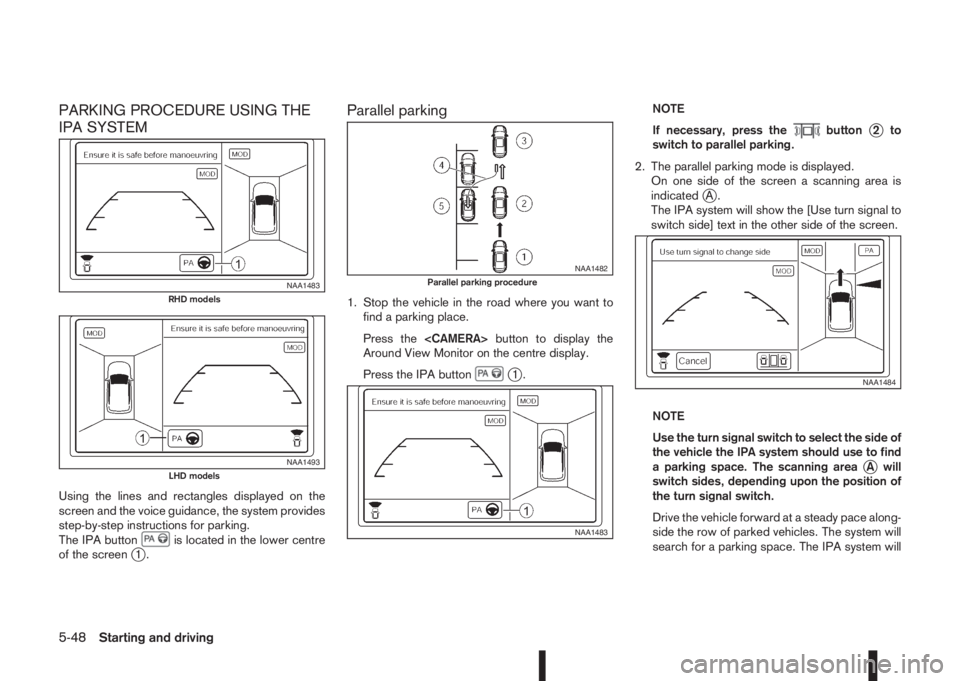
PARKING PROCEDURE USING THE
IPA SYSTEM
Using the lines and rectangles displayed on the
screen and the voice guidance, the system provides
step-by-step instructions for parking.
The IPA button
is located in the lower centre
of the screenj1.
Parallel parking
1. Stop the vehicle in the road where you want to
find a parking place.
Press the
Around View Monitor on the centre display.
Press the IPA button
j1.NOTE
If necessary, press the
buttonj2to
switch to parallel parking.
2. The parallel parking mode is displayed.
On one side of the screen a scanning area is
indicated
jA.
The IPA system will show the [Use turn signal to
switch side] text in the other side of the screen.
NOTE
Use the turn signal switch to select the side of
the vehicle the IPA system should use to find
a parking space. The scanning area
jA will
switch sides, depending upon the position of
the turn signal switch.
Drive the vehicle forward at a steady pace along-
side the row of parked vehicles. The system will
search for a parking space. The IPA system will
NAA1483RHD models
NAA1493LHD models
NAA1482Parallel parking procedure
NAA1483
NAA1484
5-48Starting and driving
Page 225 of 338
inform you when it finds a suitable parking space
between the parked vehicles. You will be told to
drive a short distance past the parking space,
and then stop.
3. Slowly move the vehicle forward to the correct
position until the IPA system instructs you to stop.
WARNING
If there is any doubt that the surroundings in
the path of the parking area and/or the park-
ing area itself are not free from obstacles im-
mediately stop the vehicle and check.
NOTE
Make sure the vehicle is stopped completely
before shifting the shift lever to the Reverse
(R) position.
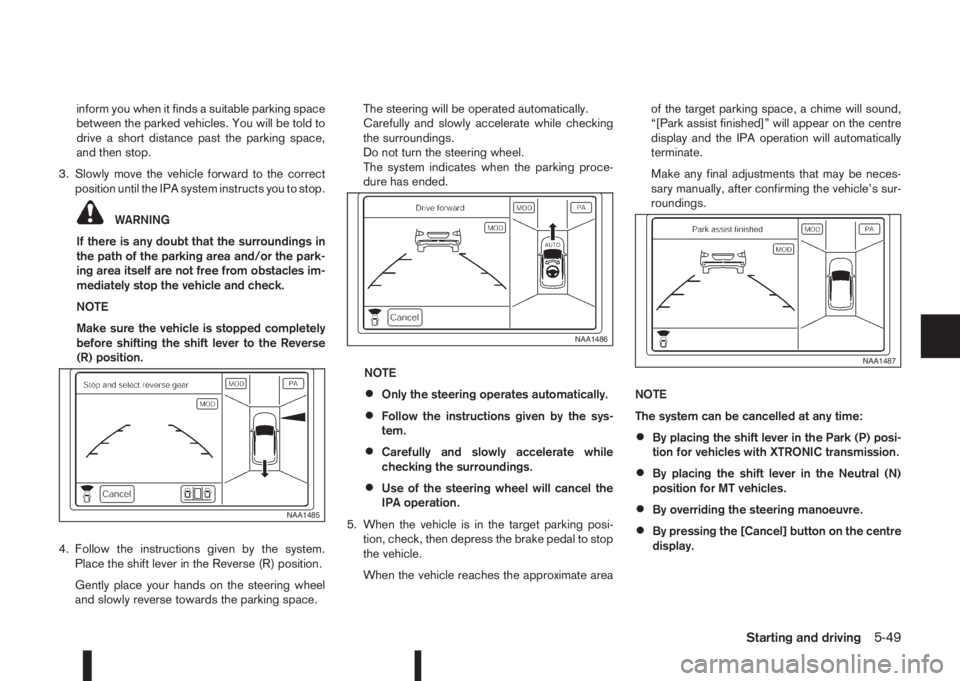
4. Follow the instructions given by the system.
Place the shift lever in the Reverse (R) position.
Gently place your hands on the steering wheel
and slowly reverse towards the parking space.The steering will be operated automatically.
Carefully and slowly accelerate while checking
the surroundings.
Do not turn the steering wheel.
The system indicates when the parking proce-
dure has ended.
NOTE
•Only the steering operates automatically.
•Follow the instructions given by the sys-
tem.
•Carefully and slowly accelerate while
checking the surroundings.
•Use of the steering wheel will cancel the
IPA operation.
5. When the vehicle is in the target parking posi-
tion, check, then depress the brake pedal to stop
the vehicle.
When the vehicle reaches the approximate areaof the target parking space, a chime will sound,
“[Park assist finished]” will appear on the centre
display and the IPA operation will automatically
terminate.
Make any final adjustments that may be neces-
sary manually, after confirming the vehicle’s sur-
roundings.
NOTE
The system can be cancelled at any time:
•By placing the shift lever in the Park (P) posi-
tion for vehicles with XTRONIC transmission.
•By placing the shift lever in the Neutral (N)
position for MT vehicles.
•By overriding the steering manoeuvre.
•By pressing the [Cancel] button on the centre
display.
NAA1485
NAA1486
NAA1487
Starting and driving5-49
Page 226 of 338
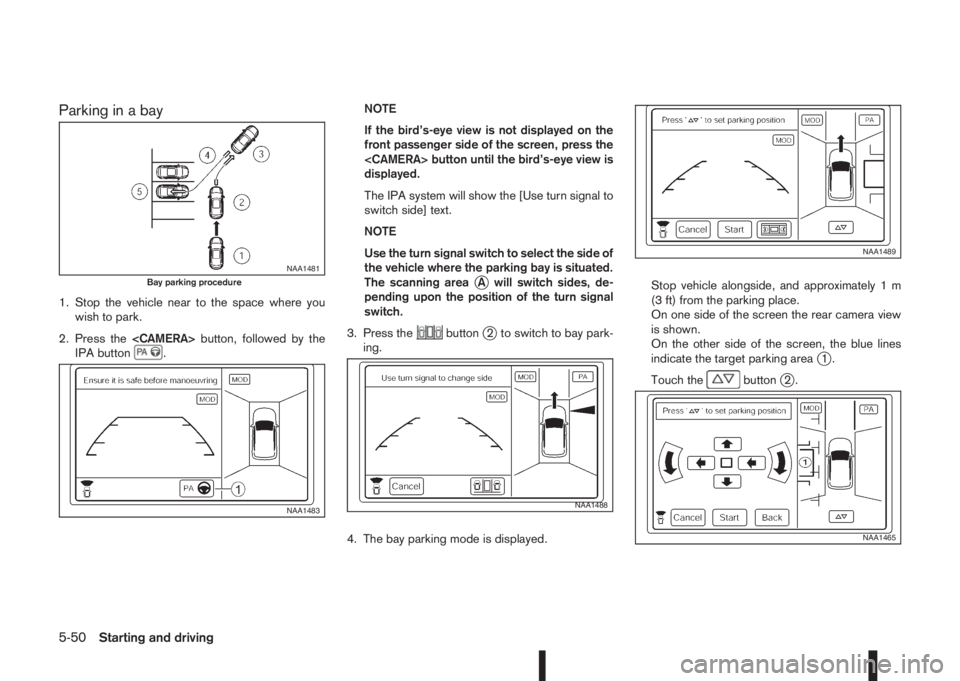
Parking in a bay
1. Stop the vehicle near to the space where you
wish to park.
2. Press the
IPA button
.NOTE
If the bird’s-eye view is not displayed on the
front passenger side of the screen, press the
displayed.
The IPA system will show the [Use turn signal to
switch side] text.
NOTE
Use the turn signal switch to select the side of
the vehicle where the parking bay is situated.
The scanning area
jA will switch sides, de-
pending upon the position of the turn signal
switch.
3. Press the
buttonj2 to switch to bay park-
ing.
4. The bay parking mode is displayed.Stop vehicle alongside, and approximately 1 m
(3 ft) from the parking place.
On one side of the screen the rear camera view
is shown.
On the other side of the screen, the blue lines
indicate the target parking area
j1.
Touch the
buttonj2.
NAA1481Bay parking procedure
NAA1483NAA1488
NAA1489
NAA1465
5-50Starting and driving
Page 227 of 338
![NISSAN QASHQAI 2015 Owner´s Manual Adjust the target parking rectanglej1 (blue) us-
ing the arrow keys on the screen so that the
clearance guidelines do not overlap any
obstacles around the vehicle.
CAUTION
After pressing [Start] the v](/img/5/40325/w960_40325-226.png "NISSAN QASHQAI 2015 Owner´s Manual Adjust the target parking rectanglej1 (blue) us-
ing the arrow keys on the screen so that the
clearance guidelines do not overlap any
obstacles around the vehicle.
CAUTION
After pressing [Start] the v")
Adjust the target parking rectanglej1 (blue) us-
ing the arrow keys on the screen so that the
clearance guidelines do not overlap any
obstacles around the vehicle.
CAUTION
After pressing [Start] the vehicle will park within
the blue area. Make sure this area is free of ob-
stacles.
5. Press [Start].
The vehicle starts the parking procedure. The
IPA operation can be started when the following
conditions are met:
•The vehicle is completely stopped.
•The steering wheel is in the straight-ahead
position.
•The shift lever is in the Drive (D) or a forward
shift position.
NOTE
If the vehicle deviates from the parking rect-
angle while following the parking procedure,
stop and adjust the position.
WARNING
If there is any doubt that the surroundings in the
path of the parking area and/or the parking area
itself are not free from obstacles immediately
stop the vehicle and check.6. Gently place hands on the steering wheel and
slowly move forward the vehicle to the correct
position indicated in green in preparation for re-
versing.
Bring the vehicle to a standstill
The steering wheel will operate itself towards the
reverse starting position rectangle (green).
Depress the brake and stop the vehicle when it
approaches another vehicle or object, or when
the vehicle reaches the reverse starting position.
7. Place the shift lever in the Reverse (R) position
Gently place hands on the steering wheel and
slowly back up to the parking space
Steering will be operated automatically.NOTE
•Only the steering operates automatically.
•Follow the instructions given by the sys-
tem.
•Carefully and slowly accelerate while
checking the surroundings.
•Use of the steering wheel will cancel the
IPA operation.
8. When the vehicle is in the target parking posi-
tion, check, then depress the brake pedal to stop
the vehicle.
When the vehicle reaches the approximate area
of the target parking space, a chime will sound,
“[Park assist finished]” will appear on the centre
display and the IPA operation will automatically
terminate.
Make any final adjustments that may be neces-
sary manually, after confirming the vehicle’s sur-
roundings.
NAA1490
NAA1491
Starting and driving5-51