eco NISSAN QASHQAI 2015 Owner´s Manual
[x] Cancel search | Manufacturer: NISSAN, Model Year: 2015, Model line: QASHQAI, Model: NISSAN QASHQAI 2015Pages: 338, PDF Size: 4.88 MB
Page 91 of 338
Wiper drip wipe system (where fitted):
The wiper will also operate once about 3 seconds
after using the washer. This operation is to wipe
washer fluid that has dripped on the windscreen.
Rain sensor (where fitted)
The sensor of the rain-sensing auto wiper system
located on the upper part of the windscreen, in front
of the rear view mirror, can automatically turn on the
wipers and adjust the wiper speed depending on
the rainfall intensity and the vehicle speed when the
lever in the AUTO position
j1.
The sensitivity can be adjusted by rotating the ring
of the wiper switch forward
jA — less sensitive, or
backwardjB — more sensitive.
NOTE
•Be sure to turn off the rain-sensing auto wiper
system when the car is in the car wash.
•Leaving the lever in AUTO position will not
harm the rain sensor system, although occa-
sional unexpected activation of the wipers
may occur.
•If the switch is left in the AUTO position, the
wipers may operate unexpectedly when dirt,
fingerprints, oil film or insects are covering
the windscreen of the rain sensor location.
The wipers may also operate when exhaust
gas or moisture affects the rain sensor.
•Do not touch or cover the windscreen where
the rain sensor is located. The wipers may
operate unexpectedly when the wiper switchis in the AUTO position and the ignition switch
is in the ON position. This can cause an injury
or a wiper damage.
REAR WINDOW
WARNING
In freezing temperatures the washer solution
may freeze on the rear window and obscure your
vision. Warm the rear window with the rear win-
dow defogger before using the rear wipers.
CAUTION
•Do not operate the washer continuously for
more than 15 seconds.
•Do not operate the washer if the reservoir
tank is empty or frozen.
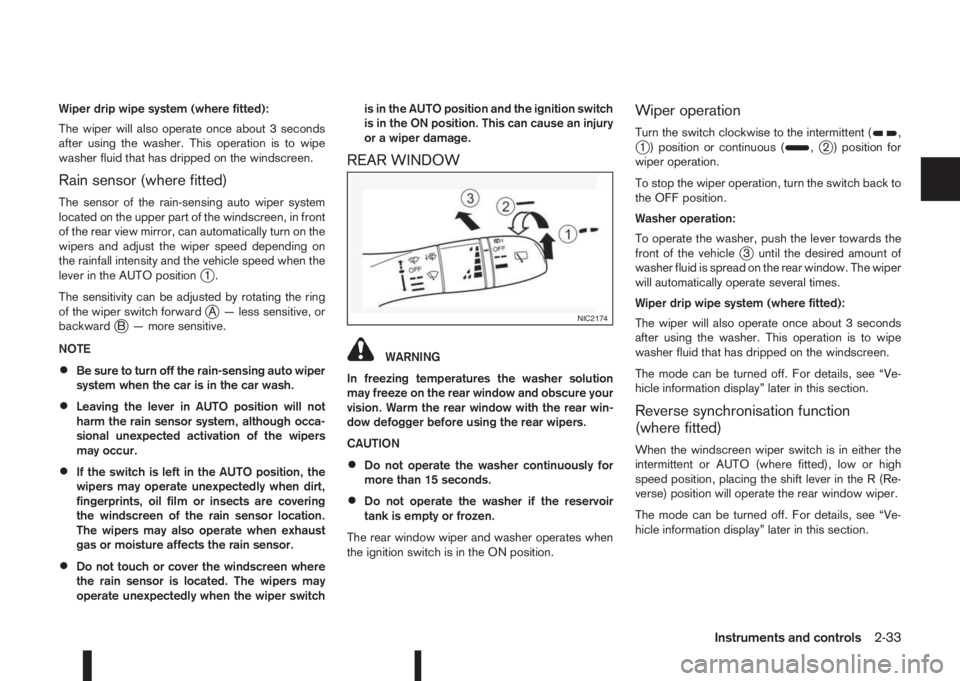
The rear window wiper and washer operates when
the ignition switch is in the ON position.
Wiper operation
Turn the switch clockwise to the intermittent (,j1 ) position or continuous (,j2 ) position for
wiper operation.
To stop the wiper operation, turn the switch back to
the OFF position.
Washer operation:
To operate the washer, push the lever towards the
front of the vehicle
j3 until the desired amount of
washer fluid is spread on the rear window. The wiper
will automatically operate several times.
Wiper drip wipe system (where fitted):
The wiper will also operate once about 3 seconds
after using the washer. This operation is to wipe
washer fluid that has dripped on the windscreen.
The mode can be turned off. For details, see “Ve-
hicle information display” later in this section.
Reverse synchronisation function
(where fitted)
When the windscreen wiper switch is in either the
intermittent or AUTO (where fitted), low or high
speed position, placing the shift lever in the R (Re-
verse) position will operate the rear window wiper.
The mode can be turned off. For details, see “Ve-
hicle information display” later in this section.
NIC2174
Instruments and controls2-33
Page 92 of 338
NOTE
In the AUTO position (where fitted), the rear wiper
will not begin to sweep when the shift lever is
placed in the R position. It waits until the front
wipers have made the first sweep.THERMACLEAR HEATED
WINDSCREEN (where fitted)
j
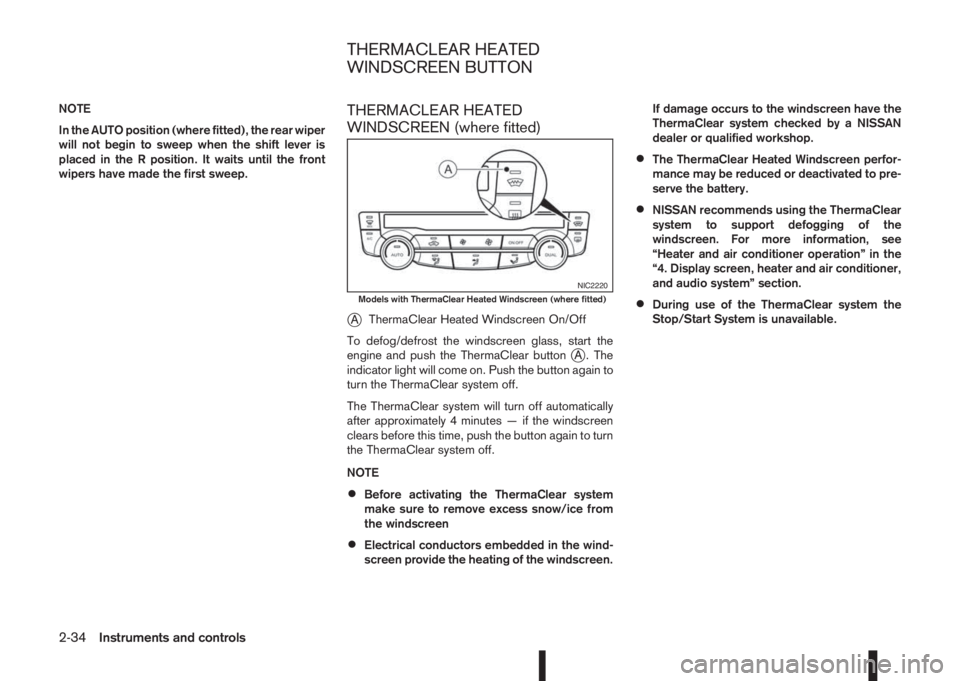
AThermaClear Heated Windscreen On/Off
To defog/defrost the windscreen glass, start the
engine and push the ThermaClear button
jA . The
indicator light will come on. Push the button again to
turn the ThermaClear system off.
The ThermaClear system will turn off automatically
after approximately 4 minutes — if the windscreen
clears before this time, push the button again to turn
the ThermaClear system off.
NOTE
•Before activating the ThermaClear system
make sure to remove excess snow/ice from
the windscreen
•Electrical conductors embedded in the wind-
screen provide the heating of the windscreen.If damage occurs to the windscreen have the
ThermaClear system checked by a NISSAN
dealer or qualified workshop.
•The ThermaClear Heated Windscreen perfor-
mance may be reduced or deactivated to pre-
serve the battery.
•NISSAN recommends using the ThermaClear
system to support defogging of the
windscreen. For more information, see
“Heater and air conditioner operation” in the
“4. Display screen, heater and air conditioner,
and audio system” section.
•During use of the ThermaClear system the
Stop/Start System is unavailable.
NIC2220Models with ThermaClear Heated Windscreen (where fitted)
THERMACLEAR HEATED
WINDSCREEN BUTTON
2-34Instruments and controls
Page 94 of 338
NISSAN recommends you to consult the local regu-
lations concerning the use of lights.
HEADLIGHT SWITCH
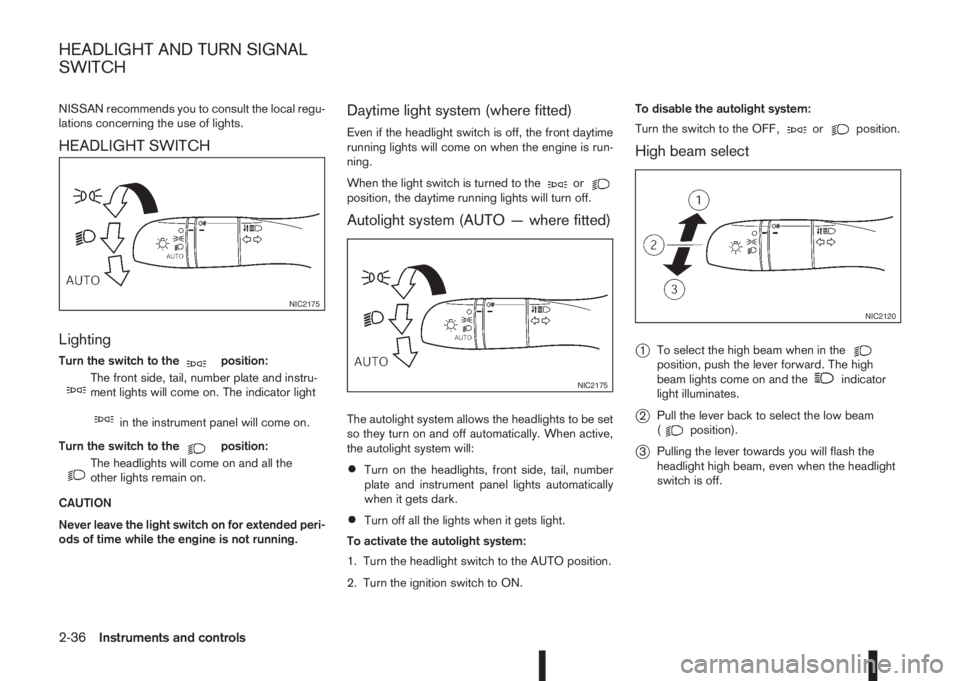
Lighting
Turn the switch to themposition:
m
The front side, tail, number plate and instru-
ment lights will come on. The indicator light
min the instrument panel will come on.
Turn the switch to the
mposition:
m
The headlights will come on and all the
other lights remain on.
CAUTION
Never leave the light switch on for extended peri-
ods of time while the engine is not running.
Daytime light system (where fitted)
Even if the headlight switch is off, the front daytime
running lights will come on when the engine is run-
ning.
When the light switch is turned to the
orposition, the daytime running lights will turn off.
Autolight system (AUTO — where fitted)
The autolight system allows the headlights to be set
so they turn on and off automatically. When active,
the autolight system will:
•Turn on the headlights, front side, tail, number
plate and instrument panel lights automatically
when it gets dark.
•Turn off all the lights when it gets light.
To activate the autolight system:
1. Turn the headlight switch to the AUTO position.
2. Turn the ignition switch to ON.To disable the autolight system:
Turn the switch to the OFF,
orposition.
High beam select
j
1To select the high beam when in theposition, push the lever forward. The high
beam lights come on and theindicator
light illuminates.
j2Pull the lever back to select the low beam
(position).
j3Pulling the lever towards you will flash the
headlight high beam, even when the headlight
switch is off.
NIC2175
NIC2175
NIC2120
HEADLIGHT AND TURN SIGNAL
SWITCH
2-36Instruments and controls
Page 95 of 338
DYNAMIC HIGH BEAM ASSISTANT
(where fitted)
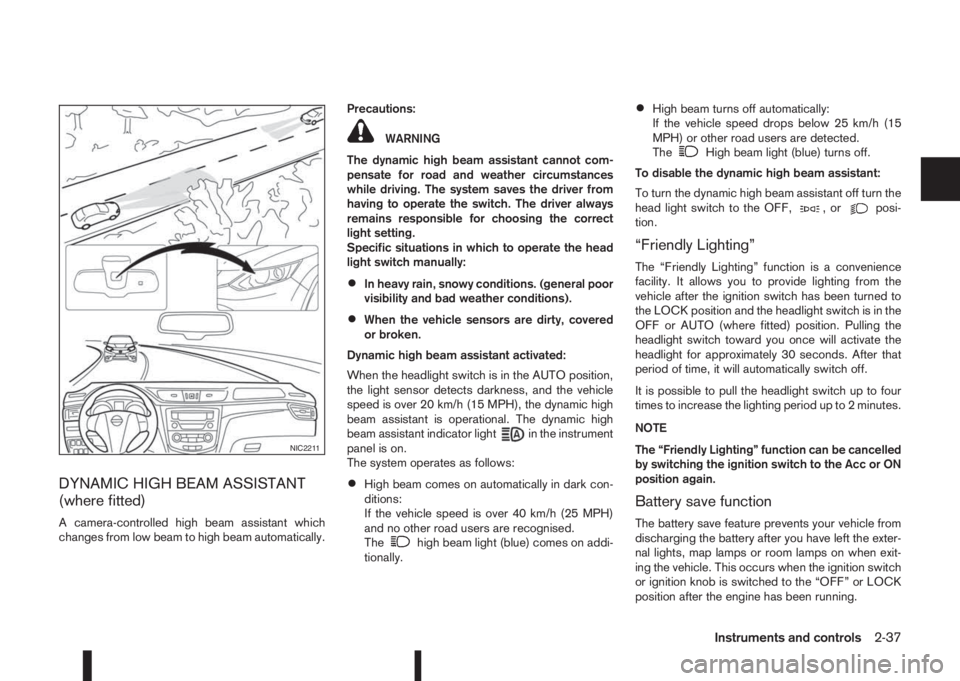
A camera-controlled high beam assistant which
changes from low beam to high beam automatically.Precautions:
WARNING
The dynamic high beam assistant cannot com-
pensate for road and weather circumstances
while driving. The system saves the driver from
having to operate the switch. The driver always
remains responsible for choosing the correct
light setting.
Specific situations in which to operate the head
light switch manually:
•In heavy rain, snowy conditions. (general poor
visibility and bad weather conditions).
•When the vehicle sensors are dirty, covered
or broken.
Dynamic high beam assistant activated:
When the headlight switch is in the AUTO position,
the light sensor detects darkness, and the vehicle
speed is over 20 km/h (15 MPH), the dynamic high
beam assistant is operational. The dynamic high
beam assistant indicator light
in the instrument
panel is on.
The system operates as follows:
•High beam comes on automatically in dark con-
ditions:
If the vehicle speed is over 40 km/h (25 MPH)
and no other road users are recognised.
The
high beam light (blue) comes on addi-
tionally.
•High beam turns off automatically:
If the vehicle speed drops below 25 km/h (15
MPH) or other road users are detected.
The
High beam light (blue) turns off.
To disable the dynamic high beam assistant:
To turn the dynamic high beam assistant off turn the
head light switch to the OFF,
,orposi-
tion.
“Friendly Lighting”
The “Friendly Lighting” function is a convenience
facility. It allows you to provide lighting from the
vehicle after the ignition switch has been turned to
the LOCK position and the headlight switch is in the
OFF or AUTO (where fitted) position. Pulling the
headlight switch toward you once will activate the
headlight for approximately 30 seconds. After that
period of time, it will automatically switch off.
It is possible to pull the headlight switch up to four
times to increase the lighting period up to 2 minutes.
NOTE
The “Friendly Lighting” function can be cancelled
by switching the ignition switch to the Acc or ON
position again.
Battery save function
The battery save feature prevents your vehicle from
discharging the battery after you have left the exter-
nal lights, map lamps or room lamps on when exit-
ing the vehicle. This occurs when the ignition switch
or ignition knob is switched to the “OFF” or LOCK
position after the engine has been running.
NIC2211
Instruments and controls2-37
Page 98 of 338
lowered using the switch located on the driver’s
side of the instrument panel, next to the steering
wheel.
The higher the number designated on the switch,
the lower the axis.
When travelling with no heavy load on a flat road,
select position 0.
AUTOMATIC AIMING CONTROL (LED
headlights)
Vehicles with LED headlights are equipped with an
automatic levelling system. The headlight axis is con-
trolled automatically.
NISSAN recommends consulting local regulations
on the use of lights.To clean the headlights, pull the windscreen washer
switch towards you while the headlight switch is in
the
position and the ignition switch is in the ON
position.
NOTE
The headlight cleaner will automatically operate
every fifth operation of the wiper and washer
switch.
HEADLIGHT CLEANER SWITCH
(where fitted)
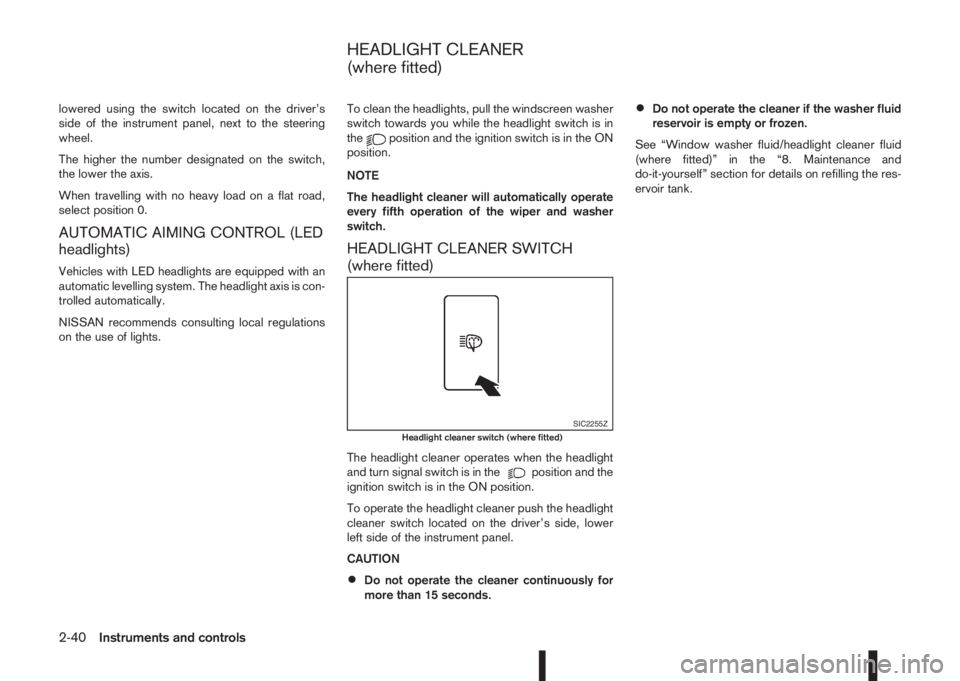
The headlight cleaner operates when the headlight
and turn signal switch is in theposition and the
ignition switch is in the ON position.
To operate the headlight cleaner push the headlight
cleaner switch located on the driver’s side, lower
left side of the instrument panel.
CAUTION
•Do not operate the cleaner continuously for
more than 15 seconds.
•Do not operate the cleaner if the washer fluid
reservoir is empty or frozen.
See “Window washer fluid/headlight cleaner fluid
(where fitted)” in the “8. Maintenance and
do-it-yourself” section for details on refilling the res-
ervoir tank.
SIC2255ZHeadlight cleaner switch (where fitted)
HEADLIGHT CLEANER
(where fitted)
2-40Instruments and controls
Page 106 of 338
POWER WINDOWS
The power window switches are located on the door
panels and will only operate when the ignition switch
is in the ON position.
WARNING
•Make sure that all passengers have their
hands, etc. inside the vehicle before operat-
ing the power windows.
•Never leave children or adults who would nor-
mally require the support of others alone in
the vehicle. They could unknowingly activate
switches or controls and inadvertently
become involved in an accident.
•It is recommended to instruct all occupants in
the safe operation of power windows with par-
ticular emphasis given to the safety and su-
pervision of children.
The power windows only operate when the ignition
switch is in the “ON” position.
To open a window, push down the power window
switch.
To close a window, pull up the power window
switch.
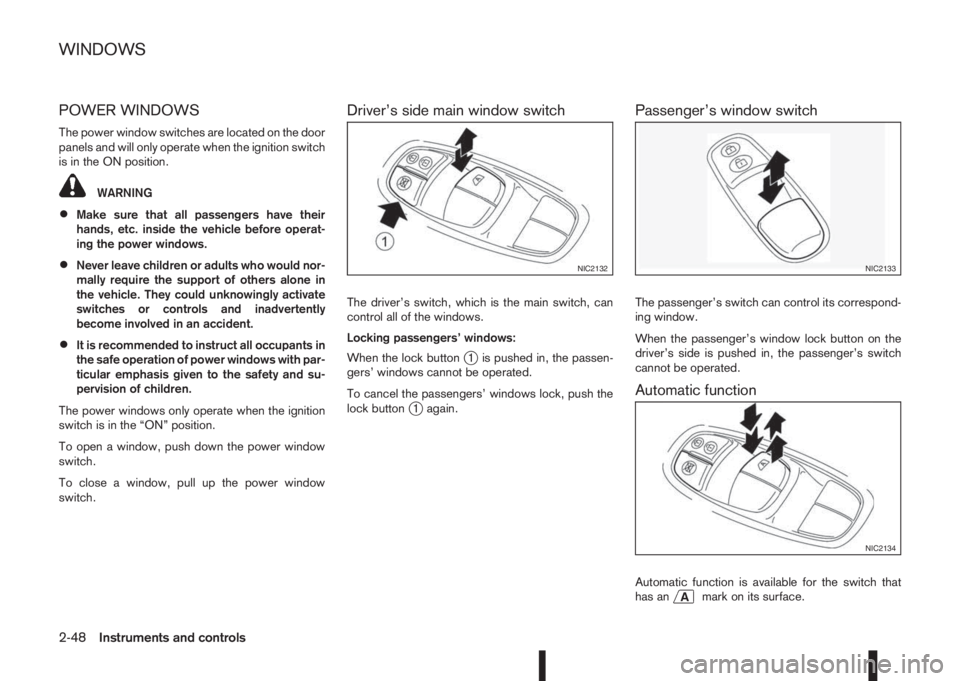
Driver’s side main window switch
The driver’s switch, which is the main switch, can
control all of the windows.
Locking passengers’ windows:
When the lock button
j1 is pushed in, the passen-
gers’ windows cannot be operated.
To cancel the passengers’ windows lock, push the
lock button
j1 again.
Passenger’s window switch
The passenger’s switch can control its correspond-
ing window.
When the passenger’s window lock button on the
driver’s side is pushed in, the passenger’s switch
cannot be operated.
Automatic function
Automatic function is available for the switch that
has anmark on its surface.
NIC2132NIC2133
NIC2134
WINDOWS
2-48Instruments and controls
Page 107 of 338
The automatic function enables a window to fully
open or close without holding the switch down or
up.
To fully open the window, push the power window
switch down to the second detent and release the
switch. To fully close the window, pull the power
window switch up to the second detent and release
the switch. The switch does not have to be held dur-
ing window operation.
To stop the window open/close operation during
the automatic function, push down or pull up the
switch in opposite direction.
Auto-reverse function:
WARNING
•There is a small distance just before the
closed position which cannot be detected.
Make sure that all passengers have their
hands, etc. inside the vehicle before closing
the windows.
•The auto-reverse function does not work
when the window is closed manually (holding
the switch in the close position).
The auto-reverse function enables a window to au-
tomatically reverse when something is caught in the
window as it is closing by the automatic function.
When the control unit detects an obstacle, the win-
dow will be lowered immediately.Depending on the environment or driving conditions,
the auto-reverse function may activate if an impact
or load similar to something being caught in the win-
dow occurs.
Reinitialisation procedure after battery
reconnection
Some power window functions (automatic close
function, auto-reverse function) will not operate as
described after the battery cable is disconnected or
the electrical supply is interrupted. Perform the fol-
lowing procedure to initialise the power window
functions.
1. Place the ignition switch in the “ON” position.
2. If the driver’s window is closed, open it com-
pletely by operating the driver’s window switch.
3. Pull up and hold the driver’s window switch to
close the driver’s window. Hold the switch for
approximately 5 seconds after the window has
been fully closed, and then release it.
4. Check if the power window functions operate
properly.
If you open or close the power window continu-
ously, it may cause the power window not to oper-
ate properly. Perform the above procedure.
If the power window functions do not operate prop-
erly after performing the above procedure, repeat
the steps. See a NISSAN dealer or qualified work-
shop, if necessary, for checking the power window
system.
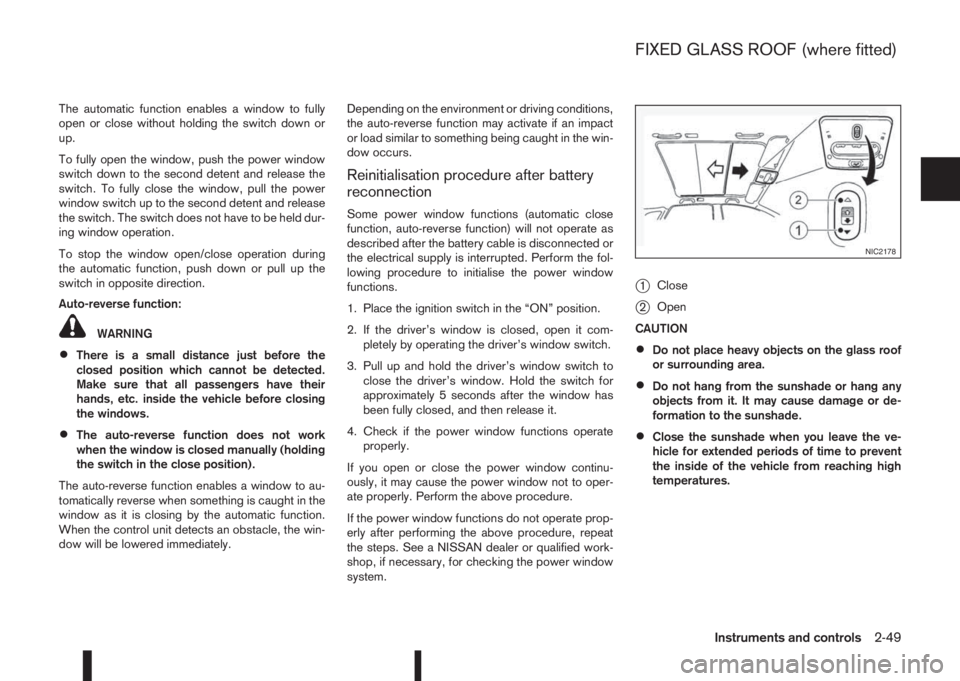
j1Close
j2Open
CAUTION
•Do not place heavy objects on the glass roof
or surrounding area.
•Do not hang from the sunshade or hang any
objects from it. It may cause damage or de-
formation to the sunshade.
•Close the sunshade when you leave the ve-
hicle for extended periods of time to prevent
the inside of the vehicle from reaching high
temperatures.
NIC2178
FIXED GLASS ROOF (where fitted)
Instruments and controls2-49
Page 112 of 338
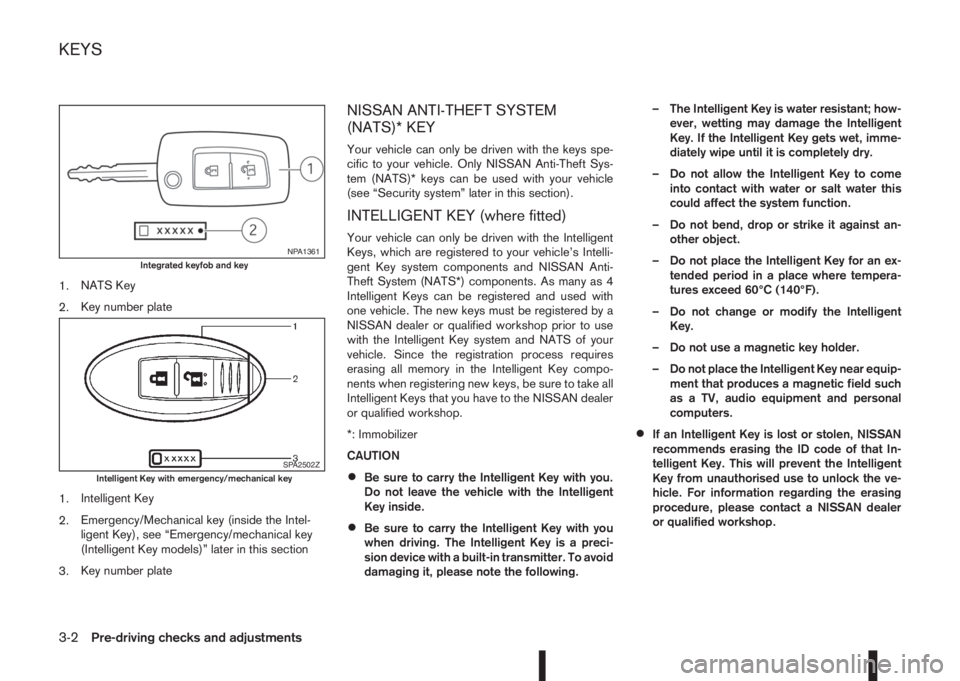
1.NATS Key
2.Key number plate
1.Intelligent Key
2.Emergency/Mechanical key (inside the Intel-
ligent Key), see “Emergency/mechanical key
(Intelligent Key models)” later in this section
3.Key number plate
NISSAN ANTI-THEFT SYSTEM
(NATS)* KEY
Your vehicle can only be driven with the keys spe-
cific to your vehicle. Only NISSAN Anti-Theft Sys-
tem (NATS)* keys can be used with your vehicle
(see “Security system” later in this section).
INTELLIGENT KEY (where fitted)
Your vehicle can only be driven with the Intelligent
Keys, which are registered to your vehicle’s Intelli-
gent Key system components and NISSAN Anti-
Theft System (NATS*) components. As many as 4
Intelligent Keys can be registered and used with
one vehicle. The new keys must be registered by a
NISSAN dealer or qualified workshop prior to use
with the Intelligent Key system and NATS of your
vehicle. Since the registration process requires
erasing all memory in the Intelligent Key compo-
nents when registering new keys, be sure to take all
Intelligent Keys that you have to the NISSAN dealer
or qualified workshop.
*: Immobilizer
CAUTION
•Be sure to carry the Intelligent Key with you.
Do not leave the vehicle with the Intelligent
Key inside.
•Be sure to carry the Intelligent Key with you
when driving. The Intelligent Key is a preci-
sion device with a built-in transmitter. To avoid
damaging it, please note the following.– The Intelligent Key is water resistant; how-
ever, wetting may damage the Intelligent
Key. If the Intelligent Key gets wet, imme-
diately wipe until it is completely dry.
– Do not allow the Intelligent Key to come
into contact with water or salt water this
could affect the system function.
– Do not bend, drop or strike it against an-
other object.
– Do not place the Intelligent Key for an ex-
tended period in a place where tempera-
tures exceed 60°C (140°F).
– Do not change or modify the Intelligent
Key.
– Do not use a magnetic key holder.
– Do not place the Intelligent Key near equip-
ment that produces a magnetic field such
as a TV, audio equipment and personal
computers.
•If an Intelligent Key is lost or stolen, NISSAN
recommends erasing the ID code of that In-
telligent Key. This will prevent the Intelligent
Key from unauthorised use to unlock the ve-
hicle. For information regarding the erasing
procedure, please contact a NISSAN dealer
or qualified workshop.
NPA1361Integrated keyfob and key
SPA2502ZIntelligent Key with emergency/mechanical key
KEYS
3-2Pre-driving checks and adjustments
Page 113 of 338
KEY NUMBER
A key number platej3 is supplied with your key
Record the key number on the “Security Informa-
tion” page at the end of this manual and keep it in a
safe place, butnot in the vehicle. The key can only
be duplicated using an original key or the original
key number. The key number is required when you
have lost all of the keys and do not have the original
key to duplicate from. If the key is lost, or you need
extra keys, provide an original key or the key number
to a NISSAN dealer or qualified workshop.
NISSAN does not record key numbers, so it is very
important that you keep a record of your key num-
ber.
NEW KEYS
As many as four NATS keys can be registered to
one vehicle at any one time. New keys must be reg-
istered to the NATS components of your vehicle by
a NISSAN dealer.
When registering a new key at a NISSAN dealer,
you are requested to bring all of your NATS keys
with you. This is necessary because the registration
process will erase and reprogram the memory of
your vehicle’s NATS components.
NOTE
A key number is only required if you have lost all
of your keys and do not have one to duplicate
from. If you still have a key, this key can be dupli-
cated by a NISSAN dealer.
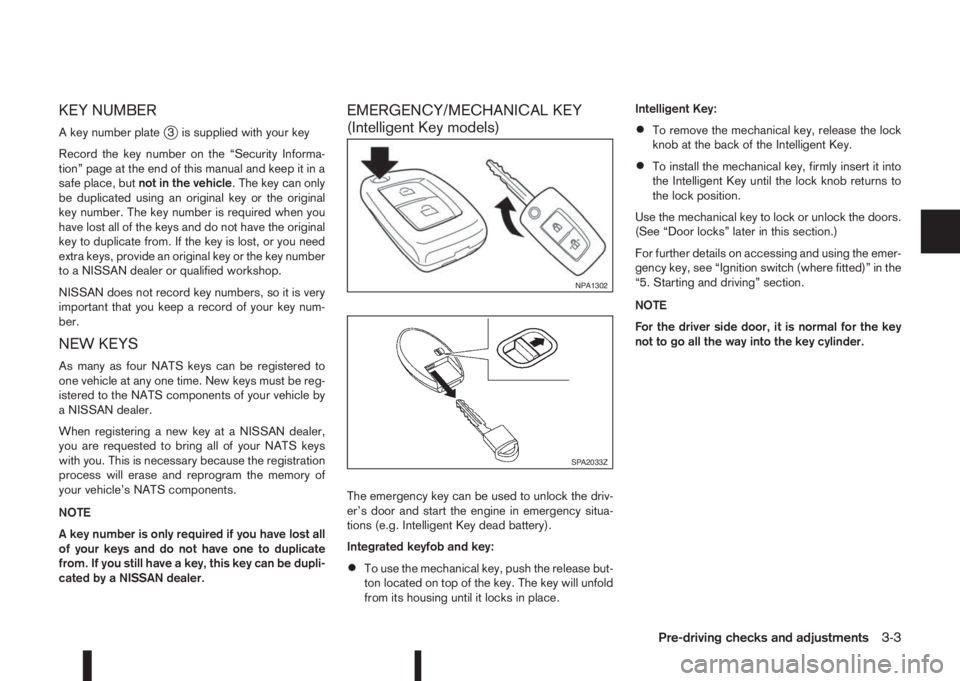
EMERGENCY/MECHANICAL KEY
(Intelligent Key models)
The emergency key can be used to unlock the driv-
er’s door and start the engine in emergency situa-
tions (e.g. Intelligent Key dead battery).
Integrated keyfob and key:
•To use the mechanical key, push the release but-
ton located on top of the key. The key will unfold
from its housing until it locks in place.Intelligent Key:
•To remove the mechanical key, release the lock
knob at the back of the Intelligent Key.
•To install the mechanical key, firmly insert it into
the Intelligent Key until the lock knob returns to
the lock position.
Use the mechanical key to lock or unlock the doors.
(See “Door locks” later in this section.)
For further details on accessing and using the emer-
gency key, see “Ignition switch (where fitted)” in the
“5. Starting and driving” section.
NOTE
For the driver side door, it is normal for the key
not to go all the way into the key cylinder.
NPA1302
SPA2033Z
Pre-driving checks and adjustments3-3
Page 116 of 338
•The locking/unlocking system has been used
continuously.
An anti lock-abuse system prevents the lock mo-
tors from overheating and disables the keyfob
locking operation for a short period of time if the
system is used continuously.
•The door handle is being pulled while the
keyfob is being operated.
•The vehicle’s battery is dead.
NOTE
See [NO KEY Detected] warning, [Key battery
low] indicator, [Key ID Incorrect] warning or In-
telligent Key system warning in “Vehicle informa-
tion display” in the “2. Instruments and controls”
section for more information.The Intelligent Key system is a convenient keyless
entry system that allows you to operate your vehicle
without using an actual key.
WARNING
Radio waves could adversely affect electric medi-
cal equipment. Those who use a pacemaker
should contact the electric medical equipment
manufacturer for the possible influences before
use.
INTELLIGENT KEY OPERATING
RANGE
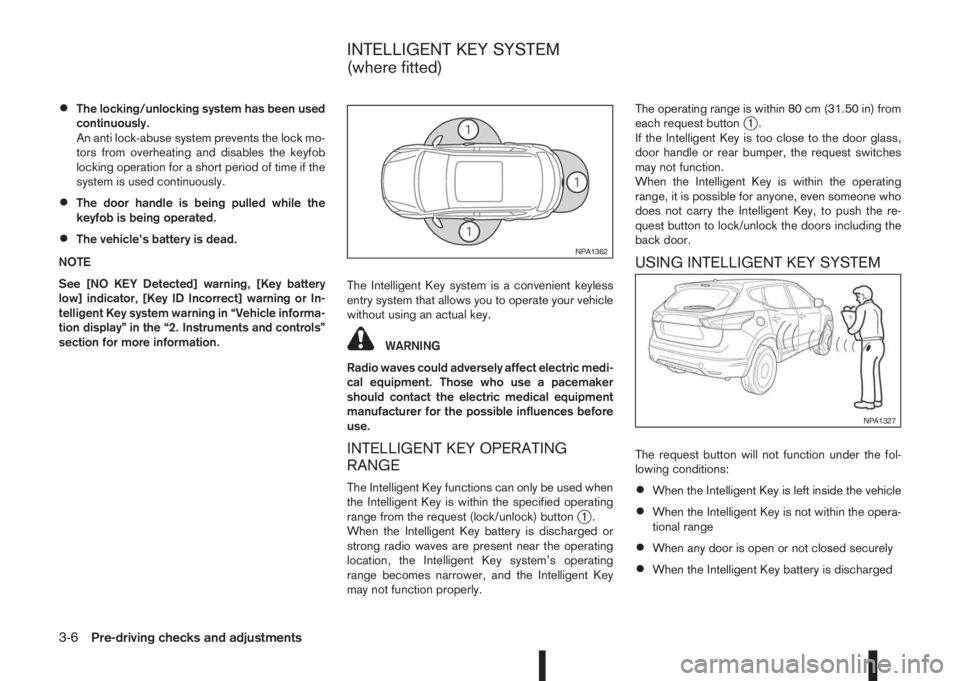
The Intelligent Key functions can only be used when
the Intelligent Key is within the specified operating
range from the request (lock/unlock) button
j1.
When the Intelligent Key battery is discharged or
strong radio waves are present near the operating
location, the Intelligent Key system’s operating
range becomes narrower, and the Intelligent Key
may not function properly.The operating range is within 80 cm (31.50 in) from
each request button
j1.
If the Intelligent Key is too close to the door glass,
door handle or rear bumper, the request switches
may not function.
When the Intelligent Key is within the operating
range, it is possible for anyone, even someone who
does not carry the Intelligent Key, to push the re-
quest button to lock/unlock the doors including the
back door.
USING INTELLIGENT KEY SYSTEM
The request button will not function under the fol-
lowing conditions:
•When the Intelligent Key is left inside the vehicle
•When the Intelligent Key is not within the opera-
tional range
•When any door is open or not closed securely
•When the Intelligent Key battery is discharged
NPA1362
NPA1327
INTELLIGENT KEY SYSTEM
(where fitted)
3-6Pre-driving checks and adjustments