battery reset NISSAN QASHQAI 2015 Owner´s Manual
[x] Cancel search | Manufacturer: NISSAN, Model Year: 2015, Model line: QASHQAI, Model: NISSAN QASHQAI 2015Pages: 338, PDF Size: 4.88 MB
Page 24 of 338
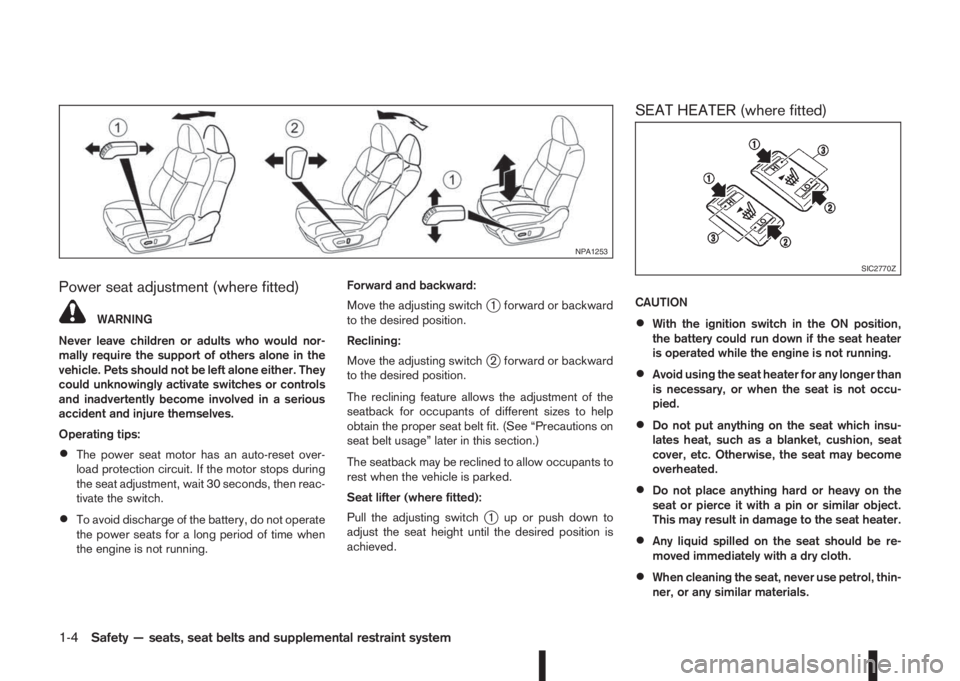
Power seat adjustment (where fitted)
WARNING
Never leave children or adults who would nor-
mally require the support of others alone in the
vehicle. Pets should not be left alone either. They
could unknowingly activate switches or controls
and inadvertently become involved in a serious
accident and injure themselves.
Operating tips:
•The power seat motor has an auto-reset over-
load protection circuit. If the motor stops during
the seat adjustment, wait 30 seconds, then reac-
tivate the switch.
•To avoid discharge of the battery, do not operate
the power seats for a long period of time when
the engine is not running.Forward and backward:
Move the adjusting switch
j1 forward or backward
to the desired position.
Reclining:
Move the adjusting switch
j2 forward or backward
to the desired position.
The reclining feature allows the adjustment of the
seatback for occupants of different sizes to help
obtain the proper seat belt fit. (See “Precautions on
seat belt usage” later in this section.)
The seatback may be reclined to allow occupants to
rest when the vehicle is parked.
Seat lifter (where fitted):
Pull the adjusting switch
j1 up or push down to
adjust the seat height until the desired position is
achieved.
SEAT HEATER (where fitted)
CAUTION
•With the ignition switch in the ON position,
the battery could run down if the seat heater
is operated while the engine is not running.
•Avoid using the seat heater for any longer than
is necessary, or when the seat is not occu-
pied.
•Do not put anything on the seat which insu-
lates heat, such as a blanket, cushion, seat
cover, etc. Otherwise, the seat may become
overheated.
•Do not place anything hard or heavy on the
seat or pierce it with a pin or similar object.
This may result in damage to the seat heater.
•Any liquid spilled on the seat should be re-
moved immediately with a dry cloth.
•When cleaning the seat, never use petrol, thin-
ner, or any similar materials.
NPA1253
SIC2770Z
1-4Safety — seats, seat belts and supplemental restraint system
Page 156 of 338
![NISSAN QASHQAI 2015 Owner´s Manual Pressing a preset button for more than 2 seconds
while in the [FM list] or radio main screen will cause
the station currently being received to be stored
against that preset button.
•Twelve stations](/img/5/40325/w960_40325-155.png "NISSAN QASHQAI 2015 Owner´s Manual Pressing a preset button for more than 2 seconds
while in the [FM list] or radio main screen will cause
the station currently being received to be stored
against that preset button.
•Twelve stations")
Pressing a preset button for more than 2 seconds
while in the [FM list] or radio main screen will cause
the station currently being received to be stored
against that preset button.
•Twelve stations (if available) can be stored in the
FM bands. (Six each for FM1 and FM2)
•Six stations (if available) can be set for the AM
band.
If the battery is disconnected, or if the fuse blows,
the radio memory will be erased. In that case, reset
the desired stations after battery connection or fuse
replacement.
Radio Data System (RDS) operation
(where fitted)
The RDS is a system through which encoded digital
information is transmitted by FM radio stations in
addition to the normal FM radio broadcasting. The
RDS provides information services such as station
name, traffic information, or news.
NOTE
•In some countries or regions, some of these
services may not be available.
Alternative Frequency (AF) mode:
The AF mode operates in the FM (radio) mode.
•The AF mode operates in the FM (radio), AUX or
CD mode (if FM was previously selected in the
radio mode).
•The AF function compares signal strengths and
selects the station with the optimum reception
conditions for the currently tuned-in station.
RDS functions
Programme Service (PS) function (station name
display function):
– FM:
When an RDS station is tuned in with seek or
manual tuning, the RDS data is received and the
PS name is displayed.
TA Traffic announcement
This function operates in FM (Radio) mode. This
function will still operate in the background if any
media source is selected (CD, USB or MEDIA
mode).
•Pressing the
The TA indicator is displayed while TA mode is
on.
•When
switched off and the TA indicator will disappear
from the display.
Traffic announcement interrupt function:
When a traffic announcement is received, the an-
nouncement is tuned in and the display shows a
notification message with the radio station name e.g.
[TA: Radio 1].
Once the traffic announcement has finished, the unit
returns to the source that was active before the traf-
fic announcement started.If
the traffic announcement interrupt mode is can-
celled. The TA mode returns to the standby mode
and the audio unit returns to the previous source.
SETUP BUTTON
To configure [Audio], [Clock], [Radio], and [Lan-
guage] settings, perform the following procedure:
1. Press the
2. Turn the
Page 285 of 338
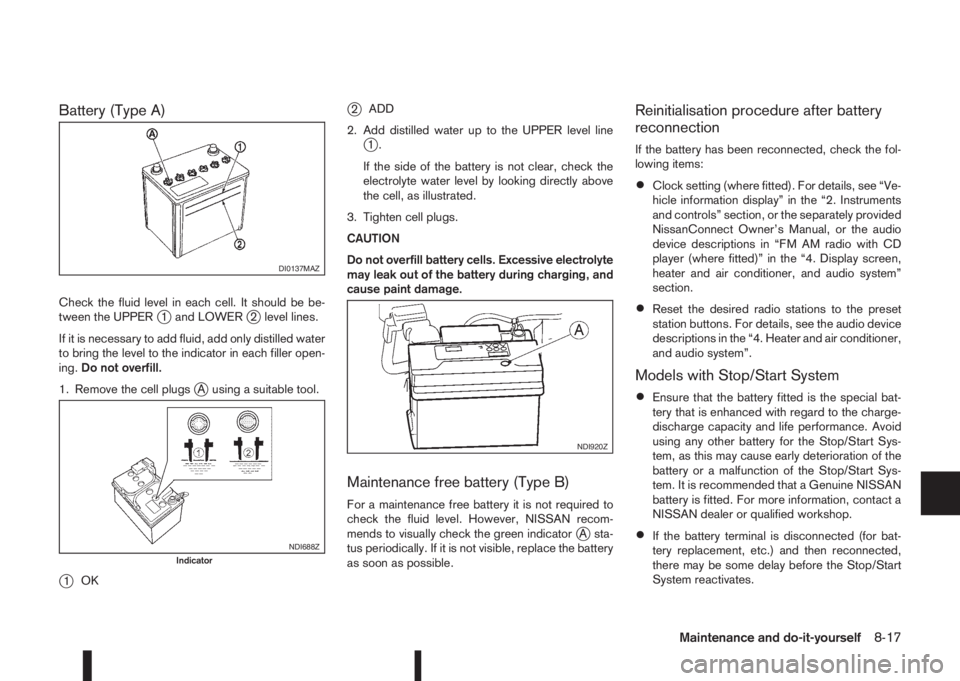
Battery (Type A)
Check the fluid level in each cell. It should be be-
tween the UPPERj1 and LOWERj2 level lines.
If it is necessary to add fluid, add only distilled water
to bring the level to the indicator in each filler open-
ing.Do not overfill.
1. Remove the cell plugs
jA using a suitable tool.
j1OK
j2ADD
2. Add distilled water up to the UPPER level line
j1.
If the side of the battery is not clear, check the
electrolyte water level by looking directly above
the cell, as illustrated.
3. Tighten cell plugs.
CAUTION
Do not overfill battery cells. Excessive electrolyte
may leak out of the battery during charging, and
cause paint damage.
Maintenance free battery (Type B)
For a maintenance free battery it is not required to
check the fluid level. However, NISSAN recom-
mends to visually check the green indicator
jA sta-
tus periodically. If it is not visible, replace the battery
as soon as possible.
Reinitialisation procedure after battery
reconnection
If the battery has been reconnected, check the fol-
lowing items:
•Clock setting (where fitted). For details, see “Ve-
hicle information display” in the “2. Instruments
and controls” section, or the separately provided
NissanConnect Owner’s Manual, or the audio
device descriptions in “FM AM radio with CD
player (where fitted)” in the “4. Display screen,
heater and air conditioner, and audio system”
section.
•Reset the desired radio stations to the preset
station buttons. For details, see the audio device
descriptions in the “4. Heater and air conditioner,
and audio system”.
Models with Stop/Start System
•Ensure that the battery fitted is the special bat-
tery that is enhanced with regard to the charge-
discharge capacity and life performance. Avoid
using any other battery for the Stop/Start Sys-
tem, as this may cause early deterioration of the
battery or a malfunction of the Stop/Start Sys-
tem. It is recommended that a Genuine NISSAN
battery is fitted. For more information, contact a
NISSAN dealer or qualified workshop.
•If the battery terminal is disconnected (for bat-
tery replacement, etc.) and then reconnected,
there may be some delay before the Stop/Start
System reactivates.
DI0137MAZ
NDI688ZIndicator
NDI920Z
Maintenance and do-it-yourself8-17