bluetooth NISSAN QASHQAI 2016 Owner´s Manual
[x] Cancel search | Manufacturer: NISSAN, Model Year: 2016, Model line: QASHQAI, Model: NISSAN QASHQAI 2016Pages: 338, PDF Size: 4.87 MB
Page 170 of 338
In order to use your mobile phone with the Blue-
tooth®of the audio system, the mobile phone must
first be setup. For details, see “BLUETOOTH®
settings” later in this section. Once it has been
setup, the hands-free mode is automatically acti-
vated on the registered mobile phone (via Blue-
tooth
®) when it comes into range.
A notification message appears on the audio display
when the phone is connected, when an incoming
call is being received, as well as when a call is initi-
ated.
When a call is active, the audio system, microphone
(located in the ceiling in front of the rear view mir-
ror), and steering wheel switches enable hands-free
communication.
If the audio system is in use at the time, the radio,
CD, iPod, USB audio, Bluetooth audio or AUX
source mode will be muted and will stay muted until
the active call has ended.
The Bluetooth
®system may not be able to connect
with your mobile phone for the following reasons:
•The mobile phone is too far away from the ve-
hicle.
•The Bluetooth®mode on your mobile phone has
not been activated.
•Your mobile phone has not been paired with the
Bluetooth®system of the audio unit.
•The mobile phone does not support Bluetooth®
technology (BT Core v2.0).NOTE
•For models with NissanConnect (Audio with
Navigation system) see the separately pro-
vided Owner’s Manual.
•For details, see your mobile phone’s Owner’s
Manual.
•For assistance with your mobile phone inte-
gration, please visit your local NISSAN dealer.
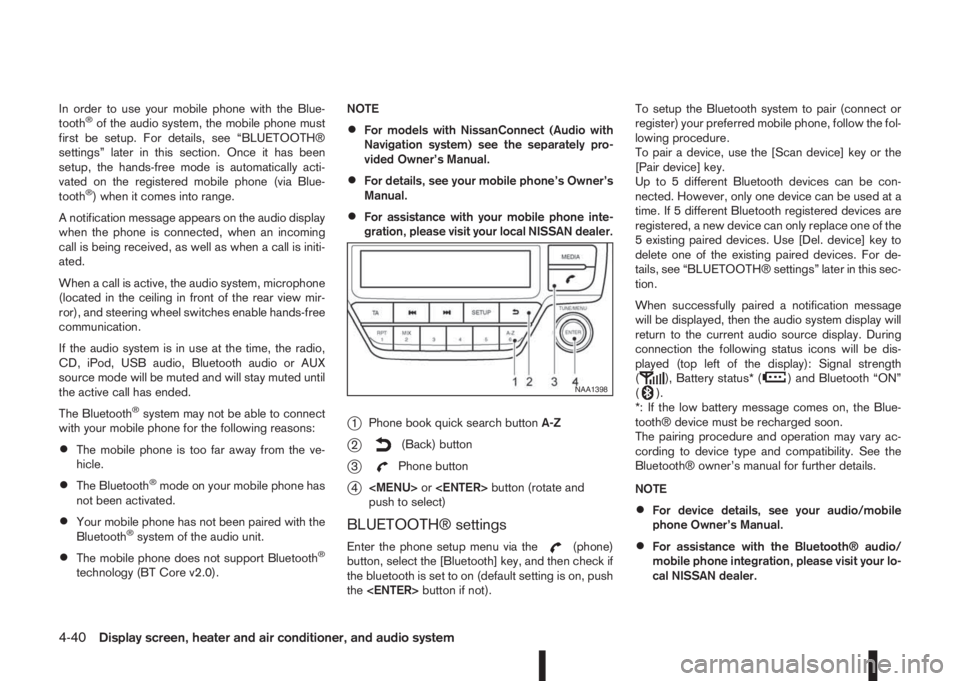
j1Phone book quick search buttonA-Z
j2(Back) button
j3Phone button
j4
Page 171 of 338
![NISSAN QASHQAI 2016 Owner´s Manual •A maximum of 5 Bluetooth devices can be
paired with the system.
To set up the Bluetooth system with a device the
following items are available:
•[Scan device]
Shows all available visible Bluetoot](/img/5/40324/w960_40324-170.png "NISSAN QASHQAI 2016 Owner´s Manual •A maximum of 5 Bluetooth devices can be
paired with the system.
To set up the Bluetooth system with a device the
following items are available:
•[Scan device]
Shows all available visible Bluetoot")
•A maximum of 5 Bluetooth devices can be
paired with the system.
To set up the Bluetooth system with a device the
following items are available:
•[Scan device]
Shows all available visible Bluetooth devices and
initializes Bluetooth connection from the audio
unit.
•[Pair device]
Initializes Bluetooth connection from the mobile
device.
•[Sel. device]
Paired Bluetooth devices are listed and can be
selected for connection.
•[Del. device]
A registered Bluetooth device can be deleted.
•[Bluetooth]
If this setting is turned off, the connection be-
tween the Bluetooth devices and the in-vehicle
Bluetooth module will be cancelled.[Scan devices]:
1) Press the
button. Select [Scan device]
The audio unit searches bluetooth devices and
shows all visible devices.
Pressing the
button cancels the search.
2) Select the device to be paired.
Use the
Page 172 of 338
![NISSAN QASHQAI 2016 Owner´s Manual [Sel. device]:
The paired device list shows which Bluetooth® au-
dio or mobile phone devices have been paired or
registered with the Bluetooth® audio system. If the
list contains devices then select](/img/5/40324/w960_40324-171.png "NISSAN QASHQAI 2016 Owner´s Manual [Sel. device]:
The paired device list shows which Bluetooth® au-
dio or mobile phone devices have been paired or
registered with the Bluetooth® audio system. If the
list contains devices then select")
[Sel. device]:
The paired device list shows which Bluetooth® au-
dio or mobile phone devices have been paired or
registered with the Bluetooth® audio system. If the
list contains devices then select the appropriate de-
vice to connect to the Bluetooth® audio system.
The following symbols (where fitted) indicate the
capability of the registered device:
•: Mobile phone integration
•: Audio streaming (A2DP – Advanced Audio
Distribution Profile)
[Del. device]:
A registered device can be removed from the Blue-
tooth audio system. Select a registered device then
press
[Bluetooth]:
If Bluetooth® has been switched off a notification
message [ON/OFF] appears when you select [Blue-
tooth] from the phone menu (press
). To switch
the Bluetooth® signal on, press
follow up screen will appear. Then select [ON] and
press
menu screen.
HANDS-FREE TELEPHONE
CONTROL
The hands-free mode can be operated using the
telephonebutton on the audio system, or theand (where fitted) on the steering wheel.
Receiving a call
When receiving an incoming call, the display will
show the caller’s phone number (or a notification
message that the caller’s phone number cannot be
shown) and three operation icons.
1. Answering and during a call:
Answer the call by pressing
is
highlighted).
By pressing
options:
•Ending the call by selectingand press
•Put the call on hold by selectingand press
•[]
Use this item (the transfer handset command) to
transfer the call from the audio system to your
mobile phone.
To transfer the call back to hands-free via the
audio system select [
].
•[#123]
Use this item to enter numbers during a call. For
example, if directed by an automated phone sys-
tem to dial an extension number the system will
send the tone associated with the selected num-
ber.
2. Put a call on hold:
Rotate the
Page 173 of 338
– Using call history (Call List menu)
•Dialled
•Received
•Missed
Making a call from the phone book:
Once the Bluetooth
®connection has been made,
between the registered mobile phone and the audio
system, phone book data will be transferred auto-
matically to the audio system. The transfer may take
a while before completion.
NOTE
Phone book data will be erased when:
•Switching to another registered mobile
phone.
•Mobile phone is disconnected.
•The registered mobile phone is deleted from
the audio system.
1. Press<
>.
2. Turn the
Page 190 of 338
If the battery of the vehicle is discharged, the push-
button ignition switch cannot be moved from the
LOCK position.
OFF position
The ignition switch is in the OFF position when the
engine is turned off using the ignition switch. No
lights will illuminate on the ignition switch.
ACC position
With the vehicle in the P (Park) position, the Intelli-
gent key with you and the ignition placed from ON
to OFF, the radio can still be used for a period of
time, or until the driver’s door is opened.
After a period of time, functions such as radio, navi-
gation, and Bluetooth® Hands-Free Phone System
may be restarted by pressing the “POWER button/
VOLUME control knob” (See “Monitor, climate, au-
dio, phone and voice recognition systems” in this
manual) or the keyfob unlock button up to a total of
30 minutes.
EMERGENCY ENGINE SHUT OFF
To shut off the engine in an emergency situation
while driving, perform the following procedure:
•Rapidly push the push-button ignition switch 3
consecutive times in less than 1.5 seconds, or
•Push and hold the push-button ignition switch
for more than 2 seconds.
STEERING LOCK
The ignition switch is equipped with an anti-theft
steering lock device.
To lock steering wheel
1. Push the ignition switch to the “OFF” position
where the ignition switch position indicator will
not illuminate.
2. Open or close the door. The ignition switch turns
to the “LOCK” position.
3. Turn the steering wheel 1/6 of a turn to the right
or left from the straight up position.
To unlock steering wheel
Push the ignition switch to “ACC”, and the steering
wheel will be automatically unlocked.
CAUTION
•If the battery of the vehicle is discharged, the
push-button ignition switch cannot be
switched from the “LOCK” position.
•If the ignition switch position does not change
from the “LOCK” position, push the ignition
switch again while rotating the steering wheel
slightly to the right and left.
INTELLIGENT KEY BATTERY
DISCHARGE
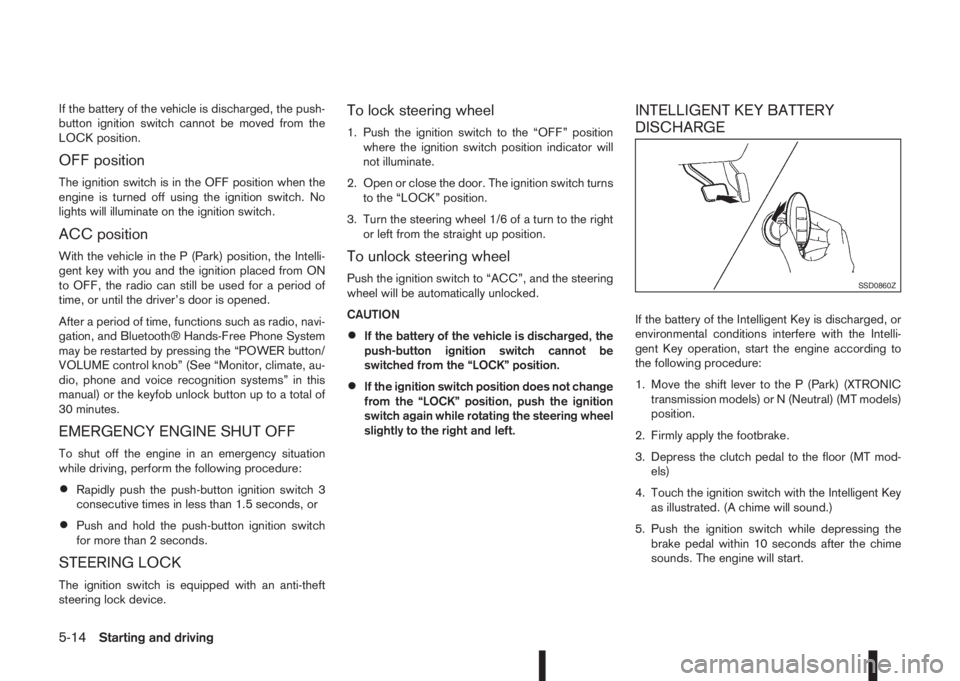
If the battery of the Intelligent Key is discharged, or
environmental conditions interfere with the Intelli-
gent Key operation, start the engine according to
the following procedure:
1. Move the shift lever to the P (Park) (XTRONIC
transmission models) or N (Neutral) (MT models)
position.
2. Firmly apply the footbrake.
3. Depress the clutch pedal to the floor (MT mod-
els)
4. Touch the ignition switch with the Intelligent Key
as illustrated. (A chime will sound.)
5. Push the ignition switch while depressing the
brake pedal within 10 seconds after the chime
sounds. The engine will start.
SSD0860Z
5-14Starting and driving
Page 321 of 338
10IndexIndex
A
Active engine brake ............................................................. 5-63
Active ride control ............................................................... 5-64
Active trace control ............................................................. 5-62
Air cleaner filter ................................................................... 8-23
Air conditioner
– Air conditioner filter .............................................. 4-19, 4-22
– Air conditioner specification label ..................................... 9-8
– Automatic air conditioner ............................................... 4-20
– Heater and air conditioner .............................................. 4-15
– Manual air conditioner ................................................... 4-16
– Servicing air conditioner ....................................... 4-19, 4-22
Air duct removal .................................................................. 8-21
Alarm system ...................................................................... 3-12
Antenna .............................................................................. 4-23
Anti-hijack – unlock mode ...................................................... 3-5
Anti-Lock Braking System (ABS) ......................................... 5-59
Anti-Theft System (NISSAN) ................................................ 3-13
Approval numbers ................................................................. 9-8
Armrest ................................................................................. 1-5
Around View Monitor ............................................................. 4-4
– Around View Monitor settings ........................................ 4-13
– Moving object detection (MOD) ..................................... 4-12
– Operating tips ............................................................... 4-13
Around view monitor operation .............................................. 4-7
Audible reminders, warning/indicator lights ............................ 2-4
Audio
– Audio operation precautions .......................................... 4-23
– Audio system ................................................................. 4-23
– AUX socket ................................................................... 4-30– Bluetooth® audio streaming main operation ................... 4-34
– FM AM radio with CD player ......................................... 4-24
– iPod® player operation .................................................. 4-31
– NissanConnect .............................................................. 4-38
– Steering-wheel switch for audio control ......................... 4-38
– USB Memory operation ................................................. 4-30
B
Battery ....................................................................... 5-66, 8-16
– Caution label ................................................................. 8-16
– Integrated keyfob battery replacement ........................... 8-18
– Intelligent Key battery discharge .................................... 5-14
– Intelligent Key battery replacement ................................. 8-18
– Vehicle battery ............................................................... 8-16
Before starting the engine ..................................................... 5-2
Blind Spot Warning (BSW)
– BSW driving situations .................................................. 5-32
– BSW system operation .................................................. 5-30
Blind Spot Warning (BSW) system ..................................... 5-30
Bluetooth® .......................................................................... 4-39
– Bluetooth® mobile phone feature .................................. 4-39
– Bluetooth® operation .................................................... 4-32
– Bluetooth® settings ....................................................... 4-32
Bonnet release .................................................................... 3-14
Boot .................................................................................... 2-47
Brake .................................................................................. 8-13
– Brake booster ............................................................... 8-14
– Brake fluid ..................................................................... 8-14
– Brake precautions ......................................................... 5-58
– Brake system ................................................................ 5-58
Page 326 of 338
Map lights ........................................................................... 2-50
Maximum load limits (for Australia) ....................................... 5-55
Mechanical/emergency key ................................................... 3-3
Meter and gauges
– Engine coolant temperature gauge ................................... 2-3
– Fuel gauge ...................................................................... 2-2
– Speedometer .................................................................. 2-2
– Tachometer ..................................................................... 2-2
Meters and gauges ............................................................... 2-2
Mirror .................................................................................. 3-18
– Automatic anti-dazzling inside mirror ....................... 3-19, 7-5
– Inside rear-view mirror ................................................... 3-18
– Outside rear-view mirrors .............................................. 3-19
– Vanity mirror .................................................................. 3-20
Mobile phone integration for FM AM radio with CD player ... 4-39
Monitor display
– Monitor display’s maintenance ......................................... 7-4
– Rear-view monitor ............................................................ 4-2
Moving object detection (MOD) ........................................... 4-12
N
NISSAN Anti-Theft System (NATS) .............................. 3-2, 5-12
– NATS key ........................................................................ 3-2
– NATS security indicator light .......................................... 3-13
– Radio approval number and information ........................... 9-8
O
Odometer/twin trip odometer ................................................ 2-2
Oil
– Changing engine oil ......................................................... 8-9
– Changing engine oil filter ............................................... 8-10
– Checking engine oil level ................................................. 8-8
– Engine oil ........................................................................ 8-8– Recommended lubricants ................................................ 9-2
– Recommended SAE viscosity number .............................. 9-4
On-pavement and off-road driving precautions ....................... 5-9
Overheat
– Engine overheat ............................................................. 6-13
P
Parcel shelf
– Installation ..................................................................... 2-45
– Removal ........................................................................ 2-45
Parking ............................................................................... 5-43
– Ultrasonic parking sensors ............................................. 5-45
Parking brake switch ........................................................... 3-16
Phone
– Bluetooth® .................................................................... 4-39
– Mobile phone integration for FM AM radio with CD
player ............................................................................ 4-39
Power
– Electric power steering system ...................................... 5-57
– Power door lock switch ................................................. 3-10
– Power outlet .................................................................. 2-42
Pre-tensioner seat belt system ............................................. 1-13
Precautions
– Audio operation precautions .......................................... 4-23
– Brake precautions ......................................................... 5-58
– Cruise control precautions ............................................. 5-36
– Maintenance precautions ................................................. 8-4
– On-pavement and off-road driving precautions ................. 5-9
– Operating precautions (trailer) ....................................... 5-54
– Precautions on push-button ignition switch operation ..... 5-12
– Precautions on Supplemental Restraint System ............. 1-29
– Safety precautions ........................................................... 4-2
– Towing precautions ....................................................... 6-14
– When starting and driving ................................................ 5-3
Precautions on child restraints ............................................. 1-15
10-6Index