clock setting NISSAN QASHQAI 2016 Owner´s Manual
[x] Cancel search | Manufacturer: NISSAN, Model Year: 2016, Model line: QASHQAI, Model: NISSAN QASHQAI 2016Pages: 338, PDF Size: 4.87 MB
Page 158 of 338
![NISSAN QASHQAI 2016 Owner´s Manual [Format]:
Set the clock display between 24-hour mode and
12-hour clock mode.
[Radio] menu
For activation or deactivation details, see “SETUP
button” later in this section.
Language settings
Select](/img/5/40324/w960_40324-157.png "NISSAN QASHQAI 2016 Owner´s Manual [Format]:
Set the clock display between 24-hour mode and
12-hour clock mode.
[Radio] menu
For activation or deactivation details, see “SETUP
button” later in this section.
Language settings
Select")
[Format]:
Set the clock display between 24-hour mode and
12-hour clock mode.
[Radio] menu
For activation or deactivation details, see “SETUP
button” later in this section.
Language settings
Select the appropriate language and press the
automatically adapt the language setting.
•[AUTO]
(Factory preset language connected with the
meter language)
•[Chinese]
•[Chinese Simplified]
•[Deutsch]
•[Español]
•[Français]
•[Italiano]
•[Nederlands]
•[Polski]
•[Português]
•[Türkçe]
•[UK English]
•[русский]
COMPACT DISC (CD) OPERATION
The CD player can play a music CD or an encoded
MP3/WMA CD and while listening to those CD’s
music information tags (track and artist information)
can be displayed (when CD encoded with text is
being used).
Press the
will start to play.
When
source mode is already operating, it will automati-
cally turn off the playing source and the CD play
mode will start.
CAUTION
•Do not force the CD into the slot. This could
damage the player.
•Do not use 8 cm (3.1 in) discs.
CD insert (CD player)
Insert the CD disc into the slot with the label side
facing up. The disc will be guided automatically into
the slot and will start playing. After loading the disc,
track information will be displayed.
NOTE
•The CD player accepts normal audio CD or
CD recorded with MP3/WMA files.
•Inserting a CD recorded with MP3/WMA files,
the audio unit will automatically detect and
[MP3CD] will be indicated.
•An error notification message will be
displayed when inserting a wrong disc type
(e.g. DVD), or the player cannot read the CD
disc. Eject the disc and insert another disc.
MEDIA button
Load a CD disc. After a short loading period the CD
starts playing.
If the disc was already loaded:
Press the
connected audio sources if necessary multiple
times) to select CD. Playing starts from the track
that was being played when the CD play mode was
switched off.
Audio main operation
List view:
While the track is being played, either press the
the available tracks in a listed view mode. To select
a track from the list, or a track to start listening from,
turn the
Page 172 of 338
![NISSAN QASHQAI 2016 Owner´s Manual [Sel. device]:
The paired device list shows which Bluetooth® au-
dio or mobile phone devices have been paired or
registered with the Bluetooth® audio system. If the
list contains devices then select](/img/5/40324/w960_40324-171.png "NISSAN QASHQAI 2016 Owner´s Manual [Sel. device]:
The paired device list shows which Bluetooth® au-
dio or mobile phone devices have been paired or
registered with the Bluetooth® audio system. If the
list contains devices then select")
[Sel. device]:
The paired device list shows which Bluetooth® au-
dio or mobile phone devices have been paired or
registered with the Bluetooth® audio system. If the
list contains devices then select the appropriate de-
vice to connect to the Bluetooth® audio system.
The following symbols (where fitted) indicate the
capability of the registered device:
•: Mobile phone integration
•: Audio streaming (A2DP – Advanced Audio
Distribution Profile)
[Del. device]:
A registered device can be removed from the Blue-
tooth audio system. Select a registered device then
press
[Bluetooth]:
If Bluetooth® has been switched off a notification
message [ON/OFF] appears when you select [Blue-
tooth] from the phone menu (press
). To switch
the Bluetooth® signal on, press
follow up screen will appear. Then select [ON] and
press
menu screen.
HANDS-FREE TELEPHONE
CONTROL
The hands-free mode can be operated using the
telephonebutton on the audio system, or theand (where fitted) on the steering wheel.
Receiving a call
When receiving an incoming call, the display will
show the caller’s phone number (or a notification
message that the caller’s phone number cannot be
shown) and three operation icons.
1. Answering and during a call:
Answer the call by pressing
is
highlighted).
By pressing
options:
•Ending the call by selectingand press
•Put the call on hold by selectingand press
•[]
Use this item (the transfer handset command) to
transfer the call from the audio system to your
mobile phone.
To transfer the call back to hands-free via the
audio system select [
].
•[#123]
Use this item to enter numbers during a call. For
example, if directed by an automated phone sys-
tem to dial an extension number the system will
send the tone associated with the selected num-
ber.
2. Put a call on hold:
Rotate the
Page 285 of 338
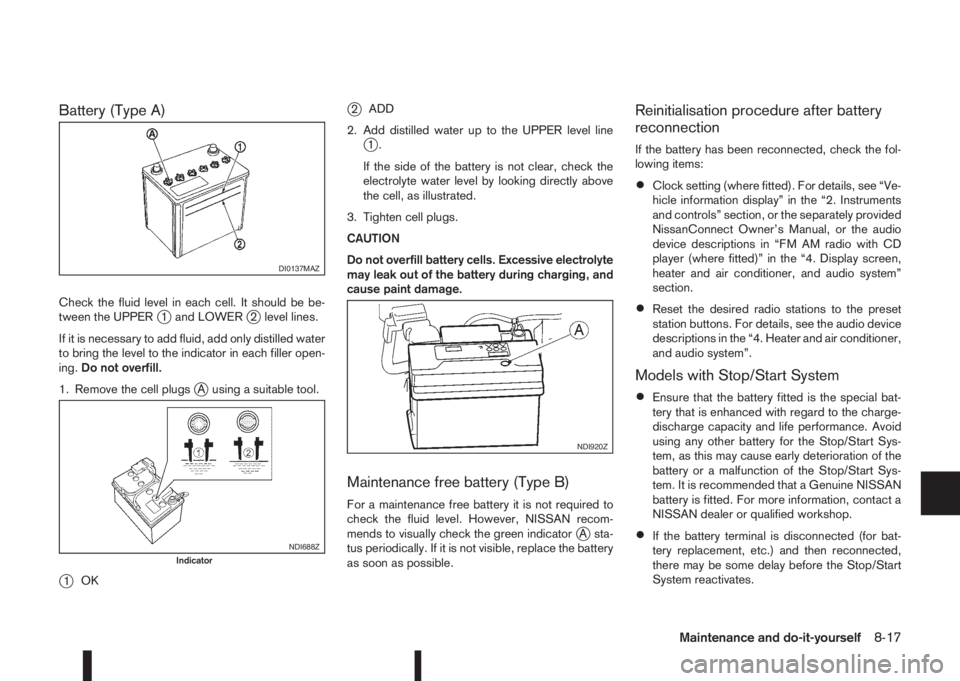
Battery (Type A)
Check the fluid level in each cell. It should be be-
tween the UPPERj1 and LOWERj2 level lines.
If it is necessary to add fluid, add only distilled water
to bring the level to the indicator in each filler open-
ing.Do not overfill.
1. Remove the cell plugs
jA using a suitable tool.
j1OK
j2ADD
2. Add distilled water up to the UPPER level line
j1.
If the side of the battery is not clear, check the
electrolyte water level by looking directly above
the cell, as illustrated.
3. Tighten cell plugs.
CAUTION
Do not overfill battery cells. Excessive electrolyte
may leak out of the battery during charging, and
cause paint damage.
Maintenance free battery (Type B)
For a maintenance free battery it is not required to
check the fluid level. However, NISSAN recom-
mends to visually check the green indicator
jA sta-
tus periodically. If it is not visible, replace the battery
as soon as possible.
Reinitialisation procedure after battery
reconnection
If the battery has been reconnected, check the fol-
lowing items:
•Clock setting (where fitted). For details, see “Ve-
hicle information display” in the “2. Instruments
and controls” section, or the separately provided
NissanConnect Owner’s Manual, or the audio
device descriptions in “FM AM radio with CD
player (where fitted)” in the “4. Display screen,
heater and air conditioner, and audio system”
section.
•Reset the desired radio stations to the preset
station buttons. For details, see the audio device
descriptions in the “4. Heater and air conditioner,
and audio system”.
Models with Stop/Start System
•Ensure that the battery fitted is the special bat-
tery that is enhanced with regard to the charge-
discharge capacity and life performance. Avoid
using any other battery for the Stop/Start Sys-
tem, as this may cause early deterioration of the
battery or a malfunction of the Stop/Start Sys-
tem. It is recommended that a Genuine NISSAN
battery is fitted. For more information, contact a
NISSAN dealer or qualified workshop.
•If the battery terminal is disconnected (for bat-
tery replacement, etc.) and then reconnected,
there may be some delay before the Stop/Start
System reactivates.
DI0137MAZ
NDI688ZIndicator
NDI920Z
Maintenance and do-it-yourself8-17