ignition NISSAN QASHQAI 2016 Owner´s Manual
[x] Cancel search | Manufacturer: NISSAN, Model Year: 2016, Model line: QASHQAI, Model: NISSAN QASHQAI 2016Pages: 338, PDF Size: 4.87 MB
Page 55 of 338
WARNING
•Since your vehicle is equipped with a front
passenger air bag, it is not permitted to install
a rearward facing child restraint on the front
passenger seat unless the front passenger air
bag has been deactivated first.
•Do not fit a rearward facing child seat on the
front passenger seat if the air bag activation/
deactivation system (where fitted) is malfunc-
tioning. Your vehicle must immediately be
taken to a NISSAN dealer or qualified work-
shop in such a situation.
The front passenger air bag status lights
andare located on the instrument panel above the
shift lever.
When the ignition switch is placed in the ON posi-
tion, the front passenger air bag status ON and
OFF lights illuminate and then turn off or remain on
depending on the front passenger air bag status.
•When the ignition switch is placed in the ON
position and the front passenger air bag is ac-
tive, both the front passenger air bag status OFF
light
, and the Supplemental Restraint Sys-
tem (SRS) air bag warning lightin the com-
bination meterj1 will turn off after about 7 sec-
onds.
The front passenger air bag status ON light
will illuminate and then turn off after a period of
time when the front passenger air bag switch is
in the ON position.
•When the ignition switch is placed in the ON
position and the front passenger air bag is inac-
tive, both the front passenger air bag status ON
light
, and the Supplemental Restraint Sys-
tem (SRS) air bag warning lightin the com-
bination meterj1 will turn on after about 7 sec-
onds.
The front passenger air bag status OFF light
will illuminate and remain on as long as the
front passenger air bag switch is in the OFF
position.
If the front passenger air bag status light operates in
a way other than described above, the front passen-
ger air bag may not function properly. Have the sys-
tem checked, and if necessary repaired, by a
NISSAN dealer or qualified workshop promptly.
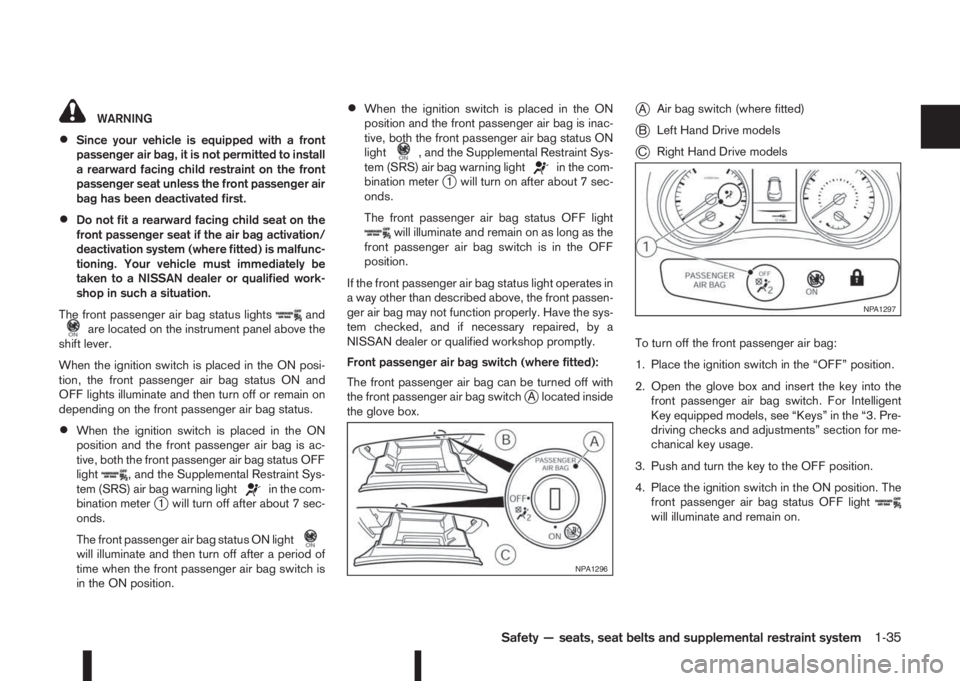
Front passenger air bag switch (where fitted):
The front passenger air bag can be turned off with
the front passenger air bag switch
jA located inside
the glove box.
jAAir bag switch (where fitted)
jBLeft Hand Drive models
jCRight Hand Drive models
To turn off the front passenger air bag:
1. Place the ignition switch in the “OFF” position.
2. Open the glove box and insert the key into the
front passenger air bag switch. For Intelligent
Key equipped models, see “Keys” in the “3. Pre-
driving checks and adjustments” section for me-
chanical key usage.
3. Push and turn the key to the OFF position.
4. Place the ignition switch in the ON position. The
front passenger air bag status OFF light
will illuminate and remain on.
NPA1296
NPA1297
Safety — seats, seat belts and supplemental restraint system1-35
Page 56 of 338
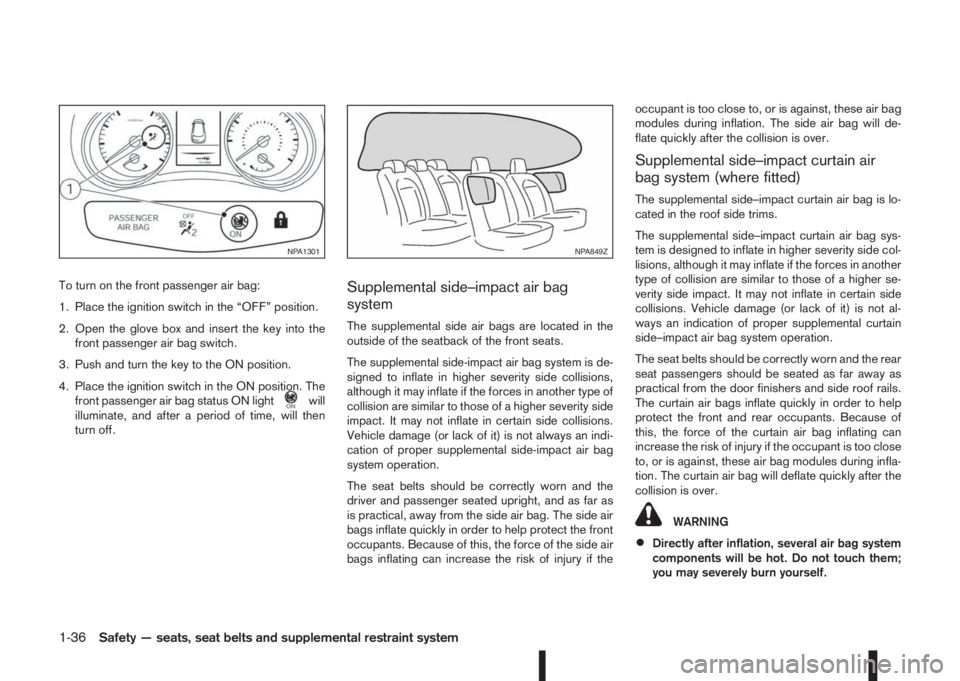
To turn on the front passenger air bag:
1. Place the ignition switch in the “OFF” position.
2. Open the glove box and insert the key into the
front passenger air bag switch.
3. Push and turn the key to the ON position.
4. Place the ignition switch in the ON position. The
front passenger air bag status ON light
will
illuminate, and after a period of time, will then
turn off.
Supplemental side–impact air bag
system
The supplemental side air bags are located in the
outside of the seatback of the front seats.
The supplemental side-impact air bag system is de-
signed to inflate in higher severity side collisions,
although it may inflate if the forces in another type of
collision are similar to those of a higher severity side
impact. It may not inflate in certain side collisions.
Vehicle damage (or lack of it) is not always an indi-
cation of proper supplemental side-impact air bag
system operation.
The seat belts should be correctly worn and the
driver and passenger seated upright, and as far as
is practical, away from the side air bag. The side air
bags inflate quickly in order to help protect the front
occupants. Because of this, the force of the side air
bags inflating can increase the risk of injury if theoccupant is too close to, or is against, these air bag
modules during inflation. The side air bag will de-
flate quickly after the collision is over.
Supplemental side–impact curtain air
bag system (where fitted)
The supplemental side–impact curtain air bag is lo-
cated in the roof side trims.
The supplemental side–impact curtain air bag sys-
tem is designed to inflate in higher severity side col-
lisions, although it may inflate if the forces in another
type of collision are similar to those of a higher se-
verity side impact. It may not inflate in certain side
collisions. Vehicle damage (or lack of it) is not al-
ways an indication of proper supplemental curtain
side–impact air bag system operation.
The seat belts should be correctly worn and the rear
seat passengers should be seated as far away as
practical from the door finishers and side roof rails.
The curtain air bags inflate quickly in order to help
protect the front and rear occupants. Because of
this, the force of the curtain air bag inflating can
increase the risk of injury if the occupant is too close
to, or is against, these air bag modules during infla-
tion. The curtain air bag will deflate quickly after the
collision is over.
WARNING
•Directly after inflation, several air bag system
components will be hot. Do not touch them;
you may severely burn yourself.
NPA1301NPA849Z
1-36Safety — seats, seat belts and supplemental restraint system
Page 57 of 338
•No unauthorised changes should be made to
any components or wiring of the air bag sys-
tem. This is to prevent accidental inflation of
the air bag or damage to the air bag system.
•Tampering with the air bag system may result
in serious personal injury. Tampering includes
making changes to the steering wheel and
the instrument panel assembly by placing ma-
terial over the steering pad and above the
dashboard, or by installing additional trim ma-
terial around the air bag system.
•Do not attach any objects to the steering
wheel pad or to the instrument panel. Objects
attached to the steering wheel pad and in-
strument panel may become dangerous pro-
jectiles and cause injury if the air bag inflates.
•Work on and around the air bag system should
be done by a NISSAN dealer or qualified work-
shop. Installation of electrical equipment
should be done by a NISSAN dealer or quali-
fied workshop. The yellow SRS wiring har-
nesses* should not be modified or discon-
nected. Unauthorised electrical test equip-
ment and probing devices should not be used
on the air bag system.
* SRS wiring harnesses are covered with yellow
insulation either just before the harness con-
nectors or on the complete harness, for easy
identification.
REPAIR AND REPLACEMENT
PROCEDURE
WARNING
•Once the air bags have been inflated, the air
bag modules will not function and must be
replaced. The air bag modules must be re-
placed by a NISSAN dealer or qualified work-
shop. The inflated air bag modules cannot be
repaired.
•The air bag systems should be inspected by a
NISSAN dealer or qualified workshop if there
is any damage to the front end portion of the
vehicle.
•When selling your vehicle, we request that you
inform the buyer about the air bag system and
guide the buyer to the appropriate sections in
this Owner’s Manual.
•If you need to dispose of the SRS or scrap the
vehicle, contact a NISSAN dealer or qualified
workshop. Correct disposal procedures are
set forth in the appropriate NISSAN Service
Manual. Incorrect disposal procedures could
cause personal injury.
The air bags and pre-tensioner seat belts are de-
signed to activate on a one-time-only basis. As a
reminder, unless the SRS air bag warning light is
damaged, the SRS air bag warning light remains
illuminated after inflation has occurred. The repair
and replacement of the SRS should be done only by
a NISSAN dealer or qualified workshop.When maintenance work is required on the vehicle,
information about the air bags, pre-tensioner seat
belts and related parts should be pointed out to the
person performing the maintenance. The ignition
switch should always be in the LOCK position when
working under the bonnet or inside the vehicle.
Safety — seats, seat belts and supplemental restraint system1-37
Page 60 of 338
NOTE
For an overview see “Meters and gauges” in the
“0. Illustrated table of contents” section and see
“Instrument and control layout” in the “0. Illus-
trated table of contents” section.
SPEEDOMETER
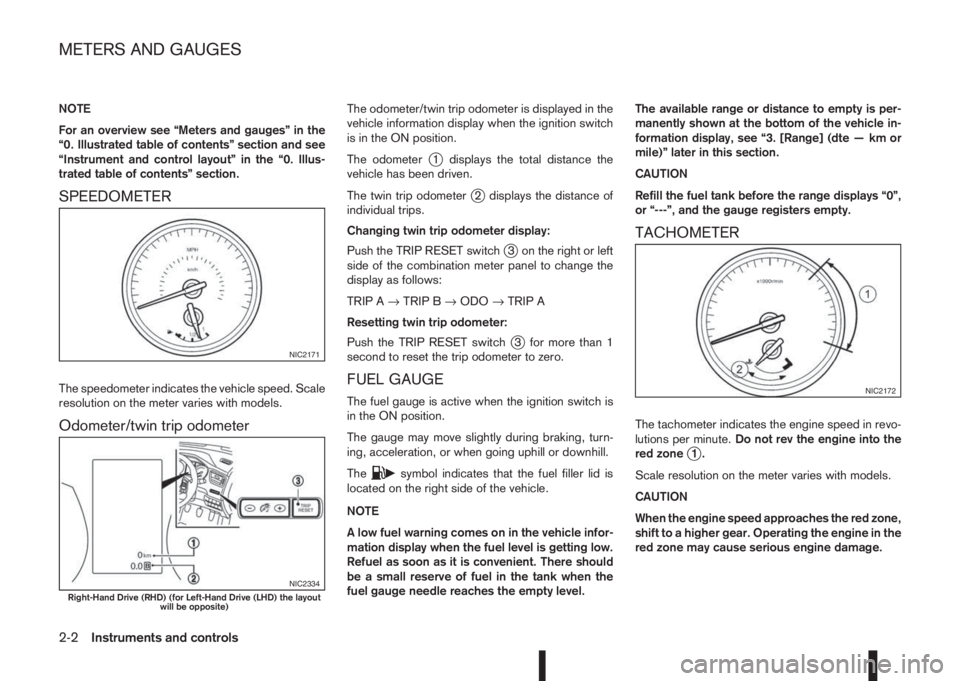
The speedometer indicates the vehicle speed. Scale
resolution on the meter varies with models.
Odometer/twin trip odometer
The odometer/twin trip odometer is displayed in the
vehicle information display when the ignition switch
is in the ON position.
The odometer
j1 displays the total distance the
vehicle has been driven.
The twin trip odometer
j2 displays the distance of
individual trips.
Changing twin trip odometer display:
Push the TRIP RESET switch
j3 on the right or left
side of the combination meter panel to change the
display as follows:
TRIP A→TRIP B→ODO→TRIP A
Resetting twin trip odometer:
Push the TRIP RESET switch
j3 for more than 1
second to reset the trip odometer to zero.
FUEL GAUGE
The fuel gauge is active when the ignition switch is
in the ON position.
The gauge may move slightly during braking, turn-
ing, acceleration, or when going uphill or downhill.
The
csymbol indicates that the fuel filler lid is
located on the right side of the vehicle.
NOTE
A low fuel warning comes on in the vehicle infor-
mation display when the fuel level is getting low.
Refuel as soon as it is convenient. There should
be a small reserve of fuel in the tank when the
fuel gauge needle reaches the empty level.The available range or distance to empty is per-
manently shown at the bottom of the vehicle in-
formation display, see “3. [Range] (dte — km or
mile)” later in this section.
CAUTION
Refill the fuel tank before the range displays “0”,
or “---”, and the gauge registers empty.
TACHOMETER
The tachometer indicates the engine speed in revo-
lutions per minute.Do not rev the engine into the
red zone
j1.
Scale resolution on the meter varies with models.
CAUTION
When the engine speed approaches the red zone,
shift to a higher gear. Operating the engine in the
red zone may cause serious engine damage.
NIC2171
NIC2334Right-Hand Drive (RHD) (for Left-Hand Drive (LHD) the layout
will be opposite)
NIC2172
METERS AND GAUGES
2-2Instruments and controls
Page 61 of 338
ENGINE COOLANT TEMPERATURE
GAUGE
The gauge indicates the engine coolant tempera-
ture. The engine coolant temperature should remain
within the normal range
j2.
The engine coolant temperature varies with the out-
side air temperature and driving conditions.
CAUTION
If the gauge exceeds the normal range, stop as
soon as it is safely possible. If the engine has
overheated, continued operation of the vehicle
may seriously damage the engine. See “Engine
overheat” in the “6. In case of emergency” sec-
tion for immediate action.
WARNING
Allow the engine to cool down before removing
the radiator cap to avoid the danger of being
scalded.
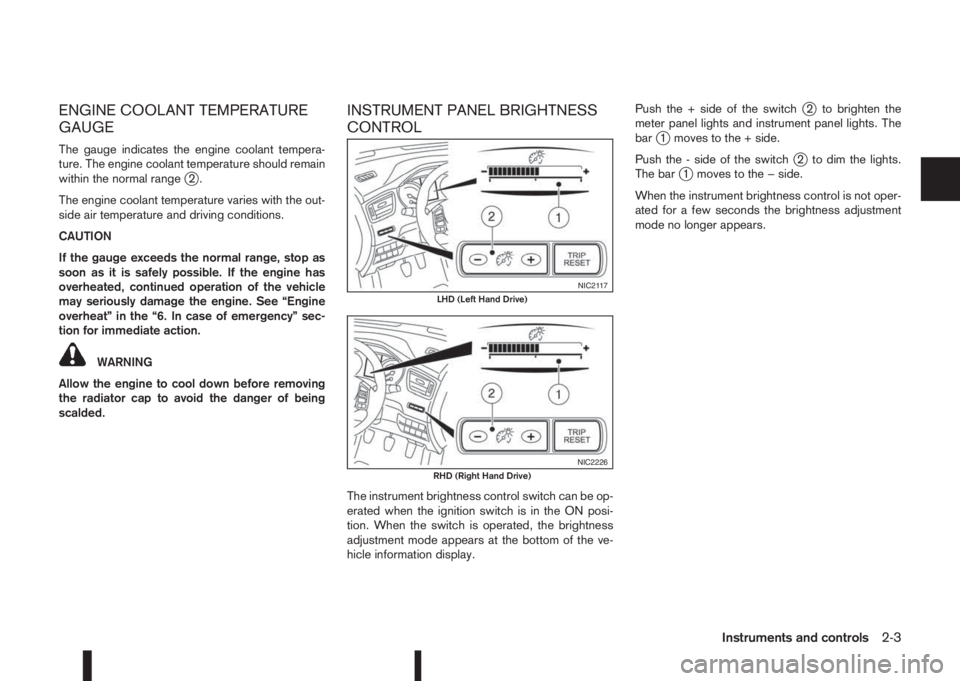
INSTRUMENT PANEL BRIGHTNESS
CONTROL
The instrument brightness control switch can be op-
erated when the ignition switch is in the ON posi-
tion. When the switch is operated, the brightness
adjustment mode appears at the bottom of the ve-
hicle information display.Push the + side of the switch
j2 to brighten the
meter panel lights and instrument panel lights. The
bar
j1 moves to the + side.
Push the - side of the switch
j2 to dim the lights.
The barj1 moves to the − side.
When the instrument brightness control is not oper-
ated for a few seconds the brightness adjustment
mode no longer appears.
NIC2117LHD (Left Hand Drive)
NIC2226RHD (Right Hand Drive)
Instruments and controls2-3
Page 62 of 338
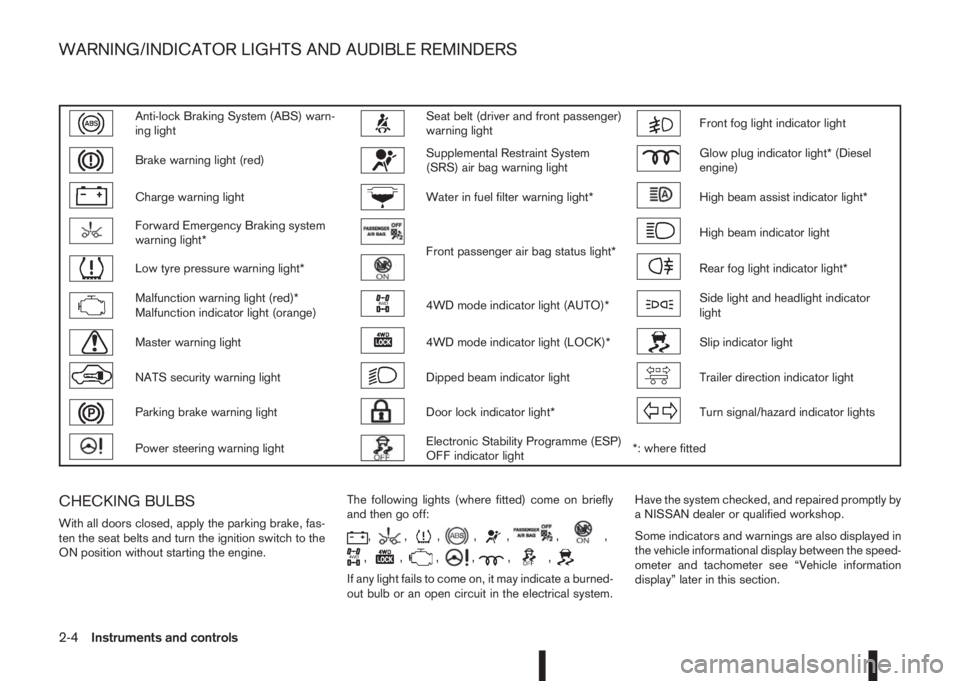
Anti-lock Braking System (ABS) warn-
ing lightSeat belt (driver and front passenger)
warning lightFront fog light indicator light
Brake warning light (red)Supplemental Restraint System
(SRS) air bag warning lightGlow plug indicator light* (Diesel
engine)
Charge warning lightWater in fuel filter warning light*High beam assist indicator light*
Forward Emergency Braking system
warning light*
Front passenger air bag status light*
High beam indicator light
Low tyre pressure warning light*Rear fog light indicator light*
Malfunction warning light (red)*
Malfunction indicator light (orange)4WD mode indicator light (AUTO)*Side light and headlight indicator
light
Master warning light4WD mode indicator light (LOCK)*Slip indicator light
NATS security warning lightDipped beam indicator lightTrailer direction indicator light
Parking brake warning lightDoor lock indicator light*Turn signal/hazard indicator lights
Power steering warning lightElectronic Stability Programme (ESP)
OFF indicator light*: where fitted
CHECKING BULBS
With all doors closed, apply the parking brake, fas-
ten the seat belts and turn the ignition switch to the
ON position without starting the engine.The following lights (where fitted) come on briefly
and then go off:,,,,,,,
,,,,,,
If any light fails to come on, it may indicate a burned-
out bulb or an open circuit in the electrical system.Have the system checked, and repaired promptly by
a NISSAN dealer or qualified workshop.
Some indicators and warnings are also displayed in
the vehicle informational display between the speed-
ometer and tachometer see “Vehicle information
display” later in this section.
WARNING/INDICATOR LIGHTS AND AUDIBLE REMINDERS
2-4Instruments and controls
Page 63 of 338
WARNING LIGHTS
Also see “Vehicle information display” later in this
section.
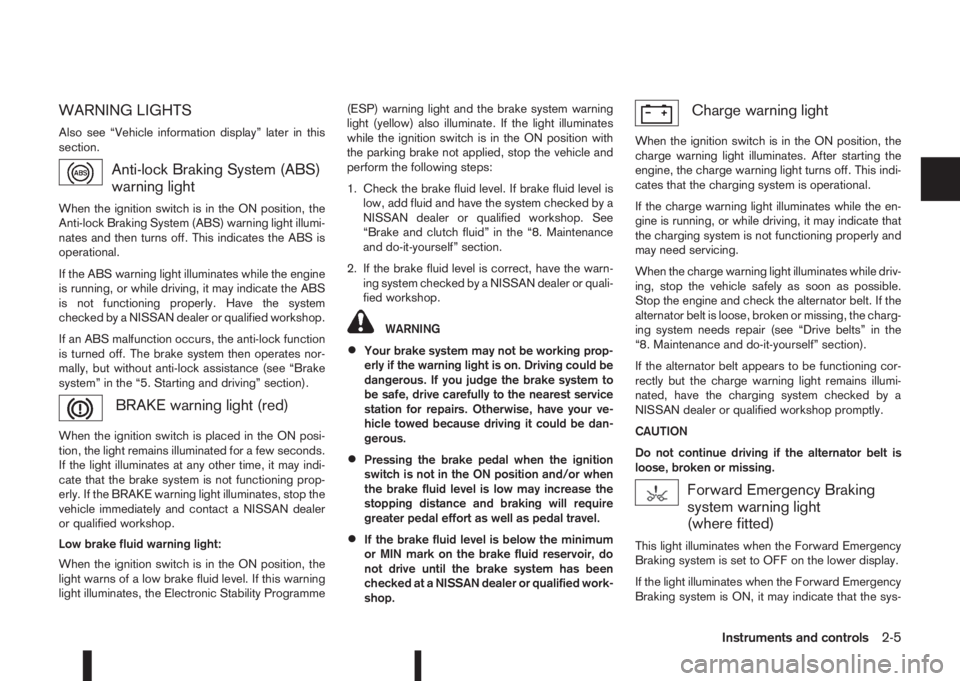
Anti-lock Braking System (ABS)
warning light
When the ignition switch is in the ON position, the
Anti-lock Braking System (ABS) warning light illumi-
nates and then turns off. This indicates the ABS is
operational.
If the ABS warning light illuminates while the engine
is running, or while driving, it may indicate the ABS
is not functioning properly. Have the system
checked by a NISSAN dealer or qualified workshop.
If an ABS malfunction occurs, the anti-lock function
is turned off. The brake system then operates nor-
mally, but without anti-lock assistance (see “Brake
system” in the “5. Starting and driving” section).
BRAKE warning light (red)
When the ignition switch is placed in the ON posi-
tion, the light remains illuminated for a few seconds.
If the light illuminates at any other time, it may indi-
cate that the brake system is not functioning prop-
erly. If the BRAKE warning light illuminates, stop the
vehicle immediately and contact a NISSAN dealer
or qualified workshop.
Low brake fluid warning light:
When the ignition switch is in the ON position, the
light warns of a low brake fluid level. If this warning
light illuminates, the Electronic Stability Programme(ESP) warning light and the brake system warning
light (yellow) also illuminate. If the light illuminates
while the ignition switch is in the ON position with
the parking brake not applied, stop the vehicle and
perform the following steps:
1. Check the brake fluid level. If brake fluid level is
low, add fluid and have the system checked by a
NISSAN dealer or qualified workshop. See
“Brake and clutch fluid” in the “8. Maintenance
and do-it-yourself” section.
2. If the brake fluid level is correct, have the warn-
ing system checked by a NISSAN dealer or quali-
fied workshop.
WARNING
•Your brake system may not be working prop-
erly if the warning light is on. Driving could be
dangerous. If you judge the brake system to
be safe, drive carefully to the nearest service
station for repairs. Otherwise, have your ve-
hicle towed because driving it could be dan-
gerous.
•Pressing the brake pedal when the ignition
switch is not in the ON position and/or when
the brake fluid level is low may increase the
stopping distance and braking will require
greater pedal effort as well as pedal travel.
•If the brake fluid level is below the minimum
or MIN mark on the brake fluid reservoir, do
not drive until the brake system has been
checked at a NISSAN dealer or qualified work-
shop.
Charge warning light
When the ignition switch is in the ON position, the
charge warning light illuminates. After starting the
engine, the charge warning light turns off. This indi-
cates that the charging system is operational.
If the charge warning light illuminates while the en-
gine is running, or while driving, it may indicate that
the charging system is not functioning properly and
may need servicing.
When the charge warning light illuminates while driv-
ing, stop the vehicle safely as soon as possible.
Stop the engine and check the alternator belt. If the
alternator belt is loose, broken or missing, the charg-
ing system needs repair (see “Drive belts” in the
“8. Maintenance and do-it-yourself” section).
If the alternator belt appears to be functioning cor-
rectly but the charge warning light remains illumi-
nated, have the charging system checked by a
NISSAN dealer or qualified workshop promptly.
CAUTION
Do not continue driving if the alternator belt is
loose, broken or missing.
Forward Emergency Braking
system warning light
(where fitted)
This light illuminates when the Forward Emergency
Braking system is set to OFF on the lower display.
If the light illuminates when the Forward Emergency
Braking system is ON, it may indicate that the sys-
Instruments and controls2-5
Page 64 of 338
tem is unavailable. See “Forward emergency brak-
ing system (where fitted)” in the “5. Starting and
driving” section for more details.
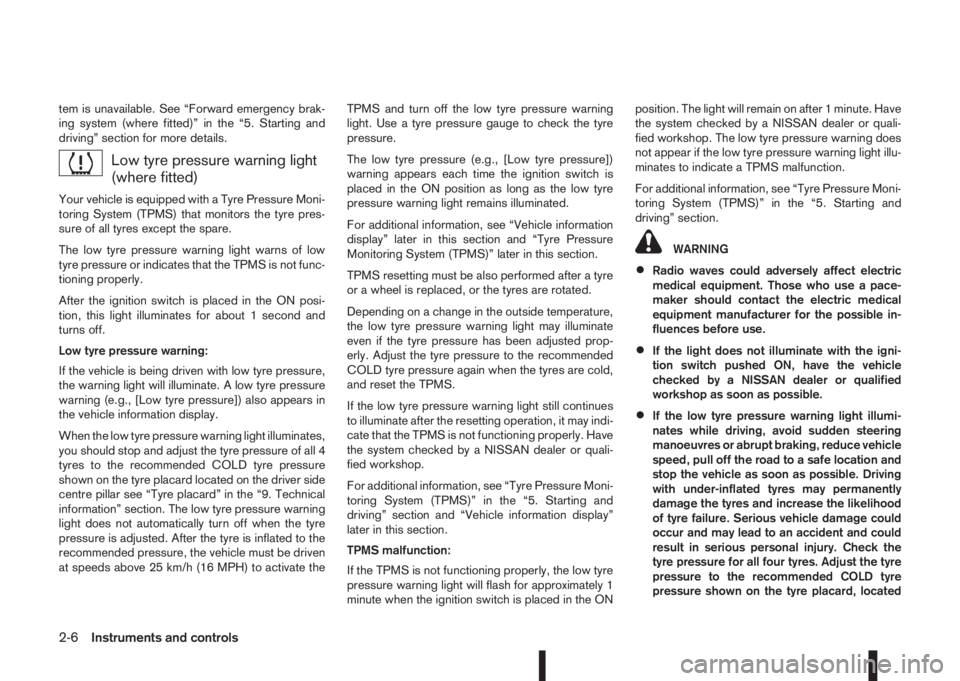
Low tyre pressure warning light
(where fitted)
Your vehicle is equipped with a Tyre Pressure Moni-
toring System (TPMS) that monitors the tyre pres-
sure of all tyres except the spare.
The low tyre pressure warning light warns of low
tyre pressure or indicates that the TPMS is not func-
tioning properly.
After the ignition switch is placed in the ON posi-
tion, this light illuminates for about 1 second and
turns off.
Low tyre pressure warning:
If the vehicle is being driven with low tyre pressure,
the warning light will illuminate. A low tyre pressure
warning (e.g., [Low tyre pressure]) also appears in
the vehicle information display.
When the low tyre pressure warning light illuminates,
you should stop and adjust the tyre pressure of all 4
tyres to the recommended COLD tyre pressure
shown on the tyre placard located on the driver side
centre pillar see “Tyre placard” in the “9. Technical
information” section. The low tyre pressure warning
light does not automatically turn off when the tyre
pressure is adjusted. After the tyre is inflated to the
recommended pressure, the vehicle must be driven
at speeds above 25 km/h (16 MPH) to activate theTPMS and turn off the low tyre pressure warning
light. Use a tyre pressure gauge to check the tyre
pressure.
The low tyre pressure (e.g., [Low tyre pressure])
warning appears each time the ignition switch is
placed in the ON position as long as the low tyre
pressure warning light remains illuminated.
For additional information, see “Vehicle information
display” later in this section and “Tyre Pressure
Monitoring System (TPMS)” later in this section.
TPMS resetting must be also performed after a tyre
or a wheel is replaced, or the tyres are rotated.
Depending on a change in the outside temperature,
the low tyre pressure warning light may illuminate
even if the tyre pressure has been adjusted prop-
erly. Adjust the tyre pressure to the recommended
COLD tyre pressure again when the tyres are cold,
and reset the TPMS.
If the low tyre pressure warning light still continues
to illuminate after the resetting operation, it may indi-
cate that the TPMS is not functioning properly. Have
the system checked by a NISSAN dealer or quali-
fied workshop.
For additional information, see “Tyre Pressure Moni-
toring System (TPMS)” in the “5. Starting and
driving” section and “Vehicle information display”
later in this section.
TPMS malfunction:
If the TPMS is not functioning properly, the low tyre
pressure warning light will flash for approximately 1
minute when the ignition switch is placed in the ONposition. The light will remain on after 1 minute. Have
the system checked by a NISSAN dealer or quali-
fied workshop. The low tyre pressure warning does
not appear if the low tyre pressure warning light illu-
minates to indicate a TPMS malfunction.
For additional information, see “Tyre Pressure Moni-
toring System (TPMS)” in the “5. Starting and
driving” section.
WARNING
•Radio waves could adversely affect electric
medical equipment. Those who use a pace-
maker should contact the electric medical
equipment manufacturer for the possible in-
fluences before use.
•If the light does not illuminate with the igni-
tion switch pushed ON, have the vehicle
checked by a NISSAN dealer or qualified
workshop as soon as possible.
•If the low tyre pressure warning light illumi-
nates while driving, avoid sudden steering
manoeuvres or abrupt braking, reduce vehicle
speed, pull off the road to a safe location and
stop the vehicle as soon as possible. Driving
with under-inflated tyres may permanently
damage the tyres and increase the likelihood
of tyre failure. Serious vehicle damage could
occur and may lead to an accident and could
result in serious personal injury. Check the
tyre pressure for all four tyres. Adjust the tyre
pressure to the recommended COLD tyre
pressure shown on the tyre placard, located
2-6Instruments and controls
Page 65 of 338
on the driver side centre pillar, to turn the low
tyre pressure warning light off. If the light still
illuminates while driving after adjusting the
tyre pressure, a tyre may be flat. If you have a
flat tyre, repair it with the emergency tyre
puncture repair kit (where fitted) or replace it
with a spare tyre (where fitted) as soon as
possible.
•After adjusting the tyre pressure, be sure to
reset the TPMS. Unless the resetting is per-
formed, the TPMS will not warn of the low tyre
pressure correctly.
•When a spare tyre is mounted or a wheel is
replaced, the TPMS will not function and the
low tyre pressure warning light will flash for
approximately 1 minute. The light will remain
on after 1 minute. Contact a NISSAN dealer or
qualified workshop as soon as possible for
tyre replacement and/or system resetting.
•Replacing tyres with those not originally speci-
fied by NISSAN could affect the proper opera-
tion of the TPMS.
CAUTION
•The TPMS is not a substitute for the regular
tyre pressure check. Be sure to check the tyre
pressure regularly.
•If the vehicle is being driven at speeds of less
than 25 km/h (16 MPH), the TPMS may not
operate correctly.
•Be sure to install the specified size of tyres to
all four wheels correctly.
Malfunction warning light (red)
(where fitted)
When the ignition switch is turned to the ON posi-
tion, the malfunction warning light illuminates. This
means the system is operational.
See “Malfunction Indicator light (orange)” later in
this section for details of the orange Malfunction
Indicator light.
If the red malfunction warning light comes on steady
while the engine is running, it may indicate an en-
gine control system malfunction.
Have your vehicle inspected by a NISSAN dealer or
qualified workshop. You do not need to have your
vehicle towed to the dealer.
CAUTION
Continued vehicle operation without having the
engine control system checked and repaired as
necessary could lead to poor driveability,
reduced fuel economy and possible damage to
the engine control system, which may affect your
warranty coverage.
Incorrect setting of the engine control system may
lead to non-compliance of local and national emis-
sion laws and regulations.
Master warning light
When the ignition switch is in the ON position, the
master warning light illuminates if any of the follow-
ing are displayed in the vehicle information display
(see “Vehicle information display” later in this sec-
tion):
•No key warning
•Key ID incorrect warning
•Low windscreen washer fluid warning
•Parking brake release warning
•Door/boot open warning
•Low tyre pressure warning
•Four-Wheel Drive (4WD) warning (where fitted)
•Intelligent Key system warning
If the driver assist system warnings (where fitted)
appear in the vehicle information display, the master
warning light also illuminates. See “Blind Spot Warn-
ing (BSW) system (where fitted)” in the “5. Starting
and driving” section, “Lane Departure Warning
(LDW) system (where fitted)” in the “5. Starting and
driving” section, and/or “Forward emergency brak-
ing system (where fitted)” in the “5. Starting and
driving” section.
Instruments and controls2-7
Page 66 of 338
NATS security warning light
This light blinks when the ignition switch is in the
LOCK, “OFF” or Acc position. This function indi-
cates that your vehicle is equipped with the NISSAN
Anti-Theft System (NATS)*.
If NATS is malfunctioning, this light will remain on
while the ignition switch is in the ON position.
For additional information, see “Security system”
later in this section.
* Immobilizer
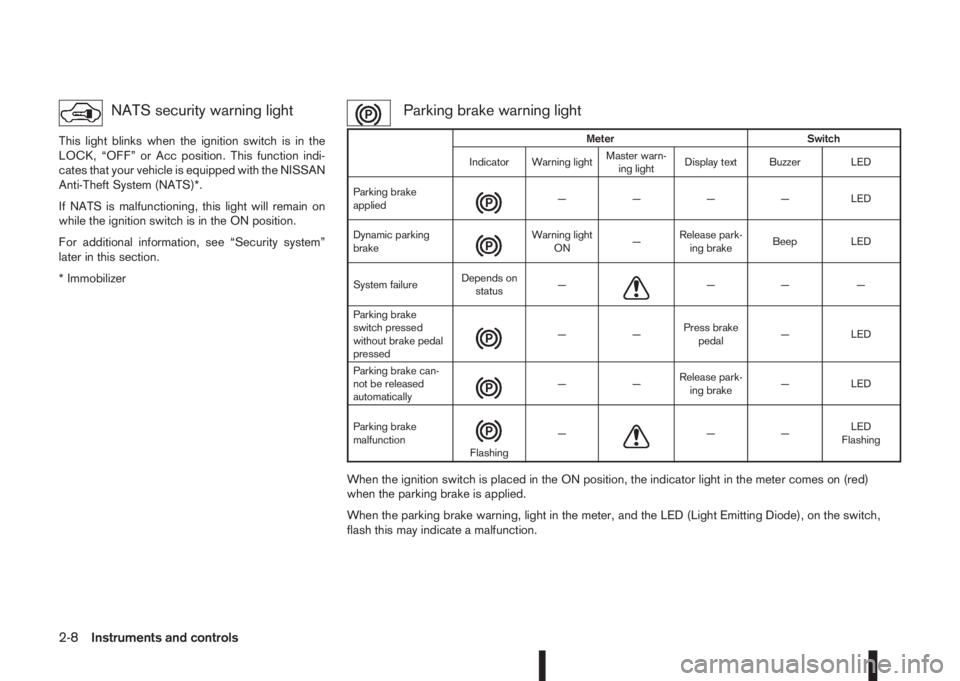
Parking brake warning light
When the ignition switch is placed in the ON position, the indicator light in the meter comes on (red)
when the parking brake is applied.
When the parking brake warning, light in the meter, and the LED (Light Emitting Diode), on the switch,
flash this may indicate a malfunction.
Meter Switch
Indicator Warning lightMaster warn-
ing lightDisplay text Buzzer LED
Parking brake
applied
m— — — — LED
Dynamic parking
brake
m
Warning light
ON—Release park-
ing brakeBeep LED
System failureDepends on
status—
m—— —
Parking brake
switch pressed
without brake pedal
pressed
m——Press brake
pedal— LED
Parking brake can-
not be released
automatically
m——Release park-
ing brake— LED
Parking brake
malfunction
mFlashing—m——LED
Flashing
2-8Instruments and controls