locking NISSAN QASHQAI 2016 Owner´s Manual
[x] Cancel search | Manufacturer: NISSAN, Model Year: 2016, Model line: QASHQAI, Model: NISSAN QASHQAI 2016Pages: 338, PDF Size: 4.87 MB
Page 84 of 338
![NISSAN QASHQAI 2016 Owner´s Manual 37. [Adaptive Front-Lighting System
Fault] warning (where fitted)
This warning illuminates when there is a problem
with the dynamic high beam assistant system. See
“Dynamic high beam assistant (wher](/img/5/40324/w960_40324-83.png "NISSAN QASHQAI 2016 Owner´s Manual 37. [Adaptive Front-Lighting System
Fault] warning (where fitted)
This warning illuminates when there is a problem
with the dynamic high beam assistant system. See
“Dynamic high beam assistant (wher")
37. [Adaptive Front-Lighting System
Fault] warning (where fitted)
This warning illuminates when there is a problem
with the dynamic high beam assistant system. See
“Dynamic high beam assistant (where fitted)” later
in this section. If this warning comes on, have the
system checked by a NISSAN dealer or qualified
workshop.
38. [Headlight System Fault] warning
(where fitted)
This warning illuminates when the LED headlights
need to be replaced. If this warning comes on, have
the system checked by a NISSAN dealer or quali-
fied workshop. See “LED headlight (where fitted)”
later in this section
39–45. [Stop/Start] System
These indicators show the Stop/Start System sta-
tus. See “Stop/Start System (where fitted)” in the
“5. Starting and driving” section.
46. [Push Ignition to OFF] warning
This warning will illuminate if the ignition switch is
placed in the ACC position when the shift lever is
moved to the P (Park) position. To turn off the Push
warning, place the ignition switch in the ON position
and then in the LOCK position.
47. [Please Select Driving Aids in
Settings Menu] warning
This warning is displayed if the Driving Aids items
are not available because they are turned off in the
Settings menu.
48–51. [System Fault] warning
This warning appears when the Blind Spot Warn-
ing, (where fitted), Lane Departure Warning (where
fitted), Traffic Sign Recognition (where fitted), or
Forward Emergency Braking systems (where fitted)
are not functioning properly.
52. [Not Available Front Radar
Obstruction] warning (where fitted)
If the sensor area of the front bumper is covered
with dirt or obstructed, making it impossible to de-
tect a vehicle ahead, the forward emergency brak-
ing system is automatically turned off. The forward
emergency braking system warning light (orange)
and the forward collision warning light (orange) will
illuminate and the [Not Available Front Radar Ob-
struction] warning message will appear in the ve-
hicle information display. If the [Not Available Front
Radar Obstruction] warning message appears, park
the vehicle in a safe location and turn the engine off.
Check to see if the sensor area of the front bumper
is blocked. If the sensor area of the front bumper is
blocked, remove the blocking material. Restart the
engine. If the warning light continues to illuminate,
have the forward emergency braking system
checked by a NISSAN dealer or qualified workshop.
53–54. [Not Available High Cabin
Temperature] warning (where fitted)
This warning appears if the interior temperature of
the vehicle has reached such a high temperature
that the sensor for the Traffic Sign Recognition and
Lane Departure warning systems can no longer
function reliably. Once the interior temperature has
reached normal levels, the warning should disap-
pear. If the warning continues to display, have the
system checked by a NISSAN dealer or qualified
workshop
55. [Not Available Clean Rear Camera]
warning (where fitted)
This message is displayed if the rear camera used
by the Blind Spot Warning system is dirty or cov-
ered with snow or rain. If the message appears,
park the vehicle in a safe place, turn off the engine,
and clean the camera unit with a soft cloth. Then
restart the engine.
56. [Steering lock Registration
Complete] indicator
This appears when a new intelligent key is regis-
tered to the vehicle.
57. [Please select 1 item or more]
indicator
This message appears when you are in the main
menu of the vehicle information display to remind
you to select at least one item.
2-26Instruments and controls
Page 106 of 338
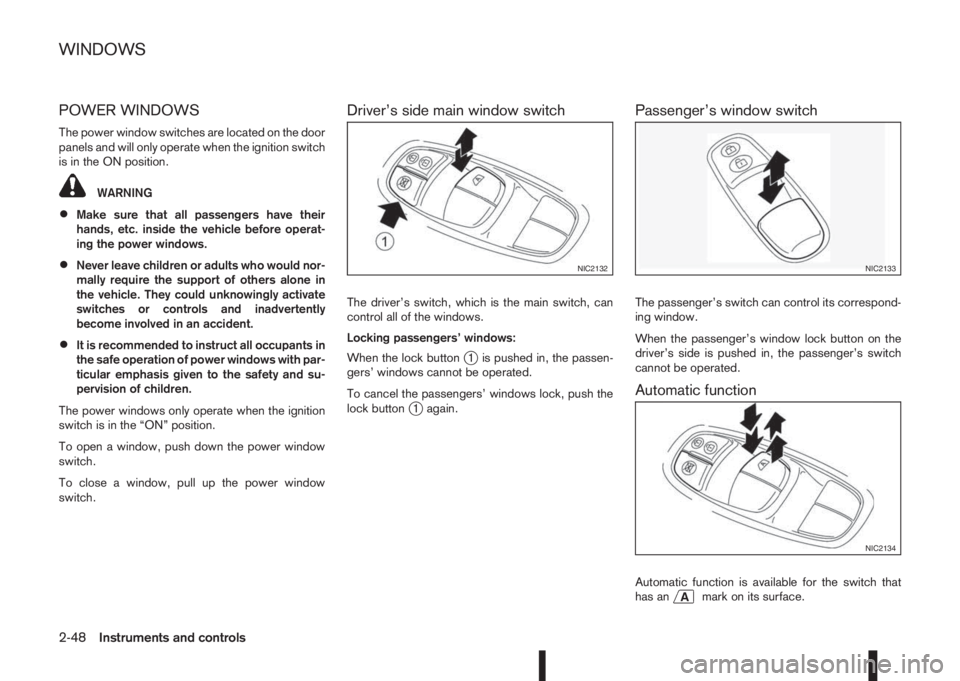
POWER WINDOWS
The power window switches are located on the door
panels and will only operate when the ignition switch
is in the ON position.
WARNING
•Make sure that all passengers have their
hands, etc. inside the vehicle before operat-
ing the power windows.
•Never leave children or adults who would nor-
mally require the support of others alone in
the vehicle. They could unknowingly activate
switches or controls and inadvertently
become involved in an accident.
•It is recommended to instruct all occupants in
the safe operation of power windows with par-
ticular emphasis given to the safety and su-
pervision of children.
The power windows only operate when the ignition
switch is in the “ON” position.
To open a window, push down the power window
switch.
To close a window, pull up the power window
switch.
Driver’s side main window switch
The driver’s switch, which is the main switch, can
control all of the windows.
Locking passengers’ windows:
When the lock button
j1 is pushed in, the passen-
gers’ windows cannot be operated.
To cancel the passengers’ windows lock, push the
lock button
j1 again.
Passenger’s window switch
The passenger’s switch can control its correspond-
ing window.
When the passenger’s window lock button on the
driver’s side is pushed in, the passenger’s switch
cannot be operated.
Automatic function
Automatic function is available for the switch that
has anmark on its surface.
NIC2132NIC2133
NIC2134
WINDOWS
2-48Instruments and controls
Page 111 of 338
3Pre-driving checks and adjustmentsPre-driving checks and adjustments
Keys ........................................................................ 3-2
NISSAN Anti-Theft System (NATS)* key ............. 3-2
Intelligent Key (where fitted)................................ 3-2
Key number ........................................................ 3-3
New keys ........................................................... 3-3
Emergency/mechanical key (Intelligent Key
models) .............................................................. 3-3
Integrated keyfob/remote control system .................. 3-4
Switching from Convenience mode to
Anti-hijack mode (where fitted) ............................ 3-5
Using the remote keyless entry system ................ 3-5
Locking the doors ............................................... 3-5
Unlocking the doors ............................................ 3-5
Keyfob operation failure ...................................... 3-5
Intelligent Key system (where fitted) ......................... 3-6
Intelligent Key operating range ............................ 3-6
Using Intelligent Key system................................ 3-6
Locking/unlocking .............................................. 3-7
Starting the engine with the Intelligent Key .......... 3-8
Door locks ............................................................... 3-8
Super Lock system (RHD models) ...................... 3-8
Locking/unlocking with the key (vehicle dead
battery) ............................................................... 3-9Inside door handle .............................................. 3-10
Power door lock switch ...................................... 3-10
Child safety lock — rear doors............................ 3-11
Back door lock ................................................... 3-11
Security system ....................................................... 3-12
Alarm system (where fitted) ................................ 3-12
NISSAN Anti-Theft System (NATS)..................... 3-13
Bonnet release ........................................................ 3-14
Fuel filler lid ............................................................. 3-15
Fuel filler lid opener lever .................................... 3-15
Fuel filler cap ...................................................... 3-15
Parking brake switch ............................................... 3-16
Driving away when towing a trailer ...................... 3-17
Steering wheel......................................................... 3-18
Sun visors ............................................................... 3-18
Mirrors..................................................................... 3-18
Inside rear-view mirror ........................................ 3-18
Automatic anti-dazzling inside mirror (where
fitted).................................................................. 3-19
Outside rear-view mirrors.................................... 3-19
Vanity mirror ....................................................... 3-20
Page 114 of 338
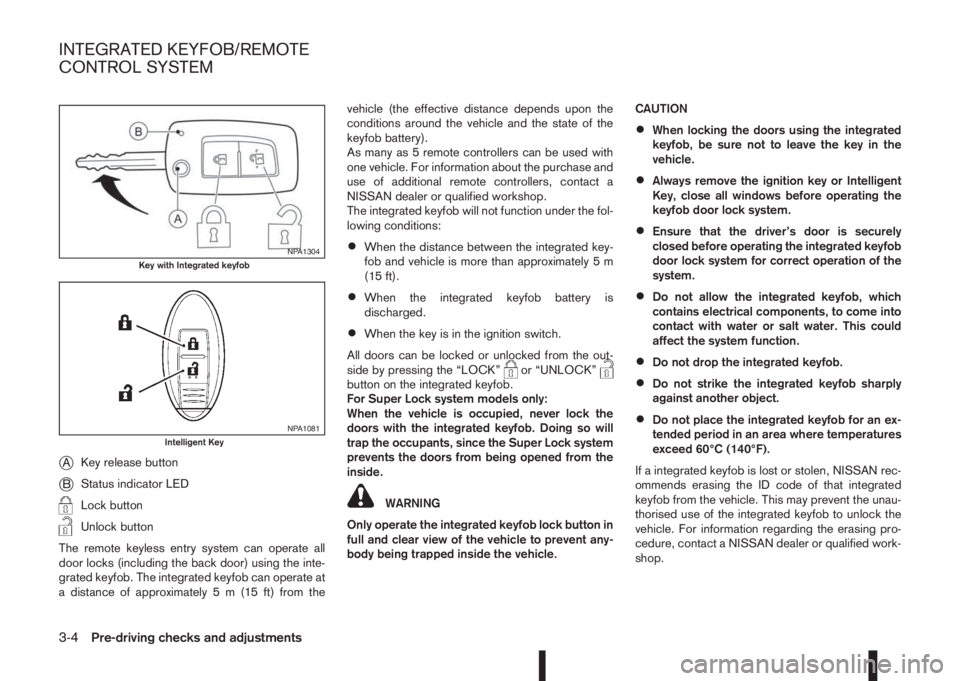
jAKey release button
jBStatus indicator LED
Lock button
Unlock button
The remote keyless entry system can operate all
door locks (including the back door) using the inte-
grated keyfob. The integrated keyfob can operate at
a distance of approximately 5 m (15 ft) from thevehicle (the effective distance depends upon the
conditions around the vehicle and the state of the
keyfob battery).
As many as 5 remote controllers can be used with
one vehicle. For information about the purchase and
use of additional remote controllers, contact a
NISSAN dealer or qualified workshop.
The integrated keyfob will not function under the fol-
lowing conditions:
•When the distance between the integrated key-
fob and vehicle is more than approximately 5 m
(15 ft).
•When the integrated keyfob battery is
discharged.
•When the key is in the ignition switch.
All doors can be locked or unlocked from the out-
side by pressing the “LOCK”
or “UNLOCK”button on the integrated keyfob.
For Super Lock system models only:
When the vehicle is occupied, never lock the
doors with the integrated keyfob. Doing so will
trap the occupants, since the Super Lock system
prevents the doors from being opened from the
inside.
WARNING
Only operate the integrated keyfob lock button in
full and clear view of the vehicle to prevent any-
body being trapped inside the vehicle.CAUTION
•When locking the doors using the integrated
keyfob, be sure not to leave the key in the
vehicle.
•Always remove the ignition key or Intelligent
Key, close all windows before operating the
keyfob door lock system.
•Ensure that the driver’s door is securely
closed before operating the integrated keyfob
door lock system for correct operation of the
system.
•Do not allow the integrated keyfob, which
contains electrical components, to come into
contact with water or salt water. This could
affect the system function.
•Do not drop the integrated keyfob.
•Do not strike the integrated keyfob sharply
against another object.
•Do not place the integrated keyfob for an ex-
tended period in an area where temperatures
exceed 60°C (140°F).
If a integrated keyfob is lost or stolen, NISSAN rec-
ommends erasing the ID code of that integrated
keyfob from the vehicle. This may prevent the unau-
thorised use of the integrated keyfob to unlock the
vehicle. For information regarding the erasing pro-
cedure, contact a NISSAN dealer or qualified work-
shop.
NPA1304Key with Integrated keyfob
NPA1081Intelligent Key
INTEGRATED KEYFOB/REMOTE
CONTROL SYSTEM
3-4Pre-driving checks and adjustments
Page 115 of 338
For information regarding the replacement of a bat-
tery, see “Integrated keyfob/Intelligent Key battery
replacement” in the “8. Maintenance and
do-it-yourself” section.
SWITCHING FROM CONVENIENCE
MODE TO ANTI-HIJACK MODE
(where fitted)
Selective unlock or “Anti-hijack” mode (where fit-
ted) allows the remote unlocking of only the driver’s
door to prevent an attacker from entering the vehicle
via an unlocked passenger door.
As default, the unlock mode will be set to “Conve-
nience” mode (all doors will unlock). Follow the in-
structions in “Vehicle information display” later in
this section.
USING THE REMOTE KEYLESS
ENTRY SYSTEM
WARNING
Super Lock system equipped models:
Failure to follow the precautions below may lead
to hazardous situations. Make sure the Super
Lock system activation is always conducted
safely.
•When the vehicle is occupied, never lock the
doors with the integrated keyfob. Doing so
will trap the occupants, since the Super Lock
system prevents the doors from being opened
from the inside of the vehicle.
•Only operate the integrated keyfob “LOCK”
button when there is a clear view of the ve-hicle. This is to prevent anybody from being
trapped inside the vehicle through the Super
Lock system activation.
For further details on the Super Lock system see
“Door locks” later in this section.
LOCKING THE DOORS
CAUTION
Before operating the keyfob remote control:
•Remove the ignition key or Intelligent Key
from the vehicle and close all windows.
•Check that the driver’s door is securely
closed.
Push the “LOCK” button
on the integrated key-
fob.
– All the doors lock.
– The direction indicators flash once.
If the “LOCK” button
is pushed with all the doors
locked, the direction indicators will flash once to
remind you that the doors are already locked.
UNLOCKING THE DOORS
When you first receive the vehicle, the door unlock
mode is set to unlock all the doors with one push of
the “UNLOCK”
button.
Convenience mode
Unlock all doors, pressing thebutton once.
Setting the convenience mode is done using the
[Settings] menu in the vehicle information display(Select the [Unlocking] menu key).
Also see “Vehicle information display” in the “2. In-
struments and controls” section.
ANTI-HIJACK MODE (where fitted)
Unlock the driver’s door only, pressing thebutton once.
Press thebutton twice to open all doors.
Setting the Anti-hijack mode is done using the [Set-
tings] menu in the vehicle information display (Se-
lect the [Unlocking] menu key). Set [Selective Un-
lock] to off.
For more information see “Vehicle information
display” in the “2. Instruments and controls” sec-
tion.
Auto-relock (where fitted):
An auto-relock function will a short period after a full
or partial unlock, if no further user action is taken.
The auto-relock will be cancelled if any door is
opened or the key is inserted into the ignition.
KEYFOB OPERATION FAILURE
The keyfob may not work properly if:
•The keyfob battery is low.
See “Integrated keyfob/Intelligent Key battery
replacement” in the “8. Maintenance and
do-it-yourself” section for keyfob battery replace-
ment instructions and the required battery type.
Pre-driving checks and adjustments3-5
Page 116 of 338
•The locking/unlocking system has been used
continuously.
An anti lock-abuse system prevents the lock mo-
tors from overheating and disables the keyfob
locking operation for a short period of time if the
system is used continuously.
•The door handle is being pulled while the
keyfob is being operated.
•The vehicle’s battery is dead.
NOTE
See [NO KEY Detected] warning, [Key battery
low] indicator, [Key ID Incorrect] warning or In-
telligent Key system warning in “Vehicle informa-
tion display” in the “2. Instruments and controls”
section for more information.The Intelligent Key system is a convenient keyless
entry system that allows you to operate your vehicle
without using an actual key.
WARNING
Radio waves could adversely affect electric medi-
cal equipment. Those who use a pacemaker
should contact the electric medical equipment
manufacturer for the possible influences before
use.
INTELLIGENT KEY OPERATING
RANGE
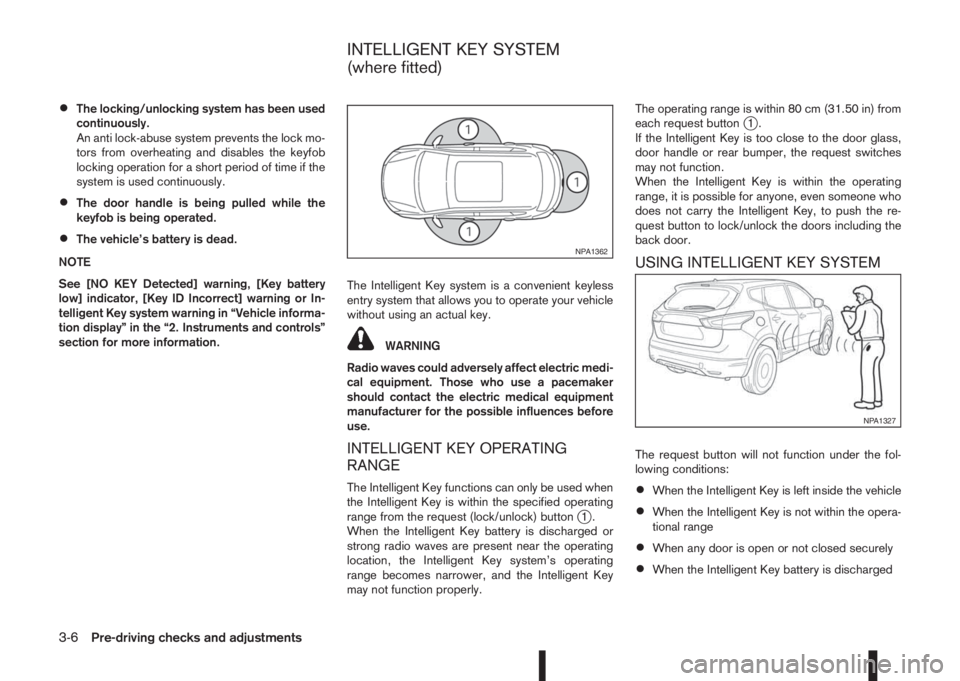
The Intelligent Key functions can only be used when
the Intelligent Key is within the specified operating
range from the request (lock/unlock) button
j1.
When the Intelligent Key battery is discharged or
strong radio waves are present near the operating
location, the Intelligent Key system’s operating
range becomes narrower, and the Intelligent Key
may not function properly.The operating range is within 80 cm (31.50 in) from
each request button
j1.
If the Intelligent Key is too close to the door glass,
door handle or rear bumper, the request switches
may not function.
When the Intelligent Key is within the operating
range, it is possible for anyone, even someone who
does not carry the Intelligent Key, to push the re-
quest button to lock/unlock the doors including the
back door.
USING INTELLIGENT KEY SYSTEM
The request button will not function under the fol-
lowing conditions:
•When the Intelligent Key is left inside the vehicle
•When the Intelligent Key is not within the opera-
tional range
•When any door is open or not closed securely
•When the Intelligent Key battery is discharged
NPA1362
NPA1327
INTELLIGENT KEY SYSTEM
(where fitted)
3-6Pre-driving checks and adjustments
Page 117 of 338
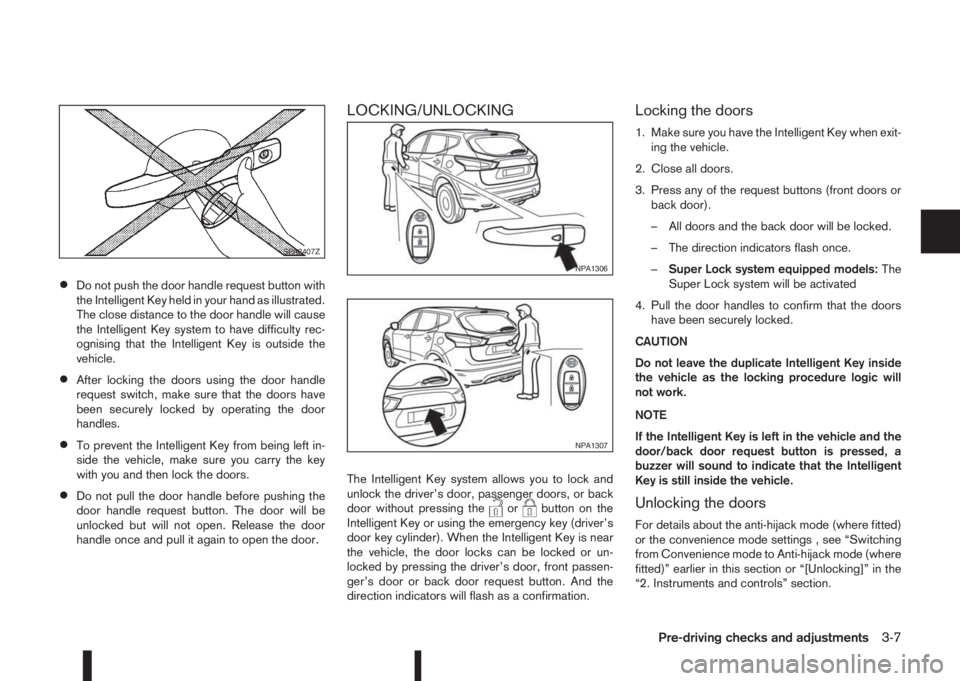
•Do not push the door handle request button with
the Intelligent Key held in your hand as illustrated.
The close distance to the door handle will cause
the Intelligent Key system to have difficulty rec-
ognising that the Intelligent Key is outside the
vehicle.
•After locking the doors using the door handle
request switch, make sure that the doors have
been securely locked by operating the door
handles.
•To prevent the Intelligent Key from being left in-
side the vehicle, make sure you carry the key
with you and then lock the doors.
•Do not pull the door handle before pushing the
door handle request button. The door will be
unlocked but will not open. Release the door
handle once and pull it again to open the door.
LOCKING/UNLOCKING
The Intelligent Key system allows you to lock and
unlock the driver’s door, passenger doors, or back
door without pressing the
orbutton on the
Intelligent Key or using the emergency key (driver’s
door key cylinder). When the Intelligent Key is near
the vehicle, the door locks can be locked or un-
locked by pressing the driver’s door, front passen-
ger’s door or back door request button. And the
direction indicators will flash as a confirmation.
Locking the doors
1. Make sure you have the Intelligent Key when exit-
ing the vehicle.
2. Close all doors.
3. Press any of the request buttons (front doors or
back door).
– All doors and the back door will be locked.
– The direction indicators flash once.
–Super Lock system equipped models:The
Super Lock system will be activated
4. Pull the door handles to confirm that the doors
have been securely locked.
CAUTION
Do not leave the duplicate Intelligent Key inside
the vehicle as the locking procedure logic will
not work.
NOTE
If the Intelligent Key is left in the vehicle and the
door/back door request button is pressed, a
buzzer will sound to indicate that the Intelligent
Key is still inside the vehicle.
Unlocking the doors
For details about the anti-hijack mode (where fitted)
or the convenience mode settings , see “Switching
from Convenience mode to Anti-hijack mode (where
fitted)” earlier in this section or “[Unlocking]” in the
“2. Instruments and controls” section.
SPA2407Z
NPA1306
NPA1307
Pre-driving checks and adjustments3-7
Page 118 of 338
![NISSAN QASHQAI 2016 Owner´s Manual Convenience mode:
Push the door/back door request button.
– All doors and the back door will be unlocked.
– The direction indicators flash twice.
– The message [All door unlock] appears in the
v](/img/5/40324/w960_40324-117.png "NISSAN QASHQAI 2016 Owner´s Manual Convenience mode:
Push the door/back door request button.
– All doors and the back door will be unlocked.
– The direction indicators flash twice.
– The message [All door unlock] appears in the
v")
Convenience mode:
Push the door/back door request button.
– All doors and the back door will be unlocked.
– The direction indicators flash twice.
– The message [All door unlock] appears in the
vehicle information display.
Anti-hijack mode (where fitted):
1. Push the door/back door request button.
– The corresponding door unlocks.
– The direction indicators flash twice quickly.
2. Push the request button again within 5 seconds.
– All the doors and the back door will be unlocked.
– The direction indicators flash twice.
NOTE
•External interference may impair the Intelli-
gent Key’s operation. In this case, use the
emergency key located in the Intelligent Key
integrated keyfob. See “Door locks” later in
this section for further details.
•If the vehicle is unlocked and no doors are
opened for 2 minutes the doors will automati-
cally be locked.
CAUTION
•Make sure the Intelligent Key battery is in good
condition. Note that battery life may vary de-
pending on condition, amount of use, ambi-
ent temperature, etc.
•The Intelligent Key contains a miniature radio
transmitter that may be affected when placed
near metal objects.
•Keep the Intelligent Key away from mobile
phones, laptop computers and other metal
objects or electronics.
STARTING THE ENGINE WITH THE
INTELLIGENT KEY
See “Push-button ignition switch (where fitted)” in
the “5. Starting and driving” section.
CAUTION
•Make sure you carry the Intelligent Key with
you when starting and driving the vehicle.
•If the Intelligent Key is too far away from the
passenger compartment, the vehicle may not
start. See “Intelligent Key operating range” in
the “3. Pre-driving checks and adjustments”
section
SUPER LOCK SYSTEM (RHD models)
WARNING
Super Lock system equipped models:
Failure to follow the precautions below may lead
to hazardous situations. Make sure the Super
Lock system activation is always conducted
safely.
•When the vehicle is occupied, never lock the
doors with the integrated keyfob. Doing so
will trap the occupants, since the Super Lock
system prevents the doors from being opened
from the inside of the vehicle.
•Only operate the integrated keyfob “LOCK”
button when there is a clear view of the ve-
hicle. This is to prevent anybody from being
trapped inside the vehicle through the Super
Lock system activation.
Pressing the “LOCK” button (
) on the integrated
keyfob or locking the doors using one of the request
buttons (Intelligent Key models) will activate the Su-
per Lock system.
When the Super Lock system is active, none of the
doors can be opened from inside the vehicle. This
provides additional security in case of theft or break-
in.
The Super Lock system will be released when all
the doors are unlocked using the integrated keyfob
or a request button (Intelligent Key models).
DOOR LOCKS
3-8Pre-driving checks and adjustments
Page 119 of 338
Emergency situations
If the Super Lock system is activated while you are
inside the vehicle, for example by a traffic accident
or other unexpected circumstances, follow the in-
structions below.
To release the Super Lock system:
– Insert the key into the ignition switch and turn it
to the ON position.
All doors can now be unlocked and opened from
inside the vehicle.
– Remove the key from the ignition switch and un-
lock the doors using the integrated keyfob “UN-
LOCK” button (
).
All doors can now be opened from inside the
vehicle.
To unlock and open the driver’s door from
inside the vehicle while the Super Lock system
is active:
1. Open or break the driver’s door window.
2. Insert the key into the outside door key cylinder
and turn it towards the rear of the vehicle.
3. The driver’s door will unlock and can now be
opened from inside the vehicle.
Locking without activating the Super
Lock system
WARNING
Do not leave the key inside the vehicle when leav-
ing the vehicle.
Locking the doors using the door key cylinder or
power door lock switch will not activate the Super
Lock system. See “Locking/unlocking with the key
(vehicle dead battery)” later in this section for fur-
ther information.
LOCKING/UNLOCKING WITH THE
KEY (vehicle dead battery)
WARNING
•When leaving the vehicle, do not leave the key
inside the vehicle.
•Never leave children unattended in a vehicle
and always be sure you have your keys withyou when leaving. If an emergency occurs it
may be more difficult to help them otherwise.
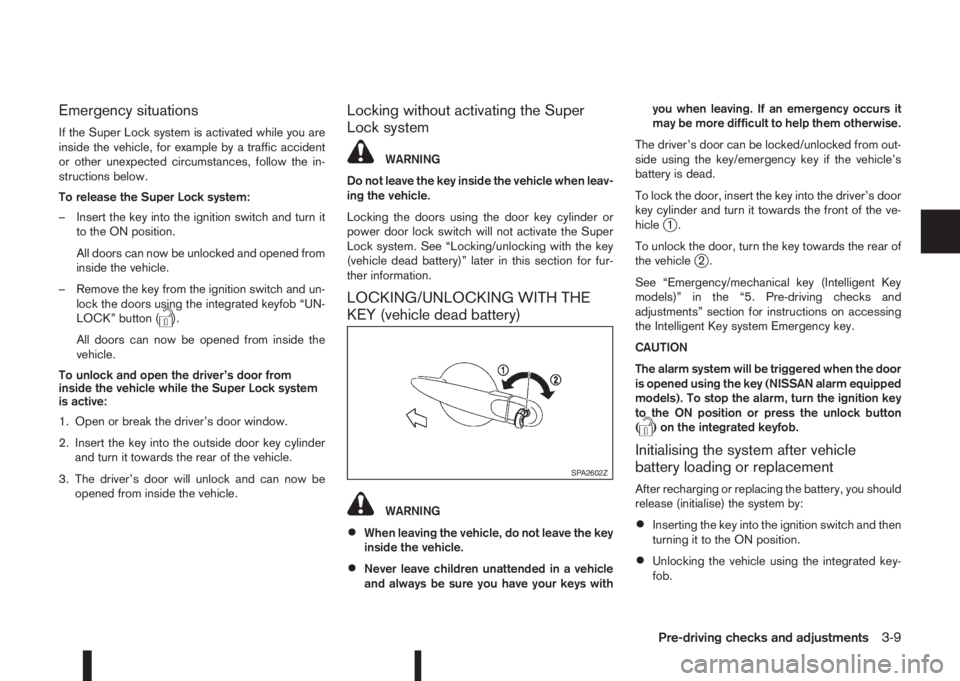
The driver’s door can be locked/unlocked from out-
side using the key/emergency key if the vehicle’s
battery is dead.
To lock the door, insert the key into the driver’s door
key cylinder and turn it towards the front of the ve-
hicle
j1.
To unlock the door, turn the key towards the rear of
the vehicle
j2.
See “Emergency/mechanical key (Intelligent Key
models)” in the “5. Pre-driving checks and
adjustments” section for instructions on accessing
the Intelligent Key system Emergency key.
CAUTION
The alarm system will be triggered when the door
is opened using the key (NISSAN alarm equipped
models). To stop the alarm, turn the ignition key
to the ON position or press the unlock button
(
) on the integrated keyfob.
Initialising the system after vehicle
battery loading or replacement
After recharging or replacing the battery, you should
release (initialise) the system by:
•Inserting the key into the ignition switch and then
turning it to the ON position.
•Unlocking the vehicle using the integrated key-
fob.
SPA2602Z
Pre-driving checks and adjustments3-9
Page 120 of 338
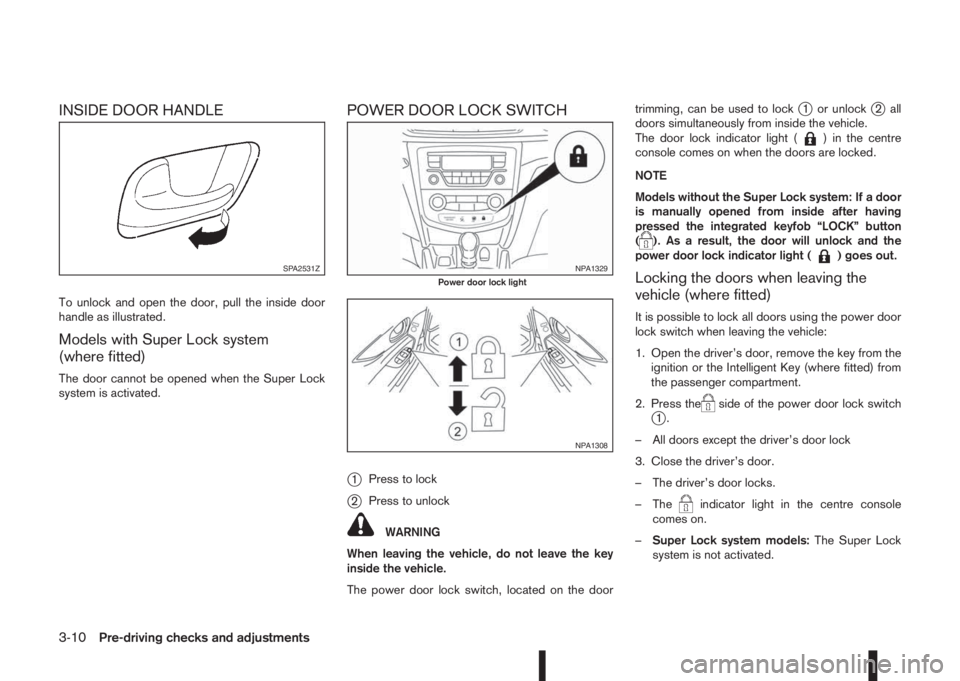
INSIDE DOOR HANDLE
To unlock and open the door, pull the inside door
handle as illustrated.
Models with Super Lock system
(where fitted)
The door cannot be opened when the Super Lock
system is activated.
POWER DOOR LOCK SWITCH
j
1Press to lock
j2Press to unlock
WARNING
When leaving the vehicle, do not leave the key
inside the vehicle.
The power door lock switch, located on the doortrimming, can be used to lock
j1 or unlockj2 all
doors simultaneously from inside the vehicle.
The door lock indicator light (
) in the centre
console comes on when the doors are locked.
NOTE
Models without the Super Lock system: If a door
is manually opened from inside after having
pressed the integrated keyfob “LOCK” button
(
). As a result, the door will unlock and the
power door lock indicator light () goes out.
Locking the doors when leaving the
vehicle (where fitted)
It is possible to lock all doors using the power door
lock switch when leaving the vehicle:
1. Open the driver’s door, remove the key from the
ignition or the Intelligent Key (where fitted) from
the passenger compartment.
2. Press the
side of the power door lock switchj1.
– All doors except the driver’s door lock
3. Close the driver’s door.
– The driver’s door locks.
– The
indicator light in the centre console
comes on.
–Super Lock system models:The Super Lock
system is not activated.
SPA2531ZNPA1329Power door lock light
NPA1308
3-10Pre-driving checks and adjustments