locking NISSAN QASHQAI 2016 Owner´s Manual
[x] Cancel search | Manufacturer: NISSAN, Model Year: 2016, Model line: QASHQAI, Model: NISSAN QASHQAI 2016Pages: 338, PDF Size: 4.87 MB
Page 26 of 338
WARNING
Head restraints supplement the other vehicle
safety systems. They may provide additional pro-
tection against injury in certain rear end colli-
sions. Adjust the head restraints properly, as
specified in this section. Check the adjustment
after someone else uses the seat. Do not attach
anything to the head restraint stalks or remove
the head restraint. Do not use the seat if the
head restraint has been removed. If the head
restraint was removed, reinstall and properly ad-
just the head restraint before an occupant uses
the seating position. Failure to follow these in-
structions can reduce the effectiveness of the
head restraints. This may increase the risk of se-
rious injury or death in a collision.
•Your vehicle is equipped with head restraints.
On the front seats they are adjustable. On the
rear seats, where fitted, they are non-adjustable
but have a lower storage position.
•Adjustable head restraints have multiple notches
along the stalk to lock them in a desired adjust-
ment position.
•The non-adjustable head restraints have a single
locking notch to secure them to the seat frame.
•Proper Adjustment:
– For the adjustable type, align the head re-
straint so the centre of your ear is approxi-
mately level with the centre of the head re-
straint.– If your ear position is still higher than the rec-
ommended alignment, place the head
restraint at the highest position.
– For the non-adjustable type, raise into lock-
ing position before use. The seat should not
be occupied with the head restraint in the
lower storage position.
•If the head restraint has been removed, ensure
that it is reinstalled and locked in place before
riding in that designated seating position.
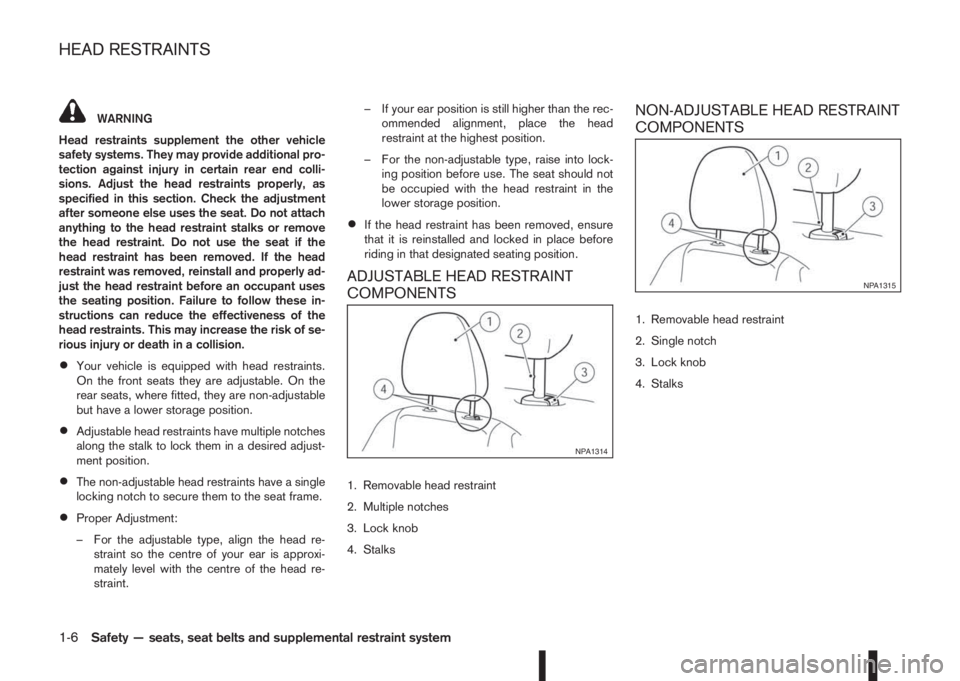
ADJUSTABLE HEAD RESTRAINT
COMPONENTS
1. Removable head restraint
2. Multiple notches
3. Lock knob
4. Stalks
NON-ADJUSTABLE HEAD RESTRAINT
COMPONENTS
1. Removable head restraint
2. Single notch
3. Lock knob
4. Stalks
NPA1314
NPA1315
HEAD RESTRAINTS
1-6Safety — seats, seat belts and supplemental restraint system
Page 36 of 338
•Never install a rear-facing child restraint sys-
tem on the front passenger seat without first
deactivating the passenger air bag with the
front passenger air bag switch (where fitted),
see “Front passenger air bag switch (where
fitted)” later in this section. In a frontal colli-
sion, supplemental front-impact air bags in-
flate with great force. An inflating supplemen-
tal front-impact air bag could seriously injure
or kill your child.
•Adjustable seatbacks should be positioned to
fit the child restraint system, but as upright as
possible.
•If the seat belt in the position where a child
restraint system is installed requires a locking
device and if it is not used, injuries could re-
sult from a child restraint system tipping over
during normal vehicle braking or cornering.
•After attaching a child restraint system, test it
before you place the child in it. Push it from
side to side and tug it forward to make sure
that it is held securely in place. The child re-
straint system should not move more than 25
mm (1 in). If the restraint is not secure, tighten
the belt as necessary, or install the restraint in
another seat and test it again.
•If a child restraint system is not anchored
properly, the risk of a child being injured in a
collision or a sudden stop greatly increases.
•Improper use of a child restraint system can
increase the risk or severity of injury for both
the child and other occupants in the vehicle.
•When the child restraint system is not in use,
keep it secured with the ISOFIX child restraint
system or a seat belt to prevent it from being
thrown around in case of a sudden stop or
accident.
NISSAN recommends that infants and small chil-
dren be seated in a child restraint system. You
should choose a child restraint system that fits your
vehicle and always follow the manufacturer’s in-
structions for installation and use. In addition, there
are many types of child restraint systems available
for larger children that should be used for maximum
protection.
CAUTION
Remember that a child restraint left in a closed
vehicle can become very hot. Check the seating
surface and buckles before placing your child in
a child restraint.
CHILD RESTRAINT AND ISOFIX
INFORMATION
When selecting any child restraint, keep the follow-
ing points in mind:
•Choose a child restraint that complies with the
latest European safety standard, ECE Regula-
tion 44.04.
•Place your child in the child restraint and check
the various adjustments to be sure the child re-
straint is compatible with your child. Always fol-
low all of the recommended procedures.
•Check the child restraint in your vehicle to be
sure it is compatible with vehicle’s seat belt sys-
tem.
•Refer to the tables later in this section for a list of
the recommended fitment positions and the ap-
proved child restraints for your vehicle.
1-16Safety — seats, seat belts and supplemental restraint system
Page 45 of 338
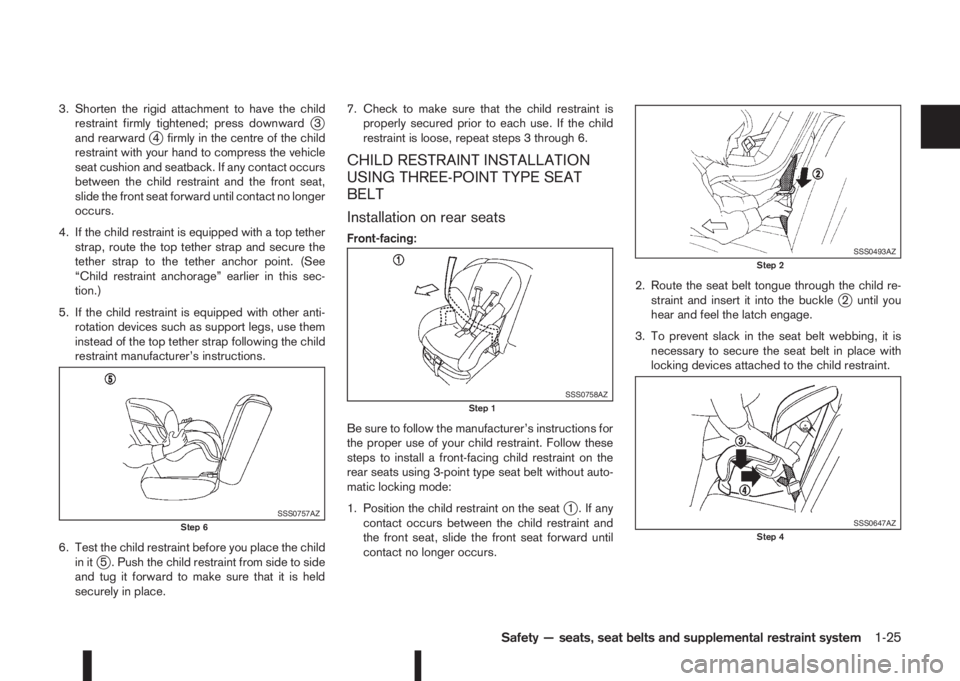
3. Shorten the rigid attachment to have the child
restraint firmly tightened; press downwardj3
and rearwardj4 firmly in the centre of the child
restraint with your hand to compress the vehicle
seat cushion and seatback. If any contact occurs
between the child restraint and the front seat,
slide the front seat forward until contact no longer
occurs.
4. If the child restraint is equipped with a top tether
strap, route the top tether strap and secure the
tether strap to the tether anchor point. (See
“Child restraint anchorage” earlier in this sec-
tion.)
5. If the child restraint is equipped with other anti-
rotation devices such as support legs, use them
instead of the top tether strap following the child
restraint manufacturer’s instructions.
6. Test the child restraint before you place the child
in it
j5 . Push the child restraint from side to side
and tug it forward to make sure that it is held
securely in place.7. Check to make sure that the child restraint is
properly secured prior to each use. If the child
restraint is loose, repeat steps 3 through 6.
CHILD RESTRAINT INSTALLATION
USING THREE-POINT TYPE SEAT
BELT
Installation on rear seats
Front-facing:
Be sure to follow the manufacturer’s instructions for
the proper use of your child restraint. Follow these
steps to install a front-facing child restraint on the
rear seats using 3-point type seat belt without auto-
matic locking mode:
1. Position the child restraint on the seat
j1 . If any
contact occurs between the child restraint and
the front seat, slide the front seat forward until
contact no longer occurs.2. Route the seat belt tongue through the child re-
straint and insert it into the buckle
j2 until you
hear and feel the latch engage.
3. To prevent slack in the seat belt webbing, it is
necessary to secure the seat belt in place with
locking devices attached to the child restraint.
SSS0757AZStep 6
SSS0758AZStep 1
SSS0493AZStep 2
SSS0647AZStep 4
Safety — seats, seat belts and supplemental restraint system1-25
Page 46 of 338
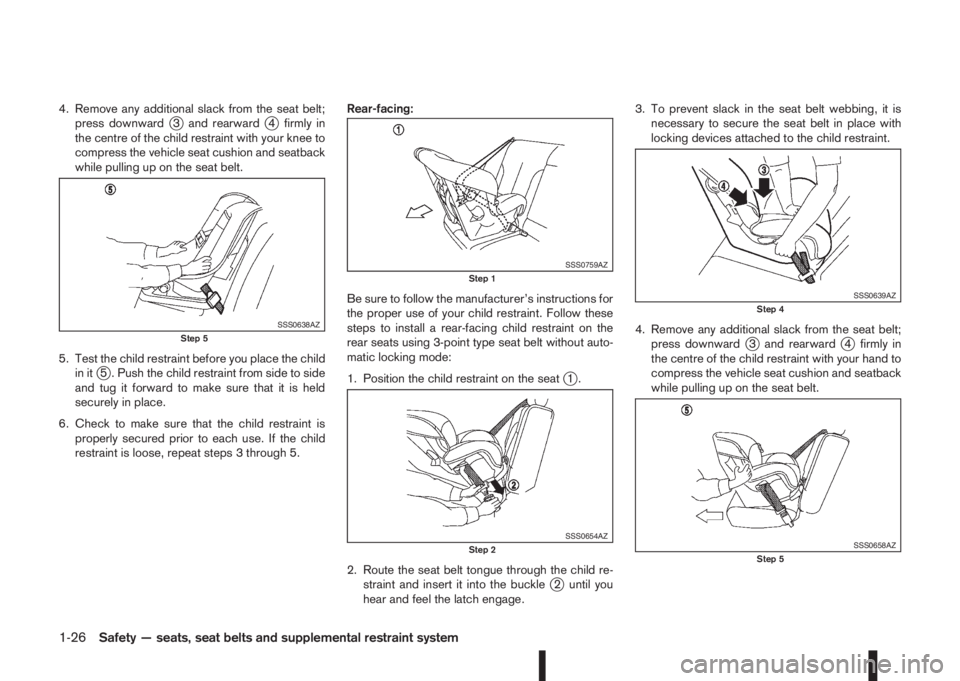
4. Remove any additional slack from the seat belt;
press downwardj3 and rearwardj4 firmly in
the centre of the child restraint with your knee to
compress the vehicle seat cushion and seatback
while pulling up on the seat belt.
5. Test the child restraint before you place the child
in it
j5 . Push the child restraint from side to side
and tug it forward to make sure that it is held
securely in place.
6. Check to make sure that the child restraint is
properly secured prior to each use. If the child
restraint is loose, repeat steps 3 through 5.Rear-facing:
Be sure to follow the manufacturer’s instructions for
the proper use of your child restraint. Follow these
steps to install a rear-facing child restraint on the
rear seats using 3-point type seat belt without auto-
matic locking mode:
1. Position the child restraint on the seatj1.
2. Route the seat belt tongue through the child re-
straint and insert it into the buckle
j2 until you
hear and feel the latch engage.3. To prevent slack in the seat belt webbing, it is
necessary to secure the seat belt in place with
locking devices attached to the child restraint.
4. Remove any additional slack from the seat belt;
press downward
j3 and rearwardj4 firmly in
the centre of the child restraint with your hand to
compress the vehicle seat cushion and seatback
while pulling up on the seat belt.
SSS0638AZStep 5
SSS0759AZStep 1
SSS0654AZStep 2
SSS0639AZStep 4
SSS0658AZStep 5
1-26Safety — seats, seat belts and supplemental restraint system
Page 47 of 338
5. Test the child restraint before you place the child
in itj5 . Push the child restraint from side to side
and tug it forward to make sure that it is held
securely in place.
6. Check to make sure that the child restraint is
properly secured prior to each use. If the child
restraint is loose, repeat steps 3 through 5.
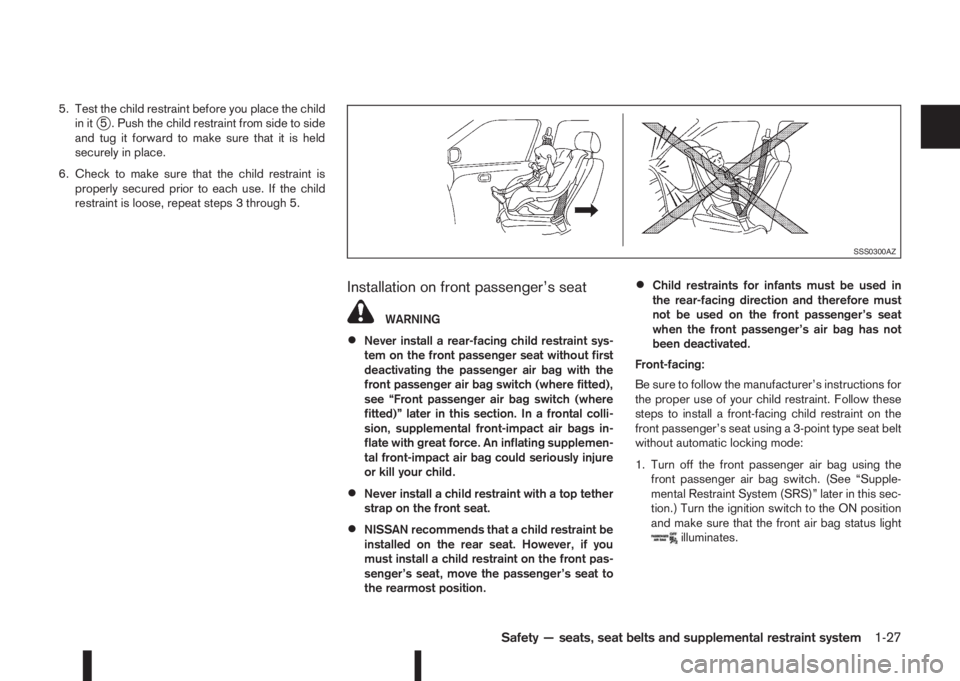
Installation on front passenger’s seat
WARNING
•Never install a rear-facing child restraint sys-
tem on the front passenger seat without first
deactivating the passenger air bag with the
front passenger air bag switch (where fitted),
see “Front passenger air bag switch (where
fitted)” later in this section. In a frontal colli-
sion, supplemental front-impact air bags in-
flate with great force. An inflating supplemen-
tal front-impact air bag could seriously injure
or kill your child.
•Never install a child restraint with a top tether
strap on the front seat.
•NISSAN recommends that a child restraint be
installed on the rear seat. However, if you
must install a child restraint on the front pas-
senger’s seat, move the passenger’s seat to
the rearmost position.
•Child restraints for infants must be used in
the rear-facing direction and therefore must
not be used on the front passenger’s seat
when the front passenger’s air bag has not
been deactivated.
Front-facing:
Be sure to follow the manufacturer’s instructions for
the proper use of your child restraint. Follow these
steps to install a front-facing child restraint on the
front passenger’s seat using a 3-point type seat belt
without automatic locking mode:
1. Turn off the front passenger air bag using the
front passenger air bag switch. (See “Supple-
mental Restraint System (SRS)” later in this sec-
tion.) Turn the ignition switch to the ON position
and make sure that the front air bag status light
illuminates.
SSS0300AZ
Safety — seats, seat belts and supplemental restraint system1-27
Page 48 of 338
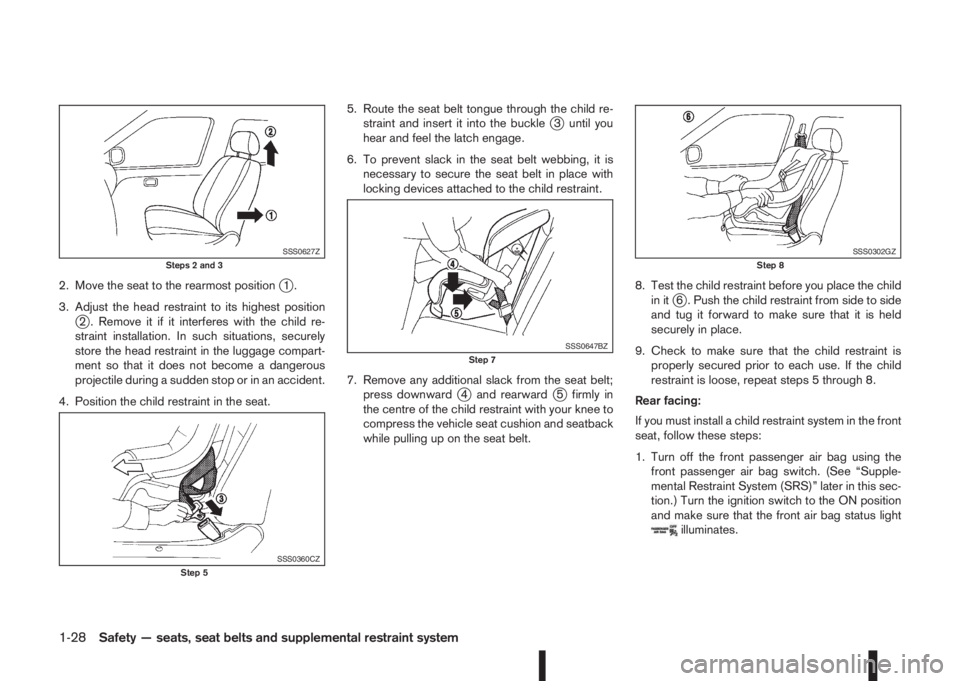
2. Move the seat to the rearmost positionj1.
3. Adjust the head restraint to its highest position
j2 . Remove it if it interferes with the child re-
straint installation. In such situations, securely
store the head restraint in the luggage compart-
ment so that it does not become a dangerous
projectile during a sudden stop or in an accident.
4. Position the child restraint in the seat.5. Route the seat belt tongue through the child re-
straint and insert it into the buckle
j3 until you
hear and feel the latch engage.
6. To prevent slack in the seat belt webbing, it is
necessary to secure the seat belt in place with
locking devices attached to the child restraint.
7. Remove any additional slack from the seat belt;
press downward
j4 and rearwardj5 firmly in
the centre of the child restraint with your knee to
compress the vehicle seat cushion and seatback
while pulling up on the seat belt.8. Test the child restraint before you place the child
in it
j6 . Push the child restraint from side to side
and tug it forward to make sure that it is held
securely in place.
9. Check to make sure that the child restraint is
properly secured prior to each use. If the child
restraint is loose, repeat steps 5 through 8.
Rear facing:
If you must install a child restraint system in the front
seat, follow these steps:
1. Turn off the front passenger air bag using the
front passenger air bag switch. (See “Supple-
mental Restraint System (SRS)” later in this sec-
tion.) Turn the ignition switch to the ON position
and make sure that the front air bag status light
illuminates.
SSS0627ZSteps 2 and 3
SSS0360CZStep 5
SSS0647BZStep 7
SSS0302GZStep 8
1-28Safety — seats, seat belts and supplemental restraint system
Page 49 of 338
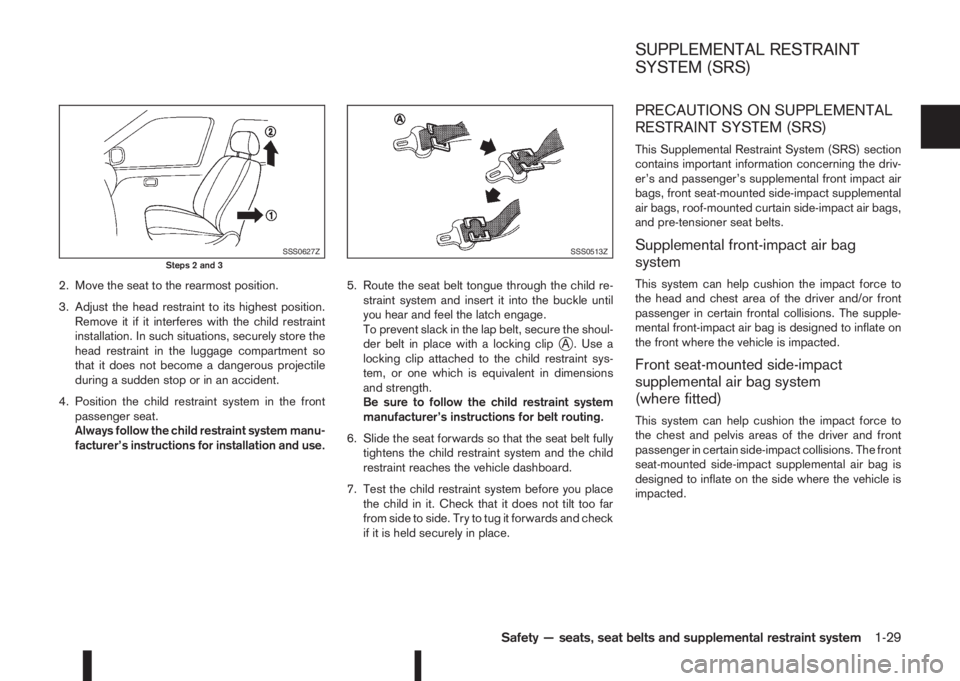
2. Move the seat to the rearmost position.
3. Adjust the head restraint to its highest position.
Remove it if it interferes with the child restraint
installation. In such situations, securely store the
head restraint in the luggage compartment so
that it does not become a dangerous projectile
during a sudden stop or in an accident.
4. Position the child restraint system in the front
passenger seat.
Always follow the child restraint system manu-
facturer’s instructions for installation and use.5. Route the seat belt tongue through the child re-
straint system and insert it into the buckle until
you hear and feel the latch engage.
To prevent slack in the lap belt, secure the shoul-
der belt in place with a locking clip
jA . Use a
locking clip attached to the child restraint sys-
tem, or one which is equivalent in dimensions
and strength.
Be sure to follow the child restraint system
manufacturer’s instructions for belt routing.
6. Slide the seat forwards so that the seat belt fully
tightens the child restraint system and the child
restraint reaches the vehicle dashboard.
7. Test the child restraint system before you place
the child in it. Check that it does not tilt too far
from side to side. Try to tug it forwards and check
if it is held securely in place.
PRECAUTIONS ON SUPPLEMENTAL
RESTRAINT SYSTEM (SRS)
This Supplemental Restraint System (SRS) section
contains important information concerning the driv-
er’s and passenger’s supplemental front impact air
bags, front seat-mounted side-impact supplemental
air bags, roof-mounted curtain side-impact air bags,
and pre-tensioner seat belts.
Supplemental front-impact air bag
system
This system can help cushion the impact force to
the head and chest area of the driver and/or front
passenger in certain frontal collisions. The supple-
mental front-impact air bag is designed to inflate on
the front where the vehicle is impacted.
Front seat-mounted side-impact
supplemental air bag system
(where fitted)
This system can help cushion the impact force to
the chest and pelvis areas of the driver and front
passenger in certain side-impact collisions. The front
seat-mounted side-impact supplemental air bag is
designed to inflate on the side where the vehicle is
impacted.
SSS0627ZSteps 2 and 3SSS0513Z
SUPPLEMENTAL RESTRAINT
SYSTEM (SRS)
Safety — seats, seat belts and supplemental restraint system1-29
Page 69 of 338
Door lock indicator light
(where fitted)
The door lock indicator light located on the instru-
ment panel illuminates when all the doors are locked
while the ignition switch is in the ON position.
•When the doors are locked with the power door
lock switch, the door lock indicator light will illu-
minate for 30 minutes.
•When the doors are locked by pushing the
LOCK button on the Intelligent Key or any re-
quest switch (where fitted), the door lock indica-
tor light will illuminate for 1 minute.
•The door lock indicator light turns off when any
door is unlocked.
For locking or unlocking doors, see “Door locks” in
the “3. Pre-driving checks and adjustments” sec-
tion.
Electronic Stability Programme
(ESP) OFF indicator light
(where fitted)
The light comes on when the Electronic Stability
Programme (ESP) OFF switch is pushed to the OFF
position. This indicates that the ESP system is not
operating.
This light also comes on briefly when the ignition
switch is turned to the ON position. The light will
turn off after approximately 1 second if the ESP sys-
tem is operational.
When the ESP OFF indicator light and SLIP indica-tor light (see “SLIP indicator light (where fitted)”
later in this section) come on with the ESP system
turned on, it alerts the driver to the fact that the sys-
tem’s fail-safe mode is operating. This means that
the system may not be functioning properly. Have
the system checked by your NISSAN dealer or quali-
fied workshop.
If an abnormality occurs in the system, the ESP sys-
tem function will be cancelled, but the vehicle is still
driveable. For additional information, see “Electronic
Stability Programme (ESP) system (where fitted)” in
the “5. Starting and driving” section.
Front fog light indicator light
The light comes on when the front fog lights are
switched on (see “Fog light switch” later in this sec-
tion).
Glow plug indicator light (Diesel
engines)
This light comes on when the ignition switch is in the
ON position and goes out when the glow plugs have
been pre-heated. When the engine is cold, the glow
plug warm-up time will be longer.
High beam assist indicator light
(where fitted)
The indicator light illuminates when the headlights
come on while the headlight switch is in the AUTO
position with the high beam selected. This indicates
that the high beam assist system is operational. (See
2-36.)
High beam indicator light
This light comes on when the headlight high beam
is on and goes out when the low beam is selected.
Malfunction Indicator light
(orange)
When the ignition switch is turned to the ON posi-
tion, the orange Malfunction Indicator light illumi-
nates. This means that the system is operational.
If the orange Malfunction Indicator light comes on
steady or blinks (where fitted) while the engine is
running, it may indicate an engine control system
malfunction.
See “Malfunction warning light (red) (where fitted)”
earlier in this section for details of the red malfunc-
tion warning light (where fitted).
On steady (orange):
An engine malfunction has been detected. Have the
vehicle inspected by a NISSAN dealer or qualified
workshop. You do not need to have your vehicle
towed to the dealer.
Blinking (orange) (where fitted):
An engine misfire has been detected which may
damage the engine control system.
To reduce or avoid engine control system dam-
age:
•Do not drive at speeds above 70 km/h (43
MPH).
•Avoid hard acceleration or deceleration.
Instruments and controls2-11
Page 74 of 338
![NISSAN QASHQAI 2016 Owner´s Manual The following options are available in the [Stop/
Start] menu:
•[Display]:
You can choose whether on not to display stop/
start information.
•[Trip CO2 saving]:
The [Trip CO2 saving] and engine st](/img/5/40324/w960_40324-73.png "NISSAN QASHQAI 2016 Owner´s Manual The following options are available in the [Stop/
Start] menu:
•[Display]:
You can choose whether on not to display stop/
start information.
•[Trip CO2 saving]:
The [Trip CO2 saving] and engine st")
The following options are available in the [Stop/
Start] menu:
•[Display]:
You can choose whether on not to display stop/
start information.
•[Trip CO2 saving]:
The [Trip CO2 saving] and engine stop time
mode shows the CO2 saving and engine stop
time since the last reset. The CO2 saving and
engine stop time can be reset by pushing ENTER
for longer than 1 second.
•[Total CO2 saving]:
The [Total CO2 saving] and engine stop time
mode shows:
– The estimated CO2 exhaust emissions pre-
vented.
– The engine stop time that the engine has been
stopped by the [Stop/Start] System
NOTE
The [Total CO2 saving] and engine stop
time values cannot be reset and show ac-
cumulated [Stop/Start] System informa-
tion since the vehicle was built.
[ECO Drive Report]:
You can choose whether or not to display ECO
information in the vehicle information display when
the ignition switch is placed in the ON position.From the Main Menu Selection select [ECO Drive
Report] to display the information when the ignition
switch is placed in the ON position.
Select [Display] then On or Off to display the infor-
mation when the ignition switch is placed in the ON
position. The ECO Drive Report is displayed when
the ignition switch is in the OFF position.
You can also view the ECO drive report history.
[Welcome Effect]:
You can choose whether or not to display the wel-
come screen when the ignition switch is placed in
the ACC (where fitted) or ON position. You can
also choose the following items to define how the
welcome screen looks:
•[Dial and pointer]
•[Display effect]
To enable/disable the welcome screen, and set how
it appears:
1. Use the
orbuttons to select [Settings], and
press ENTER.
2. Select [Welcome Effects] using the
orbut-
tons and press ENTER to select this menu. Use
the
orbuttons to navigate between the
menu options and press ENTER to turn each
function ON or OFF.
[Vehicle settings]
Use theorswitches and the ENTER button to
change the status, warnings or turn on or off any of
the systems/warnings displayed in the [Vehicle set-tings] menu. The following menu options, each lead-
ing to a further sub-menu, are available:
•[Lighting]
•[Turn indicator]
•[Unlocking]
•[Wipers]
[Lighting]:
The [Lighting] menu has the following options:
•[Welcome light]:
The welcome lighting can be set to be ON or
OFF. From the [Lighting] menu, select [Wel-
come Light]. Use the ENTER button to turn this
feature ON or OFF. When set to ON, front and
rear lamps will stay on for 30 seconds after un-
locking. They will also stay on for 10 seconds
after locking.
•[Int. Lamp timer]:
The internal light timer can be set to be ON or
OFF. From the [Lighting] menu, select [Int. Lamp
timer]. Use the ENTER button to turn this feature
ON or OFF.
•[Mood lighting]:
The mood lighting can be dimmed or brightened.
From the [Lighting] menu, select [Mood light-
ing]. Use the ENTER button and the
orswitches to adjust the brightness.
2-16Instruments and controls
Page 75 of 338
![NISSAN QASHQAI 2016 Owner´s Manual •[Auto lights]:
The sensitivity of the automatic lighting can be
adjusted. From the [Lighting] menu, select [Auto
Lights]. Use the
orand ENTER switches to
select the required sensitivity. The follow](/img/5/40324/w960_40324-74.png "NISSAN QASHQAI 2016 Owner´s Manual •[Auto lights]:
The sensitivity of the automatic lighting can be
adjusted. From the [Lighting] menu, select [Auto
Lights]. Use the
orand ENTER switches to
select the required sensitivity. The follow")
•[Auto lights]:
The sensitivity of the automatic lighting can be
adjusted. From the [Lighting] menu, select [Auto
Lights]. Use the
orand ENTER switches to
select the required sensitivity. The following op-
tions are available:
– On earliest
– On earlier
– Standard
– On later
[Turn indicator]:
The [3 flash on] overtaking feature can be set to be
ON or OFF. From the Vehicle Settings menu, select
“[3 Flash on]”. Use the ENTER button to turn this
feature ON or OFF.
[Unlocking]:
There are two options (where fitted) in the [Unlock-
ing] menu:
•[I–Key Door Lock] (where fitted)
When this item is turned on, the request switch
on the door is activated. From the [Unlocking]
menu, select [I-Key Door Unlock]. Use the
ENTER button to activate or deactivate this func-
tion.
•[Selective unlock]
When this item is turned on, and the door handle
request switch on the driver’s or front passen-
ger’s side door is pushed, only the correspond-
ing door is unlocked. All the doors can be un-
locked if the door handle request switch ispushed again within 1 minute. When this item is
turned to off, all the doors will be unlocked when
the door handle request switch is pushed once.
From the [Unlocking] menu, select [Selective
Unlock]. Use the ENTER button to activate or
deactivate this function.
[Wipers]:
•[Speed dependent] (where fitted)
The Speed dependent wiper feature can be set
to be ON or OFF. From the [Wipers] menu,
select [Speed Dependent]. Use the ENTER but-
ton to turn this feature ON or OFF.
•[Rain Sensor] (where fitted)
The [Rain sensor] feature can be activated or
deactivated. From the [Wipers] menu, select
[Rain Sensor]. Use the ENTER button to turn
this feature ON or OFF.
•[Reverse link]
The [Reverse link] wiper feature can be set to be
ON or OFF. From the [Wipers] menu, select
[Reverse Link]. Use the ENTER button to turn
this feature ON or OFF.
•[Drip wipe]
The [Drip wipe] feature can be set to be ON or
OFF. From the [Wipers] menu, select [Drip
Wipe]. Use the ENTER button to turn this fea-
ture ON or OFF.
Maintenance
1. Engine oil and filter replacement indicator:
This indicator appears when the customer set time
comes for changing the engine oil and filter. You
can set or reset the distance for changing the en-
gine oil and filter.
NIC2206
Instruments and controls2-17