wheel NISSAN QASHQAI 2016 Owner´s Manual
[x] Cancel search | Manufacturer: NISSAN, Model Year: 2016, Model line: QASHQAI, Model: NISSAN QASHQAI 2016Pages: 338, PDF Size: 4.87 MB
Page 57 of 338
•No unauthorised changes should be made to
any components or wiring of the air bag sys-
tem. This is to prevent accidental inflation of
the air bag or damage to the air bag system.
•Tampering with the air bag system may result
in serious personal injury. Tampering includes
making changes to the steering wheel and
the instrument panel assembly by placing ma-
terial over the steering pad and above the
dashboard, or by installing additional trim ma-
terial around the air bag system.
•Do not attach any objects to the steering
wheel pad or to the instrument panel. Objects
attached to the steering wheel pad and in-
strument panel may become dangerous pro-
jectiles and cause injury if the air bag inflates.
•Work on and around the air bag system should
be done by a NISSAN dealer or qualified work-
shop. Installation of electrical equipment
should be done by a NISSAN dealer or quali-
fied workshop. The yellow SRS wiring har-
nesses* should not be modified or discon-
nected. Unauthorised electrical test equip-
ment and probing devices should not be used
on the air bag system.
* SRS wiring harnesses are covered with yellow
insulation either just before the harness con-
nectors or on the complete harness, for easy
identification.
REPAIR AND REPLACEMENT
PROCEDURE
WARNING
•Once the air bags have been inflated, the air
bag modules will not function and must be
replaced. The air bag modules must be re-
placed by a NISSAN dealer or qualified work-
shop. The inflated air bag modules cannot be
repaired.
•The air bag systems should be inspected by a
NISSAN dealer or qualified workshop if there
is any damage to the front end portion of the
vehicle.
•When selling your vehicle, we request that you
inform the buyer about the air bag system and
guide the buyer to the appropriate sections in
this Owner’s Manual.
•If you need to dispose of the SRS or scrap the
vehicle, contact a NISSAN dealer or qualified
workshop. Correct disposal procedures are
set forth in the appropriate NISSAN Service
Manual. Incorrect disposal procedures could
cause personal injury.
The air bags and pre-tensioner seat belts are de-
signed to activate on a one-time-only basis. As a
reminder, unless the SRS air bag warning light is
damaged, the SRS air bag warning light remains
illuminated after inflation has occurred. The repair
and replacement of the SRS should be done only by
a NISSAN dealer or qualified workshop.When maintenance work is required on the vehicle,
information about the air bags, pre-tensioner seat
belts and related parts should be pointed out to the
person performing the maintenance. The ignition
switch should always be in the LOCK position when
working under the bonnet or inside the vehicle.
Safety — seats, seat belts and supplemental restraint system1-37
Page 64 of 338
tem is unavailable. See “Forward emergency brak-
ing system (where fitted)” in the “5. Starting and
driving” section for more details.
Low tyre pressure warning light
(where fitted)
Your vehicle is equipped with a Tyre Pressure Moni-
toring System (TPMS) that monitors the tyre pres-
sure of all tyres except the spare.
The low tyre pressure warning light warns of low
tyre pressure or indicates that the TPMS is not func-
tioning properly.
After the ignition switch is placed in the ON posi-
tion, this light illuminates for about 1 second and
turns off.
Low tyre pressure warning:
If the vehicle is being driven with low tyre pressure,
the warning light will illuminate. A low tyre pressure
warning (e.g., [Low tyre pressure]) also appears in
the vehicle information display.
When the low tyre pressure warning light illuminates,
you should stop and adjust the tyre pressure of all 4
tyres to the recommended COLD tyre pressure
shown on the tyre placard located on the driver side
centre pillar see “Tyre placard” in the “9. Technical
information” section. The low tyre pressure warning
light does not automatically turn off when the tyre
pressure is adjusted. After the tyre is inflated to the
recommended pressure, the vehicle must be driven
at speeds above 25 km/h (16 MPH) to activate theTPMS and turn off the low tyre pressure warning
light. Use a tyre pressure gauge to check the tyre
pressure.
The low tyre pressure (e.g., [Low tyre pressure])
warning appears each time the ignition switch is
placed in the ON position as long as the low tyre
pressure warning light remains illuminated.
For additional information, see “Vehicle information
display” later in this section and “Tyre Pressure
Monitoring System (TPMS)” later in this section.
TPMS resetting must be also performed after a tyre
or a wheel is replaced, or the tyres are rotated.
Depending on a change in the outside temperature,
the low tyre pressure warning light may illuminate
even if the tyre pressure has been adjusted prop-
erly. Adjust the tyre pressure to the recommended
COLD tyre pressure again when the tyres are cold,
and reset the TPMS.
If the low tyre pressure warning light still continues
to illuminate after the resetting operation, it may indi-
cate that the TPMS is not functioning properly. Have
the system checked by a NISSAN dealer or quali-
fied workshop.
For additional information, see “Tyre Pressure Moni-
toring System (TPMS)” in the “5. Starting and
driving” section and “Vehicle information display”
later in this section.
TPMS malfunction:
If the TPMS is not functioning properly, the low tyre
pressure warning light will flash for approximately 1
minute when the ignition switch is placed in the ONposition. The light will remain on after 1 minute. Have
the system checked by a NISSAN dealer or quali-
fied workshop. The low tyre pressure warning does
not appear if the low tyre pressure warning light illu-
minates to indicate a TPMS malfunction.
For additional information, see “Tyre Pressure Moni-
toring System (TPMS)” in the “5. Starting and
driving” section.
WARNING
•Radio waves could adversely affect electric
medical equipment. Those who use a pace-
maker should contact the electric medical
equipment manufacturer for the possible in-
fluences before use.
•If the light does not illuminate with the igni-
tion switch pushed ON, have the vehicle
checked by a NISSAN dealer or qualified
workshop as soon as possible.
•If the low tyre pressure warning light illumi-
nates while driving, avoid sudden steering
manoeuvres or abrupt braking, reduce vehicle
speed, pull off the road to a safe location and
stop the vehicle as soon as possible. Driving
with under-inflated tyres may permanently
damage the tyres and increase the likelihood
of tyre failure. Serious vehicle damage could
occur and may lead to an accident and could
result in serious personal injury. Check the
tyre pressure for all four tyres. Adjust the tyre
pressure to the recommended COLD tyre
pressure shown on the tyre placard, located
2-6Instruments and controls
Page 65 of 338
on the driver side centre pillar, to turn the low
tyre pressure warning light off. If the light still
illuminates while driving after adjusting the
tyre pressure, a tyre may be flat. If you have a
flat tyre, repair it with the emergency tyre
puncture repair kit (where fitted) or replace it
with a spare tyre (where fitted) as soon as
possible.
•After adjusting the tyre pressure, be sure to
reset the TPMS. Unless the resetting is per-
formed, the TPMS will not warn of the low tyre
pressure correctly.
•When a spare tyre is mounted or a wheel is
replaced, the TPMS will not function and the
low tyre pressure warning light will flash for
approximately 1 minute. The light will remain
on after 1 minute. Contact a NISSAN dealer or
qualified workshop as soon as possible for
tyre replacement and/or system resetting.
•Replacing tyres with those not originally speci-
fied by NISSAN could affect the proper opera-
tion of the TPMS.
CAUTION
•The TPMS is not a substitute for the regular
tyre pressure check. Be sure to check the tyre
pressure regularly.
•If the vehicle is being driven at speeds of less
than 25 km/h (16 MPH), the TPMS may not
operate correctly.
•Be sure to install the specified size of tyres to
all four wheels correctly.
Malfunction warning light (red)
(where fitted)
When the ignition switch is turned to the ON posi-
tion, the malfunction warning light illuminates. This
means the system is operational.
See “Malfunction Indicator light (orange)” later in
this section for details of the orange Malfunction
Indicator light.
If the red malfunction warning light comes on steady
while the engine is running, it may indicate an en-
gine control system malfunction.
Have your vehicle inspected by a NISSAN dealer or
qualified workshop. You do not need to have your
vehicle towed to the dealer.
CAUTION
Continued vehicle operation without having the
engine control system checked and repaired as
necessary could lead to poor driveability,
reduced fuel economy and possible damage to
the engine control system, which may affect your
warranty coverage.
Incorrect setting of the engine control system may
lead to non-compliance of local and national emis-
sion laws and regulations.
Master warning light
When the ignition switch is in the ON position, the
master warning light illuminates if any of the follow-
ing are displayed in the vehicle information display
(see “Vehicle information display” later in this sec-
tion):
•No key warning
•Key ID incorrect warning
•Low windscreen washer fluid warning
•Parking brake release warning
•Door/boot open warning
•Low tyre pressure warning
•Four-Wheel Drive (4WD) warning (where fitted)
•Intelligent Key system warning
If the driver assist system warnings (where fitted)
appear in the vehicle information display, the master
warning light also illuminates. See “Blind Spot Warn-
ing (BSW) system (where fitted)” in the “5. Starting
and driving” section, “Lane Departure Warning
(LDW) system (where fitted)” in the “5. Starting and
driving” section, and/or “Forward emergency brak-
ing system (where fitted)” in the “5. Starting and
driving” section.
Instruments and controls2-7
Page 68 of 338
accident. To help avoid injury to yourself or oth-
ers, have your vehicle checked by a NISSAN
dealer or qualified workshop as soon as pos-
sible.
When the ignition switch is in the ON or START
position, the Supplemental Restraint System (SRS)
air bag warning light illuminates for approximately 7
seconds and then turns off this indicates the system
is operational.
If any of the following conditions occur, the air bag
systems and pre-tensioner systems need servicing
and the vehicle must be taken to a NISSAN dealer
or qualified workshop:
•The supplemental air bag warning light remains
on after approximately 7 seconds.
•The supplemental air bag warning light flashes
intermittently.
•The supplemental air bag warning light does not
come on at all.
Unless checked and repaired, the SRS air bag sys-
tem and/or the pre-tensioner seat belt system may
not function properly.
For additional details see “SRS air bag warning
light” in the “1. Safety — Seats, Seat belts and
Supplemental Restraint System” section.
Water in fuel filter warning light
(where fitted)
If the warning light remains on or flashes irregularly
while the engine is running, there may be water in
the fuel filter. Should this happen, contact a NISSAN
dealer or qualified workshop.
CAUTION
Failure to drain the water from the fuel filter can
cause serious damage to the engine. Contact a
NISSAN dealer or qualified workshop as soon as
possible.
/Front passenger air
bag status light
(where fitted)
The front passenger air bag status light () lo-
cated on the centre console above the shift lever will
illuminate when the front passenger air bag is turned
OFF with the front passenger air bag switch. When
the front passenger air bag is turned on, the front
passenger air bag status light ON (
) will illumi-
nate.
For more details, see “Front passenger air bag sta-
tus light (where fitted)” in the “1. Safety — Seats,
Seat belts and Supplemental Restraint System” sec-
tion.
INDICATOR LIGHTS
Four-Wheel Drive (4WD) AUTO
indicator light (4WD models)
When the ignition switch is placed in the ON posi-
tion, the Four-Wheel Drive (4WD) AUTO indicator
light illuminates and then turns off.
When selecting 4WD AUTO mode while the engine
is running, the 4WD AUTO indicator light illumi-
nates. See “Four-wheel Drive (4WD) (where fitted)”
in the “5. Starting and driving” section.
4WD mode indicator light
(LOCK) (4WD models)
When the ignition switch is placed in the “ON” posi-
tion, the Four-Wheel Drive (4WD) LOCK indicator
light illuminates and then turns off. When selecting
4WD LOCK mode while the engine is running, the
4WD LOCK indicator light illuminates together with
the 4WD AUTO indicator light.
See “Four-wheel Drive (4WD) (where fitted)” in the
“5. Starting and driving” section.
Dipped beam indicator light
This light comes on when the switch is turned to the
position:The headlights will come on and front
side, tail, number plate and instrument lights remain
on.
2-10Instruments and controls
Page 70 of 338
•Avoid steep uphill grades.
•If possible, reduce the load being carried or
towed.
The Malfunction Indicator light may stop blinking
and come on steady.
Have the vehicle inspected by a NISSAN dealer or
qualified workshop. You do not need to have your
vehicle towed to the dealer.
CAUTION
Continued vehicle operation without having the
engine control system checked and repaired as
necessary could lead to poor driveability,
reduced fuel economy and possible damage to
the engine control system, which may affect your
warranty coverage.
Rear fog light indicator light
(where fitted)
The light comes on when the rear fog light is
switched on (see “Rear fog light (where fitted)” later
in this section).
Side light and headlight indicator
light
This light comes on when the side light or headlight
position is selected, see “Headlight and turn signal
switch” later in this section for further details.
SLIP indicator light
(where fitted)
The SLIP indicator blinks when the Electronic Sta-
bility Programme (ESP) system is operating, thus
alerting the driver to the fact that the road surface is
slippery and the vehicle is nearing its traction limits.
You may feel or hear the system working, this is nor-
mal.
The light will continue to blink for a few seconds
after the ESP system stops limiting wheel spin.
For additional information see “Electronic Stability
Programme (ESP) OFF indicator light (where
fitted)” earlier in this section and “Electronic Stabil-
ity Programme (ESP) system (where fitted)” in the
“5. Starting and driving” section.
Trailer direction indicator light
The light will light up whenever an additional electri-
cal load is detected by the direction indicator sys-
tem.
For additional information, see “Trailer towing” in
the “5. Starting and driving” section.
Turn signal/hazard indicator
lights
The direction indicator lights will flash when the turn
signal switch or hazard warning flasher switch is
turned on. See “Headlight and turn signal switch”
later in this section and see “Hazard warning flasher
switch” in the “6. In case of emergency” section for
further details.
AUDIBLE REMINDERS
Door open reminder chime
The chime will sound if any door other than the driv-
er’s door is left open and the power door lock switch
is held down.
Intelligent Key models:The external buzzer will
sound if the vehicle is being locked remotely or us-
ing an outside door lock switch and any door is
open.
Parking brake reminder buzzer
A buzzer will sound when driving away if the parking
brake has not been released. Stop the vehicle and
release the parking brake.
Light reminder chime
A chime will sound for 10 seconds if the driver’s
door is opened while the external lights are turned
on and the ignition switch is in the “OFF” or LOCK
position.
See “Headlight and turn signal switch” later in this
section for further details on the headlight operation.
Fog light reminder chime
A chime will sound if the ignition switch is in the
“OFF” or LOCK position and the headlight switch is
in the AUTO position (where fitted) and the fog lights
are left on.
See “Fog light switch” later in this section for further
details.
2-12Instruments and controls
Page 72 of 338
HOW TO USE THE VEHICLE
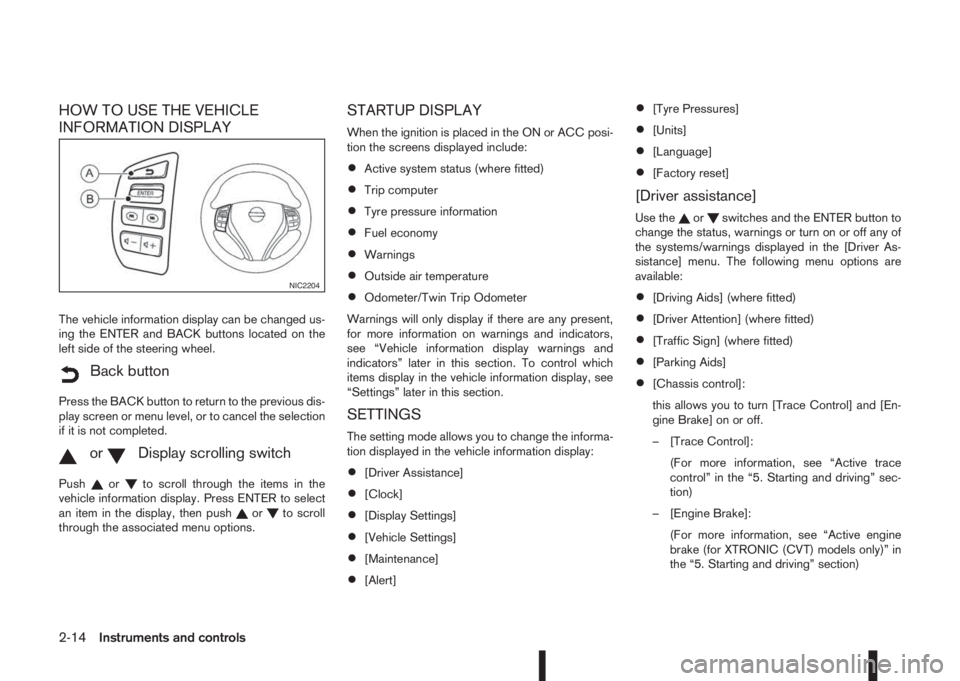
INFORMATION DISPLAY
The vehicle information display can be changed us-
ing the ENTER and BACK buttons located on the
left side of the steering wheel.
mBack button
Press the BACK button to return to the previous dis-
play screen or menu level, or to cancel the selection
if it is not completed.
mormDisplay scrolling switch
Pushorto scroll through the items in the
vehicle information display. Press ENTER to select
an item in the display, then push
orto scroll
through the associated menu options.
STARTUP DISPLAY
When the ignition is placed in the ON or ACC posi-
tion the screens displayed include:
•Active system status (where fitted)
•Trip computer
•Tyre pressure information
•Fuel economy
•Warnings
•Outside air temperature
•Odometer/Twin Trip Odometer
Warnings will only display if there are any present,
for more information on warnings and indicators,
see “Vehicle information display warnings and
indicators” later in this section. To control which
items display in the vehicle information display, see
“Settings” later in this section.
SETTINGS
The setting mode allows you to change the informa-
tion displayed in the vehicle information display:
•[Driver Assistance]
•[Clock]
•[Display Settings]
•[Vehicle Settings]
•[Maintenance]
•[Alert]
•[Tyre Pressures]
•[Units]
•[Language]
•[Factory reset]
[Driver assistance]
Use theorswitches and the ENTER button to
change the status, warnings or turn on or off any of
the systems/warnings displayed in the [Driver As-
sistance] menu. The following menu options are
available:
•[Driving Aids] (where fitted)
•[Driver Attention] (where fitted)
•[Traffic Sign] (where fitted)
•[Parking Aids]
•[Chassis control]:
this allows you to turn [Trace Control] and [En-
gine Brake] on or off.
– [Trace Control]:
(For more information, see “Active trace
control” in the “5. Starting and driving” sec-
tion)
– [Engine Brake]:
(For more information, see “Active engine
brake (for XTRONIC (CVT) models only)” in
the “5. Starting and driving” section)
NIC2204
2-14Instruments and controls
Page 76 of 338
![NISSAN QASHQAI 2016 Owner´s Manual NOTE
Diesel models with diesel engines make use of
an Oil Condition Supervisor (OCS) function.
Petrol engines have a basic service reminder.
1. Use the
orbuttons to select [Settings], and
press ENTER.](/img/5/40324/w960_40324-75.png "NISSAN QASHQAI 2016 Owner´s Manual NOTE
Diesel models with diesel engines make use of
an Oil Condition Supervisor (OCS) function.
Petrol engines have a basic service reminder.
1. Use the
orbuttons to select [Settings], and
press ENTER.")
NOTE
Diesel models with diesel engines make use of
an Oil Condition Supervisor (OCS) function.
Petrol engines have a basic service reminder.
1. Use the
orbuttons to select [Settings], and
press ENTER.
2. Select [Maintenance], followed by [Service] us-
ing the
orand ENTER switches. In the
[Service] menu, use theorbuttons to navi-
gate between the menu options and press
ENTER to set or reset the distance for changing
the engine oil.
3. (Diesel models only) Select [Maintenance], fol-
lowed by [Filter] using the
orand ENTER
switches. In the [Filter] menu, use theorbuttons to navigate between the menu options
and press ENTER to set or reset the distance for
draining the diesel fuel filter.
For scheduled maintenance items and intervals, see
your NISSAN Service and Maintenance Guide.
2. Tyre replacement indicator:
This indicator appears when the customer set dis-
tance comes for replacing tyres. You can set or
reset the distance for replacing tyres.
1. Use the
orbuttons to select [Settings], and
press ENTER.
2. Select [Maintenance], followed by [Tyre] using
the
orand ENTER switches. In the [Tyre]menu, use the
orbuttons to navigate be-
tween the menu options and press ENTER to set
or reset the distance for replacing tyres.
WARNING
The tyre replacement indicator is not a substitute
for regular tyre checks, including tyre pressure
checks. See “Wheels and tyres” in the “8. Main-
tenance and do-it-yourself” section. Many factors
including tyre inflation, alignment, driving habits
and road conditions affect tyre wear and when
tyres should be replaced. Setting the tyre re-
placement indicator for a certain driving distance
does not mean your tyres will last that long. Use
the tyre replacement indicator as a guide only
and always perform regular tyre checks. Failure
to perform regular tyre checks, including tyre
pressure checks could result in tyre failure. Seri-
ous vehicle damage could occur and may lead to
a collision, which could result in serious personal
injury or death.
3. Other indicator:
This indicator appears when the customer set time
comes for replacing items other than the engine oil,
fuel filter and tyres. You can set or reset the dis-
tance for replacing the items.
[Alert]
You can specify that an alert occurs to notify the
driver that a certain event has occurred. You can set
alerts for the following items:
•[Timer]
•[Navigation] (where fitted)
•[Phone]
•[Mail] (where fitted)
To set an alert:
1. Use the
orbuttons to select the item re-
quired, and press ENTER.
2. For [Phone], [Navigation] or [Mail] use the
ENTER button to toggle between YES and NO.
For the [Timer], to change the timer value, use
the
orbuttons and the ENTER button to
save the selected length of time.
[Tyre pressures]
The settings in the Tyre pressures] menu are all
related to the Tyre pressure monitoring system
TPMS (see “Tyre Pressure Monitoring System
(TPMS)” in the “5. Starting and driving” section).
•[Target front]
•[Target rear]
•[Tyre pressure unit]
•[Calibrate]
[Target front]:
The [target front] tyre pressure is the pressure speci-
fied for the front tyres on the tyre placard (see “Tyre
placard” in the “9. Technical information” section
and “Tyre Pressure Monitoring System (TPMS)” in
the “5. Starting and driving” section).
2-18Instruments and controls
Page 82 of 338
![NISSAN QASHQAI 2016 Owner´s Manual 16. [Low Tyre Pressure] warning
This warning ([Low Tyre Pressure] and a vehicle
icon - where fitted) appears when the low tyre pres-
sure warning light in the meter illuminates and low
tyre pressure i](/img/5/40324/w960_40324-81.png "NISSAN QASHQAI 2016 Owner´s Manual 16. [Low Tyre Pressure] warning
This warning ([Low Tyre Pressure] and a vehicle
icon - where fitted) appears when the low tyre pres-
sure warning light in the meter illuminates and low
tyre pressure i")
16. [Low Tyre Pressure] warning
This warning ([Low Tyre Pressure] and a vehicle
icon - where fitted) appears when the low tyre pres-
sure warning light in the meter illuminates and low
tyre pressure is detected. The warning appears each
time the ignition switch is placed in the ON position
as long as the low tyre pressure warning light re-
mains illuminated. If this warning appears, stop the
vehicle and adjust the pressure to the recommended
COLD tyre pressure shown on the tyre placard.
(See “Low tyre pressure warning light (where fitted)”
earlier in this section and “Tyre Pressure Monitoring
System (TPMS)” in the “5. Starting and driving” sec-
tion.)
17. [Low oil pressure stop vehicle]
warning
This warning appears in message area of the ve-
hicle information display if low oil pressure is de-
tected. This gauge is not designed to indicate low
oil level. The low oil pressure warning is not de-
signed to indicate a low oil level. Use the dipstick to
check the oil level. See “Engine oil” in the “8. Main-
tenance and do-it-yourself” section.)
CAUTION
The oil level should be checked regularly using
the engine oil dipstick. Operating with an insuffi-
cient amount of oil can damage the engine and
such damage is not covered by the warranty.
18. [Oil Level Low] warning
This warning appears in message area of the ve-
hicle information display if the oil level is not suffi-
cient for driving. Park the vehicle at a safe location
as soon as possible and use the dipstick to check
the oil level. See “Engine oil” in the “8. Maintenance
and do-it-yourself” section If the oil level is not suf-
ficient for driving, top up the engine oil with the rec-
ommended engine oil. “Engine oil” in the “8. Main-
tenance and do-it-yourself” section.)
CAUTION
The oil level should be checked regularly using
the engine oil dipstick. Operating with an insuffi-
cient amount of oil can damage the engine and
such damage is not covered by the warranty.
19. [4WD System Fault] warning
This warning appears when the four wheel drive
(4WD) system is not functioning properly while the
engine is running.
20. [4WD high temp. stop vehicle]
warning
This warning may appear while trying to free a stuck
vehicle due to increased oil temperature. The driv-
ing mode may change to Two-Wheel Drive (2WD).
If this warning is displayed, stop the vehicle with the
engine idling, as soon as it is safe to do so. Then if
the warning turns off, you can continue driving.
21. [4WD tyre size incorrect] warning
This warning may appear if there is a large differ-
ence between the diameters of the front and rear
wheels and tyres. Pull off the road in a safe area,
with the engine idling. Check that all the tyre sizes
are the same, that tyre pressures are correct and
that the tyres are not excessively worn.
22. [Shipping mode on push storage
fuse] warning
This warning may appear if the extended storage
fuse switch is not pushed in (switched on). When
this warning appears, push in (switch on) the ex-
tended storage fuse switch to turn off the warning.
For more information, see “Fuses” in the “8. Main-
tenance and do-it-yourself” section.
23. [Power will turn off to save the
battery] warning
This warning appears after a period of time if the
shift lever has not moved from the P (Park) position
while the ignition is in the ON position for a certain
period of time.
24. [Power turned off to save the
battery] warning
This warning appears after the ignition switch is au-
tomatically turned OFF to save the battery.
2-24Instruments and controls
Page 85 of 338
TRIP COMPUTER
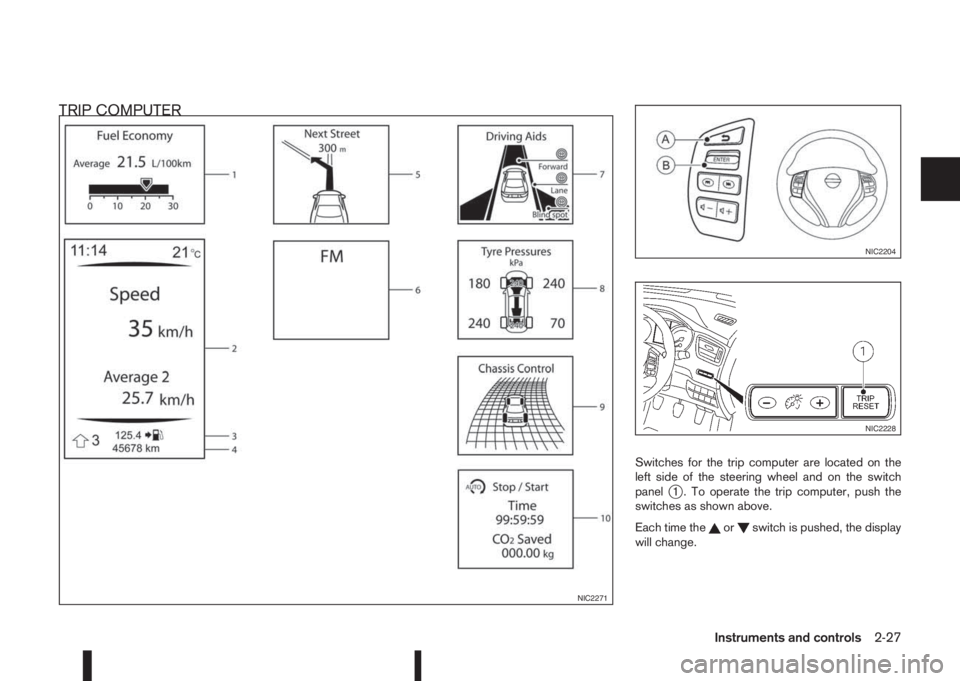
Switches for the trip computer are located on the
left side of the steering wheel and on the switch
panel
j1 . To operate the trip computer, push the
switches as shown above.
Each time the
orswitch is pushed, the display
will change.
NIC2271
NIC2204
NIC2228
Instruments and controls2-27
Page 98 of 338
lowered using the switch located on the driver’s
side of the instrument panel, next to the steering
wheel.
The higher the number designated on the switch,
the lower the axis.
When travelling with no heavy load on a flat road,
select position 0.
AUTOMATIC AIMING CONTROL (LED
headlights)
Vehicles with LED headlights are equipped with an
automatic levelling system. The headlight axis is con-
trolled automatically.
NISSAN recommends consulting local regulations
on the use of lights.To clean the headlights, pull the windscreen washer
switch towards you while the headlight switch is in
the
position and the ignition switch is in the ON
position.
NOTE
The headlight cleaner will automatically operate
every fifth operation of the wiper and washer
switch.
HEADLIGHT CLEANER SWITCH
(where fitted)
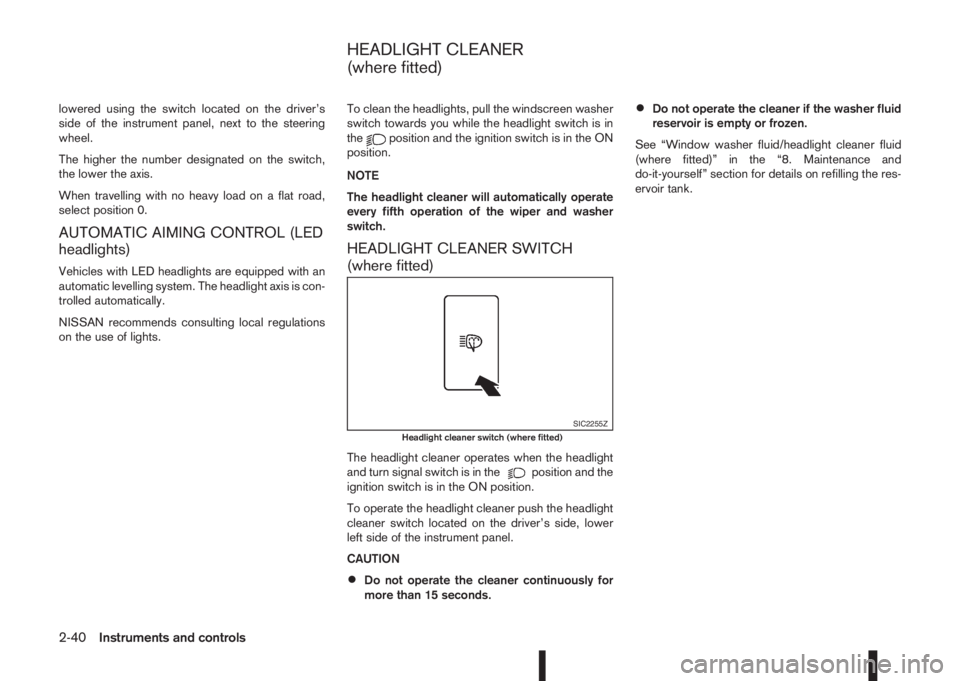
The headlight cleaner operates when the headlight
and turn signal switch is in theposition and the
ignition switch is in the ON position.
To operate the headlight cleaner push the headlight
cleaner switch located on the driver’s side, lower
left side of the instrument panel.
CAUTION
•Do not operate the cleaner continuously for
more than 15 seconds.
•Do not operate the cleaner if the washer fluid
reservoir is empty or frozen.
See “Window washer fluid/headlight cleaner fluid
(where fitted)” in the “8. Maintenance and
do-it-yourself” section for details on refilling the res-
ervoir tank.
SIC2255ZHeadlight cleaner switch (where fitted)
HEADLIGHT CLEANER
(where fitted)
2-40Instruments and controls