wheel NISSAN QASHQAI 2016 Owner´s Manual
[x] Cancel search | Manufacturer: NISSAN, Model Year: 2016, Model line: QASHQAI, Model: NISSAN QASHQAI 2016Pages: 338, PDF Size: 4.87 MB
Page 99 of 338
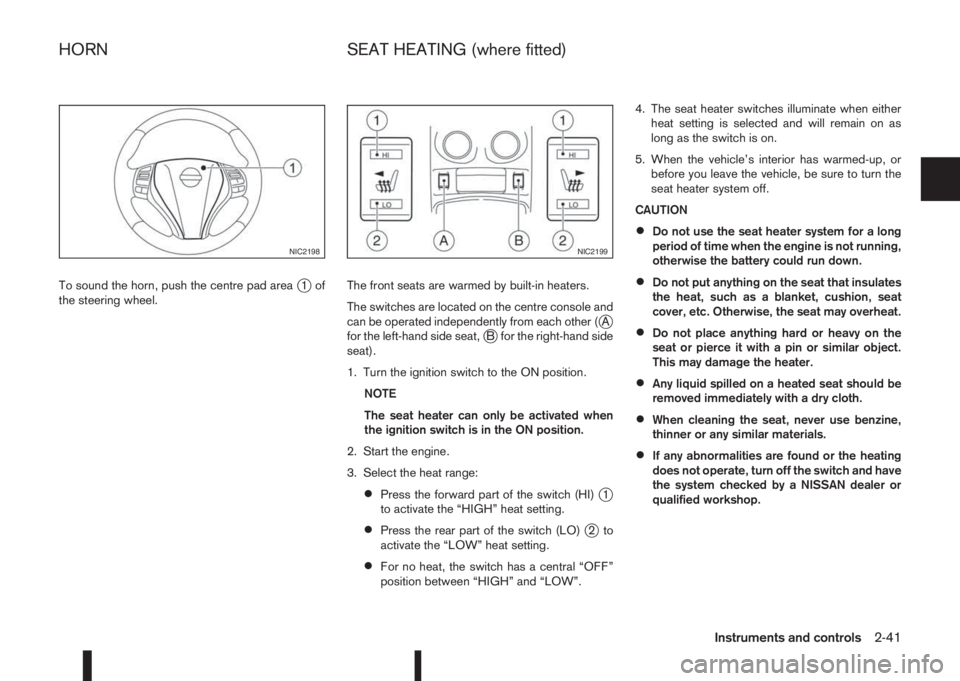
To sound the horn, push the centre pad areaj1of
the steering wheel.The front seats are warmed by built-in heaters.
The switches are located on the centre console and
can be operated independently from each other (
jA
for the left-hand side seat,jB for the right-hand side
seat).
1. Turn the ignition switch to the ON position.
NOTE
The seat heater can only be activated when
the ignition switch is in the ON position.
2. Start the engine.
3. Select the heat range:
•Press the forward part of the switch (HI)j1
to activate the “HIGH” heat setting.
•Press the rear part of the switch (LO)j2to
activate the “LOW” heat setting.
•For no heat, the switch has a central “OFF”
position between “HIGH” and “LOW”.4. The seat heater switches illuminate when either
heat setting is selected and will remain on as
long as the switch is on.
5. When the vehicle’s interior has warmed-up, or
before you leave the vehicle, be sure to turn the
seat heater system off.
CAUTION
•Do not use the seat heater system for a long
period of time when the engine is not running,
otherwise the battery could run down.
•Do not put anything on the seat that insulates
the heat, such as a blanket, cushion, seat
cover, etc. Otherwise, the seat may overheat.
•Do not place anything hard or heavy on the
seat or pierce it with a pin or similar object.
This may damage the heater.
•Any liquid spilled on a heated seat should be
removed immediately with a dry cloth.
•When cleaning the seat, never use benzine,
thinner or any similar materials.
•If any abnormalities are found or the heating
does not operate, turn off the switch and have
the system checked by a NISSAN dealer or
qualified workshop.
NIC2198NIC2199
HORN SEAT HEATING (where fitted)
Instruments and controls2-41
Page 111 of 338
3Pre-driving checks and adjustmentsPre-driving checks and adjustments
Keys ........................................................................ 3-2
NISSAN Anti-Theft System (NATS)* key ............. 3-2
Intelligent Key (where fitted)................................ 3-2
Key number ........................................................ 3-3
New keys ........................................................... 3-3
Emergency/mechanical key (Intelligent Key
models) .............................................................. 3-3
Integrated keyfob/remote control system .................. 3-4
Switching from Convenience mode to
Anti-hijack mode (where fitted) ............................ 3-5
Using the remote keyless entry system ................ 3-5
Locking the doors ............................................... 3-5
Unlocking the doors ............................................ 3-5
Keyfob operation failure ...................................... 3-5
Intelligent Key system (where fitted) ......................... 3-6
Intelligent Key operating range ............................ 3-6
Using Intelligent Key system................................ 3-6
Locking/unlocking .............................................. 3-7
Starting the engine with the Intelligent Key .......... 3-8
Door locks ............................................................... 3-8
Super Lock system (RHD models) ...................... 3-8
Locking/unlocking with the key (vehicle dead
battery) ............................................................... 3-9Inside door handle .............................................. 3-10
Power door lock switch ...................................... 3-10
Child safety lock — rear doors............................ 3-11
Back door lock ................................................... 3-11
Security system ....................................................... 3-12
Alarm system (where fitted) ................................ 3-12
NISSAN Anti-Theft System (NATS)..................... 3-13
Bonnet release ........................................................ 3-14
Fuel filler lid ............................................................. 3-15
Fuel filler lid opener lever .................................... 3-15
Fuel filler cap ...................................................... 3-15
Parking brake switch ............................................... 3-16
Driving away when towing a trailer ...................... 3-17
Steering wheel......................................................... 3-18
Sun visors ............................................................... 3-18
Mirrors..................................................................... 3-18
Inside rear-view mirror ........................................ 3-18
Automatic anti-dazzling inside mirror (where
fitted).................................................................. 3-19
Outside rear-view mirrors.................................... 3-19
Vanity mirror ....................................................... 3-20
Page 127 of 338
•A buzzer will sound if the vehicle is driven
without releasing the parking brake. See “Au-
dible reminders” in the “2. Instruments and
controls” section.
•While the electric parking brake is applied or
released, an operating sound is heard from
the lower side of the rear seat. This is normal
and does not indicate a malfunction.
•When the electric parking brake is frequently
applied and released in a short period of time,
the parking brake may not operate in order to
prevent the parking brake system from over-
heating. If this occurs, operate the electric
parking brake switch again after waiting ap-
proximately 1 minute.
•The electric parking brake can only be re-
leased with the ignition switch in the ON posi-
tion.
•If the electric parking brake must be applied
while driving in an emergency, pull up and
hold the parking brake switch. When you re-
lease the parking brake switch, the parking
brake will be released.
•While pulling up the electric parking brake
switch while driving, the parking brake is ap-
plied and a chime sounds. The parking brake
indicator light in the meter and in the parking
brake switch illuminate. This does not indi-
cate a malfunction. The electric parking brake
indicator lights in the meter and in the parking
brake switch turn off when the parking brake
is released.
•Pull up the electric parking brake switch twice
so that the maximum electric parking brake
force is applied to the vehicle.
•When pulling the electric parking brake switch
up with the ignition switch in the OFF or ACC
position, the parking brake switch indicator
light will continue to illuminate for a short pe-
riod of time.
CAUTION
To park the vehicle in cold climates place the
shift lever in 1st (1) or Reverse (R) (or in Park (P)
for automatic (AT) vehicles), and place suitable
chocks at both the front and back of a wheel with
the electric parking brake released. If the electric
parking brake is applied in cold climates, the
brake may become frozen and cannot be re-
leased.
DRIVING AWAY WHEN TOWING A
TRAILER
Please note the following points to prevent the ve-
hicle from rolling back unintentionally on a gradient.
•Pull and hold the parking brake switch and press
the accelerator. The parking brake will remain
engaged and prevent any tendency to roll back
down the slope.
•You can release the parking brake switch as
soon as the engine is delivering enough power
to the wheels.
Depending on the weight of the vehicle and trailer
and the steepness of the slope, there may be a ten-dency to roll back downhill when driving away from
a standstill. You can prevent this by pulling up the
parking brake switch as you press the accelerator
(in the same way as with a conventional handbrake).
Pre-driving checks and adjustments3-17
Page 128 of 338
WARNING
Do not adjust the steering wheel while driving.
You could lose control of your vehicle and cause
an accident.
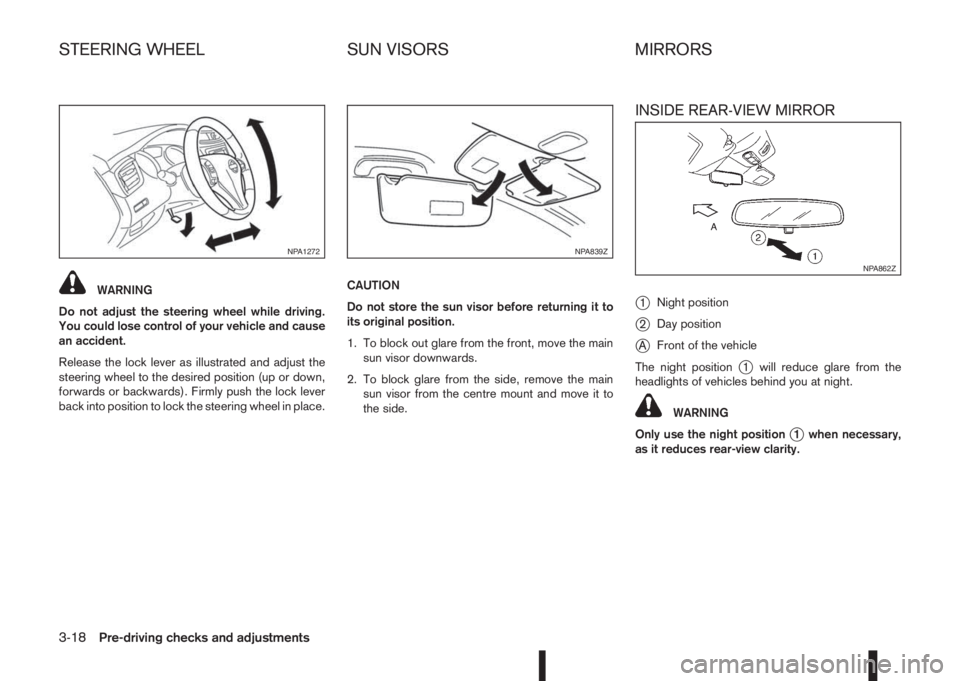
Release the lock lever as illustrated and adjust the
steering wheel to the desired position (up or down,
forwards or backwards). Firmly push the lock lever
back into position to lock the steering wheel in place.CAUTION
Do not store the sun visor before returning it to
its original position.
1. To block out glare from the front, move the main
sun visor downwards.
2. To block glare from the side, remove the main
sun visor from the centre mount and move it to
the side.
INSIDE REAR-VIEW MIRROR
j
1Night position
j2Day position
jAFront of the vehicle
The night position
j1 will reduce glare from the
headlights of vehicles behind you at night.
WARNING
Only use the night position
j1 when necessary,
as it reduces rear-view clarity.
NPA1272NPA839Z
NPA862Z
STEERING WHEEL SUN VISORS MIRRORS
3-18Pre-driving checks and adjustments
Page 131 of 338
4Display screen, heater and air conditioner,
and audio systemDisplay screen, heater and air conditioner,
and audio system
Safety precautions ................................................... 4-2
Rear-view monitor (where fitted)............................... 4-2
How to read the displayed lines .......................... 4-3
Rear-view monitor setting.................................... 4-3
Operating tips..................................................... 4-3
Around View Monitor (where fitted) .......................... 4-4
Operation ........................................................... 4-7
Guide lines ......................................................... 4-7
Difference between predictive and actual
distances ............................................................ 4-9
Moving object detection (MOD) .......................... 4-12
How to adjust the screen view ............................ 4-13
Around View Monitor settings ............................. 4-13
Operating tips..................................................... 4-13
Vents ....................................................................... 4-14
Side and centre vents ......................................... 4-14
Heater and air conditioner operation ........................ 4-15
Manual air conditioner......................................... 4-16
Automatic dual zone air conditioner (where
fitted).................................................................. 4-20
Audio system ........................................................... 4-23Audio operation precautions ............................... 4-23
Antenna .............................................................. 4-23
FM AM radio with CD player (where fitted) .............. 4-24
Audio main operation .......................................... 4-25
Radio operation .................................................. 4-25
SETUP button .................................................... 4-26
Compact Disc (CD) operation ............................ 4-28
AUX socket ........................................................ 4-30
USB Memory operation (where fitted) ................. 4-30
iPod® player operation (where fitted) .................. 4-31
Bluetooth® operation.......................................... 4-32
NissanConnect (where fitted)................................... 4-38
Steering wheel switch for audio control (where
fitted) ....................................................................... 4-38
Main operation .................................................... 4-38
Mobile phone integration for FM AM radio with
CD player (where fitted)........................................... 4-39
Bluetooth® mobile phone feature ........................ 4-39
Hands-free telephone control .............................. 4-42
Steering wheel switches (where fitted)................ 4-44
Car phone or CB radio ............................................ 4-45
Page 135 of 338
NOTE
At first operation, the corner lines are blinking
yellow for about 3 seconds. This is not a malfunc-
tion but a reminder to be cautious.
Available views:
•Bird’s-eye View
The surrounding view of the vehicle.
•Front-side View
The view around and ahead of the front passen-
ger’s side wheel.
•Front view
The view to the front of the vehicle.
•Rear view
The view to the rear of the vehicle.
•Full screen rear view
The view to the rear of the vehicle (which is a
little wider than the standard rear view)
The system is designed as an aid to the driver in
situations such as slot parking or parallel parking.
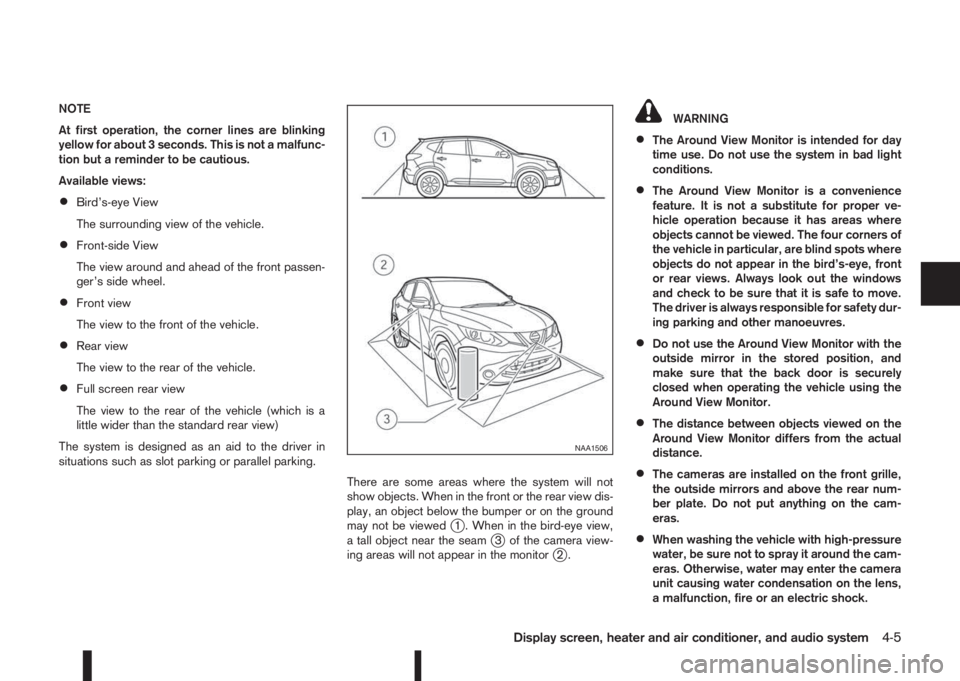
There are some areas where the system will not
show objects. When in the front or the rear view dis-
play, an object below the bumper or on the ground
may not be viewed
j1 . When in the bird-eye view,
a tall object near the seamj3 of the camera view-
ing areas will not appear in the monitorj2.
WARNING
•The Around View Monitor is intended for day
time use. Do not use the system in bad light
conditions.
•The Around View Monitor is a convenience
feature. It is not a substitute for proper ve-
hicle operation because it has areas where
objects cannot be viewed. The four corners of
the vehicle in particular, are blind spots where
objects do not appear in the bird’s-eye, front
or rear views. Always look out the windows
and check to be sure that it is safe to move.
The driver is always responsible for safety dur-
ing parking and other manoeuvres.
•Do not use the Around View Monitor with the
outside mirror in the stored position, and
make sure that the back door is securely
closed when operating the vehicle using the
Around View Monitor.
•The distance between objects viewed on the
Around View Monitor differs from the actual
distance.
•The cameras are installed on the front grille,
the outside mirrors and above the rear num-
ber plate. Do not put anything on the cam-
eras.
•When washing the vehicle with high-pressure
water, be sure not to spray it around the cam-
eras. Otherwise, water may enter the camera
unit causing water condensation on the lens,
a malfunction, fire or an electric shock.
NAA1506
Display screen, heater and air conditioner, and audio system4-5
Page 138 of 338
Guiding lines
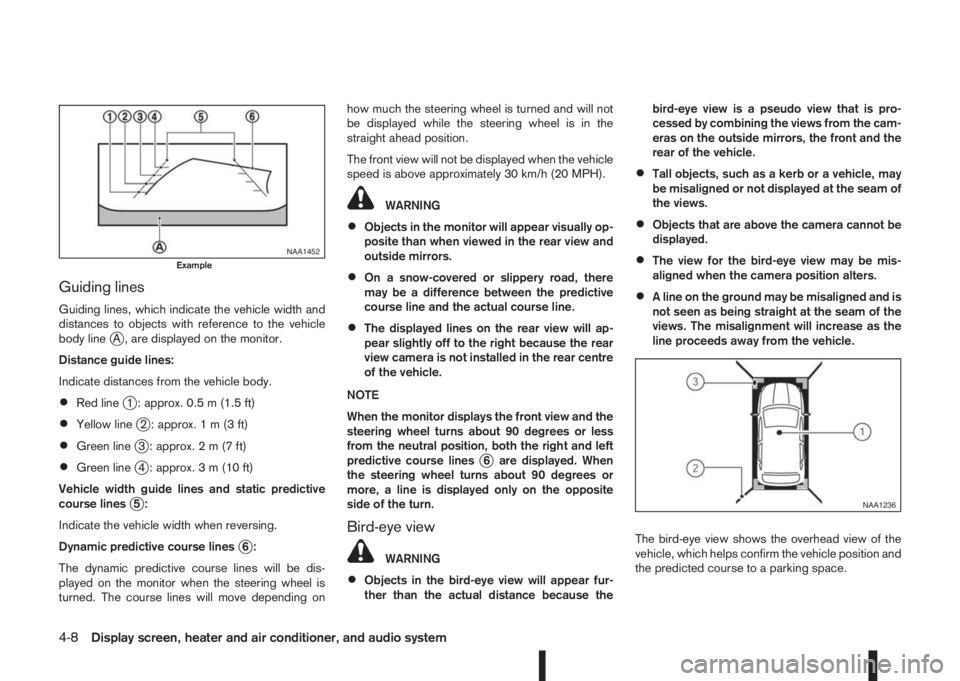
Guiding lines, which indicate the vehicle width and
distances to objects with reference to the vehicle
body line
jA , are displayed on the monitor.
Distance guide lines:
Indicate distances from the vehicle body.
•Red linej1 : approx. 0.5 m (1.5 ft)
•Yellow linej2 : approx.1m(3ft)
•Green linej3 : approx.2m(7ft)
•Green linej4 : approx. 3 m (10 ft)
Vehicle width guide lines and static predictive
course lines
j5:
Indicate the vehicle width when reversing.
Dynamic predictive course lines
j6:
The dynamic predictive course lines will be dis-
played on the monitor when the steering wheel is
turned. The course lines will move depending onhow much the steering wheel is turned and will not
be displayed while the steering wheel is in the
straight ahead position.
The front view will not be displayed when the vehicle
speed is above approximately 30 km/h (20 MPH).
WARNING
•Objects in the monitor will appear visually op-
posite than when viewed in the rear view and
outside mirrors.
•On a snow-covered or slippery road, there
may be a difference between the predictive
course line and the actual course line.
•The displayed lines on the rear view will ap-
pear slightly off to the right because the rear
view camera is not installed in the rear centre
of the vehicle.
NOTE
When the monitor displays the front view and the
steering wheel turns about 90 degrees or less
from the neutral position, both the right and left
predictive course lines
j6 are displayed. When
the steering wheel turns about 90 degrees or
more, a line is displayed only on the opposite
side of the turn.
Bird-eye view
WARNING
•Objects in the bird-eye view will appear fur-
ther than the actual distance because thebird-eye view is a pseudo view that is pro-
cessed by combining the views from the cam-
eras on the outside mirrors, the front and the
rear of the vehicle.
•Tall objects, such as a kerb or a vehicle, may
be misaligned or not displayed at the seam of
the views.
•Objects that are above the camera cannot be
displayed.
•The view for the bird-eye view may be mis-
aligned when the camera position alters.
•A line on the ground may be misaligned and is
not seen as being straight at the seam of the
views. The misalignment will increase as the
line proceeds away from the vehicle.
The bird-eye view shows the overhead view of the
vehicle, which helps confirm the vehicle position and
the predicted course to a parking space.
NAA1452Example
NAA1236
4-8Display screen, heater and air conditioner, and audio system
Page 143 of 338
•The MOD system might detect flowing water
droplets on the camera lens, white smoke
from the exhaust, moving shadows, etc.
•The MOD system may not function properly
depending on the speed, direction, distance
or shape of the moving objects.
•If your vehicle sustains damage to the parts
where the camera is installed, leaving it mis-
aligned or bent, the sensing zone may be al-
tered and the MOD system may not detect
objects properly.
•When the temperature is extremely high or
low, the screen may not display objects
clearly. This is not a malfunction.
Camera maintenance
If dirt, rain or snow accumulates on the camera, the
MOD system may not operate properly. Clean the
camera.
HOW TO ADJUST THE SCREEN
VIEW
To adjust the display brightness of the Around View
Monitor, use the settings described in the sepa-
rately provided NissanConnect owner’s manual.
Do not adjust the settings while the vehicle is mov-
ing. Make sure the parking brake is firmly applied.
AROUND VIEW MONITOR SETTINGS
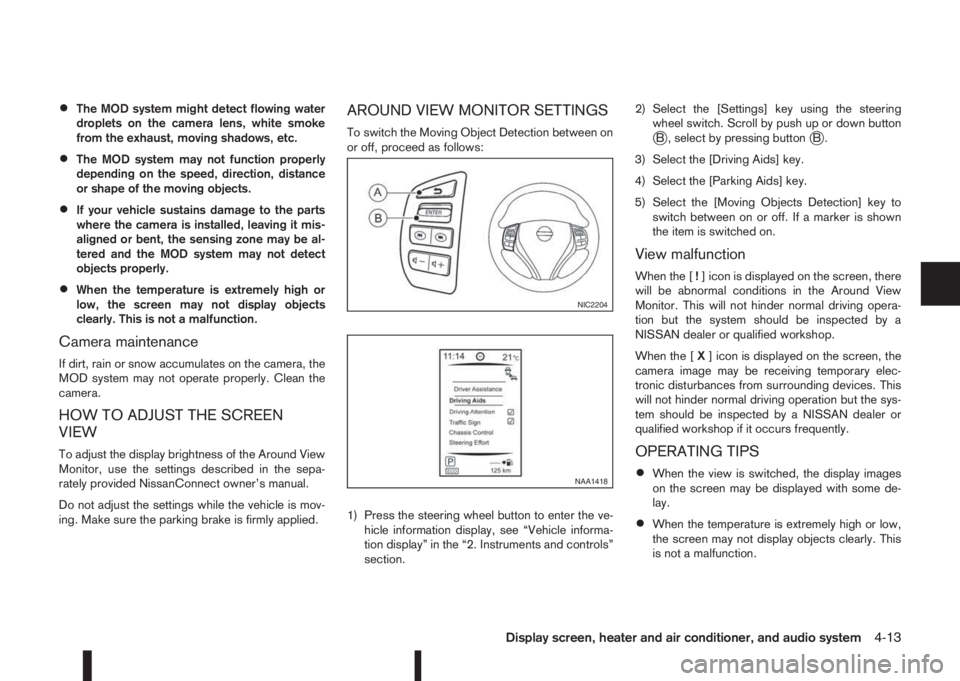
To switch the Moving Object Detection between on
or off, proceed as follows:
1) Press the steering wheel button to enter the ve-
hicle information display, see “Vehicle informa-
tion display” in the “2. Instruments and controls”
section.2) Select the [Settings] key using the steering
wheel switch. Scroll by push up or down buttonjB , select by pressing buttonjB.
3) Select the [Driving Aids] key.
4) Select the [Parking Aids] key.
5) Select the [Moving Objects Detection] key to
switch between on or off. If a marker is shown
the item is switched on.
View malfunction
When the [!] icon is displayed on the screen, there
will be abnormal conditions in the Around View
Monitor. This will not hinder normal driving opera-
tion but the system should be inspected by a
NISSAN dealer or qualified workshop.
When the [X] icon is displayed on the screen, the
camera image may be receiving temporary elec-
tronic disturbances from surrounding devices. This
will not hinder normal driving operation but the sys-
tem should be inspected by a NISSAN dealer or
qualified workshop if it occurs frequently.
OPERATING TIPS
•When the view is switched, the display images
on the screen may be displayed with some de-
lay.
•When the temperature is extremely high or low,
the screen may not display objects clearly. This
is not a malfunction.
NIC2204
NAA1418
Display screen, heater and air conditioner, and audio system4-13
Page 168 of 338
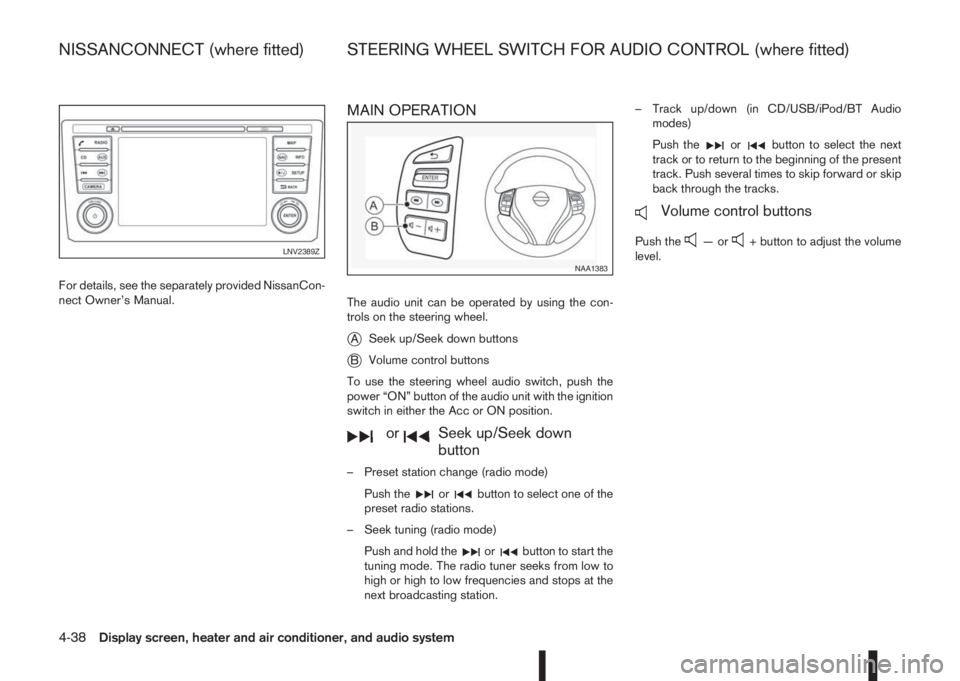
For details, see the separately provided NissanCon-
nect Owner’s Manual.
MAIN OPERATION
The audio unit can be operated by using the con-
trols on the steering wheel.
jASeek up/Seek down buttons
jBVolume control buttons
To use the steering wheel audio switch, push the
power “ON” button of the audio unit with the ignition
switch in either the Acc or ON position.
mormSeek up/Seek down
button
– Preset station change (radio mode)
Push the
orbutton to select one of the
preset radio stations.
– Seek tuning (radio mode)
Push and hold the
orbutton to start the
tuning mode. The radio tuner seeks from low to
high or high to low frequencies and stops at the
next broadcasting station.– Track up/down (in CD/USB/iPod/BT Audio
modes)
Push the
orbutton to select the next
track or to return to the beginning of the present
track. Push several times to skip forward or skip
back through the tracks.
mVolume control buttons
Push the—or+ button to adjust the volume
level.LNV2389Z
NAA1383
NISSANCONNECT (where fitted) STEERING WHEEL SWITCH FOR AUDIO CONTROL (where fitted)
4-38Display screen, heater and air conditioner, and audio system
Page 169 of 338
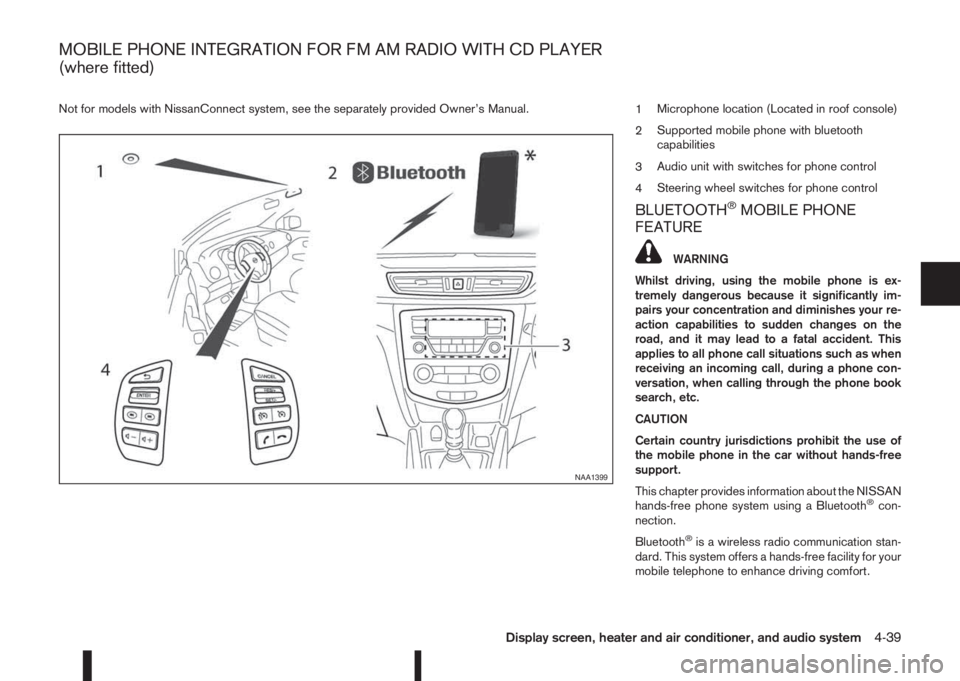
Not for models with NissanConnect system, see the separately provided Owner’s Manual.
1Microphone location (Located in roof console)
2Supported mobile phone with bluetooth
capabilities
3Audio unit with switches for phone control
4Steering wheel switches for phone control
BLUETOOTH®MOBILE PHONE
FEATURE
WARNING
Whilst driving, using the mobile phone is ex-
tremely dangerous because it significantly im-
pairs your concentration and diminishes your re-
action capabilities to sudden changes on the
road, and it may lead to a fatal accident. This
applies to all phone call situations such as when
receiving an incoming call, during a phone con-
versation, when calling through the phone book
search, etc.
CAUTION
Certain country jurisdictions prohibit the use of
the mobile phone in the car without hands-free
support.
This chapter provides information about the NISSAN
hands-free phone system using a Bluetooth
®con-
nection.
Bluetooth
®is a wireless radio communication stan-
dard. This system offers a hands-free facility for your
mobile telephone to enhance driving comfort.
NAA1399
MOBILE PHONE INTEGRATION FOR FM AM RADIO WITH CD PLAYER
(where fitted)
Display screen, heater and air conditioner, and audio system4-39