ECU NISSAN QASHQAI 2016 Owner´s Manual
[x] Cancel search | Manufacturer: NISSAN, Model Year: 2016, Model line: QASHQAI, Model: NISSAN QASHQAI 2016Pages: 338, PDF Size: 4.87 MB
Page 81 of 338
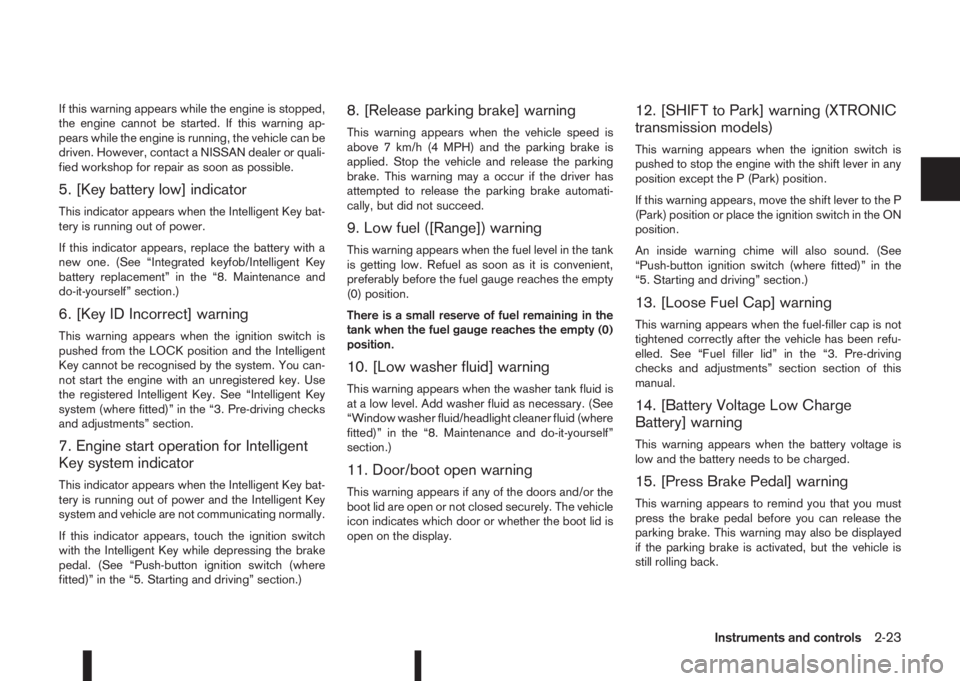
If this warning appears while the engine is stopped,
the engine cannot be started. If this warning ap-
pears while the engine is running, the vehicle can be
driven. However, contact a NISSAN dealer or quali-
fied workshop for repair as soon as possible.
5. [Key battery low] indicator
This indicator appears when the Intelligent Key bat-
tery is running out of power.
If this indicator appears, replace the battery with a
new one. (See “Integrated keyfob/Intelligent Key
battery replacement” in the “8. Maintenance and
do-it-yourself” section.)
6. [Key ID Incorrect] warning
This warning appears when the ignition switch is
pushed from the LOCK position and the Intelligent
Key cannot be recognised by the system. You can-
not start the engine with an unregistered key. Use
the registered Intelligent Key. See “Intelligent Key
system (where fitted)” in the “3. Pre-driving checks
and adjustments” section.
7. Engine start operation for Intelligent
Key system indicator
This indicator appears when the Intelligent Key bat-
tery is running out of power and the Intelligent Key
system and vehicle are not communicating normally.
If this indicator appears, touch the ignition switch
with the Intelligent Key while depressing the brake
pedal. (See “Push-button ignition switch (where
fitted)” in the “5. Starting and driving” section.)
8. [Release parking brake] warning
This warning appears when the vehicle speed is
above 7 km/h (4 MPH) and the parking brake is
applied. Stop the vehicle and release the parking
brake. This warning may a occur if the driver has
attempted to release the parking brake automati-
cally, but did not succeed.
9. Low fuel ([Range]) warning
This warning appears when the fuel level in the tank
is getting low. Refuel as soon as it is convenient,
preferably before the fuel gauge reaches the empty
(0) position.
There is a small reserve of fuel remaining in the
tank when the fuel gauge reaches the empty (0)
position.
10. [Low washer fluid] warning
This warning appears when the washer tank fluid is
at a low level. Add washer fluid as necessary. (See
“Window washer fluid/headlight cleaner fluid (where
fitted)” in the “8. Maintenance and do-it-yourself”
section.)
11. Door/boot open warning
This warning appears if any of the doors and/or the
boot lid are open or not closed securely. The vehicle
icon indicates which door or whether the boot lid is
open on the display.
12. [SHIFT to Park] warning (XTRONIC
transmission models)
This warning appears when the ignition switch is
pushed to stop the engine with the shift lever in any
position except the P (Park) position.
If this warning appears, move the shift lever to the P
(Park) position or place the ignition switch in the ON
position.
An inside warning chime will also sound. (See
“Push-button ignition switch (where fitted)” in the
“5. Starting and driving” section.)
13. [Loose Fuel Cap] warning
This warning appears when the fuel-filler cap is not
tightened correctly after the vehicle has been refu-
elled. See “Fuel filler lid” in the “3. Pre-driving
checks and adjustments” section section of this
manual.
14. [Battery Voltage Low Charge
Battery] warning
This warning appears when the battery voltage is
low and the battery needs to be charged.
15. [Press Brake Pedal] warning
This warning appears to remind you that you must
press the brake pedal before you can release the
parking brake. This warning may also be displayed
if the parking brake is activated, but the vehicle is
still rolling back.
Instruments and controls2-23
Page 103 of 338
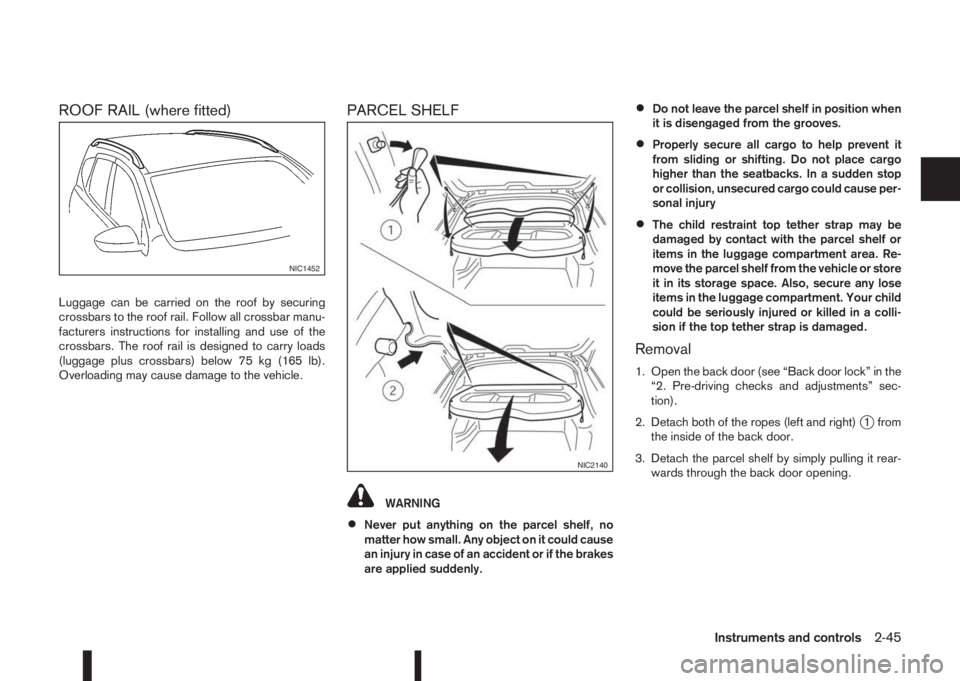
ROOF RAIL (where fitted)
Luggage can be carried on the roof by securing
crossbars to the roof rail. Follow all crossbar manu-
facturers instructions for installing and use of the
crossbars. The roof rail is designed to carry loads
(luggage plus crossbars) below 75 kg (165 lb).
Overloading may cause damage to the vehicle.
PARCEL SHELF
WARNING
•Never put anything on the parcel shelf, no
matter how small. Any object on it could cause
an injury in case of an accident or if the brakes
are applied suddenly.
•Do not leave the parcel shelf in position when
it is disengaged from the grooves.
•Properly secure all cargo to help prevent it
from sliding or shifting. Do not place cargo
higher than the seatbacks. In a sudden stop
or collision, unsecured cargo could cause per-
sonal injury
•The child restraint top tether strap may be
damaged by contact with the parcel shelf or
items in the luggage compartment area. Re-
move the parcel shelf from the vehicle or store
it in its storage space. Also, secure any lose
items in the luggage compartment. Your child
could be seriously injured or killed in a colli-
sion if the top tether strap is damaged.
Removal
1. Open the back door (see “Back door lock” in the
“2. Pre-driving checks and adjustments” sec-
tion).
2. Detach both of the ropes (left and right)
j1 from
the inside of the back door.
3. Detach the parcel shelf by simply pulling it rear-
wards through the back door opening.
NIC1452
NIC2140
Instruments and controls2-45
Page 104 of 338
CAUTION
Make sure the parcel shelf is carefully stored
when not in use in order to prevent any damage.
NOTE
The parcel shelf can be securely stored under
the luggage compartment floor boards (see
“Installation” later in this section).
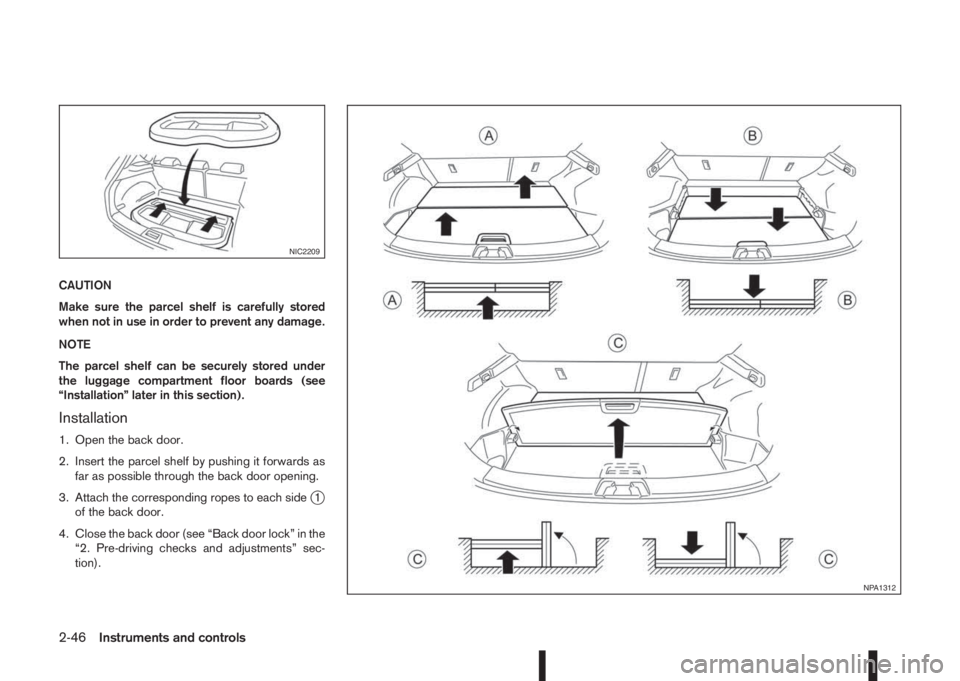
Installation
1. Open the back door.
2. Insert the parcel shelf by pushing it forwards as
far as possible through the back door opening.
3. Attach the corresponding ropes to each side
j1
of the back door.
4. Close the back door (see “Back door lock” in the
“2. Pre-driving checks and adjustments” sec-
tion).
NIC2209
NPA1312
2-46Instruments and controls
Page 105 of 338
LUGGAGE COMPARTMENT/BOOT
FLOOR (where fitted)
WARNING
•Properly secure all cargo with ropes or straps
to help prevent it from sliding or shifting. Do
not place cargo higher than the seatbacks. In
a sudden stop or collision, unsecured cargo
could cause personal injury.
•Do not put objects heavier than 50 kg (110
lbs) on the load floor.
•Never allow anyone to ride in the luggage
area. It is extremely dangerous to ride in a
luggage area inside of a vehicle. In a collision,
people riding in these areas are more likely to
be seriously injured or killed.
•Only two anchorage points identified by the
top tether labels can be used for top tether
strap anchorage. Under no circumstances
should the luggage hooks be used for top
tether strap anchorage.
The luggage (cargo) compartment or boot floor has
a dual surface (wet and dry), or dual position system
with loose floorboards that allow different luggage
compartment arrangements.
CAUTION
•The carpet finish should face up for all dry use
applications.
•The smooth surface should be used only when
loading wet objects.
•The load should be distributed evenly and
should not exceed 50 kg (110 lb) on any of the
boards/panels.
•To avoid any damage, the panels/boards
should be placed in the lower positionjB for
heavy loads and securely held with ropes or
straps to prevent any load shift.
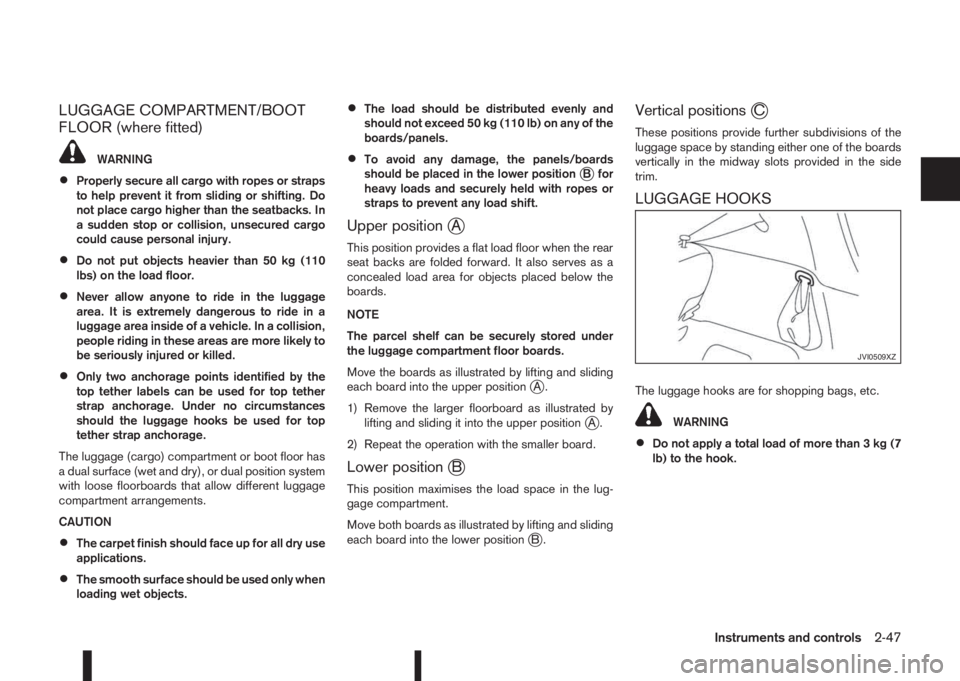
Upper positionjA
This position provides a flat load floor when the rear
seat backs are folded forward. It also serves as a
concealed load area for objects placed below the
boards.
NOTE
The parcel shelf can be securely stored under
the luggage compartment floor boards.
Move the boards as illustrated by lifting and sliding
each board into the upper position
jA.
1) Remove the larger floorboard as illustrated by
lifting and sliding it into the upper position
jA.
2) Repeat the operation with the smaller board.
Lower positionjB
This position maximises the load space in the lug-
gage compartment.
Move both boards as illustrated by lifting and sliding
each board into the lower position
jB.
Vertical positionsjC
These positions provide further subdivisions of the
luggage space by standing either one of the boards
vertically in the midway slots provided in the side
trim.
LUGGAGE HOOKS
The luggage hooks are for shopping bags, etc.
WARNING
•Do not apply a total load of more than 3 kg (7
lb) to the hook.
JVI0509XZ
Instruments and controls2-47
Page 111 of 338
3Pre-driving checks and adjustmentsPre-driving checks and adjustments
Keys ........................................................................ 3-2
NISSAN Anti-Theft System (NATS)* key ............. 3-2
Intelligent Key (where fitted)................................ 3-2
Key number ........................................................ 3-3
New keys ........................................................... 3-3
Emergency/mechanical key (Intelligent Key
models) .............................................................. 3-3
Integrated keyfob/remote control system .................. 3-4
Switching from Convenience mode to
Anti-hijack mode (where fitted) ............................ 3-5
Using the remote keyless entry system ................ 3-5
Locking the doors ............................................... 3-5
Unlocking the doors ............................................ 3-5
Keyfob operation failure ...................................... 3-5
Intelligent Key system (where fitted) ......................... 3-6
Intelligent Key operating range ............................ 3-6
Using Intelligent Key system................................ 3-6
Locking/unlocking .............................................. 3-7
Starting the engine with the Intelligent Key .......... 3-8
Door locks ............................................................... 3-8
Super Lock system (RHD models) ...................... 3-8
Locking/unlocking with the key (vehicle dead
battery) ............................................................... 3-9Inside door handle .............................................. 3-10
Power door lock switch ...................................... 3-10
Child safety lock — rear doors............................ 3-11
Back door lock ................................................... 3-11
Security system ....................................................... 3-12
Alarm system (where fitted) ................................ 3-12
NISSAN Anti-Theft System (NATS)..................... 3-13
Bonnet release ........................................................ 3-14
Fuel filler lid ............................................................. 3-15
Fuel filler lid opener lever .................................... 3-15
Fuel filler cap ...................................................... 3-15
Parking brake switch ............................................... 3-16
Driving away when towing a trailer ...................... 3-17
Steering wheel......................................................... 3-18
Sun visors ............................................................... 3-18
Mirrors..................................................................... 3-18
Inside rear-view mirror ........................................ 3-18
Automatic anti-dazzling inside mirror (where
fitted).................................................................. 3-19
Outside rear-view mirrors.................................... 3-19
Vanity mirror ....................................................... 3-20
Page 112 of 338
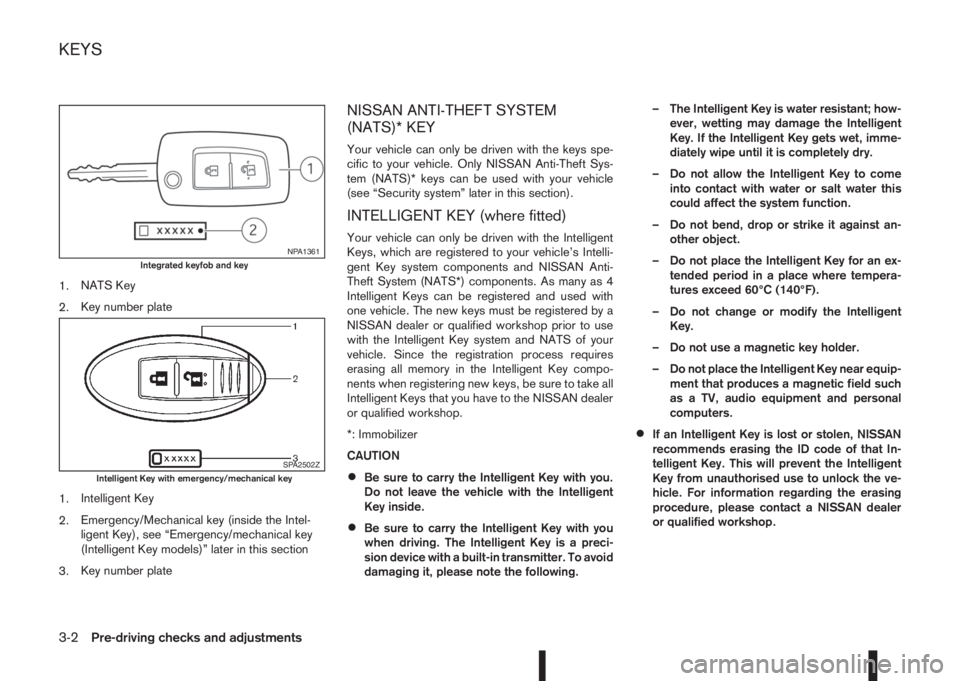
1.NATS Key
2.Key number plate
1.Intelligent Key
2.Emergency/Mechanical key (inside the Intel-
ligent Key), see “Emergency/mechanical key
(Intelligent Key models)” later in this section
3.Key number plate
NISSAN ANTI-THEFT SYSTEM
(NATS)* KEY
Your vehicle can only be driven with the keys spe-
cific to your vehicle. Only NISSAN Anti-Theft Sys-
tem (NATS)* keys can be used with your vehicle
(see “Security system” later in this section).
INTELLIGENT KEY (where fitted)
Your vehicle can only be driven with the Intelligent
Keys, which are registered to your vehicle’s Intelli-
gent Key system components and NISSAN Anti-
Theft System (NATS*) components. As many as 4
Intelligent Keys can be registered and used with
one vehicle. The new keys must be registered by a
NISSAN dealer or qualified workshop prior to use
with the Intelligent Key system and NATS of your
vehicle. Since the registration process requires
erasing all memory in the Intelligent Key compo-
nents when registering new keys, be sure to take all
Intelligent Keys that you have to the NISSAN dealer
or qualified workshop.
*: Immobilizer
CAUTION
•Be sure to carry the Intelligent Key with you.
Do not leave the vehicle with the Intelligent
Key inside.
•Be sure to carry the Intelligent Key with you
when driving. The Intelligent Key is a preci-
sion device with a built-in transmitter. To avoid
damaging it, please note the following.– The Intelligent Key is water resistant; how-
ever, wetting may damage the Intelligent
Key. If the Intelligent Key gets wet, imme-
diately wipe until it is completely dry.
– Do not allow the Intelligent Key to come
into contact with water or salt water this
could affect the system function.
– Do not bend, drop or strike it against an-
other object.
– Do not place the Intelligent Key for an ex-
tended period in a place where tempera-
tures exceed 60°C (140°F).
– Do not change or modify the Intelligent
Key.
– Do not use a magnetic key holder.
– Do not place the Intelligent Key near equip-
ment that produces a magnetic field such
as a TV, audio equipment and personal
computers.
•If an Intelligent Key is lost or stolen, NISSAN
recommends erasing the ID code of that In-
telligent Key. This will prevent the Intelligent
Key from unauthorised use to unlock the ve-
hicle. For information regarding the erasing
procedure, please contact a NISSAN dealer
or qualified workshop.
NPA1361Integrated keyfob and key
SPA2502ZIntelligent Key with emergency/mechanical key
KEYS
3-2Pre-driving checks and adjustments
Page 113 of 338
KEY NUMBER
A key number platej3 is supplied with your key
Record the key number on the “Security Informa-
tion” page at the end of this manual and keep it in a
safe place, butnot in the vehicle. The key can only
be duplicated using an original key or the original
key number. The key number is required when you
have lost all of the keys and do not have the original
key to duplicate from. If the key is lost, or you need
extra keys, provide an original key or the key number
to a NISSAN dealer or qualified workshop.
NISSAN does not record key numbers, so it is very
important that you keep a record of your key num-
ber.
NEW KEYS
As many as four NATS keys can be registered to
one vehicle at any one time. New keys must be reg-
istered to the NATS components of your vehicle by
a NISSAN dealer.
When registering a new key at a NISSAN dealer,
you are requested to bring all of your NATS keys
with you. This is necessary because the registration
process will erase and reprogram the memory of
your vehicle’s NATS components.
NOTE
A key number is only required if you have lost all
of your keys and do not have one to duplicate
from. If you still have a key, this key can be dupli-
cated by a NISSAN dealer.
EMERGENCY/MECHANICAL KEY
(Intelligent Key models)
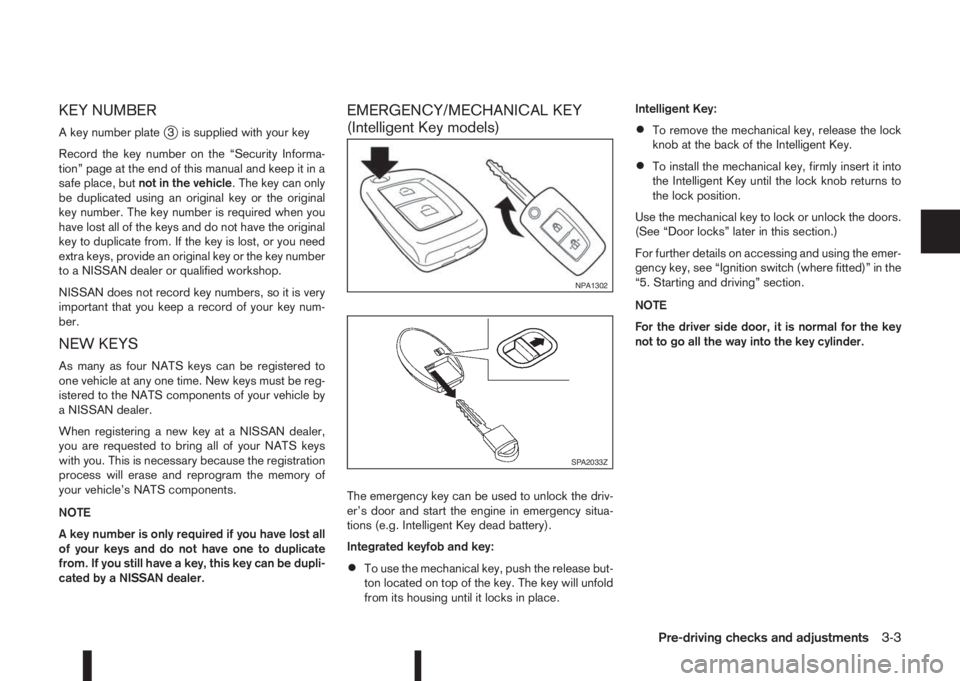
The emergency key can be used to unlock the driv-
er’s door and start the engine in emergency situa-
tions (e.g. Intelligent Key dead battery).
Integrated keyfob and key:
•To use the mechanical key, push the release but-
ton located on top of the key. The key will unfold
from its housing until it locks in place.Intelligent Key:
•To remove the mechanical key, release the lock
knob at the back of the Intelligent Key.
•To install the mechanical key, firmly insert it into
the Intelligent Key until the lock knob returns to
the lock position.
Use the mechanical key to lock or unlock the doors.
(See “Door locks” later in this section.)
For further details on accessing and using the emer-
gency key, see “Ignition switch (where fitted)” in the
“5. Starting and driving” section.
NOTE
For the driver side door, it is normal for the key
not to go all the way into the key cylinder.
NPA1302
SPA2033Z
Pre-driving checks and adjustments3-3
Page 114 of 338
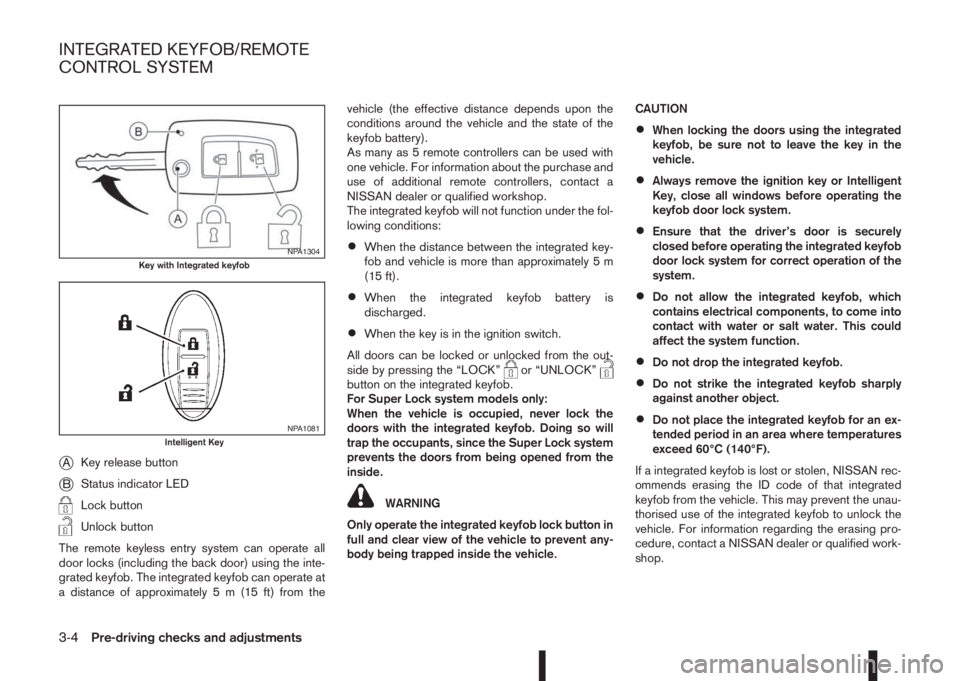
jAKey release button
jBStatus indicator LED
Lock button
Unlock button
The remote keyless entry system can operate all
door locks (including the back door) using the inte-
grated keyfob. The integrated keyfob can operate at
a distance of approximately 5 m (15 ft) from thevehicle (the effective distance depends upon the
conditions around the vehicle and the state of the
keyfob battery).
As many as 5 remote controllers can be used with
one vehicle. For information about the purchase and
use of additional remote controllers, contact a
NISSAN dealer or qualified workshop.
The integrated keyfob will not function under the fol-
lowing conditions:
•When the distance between the integrated key-
fob and vehicle is more than approximately 5 m
(15 ft).
•When the integrated keyfob battery is
discharged.
•When the key is in the ignition switch.
All doors can be locked or unlocked from the out-
side by pressing the “LOCK”
or “UNLOCK”button on the integrated keyfob.
For Super Lock system models only:
When the vehicle is occupied, never lock the
doors with the integrated keyfob. Doing so will
trap the occupants, since the Super Lock system
prevents the doors from being opened from the
inside.
WARNING
Only operate the integrated keyfob lock button in
full and clear view of the vehicle to prevent any-
body being trapped inside the vehicle.CAUTION
•When locking the doors using the integrated
keyfob, be sure not to leave the key in the
vehicle.
•Always remove the ignition key or Intelligent
Key, close all windows before operating the
keyfob door lock system.
•Ensure that the driver’s door is securely
closed before operating the integrated keyfob
door lock system for correct operation of the
system.
•Do not allow the integrated keyfob, which
contains electrical components, to come into
contact with water or salt water. This could
affect the system function.
•Do not drop the integrated keyfob.
•Do not strike the integrated keyfob sharply
against another object.
•Do not place the integrated keyfob for an ex-
tended period in an area where temperatures
exceed 60°C (140°F).
If a integrated keyfob is lost or stolen, NISSAN rec-
ommends erasing the ID code of that integrated
keyfob from the vehicle. This may prevent the unau-
thorised use of the integrated keyfob to unlock the
vehicle. For information regarding the erasing pro-
cedure, contact a NISSAN dealer or qualified work-
shop.
NPA1304Key with Integrated keyfob
NPA1081Intelligent Key
INTEGRATED KEYFOB/REMOTE
CONTROL SYSTEM
3-4Pre-driving checks and adjustments
Page 115 of 338
For information regarding the replacement of a bat-
tery, see “Integrated keyfob/Intelligent Key battery
replacement” in the “8. Maintenance and
do-it-yourself” section.
SWITCHING FROM CONVENIENCE
MODE TO ANTI-HIJACK MODE
(where fitted)
Selective unlock or “Anti-hijack” mode (where fit-
ted) allows the remote unlocking of only the driver’s
door to prevent an attacker from entering the vehicle
via an unlocked passenger door.
As default, the unlock mode will be set to “Conve-
nience” mode (all doors will unlock). Follow the in-
structions in “Vehicle information display” later in
this section.
USING THE REMOTE KEYLESS
ENTRY SYSTEM
WARNING
Super Lock system equipped models:
Failure to follow the precautions below may lead
to hazardous situations. Make sure the Super
Lock system activation is always conducted
safely.
•When the vehicle is occupied, never lock the
doors with the integrated keyfob. Doing so
will trap the occupants, since the Super Lock
system prevents the doors from being opened
from the inside of the vehicle.
•Only operate the integrated keyfob “LOCK”
button when there is a clear view of the ve-hicle. This is to prevent anybody from being
trapped inside the vehicle through the Super
Lock system activation.
For further details on the Super Lock system see
“Door locks” later in this section.
LOCKING THE DOORS
CAUTION
Before operating the keyfob remote control:
•Remove the ignition key or Intelligent Key
from the vehicle and close all windows.
•Check that the driver’s door is securely
closed.
Push the “LOCK” button
on the integrated key-
fob.
– All the doors lock.
– The direction indicators flash once.
If the “LOCK” button
is pushed with all the doors
locked, the direction indicators will flash once to
remind you that the doors are already locked.
UNLOCKING THE DOORS
When you first receive the vehicle, the door unlock
mode is set to unlock all the doors with one push of
the “UNLOCK”
button.
Convenience mode
Unlock all doors, pressing thebutton once.
Setting the convenience mode is done using the
[Settings] menu in the vehicle information display(Select the [Unlocking] menu key).
Also see “Vehicle information display” in the “2. In-
struments and controls” section.
ANTI-HIJACK MODE (where fitted)
Unlock the driver’s door only, pressing thebutton once.
Press thebutton twice to open all doors.
Setting the Anti-hijack mode is done using the [Set-
tings] menu in the vehicle information display (Se-
lect the [Unlocking] menu key). Set [Selective Un-
lock] to off.
For more information see “Vehicle information
display” in the “2. Instruments and controls” sec-
tion.
Auto-relock (where fitted):
An auto-relock function will a short period after a full
or partial unlock, if no further user action is taken.
The auto-relock will be cancelled if any door is
opened or the key is inserted into the ignition.
KEYFOB OPERATION FAILURE
The keyfob may not work properly if:
•The keyfob battery is low.
See “Integrated keyfob/Intelligent Key battery
replacement” in the “8. Maintenance and
do-it-yourself” section for keyfob battery replace-
ment instructions and the required battery type.
Pre-driving checks and adjustments3-5
Page 116 of 338
•The locking/unlocking system has been used
continuously.
An anti lock-abuse system prevents the lock mo-
tors from overheating and disables the keyfob
locking operation for a short period of time if the
system is used continuously.
•The door handle is being pulled while the
keyfob is being operated.
•The vehicle’s battery is dead.
NOTE
See [NO KEY Detected] warning, [Key battery
low] indicator, [Key ID Incorrect] warning or In-
telligent Key system warning in “Vehicle informa-
tion display” in the “2. Instruments and controls”
section for more information.The Intelligent Key system is a convenient keyless
entry system that allows you to operate your vehicle
without using an actual key.
WARNING
Radio waves could adversely affect electric medi-
cal equipment. Those who use a pacemaker
should contact the electric medical equipment
manufacturer for the possible influences before
use.
INTELLIGENT KEY OPERATING
RANGE
The Intelligent Key functions can only be used when
the Intelligent Key is within the specified operating
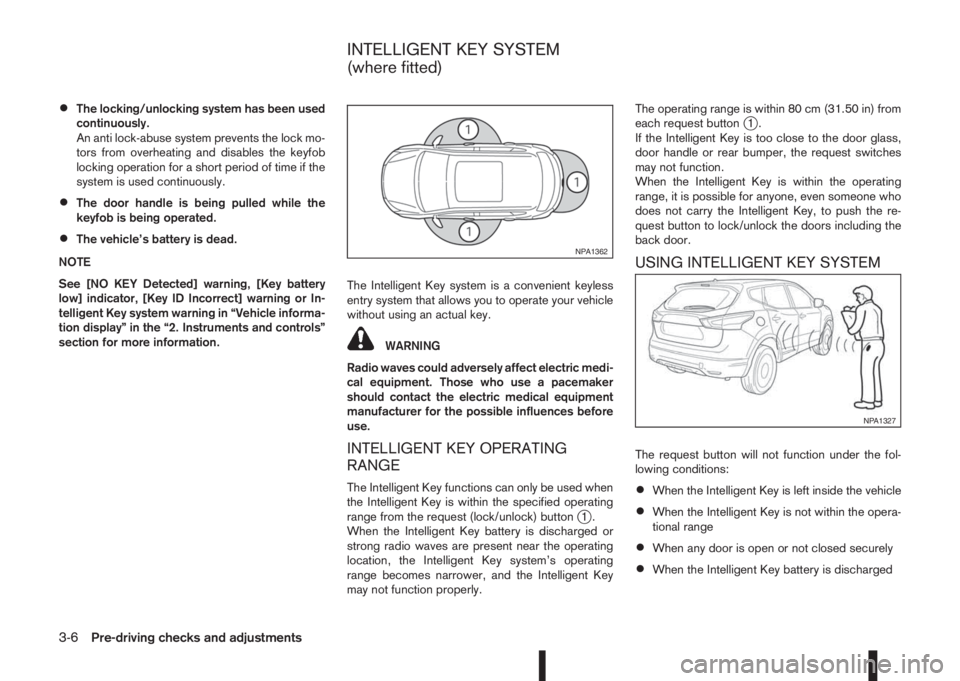
range from the request (lock/unlock) button
j1.
When the Intelligent Key battery is discharged or
strong radio waves are present near the operating
location, the Intelligent Key system’s operating
range becomes narrower, and the Intelligent Key
may not function properly.The operating range is within 80 cm (31.50 in) from
each request button
j1.
If the Intelligent Key is too close to the door glass,
door handle or rear bumper, the request switches
may not function.
When the Intelligent Key is within the operating
range, it is possible for anyone, even someone who
does not carry the Intelligent Key, to push the re-
quest button to lock/unlock the doors including the
back door.
USING INTELLIGENT KEY SYSTEM
The request button will not function under the fol-
lowing conditions:
•When the Intelligent Key is left inside the vehicle
•When the Intelligent Key is not within the opera-
tional range
•When any door is open or not closed securely
•When the Intelligent Key battery is discharged
NPA1362
NPA1327
INTELLIGENT KEY SYSTEM
(where fitted)
3-6Pre-driving checks and adjustments