ESP NISSAN QASHQAI 2016 Owner´s Manual
[x] Cancel search | Manufacturer: NISSAN, Model Year: 2016, Model line: QASHQAI, Model: NISSAN QASHQAI 2016Pages: 338, PDF Size: 4.87 MB
Page 157 of 338
![NISSAN QASHQAI 2016 Owner´s Manual [Sound] menu:
Submenus in the sound menu:
[Bass] Use this control to enhance or
attenuate bass response sound.
Turn the<MENU>dial clockwise
or anticlockwise to adjust the bass
settings then press<ENTE](/img/5/40324/w960_40324-156.png "NISSAN QASHQAI 2016 Owner´s Manual [Sound] menu:
Submenus in the sound menu:
[Bass] Use this control to enhance or
attenuate bass response sound.
Turn the<MENU>dial clockwise
or anticlockwise to adjust the bass
settings then press<ENTE")
[Sound] menu:
Submenus in the sound menu:
[Bass] Use this control to enhance or
attenuate bass response sound.
Turn the
Page 158 of 338
![NISSAN QASHQAI 2016 Owner´s Manual [Format]:
Set the clock display between 24-hour mode and
12-hour clock mode.
[Radio] menu
For activation or deactivation details, see “SETUP
button” later in this section.
Language settings
Select](/img/5/40324/w960_40324-157.png "NISSAN QASHQAI 2016 Owner´s Manual [Format]:
Set the clock display between 24-hour mode and
12-hour clock mode.
[Radio] menu
For activation or deactivation details, see “SETUP
button” later in this section.
Language settings
Select")
[Format]:
Set the clock display between 24-hour mode and
12-hour clock mode.
[Radio] menu
For activation or deactivation details, see “SETUP
button” later in this section.
Language settings
Select the appropriate language and press the
automatically adapt the language setting.
•[AUTO]
(Factory preset language connected with the
meter language)
•[Chinese]
•[Chinese Simplified]
•[Deutsch]
•[Español]
•[Français]
•[Italiano]
•[Nederlands]
•[Polski]
•[Português]
•[Türkçe]
•[UK English]
•[русский]
COMPACT DISC (CD) OPERATION
The CD player can play a music CD or an encoded
MP3/WMA CD and while listening to those CD’s
music information tags (track and artist information)
can be displayed (when CD encoded with text is
being used).
Press the
will start to play.
When
source mode is already operating, it will automati-
cally turn off the playing source and the CD play
mode will start.
CAUTION
•Do not force the CD into the slot. This could
damage the player.
•Do not use 8 cm (3.1 in) discs.
CD insert (CD player)
Insert the CD disc into the slot with the label side
facing up. The disc will be guided automatically into
the slot and will start playing. After loading the disc,
track information will be displayed.
NOTE
•The CD player accepts normal audio CD or
CD recorded with MP3/WMA files.
•Inserting a CD recorded with MP3/WMA files,
the audio unit will automatically detect and
[MP3CD] will be indicated.
•An error notification message will be
displayed when inserting a wrong disc type
(e.g. DVD), or the player cannot read the CD
disc. Eject the disc and insert another disc.
MEDIA button
Load a CD disc. After a short loading period the CD
starts playing.
If the disc was already loaded:
Press the
connected audio sources if necessary multiple
times) to select CD. Playing starts from the track
that was being played when the CD play mode was
switched off.
Audio main operation
List view:
While the track is being played, either press the
the available tracks in a listed view mode. To select
a track from the list, or a track to start listening from,
turn the
Page 173 of 338
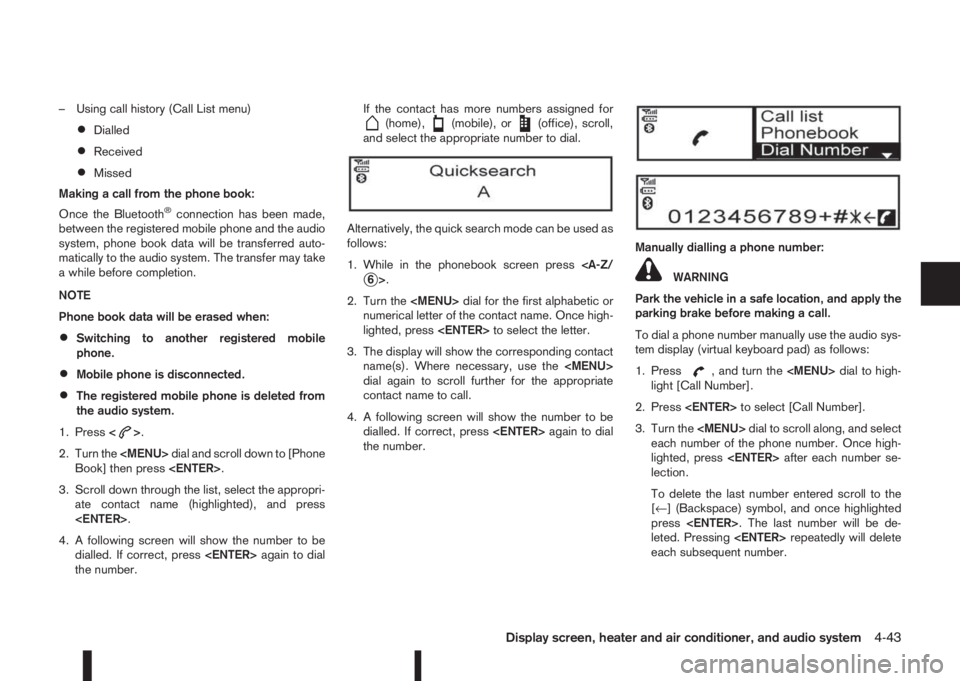
– Using call history (Call List menu)
•Dialled
•Received
•Missed
Making a call from the phone book:
Once the Bluetooth
®connection has been made,
between the registered mobile phone and the audio
system, phone book data will be transferred auto-
matically to the audio system. The transfer may take
a while before completion.
NOTE
Phone book data will be erased when:
•Switching to another registered mobile
phone.
•Mobile phone is disconnected.
•The registered mobile phone is deleted from
the audio system.
1. Press<
>.
2. Turn the
Page 177 of 338
Lane Departure Warning (LDW) system (where
fitted) ....................................................................... 5-33
LDW system operation ....................................... 5-34
LDW temporary disabled status .......................... 5-35
LDW automatic deactivation ............................... 5-35
LDW malfunction ................................................ 5-35
Multi-sensing camera unit maintenance ............... 5-35
Cruise control (where fitted) .................................... 5-36
Precautions on cruise control .............................. 5-36
Cruise control system operations ........................ 5-37
Speed limiter (where fitted) ...................................... 5-38
Speed limiter operations ..................................... 5-39
Forward emergency braking system (where fitted) ... 5-40
System operation ................................................ 5-41
Parking .................................................................... 5-43
Ultrasonic Parking Sensors (where fitted)................. 5-45
Operation ........................................................... 5-45
Intelligent Parking Assist (IPA) (where fitted) ............ 5-46
Deactivation of the IPA system ............................ 5-47
Parking procedure using the IPA system ............. 5-48
Operating tips..................................................... 5-52
Trailer towing ........................................................... 5-54
Operating precautions ........................................ 5-54
Maximum load limits (for Australia) ...................... 5-55
Tyre pressure ..................................................... 5-55
Safety chains ...................................................... 5-55
Trailer brakes...................................................... 5-55
Trailer detection (where fitted) ............................ 5-56Installation of coupling device (except for
Australia) ............................................................ 5-56
Vehicle security........................................................ 5-57
Electric power steering system ................................ 5-57
Brake system ........................................................... 5-58
Brake precautions .............................................. 5-58
Anti-lock Braking System (ABS)............................... 5-59
Using system ...................................................... 5-59
Self-test feature .................................................. 5-59
Normal operation ................................................ 5-60
Electronic Stability Programme (ESP) system
(where fitted) ........................................................... 5-60
Electronic Stability Programme (ESP) OFF
switch................................................................. 5-61
Chassis control........................................................ 5-62
Active trace control ............................................. 5-62
Active engine brake (for XTRONIC (CVT)
models only) ....................................................... 5-63
Active ride control ............................................... 5-64
Hill Start Assist (HSA) system .................................. 5-64
ECO mode system (where fitted) ............................. 5-65
Cold weather driving................................................ 5-66
Battery ............................................................... 5-66
Engine coolant .................................................... 5-66
Tyre equipment ................................................... 5-66
Special winter equipment.................................... 5-67
Corrosion protection ........................................... 5-67
Page 178 of 338
During the first 1,600 km (1,000 miles), follow these
recommendations for the future reliability and
economy of your new vehicle. Failure to follow the
recommendations may result in shortened engine
life and reduced engine performance.
•Avoid driving for long periods at a constant
speed, either fast or slow.
•Do not accelerate at full throttle in any gear.
•Avoid quick starts.
•Avoid hard braking as much as possible.
•Do not tow a trailer during the first 800 km (500
miles).
NOTE
Models with K9K diesel engine will achieve top
performance only after approximately 5,000 km
(3,000 miles).
WARNING
The driving characteristics of your vehicle can be
changed remarkably by any additional load and
its distribution as well as by adding optional
equipment (trailer couplings, roof racks, etc.).
Your driving style and speed have to be adjusted
accordingly. Especially when carrying heavy
loads, your speed must be reduced adequately.
•Make sure the area around the vehicle is free of
obstacles.
•Check fluid levels such as engine oil, coolant,
brake and clutch fluid, and window washer fluid
as frequently as possible, at least whenever you
refuel.
•Visually inspect tyres for their appearance and
condition. Also check the tyre pressure for
proper inflation.
•Maintenance items in the “8. Maintenance and
do-it-yourself” section should be checked peri-
odically.
•Check that all windows and light lenses are
clean.
•Check that all doors are closed.
•Position the seat and adjust the head restraints.
•Adjust the inside and outside mirrors.
•Fasten your seat belt and ask all passengers to
do likewise.
•Check the operation of the warning/indicator
lights when the ignition switch is turned to the
ON position.
•Do not place hard or heavy objects on the dash-
board or rear parcel shelf in order to prevent
injury in the event of a sudden stop.
RUNNING-IN SCHEDULE BEFORE STARTING THE ENGINE
5-2Starting and driving
Page 180 of 338
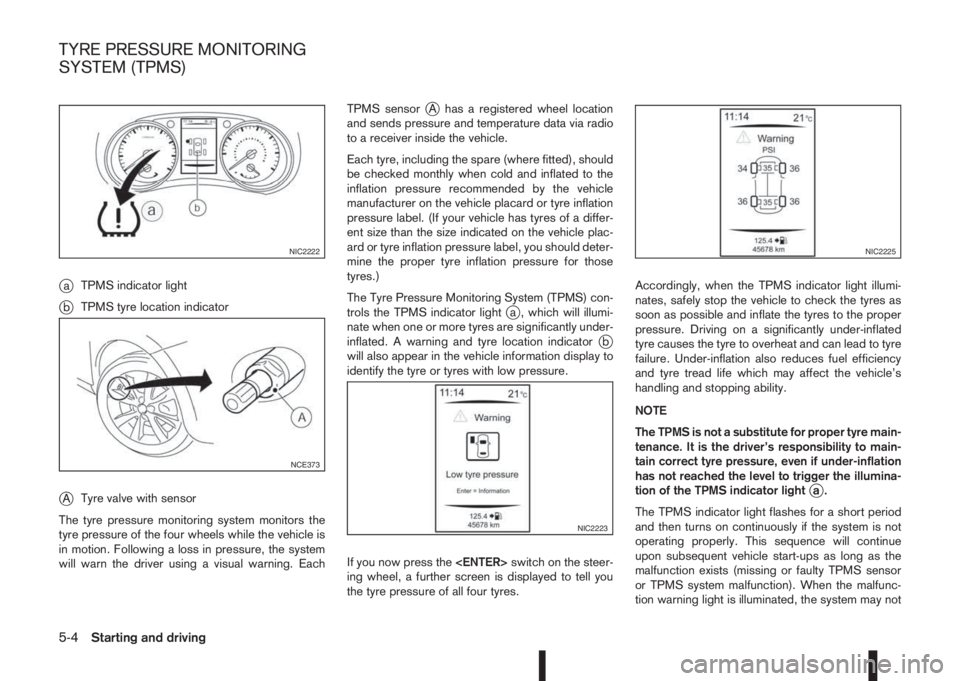
jaTPMS indicator light
jbTPMS tyre location indicator
jATyre valve with sensor
The tyre pressure monitoring system monitors the
tyre pressure of the four wheels while the vehicle is
in motion. Following a loss in pressure, the system
will warn the driver using a visual warning. EachTPMS sensor
jA has a registered wheel location
and sends pressure and temperature data via radio
to a receiver inside the vehicle.
Each tyre, including the spare (where fitted), should
be checked monthly when cold and inflated to the
inflation pressure recommended by the vehicle
manufacturer on the vehicle placard or tyre inflation
pressure label. (If your vehicle has tyres of a differ-
ent size than the size indicated on the vehicle plac-
ard or tyre inflation pressure label, you should deter-
mine the proper tyre inflation pressure for those
tyres.)
The Tyre Pressure Monitoring System (TPMS) con-
trols the TPMS indicator light
ja , which will illumi-
nate when one or more tyres are significantly under-
inflated. A warning and tyre location indicator
jb
will also appear in the vehicle information display to
identify the tyre or tyres with low pressure.
If you now press the
ing wheel, a further screen is displayed to tell you
the tyre pressure of all four tyres.Accordingly, when the TPMS indicator light illumi-
nates, safely stop the vehicle to check the tyres as
soon as possible and inflate the tyres to the proper
pressure. Driving on a significantly under-inflated
tyre causes the tyre to overheat and can lead to tyre
failure. Under-inflation also reduces fuel efficiency
and tyre tread life which may affect the vehicle’s
handling and stopping ability.
NOTE
The TPMS is not a substitute for proper tyre main-
tenance. It is the driver’s responsibility to main-
tain correct tyre pressure, even if under-inflation
has not reached the level to trigger the illumina-
tion of the TPMS indicator light
ja.
The TPMS indicator light flashes for a short period
and then turns on continuously if the system is not
operating properly. This sequence will continue
upon subsequent vehicle start-ups as long as the
malfunction exists (missing or faulty TPMS sensor
or TPMS system malfunction). When the malfunc-
tion warning light is illuminated, the system may not
NIC2222
NCE373
NIC2223
NIC2225
TYRE PRESSURE MONITORING
SYSTEM (TPMS)
5-4Starting and driving
Page 192 of 338
CAUTION
•As soon as the engine has started, release
the ignition switch immediately.
•Do not operate the starter for more than
15 seconds at a time. If the engine does
not start, turn the ignition switch to the
“OFF” position and wait 10 seconds (Petrol
engine models) or 20 seconds (Diesel en-
gine models) before cranking again, oth-
erwise the starter could be damaged.
•If it becomes necessary to start the engine
with a booster battery and jumper cables,
the instructions and cautions contained in
the “6. In case of emergency” section
should be carefully followed.
5. After starting, allow the engine to idle for at least
30 seconds to warm-up. Drive at moderate
speeds for a short distance first, especially in
cold weather.
CAUTION
Do not leave the vehicle unattended while the
engine is warming up.
6. To stop the engine:
– Manual transmission models: apply the park-
ing brake and push the ignition switch to the
“OFF” position.
– XTRONIC transmission models: move the
shift lever to the P (Park) position, apply the
parking brake and push the switch to the
“OFF” position.7. The steering wheel lock engages when ignition
is off and a door is opened or closed.
MODELS WITHOUT INTELLIGENT
KEY SYSTEM
1. Apply the parking brake. For additional informa-
tion, see “Parking brake switch” in the “3. Pre-
driving checks and adjustments” section.
2.Manual transmission models:
Move the shift lever to the N (Neutral) position,
and depress the clutch pedal to the floor while
starting the engine.
XTRONIC transmission (CVT) models:
Move the shift lever to the P (Park) or N (Neutral)
position. (P position is preferred).
The starter is designed to operate only when
the shift lever is in the proper position.
3. Rotate the steering wheel left to right to release
the ignition lock whilst turning the ignition switch
to the ON position.
4. For diesel engine models: Wait until the glow
indicator light (
) goes out.
5. With your foot on the brake pedal,not on the
accelerator pedal, crank the engine by turning
the ignition switch to START.
6. Immediately release the ignition switch when the
engine starts. If the engine starts, but fails to run,
repeat the above procedures.NOTE
Petrol engine models:
•If the engine is very hard to start in ex-
tremely cold weather or when restarting,
depress the accelerator pedal a little (ap-
proximately 1/3 of the way to the floor)
and hold it and then crank the engine. Re-
lease the ignition switch and the accelera-
tor pedal when the engine starts.
•If the engine is very hard to start because
it is flooded, depress the accelerator pedal
all the way to the floor and hold it. Crank
the engine for 5-6 seconds. After cranking
the engine, release the accelerator pedal.
Crank the engine with your foot off the ac-
celerator pedal by turning the ignition
switch to START. Release the switch when
the engine starts. If the engine starts, but
fails to run, repeat the above procedure.
CAUTION
•As soon as the engine has started, release
the ignition switch immediately.
•Do not operate the starter for more than
15 seconds at a time. If the engine does
not start, turn the ignition switch to the
“OFF” position and wait 10 seconds (Petrol
engine models) or 20 seconds (Diesel en-
gine models) before cranking again, oth-
erwise the starter could be damaged.
5-16Starting and driving
Page 193 of 338
•If it becomes necessary to start the engine
with a booster battery and jumper cables,
the instructions and cautions contained in
the “6. In case of emergency” section
should be carefully followed.
7. After starting, allow the engine to idle for at least
30 seconds to warm-up. Drive at moderate
speeds for a short distance first, especially in
cold weather.
CAUTION
Do not leave the vehicle unattended while the
engine is warming up.
8. To stop the engine:
– Manual transmission models: apply the park-
ing brake and push or turn the ignition switch
to the “OFF” position.
– XTRONIC transmission models: move the
shift lever to the P (Park) position, apply the
parking brake and push or turn the ignition
switch to the “OFF” position.
9. Rotate the steering wheel left to lock the steering
wheel.DRIVING WITH MANUAL
TRANSMISSION
CAUTION
•Do not rest your foot on the clutch pedal while
driving. This may cause clutch damage.
•Stop your vehicle completely before shifting
into the R (Reverse) position.
•When you are shifting from one gear to an-
other, be certain to depress the clutch pedal
all the way to the floor to avoid clashing or
chipping the gears.
•Avoid abrupt starts and acceleration for your
safety.
•When quick acceleration is required for some
reason, shift to a lower gear and accelerate
until the vehicle reaches the maximum speed
in each gear. Do not exceed the speed limit of
any gear. Pay special attention when acceler-
ating or when shifting into a lower gear on
slippery surfaces. Sudden acceleration or
down shifting could cause the wheels to skid
and result in loss of control.
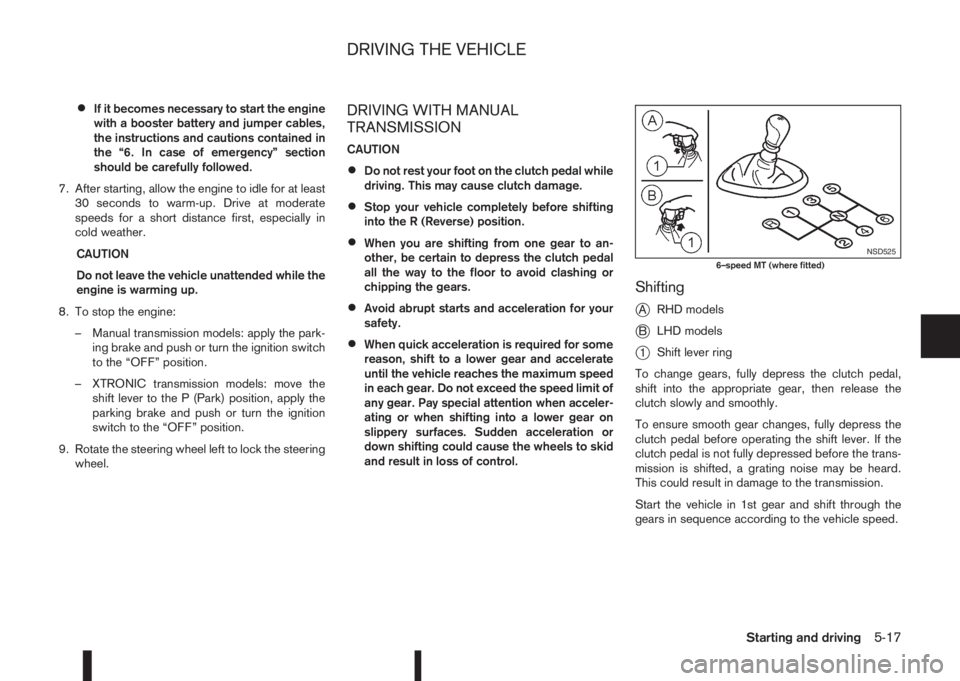
Shifting
j
ARHD models
jBLHD models
j1Shift lever ring
To change gears, fully depress the clutch pedal,
shift into the appropriate gear, then release the
clutch slowly and smoothly.
To ensure smooth gear changes, fully depress the
clutch pedal before operating the shift lever. If the
clutch pedal is not fully depressed before the trans-
mission is shifted, a grating noise may be heard.
This could result in damage to the transmission.
Start the vehicle in 1st gear and shift through the
gears in sequence according to the vehicle speed.
NSD5256–speed MT (where fitted)
DRIVING THE VEHICLE
Starting and driving5-17
Page 194 of 338
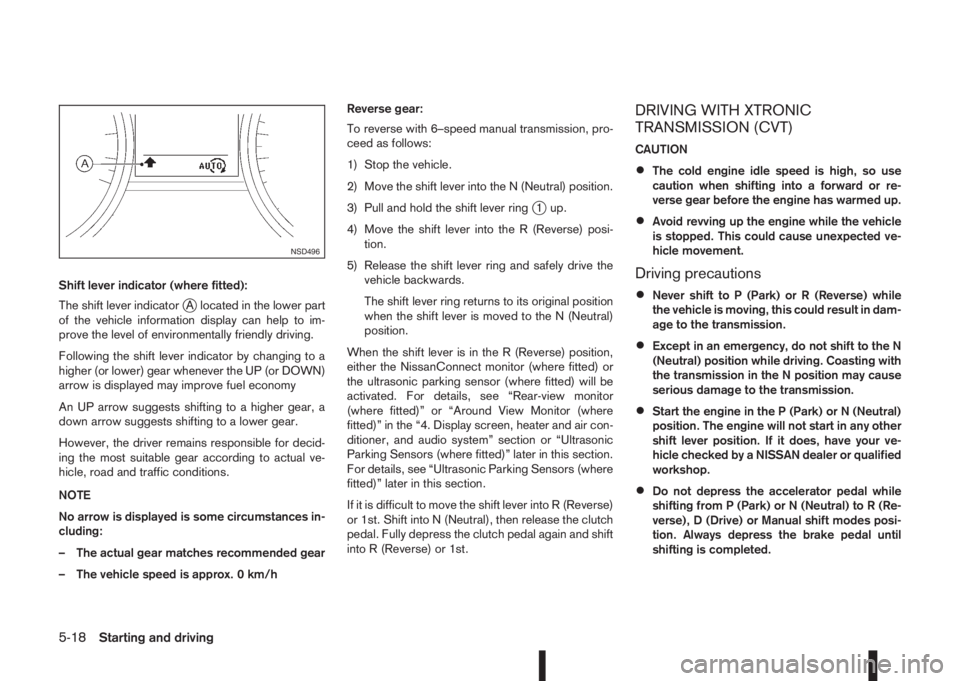
Shift lever indicator (where fitted):
The shift lever indicator
jA located in the lower part
of the vehicle information display can help to im-
prove the level of environmentally friendly driving.
Following the shift lever indicator by changing to a
higher (or lower) gear whenever the UP (or DOWN)
arrow is displayed may improve fuel economy
An UP arrow suggests shifting to a higher gear, a
down arrow suggests shifting to a lower gear.
However, the driver remains responsible for decid-
ing the most suitable gear according to actual ve-
hicle, road and traffic conditions.
NOTE
No arrow is displayed is some circumstances in-
cluding:
– The actual gear matches recommended gear
– The vehicle speed is approx. 0 km/hReverse gear:
To reverse with 6–speed manual transmission, pro-
ceed as follows:
1) Stop the vehicle.
2) Move the shift lever into the N (Neutral) position.
3) Pull and hold the shift lever ring
j1 up.
4) Move the shift lever into the R (Reverse) posi-
tion.
5) Release the shift lever ring and safely drive the
vehicle backwards.
The shift lever ring returns to its original position
when the shift lever is moved to the N (Neutral)
position.
When the shift lever is in the R (Reverse) position,
either the NissanConnect monitor (where fitted) or
the ultrasonic parking sensor (where fitted) will be
activated. For details, see “Rear-view monitor
(where fitted)” or “Around View Monitor (where
fitted)” in the “4. Display screen, heater and air con-
ditioner, and audio system” section or “Ultrasonic
Parking Sensors (where fitted)” later in this section.
For details, see “Ultrasonic Parking Sensors (where
fitted)” later in this section.
If it is difficult to move the shift lever into R (Reverse)
or 1st. Shift into N (Neutral), then release the clutch
pedal. Fully depress the clutch pedal again and shift
into R (Reverse) or 1st.
DRIVING WITH XTRONIC
TRANSMISSION (CVT)
CAUTION
•The cold engine idle speed is high, so use
caution when shifting into a forward or re-
verse gear before the engine has warmed up.
•Avoid revving up the engine while the vehicle
is stopped. This could cause unexpected ve-
hicle movement.
Driving precautions
•Never shift to P (Park) or R (Reverse) while
the vehicle is moving, this could result in dam-
age to the transmission.
•Except in an emergency, do not shift to the N
(Neutral) position while driving. Coasting with
the transmission in the N position may cause
serious damage to the transmission.
•Start the engine in the P (Park) or N (Neutral)
position. The engine will not start in any other
shift lever position. If it does, have your ve-
hicle checked by a NISSAN dealer or qualified
workshop.
•Do not depress the accelerator pedal while
shifting from P (Park) or N (Neutral) to R (Re-
verse), D (Drive) or Manual shift modes posi-
tion. Always depress the brake pedal until
shifting is completed.
NSD496
5-18Starting and driving
Page 196 of 338
P (Park):
Use this position when the vehicle is parked or when
starting the engine. Always make sure that the ve-
hicle is completely stopped before moving the shift
lever into the P (Park) position. For maximum safety,
the footbrake pedal must be depressed before mov-
ing the shift lever into the P (Park) position. Use this
position together with the parking brake. When park-
ing on a hill, first depress the footbrake pedal, apply
the parking brake and then shift into the P (Park)
position.
R (Reverse):
CAUTION
Shift into this position only after the vehicle has
completely stopped.
Use this position to reverse the vehicle.
When the shift lever is in the R (Reverse) position,
either the NissanConnect monitor (where fitted) or
the ultrasonic parking sensor (where fitted) will be
activated. For details, see “Rear-view monitor
(where fitted)” or “Around View Monitor (where
fitted)” in the “4. Display screen, heater and air con-
ditioner, and audio system” section or “Ultrasonic
Parking Sensors (where fitted)” later in this section.
N (Neutral):
Neither forward nor reverse gear is engaged. The
engine can be started in this position. You may shift
to N and restart a stalled engine while driving the
vehicle.D (Drive):
Use this position for all normal forward driving.
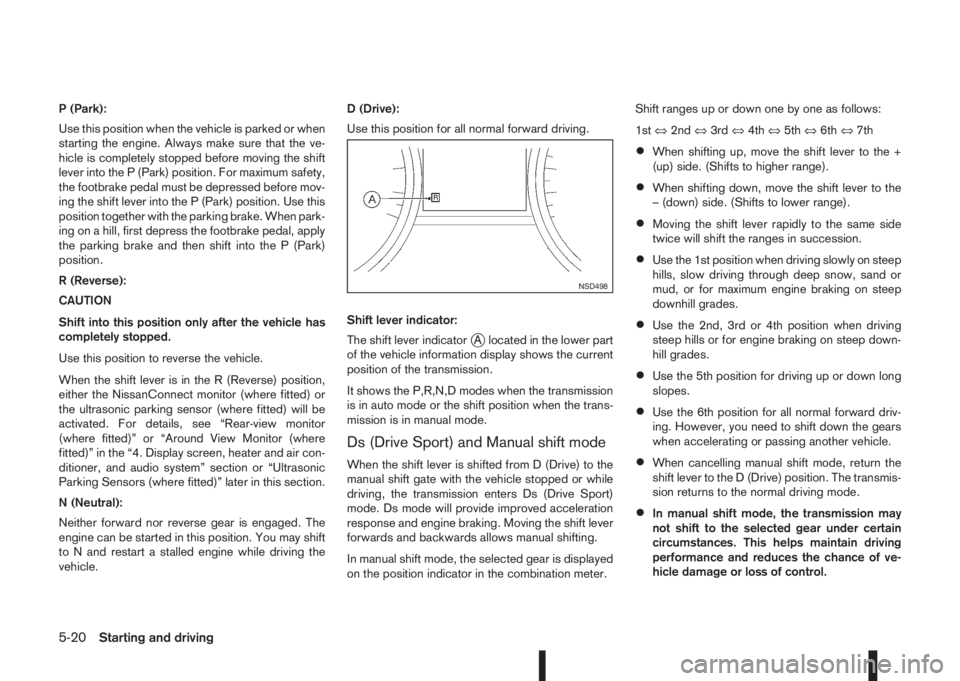
Shift lever indicator:
The shift lever indicator
jA located in the lower part
of the vehicle information display shows the current
position of the transmission.
It shows the P,R,N,D modes when the transmission
is in auto mode or the shift position when the trans-
mission is in manual mode.
Ds (Drive Sport) and Manual shift mode
When the shift lever is shifted from D (Drive) to the
manual shift gate with the vehicle stopped or while
driving, the transmission enters Ds (Drive Sport)
mode. Ds mode will provide improved acceleration
response and engine braking. Moving the shift lever
forwards and backwards allows manual shifting.
In manual shift mode, the selected gear is displayed
on the position indicator in the combination meter.Shift ranges up or down one by one as follows:
1st⇔2nd⇔3rd⇔4th⇔5th⇔6th⇔7th
•When shifting up, move the shift lever to the +
(up) side. (Shifts to higher range).
•When shifting down, move the shift lever to the
– (down) side. (Shifts to lower range).
•Moving the shift lever rapidly to the same side
twice will shift the ranges in succession.
•Use the 1st position when driving slowly on steep
hills, slow driving through deep snow, sand or
mud, or for maximum engine braking on steep
downhill grades.
•Use the 2nd, 3rd or 4th position when driving
steep hills or for engine braking on steep down-
hill grades.
•Use the 5th position for driving up or down long
slopes.
•Use the 6th position for all normal forward driv-
ing. However, you need to shift down the gears
when accelerating or passing another vehicle.
•When cancelling manual shift mode, return the
shift lever to the D (Drive) position. The transmis-
sion returns to the normal driving mode.
•In manual shift mode, the transmission may
not shift to the selected gear under certain
circumstances. This helps maintain driving
performance and reduces the chance of ve-
hicle damage or loss of control.
NSD498
5-20Starting and driving