instrument panel NISSAN QASHQAI 2016 Owner´s Manual
[x] Cancel search | Manufacturer: NISSAN, Model Year: 2016, Model line: QASHQAI, Model: NISSAN QASHQAI 2016Pages: 338, PDF Size: 4.87 MB
Page 125 of 338
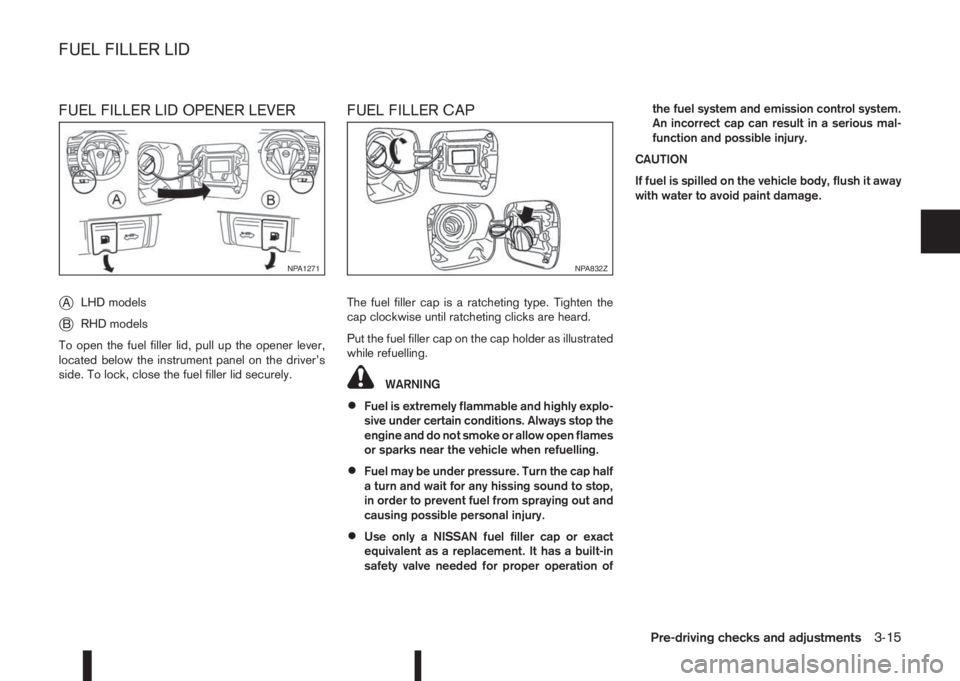
FUEL FILLER LID OPENER LEVER
j
ALHD models
jBRHD models
To open the fuel filler lid, pull up the opener lever,
located below the instrument panel on the driver’s
side. To lock, close the fuel filler lid securely.
FUEL FILLER CAP
The fuel filler cap is a ratcheting type. Tighten the
cap clockwise until ratcheting clicks are heard.
Put the fuel filler cap on the cap holder as illustrated
while refuelling.
WARNING
•Fuel is extremely flammable and highly explo-
sive under certain conditions. Always stop the
engine and do not smoke or allow open flames
or sparks near the vehicle when refuelling.
•Fuel may be under pressure. Turn the cap half
a turn and wait for any hissing sound to stop,
in order to prevent fuel from spraying out and
causing possible personal injury.
•Use only a NISSAN fuel filler cap or exact
equivalent as a replacement. It has a built-in
safety valve needed for proper operation ofthe fuel system and emission control system.
An incorrect cap can result in a serious mal-
function and possible injury.
CAUTION
If fuel is spilled on the vehicle body, flush it away
with water to avoid paint damage.
NPA1271NPA832Z
FUEL FILLER LID
Pre-driving checks and adjustments3-15
Page 189 of 338
is possible for anyone, even someone who does not
carry the Intelligent Key, to push the ignition switch
to start the engine.
•The luggage room area is not included in the
operating range, but the Intelligent Key may func-
tion.
•If the Intelligent Key is placed on the instrument
panel, inside the glove box, door pocket or the
corner of the interior compartment, the Intelli-
gent Key may not function.
•If the Intelligent Key is placed near the door or
window outside the vehicle, the Intelligent Key
may function.
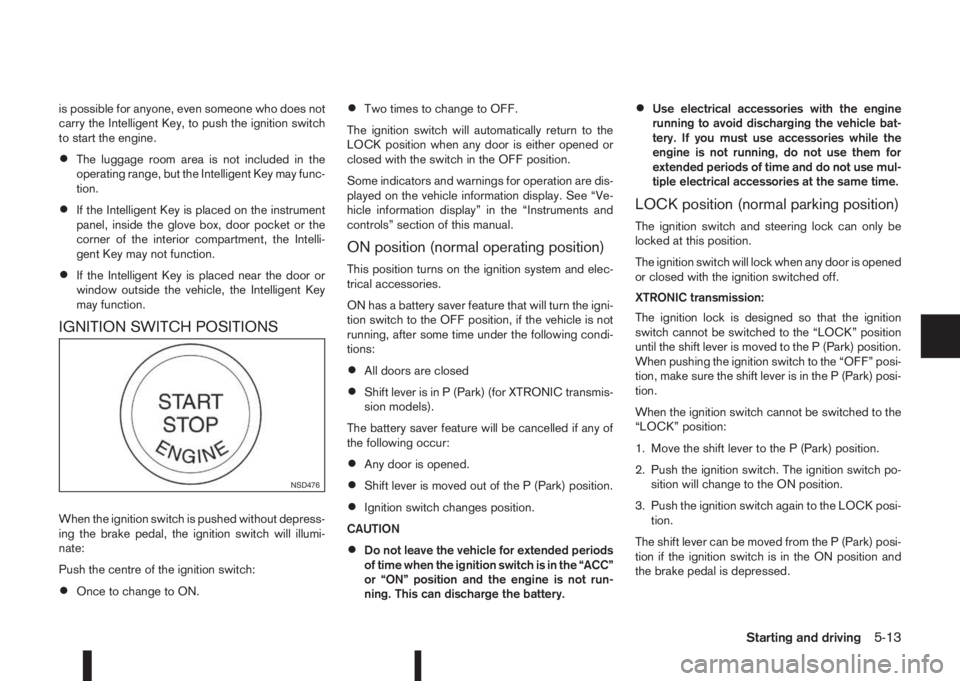
IGNITION SWITCH POSITIONS
When the ignition switch is pushed without depress-
ing the brake pedal, the ignition switch will illumi-
nate:
Push the centre of the ignition switch:
•Once to change to ON.
•Two times to change to OFF.
The ignition switch will automatically return to the
LOCK position when any door is either opened or
closed with the switch in the OFF position.
Some indicators and warnings for operation are dis-
played on the vehicle information display. See “Ve-
hicle information display” in the “Instruments and
controls” section of this manual.
ON position (normal operating position)
This position turns on the ignition system and elec-
trical accessories.
ON has a battery saver feature that will turn the igni-
tion switch to the OFF position, if the vehicle is not
running, after some time under the following condi-
tions:
•All doors are closed
•Shift lever is in P (Park) (for XTRONIC transmis-
sion models).
The battery saver feature will be cancelled if any of
the following occur:
•Any door is opened.
•Shift lever is moved out of the P (Park) position.
•Ignition switch changes position.
CAUTION
•Do not leave the vehicle for extended periods
of time when the ignition switch is in the “ACC”
or “ON” position and the engine is not run-
ning. This can discharge the battery.
•Use electrical accessories with the engine
running to avoid discharging the vehicle bat-
tery. If you must use accessories while the
engine is not running, do not use them for
extended periods of time and do not use mul-
tiple electrical accessories at the same time.
LOCK position (normal parking position)
The ignition switch and steering lock can only be
locked at this position.
The ignition switch will lock when any door is opened
or closed with the ignition switched off.
XTRONIC transmission:
The ignition lock is designed so that the ignition
switch cannot be switched to the “LOCK” position
until the shift lever is moved to the P (Park) position.
When pushing the ignition switch to the “OFF” posi-
tion, make sure the shift lever is in the P (Park) posi-
tion.
When the ignition switch cannot be switched to the
“LOCK” position:
1. Move the shift lever to the P (Park) position.
2. Push the ignition switch. The ignition switch po-
sition will change to the ON position.
3. Push the ignition switch again to the LOCK posi-
tion.
The shift lever can be moved from the P (Park) posi-
tion if the ignition switch is in the ON position and
the brake pedal is depressed.
NSD476
Starting and driving5-13
Page 204 of 338
the engine idling, and wait until the warning mes-
sage is no longer displayed, the 4WD mode re-
turns to the AUTO mode.
•Braking distance in 4WD mode is the same as in
2WD mode.
•Even if the mode automatically changes to AUTO
mode, when driving in the LOCK mode, the indi-
cator light stays in the LOCK mode.
CAUTION
•Only use the 4WD mode control when driving
in a straight direction (to select 2WD, AUTO or
LOCK).
•Do not use the 4WD mode control when turn-
ing or reversing.
•Do not use the 4WD mode control with the
front wheels spinning (to select 2WD, AUTO,
or LOCK).
•Be especially careful when starting or driving
on slippery surfaces with the 4WD mode set
to AUTO.
•Never drive on dry hard surface roads in the
LOCK position as this will overload the power
train and may cause serious malfunctions.
4WD MODE INDICATOR LIGHTS
•4WD mode indicator light (LOCK):
This light comes on when the ignition switch is
turned to the ON position, and turns off within 1
second. When selecting LOCK mode while theengine is running, this light will illuminate simul-
taneously along with the 4WD mode indicator
light (AUTO).
•4WD mode indicator light (AUTO):
This light comes on when the ignition switch is
turned to the ON position, and turns off within 1
second. If the engine is running, this light will illu-
minate when selecting AUTO mode.
The 4WD mode indicator light is located in the
instrument panel.
The light should turn off within 1 second of the
ignition switch being turned to the ON position.
While the engine is running, the 4WD mode indi-
cator light will display the position selected by
the 4WD mode control.
NOTE
The 4WD mode indicator light may blink while
shifting from one drive mode to another. Once
shifting is completed, the 4WD mode indicator
light will come on. If the indicator light does not
come on immediately, make sure that the area
around the vehicle is safe and free from ob-
stacles. Drive the vehicle straight (DO NOT ac-
celerate, decelerate or reverse), then turn the
4WD mode control.
If the 4WD warning lights comes on, the 4WD indi-
cator light(s) will go out.
DRIVING FOUR-WHEEL DRIVE (4WD)
SAFELY
Your NISSAN is designed for both normal and off-
road use. However, avoid driving in deep water or
mud as your NISSAN is mainly designed for leisure
use, unlike a conventional off-road vehicle.
Remember that Two-Wheel drive (2WD) models are
less capable than Four-Wheel Drive (4WD) models
for rough road driving and extrication when stuck,
for example, in deep snow or mud.
Please observe the following precautions:
•Drive carefully when off-road and avoid danger-
ous areas. Always wear seat belts to help keep
you and your passengers in position when driv-
ing over rough terrain.
•Do not drive across steep slopes. Instead drive
either straight up or straight down the slope. Off-
road vehicles can tip over sideways much more
easily than they can forwards or backwards.
•Many hills are too steep for any vehicle. If you
drive up them, you may stall. If you drive down
them, you may not be able to control your speed.
If you drive across them, you may roll over.
•Do not shift gears when driving on downhill
grades as this could cause loss of control of the
vehicle.
•Stay alert when driving to the top of a hill. At the
top there could be a drop-off or other hazard that
could cause an accident.
5-28Starting and driving
Page 211 of 338
or not painted clearly; yellow painted lane
markers; non-standard lane markers; or
lane markers covered with water, dirt,
snow, etc.
– On roads where the discontinued lane
markers are still detectable.
– On roads where there are sharp curves.
– On roads where there are sharply contrast-
ing objects, such as shadows, snow, wa-
ter, wheel ruts, seams or lines remaining
after road repairs. (The LDW system could
detect these items as lane markers.)
– On roads where the travelling lane merges
or separates.
– When the vehicle’s travelling direction
does not align with the lane marker.
– When the road surface is very dark due to
weak ambient light or impaired lamps.
– When rain, snow or dirt adheres to the
windscreen in front of the LDW camera
unit.
•When driving on a curved road, warning will
be late on the outside of the curve.
LDW TEMPORARY DISABLED
STATUS
The LDW system is turned off temporarily, and the
LDW light will blink when rain, snow, or dirt has
adhered to the windscreen in front of the multi-sens-ing camera unit. When this condition is corrected,
the LDW system will resume automatically.
LDW AUTOMATIC DEACTIVATION
When dirt, rain, or snow accumulates on the wind-
screen in front of the multi-sensing camera unit, the
LDW system will be turned off automatically. The
LDW light will blink.
Action to take:
If the message appears, park the vehicle in a safe
place, clean the camera unit and/or windscreen with
a soft cloth. Then turn off and restart the engine.
LDW MALFUNCTION
When the LDW system malfunctions, it will be
turned off automatically and the LDW light (orange)
will illuminate.
Action to take:
Stop the vehicle in a safe location, turn off and re-
start the engine. If the LDW light (orange) continues
to illuminate, have the LDW system checked by a
NISSAN dealer or qualified workshop.
MULTI-SENSING CAMERA UNIT
MAINTENANCE
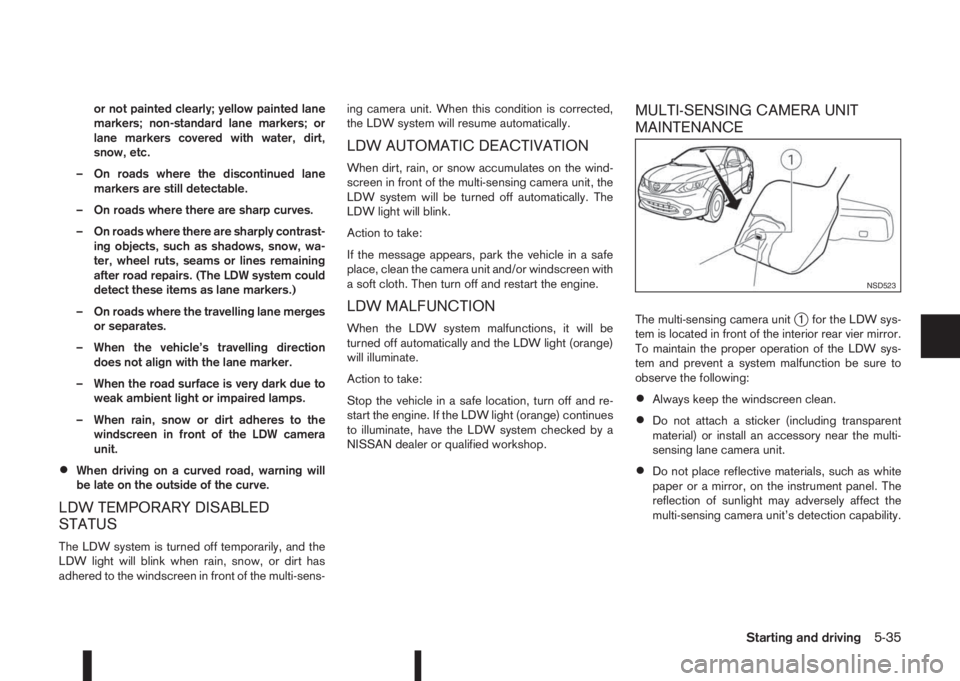
The multi-sensing camera unitj1 for the LDW sys-
tem is located in front of the interior rear vier mirror.
To maintain the proper operation of the LDW sys-
tem and prevent a system malfunction be sure to
observe the following:
•Always keep the windscreen clean.
•Do not attach a sticker (including transparent
material) or install an accessory near the multi-
sensing lane camera unit.
•Do not place reflective materials, such as white
paper or a mirror, on the instrument panel. The
reflection of sunlight may adversely affect the
multi-sensing camera unit’s detection capability.
NSD523
Starting and driving5-35
Page 235 of 338
Driving downhill
The engine braking action is effective for controlling
the vehicle while descending hills.
The shift lever (MT models) should be placed in a
gear position low enough to obtain sufficient engine
braking.
For XTRONIC transmission models, a low gear po-
sition in the manual shift mode, low enough to obtain
sufficient engine braking, should be selected.WARNING
•The Anti-lock Braking System (ABS) is a so-
phisticated device, but it cannot prevent acci-
dents resulting from careless or dangerous
driving techniques. It can help maintain ve-
hicle control during braking on slippery sur-
faces. Remember that stopping distances on
slippery surfaces will be longer than on nor-
mal surfaces even with ABS. Stopping dis-
tances may also be longer on rough, gravel or
snow covered roads, or if you are using snow
chains. Always maintain a safe distance from
the vehicle in front of you. Ultimately, the
driver is responsible for safety.
•Tyre type and condition may also affect brak-
ing effectiveness.
– When replacing tyres, install the specified
size of tyres on all four wheels.
– When installing a spare tyre, make sure
that it is the proper size and type as speci-
fied on the tyre placard. (See “Vehicle
identification” in the “9. Technical
information” section.)
– For detailed information, see “Wheels and
tyres” in the “8. Maintenance and
do-it-yourself” section.
The Anti-lock Braking System (ABS) controls the
brakes so the wheels do not lock during hard brak-
ing or when braking on slippery surfaces. The sys-
tem detects the rotation speed at each wheel and
varies the brake fluid pressure to prevent each wheelfrom locking and sliding. By preventing each wheel
from locking, the system helps the driver maintain
steering control and helps to minimise swerving and
spinning on slippery surfaces.
USING SYSTEM
Depress the brake pedal and hold it down. Depress
the brake pedal with firm steady pressure, but do
not pump the brakes. The ABS will operate to pre-
vent the wheels from locking up. Steer the vehicle to
avoid obstacles.
WARNING
Do not pump the brake pedal. Doing so may re-
sult in increased stopping distances.
SELF-TEST FEATURE
The ABS includes electronic sensors, electric
pumps, hydraulic solenoids and a computer. The
computer has a built-in diagnostic feature that tests
the system each time you start the engine and move
the vehicle at a low speed in forward or reverse.
When the self-test occurs, you may hear a “clunk”
noise and/or feel a pulsation in the brake pedal. This
is normal and does not indicate a malfunction. If the
computer senses a malfunction, it switches the ABS
off and illuminates the ABS warning light on the
instrument panel. The brake system then operates
normally, but without anti-lock assistance.
If the ABS warning light illuminates during the self-
test or while driving, have the vehicle checked by a
NISSAN dealer or qualified workshop.
ANTI-LOCK BRAKING SYSTEM
(ABS)
Starting and driving5-59
Page 294 of 338
•Be careful not to damage the connector sup-
port bracket when disconnecting the connec-
tor.
If any electrical equipment does not operate, check
for an open fuse.
The fuse box is located in the lower part of the
instrument panel at the driver’s side.
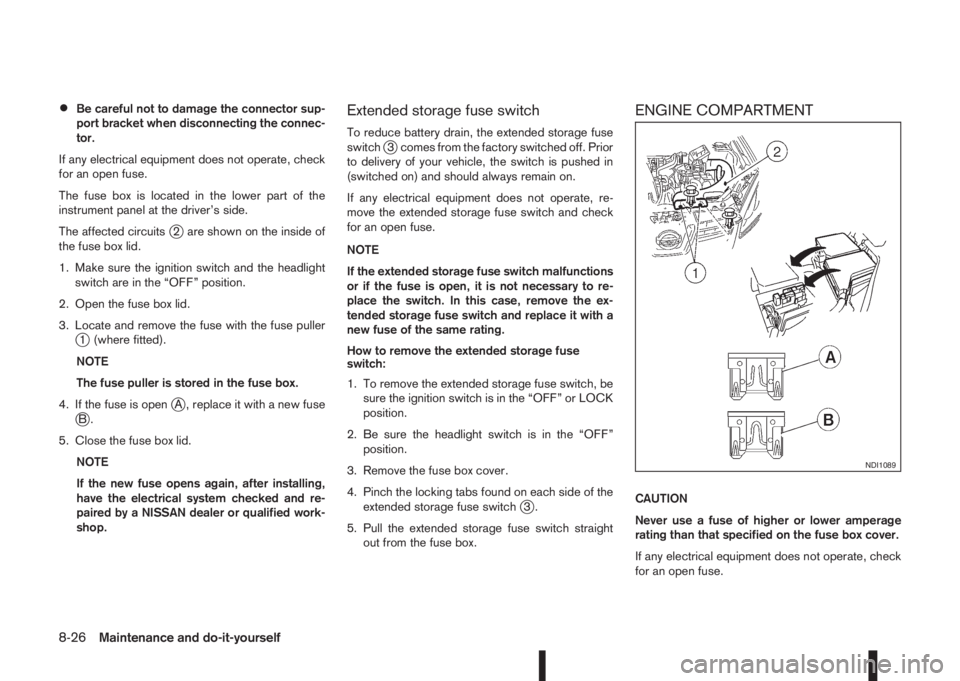
The affected circuits
j2 are shown on the inside of
the fuse box lid.
1. Make sure the ignition switch and the headlight
switch are in the “OFF” position.
2. Open the fuse box lid.
3. Locate and remove the fuse with the fuse puller
j1 (where fitted).
NOTE
The fuse puller is stored in the fuse box.
4. If the fuse is open
jA , replace it with a new fusejB.
5. Close the fuse box lid.
NOTE
If the new fuse opens again, after installing,
have the electrical system checked and re-
paired by a NISSAN dealer or qualified work-
shop.
Extended storage fuse switch
To reduce battery drain, the extended storage fuse
switchj3 comes from the factory switched off. Prior
to delivery of your vehicle, the switch is pushed in
(switched on) and should always remain on.
If any electrical equipment does not operate, re-
move the extended storage fuse switch and check
for an open fuse.
NOTE
If the extended storage fuse switch malfunctions
or if the fuse is open, it is not necessary to re-
place the switch. In this case, remove the ex-
tended storage fuse switch and replace it with a
new fuse of the same rating.
How to remove the extended storage fuse
switch:
1. To remove the extended storage fuse switch, be
sure the ignition switch is in the “OFF” or LOCK
position.
2. Be sure the headlight switch is in the “OFF”
position.
3. Remove the fuse box cover.
4. Pinch the locking tabs found on each side of the
extended storage fuse switch
j3.
5. Pull the extended storage fuse switch straight
out from the fuse box.
ENGINE COMPARTMENT
CAUTION
Never use a fuse of higher or lower amperage
rating than that specified on the fuse box cover.
If any electrical equipment does not operate, check
for an open fuse.
NDI1089
8-26Maintenance and do-it-yourself