mirror NISSAN QASHQAI 2016 Owner´s Manual
[x] Cancel search | Manufacturer: NISSAN, Model Year: 2016, Model line: QASHQAI, Model: NISSAN QASHQAI 2016Pages: 338, PDF Size: 4.87 MB
Page 178 of 338
During the first 1,600 km (1,000 miles), follow these
recommendations for the future reliability and
economy of your new vehicle. Failure to follow the
recommendations may result in shortened engine
life and reduced engine performance.
•Avoid driving for long periods at a constant
speed, either fast or slow.
•Do not accelerate at full throttle in any gear.
•Avoid quick starts.
•Avoid hard braking as much as possible.
•Do not tow a trailer during the first 800 km (500
miles).
NOTE
Models with K9K diesel engine will achieve top
performance only after approximately 5,000 km
(3,000 miles).
WARNING
The driving characteristics of your vehicle can be
changed remarkably by any additional load and
its distribution as well as by adding optional
equipment (trailer couplings, roof racks, etc.).
Your driving style and speed have to be adjusted
accordingly. Especially when carrying heavy
loads, your speed must be reduced adequately.
•Make sure the area around the vehicle is free of
obstacles.
•Check fluid levels such as engine oil, coolant,
brake and clutch fluid, and window washer fluid
as frequently as possible, at least whenever you
refuel.
•Visually inspect tyres for their appearance and
condition. Also check the tyre pressure for
proper inflation.
•Maintenance items in the “8. Maintenance and
do-it-yourself” section should be checked peri-
odically.
•Check that all windows and light lenses are
clean.
•Check that all doors are closed.
•Position the seat and adjust the head restraints.
•Adjust the inside and outside mirrors.
•Fasten your seat belt and ask all passengers to
do likewise.
•Check the operation of the warning/indicator
lights when the ignition switch is turned to the
ON position.
•Do not place hard or heavy objects on the dash-
board or rear parcel shelf in order to prevent
injury in the event of a sudden stop.
RUNNING-IN SCHEDULE BEFORE STARTING THE ENGINE
5-2Starting and driving
Page 206 of 338
While driving, the Blind Spot Warning (BSW) sys-
tem helps alert the driver to the presence of other
vehicles in adjacent lanes.
The BSW system uses the rear view monitor cam-
era unit
j1.
WARNING
•The BSW system is not a replacement for
proper driving procedure and is not designed
to prevent contact with vehicles or objects.
When driving, always use the side and rear
mirrors and always turn your head and look in
the direction you will move to ensure it is safe
to change lanes. Never rely solely on the BSW
system.
•The camera units may not function properly
under the following conditions:
– When towing a trailer.– When strong light enters the camera unit.
(for example, light directly shines on the
front or rear of the vehicle at sunrise or
sunset.)
– When ambient brightness changes sud-
denly. (for example, when the vehicle en-
ters or exits a tunnel or passes under a
bridge.)
•If the camera lens is excessively dirty, the au-
tomatic washer may not be able to completely
clean the lens. This could result in the camera
not detecting vehicles or lane markers.
•Excessive noise (for example, audio system
volume, open vehicle window) will interfere
with the chime sound, and it may not be heard.
BSW SYSTEM OPERATION
The BSW system operates above approximately 32
km/h (20 MPH).
The BSW light is shown in the vehicle information
display if the Blind Spot Warning system is active.
To switch the system on or off, see the description
later in this section.
When the camera unit detects a vehicle in the de-
tection zone, the Blind Spot Indicator light located in
the front corner of the door window (by the outside
NAA1426
NAA1425Blind Spot Indicator light on the inside of the mirrors
NAA1427BSW light in the vehicle information display
BLIND SPOT WARNING (BSW)
SYSTEM (where fitted)
5-30Starting and driving
Page 207 of 338
mirrors) will illuminate. If the turn signal is then acti-
vated, the system chimes (twice) and the Blind spot
indicator light will start flashing bright orange to alert
you to the presence of vehicle(s) in the adjacent
lane.
The Blind spot indicator light continues to flash until
the detected vehicle(s) leave the detection zone.
Detection zone
The camera unit can detect vehicles on either side
of your vehicle when part of another vehicle is within
the detection zone shown as illustrated.
This detection zone typically starts from the outside
mirror of your vehicle and extends approximately 3
m (10 ft) behind the rear bumper, and approximately
3 m (10 ft) sideways.
The brightness of the Blind Spot Indicator lights is
adjusted automatically depending on the brightness
of the ambient light.
A chime sounds if the camera unit has already de-
tected vehicles when the driver activates the turnsignal. If a vehicle comes into the detection zone
after the driver activates the turn signal, then only
the Blind Spot Indicator light flashes and no chime
sounds. (See “BSW driving situations” later in this
section.)
Turning the BSW system on or off
Turning the BSW system on or off is done using the
[Settings] menu in the vehicle information display.
For details. see “Vehicle information display” in the
“2. Instruments and controls” section.
In the [Settings] menu, select the [Driver Assistance]
key. Then select [Driving Aids]. Select [Blind Spot
Warning] key by pressing
next to [Blind Spot Warning] indicates that the sys-
tem is turned on.
SYSTEM ON:
The BSW light on the vehicle information display will
light up.
SYSTEM OFF:
The BSW light on the vehicle information display will
turn off.
WARNING
•The camera unit may not be able to detect
when certain objects are present such as:
– Pedestrians, bicycles, animals.
– Vehicles such as motorcycles, low height
vehicles, or high ground clearance
vehicles.
– Oncoming vehicles.– A vehicle approaching rapidly from behind.
(See “BSW driving situations” later in this
section.)
– A vehicle which your vehicle overtakes rap-
idly. (See “BSW driving situations” later in
this section.)
– A vehicle that merges or changes lanes
rapidly directly next to your vehicle.
•The camera unit may not be able to detect
properly when your vehicle travels beside the
middle section of a vehicle with long wheel-
base (for example, trailer truck, semi-trailer,
tractor).
•The camera detection zone is designed based
on a standard lane width. When driving in a
wider lane, the camera unit may not detect
vehicles in an adjacent lane. When driving in a
narrow lane, the camera unit may detect ve-
hicles driving two lanes away.
•The camera unit is designed to ignore most
stationary objects, however objects such as
guardrails, walls, foliage and parked vehicles
may occasionally be detected. This is a nor-
mal operating condition.
•The camera unit may detect the reflected im-
age of vehicles or roadside objects that are
not actually in the detection zone, especially
when the road is wet.
SSD1026Z
Starting and driving5-31
Page 211 of 338
or not painted clearly; yellow painted lane
markers; non-standard lane markers; or
lane markers covered with water, dirt,
snow, etc.
– On roads where the discontinued lane
markers are still detectable.
– On roads where there are sharp curves.
– On roads where there are sharply contrast-
ing objects, such as shadows, snow, wa-
ter, wheel ruts, seams or lines remaining
after road repairs. (The LDW system could
detect these items as lane markers.)
– On roads where the travelling lane merges
or separates.
– When the vehicle’s travelling direction
does not align with the lane marker.
– When the road surface is very dark due to
weak ambient light or impaired lamps.
– When rain, snow or dirt adheres to the
windscreen in front of the LDW camera
unit.
•When driving on a curved road, warning will
be late on the outside of the curve.
LDW TEMPORARY DISABLED
STATUS
The LDW system is turned off temporarily, and the
LDW light will blink when rain, snow, or dirt has
adhered to the windscreen in front of the multi-sens-ing camera unit. When this condition is corrected,
the LDW system will resume automatically.
LDW AUTOMATIC DEACTIVATION
When dirt, rain, or snow accumulates on the wind-
screen in front of the multi-sensing camera unit, the
LDW system will be turned off automatically. The
LDW light will blink.
Action to take:
If the message appears, park the vehicle in a safe
place, clean the camera unit and/or windscreen with
a soft cloth. Then turn off and restart the engine.
LDW MALFUNCTION
When the LDW system malfunctions, it will be
turned off automatically and the LDW light (orange)
will illuminate.
Action to take:
Stop the vehicle in a safe location, turn off and re-
start the engine. If the LDW light (orange) continues
to illuminate, have the LDW system checked by a
NISSAN dealer or qualified workshop.
MULTI-SENSING CAMERA UNIT
MAINTENANCE
The multi-sensing camera unitj1 for the LDW sys-
tem is located in front of the interior rear vier mirror.
To maintain the proper operation of the LDW sys-
tem and prevent a system malfunction be sure to
observe the following:
•Always keep the windscreen clean.
•Do not attach a sticker (including transparent
material) or install an accessory near the multi-
sensing lane camera unit.
•Do not place reflective materials, such as white
paper or a mirror, on the instrument panel. The
reflection of sunlight may adversely affect the
multi-sensing camera unit’s detection capability.
NSD523
Starting and driving5-35
Page 221 of 338
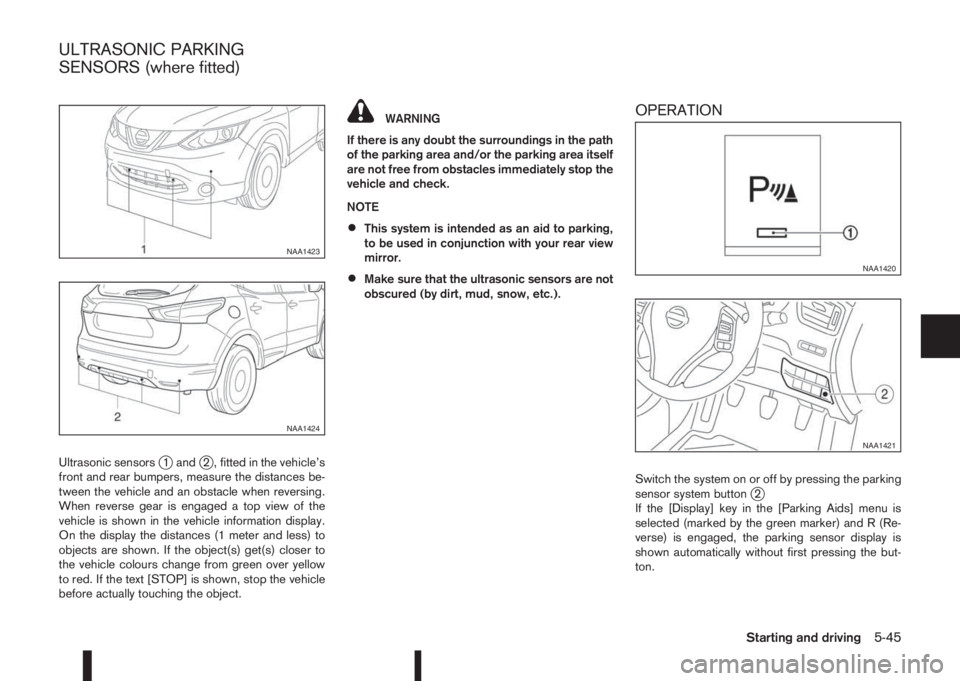
Ultrasonic sensorsj1 andj2 , fitted in the vehicle’s
front and rear bumpers, measure the distances be-
tween the vehicle and an obstacle when reversing.
When reverse gear is engaged a top view of the
vehicle is shown in the vehicle information display.
On the display the distances (1 meter and less) to
objects are shown. If the object(s) get(s) closer to
the vehicle colours change from green over yellow
to red. If the text [STOP] is shown, stop the vehicle
before actually touching the object.
WARNING
If there is any doubt the surroundings in the path
of the parking area and/or the parking area itself
are not free from obstacles immediately stop the
vehicle and check.
NOTE
•This system is intended as an aid to parking,
to be used in conjunction with your rear view
mirror.
•Make sure that the ultrasonic sensors are not
obscured (by dirt, mud, snow, etc.).
OPERATION
Switch the system on or off by pressing the parking
sensor system buttonj2
If the [Display] key in the [Parking Aids] menu is
selected (marked by the green marker) and R (Re-
verse) is engaged, the parking sensor display is
shown automatically without first pressing the but-
ton.
NAA1423
NAA1424
NAA1420
NAA1421
ULTRASONIC PARKING
SENSORS (where fitted)
Starting and driving5-45
Page 265 of 338
CLEANING GLASS
Use glass cleaner to remove smoke and dust film
from the glass surfaces. It is normal for glass to
become coated with a film after the vehicle is parked
in the hot sun. Glass cleaner and a soft cloth will
easily remove this film.
CAUTION
When cleaning the inside of the windows, do not
use sharp-edged tools, abrasive cleaners or chlo-
rine-based disinfectant cleaners. They could
damage elements in the rear windows (such as
the window defogger).
Inside rear-view mirror (Automatic
anti-dazzling, where fitted)
Use a soft cloth dampened only with water to clean
the automatic anti-dazzling inside rear view mirror
(where fitted).
CAUTION
Do not use glass cleaner. Doing so will reduce
the sensitivity of the sensor, resulting in improper
operation.
PLASTIC PARTS
Plastic parts can be cleaned with a mild soap solu-
tion. If the dirt cannot be easily removed, use a plas-
tic cleaner. Do not use any solvents.
SEAT BELTS
WARNING
•Do not allow wet seat belts to roll up in the
retractor.
•Never use bleach, dye or chemical solvents to
clean the seat belts, since these materials
may severely weaken the seat belt webbing.
The seat belts can be cleaned by wiping them with
a sponge dampened in a mild soap solution.
Allow the belts to dry completely in the shade before
using them.
MOST COMMON FACTORS
CONTRIBUTING TO VEHICLE
CORROSION
•The accumulation of moisture-retaining dirt and
debris in body panel sections, cavities, and other
areas.
•Damage to the paint surface and other protec-
tive coatings caused by gravel and stone chips
or minor traffic accidents.
ENVIRONMENTAL FACTORS
INFLUENCE THE RATE OF
CORROSION
Moisture
Accumulation of sand, dirt and water on the vehicle
body underside can accelerate corrosion. Wet floor
coverings will not dry completely inside the vehicle,
and should be removed for drying to avoid floor pan-
els corrosion.
Relative humidity
Corrosion will be accelerated in areas of high rela-
tive humidity, especially those areas where the tem-
peratures stay above freezing, where atmospheric
pollution exists and road salt is used.
Temperature
A temperature increase will accelerate the rate of
corrosion to those parts which are not well venti-
lated.
CORROSION PROTECTION
Appearance and care7-5
Page 322 of 338
– Checking brake pedal ................................................... 8-13
– Checking parking brake ................................................. 8-13
– Parking brake ................................................................ 3-16
– Trailer brakes ................................................................ 5-55
C
Cable slots .......................................................................... 2-43
Capacities and recommended fuel/lubricants ......................... 9-2
– Fuel information ............................................................... 9-4
Car phone or CB radio ........................................................ 4-45
Care when driving ............................................................... 5-10
Cargo compartment
– Cargo floor .................................................................... 2-47
CENTRE mark on rear centre seat ...................................... 1-12
Changing
– Changing engine coolant ................................................. 8-6
– Changing engine oil ......................................................... 8-9
– Changing engine oil filter ............................................... 8-10
– Changing tyres and wheels ........................................... 8-35
Chassis control ................................................................... 5-62
Checking
– Checking brake pedal ................................................... 8-13
– Checking engine coolant level ......................................... 8-6
– Checking engine oil level ................................................. 8-8
– Checking parking brake ................................................. 8-13
Child restraint anchorage .................................................... 1-22
Child restraint and ISOFIX information ................................. 1-16
Child restraint installation using 3-point type seat belt .......... 1-25
Child restraint installation using ISOFIX ............................... 1-23
Child restraint systems (CRS)
– ISOFIX .......................................................................... 1-17
– Recommended .............................................................. 1-17
– Suitable ......................................................................... 1-17
Child restraints .................................................................... 1-15Child safety .................................................................. 1-14, 1-9
Cleaning
– Alloy wheels .................................................................... 7-3
– Chrome parts .................................................................. 7-3
– Exterior ............................................................................ 7-2
– Glass ....................................................................... 7-3, 7-5
– Interior ............................................................................ 7-4
– Plastic parts .................................................................... 7-5
– Rear-view camera lens .................................................... 7-3
– Removing spots ............................................................... 7-2
– Underbody ...................................................................... 7-3
Clutch fluid .......................................................................... 8-14
Coat hooks ......................................................................... 2-44
Cold weather driving ........................................................... 5-66
Console box ........................................................................ 2-43
Continuously variable transmission
– Continuously variable transmission fluid ......................... 8-13
– Driving with continuously variable transmission ............. 5-18
Coolant
– Changing engine coolant ................................................. 8-6
– Checking engine coolant level ......................................... 8-6
– Engine coolant ............................................................... 5-66
– Engine coolant temperature gauge ................................... 2-3
– Engine cooling system ..................................................... 8-6
Corrosion protection .................................................... 5-67, 7-5
– Environmental factors ...................................................... 7-5
Cruise control ..................................................................... 5-36
Cruise control system operations ......................................... 5-37
CVT
– Driving with XTRONIC transmission .............................. 5-18
D
Defogger switch
– Outside mirror defogger ................................................ 2-35
– Rear window defogger .................................................. 2-35
10-2Index
Page 324 of 338
Fuel
– Bleeding the fuel system ................................................ 8-13
– Capacities and recommended fuel/lubricants ................... 9-2
– Draining water (Fuel filter) .............................................. 8-13
– Fuel filter (Diesel engine models) ................................... 8-13
– Fuel gauge ...................................................................... 2-2
– Fuel information ............................................................... 9-4
Fuel filler lid
– Cap ............................................................................... 3-15
– Opener lever ................................................................. 3-15
Fuses .................................................................................. 8-25
– Engine compartment ...................................................... 8-26
– Passenger compartment ................................................ 8-25
G
Gauges
– Engine coolant temperature gauge ................................... 2-3
– Fuel gauge ...................................................................... 2-2
– Meters and gauges .......................................................... 2-2
Glass roof ........................................................................... 2-49
– Sunshade operation ...................................................... 2-50
Glove box ............................................................................ 2-42
Guide lines ............................................................................ 4-7
H
Hazard warning flasher switch ............................................... 6-2
Head restraint
– Adjustment ...................................................................... 1-6
Headlight
– Headlight aiming control switch ..................................... 2-39
– Headlight and turn signal switch .................................... 2-36
– Headlight cleaner .......................................................... 2-40
– Headlight switch ............................................................ 2-36– Headlights (bulb replacement) ....................................... 8-28
– Replacement (bulb) ....................................................... 8-28
– Turn signal switch .......................................................... 2-38
Heated seats ....................................................................... 2-41
Heater and air conditioner ................................................... 4-15
Hill Start Assist (HSA) system ............................................. 5-64
Horn ................................................................................... 2-41
How to adjust the screen view ............................................. 4-13
I
Ignition
– Ignition switch ............................................................... 5-11
Ignition switch ..................................................................... 5-12
Ignition switch positions ...................................................... 5-13
Immobilizer
– NISSAN Anti-Theft System (NATS) ............................... 3-12
Indicator lights ....................................................................... 2-4
Injured persons ................................................................... 1-10
Inside rear-view mirror ......................................................... 3-18
Instrument and control layout .......................................... 0-8, 0-9
Integrated keyfob (remote control system) ............................. 3-4
– Battery replacement ...................................................... 8-18
– Ignition switch ............................................................... 5-11
– Keyfob operation failure ................................................... 3-5
– Locking the doors ............................................................ 3-5
– Setting the unlock mode .................................................. 3-5
– Super Lock system .......................................................... 3-5
– Unlocking the doors ......................................................... 3-5
Intelligent Key operating range ............................................... 3-6
Intelligent Key system ................................................... 3-6, 5-12
– Anti-hijack mode .............................................................. 3-7
– Battery replacement ...................................................... 8-18
– Intelligent Key battery discharge .................................... 5-14
– Locking/unlocking ........................................................... 3-7
10-4Index
Page 326 of 338
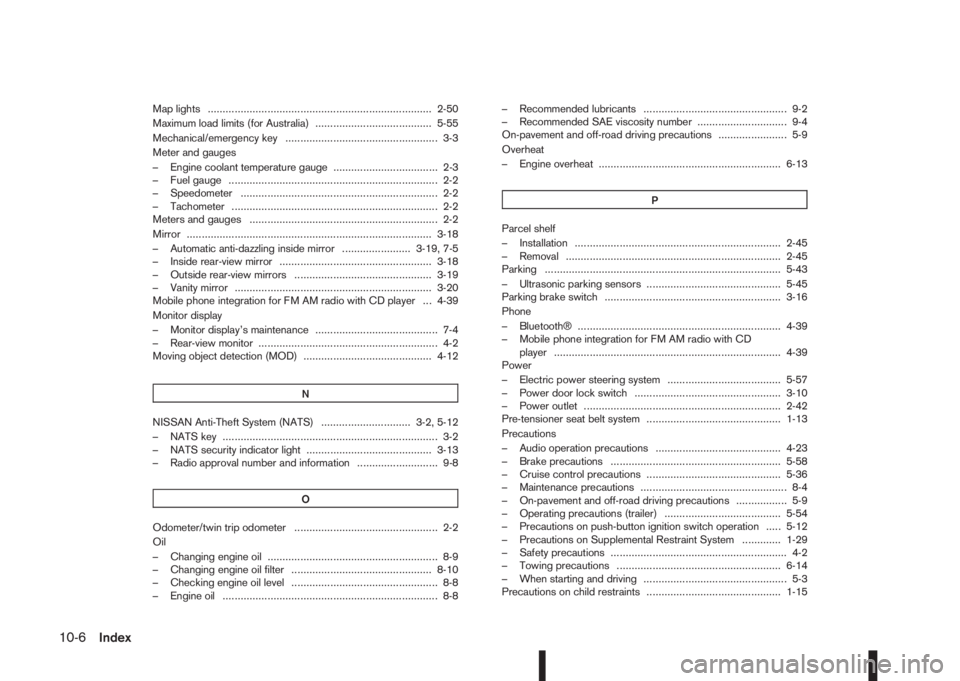
Map lights ........................................................................... 2-50
Maximum load limits (for Australia) ....................................... 5-55
Mechanical/emergency key ................................................... 3-3
Meter and gauges
– Engine coolant temperature gauge ................................... 2-3
– Fuel gauge ...................................................................... 2-2
– Speedometer .................................................................. 2-2
– Tachometer ..................................................................... 2-2
Meters and gauges ............................................................... 2-2
Mirror .................................................................................. 3-18
– Automatic anti-dazzling inside mirror ....................... 3-19, 7-5
– Inside rear-view mirror ................................................... 3-18
– Outside rear-view mirrors .............................................. 3-19
– Vanity mirror .................................................................. 3-20
Mobile phone integration for FM AM radio with CD player ... 4-39
Monitor display
– Monitor display’s maintenance ......................................... 7-4
– Rear-view monitor ............................................................ 4-2
Moving object detection (MOD) ........................................... 4-12
N
NISSAN Anti-Theft System (NATS) .............................. 3-2, 5-12
– NATS key ........................................................................ 3-2
– NATS security indicator light .......................................... 3-13
– Radio approval number and information ........................... 9-8
O
Odometer/twin trip odometer ................................................ 2-2
Oil
– Changing engine oil ......................................................... 8-9
– Changing engine oil filter ............................................... 8-10
– Checking engine oil level ................................................. 8-8
– Engine oil ........................................................................ 8-8– Recommended lubricants ................................................ 9-2
– Recommended SAE viscosity number .............................. 9-4
On-pavement and off-road driving precautions ....................... 5-9
Overheat
– Engine overheat ............................................................. 6-13
P
Parcel shelf
– Installation ..................................................................... 2-45
– Removal ........................................................................ 2-45
Parking ............................................................................... 5-43
– Ultrasonic parking sensors ............................................. 5-45
Parking brake switch ........................................................... 3-16
Phone
– Bluetooth® .................................................................... 4-39
– Mobile phone integration for FM AM radio with CD
player ............................................................................ 4-39
Power
– Electric power steering system ...................................... 5-57
– Power door lock switch ................................................. 3-10
– Power outlet .................................................................. 2-42
Pre-tensioner seat belt system ............................................. 1-13
Precautions
– Audio operation precautions .......................................... 4-23
– Brake precautions ......................................................... 5-58
– Cruise control precautions ............................................. 5-36
– Maintenance precautions ................................................. 8-4
– On-pavement and off-road driving precautions ................. 5-9
– Operating precautions (trailer) ....................................... 5-54
– Precautions on push-button ignition switch operation ..... 5-12
– Precautions on Supplemental Restraint System ............. 1-29
– Safety precautions ........................................................... 4-2
– Towing precautions ....................................................... 6-14
– When starting and driving ................................................ 5-3
Precautions on child restraints ............................................. 1-15
10-6Index